
Onshape 3D CAD
Speed Up Your Product Design
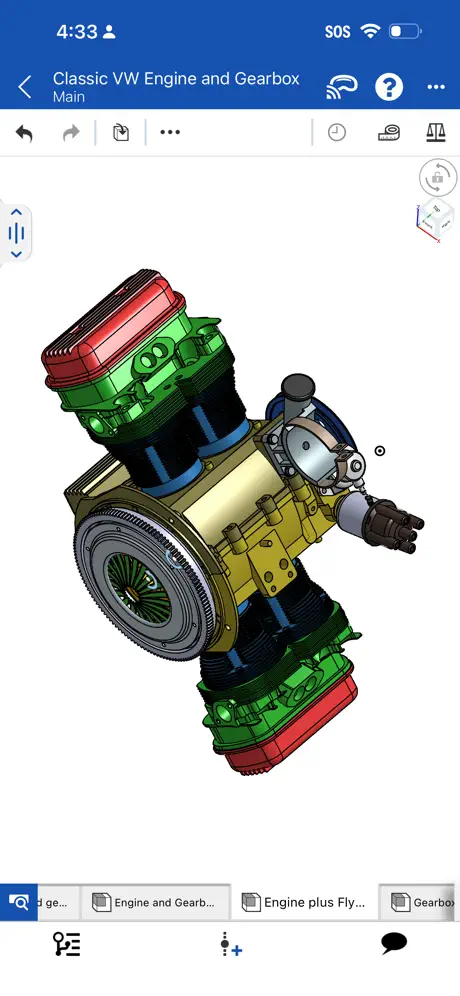
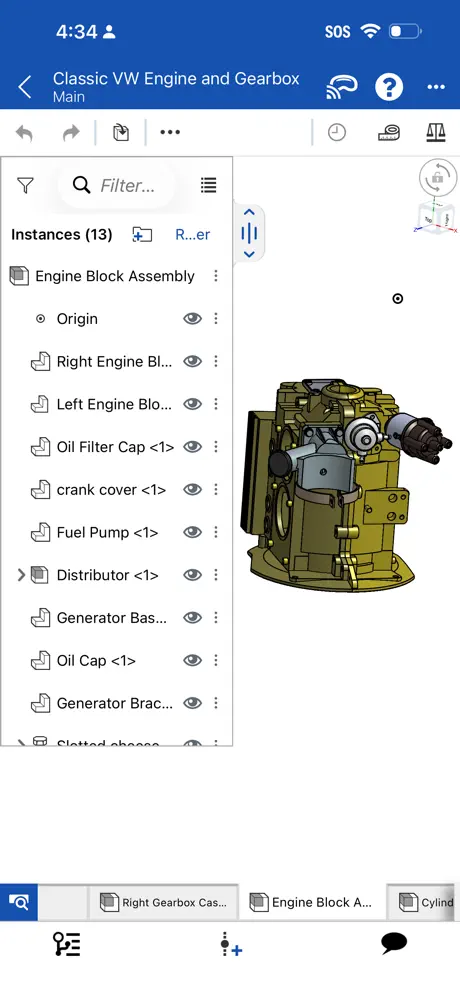
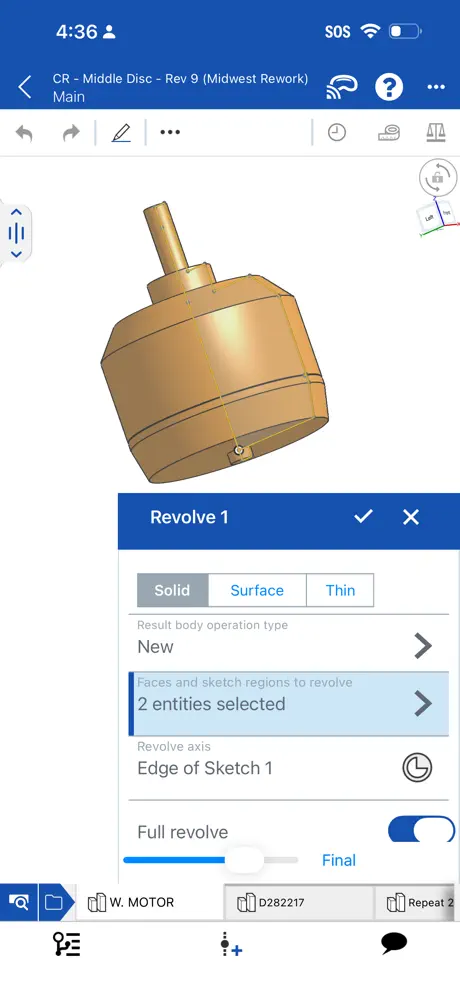
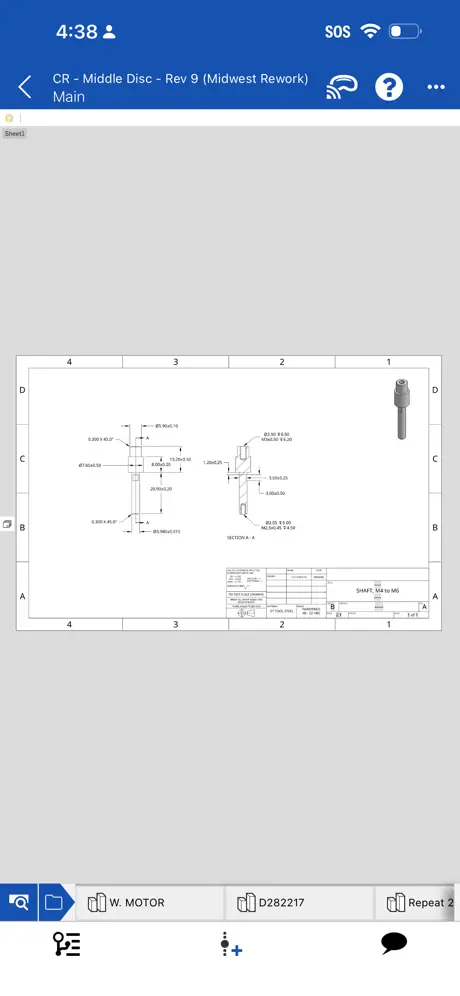
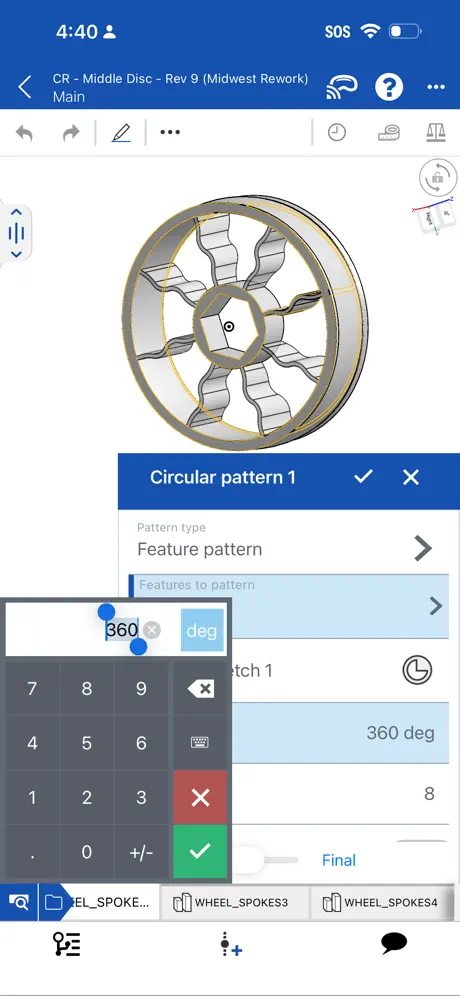
How much does Onshape 3D CAD cost?
Prices are current as of 11 Sept 2026.
Onshape 3D CAD has no in-app products on record in the United States.
10+ alternatives to Onshape 3D CAD
| Onshape 3D CAD |  Shapr 3D CAD modeling Shapr 3D CAD modeling |   AutoCAD AutoCAD |   Draft Paper Draft Paper |   ArcSite: Quick CAD Floor Plans ArcSite: Quick CAD Floor Plans |   Autodesk Fusion Autodesk Fusion |   STL Simple Viewer STL Simple Viewer |   OctoApp for OctoPrint/Klipper OctoApp for OctoPrint/Klipper |   3D Model Viewer - AR & Print 3D Model Viewer - AR & Print |   iRhino 3D iRhino 3D |   Pikaslice - 3D Print Slicer Pikaslice - 3D Print Slicer | |
|---|---|---|---|---|---|---|---|---|---|---|---|
| Rating / 5 | 3.5 | 4.8 | 4.4 | 4.4 | 4.7 | 4.6 | 4.4 | 4.9 | 4.4 | 4.4 | 3.6 |
| Reviews | 1.5K | 219K | 59K | 23K | 20K | 16K | 4.5K | 3K | 1.4K | 550 | 449 |
| Released | 2015 | 2016 | 2010 | 2014 | 2015 | 2015 | 2020 | 2023 | 2022 | 2010 | 2022 |
| Monthly price | — | $37.99 | $9.99 | — | $119.99 | — | $1.99 | $0.99 | — | — | — |
| Annual price | — | $299.99 | $99.99 | — | $119.99 | — | — | $6.99 | — | — | — |
| One-time price | — | — | — | $9.99 | — | — | $2.99 | $12.99 | $1.99 | — | — |
The going rate for each plan in United States, in its own currency, shaded from the cheapest price on the row to the dearest. Plans fewer than four in ten of the priced apps sell are left out.
Onshape 3D CAD reviews
3.5 out of 5, based on 1,474 reviews.
What people like
- Works surprisingly well for an iPad app
- Great for viewing models on the go
- Truly free compared to expensive competitors
What they complain about
- Hard to sign up on mobile
- Touch interface feels clunky and unresponsive
- Requires constant internet connection to work
Love it, great way to work on my iPad
I had used onshape on a Mac before, I was expecting the app to be a step down, but I think it’s a bit more intuitive and easy to work with. There are a few things that are interesting, but are really easy to do once you figure out how. For example, I could not figure out how to assign dimensions to things in the app, but then I found the dimension button on the sketch toolbar and it was super simple. Navigating the part studio is easier than on a Mac because you don’t have to use the arrow keys. The only thing that is harder is mate connectors in assemblies. I didn’t realize that you had to double select it. The first selection brings up available mate connectors for that area, the second selects which of those connectors you want.
Waste of time
I never write reviews but wow this one is below the bare minimum. I can't even use it without signing up, forced to sign up on the website and 2fa email never seems to arrive, reloading the page completely voids signup process.
iPad apple keyboard optimization
I love the app! But the keypad on the apple keyboard does not work like the keyboard in a PC. For instance, when you press “N” for normal to plane, nothing happens. I have to use gestures to do that. It is annoying, because my flow is less fluid when i want to use the short keys. Please FIX this, Onshape. Thanks!
Sadly it won’t work with older iPad iOS any longer.
I wish they continued legacy support for older iPad iOS versions. My iPad is still 100% usable but on iOS 17.
How do I create account and project
How
excellent software, miniaturized
its onshape on my phone and it works good. what more do you want?
Useless and it’s not even updated
I literally just got the app couple days ago and it says it’s not updated yet and then then when I go to the app store to update it’s not there so if it’s a zero star slot I will do that instead
Geht besser - Toll, aber nicht das Selbe wie am PC
Für alle Interessierten sage ich am Ende meiner Rezension, wie man Onshape auch am iPad vollwertig nutzen kann. Ich persönlich nutze Onshape zum modellieren am PC und schaue mir am Tablet nur meine Modelle an, da aktuell noch ein paar für mich wichtige Features fehlen, die ich gerne auch in der App hätte. Zum Beispiel die Keyboard shortcuts, an die man sich über den PC gewöhnt hat, jetzt aber komplett fehlen. Oder der Würfel zum navigieren. Ich verstehe zwar, dass man am Handy nicht mehr auf die einzelnen Seiten klicken kann, doch am iPad mit einer Maus wäre das gut möglich. Insgesamt ist es natürlich dafür, dass die App kostenlos ist, ein klasse Deal, doch die Erweiterung um diese paar Sachen würde die App zumindest für mich noch ein gutes bisschen besser machen. So nutze ich Onshape inzwischen am iPad: Man kann bei Safari über teilen Apps als Web-App zum Home-Bildschirm hinzufügen. Dies muss man mit der Onshape-Website machen. Mit externer Maus und Tastatur und ein paar Tastenkombinationen hat man damit genau das Gefühl des Originals. Bei mir geht Folgendes: ctrl + Linksklick = Verschieben; fn + esc = das esc vom pc; der Rest geht wie gewohnt. Hoffe, ich konnte helfen.
I am mad
I downloaded it and it won’t even let me in and it says it is not recconized somebody have a sloution
Ugh
Very hard ti use
I Love It but …
I love It but I can’t use It on my Ipad anymore because the new update now requires ios 18 🙁 and my Ipad is old
Cant use it
I can open it and use the little tutorial, but cant creat an account, so what happened?
Hard to sign up
It doesn’t give you the email which makes it really hard to sign up
No longer works
Really liked being able to use this on the go, rather than the browser version. Work great, but latest update means it is now unsupported on my iPad Pro. Cannot download the newest version, so will not run. Worked perfectly so why remove functionality on perfectly serviceable older iPads?
Ok
How do you make lines, let alone whole projects?
Best feature based CAD app
It is not perfect, but enough to make tweaks in dimensions, measurements etc.
Dumpster fire.
Don’t waste your time on this joke. They are trying to skirt around app store fees by making it impossible to create an account via mobile without basically being your own IT specialist. This is a multi-billion dollar corporation, and you cannot even get their “free” software without jumping through numerous flaming hoops, and giving up personal info.
Better than shapr3d somehow
I have used onshape on my pc for years and I have always wanted an iPad because of how good shapr3d looked. But now that I have tried it, I realize that shapr3d is frustrating and waaaayyyyyy too expensive. Onshape is very accessible and very free, which is already much better than shapr3d. There are a few big things they need to fix on the iPad version of OnShape though. Selecting objects can be a pain, and selecting views takes too many inputs and often has missed inputs. Deleting mistakes is incredibly unintuitive and I often have to just undo a few steps and redo them instead of deleting individual items. If they made this work more like the pc web version kit would be a lot better.
Nah
It’s just so clunky. It’s trying to be 5 different programs and is bad at all of them. UI is awful workflow and ergonomics are even worse 4/10. Workspace leaves a lot to be desired. I’ll try again but…Nah..
Pretty Good, but hope for improvement
I was trying this app in parallel with Shapr3d. Honestly, Shapr3d is so good! It just doesn’t have an assembly design system. So, I ultimately went with Onshape. Shapr3d is pretty expensive too. But, I hope the developers of this app incorporate some of the nice things that are in Shapr3d. Also, Some features are missing from the app (like transparency), but luckily I can just open the website in the iPad Safari app. I’m optimistic for this app’s future. One more thing, it would be amazing if the app could highlight things when the apple pencil is hovering over it. (BTW, objects do highlight if I use the website on Safari iPad app)
Best cad ever
So good
Bruh
Requires newer iOS version but I don’t have enough space for it so I can’t use this anymore :(
Missing app functionality
I really like the product, but this app won’t let me change the values in the Variable Studio.
So much promise, but awful user experience
Perhaps if this is your first/only CAD application you could get used to the UI, but coming from web based OnShape, Autodesk Fusion, and even Tinkercad, this on an iPad is a truly awful experience. Give Shapr3D a try if you can live with the free limitations, or can afford the monthly fee, else Tinkercad is a more pleasant, less frustrating experience.
Won’t work on mobile devices
I just downloaded this program which looked very promising but I couldn’t find any way to sign in. Then I found out after quite a while that they don’t support mobile devices which was disappointing. I don’t know if this is temporary or not but I’ll need to find something else now.
Great for on site work
This is a fantastic tool for quickly sketching something up where you may need to take reference photos. I was able to understand how to use the app within minutes with prior cad experience, but otherwise no tutorials (which is really hard to do). I would recommend the developers work on reshaping imported images more easily so they can be used as reference. maybe put circles that define diameters and lock the image to that. Also, the spline tool needs to be reworked because it is difficult to use and if you misplace a node you have to start over. Small nits, overall the app is great.
Privacy intrusion
Unless you pay a $1500 extortion payment, all your IP will become public domain.
Not bad
Actually I’m quite impressed the app works as well as it does on iPad. Was expecting a half baked port. So far it’s doing everything I’d expect a full PC program to do.
Very Unpolished
The interface breaks with astonishing regularity.
It's Fine
Not as user friendly as Shapr3d, but also isn't as anti-hobbyist; neither has reasonable pricing or a proper software sales model, but at least OnShape is closer to fully functional for hobbyists. OnShape's single biggest flaw is its reliance on an internet connection. Unless OnShape is prepared to provide global, 100% blanket internet connectivity, they need to immediately lose the dependence on the internet!
Exceptional CAD program for free
Onshape is pretty remarkable for being free. It has a full set of features but requires quite a bit of a learning curve to get up to speed. Those without formal CAD training may feel overwhelmed. I find the mobile options find for design reviews and small modifications on-site but for serious work I need a mouse and full keyboard. The browser based application works perfectly.
Garbage app
This is a toy for children. There is no way to specify the size of anything. Complete and utter waste of space on the internet
fantastic app!
this is a great software, i’m finally able to create good 3d models on mobile with this! i just wish it had some of the features the PC version has (colouring in separate faces etc)
No way to customize tool bars
The biggest issue with this app is there is no way to customize toolbars so everytime i want to add a new dimension or sketch or feature, i have to use the drop down menus. Very annoying, please add the feature to customize the tool bar and I would rate this 5*.
Works but only for viewing
This app is useful for viewing your 3D models and showing them to others, but it is a nightmare to work on. I struggle to just delete things and sometimes when I tap on the screen it sometimes selects everything. This is not very good for creating entire 3D models. Onshape on pc is much better and you should use a pc for Onshape.
Great application for 3d printing.
Onshape is my favorite cad software! I use it for nearly all of my 3d printing projects. I mainly use the web version on a computer, but I got this so I could model on the go. I see that some people are complaining that it is unintuitive. While I understand their complaint, I think Onshape makes perfect sense if you try to learn the web version on a computer first. The web version literally took me 10 minutes to learn and now I only need to watch a quick YouTube video if I am struggling with some very complex geometry. If you are looking for a free user-friendly cad software, especially for 3d printing, Onshape is the answer, (though if you can, use the web version on a computer)
Was great
The disruptor to oppressor pipeline is real
Logs off too early often
Login credentials should be valid for longer.
Terrible App
This app is horrible do not download it. I originally thought it was cool to have a CAD software on your phone, but it was definitely not worth the time. I struggled to design models and it was an ongoing process of trying to figure out how The text in the right spot
Not quite up there with the web browser version
I really love the browser version of Onshape and it has been the most accessible and versatile CAD software I have tried to date that is truly professional grade. There are however one or two little niggles with the iOS version that I have found make it a little harder to get the hang of. When you sketch a shape in the browser version you get a text box along each edge for you to enter the required dimensions for the shape. In the iOS version you have to manually add dimensions to get the shape to the size you want. This one thing really slows down the whole process of working the iOS version and isn’t easy to get the hang of as the dimension tool is hidden in the sub menus. If you could add the “auto-dimension” feature this app would be fantastic. Whilst I solely use the iOS app on the iPad I can see why the developers have hidden the tools in submenus to make it iPhone friendly and I can live with that but the auto-dimension feature would be a great addition please.
Great app for quick edits and viewing
I been using Onshape for a few years now, and it’s great. I find the app is very useful for viewing files and making quick and small edits. The website is quicker and more capable, but the app is still capable and works great. Would recommend downloading it and using it in conjunction with the website.
Astonishingly Horrible Customer Service
I got logged out and forgot my password. I contacted customer support for help. They will respond me then will stop responding and a new person will message me “oh are you still having this problem?” It has been about a little over three months since I’ve first messaged them. This is a more simple fix and I have no idea why my experience has been this horrible. I’m attentive to their emails and respond in a clear and concise manner. It is unbelievable how long they are taking to fix such a menial issue. When they appear very professional but have demonstrated their incompetence. At this point I’m honestly surprised and find it humorous how horrible of an experience this has been.
OnShape is amazing in browser, but not iOS.
As the title suggests, the browser version is really good, I thought I might be able to be moderately productive on an iOS device. I was wrong, I might be an idiot, but I managed to create a sketch do a simple shape, and delete it all… twice! Save yourself the pain, wait till your back in the office. Use this for viewing only
Objectively bad
I was very excited to try this as I’m currently a student and I’ve used multiple cad programs one of which being the normal version of onshape 3d. I was very disappointed because every time I would open up a document it would send me directly to my Home Screen and close the document when I would reopen the app.
?
Looks like a decent app, but i cant even sign up, because it is not letting me, sooo ye
Great companion app to the full desktop version
While this app does not include all features of the desktop version of Onshape, it is great to be able to access my models to make minor changes and view measurements on the go. I look forward to continual improvements in the app.
the most insufferable and counterintuitive app i’ve ever used
don’t use this app on ipad. it is completely useless.
Won’t let me create account
Looks so promising but I can creat an acount and I don’t have a business 😪😭😭😭😭😭😭😭😭😭😭😭😭😭😭😭😭😭😭😭😭😭😭😭😭😭😭😭😭😭😭😭😭😭😭😭😭😭😭😭😭😭😭😭😭😭😭😭😭😭😭😭😭😭😭😭😭😭😭😭😭😭😭😭😭
Buggy as all F…
This app has some advanced features, and good intentions, but they are overshadowed by its (many) shortcomings. I thought that it would be the best thing to be released in the world of engineering, since Fusion360 doesn’t even allow editing of your files, and the web version of OnShape seems functional enough, but this app is atrocious. The scale of your objects being drawn isn’t indicated ANYWHERE until after the shapes have been drawn, and then you have no ability to edit those numbers, other than to go back and re-draft the same shape on another guess. Then, when you might think, “well I know code, so I’ll familiarize myself with the scripting feature, and build that capability into this, myself…” (which SHOULDN’T be the answer for a PREMIUM program, but that’s where we are, atm) except you can’t see what templates exist, because the list won’t even allow you to scroll the options to find a good starting point. It’s (like many other things) just there for decoration, apparently. I could cite 50 more examples of half baked, ridiculous “features” that should NOT be behaving this bizarrely in a professional grade application, but I think those two glaring omissions should give an idea of the amateur hour application that this is. To say it needs more work would be a colossal understatement, and the fact that they have the gall to ask for such a monumental amount of capital invested for a subscription to this buggy mess of a program is insulting to the engineering community. In summary, this app belongs in the trash, until they can get their act together, and produce a stable app that’s capable of doing the things that an engineer needs it to do, like (the expected) CAD, CAM, Simulation, and make the user’s job easier, rather than harder. Thanks.
Not for faint hearted
App very touchy at times especially using fingers, you will need a touch screen pen to be more accurate. It’s also not a tool for beginners, after several hours use I still end up scratching my head at times. I’ve no doubt some people can use this effectively, I’m one who can’t. I’ve no problem using other cad dedicated programs this just seams to not suited for me. ( I’m used to 2d cnc programming) Mid star rating as I have no doubt it works but for some it’s not the right program for a touch screen device.
Onshape 3D CAD FAQ
- Is Onshape 3D CAD free?
- Yes. The app is free, in all 175 countries it sells in, and it sells nothing inside it.
- Does Onshape 3D CAD have a free trial?
- No. None of its offers (US) come with a free trial.
- What are the best alternatives to Onshape 3D CAD?
- Shapr 3D CAD modeling (4.8 from 219,457 reviews, premium from $32.99), AutoCAD (4.4 from 59,478 reviews, premium from $9.99) and Draft Paper (4.4 from 22,549 reviews, premium from $9.99).
Onshape 3D CAD download
Last updated 0 months ago.
Onshape 3D CAD sells in 175 countries. It was released 11 years and 6 months ago, on 9 Mar 2015. It holds a 3.5 rating from 1,474 reviews.
Supports 8 languages: English, French, German, Italian, Japanese, Korean, Chinese, Spanish.
How much does Onshape 3D CAD make?
Third-party estimates for the last 30 days, worldwide — not the store's own figures, which Apple publishes for nobody.