Concepts
Sketch, note & draw infinitely
How much does Concepts cost?
Prices are current as of 30 Sept 2026.
4 subscriptions from $4.99
In the United States, Concepts has 4 subscriptions priced $4.99 – 29.99. It comes with a 7 days free trial.
| Subscription | Period | Price |
|---|---|---|
| Everything Monthly | Monthly | $4.99 |
| Everything Monthly + Trial | MonthlyTrial: 7 days | $4.99 |
| Everything Yearly | Annual | $29.99 |
| Everything Yearly + Trial | AnnualTrial: 7 days | $29.99 |
6 one-time purchases from $1.99
In the United States, Concepts has 6 one-time purchases priced $1.99 – 39.99.
| Product | Price |
|---|---|
| Pen Brush Pack | $1.99 |
| Shape Library | $1.99 |
| Make Your Own Objects | $3.99 |
| Essentials (iPhone Only) | $4.99 |
| PDF Essentials | $4.99 |
| Essentials | $39.99 |
10+ alternatives to Concepts
| Concepts |   Tayasui Sketches Tayasui Sketches |  MediBang Paint – Drawing & Art MediBang Paint – Drawing & Art |  Art Set 4 Art Set 4 |   Linearity Curve Graphic Design Linearity Curve Graphic Design |   Brushes for Procreate Brushes for Procreate |   Morpholio Trace - Sketch CAD Morpholio Trace - Sketch CAD |   Vector & SVG Maker - Assembly Vector & SVG Maker - Assembly |   Infinite Painter Infinite Painter |   Artstudio Pro: Draw, Paint Artstudio Pro: Draw, Paint |   Flow: Note Taking & Sketchbook Flow: Note Taking & Sketchbook | |
|---|---|---|---|---|---|---|---|---|---|---|---|
| Rating / 5 | 4.7 | 4.6 | 4.6 | 4.6 | 4.6 | 4.7 | 4.7 | 4.5 | 4.2 | 4.6 | 4.0 |
| Reviews | 182K | 315K | 259K | 115K | 77K | 68K | 53K | 44K | 38K | 23K | 21K |
| Released | 2012 | 2013 | 2015 | 2018 | 2017 | 2020 | 2012 | 2015 | 2016 | 2017 | 2019 |
| Monthly price | $4.99 | $2.99 | $4.99 | — | $14.99 | $9.99 | $7.99 | $4.99 | — | — | $3.99 |
| Annual price | $29.99 | $9.99 | — | — | $74.99 | $29.99 | $9.99 | $29.99 | — | $3.49 | $29.99 |
| One-time price | $3.99 | $7.99 | $7.99 | $12.99 | — | — | — | $9.99 | $6.99 | $14.99 | $129.99 |
The going rate for each plan in United States, in its own currency, shaded from the cheapest price on the row to the dearest. Plans fewer than four in ten of the priced apps sell are left out.
Concepts reviews
4.7 out of 5, based on 181,890 reviews.
What people like
- Infinite canvas for big projects
- Lots of free tools included
- Great for mind mapping notes
- No ads interrupt your work
What they complain about
- Basic editing features cost extra
- Files crash or won't open
- Cross-platform file sharing doesn't work
- Prices keep going up
Integrity - worth supporting
Concepts deserves credit for doing something that has become surprisingly rare: honoring the people who supported the app early. I bought the app years ago, and my purchase still means something today. I wasn’t pushed into a subscription just to keep using features I already paid for. That kind of integrity matters. It builds trust, and it makes me much more willing to keep using and recommending the app. Thank you for respecting your longtime customers instead of treating them like a captive revenue stream.
No
This app is dumb where tf do I find text to type like wtf
Good
Very good
Doesn’t remember your purchases
I have been a user of this application since the very beginning. I have always been a pro user and have paid to unlock all of the features of this software. This application currently has a bug where it will forget which features you have paid to unlock. And it requires you to sign into the Apple Store to restore your purchases. The problem is that this happens to me multiple times per day. And I frequently work in the field off-line where there is no internet connection. So I am unable to open and work in certain files, especially when I have used pro features. This is very frustrating. No amount of restarting the application or restarting my iPad will fix it. It’s at the point where the app is unusable. I have tried opening Support tickets, but nobody seems to want to fix the problem. If you download this app, don’t bother paying for the pro features because you may not be able to use them all the time.
Make easy things easier
Export line art to svg in one or two gestures Select should be a top line function, not a detail on par with brush selection
It’s been a while
I haven’t used this app for over a year, going over my Art Skills within other Apps. A fellow Artist put me on via link of another Artist on YouTube reviewing it and other Apps. I just went in and overcame the slight learning curve and replaced my favorite Drawing App with this one.
Fake!!
I just downloaded this app. cant even load it. i hate it!!
Real time collaboration-
I love this app so much, it’s so useful (even on the free version and NO ADS!) but there is a cloud in the sky and that’s that there is no real time collaboration available. I think this would really add to the app and help teams mind map more efficiently. Thank you for this wonderful app though, it’s amazing!
Severe limits after years!
I have to agree with a previous reviewer and say that the developers of this app are painfully slow to update it with anything significant (not just bug fixes). 1) not being to change fonts after years of asking is astonishing. 2) still no macOS version - why?? You’ve got it on iOS, Microsoft, google play, Chromebook, Galaxy store, but for some reason Apple Macs are ignored - it’s not as if creative/designer people use Mac computers….oh wait a second….and from what the previous reviewer said it doesn’t even work across the current platforms anyway. 3) still no ability to colour fill shapes or objects easily without tracing around everything. There are also so many other issues about ease of use that others have already talked about too, but as it stands the app is the same now as it was when I started using it years ago (really don’t care about the packs!) and from I’ve heard there are no real plans to address these severe limitations.
Good infinite zoom but money hungry
I like that this is meant to be an infinite zoom canvas but it's not as "infinite" as some might think. It's kinda hard to tell where it ends so probably add a zoom variable for how much in or out you have zoomed. Also, this app is rather money hungry. Paying to edit your drawings, i.e. Lasso, etc., is quite greedy because it is one of the main mechanics of drawing apps as a whole.
Great Concept
The tutorials included in this app are worth the price of admission. I’m enjoying the app along with the learning process.
“Editing is a paid feature”
Another “free” app that tries to force you into a purchase. I wouldn’t even mind purchasing, but having to rent to edit is kinda nutty.
Nice App
It’s a good drawing app, but I feel like its biggest drawback is that you can’t move stuff without paying. I Don’t use it a ton, and it’s a good app overall, but there should be some editing options that are free, such as moving.
Multi-selecting
Find a less cancerous way of multi-selecting files please. I can’t bulk export my files in the desired file type thanks to the stupid current way of doing it, and it wasted a good amount of my time.
Needs tweaks
Great app but needs tweaks to be an industrial designer tool. 1. All shape recognition to be just lines, circles and ellipses. Annoying arrow heads and other odd shapes is almost a workflow killer 2. Even with no grid snap on, the dragging of straight line still tends to have slight snap, it’s not Freeform. Shape recognition needs fixing. 3 Some type of pathfinder tool or alpha locking where you can only draw within a selected shape or use one shape to chop another would be amazing
Mind Map Cheat Code
I love this app for taking notes, especially non-notes like a mind map. I love the easy to use lasso tool and the easy color swap button for IOS. Compared to other infinite canvas apps, Concepts has drastically improved my efficiency.
Can’t do anything useful, scam app
“Editing is a paid feature” oh okay so you’re useless then huh
Amazing app but runs my device hot over time
Most feature rich infinite canvas app of them all so far but runs my iPad 10th gen hot over time. Would love that fixed.
I thought it has an infinite canvas
Besides this app having a much larger learning curve than others, it said infinite canvas but stopped letting me zoom in 🤷🏻♀️
last update broke all previous drawings
after the latest update my previous files crash the app. when I select any previous drawing the app immediately crashes with no warning (iPad pro 13’’)
Fantastic!
I got this app mainly for my sewing planning and fashion sketches, but I ended up doing so much more! It’s free, with no ads. There is an option to buy pro, but you still have plenty of tools and options without it. There is no limit (at least that I know of) to drawings and folders. You can import photos, and trace over them and color them (that’s what I do when bored), or just doodle! Also great for story planning!
Pls read!!!
Hey, so I tried to download the older version but it kept making me press that cloud looking button to try and download but it kept doing that so can u fix it?
So much potential but devs seem complacent.
This app is great, but is missing some features that would actually make it the perfect design app. 1. Text is basic, its not worth using in concepts and is easier to export to procreate or some other program. Could really use a font library especially architectural. 2. Brush library is also basic, fill textures could be drastically improved. 3. The measurement text system sucks, again is better to write the actual measurement then using the tap to display feature. Once you zoom out so does the text which then moves it and makes it a pain to deal with. 4. Could really take advantage of the lidar scanner. If it allowed you to import lidar scan to scale from your iPad, concepts would be in a league of its own. 5. There should be an option for the grid to auto scale, so you can use the grid to quickly measure out your project. 6. Live collaboration would be cool but probably a stretch. I really like using concepts but is lacking so many features that force me to move my projects from concepts to other apps to finish my projects.
All flash and no substance
I have been a pro subscriber for years on the basis that the Concepts developers were working towards fixing the shortcomings of the app: 1) The lack of ability to change font 2) The only way to increase text size is to increase it using handles rather than a unified - already established - method like selecting a font size 3) Concepts is supposed to be cross platform…but files created on iPad don’t load on windows and vice versa. Are the developers working to fix these glaring problems? No. They’re too busy creating object packs. I’m done. I hung around in the hope they would listen to their customers but they haven’t and clearly don’t intend to. It’s a shame but I’m sure I’ll get over it when I don’t have to use the same font throughout an entire document or I am able to work on a document in both windows and iPad. I’m voting with my feet!
Good for writing/drawing but HUGE downsides
Concepts is great and most of the features work okay (the objects can be really wack sometimes), however, over years of continuous use every day, I have encountered MAJOR issues. Firstly, theres practically no cross platforming. If I make a drawing on my Ipad I cannot view it anywhere else except my ipad. There isnt even a viewing mode or useable concepts app on Mac yet. It is also nightmarish to export the files since they are often massive (which makes sense), but because of this, you really cannot share your work with anyone else. There is a Windows concepts app, however, you cannot view Ipad drawings on it which makes no sense imo. It makes me think the app coding must be janky or not built with cross platforming in mind so they just kinda ignored it and now they cant go back. Fixing/implementing this has been on their “in development” list for years. Additionally, I have lost access to multiple important drawings after sinking dozens of hours into them, so just a heads up you may lose your hard work. Other than these apparent limitations, minor missing features or glitchy objects has practically forced me to move to another, more optimized, app.
Great app
Most free value of any productivity app in the App Store for the IPad!
Ridiculous price
Ridiculously expensive one-time purchases (and subscriptions) when Procreate is a quarter of the price for similar features. I bought this twice — on Android and Windows — and it proved to be not worth it. Not buying it again here.
I love this app! Some fine tuning is recommended
I enjoy using the Concepts app for sketching and visual thinking—the infinite canvas and vector-based workflow make it a powerful tool for brainstorming and design. However, there are a few improvements that would significantly enhance the experience. First, cross-platform compatibility would make a big difference. Being able to move seamlessly between devices and operating systems would make the app far more flexible for users who work across multiple platforms. From a drawing perspective, the brush engine could benefit from better blending capabilities. It would be great to have tools that allow brush strokes to blend or smudge together more naturally. In particular, markers and the airbrush would feel much more expressive if their colors could mix and transition smoothly. Object manipulation could also be improved. Scaling elements can be affected by the objects line weight, so more precise and intuitive scaling controls would help when adjusting compositions. Another feature that would be extremely useful is a fill tool for quickly filling shapes or enclosed areas with solid colors. This would speed up coloring and blocking out designs. Finally, erasing behavior could be more flexible. When erasing part of an object, it would be helpful if the remaining sections automatically split into separate objects that can be edited or deleted individually. Alternatively, a dedicated slice tool could achieve the same effect by letting users cut shapes into independent pieces. Overall, Concepts is already a creative and capable sketching environment, but adding stronger blending tools, improved object controls, and better cross-platform support would make it an even more powerful app for artists and designers.
Great, aside from the issue left unfixed for 3 years.
Genuinely a good app, I’m very impressed and have had my expectations exceeded. However, the Fixed Width brush does not have a fixed width. Drawing a long line will make the starting end of the line thinner, turning a corner will make the corners thinner, no amount of changing setting fixes this. I looked online to see if there was a quick fix or if this was a new issue, only to find posts from over 3 years ago complaining of the same issue, with replies from the devs claiming they were “working on it”. The fact that this known issue has not been fixed on over 3 years is incredibly disappointing and deeply frustrating, the developers allowing a problem to persist for so long is indicative of their lack of care for both the app and its users. If you are looking for something basic, with no need for precision in your work, then this app is excellent. Otherwise, I advise looking elsewhere. If the issue of the Fixed Width brush is resolved, I will edit this review to reflect that change.
Subscription issues
If I buy the subscription on my iphone, could I get it on other devices signed into my apple ID?
Solid
Concepts has been a solid go to for immediate conceptualization. I’m particularly impressed with its ability to import imagery, allow resizing, place and erase while building a quick collage to reference for sketching. Since I prefer to sketch out many ideations by hand, these minor conveniences are awesome… because all of a sudden I realize i can sketch right on top of the images and then sketch beside them. I’m testing out using it in tandem with procreate; where more polished collages and are can be done. However, between the two concepts has been a lot simpler to simply start a new drawing and get going. Excellent stand alone, even better in tandem.
Concepts is great when you get used to it.
I’m just not down to lock into pay monthly, or pay annually, or any ongoing payment for a super simple vector drawing app. I understand this is their business model, this is just , like most any app, not worth an ongoing subscription payment for, and the iOS native Freeform app or the Sketchbook™ app with only a 1x $3 premium upgrade for life, is exponentially a better value for just about any user, in my approximation. The idea of ongoing payments for things that do not provide constant, edge of the moment, extremely relevant content upgrades are simply not worth the expense. Americans are getting squeezed by real non-negotiable expenses and can’t afford the non-stop discretionary spend throwaways like this.
Bit of an odd beast
I’m always searching for the best drawing app, especially on the iPad. For a long time I didn’t really ‘get’ Concepts then one day it just made a lot of sense. Unlike pretty much anything else out there and with a modest footprint. A lighter download than some rivals which run at over 1Gb just to draw vector artwork. There is a good range of tools included with the one off payment option, not too many to overwhelm and I particularly like the fill brush and the nudge tool. The fact this is a Vector app makes it so useful and the infinite canvas means you can just keep going and going. Concepts is responsive and speedy on my M2 iPad AIr. Joy to use. Wish there was a Mac version too.
Could have been good
Simple editing being a paid feature is insane. Use microsoft whiteboard or miro instead
Cropping function?
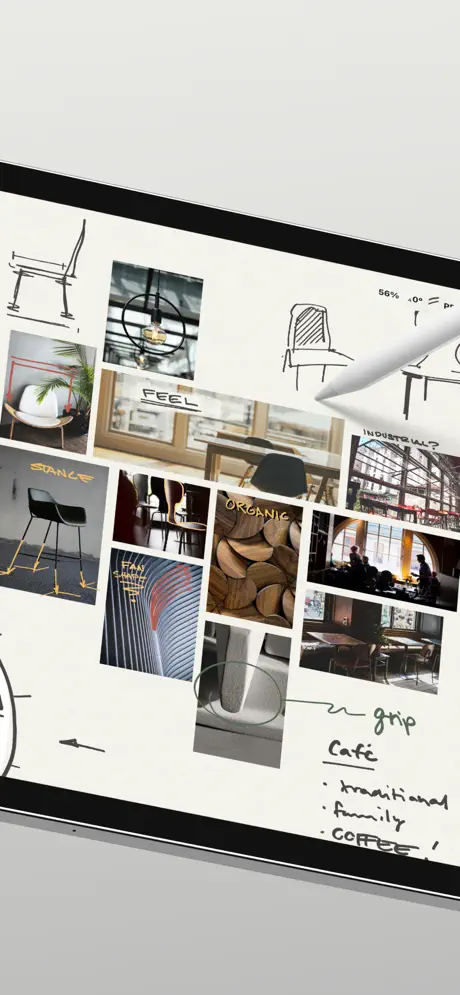
Recently downloaded and upgraded to the full version as I really enjoy the UI and general design of this app. Part of the usage would be to make mood-boards, as suggested on your marketing, however very surprised there isn’t a cropping function for imported images. Really surprised as this is essential to mood-board and I would imagine easily integrated to the UI as you can rescale images. Seems like a missed opportunity as currently it means swapping out of the app every time I wish to crop an image which will eventually just make me use a different app all together. Hopefully you can add this in?! Thank you
I LOVE THIS APP SO MUCH!!
I only got it to sketch on an infinite canvas, but the more I used it the more I fell in love with it!! It offers so much in the free version that I would buy the everything one time purchase just for my love of the app. The brushes are amazing (with an apple pen!) and when I went to other apps I missed being able to erase with my finger. ITS JUST AN ALL AROUND AMAZING APP! + no ads either!! The only thing that gets me is that there’s no lasso tool unless you buy the everything one or the subscription. Which I don’t mind getting, BUT it gives you a free 7 week trial just for using the app at some point!! The greed is nonexistent and I want to support it more :)
Don’t forget your login
I purchased pro back in 2016 and on a new iPad I log in but none of the 21 packs I’ve purchased are shown and restore purchases doesn’t do anything. I’ve spent about 2 hours with their unhuman chat interface which is a joke. I mentioned that I’m able to login to my Apple account and see all Concept items listed in my history. Now the chat agrees I have an issue and escalated my issue. 24-48 hour response time. Frustrating experience. There’s no help for account verification, lost password, or anything like that normal software sites have.
Very good
Fantastic app for conceptual work as a university student. I met someone who used it in practice as well. The only thing that I don’t like is that the fill tool has to be drawn you can’t just full a space.
More expensive
Besides price increases in one-time purchase I saw monthly price too (from £4.49 to £7.99). A sign of increasing yearly price? If they add their £26.99 to something like £52, I can't justify it even when sync to cloud is ready.
About this app
This app is very good for finger work and messing around, although if you are looking to use a apple pen or mechanical pen it will not work. If you are looking for a ultimate zoom app this does not fall into this category. Thank you
Awesome Concepts
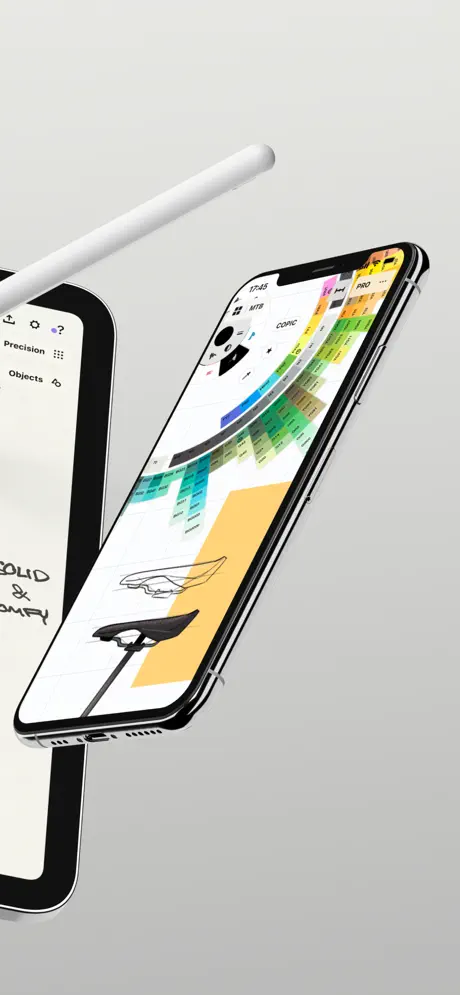
I love the color wheel
Nightmarish
Consistently Freezes, Seizes up and doesn’t respond. It is a total mess. Really disappointed, it has cost me many design ideas where I just decided to not bother and never noted down the idea. Lost forever!
Overall great
Overall the app is great especially as someone who works well studying their degree with mind mapping. The only complaint I really have is that for those who can only afford the free version they could really add in the lasso tool as a basic tool. The paid version is great and I have no complaint but I remember when I first got it as a student the fact that everytime I wanted to move a topic on my mind map and had to rub it out was really irritating, there’s a reason why a lot of people rather take notes on tablets than paper and it’s cause if the efficiency.
So Expensive now
Its a good app, but severely hindered in the free version by missing basic features like selections and two point perspective. I intended to buy the Essentials package but at £20 it was quite expensive for it to still miss so many features and not to include extra brush sets or objects. Overnight the price doubled to £40 with no extra features. I can’t justify the extra cost, so rather than buying the app I’m afraid I’ll be uninstalling.
The most meidiocure thing ever
The so called liquify tool is actin weird bro idk what to say :|
I love concepts ❣️
This app has ideas and creativity for people that love drawing and writing things for making art. It’s a pretty good app! I love everything in concepts.I just think this is a 100% app! I love your concept app😍
Scam trial
Scam app that says you get a trial period but still charges you for a full month.
Unlike some apps the developers listen and respond
I’ve been using concepts for quite a few years. I also use procreate but for project ideas and sketching it’s concepts every time. It has gradually improved over the years. The infinite option allows all the room you could ever need. The nudge tool is invaluable. I find it can handle both artistic and technical drawings which most art apps can’t do. I have asked for tech help on many occasions and i get a response within 24 hours every time. It either suits you or it doesn’t. If you have issues maybe it’s not for you?
Broken since last update.
Loved the app previously, but since the last update it’s running extremely poorly. I’m unable to edit old files, especially ones with lots of objects. Frustrating as it ran fine before.
Not Cross Platform
I like the app, but very disappointed that a project can’t be shared between iOS and Windows despite me buying both versions. This was the only reason I brought an iPad…
Concepts price by country
A one-time purchase costs $1.99 in Gabon and $6.03 in Colombia — 3× more for the same thing. Below is the going rate for each plan in every country that sells it — the middle price of what the app charges there, in the country's own currency with the dollar equivalent beneath it.
| Country | Monthly | Annual | One-time |
|---|---|---|---|
| Afghanistan | — | — | $1.99 |
| Albania | $5.99 | $34.99 | $1.99 |
| Algeria | $4.99 | $29.99 | $1.99 |
| Angola | $4.99 | $29.99 | $1.99 |
| Anguilla | — | — | $1.99 |
| Antigua And Barbuda | $4.99 | — | $1.99 |
| Argentina | $4.99 | $29.99 | $4.99 |
| Armenia | $5.99 | $34.99 | $1.99 |
| Australia | A$7.99$5.59 | A$49.99$34.96 | A$5.99$4.19 |
| Austria | €5.99$6.81 | €34.99$39.81 | €3.99$4.54 |
| Azerbaijan | $4.99 | $29.99 | $4.99 |
| Bahamas | $4.99 | $29.99 | $1.99 |
| Bahrain | $4.99 | $29.99 | $4.99 |
| Barbados | $5.99 | $34.99 | $1.99 |
| Belarus | $5.99 | $34.99 | $5.99 |
| Belgium | €5.99$6.81 | €34.99$39.81 | €3.99$4.54 |
| Belize | $4.99 | $29.99 | $1.99 |
| Benin | $5.99 | $34.99 | $1.99 |
| Bermuda | $4.99 | $29.99 | $1.99 |
| Bhutan | — | $29.99 | $1.99 |
| Bolivia | $4.99 | $29.99 | $1.99 |
| Bosnia & Herzegovina | €5.99$6.81 | €34.99$39.81 | €1.99$2.26 |
| Botswana | $4.99 | $29.99 | $1.99 |
| Brazil | R$24.90$4.78 | R$149.90$28.77 | R$24.90$4.78 |
| British Virgin Islands | $4.99 | $29.99 | $1.99 |
| Brunei Darussalam | $4.99 | $29.99 | $4.99 |
| Bulgaria | €4.99$5.68 | €34.99$39.81 | €3.99$4.54 |
| Burkina Faso | $4.99 | $29.99 | $1.99 |
| Cambodia | $4.99 | $29.99 | $1.99 |
| Cameroon | $5.99 | $34.99 | $1.99 |
| Canada | CA$6.99$4.92 | CA$39.99$28.16 | CA$4.99$3.51 |
| Cape Verde | $4.99 | $29.99 | $1.99 |
| Cayman Islands | $4.99 | $29.99 | $1.99 |
| Chad | — | — | $1.99 |
| Chile | CLP 5,990$6.23 | CLP 34,990$36.39 | CLP 4,990$5.19 |
| China | CN¥38.00$5.65 | CN¥198.00$29.46 | CN¥38.00$5.65 |
| Colombia | COP 24,900$7.54 | COP 129,900$39.35 | COP 19,900$6.03 |
| Congo | — | $29.99 | $1.99 |
| Congo, Democratic Republic | $4.99 | $29.99 | $1.99 |
| Costa Rica | $4.99 | $29.99 | $3.99 |
| Cote Divoire | $5.99 | $34.99 | $1.99 |
| Croatia | €5.99$6.81 | €34.99$39.81 | €3.99$4.54 |
| Cyprus | €5.99$6.81 | €34.99$39.81 | €3.99$4.54 |
| Czech Republic | CZK 129.00$6.01 | CZK 799.00$37.25 | CZK 99.00$4.62 |
| Denmark | DKK 39.00$5.94 | DKK 249.00$37.90 | DKK 39.00$5.94 |
| Dominica | — | $29.99 | $1.99 |
| Dominican Republic | $4.99 | $29.99 | $3.99 |
| Ecuador | $4.99 | $29.99 | $3.99 |
| Egypt | EGP 249.99$4.80 | EGP 1,499.99$28.81 | EGP 199.99$3.84 |
| El Salvador | $4.99 | $29.99 | $3.99 |
| Estonia | €5.99$6.81 | €34.99$39.81 | €1.99$2.26 |
| Fiji | $4.99 | $29.99 | $1.99 |
| Finland | €5.99$6.81 | €34.99$39.81 | €3.99$4.54 |
| France | €5.99$6.81 | €34.99$39.81 | €3.99$4.54 |
| Gabon | $4.99 | — | $1.99 |
| Gambia | $4.99 | — | $1.99 |
| Georgia | $5.99 | $34.99 | $1.99 |
| Germany | €5.99$6.81 | €34.99$39.81 | €3.99$4.54 |
| Ghana | $5.99 | $34.99 | $1.99 |
| Greece | €5.99$6.96 | €34.99$40.64 | €3.99$4.63 |
| Grenada | — | $29.99 | $1.99 |
| Guatemala | $4.99 | $29.99 | $3.99 |
| Guinea-bissau | — | — | $1.99 |
| Guyana | $4.99 | $29.99 | $1.99 |
| Honduras | $4.99 | $29.99 | $1.99 |
| Hong Kong | HK$38.00$4.85 | HK$228.00$29.08 | HK$38.00$4.85 |
| Hungary | HUF 1,990$6.17 | HUF 12,990$40.25 | HUF 1,790$5.55 |
| Iceland | $5.99 | $34.99 | $4.99 |
| India | ₹499.00$5.19 | ₹2,999.00$31.22 | ₹399.00$4.15 |
| Indonesia | IDR 89,000$4.95 | IDR 499,000$27.75 | IDR 79,000$4.39 |
| Iraq | $4.99 | $29.99 | $1.99 |
| Ireland | €5.99$6.96 | €34.99$40.64 | €3.99$4.63 |
| Israel | ₪17.90$5.83 | ₪99.90$32.54 | ₪12.90$4.20 |
| Italy | €5.99$6.81 | €34.99$39.81 | €3.99$4.54 |
| Jamaica | $4.99 | $29.99 | $1.99 |
| Japan | ¥700$4.45 | ¥4,500$28.60 | ¥600$3.81 |
| Jordan | $4.99 | $29.99 | $3.99 |
| Kazakhstan | KZT 2,490.00$5.65 | KZT 14,990.00$34.02 | KZT 2,490.00$5.65 |
| Kenya | $5.99 | $34.99 | $1.99 |
| Kosovo | €5.99$6.81 | €34.99$39.81 | €1.99$2.26 |
| Kuwait | $4.99 | $29.99 | $3.99 |
| Kyrgyzstan | $4.99 | $29.99 | $1.99 |
| Lao Peoples Democratic Republic | $4.99 | $29.99 | $1.99 |
| Latvia | €5.99$6.81 | €34.99$39.81 | €3.99$4.54 |
| Lebanon | $4.99 | $29.99 | $3.99 |
| Liberia | $4.99 | — | $1.99 |
| Libya | $4.99 | $29.99 | $1.99 |
| Lithuania | €5.99$6.81 | €34.99$39.81 | €3.99$4.54 |
| Luxembourg | €5.99$6.81 | €34.99$39.81 | €3.99$4.54 |
| Macao | $4.99 | $29.99 | $4.99 |
| Macedonia | $4.99 | $29.99 | $1.99 |
| Madagascar | $4.99 | $29.99 | $1.99 |
| Malawi | $4.99 | $29.99 | $1.99 |
| Malaysia | MYR 22.90$5.68 | MYR 129.90$32.23 | MYR 19.90$4.94 |
| Maldives | $4.99 | $29.99 | $1.99 |
| Mali | $4.99 | $29.99 | $1.99 |
| Malta | €5.99$6.81 | €34.99$39.81 | €3.99$4.54 |
| Mauritania | $4.99 | $29.99 | $1.99 |
| Mauritius | $4.99 | $29.99 | $5.99 |
| Mexico | MX$99.00$5.53 | MX$599.00$33.46 | MX$89.00$4.97 |
| Micronesia | — | — | $1.99 |
| Moldova | $5.99 | $34.99 | $4.99 |
| Mongolia | $4.99 | $29.99 | $3.99 |
| Montenegro | €4.99$5.80 | €29.99$34.83 | €1.99$2.31 |
| Montserrat | — | — | $1.99 |
| Morocco | $4.99 | $29.99 | $1.99 |
| Mozambique | $4.99 | $29.99 | $1.99 |
| Myanmar | $4.99 | $29.99 | $1.99 |
| Namibia | $4.99 | $29.99 | $1.99 |
| Nauru | — | — | $1.99 |
| Nepal | $5.99 | $34.99 | $1.99 |
| Netherlands | €5.99$6.81 | €34.99$39.81 | €3.99$4.54 |
| New Zealand | NZ$9.99$5.64 | NZ$49.99$28.24 | NZ$6.99$3.95 |
| Nicaragua | $4.99 | $29.99 | $1.99 |
| Niger | $4.99 | — | $1.99 |
| Nigeria | NGN 7,900.00$5.94 | NGN 49,900.00$37.54 | NGN 3,200.00$2.41 |
| Norway | NOK 59.00$6.32 | NOK 399.00$42.72 | NOK 49.00$5.25 |
| Oman | $4.99 | $29.99 | $1.99 |
| Pakistan | PKR 1,300$4.69 | PKR 7,900$28.52 | PKR 1,300$4.69 |
| Palau | — | $29.99 | $1.99 |
| Panama | $4.99 | $29.99 | $3.99 |
| Papua New Guinea | $4.99 | $29.99 | $1.99 |
| Paraguay | $4.99 | $29.99 | $1.99 |
| Peru | PEN 19.90$5.82 | PEN 119.90$35.06 | PEN 17.90$5.23 |
| Philippines | ₱299.00$4.78 | ₱1,790.00$28.64 | ₱249.00$3.98 |
| Poland | PLN 29.99$7.81 | PLN 149.99$39.06 | PLN 19.99$5.21 |
| Portugal | €5.99$6.96 | €34.99$40.64 | €3.99$4.63 |
| Qatar | QAR 19.99$5.49 | QAR 99.99$27.47 | QAR 14.99$4.12 |
| Romania | RON 29.99$6.46 | RON 149.99$32.33 | RON 19.99$4.31 |
| Russia | RUB 449.00$5.32 | RUB 2,490.00$29.51 | RUB 349.00$4.14 |
| Rwanda | $4.99 | $29.99 | $1.99 |
| Sao Tome & Principe | — | — | $1.99 |
| Saudi Arabia | SAR 19.99$5.33 | SAR 129.99$34.66 | SAR 17.99$4.80 |
| Senegal | $5.99 | $34.99 | $1.99 |
| Serbia | €5.99$6.81 | €34.99$39.81 | €1.99$2.26 |
| Seychelles | $4.99 | $29.99 | $1.99 |
| Sierra Leone | $4.99 | $29.99 | $1.99 |
| Singapore | SGD 6.98$5.50 | SGD 39.98$31.48 | SGD 5.98$4.71 |
| Slovakia | €5.99$6.81 | €34.99$39.81 | €3.99$4.54 |
| Slovenia | €5.99$6.81 | €34.99$39.81 | €3.99$4.54 |
| Solomon Islands | — | $29.99 | $1.99 |
| South Africa | ZAR 99.99$6.09 | ZAR 599.99$36.56 | ZAR 79.99$4.87 |
| South Korea | ₩6,600$4.86 | ₩44,000$32.38 | ₩6,600$4.86 |
| Spain | €5.99$6.81 | €34.99$39.81 | €3.99$4.54 |
| Sri Lanka | $4.99 | $29.99 | $4.99 |
| St. Kitts and Nevis | $4.99 | $29.99 | $1.99 |
| St. Lucia | $4.99 | $29.99 | $1.99 |
| St. Vincent & The Grenadines | — | — | $1.99 |
| Suriname | — | — | $1.99 |
| Swaziland | $4.99 | — | $1.99 |
| Sweden | SEK 69.00$6.93 | SEK 399.00$40.06 | SEK 49.00$4.92 |
| Switzerland | CHF 5.00$6.01 | CHF 30.00$36.06 | CHF 3.00$3.61 |
| Taiwan | NT$150.00$4.72 | NT$990.00$31.12 | NT$150.00$4.72 |
| Tajikistan | $4.99 | $29.99 | $1.99 |
| Tanzania | TZS 14,900.00$5.63 | TZS 89,900.00$33.97 | TZS 5,900.00$2.23 |
| Thailand | THB 199.00$5.92 | THB 999.00$29.74 | THB 149.00$4.44 |
| Tonga | — | $29.99 | $1.99 |
| Trinidad and Tobago | $4.99 | $29.99 | $3.99 |
| Tunisia | $4.99 | $29.99 | $1.99 |
| Turkey | TRY 199.99$4.08 | TRY 999.99$20.41 | TRY 199.99$4.08 |
| Turkmenistan | — | — | $1.99 |
| Turks and Caicos | $4.99 | — | $1.99 |
| Uganda | $5.99 | $34.99 | $1.99 |
| Ukraine | $5.99 | $34.99 | $4.99 |
| United Arab Emirates | AED 19.99$5.45 | AED 119.99$32.69 | AED 14.99$4.08 |
| United Kingdom | £4.99$6.62 | £29.99$39.77 | £3.99$5.29 |
| United States | $4.99 | $29.99 | $3.99 |
| Uruguay | $4.99 | $29.99 | $3.99 |
| Uzbekistan | $4.99 | $29.99 | $1.99 |
| Vanuatu | — | — | $1.99 |
| Venezuela | $4.99 | $29.99 | $1.99 |
| Vietnam | ₫129,000$4.98 | ₫799,000$30.83 | ₫119,000$4.59 |
| Yemen | $4.99 | — | $1.99 |
| Zambia | $5.99 | — | $1.99 |
| Zimbabwe | $5.99 | $34.99 | $1.99 |
Concepts FAQ
- Is Concepts free?
- Yes. The app and its basic features are free, in all 175 countries it sells in. Premium features are paid: they start from $4.99 (US), across 4 subscriptions and 6 one-time purchases.
- How much does Concepts cost per month?
- Everything Monthly is $4.99 (US). The annual plan works out cheaper per month: $29.99 a year.
- Does Concepts have a free trial?
- Yes — a 7 days free trial (US).
- Where is Concepts cheapest?
- A one-time purchase costs $1.99 in Gabon and COP 19,900 (≈$6.03) in Colombia, its cheapest and dearest countries.
- What are the best alternatives to Concepts?
- Tayasui Sketches (4.6 from 315,353 reviews, premium from $2.99), MediBang Paint – Drawing & Art (4.6 from 259,018 reviews, premium from $2.99) and Art Set 4 (4.6 from 114,968 reviews, premium from $12.99).
Concepts download
Last updated 1 month ago.
Concepts sells in 175 countries. It was released 14 years ago, on 6 Oct 2012. It holds a 4.7 rating from 181,890 reviews.
Supports 11 languages: English, Finnish, French, German, Italian, Japanese, Korean, Portuguese, Russian, Chinese, Spanish.
How much does Concepts make?
Third-party estimates for the last 30 days, worldwide — not the store's own figures, which Apple publishes for nobody.
Revenue by plan
- Monthly 44%
- One-time 31%
- Annual 25%
Revenue by country
- United States 25%
- China 13%
- Japan 11%
- Germany 7%