
Photo Manager Pro
Keep photos organized & safe

How much does Photo Manager Pro cost?
Prices are current as of 6 Nov 2026.
Photo Manager Pro has no in-app products on record in the United States.
Photo Manager Pro download price by country
| Country | Price |
|---|---|
| United States | $2.99 |
| China | CN¥22.00 |
| United Kingdom | £2.99 |
| Germany | €2.99 |
| Canada | CA$3.99 |
| Australia | A$4.99 |
| Italy | €2.99 |
| Thailand | THB 99.00 |
| Switzerland | CHF 3.00 |
| France | €2.99 |
| Hong Kong | HK$22.00 |
| Japan | ¥500 |
| Mexico | MX$69.00 |
| Netherlands | €2.99 |
| Spain | €2.99 |
| Russia | RUB 249.00 |
| Singapore | SGD 3.98 |
| India | ₹299.00 |
| Taiwan | NT$90.00 |
| Malaysia | MYR 14.90 |
| Austria | €2.99 |
| Saudi Arabia | SAR 12.99 |
| Sweden | SEK 39.00 |
| Belgium | €2.99 |
| Czech Republic | CZK 79.00 |
| Denmark | DKK 29.00 |
| South Korea | ₩4,400 |
| Brazil | R$19.90 |
| Greece | €2.99 |
| New Zealand | NZ$4.99 |
| South Africa | ZAR 59.99 |
| Indonesia | IDR 59,000 |
| Turkey | TRY 149.99 |
| Vietnam | ₫99,000 |
| Kuwait | $2.99 |
| United Arab Emirates | AED 12.99 |
| Philippines | ₱199.00 |
| Colombia | COP 14,900 |
| Portugal | €2.99 |
| Poland | PLN 14.99 |
| Egypt | EGP 149.99 |
| Hungary | HUF 1,490 |
| Chile | CLP 2,990 |
| Israel | ₪9.90 |
| Ukraine | $3.99 |
| Lebanon | $2.99 |
| Croatia | €2.99 |
| Norway | NOK 39.00 |
| Peru | PEN 12.90 |
| Argentina | $2.99 |
| Luxembourg | €2.99 |
| Latvia | €2.99 |
| Ireland | €2.99 |
| Qatar | QAR 9.99 |
| Romania | RON 14.99 |
| Slovakia | €2.99 |
| Costa Rica | $2.99 |
| Pakistan | PKR 900 |
| Finland | €2.99 |
| Bulgaria | €2.99 |
| Ecuador | $2.99 |
| Guatemala | $2.99 |
| Slovenia | €2.99 |
| Bolivia | $2.99 |
| Namibia | $2.99 |
| Estonia | €2.99 |
| Moldova | $3.99 |
| Mauritius | $3.99 |
| Oman | $2.99 |
| Albania | $3.99 |
| Armenia | $3.99 |
| Brunei Darussalam | $2.99 |
| Cyprus | €2.99 |
| Kenya | $3.99 |
| Lao Peoples Democratic Republic | $2.99 |
| Sri Lanka | $2.99 |
| Panama | $2.99 |
| El Salvador | $2.99 |
| Uruguay | $2.99 |
| Azerbaijan | $3.99 |
| Bosnia & Herzegovina | €2.99 |
| Bahrain | $2.99 |
| Bermuda | $2.99 |
| Belarus | $3.99 |
| Dominican Republic | $2.99 |
| Georgia | $3.99 |
| Honduras | $2.99 |
| Jamaica | $2.99 |
| Jordan | $2.99 |
| Kyrgyzstan | $2.99 |
| Cambodia | $2.99 |
| Kazakhstan | KZT 1,790.00 |
| Lithuania | €2.99 |
| Morocco | $3.99 |
| Madagascar | $2.99 |
| Myanmar | $2.99 |
| Mongolia | $2.99 |
| Macao | $2.99 |
| Malta | €2.99 |
| Paraguay | $2.99 |
| Senegal | $3.99 |
| Trinidad and Tobago | $2.99 |
| Uganda | $3.99 |
| Afghanistan | $2.99 |
| Antigua And Barbuda | $2.99 |
| Anguilla | $2.99 |
| Angola | $2.99 |
| Barbados | $3.99 |
| Burkina Faso | $2.99 |
| Benin | $3.99 |
| Bahamas | $2.99 |
| Bhutan | $2.99 |
| Botswana | $2.99 |
| Belize | $2.99 |
| Congo, Democratic Republic | $2.99 |
| Congo | $3.99 |
| Cote Divoire | $3.99 |
| Cameroon | $3.99 |
| Cape Verde | $2.99 |
| Dominica | $2.99 |
| Algeria | $2.99 |
| Fiji | $2.99 |
| Micronesia | $2.99 |
| Gabon | $2.99 |
| Grenada | $2.99 |
| Ghana | $3.99 |
| Gambia | $2.99 |
| Guinea-bissau | $2.99 |
| Guyana | $2.99 |
| Iraq | $2.99 |
| Iceland | $3.99 |
| St. Kitts and Nevis | $2.99 |
| Cayman Islands | $2.99 |
| St. Lucia | $2.99 |
| Liberia | $2.99 |
| Libya | $2.99 |
| Montenegro | €2.99 |
| Macedonia | $2.99 |
| Mali | $2.99 |
| Mauritania | $2.99 |
| Montserrat | $2.99 |
| Maldives | $2.99 |
| Malawi | $2.99 |
| Mozambique | $2.99 |
| Niger | $2.99 |
| Nigeria | NGN 4,900.00 |
| Nicaragua | $2.99 |
| Nepal | $3.99 |
| Nauru | $2.99 |
| Papua New Guinea | $2.99 |
| Palau | $2.99 |
| Serbia | €2.99 |
| Rwanda | $2.99 |
| Solomon Islands | $2.99 |
| Seychelles | $2.99 |
| Sierra Leone | $2.99 |
| Suriname | $2.99 |
| Sao Tome & Principe | $2.99 |
| Swaziland | $2.99 |
| Turks and Caicos | $2.99 |
| Chad | $2.99 |
| Tajikistan | $2.99 |
| Turkmenistan | $2.99 |
| Tunisia | $2.99 |
| Tonga | $2.99 |
| Tanzania | TZS 9,900.00 |
| Uzbekistan | $2.99 |
| St. Vincent & The Grenadines | $2.99 |
| Venezuela | $2.99 |
| British Virgin Islands | $2.99 |
| Vanuatu | $2.99 |
| Kosovo | €2.99 |
| Yemen | $2.99 |
| Zambia | $3.99 |
| Zimbabwe | $3.99 |
10+ alternatives to Photo Manager Pro
| Photo Manager Pro | 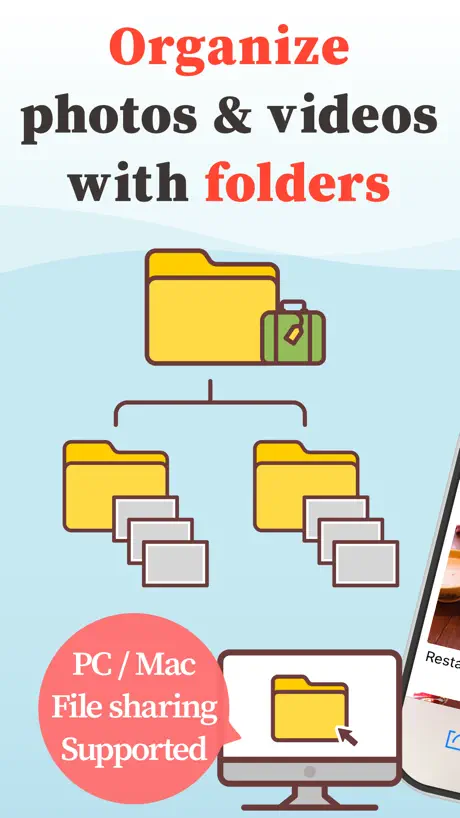  MyPics - A Powerful PhotoAlbum | 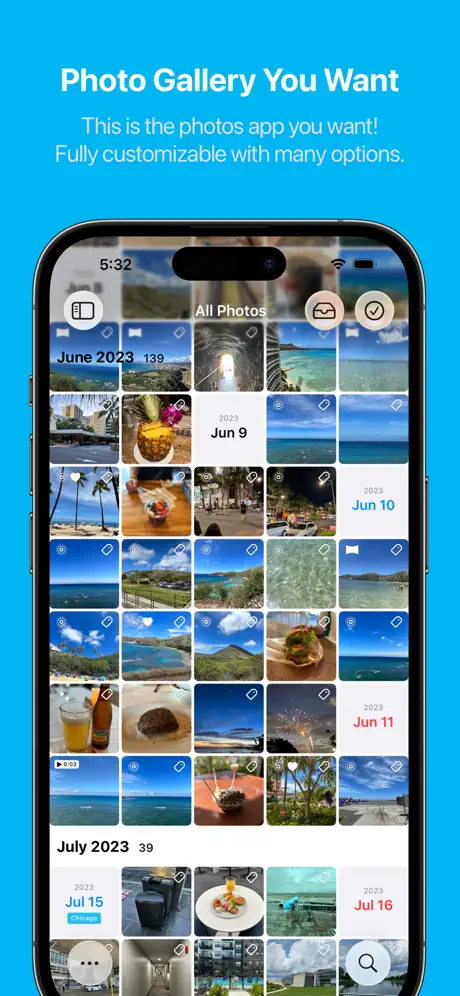  HashPhotos | 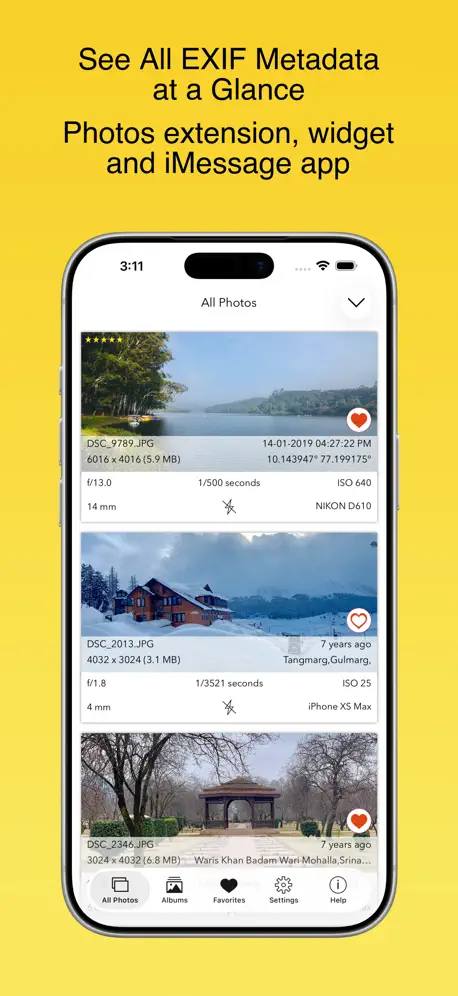  EXIF Viewer by Fluntro |   Image Blender |   Photo Album Private Manager |   RAW Power |   Distressed FX : Plus |   Utiful: Move & Organize Photos |   Mylio Photos |   Nitro Photo | |
|---|---|---|---|---|---|---|---|---|---|---|---|
| Rating / 5 | 4.5 | 4.5 | 4.7 | 4.7 | 4.8 | 4.5 | 4.5 | 4.8 | 4.0 | 3.9 | 4.6 |
| Reviews | 6.3K | 29K | 27K | 9.8K | 5.7K | 3.6K | 3.1K | 2K | 1.6K | 634 | 240 |
| Released | 2016 | 2012 | 2013 | 2015 | 2011 | 2012 | 2017 | 2019 | 2015 | 2014 | 2024 |
| Monthly price | — | — | $1.99 | — | — | — | — | — | $6.99 | $25.00 | $2.99 |
| Annual price | — | $8.99 | $9.99 | — | — | — | — | — | $49.99 | $239.99 | $19.99 |
| One-time price | — | $6.99 | $19.99 | — | — | $0.99 | — | — | — | — | $79.99 |
The going rate for each plan in United States, in its own currency, shaded from the cheapest price on the row to the dearest.
Photo Manager Pro reviews
4.5 out of 5, based on 6,324 reviews.
What people like
- One-time price with no subscriptions.
- Organizes photos in real folders nicely.
- Excellent customer support when they reply.
- Great for managing large photo libraries.
What they complain about
- Lost all my organized photos suddenly.
- Support never actually helps or replies.
- Hard to move files around easily.
- Drains battery and runs very slow.
Awesome app!
This program is everything I needed and more. It makes managing your photos so easy. And you can’t beat the price!
“Doesn't Act Pro!”
Stop acting stupid; in the recent email you sent - did you notice the 2 screenshots? Again, the “Photo Manager” app library uses 135.71 GB of iPad storage. Does the app store a second local copy of every photo and video, or does it access Apple Photos in place? Does the green iCloud indicator provide live syncing, iCloud Backup only, or cloud-only storage? Does the app support optimized/thumbnails-only local storage while preserving full-resolution originals in iCloud? If I enable that option, will deleting local copies delete the originals from Apple Photos or iCloud? Please give exact steps to reduce local storage without reducing original quality. Right now, I'm comparing it to an app I just installed where I loaded the same photos and videos that Photo Manager has, but it is only taking up 1.29 GB in Storage Settings.
Almost Everything
Photo Manager Pro has everything to easily manage photos. Would be great if the video had slow motion to easily stop and precisely capture photos to add in the albums too!
App refreshes or restarts too often now
Edit: I have had this issue before with this app, but it seems to really have an issue with iOS 26 now. I just started going over a photo album, did a little surfing, then came back less than 10 minutes later to find it restarted. Fine, but then you have to go back to where you started. It makes you want to use another app to view photos on the camera roll or off storage. While I can see blaming iOS 26 makes sense, other recently opened or used apps are fine. And that has traditionally been the case before 26. I think there is a developer option to not let this happen so easily. Not sure if this app has that factored in or not. Thoughts? Thanks. Past issue: My primary photo album app. But, I decided to try the 8bitdo micro controller in keyboard mode with the all of the arrow keys mapped right, but it won’t let me cycle through photos with this. Same for my Magic Keyboard. Arrow or direction keys not working. The controller does work with Apple’s quick view and Photos app along with other photo viewers. Am I missing something? Thanks!
Good for non RAW images
I got this in my search for a good RAW image browser. It does a decent job for everything EXCEPT RAW. It may work with some RAV varieties, but not with Panasonic LUMIX RAW
Best way to delete per photo
I was hesitant to pay for an app that I wasn't 100% sure would do what I want. All I wanted was a simple way to sort through many old photo albums, not my iOS Camera Roll photos but from normal folders as normal JPEG files. I took a chance and am extremely satisfied. This app lets me browse folders and while viewing the pictures, presents buttons below to immediately send it to trash. This is IDEAL for sorting through huge old folders of pictures, most of which are garbage. I can rapidly delete photos I don't like and end up with a clean, organized folder. It actually is way more useful than that because it also lets you edit/crop the photo immediately, organize by names and sizes etc., all with real files, not just restricted to the iCloud Camera Roll (although it also works with that if you want). You can add the files from nearly anywhere: Dropbox, iCloud folders, local folders on your device, or my personal favorite, the app itself can act as an FTP client, so you can use your desktop browser or a desktop FTP client to quickly send whole batches or folders over to the app. Can even password or TouchID/FaceID protect specific folders. This has been a lifesaver app for dealing with massive amounts of old pictures and is absolutely worth the price. I'm writing this hoping anyone else with this need can find it useful. If you have folders of photos *outside of iCloud* you want to sort, organize, edit, delete, this is the app you want. (Of course it works with Camera Roll photos too but for me, I don't mind editing those in Apple Photos; I just didn't want to copy thousands of old pictures into iCloud just to have to deal with 3 clicks each to delete them individually.)
What happened?
It went from a straight forward, easy to use app and effed it up beyond belief. Horrible. Thanks for ruining this. Was it too easy? Was it too simple and straightforward? Now it takes me three or four moves to do what I used to do and that includes completely swiping the app away and restarting it so what I’ve chosen to download shows up. Why? WHY? Ungh! Always messing with stuff that doesn’t need it:
This is what I was looking for
It's not givinge option to migrate from google photo or Google drive
iCloud
There’s an iCloud tab but I can’t access my iCloud Photos ??? I’d also like to change the main screen when I open the app
Can’t change Folder Cover Photo
I followed Help Instructions, but no tab or choice appears in the drop down to make the image change as instructed.
Lifesaver and what I have been looking for
This App is a literal lifesaver, I dabble in dealing commercial Philately online and this App not only helps me organize by lot and stamp types, it also separates my personal Gallery from my Philately related pics. I can’t believe it’s not priced a lot higher. I love this App, I love this App and I love this App 🥰🥰🥰
DOES ABSOLUTELY NOTHING
ZERO support from developer. Manual is useless. Does not do anything, does not seem to see your Photos collection. Wrote emails to developer, no reply. At this point; an absolutely terrible and useless product.
Nearly perfect
Love this organizing app a lot, all I really would want is more folder colors, maybe even an optional color wheel for one, but that is all, thanks, devs
Icloud
I love how I was able to put my photos in albums. But recently I had to reset my iPhone. I had PMP backup enabled. But my photos were gone. Many years of photos gone.
Why to close app everytime...?
Why is it that everytime I want to import a pic, after the first time, I have to close the app or it would never let me select more pics?, it only shows the recent, very annoying and a waste of time. Am I doing something wrong??! Also I edited one of my pics that I have had for forever, it was a card with my important info like s.s# of my fam. and phone numbers and the next day it wasn't there anymore, it just disappeared! I don't physically have that card anymore so it was a bummer that I completely lost it now. Anyway what's with the import/select more pics, please fix that. I've had this app for a year now cuz the previous one which I loved stopped working when I updated my phone.
Please add Arabic language
Please add Arabic language
Useless
Stoped working. Lost all my files. iCloud isn’t accessible. Please enable it from iOS settings. (Nothing to access and all other iCloud files and apps work fine)
Almost perfect
Nice and simple without the enormously unnecessary bells and whistles of apps like Apple Photos. Just wish I had the ability to trim and repeat videos. If so it would be 5 stars.
A step backwards
Previously, prior to the “iOS optimization “ you could open the app to view photos without a password while your private folder remained hidden behind a password wall. This password could be different from your unlock code and not tied to facial recognition. There was no hint of a hidden folder unless you chose to display it and then a user set password was required to open it. Not so in the current revision. Now, you use a password or not at your discretion to open the application but once in, the second layer of password protection for your private photos is gone. In other words: lock out the app entirely and give the impression that there is something hidden OR let the app open normally and let anyone you hand the iPad to stumble onto and view your private folder.
Almost Great
In my opinion this is a good app. There’s one feature missing in it that brings it down from five stars to three though. When you go to import from the Photos on iPhone a grid view of the photos shows across the screen in rows. If you have a picture in the Photos then it’s easy to pick out and import. But if you have for instance a screenshot with text in it as the main content then it’s very hard if not impossible to read the text in the grid view and know which pictures to pick out to import. The app needs a feature in it where instead of just the grid view you can also show a full picture on the screen with a select option to include in the import. Then you could easily see text images that you want to include. Also, I emailed their support about this problem over 24 hours ago and have not heard from them.
Simplicity
What not to like about this app. Everything I’ve been looking for! All I want to do is organize my photos in folders and subfolders, which all my other apps don’t allow. Apps like Apple Photos and Google Photos, while offering a variety of useful features, don't directly support subfolders within albums in a typical hierarchical file structure. If you’re looking for a simple app that does an effective job organizing photos and videos this is it. Easy to import photos and rearrange them all in folders and subfolders drag and drop. No complicated file structure. The best part is the one-time price. No stupid monthly yearly subscriptions. Sick of those. Kudos to the developer for an affordable and simple app.
Can only import one photo at a time
Unfortunately if you want to share and import a large number of photos from your library it won’t let you, you have to do it one at a time.
New user
Only recently started using this app, I’m enjoying it so far but I wish I was able to change cover photos on folders after they’re created. Once they’re set it seems like they’re stuck until you turn them off entirely (stays the same once you turn them back on) or make a new folder with a different cover. I also think with it being a photo storage app, it would be cool for it to have a duplicate detector for photos.
Not able to move multiple photos between folders.
App has one large flaw for me, and that’s the inability to move things easily once they’re loaded onto the app. One at a time. And then go back and delete.
Update loss of function
Location metadata has disappeared in the most recent update, a function I use a lot. Annoyingly will have to now use another app, this is infuriating. Surely updates shouldn’t remove a basic function?
Essential; good value
Glad to see devs continue updating & enhancing this project. Feature request: Sort by type or file extension.
Needs more work to useful
Not very useful, limited number of photo can be transfer at one time via zip file. Pure pain in the butt to use. Photos that are transfer are in jpeg format. What up with that?
What does STAR button do ?
I see the area to Rate by Stars, but happens when I press the Big Star at the bottom.
Great for some things… not so much for others.
I thought this app would be my savior, freeing me from the horrendous mess that is apple photos, but alas, some thing this app claims to do… it does not do. Drag and drop for one thing. The help file says press and hold, drag and drop. This is not the case. The app has NO real drag and drop function which makes organizing photos very hard. And… when you try to move them manually, you have to RESELECT the receiving folder every single time. It gets to be almost as annoying as apple photos in the long run.
Recent update is crashing unexpectedly
Had this app for years without issue. Since last ios13 update (and recent bug fix attempt) it continues to crash unexpectedly during use. 3 times in last 24 hrs. Come on folks....get it right!
Great product, great support
I’ve been using PM Pro for years. Love how you can manage and organize photos and albums. I use it to shows prospective customers of our work. I showed this to some of my employees and they all wanted it. I contact PM support about sharing the photo albums. They emailed back the next morning with videos and a tutorial on how it’s done. I would’ve never figured it out on my own but following the simple steps it was easy. Great product and EXCELLENT support.
This app is a joke
This is not a real app but more like an unfinished high school project that would not even get a high grade. I feel scammed.
Almost Perfect Photo Manager
Have been using this for many years after an exhaustive search for a phot manager that matched my needs. I like to sort my photos by year and subject, while also being able to search by partial or full file name, which most don’t do. I also don’t use iCloud for storing photos or use the Apple Photos app, preferring to keep them on my Mac in a similar folder structure, which for many apps make transferring nearly impossible. Photo Manager Pro does this well and offers multiple ways of sorting and organizing. To me, the only drawback is that it doesn’t include a file transfer utility, necessitating the use of a third party app such as FileZilla or Cyberduck. To the average user such as myself, these may be intimidating to use at the beginning. That said, it’s a great app, which I highly recommend.
Must enable icloud to use dropbox
I was disappointed in this app. Unlike other file apps I use, this one requires iCloud be enabled to access Dropbox.
Great, but...
This is a much better way to organise photos the the native iOS app... ...but there is no synchronisation either cloud. Yes, you can manually transfer files between your cloud data services and PM Pro, but that’s rather a let down in this day and age.
Great app worth every penny.
At last - an easy-to-use photo manager app with useful tools. First of all, I like the fact that it does not change the image’s file name when imported. Organization of files is very easy and it does not try to do anything crazy. It offers a full suite of editing and markup options. Best of all, in my mind, are the various ways in which you can import/export images: via FTP, HTML and USB memory sticks. Great job - thank you!
good app but drive people nuts
the whole idea of the app is good. But, the rating stars are so small, not easy to get it right, operation error is like 30% while my finger is not fat….. another thing is swiping is supper sensitive if you swipe with just a tiny angle it will recognize as swipe down and quit. The best part is when quit, it quiets to the beginning, not where you swiped out. Please kindly fix above and I will switch to 5 again,thanks
I really like this app
PM Pro is a great app. I am using for my airbrush face painting & airbrush tattoo business as a private menu board. To the creators of this app… 1. Issue: I have issues when transferring my folders from my iPhone to my iPad. The metadata is missing. Sometimes they will transfer with all the info, but most times I am missing the metadata. 2. Suggestion: I would really like to see a feature where you can allow other people to view and interact with the photos, as in search, viewing folders/photos, etc. without them being able to have access to changing or deleting the photos. This would be an amazing feature as I can then use my app as a digital menu board for people to choose designs, but not able to change anything. Thanks for the app!
Password protect private zone folder
You can hide the private zone folder but I cannot see a way to password protect it.
Less attractive after update
Please return the background colour to black or give the user a choice in settings. The new white background does not show images to their best advantage. The folder view with four images option has gone - why? I have used previous version for years and found it excellent. This update is disappointing, especially as we have to pay for it. I shall stay with the old version!
A lil P & Z
Add pan and zoom to slideshow
Where did my photos go?
I had a ton of well organized pictures in this app. All of the sudden, they were all gone! No heads up or warning. Very distressed aboout this. I spent years organizing my photos here and now they are no more. I really loved this app, now it just makes me sad and distressed. I sent several messages but got no response at all. Some folders are still,showing, but they are empty. Unbelievable!
Suggestion to add the option to delete photos from the gallery
Good application. I would like to add an optional option (delete the transferred images from the gallery) when you select a group of gallery images. You want to delete them directly from the gallery and move them within the app. The transferred images may be many and difficult to search for. Please add the option to delete from the studio during the transfer directly.
Downgrade
Updated from 4.5 to 6 cos earlier version doesn’t support HEIC export. This latest iteration is one of the most difficult apps to navigate I have ever come across. 4.5 did everything needed but some numpty decided to completely screw up the menus. Must be something better out there.
Struggling with importing my photos
Seems to be very sensitive with spare memory, even after deleting several apps to free up space. Struggled to import 20 photos from my iPhone, have only managed 3 so far!
Excellent
Great app. Perfect for a portfolio.
Lost photos
I haven't used this app in awhile. I opened it today to realize that all my saved photos have been removed.
New annoying pop-up
I’ve been using this app since version 4-ish and I love it. I just upgraded to 6.3.2 on iOS 16.2 iPhone. Annoying new occurrence: When I SELECT a thumbnail photo in order to reposition my photos, a large pop-up screen appears with COPY TO, MOVE TO, RENAME, SHARE, DELETE, etc. That pop-up has become a pain in the butt while I wait until it disappears and I can then reposition the thumbnail. All those options are available at the bottom of the screen and I don’t need them in my face every time I select a photo. Is there an option to prevent this pop-up from occurring? Thanks.
Dated and lacking features
Given the ongoing issues with Apple Photos this app could be a godsend. However, it is very dated, and as another reviewer has advised you cannot import photos from anywhere other than the a Photos app. Therefore this app is of little use. Such a shame.
Photo Manager Pro
Seems to be slow and judders when swiping through album. Also seems to drain the iPhone battery quite quickly. Didn't have any of these issues with the previous version. The developer obviously doesn't think much to the people who paid for the previous version making them pay again rather than updating the old app.
Photo Manager Pro FAQ
- Is Photo Manager Pro free?
- No. Photo Manager Pro costs $2.99 (US) to download.
- Does Photo Manager Pro have a free trial?
- No. None of its offers (US) come with a free trial.
- What are the best alternatives to Photo Manager Pro?
- MyPics - A Powerful PhotoAlbum (4.5 from 28,635 reviews, premium from $6.99), HashPhotos (4.7 from 26,922 reviews, premium from $1.99) and EXIF Viewer by Fluntro (4.7 from 9,825 reviews).
Photo Manager Pro download
Last updated 25 days ago.
Photo Manager Pro sells in 175 countries. It was released 10 years and 2 months ago, on 4 Sept 2016. It holds a 4.5 rating from 6,324 reviews.
Supports 3 languages: English, German, Chinese.
How much does Photo Manager Pro make?
Third-party estimates for the last 30 days, worldwide — not the store's own figures, which Apple publishes for nobody.