
3CX
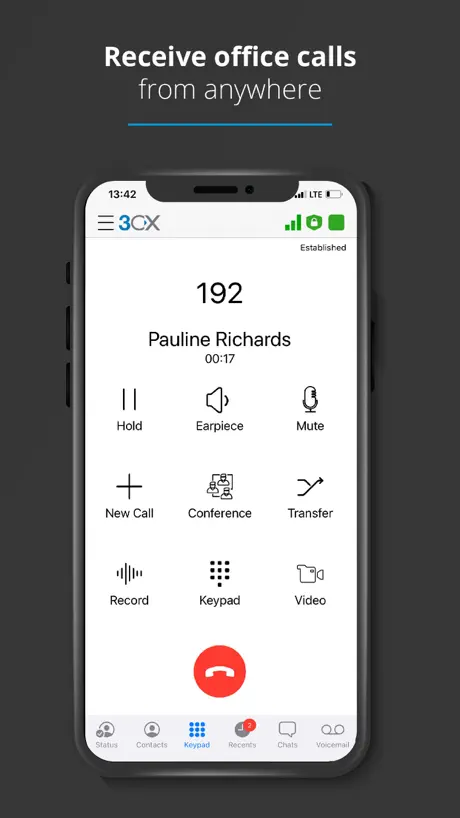
Work Remotely, Anywhere
How much does 3CX cost?
Prices are current as of 9 Sept 2026.
3CX has no in-app products on record in the United States.
10+ alternatives to 3CX
| 3CX |   UniFi UniFi |   UniFi Verify UniFi Verify |   Microsoft 365 Admin Microsoft 365 Admin |   UniFi Endpoint UniFi Endpoint |   Bria Mobile: VoIP Softphone Bria Mobile: VoIP Softphone |   Zoiper Lite voip soft phone Zoiper Lite voip soft phone |   Zoho CRM - Sales & Marketing Zoho CRM - Sales & Marketing |   Dialpad Dialpad |   FortiToken Mobile FortiToken Mobile |   WatchGuard AuthPoint WatchGuard AuthPoint | |
|---|---|---|---|---|---|---|---|---|---|---|---|
| Rating / 5 | 2.6 | 4.7 | 4.8 | 4.6 | 4.8 | 4.4 | 4.3 | 4.5 | 4.5 | 2.7 | 3.9 |
| Reviews | 1.6K | 62K | 25K | 21K | 17K | 14K | 11K | 8.3K | 6.1K | 754 | 189 |
| Released | 2015 | 2015 | 2021 | 2013 | 2023 | 2017 | 2011 | 2011 | 2014 | 2012 | 2018 |
| Monthly price | — | — | — | — | — | $0.99 | $0.99 | $34.99 | — | — | — |
| Annual price | — | — | — | — | — | — | $9.99 | $279.99 | — | — | — |
| One-time price | — | — | — | — | — | — | $4.99 | — | — | $499.00 | — |
The going rate for each plan in United States, in its own currency, shaded from the cheapest price on the row to the dearest.
3CX reviews
2.6 out of 5, based on 1,632 reviews.
What people like
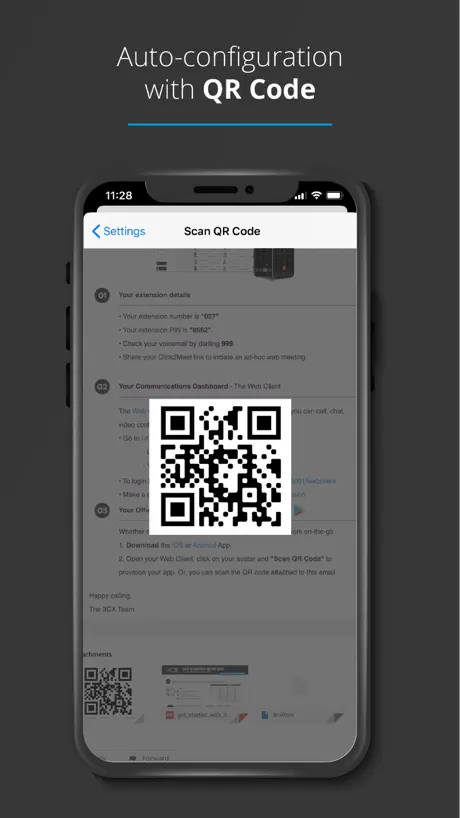
- Setup is quick and easy using a QR code
- Call audio is clear and sound quality is good
- App updates regularly make the experience better over time
What they complain about
- Calls often fail to ring or come through
- Support team is unhelpful and slow to respond
- Audio quality suffers from echo and background noise
Lautsprecher extrem Leise
Am iPhone ist das Freisprechen extrem Leise geworden. Bitte wieder nachbessern. Schnelle Reaktion. Jetzt wieder alles gut.
AVOID AT ALL COST
CALLS DON'T COME THROUGH. IT WILL MAKE YOUR BUSINESS LOOSE MONEY
Tolle App
Es ist eine tolle App! Sie macht was sie soll! Einziges Manko: im Widget wird der Teilnehmerstatus nicht angezeigt(verfügbar, abwesend, nicht stören etc). Es wäre klasse wenn auch hier die Statusanzeige eingeblendet werden könnte! Ist das für eine kommende Version geplant?
Unbrauchbar mit CarPlay
Nach Telefonat permanente Wiedergabeprobleme egal ob Musik oder Podcast. Nach Trennung und neuem verbinden Problem weg. Nach neuem Anruf wieder da Problem ist reproduzierbar.
Konfiguration
ca. Alle 2 Wochen verliert die App die Konfiguration und ich muss erneut den qr Code Einscannen. Vorzugsweise wenn ich gerade unterwegs bin.
Funktioniert und macht was es soll!
Ganz zufrieden mit der App!
Doesn’t work
No longer rings/get notifications and the only way I know someone has tried to contact me is by opening the app and looking for missed calls. Makes working from home difficult.
Gut.
App macht fast immer, was sie soll. Entgegen anderer Rezensionen, funktioniert die App mit CarPlay, ohne diese extra zu starten (muss in Einstellungen für CarPlay ausgewählt sein) Riesiges Problem: ist man in dem WLAN der Firma, wo die Telefone laufen, verbindet sich die App nicht und man kann nichts machen: weder Anrufe annehme oder tätigen, noch das Team oder seine Kontakte sehen. Das muss funktionieren! Alle iPhones in der Firma haben das Problem leider. War vor dem letzten App-Update vor ca. 3 Wochen noch nicht so. Verbesserungsvorschlag: bei Anrufeingang im Sperrzuststand Rufnummernanzeige. Das klappt nur, wenn das Handy vorher schon entsperrt war. Sonst aber eine gut laufende App, die im großen und Ganzen funktioniert.
Gute Idee aber Umsetzung hapert
An sich eine gute Idee und man weiß wo die Reise hingehen soll, jedoch gibt es noch sämtliche Dinge, die verbessert werden müssen. Widget, Kontaktauswahl, Verknüpfung mit dem Telefonbuch des Smartphones. Das Potential ist da.
Watch
Leider bekommt man nur eine Nachricht wenn man einen direkten Anruf verpasst hat. Ein klingeln oder vibrieren wie bei normalen Anrufe bekommt man nicht auch wenn man angerufen wird Schade
App works
Really works well 👍
Not great
Sound quality for me listening is ok, however I’m constantly getting bad feedback from callers on other end saying there is a delay and can barely hear me.. and I also have to keep deleting and reinstalling the app every day or 2 as calls don’t come through
Standard Telefon
Wann lässt sich die App als Standard Telefon App unter iOS festlegen?
Finger weg
Wer bei seiner Firmenkommunikation auf diesen Anbieter setzt kann sich auf ständige Probleme, nicht existenten Support und schlecht durchdachte “Lösungen” freuen. Einfachste Basics die eine Telefonanlage erfüllen soll, gibts nicht… alles in allem eine Katastrophe.
Ganz nett…
… Die App macht, was sie soll und funktioniert eigentlich ganz gut. Ist für ein Softphone aber auch keine große Herausforderung. Was allerdings extrem schlecht bis gar nicht funktioniert ist die Variante mit Apple CarPlay. Dort ist die App praktisch unbrauchbar. Zum einen muss man immer erst das Handy in die Hand nehmen und die App dort manuell starten, dies kann ja nicht im Sinne des Erfinder sein während der Autofahrt. Des Weiteren muss man die CarPlay Verbindung erst trennen und neu wiederherstellen, nachdem man über diese App telefoniert hat da andernfalls sämtliche vorher gehörten, Medien über CarPlay anfangen zu stocken.
Funktioniert problemlos!
Einfach zu bedienende App, die bisher ohne Probleme funktioniert.
Doos not respect no notification
The app rings even though I have disabled notifications in the Settings app.
Nützlich
Die funktioniert ganz gut, es wäre aber sehr gut, wenn es diese auch für macOS geben würde, dann müsste ich nicht immer mein iPhone als Extra Telefonagent verwenden, sondern könnte direkt auf dem Mac mit Headset arbeiten. Für Windows gibt es schließlich auch eine Desktop App, also warum nicht für Mac?!
Gone downhill
I have used the 3CX app for some time now as I work remotely from my office. Recently I find a lot of people get feedback and an echo hearing themselves instead of me. I’ve in-installed the app numerous times but don’t seem to have much joy in eradicating the issue. There is also a large delay in the call reaching the mobile host
Gut, shortcuts aber noch zu unpraktisch
Die App tut an sich was sie soll. Die verfügbaren Shortcuts erfordern leider, dass die App im Vordergrund und das Telefon entsperrt ist. Schade, weil sonst z.B. der Anwesenheitsstatus abhängig vom Standort gesetzt werden könnte. Wenn das nachgearbeitet wird, sind 5 Sterne sicher gerechtfertigt.
DECENT!
I use this app for work purposes and each update it gets better. Highly recommend
Useless
Have just moved our entire office to 3CX and have discovered like others that it won’t dial +44 numbers - pretty much all my contacts are created this way. We will have to cancel the whole contract as it’s unfit for purpose.
Ausreichend. Freue mich auf Verbesserung
Ich bin froh, dass es diese App gibt, da sie mir die Arbeit im Homeoffice ermöglicht. Leider funktioniert seit dem letzten Update die Einstellung des Klingeltons nicht mehr. Davor konnte ich schon beim ersten Klingeln hören, ob es sich um einen geschäftlichen oder privaten Anruf handelt.
Global awareness questionable.
So, I know the email field is a little extraneous for a VoIP application, BUT. One might expect to use any valid email address in that field. Try a .co.uk, or any top-level domain with two full-stops (that's a period for our American friends) and you'll be required to, "Please enter correct Email". It used to work so obviously one of the children adjusted the validation pattern to limit email addresses to those with a single top-level domain (.com,.edu,.net). It's a bug! One that definitely should NOT have slipped under the radar. Perhaps an indication of their attention, or lack thereof, to the quality of their code. Another update under their belt and still unable to add .co.uk/.org.uk/.gov.uk, etc., addresses.
Ausbaufähig
Die App an sich ist ganz okay, auf der Apple Watch funktioniert sie nicht. Benachrichtigungen kommen komischer Weise auf der Uhr an, Anrufe nicht, so schwer kann das doch nicht sein..
Does what it says
Easy to use and configures with a QR code. I can truly stay in the loop with calls and messages while on the go or working from home.
Horrible app
Clunky, temperamental, the process of transferring calls has nothing intuitive in it. Sometimes I can go a day without receiving a single call, then get to the office to find ten missed calls on my desk phone. I’m sure it was better than this during lockdown. Thankfully hardly anyone uses phones anymore anyway and we can soon consign this app to the bin.
Cursor fehlt
Super einfache und schnelle app. Was mir aber total fehlt, ist die Möglichkeit ein Präfix vor die Nummer schreiben zu können, die ich anrufen möchte (ausgehende Regel). Leider gibt es keinen cursor, mit dem ich an den Anfang der eingefügten Nummer navigieren kann. Auch „paste“, nachdem ich ein Präfix in das Nummernfeld eingegeben habe, geht nicht mehr.
No notifications on iPhone
Layout of the app is ok, but iPhone doesn’t ring when receiving calls so 50% pointless having it. Tried speaking with 3CX but no help what so ever
CarPlay eingeschränkt nutzbar
Car Play unterstützt nicht gut umgesetzt. Kontakt Favoriten nicht vorhanden. Kontakt Suche umständlich
3CX
The 3CX app is hands down the best VoIP mobile app I have ever used. I can say that with some authority as I work in technology. Reading some of the less so good reviews is surprising. I can only assume the reseller has not provided enough training or the system is being hosted on some flaky platform (more likely as telecom companies are often more interested in securing business and have to look as competitive as possible often to the detriment of the solution and customer). 10 out of 10 for me.
Poor functionality, poor performance
Like other users, have found the app freezes and you cannot flip back to contacts without closing the app and re-opening. It also refuses to dial UK to UK when the iPhone contact is entered with +44 (most of mine are for when I’m calling from overseas). Sound quality relatively poor but probably deserves 2* for that. Seems 3CX isn’t so interested in investing to improve service to their customer base and I would therefore struggle to recommend their offering to those not already having 3CX in their office.
Very happy with this app
3CX was installed by our office complex for all the businesses there. I am using the app on my phone for remote working and am very happy with it. No glitches so far and a good clear front face and good quality phone calls. Would recommend.
Not user friendly at all
Make the desktop software match the phone app. Why have two that work so differently? When transferring a call you don’t get a key pad option. Just names so your personal phone book mixes with the work one and you can’t tell who you’re calling! Definitely feel like a step back since the new update.
Doesn’t ring anymore since iOS 18 upgrade
The phone with the issue is an iPhone13 Pro. Since upgrading to iOS 18 I no longer receive calls from App. When I go to recent calls it then updates to show incoming calls even though they haven’t rung through. Outgoing calls seem to work fine. I tried to contact technical support but the response I received was less than helpful, in fact they couldn’t have shown less interest, despite that all I was doing was to highlight something that could be a big issue. Maybe some training is required? Anyway fortunately I have temporary use of an iPhone 14 that has only been updated to iOS 17.7 and that works fine with 3CX. Come on 3CX get your act together.
Very useful app
Great for working from home, would be very useful though to be able to set status using shortcuts and potentially to have a widget or lock screen indication of current status
Poor and inconsistent user experience
The app very much feels like an afterthought. The way the app behaves compared to other VoIP apps is just weird. E.g. If you're on a call and then lock your iPhone, the app simply drops the call. If you lock your phone using other VoIP apps, it keeps the call going. Why doesn't 3CX behave in the same way? If you want to put the call on speaker, it's a 2 step process using the app. You have to press speaker and then select iPhone or Speaker via AirPlay. Again, this is not something you need to do via other apps. If you want to transfer a call, you only get an option to select from the existing contact list, not dial a number. It's inconsistent with the webclient. It's a disappointing experience and I would say that the app needs a lot of development and improvement.
Happy
Happy with the app and th 3CX system overall. To replicate the phone app via desktop app would be perfect. Can’t understand some of the reviews here which really slag the system off. With any web based or software product you will get occasional bugs. No complaints here
Great idea, has issues 😒072020
Great hone system. Evening having an app that works in this fashion seamlessly is amazing. However, since the latest update to the app, there are more issues that need sorting, call quality isn’t what it should be, loss of calls is common. Once sorted happy to revise this review and say how great it is as an app, as well as the platform is.
IOS Unterstützung
Stimmenisolation und 🍏 Watch Unterstützung wäre wünschenswert. Ansonsten funktioniert die App Rufliste funktioniert bei mir 👍🏻
Much Improved
Now that the bugs have been worked out this app is much, much better.
Requires me to review it
Requires a review before I can use it, so giving it 1 star
Good with some flaws
The latest update has improved my experience of the app. Overall it is making working from home easier. There are some flaws that I find irritating, hence not 5 stars. 1. In the new version the button to make a call is the same one to end a call. It’s a race to hang up first as you find yourself calling the person back if they hang up first and you are pressing to end the call. Sounds minor but it’s irritating and wastes time 2. There is no obvious way to contact 3CX through the app, like to make constructive suggestions. You are taken to their website where you cannot proceed to submit a contact form without the license key. I have no idea what that is or where I would find it.
unreliable latest update
At a crucial time when I need to make calls home to check in with families, they've messed around with it, taken away different line choices and call quality/reliability is poor. Lots of random beeping in the middle of calls. Never had this issue before. Needs fixing fast.
Gute Idee, doch die Ausführung…
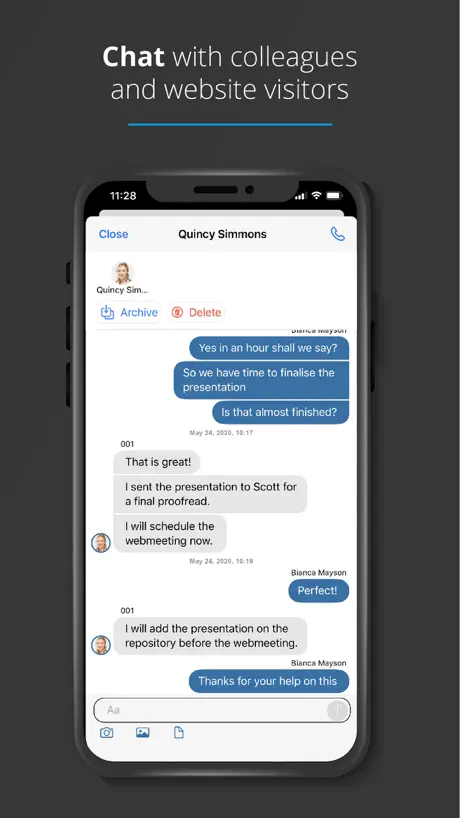
…hat noch Verbesserungspotential. Wie schon an anderer Stelle erwähnt, wäre eine Nutzung mit CarPlay und der Apple Watch sehr von Vorteil. Außerdem wäre eine Formatierung (Fettdruck, kursiv, etc.) im Chat sehr willkommen. Wir möchten die 3CX App eigentlich so nutzen wie Teams. Aber schon allein, dass man in Chad das iPhone nicht ins Querformat drehen kann, ist ein erheblicher Nachteil bei der Betrachtung von Dokumenten. Es gibt also noch einiges zu tun!
Awesome
I’ve been using this new version for a few months now (Test Flight Beta) and the app has worked flawlessly for myself and my colleagues. So much quicker and fresher looking than old version.
The WORST
Everything is just wrong with this app. All the calls i get the phone dont even ring and it is linked as a missed call. the sound quality is terrible. Signal is awful.
Backward step
We use the system for work - and it has worked ok - but the latest update of the app for mobile has rendered it absurdly unreliable when it comes to answering incoming calls. 50% of the time (at a guess) there is simply no ‘answer’ option. This could not have come at a worse time since, like so many, I am working from home and NEED this system to function as it did perfectly well before the update. Please sort it - it is making life very frustrating and harming productivity. People expect us to answer their calls - every missed call is a poor reflection on my organisation. It needs to be fixed - and now ......
Needs bug fixes
After every call I make, the interface freezes and is not usable for at least 20 seconds or until I’ve restarted the app. Please sort ASAP.
3CX FAQ
- Is 3CX free?
- Yes. The app is free, in all 174 countries it sells in, and it sells nothing inside it.
- Does 3CX have a free trial?
- No. None of its offers (US) come with a free trial.
- What are the best alternatives to 3CX?
- UniFi (4.7 from 61,630 reviews), UniFi Verify (4.8 from 25,107 reviews) and Microsoft 365 Admin (4.6 from 20,594 reviews).
3CX download
Last updated 2 months ago.
3CX sells in 174 countries. It was released 11 years and 3 months ago, on 30 Jun 2015. It holds a 2.6 rating from 1,632 reviews.
Supports 12 languages: English, Czech, Dutch, French, German, Italian, Polish, Portuguese, Russian, Chinese, Spanish, Turkish.
How much does 3CX make?
Third-party estimates for the last 30 days, worldwide — not the store's own figures, which Apple publishes for nobody.