SafeNet MobilePASS
How much does SafeNet MobilePASS cost?
Prices are current as of 11 Sept 2026.
SafeNet MobilePASS has no in-app products on record in the United States.
10+ alternatives to SafeNet MobilePASS
| SafeNet MobilePASS |   Yubico Authenticator Yubico Authenticator |   My Authenticator app My Authenticator app |   PingID PingID |   Ivanti Email+ Ivanti Email+ |   EquateAccess EquateAccess |   Zscaler Client Connector Zscaler Client Connector |   Octopus Authenticator Octopus Authenticator |   Quore Quore |   Beyond Identity Beyond Identity |   SwiftConnect Mobile SwiftConnect Mobile | |
|---|---|---|---|---|---|---|---|---|---|---|---|
| Rating / 5 | 2.5 | 3.7 | 4.1 | 2.3 | 1.9 | 1.4 | 2.6 | 2.5 | 2.5 | 3.4 | 3.8 |
| Reviews | 400 | 868 | 852 | 749 | 687 | 579 | 467 | 347 | 89 | 61 | 20 |
| Released | 2010 | 2019 | 2023 | 2014 | 2015 | 2021 | 2017 | 2017 | 2019 | 2020 | 2022 |
SafeNet MobilePASS reviews
2.5 out of 5, based on 400 reviews.
What people like
- Works great and replaces losing hardware tokens
- Simple and easy to use for VPN login
- Support team actually fixes bugs when contacted
What they complain about
- No Apple Watch support for quick access
- Keeps forcing you to pick your token every time
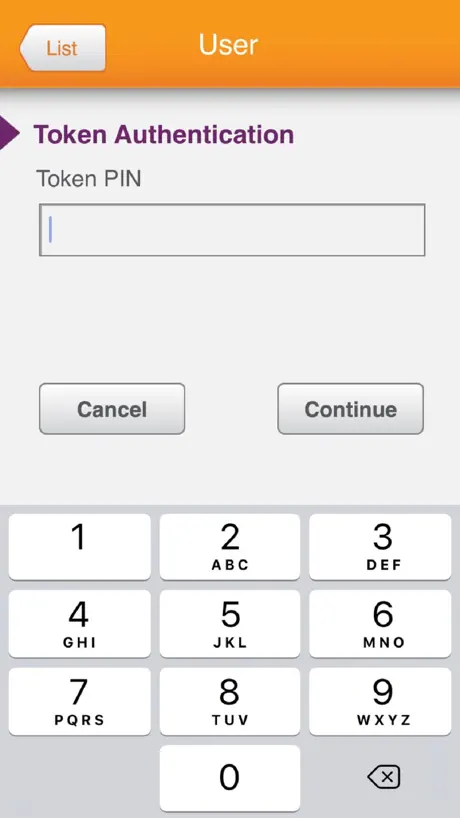
- Still uses an old four digit PIN instead of Face ID
- Looks ugly and feels outdated on modern phones
Good utility
The updated app works well
Not able to work
Not happy; confusing ; support is by a bot; sends you to read arrticles; that is what my doctor told me when i got ill ; read how to cure it; it is laughable.
Needs Apple Watch app!!!!!!!!
For those of us that needed to obtain frequent tokens (developers, IT support, physicians and prescribers) it would be helpful to have an Apple Watch app. Having to grab my phone every time I need a token adds up in time. With many companies wanting to go away from physical tokens, having an Apple Watch app would make a more smooth transition. And it would be just secure. The watch locks when removed from your wrist. So it may even be more secure than a physical token. Thank you for considering. It would make many of us happy.
Still no Watch Integration?
This app has just one job. It’s like it was MADE for the Apple Watch...except that’s the one thing it doesn’t do. 2014 called: they want their app back.
Basic user features missing
Have to use this for work but seeing that I have only one token, shouldn’t there be an option to have that display when I open the app? Having to tap the only token to show my OTP feels like your grandpa coded this.
Good
Good
DONT DOWNLOAD
A few of my friends have has this issue, but his has been over the top. I never even knew this app existed, and it was all fine until one day it downloaded randomly. I deleted it but then found myself having to delete it 10+ times a day. This is SUPER annoying. The same thing has started with another app, called “comp portal” don’t download either of these apps, they WILL crash your device and they are not really good apps at all. Sorry to whoever made this!! I never write bad reviews! In fact, I never write reviews! 😬💕😊
Does its job
Doesn’t have bell and whistles such as Apple Watch integration for all the ‘cool’ people. I didn’t even realize adults wore the Apple Watch (learn something new every day).
Where is FaceID?
This app is great but seems so 1990’s. FaceID is such a better way to authenticate and they stuck to four-digit number. Most people I know who use this app forget the PIN it use the same pin in every app make this vulnerable if the phone is stolen. Please modernize.
UI Change Issue
The keyboard now sits too low on the screen on the iPhone X. Half the time if I try touching one of the lower row keys, the app thinks I’m trying to close it. Raise it up a bit and the app would be fine (works well for what it does).
8.4.7 and 8.4.8 CRASHING OUR iPads
UPDATED: was contacted by the company directly. They asked for the crash data and went to work on a fix. Two days later the updates started coming. Although their initial customer service (outsourced) was/is horrific, once I was contacted by a “stateside” person, they were very responsive and helpful! Back to working flawlessly! The updated app keeps crashing our iPads. 8.4.7 instantly crashed when you’d open the app and the updated 8.4.8 that included bug fixes and it still crashes. Their CS is nonexistent and refused to help since they don’t have a “PO” on file from us. Ummmmmm since when do we have to pay for something that is a free app on the App Store. I’d avoid this at all costs if possible.
Awful
Just bad overall
Please integrate Apple Watch
I have to open this app 50 times per day. Apple Watch integration would be a game changer.
MobilePASS
In the last update or two, the haptic response was removed, meaning that when you tapped on a number, you could ‘feel’ and hear a response. Also, the number pad seems lower on the screen such that when you tap on 0, it is so close to the close screen bar (iPhone version), that half of the time it wants to close the app, or when you compensate, it won’t register, so you have to tap carefully several times to make sure you get the number you want. I would really like to have the previous version back.
An update. It almost got me killed.
I still don't understand why someone would choose this over any other 2 factor code generator app. But my work does. Why not add Face ID?
Works perfectly
It may not be a pretty app, but it works great. Smooth and easy. Takes me just a few seconds to get the code to log on to my work VPN.
Doesn’t work
Mostly just keeps me from accessing my information.
Good App
Good App, does the job well. Would be great if it had Apple Watch and Touch ID integration!
New UI - Code Entry
The new UI is an OK update but they removed the letters (a-z) information from the numeric code entry screen. The a-z information should be added back ASAP!
Add for Apple Watch
Agree that I use this at least 5-10 times a day, would be 5 stars if we could use from the Watch so I don't have to dig my phone out all the time.
Fantastic
I’m so happy to be rid of my old authenticator. This solves it!
Touch ID access
In the world of mobile. You need enable Touch ID when I want to login to get tokens. It is such a backward tool.
Needs Apple Watch support
It's fine. A little clunky, but it works. Really could use an Apple Watch app to make it amazing.
Needs work
1. The app still hasn’t been updated to support the iPhone X size. 2. It doesn’t have a Watch app, which would make it much more convenient. 3. I only have one token, so don’t force me to tap on it every time I launch the app; just take me to it directly. 4. Give me a Siri shortcut so I don’t have to launch the app and tap through things. This would be a perfect use for a Siri shortcut. There’s practically no interaction required.
Need touch id + apple watch support
Need touch id + apple watch support
Works nicely
Small and simple. Works nicely
Mobile Pass
Hate to say Citi needs to go back to the tokens. Mobile pass set up is to complicated. Why can’t a global bank have a better grasp on technology?? Tokens are so much better than mobile pass, must be some sort of cost savings for Citi. Keep in mind if you are a current mobilepass user if you get a new cell phone you have re install the app on your mobile device. This isn’t communicated out to users. System admins are busy keeping up with this product......uuuugggh!
Good authenticator
Good app, does the authentication job. One thing - please add touch id support to replace the annoying pincode, thanks!
No updates in 2 years, no iPhone X support
This functions and lets me log in to the VA remote access. However, it hasn’t been updated in 2 years and doesn’t even support the iPhone X screen size. I don’t know of any other major app that doesn’t support the newest types of iPhones (and iPhone X isn’t even the newest anymore). If the federal government relies on this application, it should at least invest the relatively small amount of money that would be required to just keep this app updated with the bare minimum new features of iOS, like screen size.
Ok, but UX could be better
Works ok, but it would indeed be nice if when there is only a single entry in the app it would be opened automatically when the app is started.
They listened
Nice they came back to the numerical keypad. does the job nice and easy
Was accessible using VoiceOver
This app worked flawlessly with the VoiceOver screen reader until the August 9 update. Now, when VoiceOver is being used, you can’t double tap on the PIN entry field to enter a PIN. I’m visually impaired, depend on VoiceOver to use my iPhone 8 and need this app to access my company’s VPN network. Fix it immediately!
Does what its supposed to do
Any chance to get this to be apple watch compatible too? I'd love to not have to pull out my phone everytime.
Just Adequate
This app is fine but could be better. First, it needs Apple Watch integration. Second, I would expect that most users have only one token, and even those who have multiple tokens use one most often. Thus, it’s lame to make me select a token every time I need my token. Either remember which token I last used, or allow me to select one as my favorite or default. Or, since I have only one token, take me directly there!! I really wish my company had stuck with our previous app.
Good for what t is...
It is cool. Wish it had an Apple Watch integration like OKTA Verify.
Excellent App!!
This is an excellent app. I never used the old version so no compares. But this the best compared to the safe word token required to be carried before :)
iPhone X UI redesign awful
The app works fine. Used to look just fine. The redesigned ui places the keypad too low where typing on the lower keys often closes the app. Raise the keypad and I’ll raise my rating.
Needs Touch ID Support
The app is ok (removing tokens is a pain if you don't know the PIN), but it would be a lot better if it supported Touch ID.
Please Add Apple Watch Integration
For the software developers and staff at MobilePASS- The app works fine, but I have to take my phone out of my pocket 10 times a day to use it (then unlock the phone, swipe through my apps to find MobilePASS, then enter password- the process is cumbersome). Integrating a feature that allows users to use the Apple Watch would make its use seamless while still having the same two levels of authentication. Duo has done this very well. Though Duo doesn’t have me enter a four digit password into the Apple Watch, which is currently a required step for MobilePASS iPhone app, the Apple Watch’s screen is large enough for users to complete this step. Please strongly consider adding integration with the Apple Watch. Thank you.
Open with default list
Instead starting in list view, can we set a list as a default and open the default list? In that way, can save a few clicks.
Does what it says on the tin!
Just works! Simple and easy to use.
Print size suddenly tiny
App works great but the print size went way down with this last update. Put it back please! I was always impressed by how easy it was to read in this app and you broke it. At least honor the iPhone text sizing and let users control the size.
Better
I moaned about UI in prior release. They've listened. Case closed. User happy.
It functions just fine.
Nothing special. Would give it 5 stars if it had touch support and if I didn't have to select the name of the token each time I use it. I only have 1 token. Shouldn't it know which one I want to use? Click fatigue has set in.
Terrible design
This app looks terrible, and not just because it's not optimized for larger displays. You are clearly not using a storyboard correctly since there should be transitions between scenes. Also, the back button and token name are not in the correct places, which is something a developer shouldn't be responsible for since these are built into the standard controls that iOS provides.
Brilliant!
Love this app!! I have been waiting for a software based token for the iPhone OS for a long time now and it's great. No more loosing hardware tokens :)
Integrate with Watch or Face ID
The 4 digit pin is archaic.
It just works!
Simplicity itself. Glad I don't need an easy to lose, easy to break keyfob anymore!
Does what you need it to, but just barely
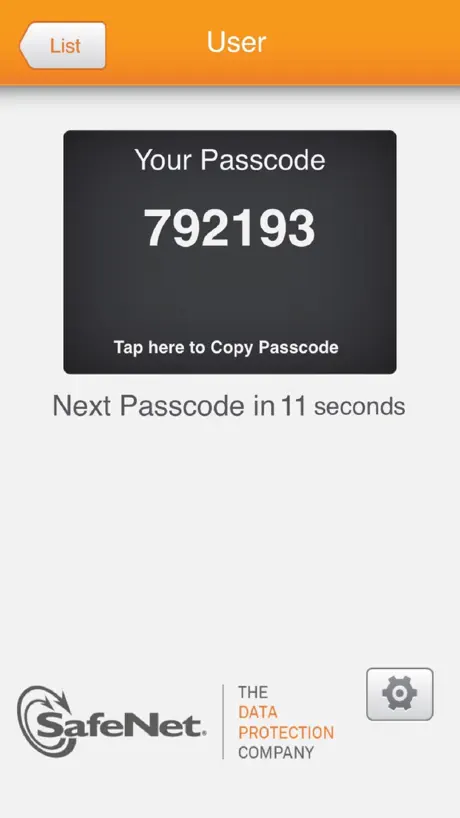
I am required to use this app for work along with a similarly non-user-friendly Windows application from Cisco. If I had any other options I’d use them instead. This app is ugly and has poor usability. I want it to show me my passcode so I can enter it and move on. When I open it though, instead of just showing me the passcode I get a list with one option which is to view my work passcode. If I had more than one code set up here then okay, but since I only have one it really should go straight to it. After I choose my one option I see the passcode. Just below that, there’s a countdown until the code changes, but it’s just a number so I can’t tell at a glance whether it’s about to change and I should wait for the next one. A progress bar or some other visual indicator would help here. This app could be a much faster experience with just a couple simple improvements, and speed matters here.
Don't Update!
This is a very convenient app to have instead of carrying around a hardware token. Also, unlike the other reviewer, I have no problem with the compatibility with the iPhone 6. However, before this update when I opened the app, it would display the code of my only token right away on startup, and now I have to click the token after it starts up. Not the biggest deal, I know, but the functionality changed for the worse with this minor inconvenience.
SafeNet MobilePASS FAQ
- Is SafeNet MobilePASS free?
- Yes. The app is free, in all 175 countries it sells in, and it sells nothing inside it.
- Does SafeNet MobilePASS have a free trial?
- No. None of its offers (US) come with a free trial.
- What are the best alternatives to SafeNet MobilePASS?
- Yubico Authenticator (3.7 from 868 reviews), My Authenticator app (4.1 from 852 reviews) and PingID (2.3 from 749 reviews).
SafeNet MobilePASS download
Last updated 1 year ago.
SafeNet MobilePASS sells in 175 countries. It was released 16 years and 6 months ago, on 29 Mar 2010. It holds a 2.5 rating from 400 reviews.
Supports 1 language: English.
How much does SafeNet MobilePASS make?
Third-party estimates for the last 30 days, worldwide — not the store's own figures, which Apple publishes for nobody.