Albums: Music Library Player
MusicEntertainment

Albums: Music Library Player

Adam Linder · released 25 Aug 2019 · Open in App Store ↗

Revenue 30d not estimated
Downloads 30d not estimated
Rating 4.63 741 reviews

No in-app products collected for this app.

Rating
United States48%3544.67
Germany12%924.39
United Kingdom7%514.59
Canada5%404.45
Australia5%374.84
Netherlands3%224.82
France2%164.50
Japan2%124.92
Spain1%104.90
Brazil1%84.25

The store shows a different set in every country

Description

Albums is the Apple Music player that puts you in control of your music. Whether you just want to throw on album shuffle or spend hours meticulously sorting and filtering your collection, Albums cares about your music library as much as you do.

Free Features:

QUICK SELECTION

Just press “shuffle,” scroll through a grid of album art, or browse your library to select an album, and easily skip to the next one with album-focused controls.

WIDGETS & CARPLAY

See your music on your home screen with Now Playing, Collection, and Quick Collection widgets. Take it on the road with CarPlay, and pin albums and collections for easy access.

ICLOUD SYNC

iCloud sync ensures you can pick up listening where you left off across all your devices.

ALBUM NOTES

Add notes about albums or specific listening sessions.

ACCESSIBLE FOR ALL

Albums offers robust Siri interactions and App Intents and supports Dynamic Type.

Premium Tools for Power Users*:

SUBSTANTIAL STATS

Get weekly, monthly, and yearly reports looking back at your listening, and dig into the data with customizable charts.

LAST.FM COMPATIBILITY

Scrobble your listening in real-time or manually. Import your last.fm history to fill in the full picture.

MORE CUSTOMIZATION

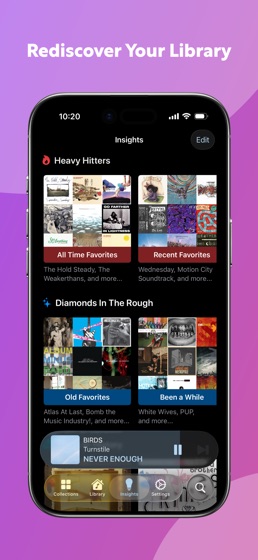
Explore built-in Insight Collections highlighting new and unlistened albums, old favorites you haven’t heard in a while, or even music from when you were in high school. Tag albums to create collections of your own. Customize the interface to match the color of your current album’s artwork with a simple two-finger tap.

RICHER DISCOVERY

See what’s next with a release feed of Artists and Record Labels in your library. Delve into production credits from MusicBrainz and Discogs, then browse collections of Record Labels, Producers, and more.

*Requires Albums Premium

Note:

Albums optionally integrates with Apple Health. If you choose to give Albums access to your Workout history, it can create "Workout Jams" Insight Collections, which match up your listening history to your exercise history. You can enable this functionality by going to the Insights tab and tapping the settings gear next to the "Workout Jams" heading. Permission for Albums to access this data can be controlled via the Apple Health app.