Doppi: a local music player
MusicUtilities

Doppi: a local music player

Radu Dutzan · released 21 Sept 2015 · Open in App Store ↗

Revenue 30d not estimated
Downloads 30d not estimated
Rating 4.22 292 reviews

No in-app products collected for this app.

Rating
United States29%854.12
Germany9%263.88
China5%164.13
United Kingdom4%134.23
India4%134.92
Canada4%123.92
France4%123.92
Mexico3%104.50
Australia2%65.00
Netherlands2%64.33
Italy2%55.00
Philippines2%55.00
Belgium1%45.00
Colombia1%44.50
Czech Republic1%44.50
Japan1%45.00
Turkey1%44.75
South Africa1%42.00
Brazil1%34.33
Spain1%34.67
Poland1%35.00

The store shows a different set in every country

Description

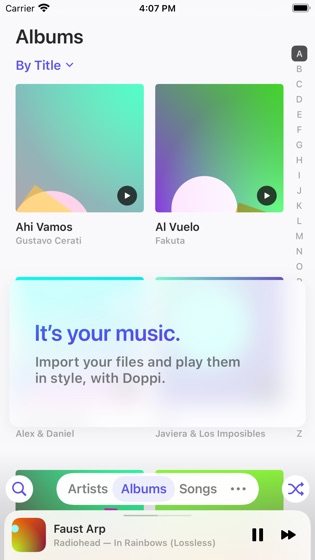
A beautiful local music file player — MP3, FLAC, WAV, and more — with an equalizer, widgets, Timed Lyrics, CarPlay support & more. Designed for iPhone and iPad. Now free for up to 80 songs.

A Lovely Home for Your Music

Put your high-quality music file collection in one of the nicest UIs out there.

See It Shine

Clutter-free interface with big, beautiful artwork and clean typography.

Glide Through It

Navigate with silky-smooth gestures and handy shortcuts to find things fast.

Queue It Up

Easily queue up songs to play next and edit the upcoming list with Up Next.

Search, Fast

Pull down from anywhere in your library to invoke Search, and use the Return key to select the top result.

Make Playlists

Create playlists and add songs with multitouch drag-and-drop.

Edit Metadata

Change information like title, artist, album, lyrics, artwork and more on your music files.

Now Playing Widget

Large artwork and playback controls (while playing), available in 3 sizes.

Equalizer

Enjoy your way with an 8-band 6-preset (+ Custom) equalizer, available right on the player menu.

Timed Lyrics

Have a sing-along! LRC-formatted timed lyrics are shown synced to the music.

Get Lyrics

Doppi can (try to) automatically fetch lyrics for you! Just tap Get Lyrics.

Make It Your Own

Choose from 6 highlight colors, 4 light and dark themes, 32 icon variations with dark mode and tinting support, reorder your library tabs, and more.

Hello Tab

Your most loved, most played, and most recent albums and artists, all in one place.

CarPlay

Drive safely and enjoy your music from the intuitive Doppi interface for CarPlay.

Scrobble to Last.fm

Log into your Last.fm account from Settings to start sending your Doppi plays to the service.

Continue With Album

Ever shuffled your music, found a song you loved, and wished you could continue the album instead? Doppi can make it happen.

Completely Readable

With thick fonts, support for Dynamic Type, and high contrast themes, your eyes wonʼt get in the way of your ears.

Ask Siri to DJ

Your assistant can play songs, albums, artists, playlists, and genres from your library — just ask it to play in Doppi.

Shortcuts

As you play your music, those actions will be suggested to you by the system and appear on the Shortcuts app.

Just Much Nicer

Doppi has been carefully designed with clean typography, pleasing contrast, and elegant motion. Enjoy your music in a joyfully clean UI.

Give your music the lovely home it deserves.

————

Important:

Doppi does not include any music. It's designed to play your music files, that you transfer manually to your device. It does not support playing music from any streaming service, or music that is digitally protected.

In-app purchases are governed by the Apple Standard Terms of Use, available at https://www.apple.com/legal/internet-services/itunes/dev/stdeula/