
SELPHY Photo Layout
How much does SELPHY Photo Layout cost?
Prices are current as of 8 Nov 2026.
SELPHY Photo Layout has no in-app products on record in the United States.
10+ alternatives to SELPHY Photo Layout
| SELPHY Photo Layout |  Adobe Lightroom for iPad |   Canon Mini Print |   HP Sprocket |   DJI Ronin |   FUJIFILM XApp |   Sony | Creators' App |   UNSCRIPTED Photography Poses |   LumaBooth Event Photo Booth |   Capture One |   Fuji X Weekly — Film Recipes | |
|---|---|---|---|---|---|---|---|---|---|---|---|
| Rating / 5 | 4.7 | 4.8 | 4.8 | 4.7 | 4.7 | 4.4 | 4.2 | 4.6 | 4.4 | 3.3 | 4.2 |
| Reviews | 137K | 230K | 176K | 121K | 37K | 30K | 23K | 8.7K | 3.1K | 1.5K | 793 |
| Released | 2018 | 2014 | 2018 | 2016 | 2017 | 2023 | 2022 | 2019 | 2016 | 2022 | 2020 |
| Monthly price | — | $6.99 | — | — | — | — | $4.99 | $34.99 | $19.99 | $10.99 | — |
| Annual price | — | $49.99 | — | — | — | — | — | $199.99 | $199.99 | $109.00 | $19.99 |
The going rate for each plan in United States, in its own currency, shaded from the cheapest price on the row to the dearest. Plans fewer than four in ten of the priced apps sell are left out.
SELPHY Photo Layout reviews
4.7 out of 5, based on 136,931 reviews.
What people like
- Super easy for beginners to use
- Prints look sharp and high quality
- Great for printing photos while traveling
What they complain about
- Hard to connect to your home Wi-Fi
- Printed photos often have weird color casts
- App freezes or crashes when browsing photos
Great portable printer
Easy to use just print from your phone. So cool.
Broken App, fake 5 star reviews
No chance this app has 5 star reviews. I can’t even get it to connect to the printer. Constantly requires me to re register the printer even though it’s already done.
Great app but
The way it organizes albums I’ve created is literally all over the place with no understandable system or ability to filter by date, etc., that would be a 10 star upgrade if they added that when I’m looking through my albums. It’s hard to find time to print right after an event I take photos at so I’m usually playing quarterly catch up.
Réglage couleurs non dispo sur l’application
Il est tout à fait possible de régler les nuances de couleur depuis l’imprimante pour les photos qu’on importe sur l’imprimante alors qu’il n’est pas possible de modifier ces réglages depuis l’application. Je trouve que cela est vraiment problématique. Des photos très froides de ressort orange. Vite une mise à jour s’il vous plaît
打印问题
手机直接打印有色差,每次都得调参数,能不能更新一个自定义参数设置,就那么费劲吗?
Sup
Awesome And more awesome
Don’t
Hard to setup. The screen display says both ink cassette and paper are wrong sizes!! How is that even possible when it came in the same damn packaging?!? It says change both. I just freaking purchased this BS!!
De la part de Loulou
Bonjour SELPHY photo !! Je suis gérés ravis de c’ette machine je peut faire plein de chose , de décore même si sa manque un peut ..!! Voilà voilà
bien mais……..
ça fonctionne quand ça a le temps !!!!!!!!!
用起来麻烦
打印要跳转到另一个app,编辑功能也太弱,操作流程有点反人类
SELPHY
I absolutely love my Canon SELPHY!
Awful
Will not print after many attempts
Option partage
Bonne application mais il manque l’option de partager la photo vers l’application directement depuis Photos
Not responding well
Why the options if you can’t print them
No easy way to print from photos
App prints well, so that’s good, but it is slow and clunky at navigating large photo libraries, and they don’t seem to support iOS share sheet functionality, nor shortcuts, so rather than being able to print from the Photos app, you have to use their app. Older versions of this supported Apple shortcuts, so I hope they reintroduce that support. Also, when you load the list of albums, there is no apparent sort order -it’s neither alphabetical nor chronological, and you can’t search for an album name. Do they actually test this app with real users with real photo libraries that go back decades?
Printing is Important
The Selphy line of printers from Canon allow me to print high quality photos from my digital range finder and my iPhone, closing the loop on photography and sharing the images in tangible way that we've almost forgotten about in the online era.
Forces direct Wi-Fi even when printer is already on your network
The CP1500 works perfectly over normal home Wi-Fi with AirPrint, but SELPHY Photo Layout won’t use that connection. It forces you to switch the printer into its own direct Wi-Fi mode just to use the app. That means constantly changing connection modes for no good reason. Very clunky and unnecessarily frustrating.
Good printer
This little printer is so easy to use.
Pas fluide
Obligé de se connecter à cette imprimante pour imprimer De plus on ne peut pas vraiment modifier les photo les emplacements pour recadrer
Soucis applicatif
Très contente de pouvoir imprimer en voyage les photos, le papier est de qualité et l impression est très fidèle. L applicatif est peu userfriendly, de plus je n ai jamais les mêmes options après avoir choisi les photos. Jamais trouvé l option pour imprimer sans bord blanc ou choisir l endroit du bord blanc :(
Really good photo printer!
I really enjoy this photo printer. It makes printing photos at home easy, can’t say enough how good it is!
WiFi Printing
Unable to print over normal WiFi, can only print over adhoc network
Hard to Connect
I love the app but it is so hard to connect to the phone sometimes. At times it takes 20 mins to connect and it’s never the same issue each time. If you come up with a no brains way to connect to iPhones it would be the BEST app out there. I give a 5 star rating for the ease once connected. Fix the problem and it gets 10 stars!!!
Qualité
La qualité de la photo est moyenne mais il y’a beaucoup plus de réglage sur la texture ,luminosité, par exemple qu’une simple imprimante et beaucoup plus rapide
Fun but eats a lot of ink and paper
Bought this according to a YouTube review with intentions to add travel photos to my journal as well as for family. You have to replace the ink cartridge after every pack of paper making it a pain to carry so many pieces whilst traveling. Prints are good for what you get but next tome I’ll do a more thorough review before I take a YouTubers word…
Easy to use
Easy to set up and easy to use. Does a great job and looks great.
It’s 2026 people!
I am a retired Dir of IT and have had an easier time configuring a network than using this software with the printer. I don’t feel like getting my blood pressure up too high again but fix everything that has to do with WiFi connecting and printing. If I see that “Selphy wants to connect to CP1500” message again today, baseballs fastest pitch to date will be decimated. Be smarter.
أحبار
أين أستطيع أن أحصل على أحبار هذه الطابعة فأنا في كل مرة أشتري الطابعة ومعها أوراق وعلبتين فقط للحبر لاتكفي سوى لأربع ثور فقط
Photo Locations Freezes app
The printer is great. But when I try to look at anything other than recent photos the app freezes. Clicking photo locations gives me the windmill of death. I’d love to be able to navigate to an album so I don’t have to scroll back in time to find a photo. iPhone 15, Pro Max, most current release of SELPHY app.
He has room for improvement
I like it. I like that it is so easy to use. I wanted to use this app for a Photo Booth. However, somebody would have to be taking the photo. This app really needs a zoom out feature and a timer for the photo capture.
Super easy to use
Super easy to use
Stopped working
Printed 2 photos then stopped working, giving an error for no paper or cartridge incorrectly installed. The paper feed is running backwards. Reboot and factory reset ha not fixed it.
Génial !!!☺️👌👍
C’est génial mais peut être rajouter plus de stickers et de filtres
Terrible controls
If you change the printer to your own wifi there is no way in the app to change it and the only way it will show the setup QR code is if you use the in printer wifi. Ridiculous set of constraints.
Keeps telling me it jammed
I like this little printer a lot except it has a hell of a time picking up paper to print and tells me it’s jammed.
Great for crafting
I received for my birthday and have enjoyed it immensely! I craft and have made my grands and a neighbor birthday cards using their pictures! I’m still learning so can’t wait to see what else I can do!
Poor print quality
Colors lack luster and are poor print quality
Number sliding scale
I would love a numbered sliding scale when working with the colour filter. —or have some indication for each value. It would make it much easier to apply the same lighting properties across photos, helping everything look more uniform in my journal. Overall, easy to use and beginner friendly instructions!
Poor quality
Color and quality of the printing very poor
拼图功能能不能有一张张装饰的
别自动一起拼上啊
Compact
This lilt printer is mighty. And the prints are legit
Frustration Apponified
SELPHY Layout, Meh. Connection fails every time. Better off painting.
Review
This app is well organized I know where to find everything and it’s easy to manage. I do wish there was an option where we could organize and select where and how we want the photos organized so that we can save on printer paper and get the exact size we want, but overall a good app.
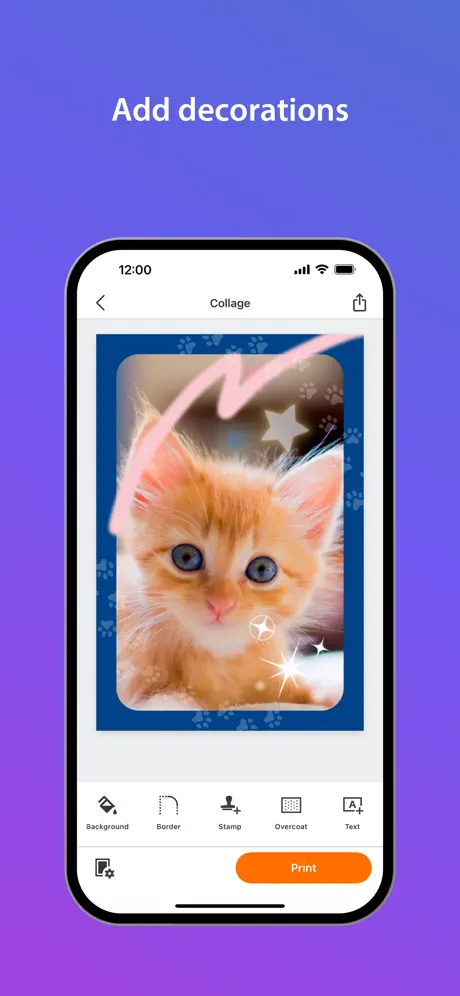
Removed overcoat feature on photos
I’m disappointed that when updating the app they made it worse.
打印照片,颜色发绿
打印的照片颜色发绿,在App内调整色调无法解决。只能先将原照片的色调加红60%再打印时才能和原照片差不多
Best
Fast easy made lotta money with this
Why was the N-up feature removed?
I just got the Canon CP1500 after my friend recommended it. She had said I could use the N-up feature to print 4 copies of the same photo. So I was hoping to leverage this technology but when I used it recently, I discovered this feature had been quietly removed. It makes no sense at all, since now I have to select the same photo 4 times under Collage, which adds 3 extra steps. I’ll keep my rating 1 star until the developers bring it back (as well as bring back some common sense). This is a prime example of poor user experience at its finest.
Selphy co1500
Terrible! This used to be SO EASY to use! Now, you can only print 3x4’s one sheet at a time, cropping the images skews the image and it’s almost impossible to straighten it, cannot connect to my home wifi so now it’s impossible to print from google photos. BRUTAL! This was the best little printer and now it’s not even good enough to be a brick! It wasn’t broken! Why did you absolutely RUIN this!???
Recent Update Ruined App
Now the interface is confusing and they removed many options like applying an overlay and text to the photos. Please fix.
照片排序
拼图时 选定照片后是否可采取手动拖动照片调整照片位置 ?
SELPHY Photo Layout FAQ
- Is SELPHY Photo Layout free?
- Yes. The app is free, in all 164 countries it sells in, and it sells nothing inside it.
- Does SELPHY Photo Layout have a free trial?
- No. None of its offers (US) come with a free trial.
- What are the best alternatives to SELPHY Photo Layout?
- Adobe Lightroom for iPad (4.8 from 229,958 reviews, premium from $1.99), Canon Mini Print (4.8 from 176,117 reviews) and HP Sprocket (4.7 from 120,704 reviews).
SELPHY Photo Layout download
Last updated 1 month ago.
SELPHY Photo Layout sells in 164 countries. It was released 8 years and 2 months ago, on 3 Sept 2018. It holds a 4.7 rating from 136,931 reviews.
Supports 12 languages: English, French, German, Italian, Japanese, Korean, Portuguese, Russian, Chinese, Spanish, Turkish, Ukrainian.
How much does SELPHY Photo Layout make?
Third-party estimates for the last 30 days, worldwide — not the store's own figures, which Apple publishes for nobody.