Staventabs: Compose & Notate
MusicEducation

Staventabs: Compose & Notate

Ivan Korovin · released 25 Mar 2015 · Open in App Store ↗

Revenue 30d not estimated
Downloads 30d not estimated
Rating 4.08 492 reviews

No in-app products collected for this app.

Rating
China18%914.37
Russia17%834.00
United States14%693.78
France5%263.77
Germany5%233.61
United Kingdom4%193.79
Italy3%163.69
Canada3%144.50
Ukraine3%144.43
Australia3%134.15
Japan2%114.64
Hong Kong2%85.00
Taiwan1%73.71
Brazil1%63.33
Switzerland1%64.17
Spain1%53.40
Mexico1%53.40
Malaysia1%54.80
Turkey1%53.40

The store shows a different set in every country

Description

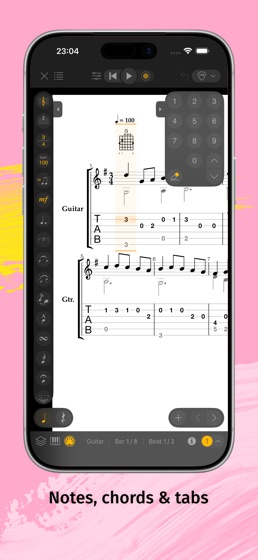
A simple notation and tab editor, Staventabs could become your indispensable helper in music creation. Use smart and convenient tools of Staventabs for composing and improving scores on your iPad or iPhone. Get inspired by viewing majestic classics scores or practicing good old jazz. Easily edit sheet music and tablature with user friendly interface like never before. Share musical inspiration with your band using Staventabs files.

Create music

Start your new score from the scratch or with one of the two dozen templates²

Enter notes with intuitive instrument-independent interface or virtual Piano Keyboard

Explore and edit your score with sophisticated Piano Roll and Drums Editor

Choose from 22 groups of the instruments (keyboards, guitars, strings, drums, percussions, etc.)² listening their preview fragments

Use context-sensitive selection for bars, chords and tracks

Modify notes with dots, tuplets and ties

Make your music alive with lyrics

Customize clefs, key signatures and time signatures for bars

Change dynamics

Switch between enharmonic equivalents of the notes

Use customizable voices

Setup tunings with the large value of presets

Navigate around the score with Tracks board

Easily copy, paste and remove selected areas

Switch fast between tablature and stave inputs

Edit tabs with easy-to-use numeric keypad or virtual Fingerboard

Input notes by Staff Positions

Set the visibility for instrument parts in the score

Edit title and information about creators

Select and customize horizontal, vertical or page layout for your score

Use Scientific or Helmholtz pitch notation when entering notes

Add repeat signs and volta brackets

Don’t worry about losing data thanks to auto-saving

Connect your MIDI devices to Staventabs

Practice your songs

Play the whole composition or selected fragment

Customize metronome clicking and countdown

Change track’s audio properties on-the-fly

Loop the playback of the desired part

Improve compositions

Mark non-playable objects with "Highlight issues"

Use the "Starred scales" AI to determine the chromatic scales most similar to the selected area

Adjust the semitones of the selected area notes to the chromatic scale

Customize the chromatic scale for adjustment³

Diminish, augment and subdivide note values

Transpose pitches by semitones

Manage projects

Browse your projects with convenient file manager

Store your compositions in iCloud Drive and keep them up-to-date across all your iOS devices

Create new projects and duplicate existing (up to three editable projects in free version)¹

Listen to preview fragments of the scores directly from the files menu

Open SNT, MIDI, MusicXML, Compressed MusicXML (MXL), Guitar Pro (GPX, GP5, GP4, GP3) and Karaoke (KAR) files

Edit MIDI, MusicXML, MXL, Guitar Pro and Karaoke files¹

Organize your files from a desktop computer using iTunes or iCloud Drive

Open files from Mail and other applications (Dropbox, Box, etc.)

Convert files between supported formats¹

Share your brand-new hits with friends

Email your scores and tabs right from Staventabs

Print your score¹

Export to PDF and MPEG-4 AAC¹

Features marked with superscript numbers are available via the corresponding in-app purchases:

¹ Unlimited Projects

² Additional Instruments

³ Advanced Composing