
K-ETA
Korea ETA
How much does K-ETA cost?
Prices are current as of 9 Sept 2026.
K-ETA has no in-app products on record in the United States.
10+ alternatives to K-ETA
| K-ETA |   Kakao T Kakao T |   Subway Korea Subway Korea |   NAVER Maps, Navigation NAVER Maps, Navigation |   WOWPASS: Go Cashless in Korea WOWPASS: Go Cashless in Korea |   Korea transit card - BucaCheck Korea transit card - BucaCheck |   Seoul Metro Subway Map Seoul Metro Subway Map |   k.ride - taxi, cab, travel k.ride - taxi, cab, travel |   NOL World NOL World |   Jeju air Jeju air |   VISITKOREA VISITKOREA | |
|---|---|---|---|---|---|---|---|---|---|---|---|
| Rating / 5 | 1.7 | 4.7 | 4.7 | 3.9 | 4.7 | 4.8 | 4.7 | 4.6 | 4.2 | 4.3 | 3.4 |
| Reviews | 689 | 483K | 154K | 97K | 8.1K | 7.9K | 7.5K | 5.3K | 3.1K | 86 | 80 |
| Released | 2021 | 2015 | 2009 | 2009 | 2022 | 2019 | 2013 | 2024 | 2024 | 2010 | 2011 |
| One-time price | — | — | $0.99 | — | — | $0.99 | — | — | — | — | — |
The going rate for each plan in United States, in its own currency, shaded from the cheapest price on the row to the dearest. Plans fewer than four in ten of the priced apps sell are left out.
K-ETA reviews
1.7 out of 5, based on 689 reviews.
What people like
- Uploads passport photos easily
- Gets approved very quickly
- Easier than using the website
What they complain about
- Payment often fails or rejects cards
- Email verification codes never arrive
- App crashes and freezes frequently
一応入れておいた方が良いかな?
旅行用に何かあった場合に入れました。まだ、使用実績ないです。
I was curious how bad
yeah, this is a painful to use app doesn’t play well with gmail to start spent too much time stuck on creating a password - says “don’t use these special characters”, but doesn’t say you MUST USE other acceptable special characters. entering hotel name a nightmare - keyboard obscures the field you are typing, so can’t see what you are typing. CANNOT paste into that field. Needlessly painful. Searching for my hotel name (3 with same name across Seoul) returns ONE only, not mine. ¯\_(ツ)_/¯
White screen bug
I’ve got a completely white screen bug. No matter how many times i re install the app or close and open it again- it remains the same :(
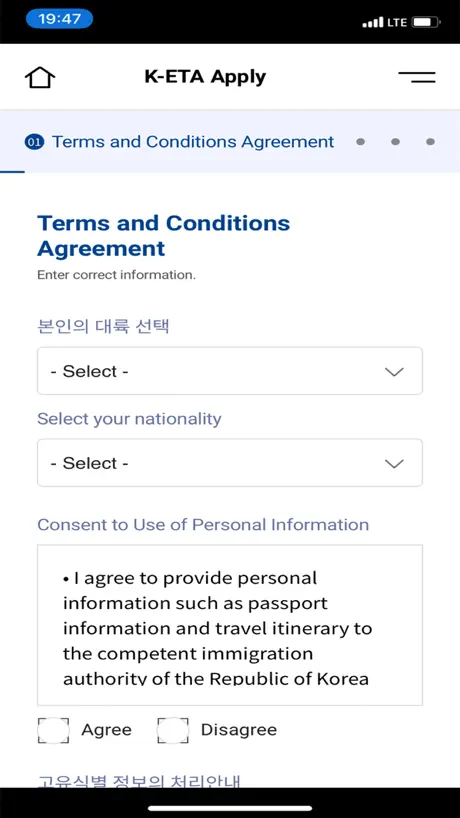
Steps to apply for K-ETA that worked for me:
1.) I completed everything but the payment on the official website (photos and everything), because the payment system was broken and accepted none of my cards 2.) Open the app and press apply (don’t worry, it will soon allow you to continue your progress from the website 3.) Agree to their terms and conditions, then input your passport # and email address. After you do this and click “next”, the app will detect your ongoing application on their website and give you the option to continue progress and skip to the payment screen. 4.) From here, all you have to do is pay the application fee. From my experience, only a visa card worked. A mastercard may work (I haven’t tried), but a visa card worked for me (discover card does not work) 5.) done This app can definitely use some maintenance. As it stands, it is truly a struggle to complete such a simple process due to technical errors
For applying after online travel app
I was testing this can appear and pop up, but a few weeks loading was not responsive🤨
Not sure why the low rating
Works just fine. The app allows for the picture to be uploaded via phone vs the website you have to have a pdf or something of your passport.
The app is broken
The app is so broken and not working
Convenient, but glitchy and archaic
The K-ETA is a cumbersome process online, and this app simplifies the upload of oversized photos and passport copies. The address zip code lookup is very confusing, and should include an example for foreigners unfamiliar with Koreas’s address format. The final credit card payment option is very strange, and requires you to use a virtual keyboard to enter your payment information. This page is buggy, and requires several clicks to get through.
Update the system urgently.
Sending the verification code is very slow. Sign up many times, but it freezes unsuccessfully.
ちゃんとできた
普通にちゃんと申請できたしウェブからの申請をしてみたが決済が進まずこのアプリをダウンロードして申請し直してみたら決済できた
Terrible
The app sucks and is just as bad as the website. No matter what email address I use, the email verification code never arrives. And I can’t use the ask or contact feature because to make an inquiry, that requires the non-functional email verification as well. This system is a joke and a sets a bad example for Korea to the rest of the world. Looks like I might have to choose a different country to visit.
Upload pic problem
Everytime i try to upload the picture and summit the picture keep change to other ppl pictures. I not sure when i done the payment my picture still there or not 😞
This app works
First turn on camera on this app. It doesn’t take American Express try using master card or visa.
Works Great!
I applied for a K-ETA and edited it in a later time without any problems. The app is a bit slow, but it works.
One star was too much
Yes you can with considerable pain fill out the forms. But it doesn’t like gmail accounts, doesn’t like my email and we were forced to use aol . I think I ended up having to login about 10 times to use the app and it’s so stupid if you have a party of three you have to fill out every single piece of the form over and over and over again I know Max is here. It was so painful. I wouldn’t wanna go to Korea. I didn’t already book the trip.
Results
I applied k eta a week before my father applied but until now I didn’t get any results. However my father applications was approved 3 hours after apply. It’s already 2 weeks and i still didn’t get any results! I did email them inquires four times but the only answers is too much application. But how can my father’s application get result even though I apply a week before he apply? Please upgarde your system. Because how many people have to burn their flight tickets just because we need to wait for the k eta results!
Not perfect but worked
I completed visa applications for myself and my wife. Documentation isn’t great. When it asks for the street address in Korea it wants the street name not the whole address. Then you choose the address from the list. Taking a selfie was a little wonkie. It did crash once and I had to start it over. However, application was approved overnight. Now I can but my plane tickets.
payment failed
The system is unstable, the registration payment fails very often.
Simply doesnt work
Terrible app asks to scan your passport, fails, alliws you to enter the info instead, and then refuses to proceed. ANGRY ABOUT THE TIME I WASTED TRYING TO USE THIS WORTHLESS APP!
Just to the website
This “app” is a dummy shell over the website. Pointless.
App works but cant print.
Was able to get my info in and approved but cant print the form. Print button does nothing.
Got approved in less than 30 mins
This app has such low ratings but it was very straight forward and user-friendly for my family and I. The passport scans were quick and efficient. The in-app photo booth was very handy as well. We took pictures straight from my iPhone.
Scam
This app is used by the government of this country to unjustly take people’s money. It’s not just an app issue it’s part of a wider system of exploitation. Be very cautious if you’re forced to use it
Avoid the scanner
Had 4 new Australian passports to do . 2 worked fine . 1 made a minor mistake on scanning a v for a y but we did not pick up , also no backward button to check so visa rejected. The 4 th passport no matter what we did it we could not get it to scan . It turns out you don’t need to scan the passport just enter the details manually and save yourself a lot of time and headaches
Payment error
I cant make payment . Always stuck at payment sections.
App went smoothly 2023
Applied and approved within the hour. Just make sure when you scan your passport to take it a little higher than the boundary until you see a confirmation. Also for the self portrait, my advice is to not wear glasses, the reflection will show if you do. Make sure all your details are correct because it needs to match your passport when you arrive to immigration or else you might delay the process.
Unusable.
No matter if you’re applying on their slower-than-molasses website or on this glorified web wrapper, this site refuses to load, drops the connection, and is practically inoperable. 삼류도 못 되는…
I can’t find my country
Hello there! I cannot select my country, Kazakhstan in the app. It disappears as soon as find it. I am asking you here to fix , so I can try. Thank you in advance
Great
I saw so much bad reviews. I was a bit nervous to use it. But it worked perfect for me. Got approved and everything very fast. The app was very easy to use
Shameful Incompetence
After spending way too long time trying to apply for my parent K-ETA (i did their application since they don’t speak english and aren’t tech savvy) i finally managed to submit. a day later, i got approval emails. Months later when it was time to check in to their flight it turns out that K-ETA scanned my dad’s passport number incorrectly and while i had an approval, it was not valid for boarding the plane. Cost me $800 to reschedule their flights. No customer service, no recourse, no accountability. Do yourself a favor and avoid Korea. This app can really ruin your travel plans.
I don’t understand all the negative reviews…
I originally started applying for my K-ETA through the website but quickly realized it was very difficult to upload pictures. Even after I’d cropped them down as small as I could, the size limit was still exceeded. After a couple google searches, it was advised I try this app instead because it sizes the pictures for you. I had initially avoided using this app after seeing all the negative reviews, but I figured I’d give it a chance to possibly spare myself some frustration. Not only was taking and uploading the pictures one and done, but the whole process was super smooth, only costed me $8, was easy to understand and I got approved in the same day. I absolutely recommend using this app instead of the website. Also, I’m 4 weeks out from my trip in case that helps anyone with timing!
The Worst app I ever had
The postal code , the Korea address , scan passport ( worst) upload your picture , try to type your credit card number All these are user not friendly , I tried 8 times within two weeks I almost cancel my trip to South Korea how come Korea government accepted the app for tourists to apply visa? If I can put negative star I definitely will put it
Pretty Easy
So my friend applied from their desktop & I applied via the app. The app is exactly the same as the website. I found it easy to move through. The only part that was tricky was trying to do the postal code part. Other than that it was pretty simple and didn’t run into any other issues otherwise.
Took me 3 1/2 hours
Poor userability design - switched between web, IOS and android to get passport info scanned (which still required manual editing of incorrectly scanned text, while struggling with the size of image upload, followed by challenges in finding acceptable address and postal code. This ETA website and app need serious reworking to mitigate user frustration.
K-ETA FAQ
- Is K-ETA free?
- Yes. The app is free, in all 175 countries it sells in, and it sells nothing inside it.
- Does K-ETA have a free trial?
- No. None of its offers (US) come with a free trial.
- What are the best alternatives to K-ETA?
- Kakao T (4.7 from 483,094 reviews), Subway Korea (4.7 from 154,359 reviews, premium from $0.99) and NAVER Maps, Navigation (3.9 from 96,801 reviews).
K-ETA download
Last updated 1 month ago.
K-ETA sells in 175 countries. It was released 5 years and 5 months ago, on 2 May 2021. It holds a 1.7 rating from 689 reviews.
Supports 1 language: English.
How much does K-ETA make?
Third-party estimates for the last 30 days, worldwide — not the store's own figures, which Apple publishes for nobody.