
Carrier SmartHome
How much does Carrier SmartHome cost?
Prices are current as of 12 Sept 2026.
Carrier SmartHome has no in-app products on record in the United States.
10+ alternatives to Carrier SmartHome
| Carrier SmartHome |   iAquaLink iAquaLink |   Pentair Pool Pentair Pool |   Home Connect (America) Home Connect (America) |   Lutron App Lutron App |   PowerView PowerView |   Flo by Moen™ Flo by Moen™ |   Sub-Zero Group Owner’s App Sub-Zero Group Owner’s App |   Bryant SmartHome Bryant SmartHome |   Control4 Control4 |   YoLink YoLink | |
|---|---|---|---|---|---|---|---|---|---|---|---|
| Rating / 5 | 3.6 | 4.7 | 4.6 | 4.5 | 4.8 | 4.3 | 4.0 | 4.4 | 3.6 | 3.6 | 3.1 |
| Reviews | 2.7K | 106K | 25K | 24K | 7.2K | 3.5K | 2.1K | 832 | 828 | 101 | 43 |
| Released | 2024 | 2011 | 2019 | 2016 | 2014 | 2015 | 2016 | 2017 | 2025 | 2025 | 2019 |
Carrier SmartHome reviews
3.6 out of 5, based on 2,681 reviews.
What people like
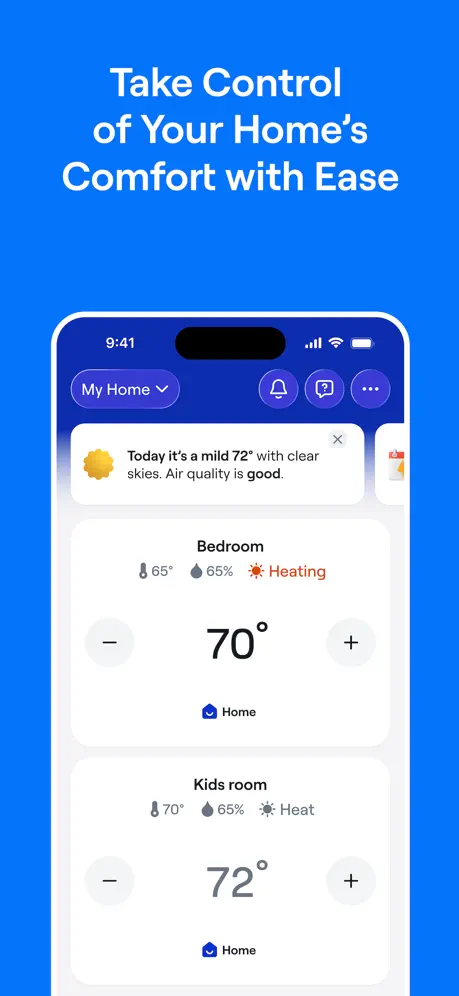
- Setup process is quick and very easy.
- Recent updates made the app much more stable.
- It responds faster than the old version did.
What they complain about
- App shows offline when system is actually on.
- Takes minutes to sync with your thermostat.
- Updates break features and cause constant bugs.
- Support team never replies to your requests.
Greatly being improved
Regular rollouts are greatly improving the application. I only had bad things to say about the development practice that supported this application when I first got it in 2016, now it is much much better for the past year or so.
Pain in my backside
Can’t keep a consistent temperature. We have set it and reset it and it’s not cooling as directed
Reset Air Filter
I just changed my filter and reset the thermostat setting to zero. Yet one day later it reads 20% used. Seems like a problem.
Forcing you to use password in your own home
This app really stinks. Now I’m being forced to do Face ID to change my own thermostat. Give me a break. I will never buy a carrier system again.
Latest update stopped refreshing
Most recent updates have helped to stabilize app control… until one of the latest. Background refresh stopped working. Now, have to close the app to get current reading.
Carrier Infinity wall control
Excellent app. Easy to set up. AI help nailed it with my only question. Well done!
Absolutely horrible
1.2.40. At least your lack of quality testing is consistent. Any change now results in 10 email notifications over the course of an hour. Just horrendous attention to detail. Clearly folks that are not qualified. @carrier/Bryant you should be ashamed to push this junk software out 1.2.39 the garbage continues. Clearly not a sole is testing. Made a change at the wall controller and subsequently received 35 notifications over the next 4 hours that I made a change. Good grief. Can someone please test before releasing. The qty of bugs, broken functionality and lack of features is astonishing. 1.2.38. Absolutely terrible. App does not communicate with wall controller. Wall controller shows fully connected to WiFi and all servers. Another trash release. When is @carrier going to get real developers and fix this trash app. Expect more from a $20k system. What a joke. 1.2.35. Still have not fixed the most basic of items. What is my system doing? Wall controller on WiFi and all servers connected. Wall controller says cooling. Your “smart” app says idle. Your crack AI chat bot is useless. Request for tech support goes unanswered. @carrier your need to fix your trash app. This has been going on for g on for way too long. 1.2.34 is total trash. Nothing in the app is reflected on the wall co troller. WiFi connected and operational. Your new BOT help is useless. Submitted help request 3 weeks ago no reply. I am done with @carrier Absolute worst garbage. App shows my system is “off”. Wall controller shows it in cooling mode(can see on security camera) Now I need to drive 2 hours each way to reset system by killing power. What’s the point of the software to remote monitor? @Carrier fire every software developer and fix ur trash this has been going on since you released your “SmartHome” app. Not very smart is it. 1.2.33 now app either does not load or takes over 1 minute to show data. What trash. (Yes have deleted and reinstalled) 1.2.32. App continues to be trash. Let be be clear. Connected to all servers and WiFi. Your app IS NOT IN SYNC WITH WALL CONTROLLER. HOW LONG ARE YOU GOING TO TAKE TO FIX THIS. GET NEW DEVELOPERS. 1.2.31. Yet another trash release from @carrier. At least they are consistent. Wall controller shows heating. App shows heating and idle. Operating status in app shows everything off. What garbage. 1.2.30 yet again another trash release. PLEASE FIX the most basic of items. THE WALL CONTROLLER IS NOT IN SYNC WITH THE APP. HOW HARD CAN THIS BE TO FIX. TRASH!! Once this is fixed I will enumerate the dozen other broken items 1.2.29 Yet another joke of a release. Wall controller shows fan off and gas off. Card shows heating but idle. How in any way possible does this garbage get thru QC. I can explain. There is not a shred of quality control @Carrier. Garbage release. @Carrier get ur act together and put some quality into your work. 1.2.28. Not sure what bugs you are fixing but the crack team @carrier has yet to fix the most basic of bugs. What is my system doing? Wall controller shows 55% gas heat. Card shows idle and status and usage shows no gas heat but fan on Who is asleep at the wheel. Fix ur trash @carrier. 1.2.27 yet another embarrassment. Get another dev team. Clearly this team cannot fix wall controller and app not being in sync. Wall controller clearly shows 40% gas heat. App says idle. Clearly no one is doing any sort of QC. Stay away from @carrier 1.2.26 same trash as before. Most basic of functions don’t work. ?what is my system doing? Nope wall controller and app not in sync If your “listening” fix the most basic. WRONG STATUS Changes from app not /infrequently reflected on wall controller “Smart” what a joke. Not worth it. Toss the app and start over with folks that know what they are doing. EMBARRASSMENT. 1.2.25 yet another trash release. wall controller shows fan on with 40% gas heating. (Visually confirmed and correct. ) Status and Usage in app shows fan on but gas off. Card shows heating but idle. How in all that is good is this possible.? Clearly not an ounce of QC. But they did add the ability to not show the weather. Stop with the lipstick on the pig and fix the pig. Just HORRIBLE TRASH. @Carrier you should be ashamed to release this junk
Great app, but missing vital hybrid scheduling options!
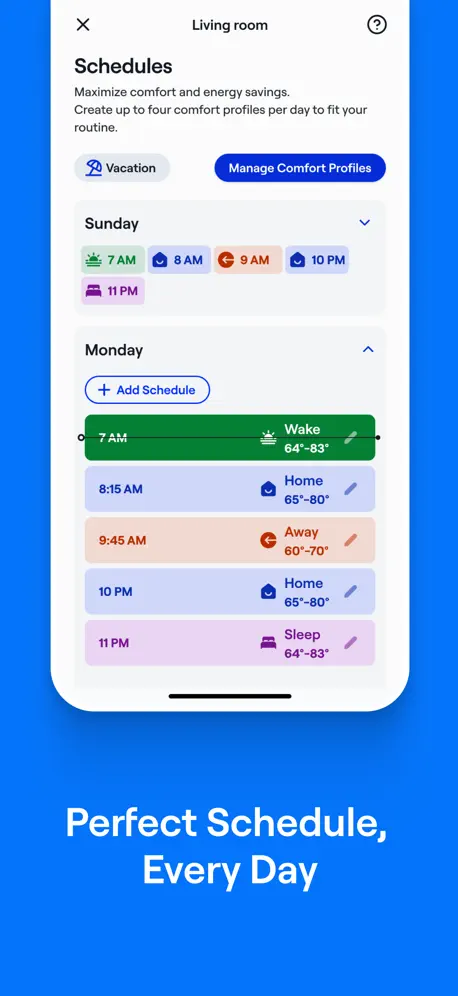
Great app, but missing vital hybrid scheduling options! I love my premium Carrier Infinity 27VNA0 variable-speed heat pump systems, but the app is missing a huge optimization feature for multi-story homes. Right now, "Hybrid Heat" only switches between the heat pump and the gas furnace based on outdoor temperature balance points. We desperately need a scheduled "Heat Source Override" option inside the Comfort Profiles / Scheduling wheel. I want to be able to schedule my downstairs unit to switch to "Gas Heat Only" automatically at night during the winter. This allows the hot furnace air to rise naturally and heat the upstairs bedrooms, keeping my larger 4-ton upstairs heat pump completely idle while we sleep. In the morning, it should automatically switch back to "System in Control" for daytime efficiency. Currently, I have to manually tap through the menus to do this every single night and morning. Adding a timed fuel source selector to the scheduling wheel would make this app perfect for modern utility rate structures and multi-story homes!
Constant false emails from system
Works well enough but I am getting a dozen emails a day saying the system setting have been updated. No info on what changed or where the change was made local or app. The app doesn’t even show the updates that the thermostat is emailing me. Something is broken. Just about ready to disconnect it from the WiFi.
App not working since update.
Since the last update I’ve not been able to control thermostat from my IPhone. Keep getting message Offline. I can control from thermostat but not my phone.
Keeps going offline
This app very frequently show the system offline and the fix is to physically reboot the system. This happens frequently and it is infuriating that you cannot reliably interact with the thermostat when you are not physically at home. I tried the self help tools available in the app, but was directed that the fix is to physically reboot the system and that there is no way to get it online while remote. It goes offline multiple times a month. I travel extensively for work and this system is unworkable. I will be looking for a different system.
Filter change indicator finally working as it should
Filter reset feature appears to be fixed after last update. Thank you.
Primitive at best
It seems like an app written by an elementary school student. You can’t seem to program a schedule, or get running status of zones or ac etc. At best you can change your zone temps . 1/20/26 update. The app is still very basic. The biggest problem I have is it can take 30 to 60 seconds before the app refreshes and gets the actual settings. When you launch the app you would expect it to refresh right away. I have cheap thermometer apps that refresh faster than this. 8/24/2026 update After 8 months, this app still has massive lag. It takes a very long time for the app to get the actual updated temps. Meaning you launch the app, and it takes several minutes to sync with the actual thermostats. This is basic stuff. It’s obvious they have no idea how to create cloud apps. Even my basic sprinkler system sync’s the moment I launch the app. How can such an expensive flagship HVAC system be so lame?
Carrier Infinity Control Module
The Carrier smart app and and HVAC system control panel is not friendly to use whatsoever. I previously owned a Honeywell control system panel with iPhone app, and it was 1000% better and easier to use. The Carrier HVAC system seems to be a good heating and cooling system, but the control panel is the worst!!! The Carrier HVAC system was installed 12 days ago, and I am already having issues with the smart app. It is already showing it is offline, and I cannot get it back online. I am contacting the company that installed the Carrier HVAC system to see if they can reinstall the old Honeywell control unit with its iPhone app. This is so frustrating since I just spent a large sum of money on the Carrier system. Huge Regrets!!!!!!!!! Carrier needs to develop a new control panel and a new smart app!! Terrible design , absolutely terrible.
I set Tstat for heating
Opened app later and said cooling??
Lost login
Lost login but my thermostat still connected. Can’t log into the app and it won’t allow me to change the password. Can’t login to site on my PC either. Help After contacting help desk I was back online after 3 business days. The new app is faster and more responsive. I like it.
System status in never correct
Hot day. System cooling at 100% according to the wall mounted thermostat. iOS app says it’s idle and detailed status says the system is off. Been this way for years.
I wish I knew
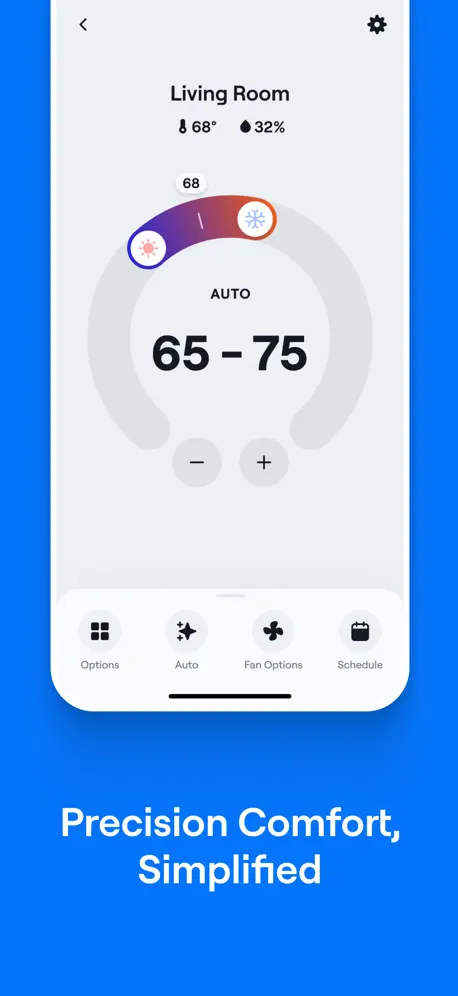
When the set point on my Comfort Profile reads Auto 68-74, what does that mean? Temp reading is currently 74
Will not stay connected
It may stay connected for a few days and then looses WiFi connection I learned it you shut off furnace for 5 minutes it MAY reconnect- IF not had that success. Call for support 15 questions and wait time so you are upset IF an agent answers Then down load their fix it app in desperation only for this 2 star app to ask you to enter a 4 digit number that I have no idea of how to get it
Information not on new app
I miss the breakdown of the energy usage between fan running, electric heat on and heat pump running. Maybe it is there and I am missing something?
Can’t add COR Device
I have COR thermostats throughout my house and I don’t have an app to control them with other than Apple home. Please add a way for me to register and add those thermostats to the app or some app please.
It “works” but…
Every other smart thermostat I’ve used have far better app features, the one missing here the most is a widget for home screen/lock screen. This one thing has me seriously considering swapping it for an ecobee. As for everything else, UI is uninspired, functionality is “ok” but appears to be absolutely the minimum effort.
Don’t bother …
Carrier may manufacture great hvac and heating systems, but their app onboarding is infuriating. The manual doesn’t even tell you which app or QR code to scan - so the customer is left to guess, download an app, create an account, and then find out it’s the wrong app without the aforementioned wrong app telling you which app to use ! Reinstalled my Nest Gen 3 …
Finally it works.
I’ve complained about Carrier SmartHome application that replaced Carrier Home, as I couldn’t use it. It was so frustrating for me, as for a few years I used Carrier Home without any problems. Finally the latest release of updated SmartHome works and I’m so happy to control my Carrier thermostat remotely. Now, 4 starts, but if a new app will be stable after some time of using it, no problem to rate it with 5 stars.
High Cost equipment, low cost app
Spent a lot of money for my top of the line carrier infinity AC unit but the app almost never shows current thermostat settings. Seriously lags. Very disappointing. A top of the line HVAC system should be paired with a top of the line app.
Operation
Not user friendly
Cant even verify my gmail how am i supposed to create the account
Cant even verify my gmail how am i supposed to create the account
I’m in Canada. Could I get temperatures in Celsius and wind speeds in Kilometres/ hour.
Thank you.
Missing functionality
Very simplistic. Scheduling functionality is limited. Cannot pick a specific schedule. Fan control should be easily accessible. Needs to display system load percentage. Fan status.
Information is power
So far it is ok Thermostat firmware release notes always lag… I’m on 4.74 series B and website is showing release notes for 4.70… aren’t they updated in sync ???? UI does not fit nicely on my iPhone XS forcing a small amount of scroll to see the full content. That is bad UI design Mid August 2025 version Showing outdoor temp in F when all my settings are in C - really ? The rotary temp control - not a great UI - and all that space it takes And why is status buried under energy insights ???
Infinity Units are unserviceable
The corporate level bean counters at Carrier have stopped production of key components to the HVAC unit. My infinity is 3 months out of warranty. Has been a lemon from the get go needing new compressor and inverter. The inverter has failed again and what should be a $600 part now is quoted as $8000 from my HVAC installer. It can be found used on eBay for cheaper. This is an example of how they want to force a new sell on you. Never buy carrier!
Good App
I like the app works nice does not disconnect from wifi like the old one. Except when the heat is on I do not see any indication on the app like in the old app it would show ‘ Gas Heating ‘ .
Nonintuitive Display
The screen is nonintuitive. The large main numbers should be the actual room temperature. The “setting” should be the small number. Go look at Trane - they have a better app.
Worst every time you upgrade
Last revision the app lost a lot of functionality. This time we can’t see the actual outside temperature at our house. Getting worst overtime. I hope you don’t plan any more revision s!
From bad to worse
This app has never been fully functional (usually 1 of our 2 zones is always “offline”). But after this most recent update, both zones are offline, rendering it completely useless. Every update is the same in that the app still never works and says that both units are “offline.”
Bizarre Interface
Looks like it was written in the 80's. Arcane interface reminiscent of something written 20+ years ago, and definitely not "smart". 30K for this Infinity system and this is the best they could do? The thermostat itself is just as stupid.
Weather not in metric values.
I reported this previously. Weather forecast is not in metric values despite my settings being metric as Canada uses. Show centigrade not Fahrenheit and kmh not mph based on user preference Preferred previous version overall.
Terrible App
This app is simply terrible. It glitches often and lately most of us users have gotten the “Offline” message. There’s no way to troubleshoot and get rid of it. I’ve deleted the app from my phone together, re-installed it, and I’m still getting the “Offline” error. What’s the point in having a smart thermostat if the app used to control it doesn’t function correctly and the only option to operate the thermostat is manually from the wall? 🙄 Get it together, Carrier. You’re too large and reputable of a company to have such a poor performing subpar app that’s highly unreliable.
Not accurate
Heat pump is not working but app says it is.
Carrier SmartHome FAQ
- Is Carrier SmartHome free?
- Yes. The app is free, in all 7 countries it sells in, and it sells nothing inside it.
- Does Carrier SmartHome have a free trial?
- No. None of its offers (US) come with a free trial.
- What are the best alternatives to Carrier SmartHome?
- iAquaLink (4.7 from 105,835 reviews), Pentair Pool (4.6 from 24,530 reviews) and Home Connect (America) (4.5 from 23,553 reviews).
Carrier SmartHome download
Last updated 1 month ago.
Carrier SmartHome sells in 7 countries. It was released 1 year and 11 months ago, on 4 Nov 2024. It holds a 3.6 rating from 2,681 reviews.
Supports 1 language: English.
How much does Carrier SmartHome make?
Third-party estimates for the last 30 days, worldwide — not the store's own figures, which Apple publishes for nobody.