MyStuff2 Pro
ProductivityBusiness

MyStuff2 Pro
Rick Maddy · released 20 Sept 2012 · Open in App Store ↗

Revenue 30d not estimated
Downloads 30d not estimated
Rating 4.47 993 reviews

No in-app products collected for this app.

Rating
United States53%5314.43
Canada8%784.53
United Kingdom7%654.45
Germany5%534.21
Australia5%454.60
Netherlands2%184.67
France2%164.56
Spain1%134.69
Italy1%134.08
Hong Kong1%124.42
Russia1%104.90

The store shows a different set in every country

Description

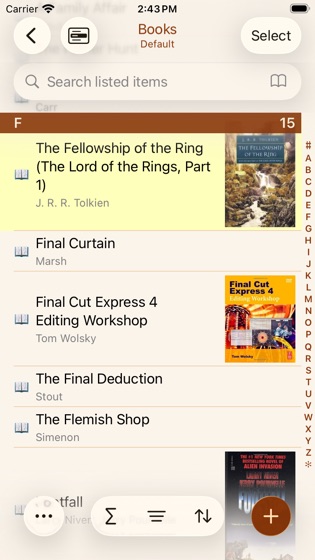
It's now easier than ever to keep track of all your stuff. Organize your collections, music, movies, books, video games, electronics, wine lists, jewelry, appliances, office supplies, or anything else in your possession with this easy to use but powerful database and inventory application.

MyStuff2 Pro allows you to get organized. Avoid buying something you already have. Make it easy to find your stuff. Be prepared in case of theft, fire, or flood.

NOTE: The initial free version has a limit of 15 items but it includes all Pro features so you can try out all functionality. Once upgraded to unrestricted items, the Pro level features become optional in-app purchases.

Data entry is made easy with barcode scanning and product search, autofill, quick copy, and bulk editing.

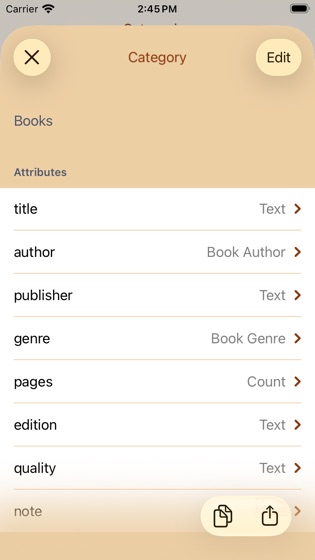
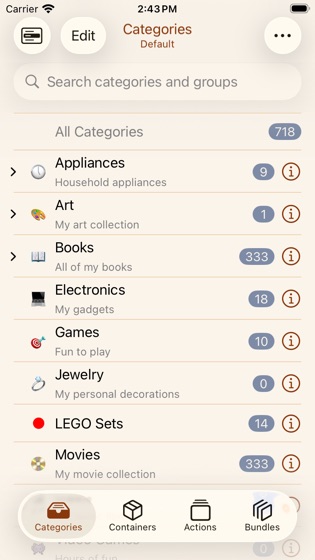
User definable categories allow you to keep track of what you want and how you want it. MyStuff2 Pro comes with sample categories to get you started quickly but you can set it up any way you desire to fit your needs.

Here is a small list of things you can keep track of:

Movies

Music

Books

Video Games

Coins

Stamps

Quilting/knitting/sewing materials

Wine Cellar

Garage Sales / Estate Sales

Art

Electronics

Appliances

Toys

Clothes

Jewelry

Furniture

Product Inventory

Anything you want to organize

Maintain multiple, independent databases of information.

Automatically sync your data between your iOS and macOS devices or share your data automatically with other MyStuff2 Pro users.

Import existing data from other applications using CSV files, Excel (xlsx) and Open Document (ods) spreadsheet files.

Transfer data into or out of MyStuff2 Pro using your own computer, email, iCloud, Dropbox, Google Drive, Box, OneDrive, ftp, other apps, or other iOS/macOS devices running MyStuff2 Pro.

You can export your data as CSV files, PDF reports, or Excel (xlsx) and Open Document (ods) spreadsheet files.

Email data to yourself or others. View data in other apps installed on your iOS device.

Backup and restore features allow you make a copy of your data for safe keeping.

User defined actions allow you to keep track of various item events. Examples include donating, lending, selling, using, or repairing.

User defined bundles allow you to group related items into an easy to use collection.

Quickly find your items using MyStuff2 Pro's powerful filtering, searching, and sorting capabilities.

MyStuff2 Pro allows you to enter the following types of data:

Text (single-line)

Barcode

Calculated (formulas supporting 130+ functions)

Color

Contact (Address Book)

Count

Currency

Date

Decimal (e.g. 3.14)

Duration (hour, minute, second)

Email Address

Integer (e.g. 42)

Item Link (related items)

Location (GPS, address, map)

Note (multi-line)

Phone Number

Rating

Signature

Term (years, months, days)

Time

Toggle (Yes/No, On/Off, etc.)

Voice Memo

Web Address (URL)

Lookup List (user defined list of values)

Store up to 40 images for each of your items.

Add file attachments to your items. View and export the attachments.

Setup alarms on any date value. Great for things like warranty or replacement reminders.

Share your data with others. Email lists to co-workers or friends and family. Other users of MyStuff2 Pro can import your shared data directly simply by opening the email attachment.

Customize item lists to display exactly the data you want to see. Apply colors to categories, actions, or individual items to make them stand out.

See a summary of the item list you are viewing. Shows item count, totals, and averages of your data.

Protect access to your data with a passcode. Keep others out of your data. You can also passcode protect individual categories.

Please visit http://www.maddysoft.com/mystuff to see additional information, tutorials, FAQs, and contact information for MyStuff2 Pro.

NOTE: If you have any issues please contact support.

Supports backup files from Mindersoft's MYStuff Pro macOS app.