
Disk Decipher
Access encrypted virtual disks
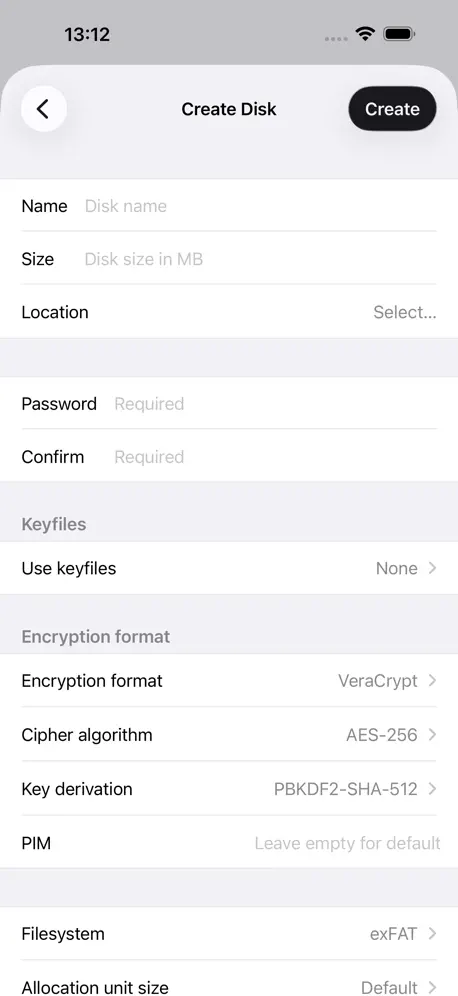
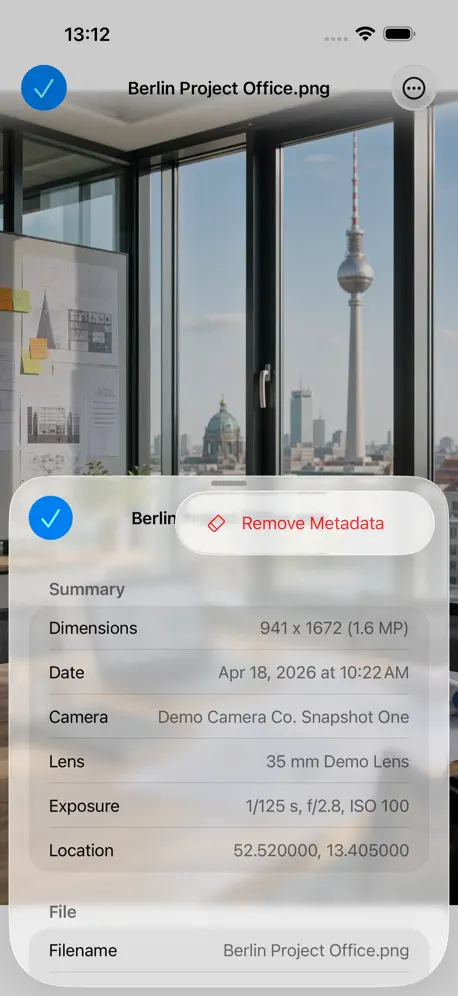
How much does Disk Decipher cost?
Prices are current as of 22 Nov 2026.
8 one-time purchases from $0.99
In the United States, Disk Decipher has 8 one-time purchases priced $0.99 – 7.49.
| Product | Price |
|---|---|
| Small Donation | $0.99 |
| Medium Donation | $1.99 |
| APFS write license | $2.99 |
| HFS write license | $2.99 |
| NTFS write license | $2.99 |
| exFAT filesystem support | $2.99 |
| Large Donation | $3.99 |
| All filesystem licenses | $7.49 |
Disk Decipher download price by country
| Country | Price |
|---|---|
| United States | $0.99 |
| Germany | €0.99 |
| Russia | RUB 99.00 |
| France | €0.99 |
| United Kingdom | £0.99 |
| Italy | €0.99 |
| Canada | CA$0.99 |
| China | CN¥8.00 |
| Australia | A$1.99 |
| Switzerland | CHF 1.00 |
| Spain | €0.99 |
| Austria | €0.99 |
| India | ₹99.00 |
| Japan | ¥150 |
| Poland | PLN 4.99 |
| Hong Kong | HK$8.00 |
| Netherlands | €0.99 |
| Ukraine | $0.99 |
| Brazil | R$6.90 |
| Czech Republic | CZK 29.00 |
| Singapore | SGD 0.98 |
| Belgium | €0.99 |
| Finland | €0.99 |
| South Korea | ₩1,100 |
| Norway | NOK 9.00 |
| Turkey | TRY 49.99 |
| Denmark | DKK 9.00 |
| Bulgaria | €0.99 |
| Hungary | HUF 499 |
| Indonesia | IDR 19,000 |
| Luxembourg | €0.99 |
| Mexico | MX$19.00 |
| New Zealand | NZ$1.99 |
| Portugal | €0.99 |
| Taiwan | NT$30.00 |
| Vietnam | ₫29,000 |
| Argentina | $0.99 |
| Israel | ₪2.90 |
| Philippines | ₱49.00 |
| Sweden | SEK 9.00 |
| Slovenia | €0.99 |
| Slovakia | €0.99 |
| Azerbaijan | $0.99 |
| Belarus | $0.99 |
| Colombia | COP 4,900 |
| Estonia | €0.99 |
| Greece | €0.99 |
| Ireland | €0.99 |
| Kazakhstan | KZT 499.00 |
| Montenegro | €0.99 |
| Namibia | $0.99 |
| Panama | $0.99 |
| El Salvador | $0.99 |
| United Arab Emirates | AED 2.99 |
| Afghanistan | $0.99 |
| Antigua And Barbuda | $0.99 |
| Anguilla | $0.99 |
| Albania | $0.99 |
| Armenia | $0.99 |
| Angola | $0.99 |
| Bosnia & Herzegovina | €0.99 |
| Barbados | $0.99 |
| Burkina Faso | $0.99 |
| Bahrain | $0.99 |
| Benin | $0.99 |
| Bermuda | $0.99 |
| Brunei Darussalam | $0.99 |
| Bolivia | $0.99 |
| Bahamas | $0.99 |
| Bhutan | $0.99 |
| Botswana | $0.99 |
| Belize | $0.99 |
| Congo, Democratic Republic | $0.99 |
| Congo | $0.99 |
| Cote Divoire | $0.99 |
| Chile | CLP 990 |
| Cameroon | $0.99 |
| Costa Rica | $0.99 |
| Cape Verde | $0.99 |
| Cyprus | €0.99 |
| Dominica | $0.99 |
| Dominican Republic | $0.99 |
| Algeria | $0.99 |
| Ecuador | $0.99 |
| Egypt | EGP 49.99 |
| Fiji | $0.99 |
| Micronesia | $0.99 |
| Gabon | $0.99 |
| Grenada | $0.99 |
| Georgia | $0.99 |
| Ghana | $0.99 |
| Gambia | $0.99 |
| Guatemala | $0.99 |
| Guinea-bissau | $0.99 |
| Guyana | $0.99 |
| Honduras | $0.99 |
| Croatia | €0.99 |
| Iraq | $0.99 |
| Iceland | $0.99 |
| Jamaica | $0.99 |
| Jordan | $0.99 |
| Kenya | $0.99 |
| Kyrgyzstan | $0.99 |
| Cambodia | $0.99 |
| St. Kitts and Nevis | $0.99 |
| Kuwait | $0.99 |
| Cayman Islands | $0.99 |
| Lao Peoples Democratic Republic | $0.99 |
| Lebanon | $0.99 |
| St. Lucia | $0.99 |
| Sri Lanka | $0.99 |
| Liberia | $0.99 |
| Lithuania | €0.99 |
| Latvia | €0.99 |
| Libya | $0.99 |
| Morocco | $0.99 |
| Moldova | $0.99 |
| Madagascar | $0.99 |
| Macedonia | $0.99 |
| Mali | $0.99 |
| Myanmar | $0.99 |
| Mongolia | $0.99 |
| Macao | $0.99 |
| Mauritania | $0.99 |
| Montserrat | $0.99 |
| Malta | €0.99 |
| Mauritius | $0.99 |
| Maldives | $0.99 |
| Malawi | $0.99 |
| Malaysia | MYR 4.90 |
| Mozambique | $0.99 |
| Niger | $0.99 |
| Nigeria | NGN 1,500.00 |
| Nicaragua | $0.99 |
| Nepal | $0.99 |
| Nauru | $0.99 |
| Oman | $0.99 |
| Peru | PEN 4.90 |
| Papua New Guinea | $0.99 |
| Pakistan | PKR 300 |
| Palau | $0.99 |
| Paraguay | $0.99 |
| Qatar | QAR 2.99 |
| Romania | RON 4.99 |
| Serbia | €0.99 |
| Rwanda | $0.99 |
| Saudi Arabia | SAR 4.99 |
| Solomon Islands | $0.99 |
| Seychelles | $0.99 |
| Sierra Leone | $0.99 |
| Senegal | $0.99 |
| Suriname | $0.99 |
| Sao Tome & Principe | $0.99 |
| Swaziland | $0.99 |
| Turks and Caicos | $0.99 |
| Chad | $0.99 |
| Thailand | THB 29.00 |
| Tajikistan | $0.99 |
| Turkmenistan | $0.99 |
| Tunisia | $0.99 |
| Tonga | $0.99 |
| Trinidad and Tobago | $0.99 |
| Tanzania | TZS 2,900.00 |
| Uganda | $0.99 |
| Uruguay | $0.99 |
| Uzbekistan | $0.99 |
| St. Vincent & The Grenadines | $0.99 |
| Venezuela | $0.99 |
| British Virgin Islands | $0.99 |
| Vanuatu | $0.99 |
| Kosovo | €0.99 |
| Yemen | $0.99 |
| South Africa | ZAR 19.99 |
| Zambia | $0.99 |
| Zimbabwe | $0.99 |
10+ alternatives to Disk Decipher
| Disk Decipher |   FE File Explorer |   FileBrowser: Documents Manager |   iPGMail |   Keka |   StopTheMadness Pro |   Paranoia Text Encryption Lite |   On‑Device AI:Private Workspace |   CryptCloudViewer |   OnionShare |   Paranoia File Encryption Lite | |
|---|---|---|---|---|---|---|---|---|---|---|---|
| Rating / 5 | 4.5 | 4.7 | 4.7 | 4.2 | 4.8 | 4.8 | 4.7 | 4.3 | 4.2 | 4.5 | 4.6 |
| Reviews | 532 | 38K | 27K | 792 | 668 | 478 | 332 | 332 | 86 | 33 | 13 |
| Released | 2012 | 2012 | 2010 | 2011 | 2023 | 2023 | 2016 | 2024 | 2019 | 2023 | 2023 |
| Monthly price | — | — | — | — | — | — | — | $3.99 | — | — | — |
| Annual price | — | — | — | — | — | — | — | $34.99 | — | — | — |
| One-time price | $2.99 | — | — | — | — | — | — | $49.99 | — | — | — |
The going rate for each plan in United States, in its own currency, shaded from the cheapest price on the row to the dearest.
Disk Decipher reviews
4.5 out of 5, based on 532 reviews.
What people like
- Opens VeraCrypt containers perfectly.
- Integrates well with Files app.
- Very secure and private.
What they complain about
- Hidden fees for write support.
- Support emails go unanswered.
- Dropbox integration often fails.
One of my favorite apps
It will be greater if it has built in slideshow functionality.
Avoid
If I could leave negative I would, it expects you to pay an extra £2.99 for exFAT file system support or £6.99 for all file systems . Considering you already pay £0.99 for the app in the first place!
Minor Networking Bugs & Creating Disks
When it asks me to sign into my Google or Microsoft account. On Google it will log in but it won’t save. The Google login will keep asking me to login and I can’t create a disk on Google Drive. The Microsoft Account won’t even load the login page. I’m not sure if it’s because I went password less for that account and Disk Decipher needs updated networking code to work with that?
Hidden costs!
After paying $1 (CAD), I was disappointed to learn that it’s another $4 for write support for either APFS or MacOS Exten formats on a sparsebundle, or $10 for many formats. (Rounding up a cent for simplicity.) Should have been transparent about that ahead of time. If I don’t return it, I’ll play with it more and update my rating.
Hidden Purchase
It doesn’t tell you before you buy the app that once you buy the app, if you want to write anything to your encrypted volume you have to pay to unlock filesystems. I added one more star because I found if I expand the information there is text that explains file systems are an extra purchase, but there is no information to make a decision such as cost. In Australia it is $12 AUD to unlock all the filesystems.
Works but…..
I had some issues at first but got it to work however when I went to disk-decipher.app/contact for help there is no way to contact anyone. I don’t want to have to join Reddit just to get help. If someone needs help we should have access to a valid contact.
Files disappear
I created two containers on my iPad and loaded them up with about 5 GB each. The limit appears to be 9 GB. It will not create a container any larger than that. Everything went well, I loaded up the files and everything was accessible. I dismounted the disc and when I came backto open it the next day 90% of the files were not there. This program also will not work with a USB. It will not create a container at all. I found this program useless for my needs
Questions about the import function
I have a file on my local disk that has been encrypted with Veracrypt software, which allows me to decrypt and view the file and export it. But when I import the new file, I reopen the encrypted file and there is no new file.
Doesn't work on hidden containers
Tried to access my hidden containes that's encrypted using veracrypt, doesn't detect anything, also I had enables 'hidden files'. Tried to submit refund but apple doesn't allow it.
Add Proton Drive Support
Hi could you please add proton drive support please. Other than that app works great.
A great mobile app
So, I have been using Disk Decipher or the past two and a half years. As my job required encrypted data, we were using encrypted disks on PC, because nothing like a mobile app was available. Then came Disk Decipher, an app on mobile that helped get our encrypted data on the go. I used it, I liked it, I loved it. The developer is great, always updating and improving the app. I got my (almost) whole company using the app. Keep doing the best work, we will always support you.
Problematic
It can't, in fact, open veracrypt archives with keyfiles. It may be that this app either takes the entire keyfile rather than truncating, or that it truncates large keyfiles at a different length than veracrypt does. the result is the same: wrong key or not an encrypted volume.
it suits my need、 but…
I can not create any volume anymore, the button of create is gray. 5/7/2024 When can we add file into remote disk as promised # it is crashing everytime when I try to mount remote disk. 12/24/2021
Password not recognised
Doesn't recognise simple password used for testing. Veracrypt volume mounts fine on PC but not with this mobile. Another volume with password and encryption key can't open either. Read the encryption had to somehow be stored into key chain created a volume with the key in on the pc. Try to open that volume with this app can't recognise the simple test password. Seems pretty useless or needing to work better with new version of veracrypt. As is totally of no use.
Well made but flawed
This is a well made app, sadly it doens't support APFS which is the native mac filesystem, therefore trying to open encryped DMG in APFS won't work... a big issue for those who work in the Mac ecosystem.
Perfect App for .dmg
This is a must-have for all macOS/ iOS users!
This App Does Nothing
Don’t waste your time or money! This App Does Nothing!!! Should get zero stars.
Best at what it does.
At the time of writing this, there is no other commercially available solution that does what this app does. That being said, I have to take away one star in hopes that we will eventually get more support for additional video and image formats.
Great for simplified management of containers, but one glaring issue:
I've set a passcode lock on my installation of DD (M1 Macbook Air) and any time I go to remove the passcode lock in the preferences, the app greys out and creates a popup requiring my passcode BEHIND the settings themselves; effectively it's impossible for me to actually manage the passcode settings.
Can't install
Trying to install but it says it requires macOS 11, which isn't out yet.
Does Exactly What it Says on the Tin
Perfect! Needed a way to open up my VeraCrypt container stored on my USB on my iPhone, this did it perfectly. Though a 'loading' modal when importing a local file would be nice, it took a bit because it's a large container, and I couldn't tell if it was actually working on opening or not. Also it just wouldn't open the file without an extension, and no errors. Otherwise I love this, well worth the $1
Cannot mount Veracrypt
Claims to support veracrypt, but is unable to mount, at least when accessed over WebDAV.
nice
Nice software. WOuld be a 5 Star for more functionality like VeraCrypt in my opinion.
Bugs and Errors! Please fix it, I paid...
Importing Files into exFat NOT POSSIBLE?! Waiting for detecting Disk Format ist very long! Please let me decide when to lock the Disk. At the moment, you want immediately to enter the password when leaving the App for only a short time... It is not possible to send files to the App (Open in... so not available)!
Can be better
It works just fine but I would like to see the ability to use a key file in addition to the password.
Perfect App for Encrypted Cloud Access
Having access to my encrypted files everywhere is extremely helpful. Love the Files integration. My only minor teensy gripe is I wish you could dismiss images with a downward swipe. Other files are ok as they are, just images.
Unable to work with dropbox!!!!
Remote file in dropbox - can’t be read!
Alright app
App works fine, but does not have many features. You are unable to create crypts (you must create with 3rd party then import. I used VeraCrypt and sent the file through Google Drive), you are unable to delete directories (folders), you cannot move files around, you cannot search for items (no search bar/function), and you cannot choose how items are sorted (date/alphabetical/size/etc). The app feels a bit restrictive, but it does its job. I’d recommend this app as more of a crypt viewer than a crypt editor. On the plus side, this app’s privacy policy is great, it supports many file types, and it is very secure (the second you close the app it dismounts the drive). Of the two apps for file decryption on the AppStore right now, I would recommend this app. While this app is missing a lot of features, it has a much better privacy policy than the other, and this app does not (to my knowledge) have ties to the Chinese government like the other one. Overall, missing features, but secure. 4/5.
Lacking
I used to use this app awhile ago when I had the 4s. After moving back to apple I bought the app again with faith that it would be better. To my amaze this app hasn’t seemed to have been updated. So before I make a better version I’d like to address things that need updated. -Ability to create encrypted containers. -black theme... -ability to add photos(seems broken on current os on iPhone Xs)
Crushes
I don’t know why but the app crushes every time I try to enter it. I’m using iPhone XsMax with ios 12.1.2.
Thumbs Up
Awesome app, but no longer able to drag and drop files into an image (sparsebundle) from another app (Documents). I get an error: Import Failed: Could not coerce an item to class NSURL.
I can’t make it work. At all.
I have a very small ( 100kb) truecrypt file. It works fine on truecrypt. I can’t get the file to open on my iPhone using this app. For local images , the app tells me to retrieve the images using another app then choose open in -> disc decipher. But disc decipher is not offered anywhere as one of the options to use. I’ve tried all the different ways to get disc decipher to even be asked to open the file and it is just never offered as an option. So then on to using a linked remote file - eg in google drive. I can get the file to show in disc decipher - but it cannot open it. It spends 10 minutes trying then says unsupported file type. I have written to the e mail in the support page but no reply.
It does the job however
The apps works well when you understand the concept, however ExFat should be included for free. There are lots of git online that provides Exfat access and does not interface with Microsoft license. The developer could use the same open source hit to allow us IPhone/IPad users to get free ExFat. See this hit for more info: GitHub.com/sovworks/edsexfat/releases based on osxfuse. Until ExFat is included only 4 stars for now.
Dev MIA?
The developer seems to be MIA. His page has a poll to see what he should do next, but none of it seems to be happening...
Please add ability to move files to encrypted containers
I really like the app but it would be nice if we could add files from say the Photos app into the mounted VeraCrypt container. Sent from my iPhone
Eureka — I’ve been looking for something like this for a long time
I always thought it was a major flaw that Apple didn’t provide support for .dmg and .sparseimage files on iCloud volumes. I recently read an article that mentioned that a $0.99 app does just what I was looking for — and here it is. This app is remarkably capable. Very happy I found it.
Dropbox integration not functional
Dropbox integration does not work (anymore?). I linked the app successfully to my Dropbox, yet it was unable to access any files in my Dropbox account.
Works for me
I have a 3.5 gb Veracrypt container that I created and update on my Windows PC. When traveling, I copy the Veracrypt file to both my iphone and iPad. I use this app to open the Veracrypt file on both my iPhone and IPad. This gives me access to all my data files while on the road. It’s never failed me.
Keine Updates..
Produkpflege fehlt.
Works but
Hasn't been updated in over a year, and more than that file extensions shouldn't matter. I should be able to name my file .baz or .inga or whatever.
🌺
this best app 🌺
Won't open apple encrypted dmg files
The title is somewhat self explanatory. But not complete. It also does not work with Apple icloud. What is the point of Apple offering stuff through App Store that does not work with its own infrastructure?
File support fixed! But...
I’m updating my review for two reasons. #1 is that file support was added, and I can now easily import a LUKS container from iCloud or Nextcloud/ownCloud/etc.. However, I was disappointed to discover, after importing my containers, that they failed to mount. After reading on the website I conclude that there is no support for ext4 formatted containers. Having a journaled FS in my container has saved me from file corruptions on several occasions. On my computers I run fsck on the decrypted volume every time I mount the container, and it’s not uncommon for it to find problems and fix them. You might wan’t to consider added a step like that as well. Not that I’m an expert on any of this, though. At the least, could you please add support for common open-source filesystems, such as ext4? I’ve been patiently waiting and watching as this app evolves, and I was sure it would where I needed it to be for my use-case in this last update... I’d be so grateful if you could make it compatible with containers that house an ext4 filesystems! P.s. I tried to find an email on your website but didn’t see one, the feature request form did not have a place to write in a feature either, only select one of those in the list. Thanks!
Excellent idea but still immature product
Not ready for prime. The inapp open-in of the truecrypt volume doesn't work at all. It says file cant be opened. On top of that the remote file doesn't support https (yet) so no point sharing link with dropbox. Go and spend half an hour setting up FTP or something just to be able access the file. Not ready for prime as I said. Needs further work then I'll revise the review. I continue use "Datalocker" app, which is proprietary but works with dropbox as I would expect it.
Great software but has not been updated in a year
Pros: Works very well with TrueCrypt containers. Decent Dropbox integration - if your container file is in Dropbox, you can open it in Disk Decipher. Cons: The software has not been updated in a year. The developer may have lost interest. Basic file browser features are not supported. If you have a directory with many files, or a large subdirectory structure, you cannot search for files. You can’t sort by date.
Great app for accessing encrypted virtual drives
Picked this up specifically so I has a way to access on iOS the encrypted sparse bundle virtual disks I created on my Mac. Was able to access these types of virtual drives from a USB drive, as well as from iCloud Drive. Integrates with the Files app in the "Sources" column. Did exactly what I wanted and the pricing is very fair.
Did not work
tried to open a Truecrypt file with extension .tc both on the iPad and a Seagate wireless portable drive. The "open with" command is triggered on selecting the file in Safari or another program but the app does not respond. The browser just hangs. Cannot understand what the problem is. Please look into this and post possible solution in your FAQ on your website. Thanks
one of the few
One of the few pieces of software I’ve found that can reliably handle Truecrypt & Veracrypt files over Apple IOS. Worked on my Ipad 3 and still working on the 2018 Ipad. Still getting udates as well, I see. Nice.👍👍
Need an Open in
Have good potential but missing an important feature Interesting to securely transfer data over an unsecured connection. Example: 1) Encrypt your file with TrueCrypt in a .tc volume file on your PC or NAS 2) Download your encrypted .tc volume file through the unsecured FTP protocol from an iPad app 3) Perform an Open In ... Disk Decipher from your FTP iPad app Important limitation - NO WAY TO OPEN THE DECRYPTED FILE in another app (capable of reading the file once decrypted). Can only be read by Disk Decipher.
Who knows...
Can't get remote storage access to work and the online help provided is poor, offering no help with syntax, so I'm using guess work to gain access to my NAS. The app may well be good, but who knows - I certainly don't
Disk Decipher price by country
A one-time purchase costs $2.73 in Taiwan and $4.69 in Colombia — 1.7× more for the same thing. Below is the going rate for each plan in every country that sells it — the middle price of what the app charges there, in the country's own currency with the dollar equivalent beneath it.
| Country | One-time |
|---|---|
| Afghanistan | $2.99 |
| Albania | $3.99 |
| Algeria | $2.99 |
| Angola | $2.99 |
| Anguilla | $2.99 |
| Antigua And Barbuda | $2.99 |
| Argentina | $2.99 |
| Armenia | $3.99 |
| Australia | A$4.99$3.37 |
| Austria | €2.99$3.30 |
| Azerbaijan | $3.99 |
| Bahamas | $2.99 |
| Bahrain | $2.99 |
| Barbados | $3.99 |
| Belarus | $3.99 |
| Belgium | €2.99$3.30 |
| Belize | $2.99 |
| Benin | $3.99 |
| Bermuda | $2.99 |
| Bhutan | $2.99 |
| Bolivia | $2.99 |
| Bosnia & Herzegovina | €2.99$3.30 |
| Botswana | $2.99 |
| Brazil | R$19.90$3.52 |
| British Virgin Islands | $2.99 |
| Brunei Darussalam | $2.99 |
| Bulgaria | €2.99$3.30 |
| Burkina Faso | $2.99 |
| Cambodia | $2.99 |
| Cameroon | $3.99 |
| Canada | CA$3.99$2.79 |
| Cape Verde | $2.99 |
| Cayman Islands | $2.99 |
| Chad | $2.99 |
| Chile | CLP 2,990$3.01 |
| China | CN¥22.00$3.29 |
| Colombia | COP 14,900$4.69 |
| Congo | $3.99 |
| Congo, Democratic Republic | $2.99 |
| Costa Rica | $2.99 |
| Cote Divoire | $3.99 |
| Croatia | €2.99$3.30 |
| Cyprus | €2.99$3.30 |
| Czech Republic | CZK 79.00$3.58 |
| Denmark | DKK 29.00$4.29 |
| Dominica | $2.99 |
| Dominican Republic | $2.99 |
| Ecuador | $2.99 |
| Egypt | EGP 149.99$2.81 |
| El Salvador | $2.99 |
| Estonia | €2.99$3.30 |
| Fiji | $2.99 |
| Finland | €2.99$3.30 |
| France | €2.99$3.30 |
| Gabon | $2.99 |
| Gambia | $2.99 |
| Georgia | $3.99 |
| Germany | €2.99$3.30 |
| Ghana | $3.99 |
| Greece | €2.99$3.34 |
| Grenada | $2.99 |
| Guatemala | $2.99 |
| Guinea-bissau | $2.99 |
| Guyana | $2.99 |
| Honduras | $2.99 |
| Hong Kong | HK$22.00$2.80 |
| Hungary | HUF 1,490$4.51 |
| Iceland | $3.99 |
| India | ₹299.00$3.17 |
| Indonesia | IDR 59,000$3.24 |
| Iraq | $2.99 |
| Ireland | €2.99$3.30 |
| Israel | ₪9.90$3.08 |
| Italy | €2.99$3.30 |
| Jamaica | $2.99 |
| Japan | ¥500$3.13 |
| Jordan | $2.99 |
| Kazakhstan | KZT 1,790.00$4.02 |
| Kenya | $3.99 |
| Kosovo | €2.99$3.30 |
| Kuwait | $2.99 |
| Kyrgyzstan | $2.99 |
| Lao Peoples Democratic Republic | $2.99 |
| Latvia | €2.99$3.30 |
| Lebanon | $2.99 |
| Liberia | $2.99 |
| Libya | $2.99 |
| Lithuania | €2.99$3.30 |
| Luxembourg | €2.99$3.30 |
| Macao | $2.99 |
| Macedonia | $2.99 |
| Madagascar | $2.99 |
| Malawi | $2.99 |
| Malaysia | MYR 14.90$3.64 |
| Maldives | $2.99 |
| Mali | $2.99 |
| Malta | €2.99$3.30 |
| Mauritania | $2.99 |
| Mauritius | $3.99 |
| Mexico | MX$69.00$3.72 |
| Micronesia | $2.99 |
| Moldova | $3.99 |
| Mongolia | $2.99 |
| Montenegro | €2.99$3.30 |
| Montserrat | $2.99 |
| Morocco | $3.99 |
| Mozambique | $2.99 |
| Myanmar | $2.99 |
| Namibia | $2.99 |
| Nauru | $2.99 |
| Nepal | $3.99 |
| Netherlands | €2.99$3.30 |
| New Zealand | NZ$4.99$2.84 |
| Nicaragua | $2.99 |
| Niger | $2.99 |
| Nigeria | NGN 4,900.00$3.62 |
| Norway | NOK 39.00$4.08 |
| Oman | $2.99 |
| Pakistan | PKR 900$3.25 |
| Palau | $2.99 |
| Panama | $2.99 |
| Papua New Guinea | $2.99 |
| Paraguay | $2.99 |
| Peru | PEN 12.90$3.79 |
| Philippines | ₱199.00$3.12 |
| Poland | PLN 14.99$3.76 |
| Portugal | €2.99$3.30 |
| Qatar | QAR 9.99$2.74 |
| Romania | RON 14.99$3.10 |
| Russia | RUB 249.00$3.02 |
| Rwanda | $2.99 |
| Sao Tome & Principe | $2.99 |
| Saudi Arabia | SAR 12.99$3.46 |
| Senegal | $3.99 |
| Serbia | €2.99$3.30 |
| Seychelles | $2.99 |
| Sierra Leone | $2.99 |
| Singapore | SGD 3.98$3.09 |
| Slovakia | €2.99$3.30 |
| Slovenia | €2.99$3.30 |
| Solomon Islands | $2.99 |
| South Africa | ZAR 59.99$3.55 |
| South Korea | ₩4,400$3.29 |
| Spain | €2.99$3.30 |
| Sri Lanka | $2.99 |
| St. Kitts and Nevis | $2.99 |
| St. Lucia | $2.99 |
| St. Vincent & The Grenadines | $2.99 |
| Suriname | $2.99 |
| Swaziland | $2.99 |
| Sweden | SEK 39.00$3.87 |
| Switzerland | CHF 3.00$3.58 |
| Taiwan | NT$90.00$2.73 |
| Tajikistan | $2.99 |
| Tanzania | TZS 9,900.00$3.75 |
| Thailand | THB 99.00$2.92 |
| Tonga | $2.99 |
| Trinidad and Tobago | $2.99 |
| Tunisia | $2.99 |
| Turkey | TRY 149.99$2.98 |
| Turkmenistan | $2.99 |
| Turks and Caicos | $2.99 |
| Uganda | $3.99 |
| Ukraine | $3.99 |
| United Arab Emirates | AED 12.99$3.54 |
| United Kingdom | £2.99$4.00 |
| United States | $2.99 |
| Uruguay | $2.99 |
| Uzbekistan | $2.99 |
| Vanuatu | $2.99 |
| Venezuela | $2.99 |
| Vietnam | ₫99,000$3.85 |
| Yemen | $2.99 |
| Zambia | $3.99 |
| Zimbabwe | $3.99 |
Disk Decipher FAQ
- Is Disk Decipher free?
- No. Disk Decipher costs $0.99 (US) to download, and its premium features are extra: 8 one-time purchases starting from $0.99.
- Does Disk Decipher have a free trial?
- No. None of its offers (US) come with a free trial.
- Where is Disk Decipher cheapest?
- A one-time purchase costs NT$90.00 (≈$2.73) in Taiwan and COP 14,900 (≈$4.69) in Colombia, its cheapest and dearest countries.
- What are the best alternatives to Disk Decipher?
- FE File Explorer (4.7 from 38,082 reviews), FileBrowser: Documents Manager (4.7 from 26,893 reviews) and iPGMail (4.2 from 792 reviews).
Disk Decipher download
Last updated yesterday.
Disk Decipher sells in 175 countries. It was released 14 years and 6 months ago, on 24 Apr 2012. It holds a 4.5 rating from 532 reviews.
Supports 17 languages: English, Arabic, Czech, Dutch, French, German, Greek, Hungarian, Italian, Polish, Portuguese, Russian, Chinese, Slovak, Spanish, Turkish, Ukrainian.
How much does Disk Decipher make?
Third-party estimates for the last 30 days, worldwide — not the store's own figures, which Apple publishes for nobody.
Revenue by plan
- One-time 100%
Revenue by country
- United States 24%
- Germany 19%
- France 4%
- United Kingdom 4%