On‑Device AI:Private Workspace
No in-app products collected for this app.
| Rating | |||
|---|---|---|---|
| United States | 50%161 | 4.38 | |
| Germany | 10%32 | 4.03 | |
| Canada | 4%12 | 2.67 | |
| Italy | 3%9 | 4.67 | |
| Russia | 2%8 | 4.63 | |
| France | 2%7 | 4.86 | |
| Australia | 2%6 | 4.83 | |
| India | 2%6 | 4.33 | |
| United Kingdom | 2%5 | 4.60 | |
| Hong Kong | 1%4 | 4.75 | |
| Japan | 1%4 | 5.00 | |
| South Korea | 1%4 | 5.00 | |
| Mexico | 1%4 | 5.00 | |
| Romania | 1%4 | 5.00 | |
| Thailand | 1%4 | 4.00 | |
| Ukraine | 1%4 | 4.00 |
Description
On-Device AI puts chat, listening, transcription, notes, and research in one private app for iPhone, iPad, Mac, and Apple Vision Pro. Your data stays on your device.
Download a model once and the app keeps working on a plane, on the subway, or with no signal at all. Your chats, documents, recordings, and notes are processed and stored on your device. Online providers and web features are there when a task needs them, and only after you switch them on.
ONE APP, TEN WORKSPACES
AI Chat, AI Search, AI Browser, Listen Library, RSS Feeds, Voice Note, Text to Speech, Knowledge, Text Note, and App Help all share the same models and the same private storage.
AI CHAT
Chat with local or cloud models.
Run local models from families such as Gemma, Qwen, DeepSeek, and Mistral, or connect your own provider account
Pick models that fit your device, including ones for text, vision, reasoning, and tools
Drop in documents and images, fork any conversation, and compare several models on the same prompt
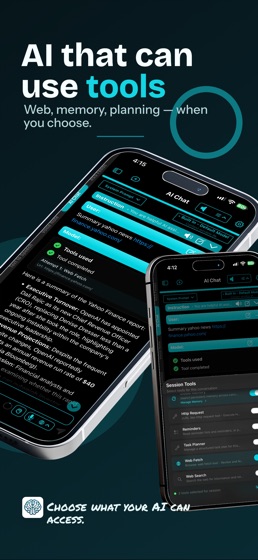
Let the model use tools for calculations, web requests, documents, Calendar, and Reminders, and review proposed changes before they apply
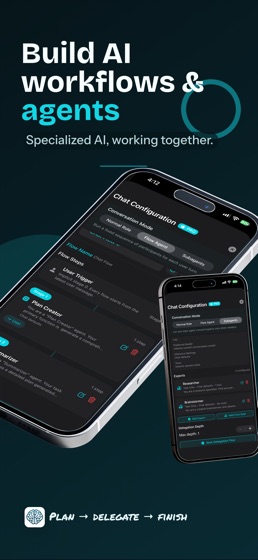
Build Agent Profiles, add AI Skills, connect MCP servers, and run subagents when a job takes several steps
Keep facts you repeat often in Global Memory
LISTEN LIBRARY AND RSS FEEDS
Read less, listen more.
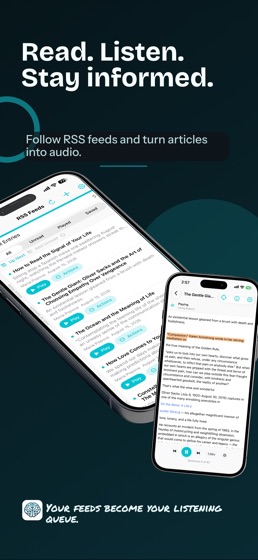
Turn PDFs, Markdown, plain text, web articles, and scanned books into a listening queue
Scan photographed pages, correct the OCR the app runs on device, and keep each page with its spoken text
Follow sites through RSS, Atom, and JSON feeds, then send articles to Up Next
Choose Apple voices or local neural voices, follow along in the reader, and set a sleep timer
VOICE NOTE, VOICE TYPING, AND TEXT TO SPEECH
Speak instead of typing, and listen instead of reading.
Record and transcribe meetings, lectures, interviews, and quick ideas
Dictate with Voice Typing on Mac or the voice keyboard on iPhone and iPad
Transcribe with Apple Speech, Whisper, Parakeet, Nemotron, Qwen3-ASR, and other engines
Turn text, or text captured from a photo, into audio with Apple voices, Kokoro, PocketTTS, Qwen 3 TTS, CosyVoice, and VibeVoice
Export transcripts as text, subtitles, or Markdown
AI SEARCH AND AI BROWSER
Research with a second pair of hands.
Search the web in a conversation and let the model read the results for you
Browse with tabs, profiles, history, and downloads, then ask your model to read, assist, or act on the page
Hand a task to the browser agent, watch each step, and take over whenever you want
KNOWLEDGE AND TEXT NOTE
Give your AI your own material to work from.
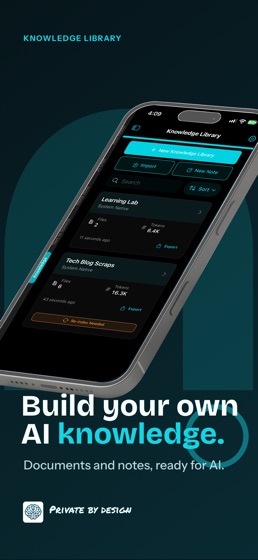
Add PDFs, text, Markdown, code, images, and website content to a private searchable library
Write and edit Markdown notes in the app
Import AI chats, voice notes, Text to Speech items, and AI Search results
Tune retrieval and index edited content again
APP HELP
Ask how a feature or setting works. App Help answers from a guide that ships inside the app, keeps help out of your saved chats, and points to the right settings.
MADE FOR APPLE DEVICES
Widgets for Listen, Voice Note, Text Note, and Quick Actions
Siri, Apple Shortcuts, App Intents, the Mac menu bar, and keyboard shortcuts you can customize
Apple hardware acceleration for supported local models
Store models internally, on an external drive, or on a shared volume
On Mac, connect messaging apps so your model can draft or send replies under rules you set
Interface in English, Dutch, French, German, Italian, Japanese, Spanish, Portuguese, and Traditional Chinese
EULA: https://www.apple.com/legal/internet-services/itunes/dev/stdeula/