Utility Spreadsheet
Number Crunching Made Easy
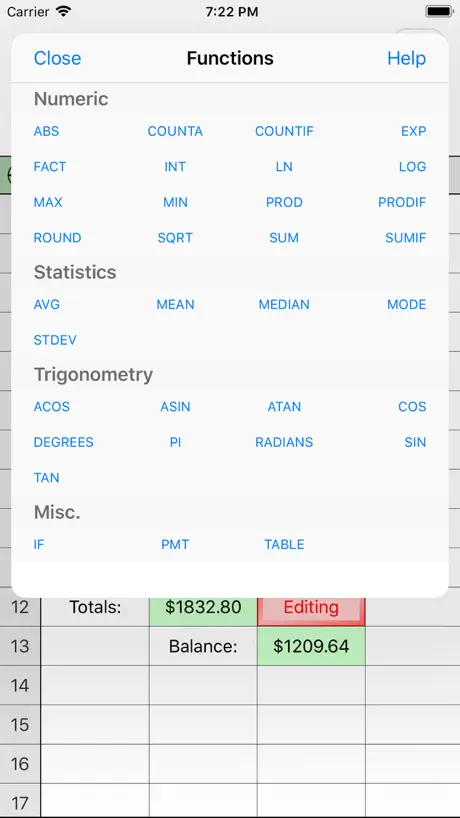
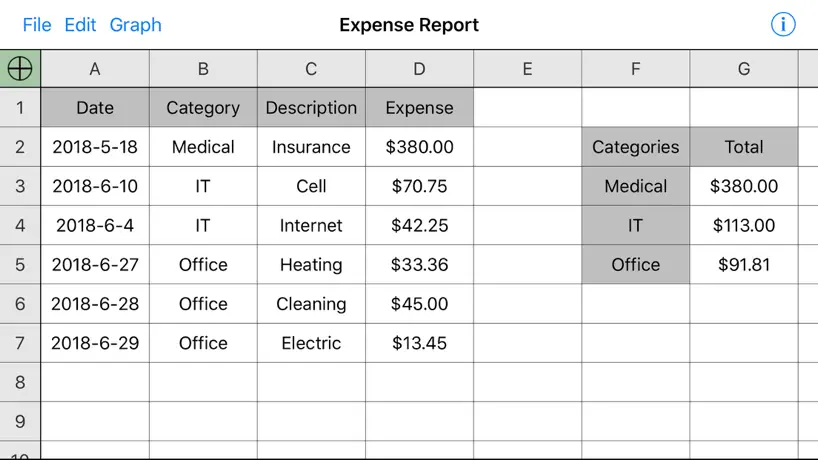
How much does Utility Spreadsheet cost?
Prices are current as of 8 Sept 2026.
1 one-time purchase from $2.99
In the United States, Utility Spreadsheet has 1 one-time purchase priced $2.99.
| Product | Price |
|---|---|
| Remove Ads | $2.99 |
10+ alternatives to Utility Spreadsheet
| Utility Spreadsheet | 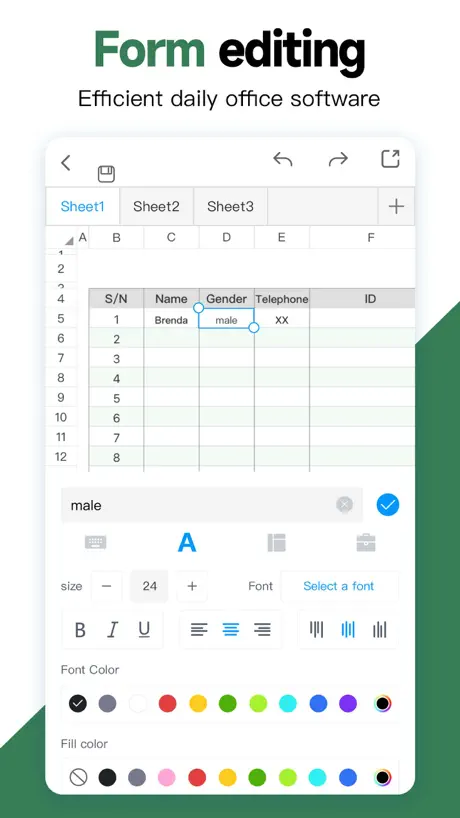  Spreadsheet-xlsx&csv editor Spreadsheet-xlsx&csv editor |   Draft Paper Draft Paper |   XLSX Sheets: Edit Spreadsheet XLSX Sheets: Edit Spreadsheet |   AO Office AO Office |   SunTable-Spreadsheet view&edit SunTable-Spreadsheet view&edit |   Zoho Sheet: Spreadsheet App Zoho Sheet: Spreadsheet App |   The Spreadsheet App - Sheets The Spreadsheet App - Sheets |   Spreadsheet - Sheetlet Spreadsheet - Sheetlet |   Office Suite-Word, PDF, Sheets Office Suite-Word, PDF, Sheets |  Zoho Sheet—Spreadsheet on iPad Zoho Sheet—Spreadsheet on iPad | |
|---|---|---|---|---|---|---|---|---|---|---|---|
| Rating / 5 | 4.0 | 4.7 | 4.4 | 4.5 | 4.3 | 4.8 | 4.7 | 4.5 | 4.6 | 4.1 | 4.6 |
| Reviews | 1.3K | 238K | 23K | 17K | 12K | 8.4K | 4.9K | 1.4K | 1.4K | 977 | 464 |
| Released | 2009 | 2020 | 2014 | 2023 | 2016 | 2022 | 2021 | 2023 | 2018 | 2023 | 2021 |
| Monthly price | — | $4.99 | — | $4.99 | — | $1.49 | — | $5.99 | $5.99 | — | — |
| Annual price | — | $25.99 | — | $29.99 | — | $6.99 | — | $34.99 | — | — | — |
| One-time price | $2.99 | $39.99 | $9.99 | — | $19.99 | $19.99 | — | $4.99 | $2.99 | — | — |
The going rate for each plan in United States, in its own currency, shaded from the cheapest price on the row to the dearest. Plans fewer than four in ten of the priced apps sell are left out.
Utility Spreadsheet reviews
4.0 out of 5, based on 1,294 reviews.
What people like
- Super fast and lightweight
- Easy to use on iPhone
- Free version works well
- Better than Excel for basics
What they complain about
- Files disappear or get corrupted
- App crashes when using functions
- Cloud sync deletes your work
- No help if things break
JRivas
Powerful yet easy to use. I use it for everything, including shopping lists, extensive check-lists and financial analysis. I, however, miss the “cut and paste” inside a cell feature you used to have and ask that you bring it back. With this feature, you can still search the internet by pasting info into your browser copied right from a cell. 🤞 🙏 UPDATE: Thanks for putting back the cut & paste! This makes moving data around much easier and faster. I have a new request for your consideration: add FV (Future Value) to the Functions. Inflation can screw up any budget, but with FV, you can calculate forward easily without having to use a separate financial calculator and then transfer figures back and forth. Thank you so much.
This app isn’t free
After a few line entries it asked if I wanted to remove Add’s for 3 bucks or…remove purchases. I have made no purchases and that is the response if that is what I choose. So it goes back to the same menu and there is ONLY one response available to escape the pop-up menu and that is to answer Yes to remove adds for 3 bucks. Data entry no longer available until the only question that can be satisfied is agreement to pay. It would be an interesting thought experiment to theorize the defense for saying it is free. But I am not willing to…Invest the time.
Nice simple app
Easy to use, has all the functionality I need, lightweight and simple.
After I click on “save” and watch Ad, the ad stays. Clicking on X doesn’t work. iPhone 16.
I don’t have to turn off my phone and restart to get back into the SpreadSheet app. Isn’t my font setting?
Ipad function crash
Useful although it crashes when selecting the "function" link. So that aspect is pretty useless unless you can guess the functions available and their format.
Trust
Best one
Garbage
Tried to open an xls file from iCloud and nothing happened except he app minimizing and my iPad Home Screen opened. Clicked on their link for help and a 404 error page opened in my browser. App should be deleted from the App Store
Great App
It’s a great app, my only issue is that the functions tab crashes the app
Confusing
I’m new to spread sheets and theres no tutorial so I’m so confused on how to add stuff up and basically navigate through this app
Missing File
Spreadsheet App Not sure about this app. I purchased this yesterday on my iPad and upgraded paying the small fee. I started to use it and after setting up a small spreadsheet used the save function. Today I went back to the file but it is nowhere to be found. It is not on the cloud or on my iPad files. Can anyone tell me what the issue is please Also it has appeared now on my iPhone but I am being asked again to upgrade and there is not sign of the missing file
Icon missing
I can only use this brilliant app now by pressing open from a search for utility spreadsheet in the App Store. I can’t delete to re install as there’s no icon on my screen.
Messed up Function
Good job developers on messing up the app. Functions option causes the app to crash. Been using this for years and now, crashes when you hit the functions words to use a function.
Works okay.
Has it's quirks, but, so far so good. Quirks may be features for all I know, in any event, SpreadSheet is fast and light so can't complain. Obviously, more formulae, without making the app to 'heavy' would be nice to see as it evolves. How Luminant snagged "Spreadsheet.app" name is curious, lucky I guess, but, it sure makes it easy to open the app from keyboard. Just think "spreadsheet" and if your fingers are on the keyboard it magically opens! Don't need Elon Musk sticking wires into your brain with the SpreadSheet app! Have not had much luck dragging or copying pasting formulae without having to edit them for their new locations, but, I suppose that is a problem in Numbers.app often enough also. Ability to "Share" to or from other apps like Agenda, Logseq, etc. would be useful at some point soon.
Crashes often
App keeps closing when trying to open saved spreadsheet. I have been trying for days and I still can’t open it!
lightweight
great for quick lightweight data entry but, “Formula Error: SUM is not a recognized function” Tried a simple sum, inserted right from the Functions button. Weird. Oh well
Great Spreedsheet
Don’t expect all the bells and whistles of a high priced spreadsheet, but it is an excellent app. Love it!!!
Lost everything
All of my saved spreadsheets just vanished. They still are titled but are now just blank. Unacceptable.
Works okay
There's no import feature so I have to copy from one app and do file-"paste over an area" and guess how big the area needs to be
Latest update a disaster.
This has been my go-to simple spread sheet for many years and has served me well, but the last update has taxed my patience no end. It claims “improved iCloud scynchronisation if the local cache is purged” well, it seems the cache is purged every single night and it loads a random version, not the latest. Very, very frustrating.
Where is settings
I just upgraded so I like the spreadsheet BUT I can’t ind the settings button.
If you do not need all the features of Numbers and excel
Having been using this app for years. It is somewhat intuitive where I find I need to keep reading instructions or google help. I cannot memorize how to do so many steps. Numbers and excellent are not intuitive at all. With this app you can alway import to numbers or excel to polish it up. i just want to get work done. I use this in my engineering business. I can easily find my files where is it a pain to find same file on my Mac. I use to do quick cost proposals and even some calculations for my calc. The touch screen is a big plus over my Mac. I am also challenged to us the google system on my touch screen chrome book. Also, I never need to update.So what works today works tomorrow. Don’t have to learn the updates each year
Worst spreadsheet ever
Spent 8 hours adding data for trading card inventory. Decided to sort by play alphabetically. When I did this it only sorted the players and didn’t carry the rest of the info in each row, scrambling up all 1000 plus rows of data. No way to revert now without starting over. Clicking undo only removes boxes of data. Complete waste of my time. I WILL NEVER use this app again. These companies should be held liable for their crappy products and be forced to compensate people for their time using their products and it not work as it should. Will definitely be using excel from now on…., a spreadsheet that actually works as it should.
Great app..one thing though!
I only have being using this app for a little bit but it’s great! Super easy for me to control, just one thing, the advertisements at the bottom get in the way when you start working on the lower area.
Use to be able to print spreadsheet but not it won’t print!
MUST add a button to MAKE onscreen keyboard re-appear
I was about to give a Five Star review when I was slammed by this bug. The onscreen keyboard disappears during (1) an error or (2) adding a function to an existing formula. Once gone, the onscreen keyboard does NOT come back on during an edit. All edits are LOST. Similar to many other apps, PLEASE give us a persistent toggle to make the onscreen keyboard manually re-appear. A slider bar to zoom the sheet in and out is also essential. 20th Century spreadsheets like Lotus and VisiCalc didn't have them, but 21st Century spreadsheets do. Ditto for undo / redo. Better file management (cloud, share button) is also usually standard in the 2020s. Send CSV, XLS, PDF, and image. Sending data in .DBF and ODS formats would be nice. Financial calcs (npv, irr, lump sum & annuity [n, I, PV, FV, PMT]) would be "nice" for many of us. OTHERWISE, this tool outperforms most of the competition. Wishlist : web connect to MySQL, MariaDB, SQLLite3, etc would be dynamite. Ditto for data import functions. Also : consider a few "how to" videos on YouTube.
Best simple spreadsheet
I tried several different spreadsheets. This one is really good. It’s easy to use and simple to figure out. Has lots of great functions.
Data Lost
I have years of data seemingly lost. Message says spreadsheet must be downloaded from cloud to be viewed. Spreadsheet was not in iCloud so can not be downloaded. Don't waste your time with app. Try looking for a phone number or email for help, you will not find one. I upgraded to paid version and still no help. Don't let this happen to you.......
Nice little free spreadsheet
This is a nice app that pretty much meets my needs, especially the fact it’s a free app. The only problem I cannot seem to resolve is setting the margins on the documents. It causes what would be a one page document to become two pages because I can’t make the margins more narrow. It’s also frustrating because I can’t find any support that may help.
Not fit for purpose
Unable to download saved file from iCloud.
Ok
It’s proven to be ok. Don’t know if I’m using it wrong but I feel as though promptly after getting the app, I kept being instructed to upgrade in order to make any progress in the app. Didn’t like that and cancelled; even though it was just $2.99, I just didn’t like what felt like a bait and switch. So in my limited use it was ok. Served a very limited purpose, but worked for the purpose needed.
The best
I’ve relied on this spreadsheet for years. It’s very handy and easy to use on my iPhone.
Not usable as a spread sheet. It’s just a very unfriendly calc app
I use spreadsheets to create formulas that show series calculations. Thus the “fill down” function is crucial to me. This mess doesn’t even properly cut and paste, much less fill.
Can not drag a formula continuously
Apple’s Numbers spreadsheet is very useful and easy to use, however, you’re not able to drag a formula past the length of the page (approximately 25 to 30 cells). This means each time you must stop, scroll the page up, and then re-drag it again. This can take a while if you plan to drag it down 1000 cells. I remember the old Microsoft Excell program used to have the capability to do this continuously without limit.
Formula
Since upgrade Constantly have to wait until downloads from iCloud
worked great until…
was my favourite app for spreadsheeting things until it started randomly making certain files inaccessible or reverting them to versions of the file to a saved version from several months ago. they’ll come back randomly, sometimes after days of being “erased”, which screws with my daily tracking. very frustrating.
NICE PRODUCT
this spreadsheet does everything I need in a basic spreadsheet. .easy and intuitive to use.
Keeps telling me AVG isn’t a recognized formula
Even though the app provides it that way. Totally useless.
Good app.
If I could save my spreadsheet to the iCloud and share between iPad and iPhone, I’d give 5 stars!
Glitchy
Nice layout but it crashes too often. Takes dreadfully long to open. I’ve lost data so I’m looking for something else.
Sunday Nov 11/1/2020 ♿️
Interesting spreadsheet however, I don’t see a copy and paste function or a Today type one that will include updated cells .. Maybe I’m missing the formulas ? (Syntax)?
Better than Excel
This app beats the snot out of Excel. It’s fast as grease lightning, and Excel is not. It’s efficient and streamline, Excel is not. It delivers ample power and performance, while Excel is an overweight hog. Thank you Luminant Software! — Love your cookin’
Deleted Current Files
I keep some vitality important figures on these spreadsheets. I opened up the app one day and it had all my sheets I deleted years ago showing up and my current sheets were gone. What in the world is going on. Horrible app,
Hasn’t updated in a long time
Really like this basic spreadsheet for my uncomplicated needs. I wish I could use it on both my iPads but they don’t sync and saving is useless. Mostly I’m concerned we’re pretty much on our own because am not seeing signs of life from Luminant Software. The app hasn’t been updated in a year or more and their website doesn’t indicate their other apps have either.
Features not working
Am unable to select entire rows and columns anymore, and the sort-data feature hasn’t been working either. I went so far as to delete the app entirely and re-download it but nothing works. Without the ability to select and sort data columns this becomes about useless for what I need.
Cannot lock
I find it strange that I cannot lock any columns or rows making it easy to accidentally change some formulas. Nor can you lock the app with your finger print or code?
Gonna buy
Great design and function. Maybe next update will include a dark mode?
Messed up my sheet. LOOK ELSEWHERE FOR ONE THAT DOES WHAT IT SAYS IT WILL DO!
I decided it was time to reduce the size. So I highlighted rows 10 at a time. AFTER 5 MINUTES PER DELETION the damned screen went dark and crashed the app. WHEN I FINALLY FOUND THE SPREADSHEET, IT WAS ALL SCREWED UP. DAMNED GOOD THING I USE APPLE NUMBERS AS A BACK UP. ALSO FOUND I CAN NOT IMPORT A CSV FILE! LIKE THE ONLINE DESCRIPTION OF THIS APPS SAYS IT CAN.
I can’t print :(
I like the app. It is easy to use and is hella free but when I try to print it crashes. Otherwise, its a great tool.
Help
I wanted to create a new spreadsheet and it asked if I wanted to same the current one and I said yes but now I don’t know where it went and I need it.
Phone gets hot
I can feel my phone getting hot just having the app on. Not sure what's happening, but can't see any need to have CPU at full load.
Utility Spreadsheet price by country
A one-time purchase costs $2.74 in Indonesia and $4.75 in Colombia — 1.7× more for the same thing. Below is the going rate for each plan in every country that sells it — the middle price of what the app charges there, in the country's own currency with the dollar equivalent beneath it.
| Country | One-time |
|---|---|
| Afghanistan | $2.99 |
| Albania | $3.99 |
| Algeria | $2.99 |
| Angola | $2.99 |
| Anguilla | $2.99 |
| Antigua And Barbuda | $2.99 |
| Argentina | $2.99 |
| Armenia | $3.99 |
| Australia | A$4.99$3.54 |
| Azerbaijan | $3.99 |
| Bahamas | $2.99 |
| Bahrain | $2.99 |
| Barbados | $3.99 |
| Belarus | $3.99 |
| Belize | $2.99 |
| Benin | $3.99 |
| Bermuda | $2.99 |
| Bhutan | $2.99 |
| Bolivia | $2.99 |
| Bosnia & Herzegovina | €2.99$3.46 |
| Botswana | $2.99 |
| Brazil | R$19.90$3.82 |
| British Virgin Islands | $2.99 |
| Brunei Darussalam | $2.99 |
| Burkina Faso | $2.99 |
| Cambodia | $2.99 |
| Cameroon | $3.99 |
| Canada | CA$3.99$2.87 |
| Cape Verde | $2.99 |
| Cayman Islands | $2.99 |
| Chad | $2.99 |
| Chile | CLP 2,990$3.27 |
| China | CN¥22.00$3.25 |
| Colombia | COP 14,900$4.75 |
| Congo | $2.99 |
| Congo, Democratic Republic | $2.99 |
| Costa Rica | $2.99 |
| Cote Divoire | $3.99 |
| Dominica | $2.99 |
| Dominican Republic | $2.99 |
| Ecuador | $2.99 |
| Egypt | EGP 149.99$2.97 |
| El Salvador | $2.99 |
| Fiji | $2.99 |
| Gabon | $2.99 |
| Gambia | $2.99 |
| Georgia | $3.99 |
| Ghana | $3.99 |
| Grenada | $2.99 |
| Guatemala | $2.99 |
| Guinea-bissau | $2.99 |
| Guyana | $2.99 |
| Honduras | $2.99 |
| Hong Kong | HK$22.00$2.81 |
| Iceland | $3.99 |
| India | ₹299.00$3.12 |
| Indonesia | IDR 49,000$2.74 |
| Iraq | $2.99 |
| Israel | ₪9.90$3.31 |
| Jamaica | $2.99 |
| Japan | ¥500$3.13 |
| Jordan | $2.99 |
| Kazakhstan | KZT 1,790.00$3.88 |
| Kenya | $3.99 |
| Kosovo | €2.99$3.46 |
| Kuwait | $2.99 |
| Kyrgyzstan | $2.99 |
| Lao Peoples Democratic Republic | $2.99 |
| Lebanon | $2.99 |
| Liberia | $2.99 |
| Libya | $2.99 |
| Macao | $2.99 |
| Macedonia | $2.99 |
| Madagascar | $2.99 |
| Malawi | $2.99 |
| Malaysia | MYR 14.90$3.67 |
| Maldives | $2.99 |
| Mali | $2.99 |
| Mauritania | $2.99 |
| Mauritius | $3.99 |
| Mexico | MX$69.00$4.04 |
| Micronesia | $2.99 |
| Moldova | $3.99 |
| Mongolia | $2.99 |
| Montenegro | €2.99$3.46 |
| Montserrat | $2.99 |
| Morocco | $2.99 |
| Mozambique | $2.99 |
| Myanmar | $2.99 |
| Namibia | $2.99 |
| Nauru | $2.99 |
| Nepal | $3.99 |
| New Zealand | NZ$4.99$2.94 |
| Nicaragua | $2.99 |
| Niger | $2.99 |
| Nigeria | NGN 4,900.00$3.63 |
| Norway | NOK 39.00$4.14 |
| Oman | $2.99 |
| Pakistan | PKR 900$3.24 |
| Palau | $2.99 |
| Panama | $2.99 |
| Papua New Guinea | $2.99 |
| Paraguay | $2.99 |
| Peru | PEN 12.90$3.83 |
| Philippines | ₱199.00$3.22 |
| Qatar | QAR 9.99$2.74 |
| Russia | RUB 249.00$2.93 |
| Rwanda | $2.99 |
| Sao Tome & Principe | $2.99 |
| Saudi Arabia | SAR 12.99$3.46 |
| Senegal | $3.99 |
| Serbia | €2.99$3.46 |
| Seychelles | $2.99 |
| Sierra Leone | $2.99 |
| Singapore | SGD 3.98$3.11 |
| Solomon Islands | $2.99 |
| South Africa | ZAR 59.99$3.69 |
| South Korea | ₩4,400$3.12 |
| Sri Lanka | $2.99 |
| St. Kitts and Nevis | $2.99 |
| St. Lucia | $2.99 |
| St. Vincent & The Grenadines | $2.99 |
| Suriname | $2.99 |
| Swaziland | $2.99 |
| Switzerland | CHF 3.00$3.69 |
| Taiwan | NT$90.00$2.82 |
| Tajikistan | $2.99 |
| Tanzania | TZS 9,900.00$3.74 |
| Thailand | THB 99.00$2.99 |
| Tonga | $2.99 |
| Trinidad and Tobago | $2.99 |
| Tunisia | $2.99 |
| Turkey | TRY 149.99$3.13 |
| Turkmenistan | $2.99 |
| Turks and Caicos | $2.99 |
| Uganda | $3.99 |
| Ukraine | $3.99 |
| United Arab Emirates | AED 12.99$3.54 |
| United Kingdom | £2.99$4.05 |
| United States | $2.99 |
| Uruguay | $2.99 |
| Uzbekistan | $2.99 |
| Vanuatu | $2.99 |
| Venezuela | $2.99 |
| Vietnam | ₫99,000$3.79 |
| Yemen | $2.99 |
| Zambia | $3.99 |
| Zimbabwe | $3.99 |
Utility Spreadsheet FAQ
- Is Utility Spreadsheet free?
- Yes. The app and its basic features are free, in all 148 countries it sells in. Premium features are paid: they start from $2.99 (US), across 1 one-time purchase.
- Does Utility Spreadsheet have a free trial?
- No. None of its offers (US) come with a free trial.
- Where is Utility Spreadsheet cheapest?
- A one-time purchase costs IDR 49,000 (≈$2.74) in Indonesia and COP 14,900 (≈$4.75) in Colombia, its cheapest and dearest countries.
- What are the best alternatives to Utility Spreadsheet?
- Spreadsheet-xlsx&csv editor (4.7 from 238,365 reviews, premium from $4.99), Draft Paper (4.4 from 22,549 reviews, premium from $9.99) and XLSX Sheets: Edit Spreadsheet (4.5 from 16,803 reviews, premium from $1.99).
Utility Spreadsheet download
Last updated 1 year ago.
Utility Spreadsheet sells in 148 countries. It was released 17 years and 2 months ago, on 1 Aug 2009. It holds a 4.0 rating from 1,294 reviews.
Supports 1 language: English.
How much does Utility Spreadsheet make?
Third-party estimates for the last 30 days, worldwide — not the store's own figures, which Apple publishes for nobody.
Revenue by plan
- One-time 100%
Revenue by country
- United States 66%
- United Kingdom 15%
- Canada 7%
- Australia 5%