Spreadsheets Editor-XLS Reader
Edit xlsx,scan image to table
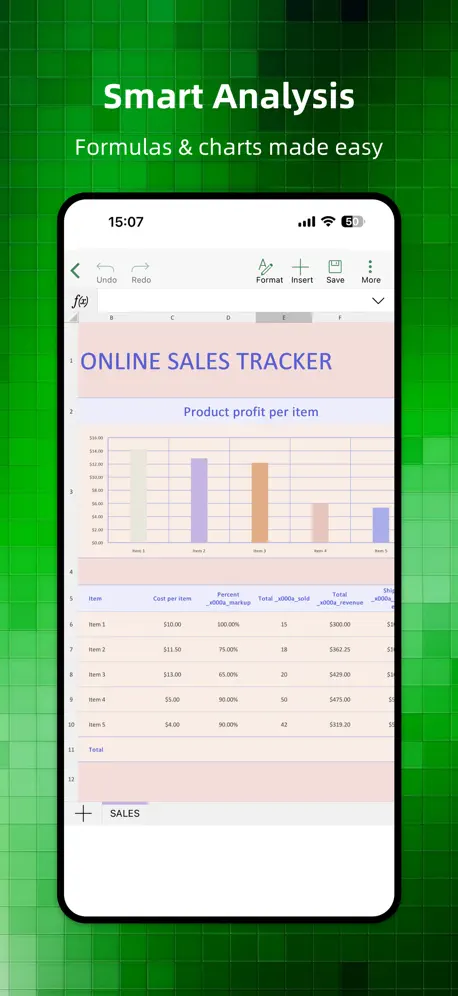
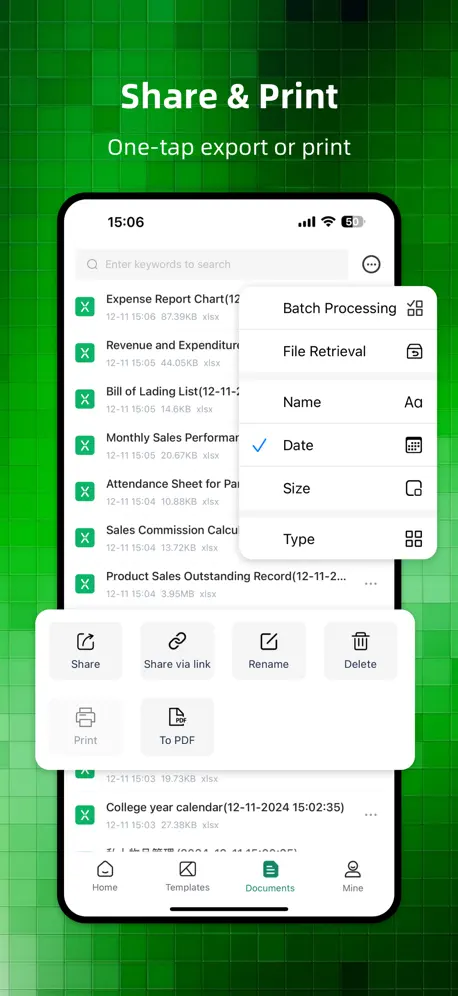
How much does Spreadsheets Editor-XLS Reader cost?
Prices are current as of 6 Oct 2026.
3 subscriptions from $4.99
In the United States, Spreadsheets Editor-XLS Reader has 3 subscriptions priced $4.99 – 12.99.
| Subscription | Period | Price |
|---|---|---|
| Monthly Membership | Monthly | $4.99 |
| Annual Membership | Annual | $9.99 |
| Yearly Membership | Annual | $12.99 |
2 one-time purchases from $12.99
In the United States, Spreadsheets Editor-XLS Reader has 2 one-time purchases priced $12.99 – 29.99.
| Product | Price |
|---|---|
| Lifetime Membership Discount | $12.99 |
| Lifetime Membership | $14.99 – 29.99 |
See what Spreadsheets Editor-XLS Reader costs in all 175 countries →
10+ alternatives to Spreadsheets Editor-XLS Reader
| Spreadsheets Editor-XLS Reader |   Speed Dialer+ Speed Dialer+ |   SunTable-Spreadsheet view&edit SunTable-Spreadsheet view&edit |   转盘鸭 -- AI大转盘帮你完成小决定 转盘鸭 -- AI大转盘帮你完成小决定 |   XLSX Spreadsheet-Sheets Editor XLSX Spreadsheet-Sheets Editor |   PDF Master: Editor & Scanner PDF Master: Editor & Scanner |   Unzip Master: RAR 7Z Extractor Unzip Master: RAR 7Z Extractor |   AIPPT Maker - Slides Maker AIPPT Maker - Slides Maker |   AI识动物 AI识动物 | |
|---|---|---|---|---|---|---|---|---|---|
| Rating / 5 | 4.4 | 4.8 | 4.8 | 4.7 | 4.3 | 4.5 | 4.2 | 4.1 | 2.7 |
| Reviews | 458 | 44K | 8.4K | 788 | 137 | 134 | 38 | 33 | 9 |
| Released | 2024 | 2015 | 2022 | 2024 | 2026 | 2022 | 2025 | 2024 | 2025 |
| Monthly price | $4.99 | $0.99 | $1.49 | — | — | $3.99 | — | — | — |
| 3-month price | — | $0.99 | $2.99 | — | — | — | — | — | — |
| Annual price | $9.99 | $0.99 | $6.99 | — | — | $9.99 | — | — | — |
| One-time price | $14.99 | $0.99 | $19.99 | — | — | $19.99 | — | — | — |
The going rate for each plan in United States, in its own currency, shaded from the cheapest price on the row to the dearest. Plans fewer than four in ten of the priced apps sell are left out.
Spreadsheets Editor-XLS Reader reviews
4.4 out of 5, based on 458 reviews.
What people like
- Works great on mobile phones
- Boosts your work efficiency fast
- Easy to share and print
What they complain about
- Ads interrupt you constantly
- Support never actually helps
- Keeps crashing when you open it
- Prices feel way too high
好用的
比较一圈还是这个好用,没有广告满天飞
更新
改版后没那么方便,不好用了
太难用了
根本就是非常难编辑,想给钱吧,又好贵,一年就80多,终身还要180多,widows系统是又好用,还免费。
好用
非常不错的软件,表格手机版使用起来方便快捷,好用的软件值得推荐
一直在當機
打完資料按保存 下一秒整個又不見 到底是在搞笑嗎
还可以
广告多
好用
功能齐全,表格编辑一键搞定,大大提高工作效率
差中极品
密码的 差的不能再差 气死我了 打了好几遍数据卡了全没了
推荐,好用
非常不错的软件,实用使用方便,值得推荐
垃圾
做了发出去还要冲VIP? 那这软件下了有什么用
不错
用了这个表格AI版之后,工作效率提高了很多,导入微信表格很方便,分享和打印都很顺利,真的是职场必备!
我需要退款
扣了198不给我退款,发了邮件也没给我回
很好用的excel表格
手机上编辑excel很方便,模板很丰富,Ai写表格跟实用。
非常差
简直就是垃圾中的战斗机
不实用
会员买了 半天生成不了 最搞笑不能超过100个字 太麻烦了
不给钱啥都用不了是不是
你们是不是穷疯了 我还没开始用还不知道好不好用就开始要钱 哪怕让我们体验一天都行啊
Spreadsheets Editor-XLS Reader price by country
A monthly subscription costs $4.68 in Pakistan and $8.08 in Poland — 1.7× more for the same thing. Below is the going rate for each plan in every country that sells it — the middle price of what the app charges there, in the country's own currency with the dollar equivalent beneath it.
| Country | Monthly | Annual | One-time |
|---|---|---|---|
| Afghanistan | $4.99 | $9.99 | $14.99 |
| Albania | $5.99 | $11.99 | $17.99 |
| Algeria | $4.99 | $9.99 | $14.99 |
| Angola | $4.99 | $9.99 | $14.99 |
| Anguilla | $4.99 | $9.99 | $14.99 |
| Antigua And Barbuda | $4.99 | $9.99 | $14.99 |
| Argentina | $4.99 | $9.99 | $14.99 |
| Armenia | $5.99 | $11.99 | $17.99 |
| Australia | A$7.99$5.75 | A$14.99$10.78 | A$22.99$16.54 |
| Austria | €5.99$6.97 | €9.99$11.62 | €17.99$20.92 |
| Azerbaijan | $4.99 | $9.99 | $17.99 |
| Bahamas | $4.99 | $9.99 | $14.99 |
| Bahrain | $4.99 | $9.99 | $14.99 |
| Barbados | $5.99 | $11.99 | $17.99 |
| Belarus | $5.99 | $11.99 | $17.99 |
| Belgium | €5.99$6.97 | €9.99$11.62 | €17.99$20.92 |
| Belize | $4.99 | $9.99 | $14.99 |
| Benin | $5.99 | $11.99 | $17.99 |
| Bermuda | $4.99 | $9.99 | $14.99 |
| Bhutan | $4.99 | $9.99 | $14.99 |
| Bolivia | $4.99 | $9.99 | $14.99 |
| Bosnia & Herzegovina | €5.99$6.97 | €9.99$11.62 | €17.99$20.92 |
| Botswana | $4.99 | $9.99 | $14.99 |
| Brazil | R$24.90$4.88 | R$49.90$9.78 | R$99.90$19.59 |
| British Virgin Islands | $4.99 | $9.99 | $14.99 |
| Brunei Darussalam | $4.99 | $9.99 | $14.99 |
| Bulgaria | €4.99$5.80 | €9.99$11.62 | €17.99$20.92 |
| Burkina Faso | $4.99 | $9.99 | $14.99 |
| Cambodia | $4.99 | $9.99 | $14.99 |
| Cameroon | $5.99 | $11.99 | $17.99 |
| Canada | CA$6.99$5.07 | CA$12.99$9.41 | CA$19.99$14.49 |
| Cape Verde | $4.99 | $9.99 | $14.99 |
| Cayman Islands | $4.99 | $9.99 | $14.99 |
| Chad | $4.99 | $9.99 | $14.99 |
| Chile | CLP 5,990$6.41 | CLP 9,990$10.69 | CLP 17,990$19.26 |
| China | CN¥38.00$5.66 | CN¥68.00$10.13 | CN¥98.00$14.61 |
| Colombia | COP 24,900$7.96 | COP 49,900$15.96 | COP 69,900$22.35 |
| Congo | $4.99 | $9.99 | $14.99 |
| Congo, Democratic Republic | $4.99 | $9.99 | $14.99 |
| Costa Rica | $4.99 | $9.99 | $14.99 |
| Cote Divoire | $5.99 | $11.99 | $17.99 |
| Croatia | €5.99$6.97 | €9.99$11.62 | €17.99$20.92 |
| Cyprus | €5.99$6.97 | €9.99$11.62 | €17.99$20.92 |
| Czech Republic | CZK 129.00$6.20 | CZK 249.00$11.96 | CZK 399.00$19.16 |
| Denmark | DKK 39.00$6.07 | DKK 89.00$13.84 | DKK 129.00$20.06 |
| Dominica | $4.99 | $9.99 | $14.99 |
| Dominican Republic | $4.99 | $9.99 | $14.99 |
| Ecuador | $4.99 | $9.99 | $14.99 |
| Egypt | EGP 249.99$4.90 | EGP 499.99$9.80 | EGP 799.99$15.68 |
| El Salvador | $4.99 | $9.99 | $14.99 |
| Estonia | €5.99$6.97 | €9.99$11.62 | €17.99$20.92 |
| Fiji | $4.99 | $9.99 | $14.99 |
| Finland | €5.99$6.97 | €9.99$11.62 | €17.99$20.92 |
| France | €5.99$6.97 | €9.99$11.62 | €17.99$20.92 |
| Gabon | $4.99 | $9.99 | $14.99 |
| Gambia | $4.99 | $9.99 | $14.99 |
| Georgia | $5.99 | $11.99 | $17.99 |
| Germany | €5.99$6.97 | €9.99$11.62 | €17.99$20.92 |
| Ghana | $5.99 | $11.99 | $17.99 |
| Greece | €5.99$6.97 | €9.99$11.62 | €17.99$20.92 |
| Grenada | $4.99 | $9.99 | $14.99 |
| Guatemala | $4.99 | $9.99 | $14.99 |
| Guinea-bissau | $4.99 | $9.99 | $14.99 |
| Guyana | $4.99 | $9.99 | $14.99 |
| Honduras | $4.99 | $9.99 | $14.99 |
| Hong Kong | HK$38.00$4.85 | HK$88.00$11.22 | HK$118.00$15.05 |
| Hungary | HUF 1,990$6.36 | HUF 4,490$14.36 | HUF 6,990$22.35 |
| Iceland | $5.99 | $11.99 | $17.99 |
| India | ₹499.00$5.26 | ₹999.00$10.53 | ₹1,499.00$15.81 |
| Indonesia | IDR 89,000$5.05 | IDR 169,000$9.59 | IDR 249,000$14.12 |
| Iraq | $4.99 | $9.99 | $14.99 |
| Ireland | €5.99$6.97 | €9.99$11.62 | €17.99$20.92 |
| Israel | ₪17.90$5.93 | ₪34.90$11.56 | ₪49.90$16.52 |
| Italy | €5.99$6.97 | €9.99$11.62 | €17.99$20.92 |
| Jamaica | $4.99 | $9.99 | $14.99 |
| Japan | ¥800$5.20 | ¥1,500$9.75 | ¥2,500$16.25 |
| Jordan | $4.99 | $9.99 | $14.99 |
| Kazakhstan | KZT 2,490.00$5.48 | KZT 4,990.00$10.99 | KZT 8,990.00$19.79 |
| Kenya | $5.99 | $11.99 | $17.99 |
| Kosovo | €5.99$6.97 | €9.99$11.62 | €17.99$20.92 |
| Kuwait | $4.99 | $9.99 | $14.99 |
| Kyrgyzstan | $4.99 | $9.99 | $14.99 |
| Lao Peoples Democratic Republic | $4.99 | $9.99 | $14.99 |
| Latvia | €5.99$6.97 | €9.99$11.62 | €17.99$20.92 |
| Lebanon | $4.99 | $9.99 | $14.99 |
| Liberia | $4.99 | $9.99 | $14.99 |
| Libya | $4.99 | $9.99 | $14.99 |
| Lithuania | €5.99$6.97 | €9.99$11.62 | €17.99$20.92 |
| Luxembourg | €5.99$6.97 | €9.99$11.62 | €17.99$20.92 |
| Macao | $4.99 | $9.99 | $14.99 |
| Macedonia | $4.99 | $9.99 | $14.99 |
| Madagascar | $4.99 | $9.99 | $14.99 |
| Malawi | $4.99 | $9.99 | $14.99 |
| Malaysia | MYR 22.90$5.64 | MYR 49.90$12.29 | MYR 69.90$17.22 |
| Maldives | $4.99 | $9.99 | $14.99 |
| Mali | $4.99 | $9.99 | $14.99 |
| Malta | €5.99$6.97 | €9.99$11.62 | €17.99$20.92 |
| Mauritania | $4.99 | $9.99 | $14.99 |
| Mauritius | $4.99 | $9.99 | $17.99 |
| Mexico | MX$99.00$5.85 | MX$199.00$11.75 | MX$299.00$17.66 |
| Micronesia | $4.99 | $9.99 | $14.99 |
| Moldova | $5.99 | $11.99 | $17.99 |
| Mongolia | $4.99 | $9.99 | $14.99 |
| Montenegro | €4.99$5.80 | €9.99$11.62 | €12.99$15.10 |
| Montserrat | $4.99 | $9.99 | $14.99 |
| Morocco | $4.99 | $9.99 | $14.99 |
| Mozambique | $4.99 | $9.99 | $14.99 |
| Myanmar | $4.99 | $9.99 | $14.99 |
| Namibia | $4.99 | $9.99 | $14.99 |
| Nauru | $4.99 | $9.99 | $14.99 |
| Nepal | $5.99 | $11.99 | $17.99 |
| Netherlands | €5.99$6.97 | €9.99$11.62 | €17.99$20.92 |
| New Zealand | NZ$9.99$5.84 | NZ$19.99$11.69 | NZ$29.99$17.54 |
| Nicaragua | $4.99 | $9.99 | $14.99 |
| Niger | $4.99 | $9.99 | $14.99 |
| Nigeria | NGN 7,900.00$5.98 | NGN 14,900.00$11.27 | NGN 24,900.00$18.83 |
| Norway | NOK 59.00$6.39 | NOK 129.00$13.96 | NOK 199.00$21.54 |
| Oman | $4.99 | $9.99 | $14.99 |
| Pakistan | PKR 1,300$4.68 | PKR 2,900$10.45 | PKR 3,900$14.05 |
| Palau | $4.99 | $9.99 | $14.99 |
| Panama | $4.99 | $9.99 | $14.99 |
| Papua New Guinea | $4.99 | $9.99 | $14.99 |
| Paraguay | $4.99 | $9.99 | $14.99 |
| Peru | PEN 19.90$5.94 | PEN 39.90$11.91 | PEN 69.90$20.87 |
| Philippines | ₱299.00$4.78 | ₱499.00$7.98 | ₱999.00$15.97 |
| Poland | PLN 29.99$8.08 | PLN 49.99$13.47 | PLN 69.99$18.87 |
| Portugal | €5.99$6.97 | €9.99$11.62 | €17.99$20.92 |
| Qatar | QAR 19.99$5.49 | QAR 39.99$10.99 | QAR 49.99$13.73 |
| Romania | RON 29.99$6.63 | RON 49.99$11.06 | RON 79.99$17.70 |
| Russia | RUB 449.00$5.20 | RUB 899.00$10.40 | RUB 1,290.00$14.93 |
| Rwanda | $4.99 | $9.99 | $14.99 |
| Sao Tome & Principe | $4.99 | $9.99 | $14.99 |
| Saudi Arabia | SAR 19.99$5.33 | SAR 39.99$10.66 | SAR 59.99$16.00 |
| Senegal | $5.99 | $11.99 | $17.99 |
| Serbia | €5.99$6.97 | €9.99$11.62 | €17.99$20.92 |
| Seychelles | $4.99 | $9.99 | $14.99 |
| Sierra Leone | $4.99 | $9.99 | $14.99 |
| Singapore | SGD 6.98$5.54 | SGD 14.98$11.89 | SGD 19.98$15.86 |
| Slovakia | €5.99$6.97 | €9.99$11.62 | €17.99$20.92 |
| Slovenia | €5.99$6.97 | €9.99$11.62 | €17.99$20.92 |
| Solomon Islands | $4.99 | $9.99 | $14.99 |
| South Africa | ZAR 99.99$6.25 | ZAR 199.99$12.50 | ZAR 299.99$18.75 |
| South Korea | ₩6,600$4.92 | ₩14,000$10.44 | ₩25,000$18.64 |
| Spain | €5.99$6.97 | €9.99$11.62 | €17.99$20.92 |
| Sri Lanka | $4.99 | $9.99 | $14.99 |
| St. Kitts and Nevis | $4.99 | $9.99 | $14.99 |
| St. Lucia | $4.99 | $9.99 | $14.99 |
| St. Vincent & The Grenadines | $4.99 | $9.99 | $14.99 |
| Suriname | $4.99 | $9.99 | $14.99 |
| Swaziland | $4.99 | $9.99 | $14.99 |
| Sweden | SEK 69.00$7.19 | SEK 129.00$13.45 | SEK 199.00$20.75 |
| Switzerland | CHF 5.00$6.17 | CHF 10.00$12.35 | CHF 14.00$17.28 |
| Taiwan | NT$150.00$4.71 | NT$320.00$10.04 | NT$490.00$15.37 |
| Tajikistan | $4.99 | $9.99 | $14.99 |
| Tanzania | TZS 14,900.00$5.63 | TZS 29,900.00$11.30 | TZS 39,900.00$15.08 |
| Thailand | THB 199.00$6.05 | THB 399.00$12.13 | THB 499.00$15.17 |
| Tonga | $4.99 | $9.99 | $14.99 |
| Trinidad and Tobago | $4.99 | $9.99 | $14.99 |
| Tunisia | $4.99 | $9.99 | $14.99 |
| Turkey | TRY 229.99$4.74 | TRY 449.99$9.28 | TRY 799.99$16.50 |
| Turkmenistan | $4.99 | $9.99 | $14.99 |
| Turks and Caicos | $4.99 | $9.99 | $14.99 |
| Uganda | $5.99 | $11.99 | $17.99 |
| Ukraine | $5.99 | $11.99 | $17.99 |
| United Arab Emirates | AED 19.99$5.45 | AED 39.99$10.90 | AED 59.99$16.35 |
| United Kingdom | £4.99$6.76 | £9.99$13.54 | £14.99$20.31 |
| United States | $4.99 | $9.99 | $14.99 |
| Uruguay | $4.99 | $9.99 | $14.99 |
| Uzbekistan | $4.99 | $9.99 | $14.99 |
| Vanuatu | $4.99 | $9.99 | $14.99 |
| Venezuela | $4.99 | $9.99 | $14.99 |
| Vietnam | ₫129,000$4.97 | ₫249,000$9.60 | ₫499,000$19.24 |
| Yemen | $4.99 | $9.99 | $14.99 |
| Zambia | $5.99 | $11.99 | $17.99 |
| Zimbabwe | $5.99 | $11.99 | $17.99 |
Spreadsheets Editor-XLS Reader FAQ
- Is Spreadsheets Editor-XLS Reader free?
- Yes. The app and its basic features are free, in all 175 countries it sells in. Premium features are paid: they start from $4.99 (US), across 3 subscriptions and 2 one-time purchases.
- How much does Spreadsheets Editor-XLS Reader cost per month?
- Monthly Membership is $4.99 (US). The annual plan works out cheaper per month: $9.99 – 12.99 a year.
- Does Spreadsheets Editor-XLS Reader have a free trial?
- No. None of its offers (US) come with a free trial.
- Where is Spreadsheets Editor-XLS Reader cheapest?
- A monthly subscription costs PKR 1,300 (≈$4.68) in Pakistan and PLN 29.99 (≈$8.08) in Poland, its cheapest and dearest countries.
- What are the best alternatives to Spreadsheets Editor-XLS Reader?
- Speed Dialer+ (4.8 from 43,965 reviews, premium from $0.99), SunTable-Spreadsheet view&edit (4.8 from 8,444 reviews, premium from $1.49) and 转盘鸭 -- AI大转盘帮你完成小决定 (4.7 from 788 reviews).
Spreadsheets Editor-XLS Reader download
Last updated 1 month ago.
Spreadsheets Editor-XLS Reader sells in 175 countries. It was released 1 year and 9 months ago, on 13 Dec 2024. It holds a 4.4 rating from 458 reviews.
Supports 2 languages: English, Chinese.
How much does Spreadsheets Editor-XLS Reader make?
Third-party estimates for the last 30 days, worldwide — not the store's own figures, which Apple publishes for nobody.
Revenue by plan
- One-time 50%
- Monthly 38%
- Annual 12%
Revenue by country
- China 80%
- United States 7%
- Taiwan 6%
- Singapore 2%