3D Object Capture|Room Scanner
No in-app products collected for this app.
| Rating | |||
|---|---|---|---|
| United States | 23%60 | 4.35 | |
| Germany | 11%30 | 4.33 | |
| Taiwan | 11%29 | 4.76 | |
| Japan | 10%26 | 4.23 | |
| Hong Kong | 6%17 | 4.41 | |
| Russia | 5%12 | 4.75 | |
| Canada | 4%11 | 4.91 | |
| Austria | 3%9 | 4.33 | |
| Brazil | 3%7 | 4.43 | |
| United Kingdom | 3%7 | 3.57 | |
| Italy | 2%4 | 3.75 | |
| United Arab Emirates | 1%3 | 4.67 | |
| Switzerland | 1%3 | 3.67 | |
| South Korea | 1%3 | 4.67 |
Description
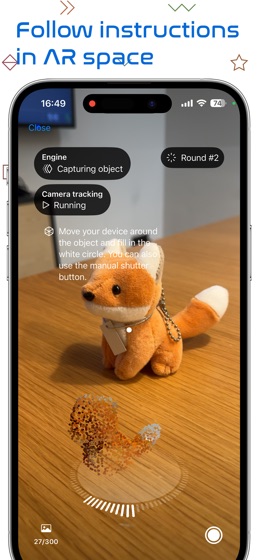
Turn your iPhone or iPad into a powerful 3D scanner. Point at an object, follow the AR guidance, and get a textured 3D model — built entirely on your device. No account. No cloud processing. No subscription.
SCAN OBJECTS
Perfect for artworks, hand-crafted items, toys, anime figures, and more:
1. Point at the object — the app gauges its size and places a bounding box you can adjust
2. Slowly circle the object — photos are taken automatically; just light up the ring of white dots
3. Follow the guided passes with short tutorial videos: flip the object, or scan from a lower angle and the top
4. Generate the model on your device and preview it in AR
5. Share it in a few taps
SCAN ROOMS — TWO WAYS
Floor plan: walk through your space and watch walls, doors, windows, and furniture get outlined live. Scan several rooms and merge them into one structure. You get an interactive 3D model plus a measured 2D floor plan: floor area, wall lengths and height, door and window counts — tap any piece of furniture for its dimensions.
Photo-textured room mesh (LiDAR): capture a true 3D mesh of your room with photos baked in as seam-free textures. The app shoots high-resolution (up to 4K HDR) photos hands-free while a color tint shows what you have covered. Then drive a hovering robot through your scan in third person, with real collision against your scanned walls and furniture. Exploring is free; exporting and sharing room meshes requires Pro.
EXPORT & SHARE
.usdz — mobile friendly, opens straight into AR Quick Look
.obj with textures — for professional 3D software (Pro)
.stl — for 3D printing (Pro); room meshes export with hole filling, smoothing, and a detail slider
Share via Messages, Mail, AirDrop, or save to Files
Create a public iCloud Drive download link anyone can open — no app needed (iOS 26 or later)
Publish to Sketchfab and share your model as a link or QR code
CAD-STYLE FLOOR PLAN EXPORTS
PNG image or a CAD-styled multi-page PDF report with dimension lines, a scale bar, and wall/object schedules (2 free exports included)
Layered DXF that opens in your CAD software (Pro)
Plan your furniture: draw annotation boxes with exact real-world sizes on the floor plan — they turn red if they would collide with walls or existing furniture (Pro)
MEASURE
See the real-world width, height, and depth of your scans, and measure point-to-point on 3D models and 2D floor plans, in your local units (2 free measuring sessions included).
AND MORE
Import 10 or more of your own photos from Photos or Files and reconstruct them into a 3D model on-device (Pro)
Try it instantly with a free downloadable example capture
Transfer captures to the companion Mac app for maximum-detail models
Localized in 16 languages
Pro is a one-time purchase — no subscription, works on all your devices
REQUIREMENTS
Scanning requires a LiDAR-equipped iPhone Pro or iPad Pro. Captured data stays on your device unless you choose to share it.