Ooma Setup
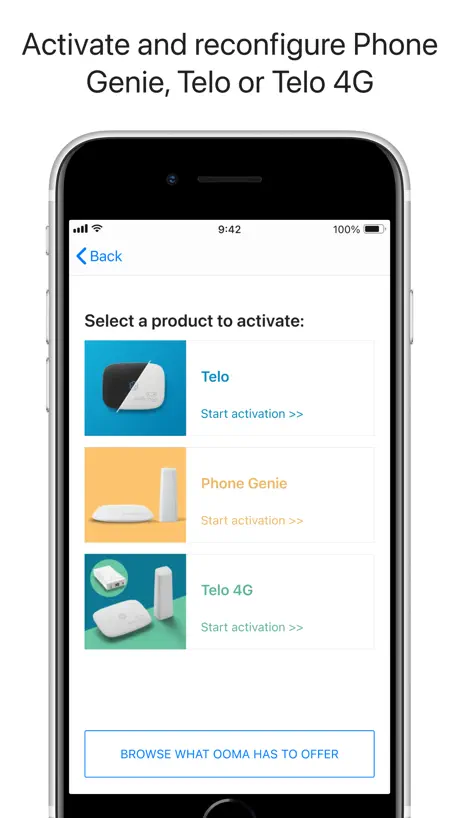
Activate and Reconfigure Telo
How much does Ooma Setup cost?
Prices are current as of 19 Nov 2026.
Ooma Setup has no in-app products on record in the United States.
10+ alternatives to Ooma Setup
| Ooma Setup |   Mobile Link for Generators |   Airthings |   Vonage Home Extensions |   Permission Slip by DeleteMe |   SofaBaton |   T-Mobile Fiber: Gigaspire |   Pocket Geek Home |   IQ Fiber Smart WiFi |   Accushield Mobile |   HINT Control | |
|---|---|---|---|---|---|---|---|---|---|---|---|
| Rating / 5 | 4.9 | 4.8 | 4.4 | 4.3 | 4.7 | 2.7 | 3.8 | 4.3 | 4.6 | 2.9 | 4.3 |
| Reviews | 2.1K | 98K | 6.2K | 5.9K | 5.7K | 445 | 358 | 329 | 167 | 164 | 115 |
| Released | 2018 | 2014 | 2022 | 2011 | 2022 | 2019 | 2025 | 2020 | 2022 | 2021 | 2023 |
| Monthly price | — | $7.49 | — | — | $9.99 | — | — | — | — | — | — |
| Annual price | — | $74.99 | — | — | — | — | — | — | — | — | — |
The going rate for each plan in United States, in its own currency, shaded from the cheapest price on the row to the dearest.
Ooma Setup reviews
4.9 out of 5, based on 2,118 reviews.
What people like
- Setup is easy and fast
- Step-by-step instructions work well
- No computer needed for setup
What they complain about
- Setup fails often on newer devices
- Customer support is rude or absent
- Hidden charges surprise you later
AWESOME!!
I’m so happy I did not have to wait for batch orders or any of that ridiculousness. We tried a previous company that couldn’t work with a high security Wi-Fi but OOMA could do it and was set up within minutes!!!
Non-consensual
Be aware this is a dark pattern practicing company. It’s borderline scam behavior. After having started my service, about two months in an email allegedly appeared that I paid little attention to and without any consent that I’m aware of, my account was changed to their upgraded service. The cost went from under seven dollars to over 17 per month. The icing on that cake is you can’t just change it back, you have to call them. I’m not trying to get my money back, I started using it as I planned to move my home phone number there to reduce my phone budget. After this experience I’m willing to pay an AT&T or other company with some real reputation more than that 17 dollars a month just to not be bleeped over by these people.
Doesn’t handle hidden networks
The app works OK but doesn’t allow you to configure Telo (Air 2) for a hidden network.
Setup Review + DC Statehood Now
I had quite a bit of issues with setup and I think process could be improved with more clear instructions and more troubleshooting options. No complaints so far on the device. Also, I’m required to put in my address, but there was no option in the state dropdown for DC so I had to choose Maryland. I mean, I know DC is not a state and doesn’t have any Congress members but… et tu Ooma? #taxationwithoutrepresentation. For troubleshooting: I was not able to connect Telo Air 2 to bluetooth (tried 2 mobile devices and confirmed all the permissions needed). Troubleshooting link had an image that described an alternate wired setup involving a computer, when most laptops do not have ethernet jacks and I feel like a lot of people these days do not have desktops. It would be nice to add another option: just connect the device into the back of your router or an Ethernet jack in your home if ethernet is setup. When I did that, it worked like magic. I waited a few minutes and the light turned blue. It would be nice to (1) have the alternate explanation on that screen and (2) explain what to do after. If you have the same problem Claude or Chatgpt walks you through all kinds of options. (I tried to use human help first don’t @ me!)
Whitelist editing is missing
I’ve setup a call whitelist (trusted circle) but this app is unable to edit the whitelist. Instead I have to go to a laptop and load the website as the website is also blocked from fully working on a mobile device. I’d really like to be able to add a friend to my whitelist for my kids to call without having to drive home and use my computer to do it. 😢
Ooma Telo Air 2
So far, everything is functioning perfectly.
Loses Functionality!
Very disappointed with Ooma. First, they screwed up the LTE backup service by replacing the USB tower modem with a USB stick that cannot use any extension usb cable to improve reception. They failed to properly verify and test the new connection which requires the usb LTE modem to be connected directly to the telos usb port and requires a 90° usb M-F elbow. Add any length usb extension cable and the modem goes into a rolling boot and doesn’t connect. The final straw is they update the app and access to the LTE adapter and signals strength are gone. Tech support is not aware of this and don’t seem to care. Looking to move to another more reliable phone service soon!
New App
The old app was better. It opened to a full screen making it easier to find what you wanted. Not just a small picture in the middle of the screen. The old icon was nicer, too.
Easy setup
Straight forward and Easy setup
Terrible App
Went to set up my new Telo and make a new account as a new customer. Got all the way through to the part where you pick a phone number and after selecting the number the next screen throws up an error telling me to call customer service. I started all over again and the same error happened. I had to call the customer service number and was told that I had to set up it up online. What good is this app when you were instructed to set it up on the app for the most convenient way instead of going online. Very disappointed in this company and its app for not being able to set it up through the app.
Very Basic Functionality
The Ooma Telo setup app is intended to only perform very basic setup of the device. Once this setup has been completed, the app doesn’t offer much value. One huge problem with the app is that it does not recognize the replacement LTE Adapter device that Ooma recently sent out (June 2022) to replace the old LTE Adapter, in order to move LTE connectivity from the old Sprint LTE network to the T-Mobile LTE network. While the new LTE Adapter does work, the app indicates that the LTE Adapter is disconnected. So it’s not useful at all now, because the app used to be able to check the LTE signal strength, and could be used to find an optimum location for the LTE Adapter. Please update the app to recognize the new LTE Adapter.
MLC
The setup is well documented, easy to follow, and was done without any issues. Thanks
Poor reliability
I have been a user of the phone and security services for approximately 6 months, and the security system has been plagued with technical glitches errors since day one. It’s a miracle if the system makes it a week without offline failures, complete resets, app reinstall. Ooma just doesn’t have performance you can rely on. Between the Telo box losing connection with ‘security service’ and the app randomly failing with ‘server error’ and ‘server not found’ messages it’s really a complete waste of time. The only thing that actually works with the Ooma platform is the phone service, don’t bother with their very unstable unreliable and extremely frustrating ‘smart security’ Buyer beware
Canceling is a Pain!!
I gave 3 stars because it was such a pain to cancel. The ooma worked great when I was using it but when I wasn’t using it and wanted to cancel it. I felt very pressured to keep from Ooma customer service. It was so frustrating. Then my husband was not happy with me when it didn’t get canceled the first time I tried to do it. So it took to calls to get it canceled.
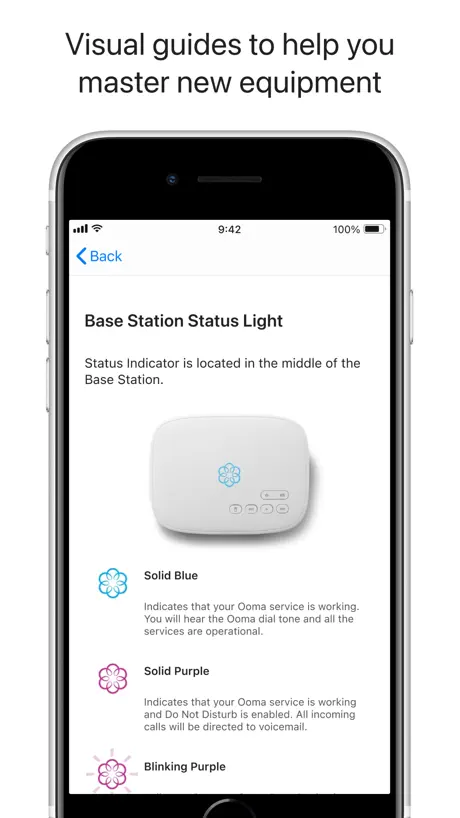
Great support with just the right amount of help and pictures in the set up book to guide me clear.
Thanks for the help.
The activation request failed
“Please call customer service” You call them and nobody picks up. You google the problem and there are tons of posts of the same problem with no replies from the company. This app is poorly executed and the customer support is nonexistent.
Didn’t work like expected
Tried to set up my new Telo Air 2. Could never get past the Agreement page. Would not let me check the boxes. Had to manually set it up and the go back to app and click “Already have an account” on startup page, then go to Bluetooth page to finish setup. Concept is good for setting up Telo using mobile device if you don’t have a computer but just didn’t work like it was supposed to. I was using an iPhone 8+.
Easy setup.
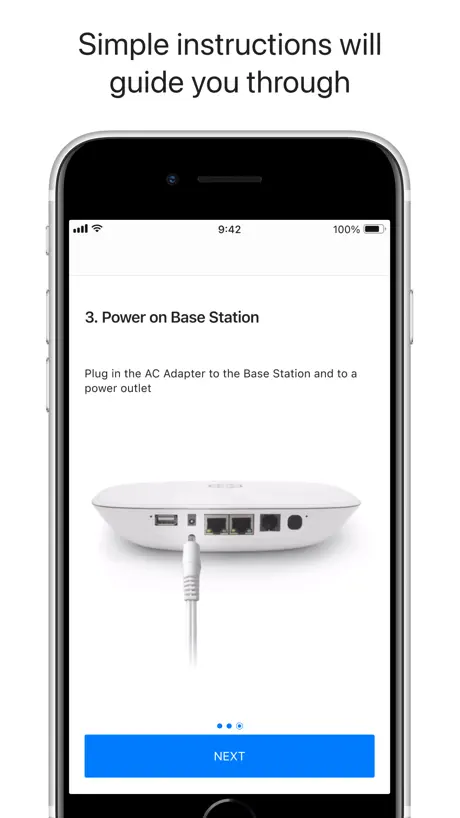
The app and system walk through the setup process step by step.
Tech support via chat is useless
The guy in tech support would not let me ask my question. He kept suggesting fixes for issues I didn’t have. B.Solis is the most arrogant and condescending tech agent I’ve talked to in years. I copy/pasted the entire session into an email if anyone is interested
Use case limited to new setup only
I needed to upgrade my hardware because I lost it - I downloaded this app because the guide told me to buy i couldn’t setup the new device because I was trying to transfer an old number from an existing device to this new one. I still had to call technical support so this was pretty much a single use case app.
Setup
Setup was very easy and did not take long. Now to port my number.
No use if you’re replacing an older one
I can’t be the only person in the universe to need to do this, but the app wasn’t any help. It also couldn’t link to the base via Bluetooth with very little help other than switch off and on. A total waste of time.
Couldn’t connect
I couldn’t get this to connect to my Ooma. I think its possibly because I still have a gen 1 Ooma? Thats how long my Ooma has lasted! My Ooma does not have the QR code so I had to enter the code manually. I enter the code, i see the ooma light blink red a few time. Then when I try to connect it just shows that its attempting to connect but it never does.
Easy Setup
Installed without a hitch which rarely happens with technology. Loved the step by step instructions. Well done!
Waste of time. No Support available.
Gave up on using App to connect to Telo 2. There is no Bluetooth enabled on Telo. Apparently this App and connectivity directions must be configured for an older wired model not the WiFi model. Save yourself the aggravation just use the Ethernet (home) port direct to a computer. Set your computer network to DHCP. (They left that important step out.)
Smooth setup
This review is only for app. I don’t have any experience yet with the actual service. The entire flow of setting up an Ooma adapter was smooth and well-designed. Didn’t need to go to a computer.
Fraudulent billing
Check your monthly bill! Ooma changed my billing from their Basic service to their “Premium” service without my authorization and began charging me over $17 per month.
It does what advertised, have a Telo air 2
I had Telo couple years ago and then I cancelled because either I didn’t have patience dealing with troubleshooting my box , but now I’m back and Ooma has improved very very good , it took few days to port my number from Comcast , and even the wireless feature is a plus , I made a good choice switching back to Ooma because comcast it was charging me more every year, my whole bill went out of whack , you won’t regret going with Ooma , no brained…..
Device setup keeps bombing
This app keeps bombing on me and won’t let me set up my device!
Ooma Setup FAQ
- Is Ooma Setup free?
- Yes. The app is free, in all 175 countries it sells in, and it sells nothing inside it.
- Does Ooma Setup have a free trial?
- No. None of its offers (US) come with a free trial.
- What are the best alternatives to Ooma Setup?
- Mobile Link for Generators (4.8 from 98,366 reviews, premium from $3.39), Airthings (4.4 from 6,198 reviews) and Vonage Home Extensions (4.3 from 5,903 reviews).
Ooma Setup download
Last updated 3 days ago.
Ooma Setup sells in 175 countries. It was released 8 years and 10 months ago, on 12 Jan 2018. It holds a 4.9 rating from 2,118 reviews.
Supports 1 language: English.
How much does Ooma Setup make?
Third-party estimates for the last 30 days, worldwide — not the store's own figures, which Apple publishes for nobody.