Neo Smart Blinds
How much does Neo Smart Blinds cost?
Prices are current as of 20 Nov 2026.
Neo Smart Blinds has no in-app products on record in the United States.
10+ alternatives to Neo Smart Blinds
| Neo Smart Blinds |   TaHoma by Somfy |   Somfy myLink |   Weiser |   Bond Home |   JennAir |   Tuiss SmartView |   TaHoma pro by Somfy |   Connector+ |   AUTOMATE SHADES |   MySmartBlinds | |
|---|---|---|---|---|---|---|---|---|---|---|---|
| Rating / 5 | 3.8 | 4.1 | 4.3 | 4.8 | 4.8 | 4.2 | 4.3 | 4.7 | 2.8 | 2.7 | 2.5 |
| Reviews | 178 | 127K | 11K | 10K | 4.5K | 3K | 2.1K | 631 | 291 | 167 | 110 |
| Released | 2015 | 2021 | 2014 | 2019 | 2019 | 2015 | 2022 | 2021 | 2018 | 2019 | 2015 |
Neo Smart Blinds reviews
3.8 out of 5, based on 178 reviews.
What people like
- Support team is patient and helpful
- Works well with Alexa and Google
- Easy to install the hardware yourself
- App interface is clean and simple
What they complain about
- App takes too long to start up
- No status showing if blind is open
- Setup instructions are missing and confusing
- Schedules often fail or work randomly
Customer service
I was facing a critical problem with the blinds and didn’t know how to fix it because the previous residents did not leave the manual. I only made the effort to email, and after a couple of back and forth, the issue was resolved. Special thanks to Khalil Ladhari for providing clear and instructions and overall diligence.
Painful to use !
CONSTANTLY insists that you sign in again, when all you want to do is close a bloody blind ! PLEASE developers, correct this annoying and completely unnecessary annoyance. You’re only closing blinds FFS it’s hardly a huge security risk !
Excellent app services
I have recently changed my wifi network to 5g which cased the automated blind app disconnected. After splitting the network, I was still facing connection issues. However, the customer support went above and beyond to make sure the app connects to the current wifi network and the automated blind works smoothly. I would highly recommend Neo Smart Blind app.
So so basic
Feels and looks like such old tech. Blinds can be hit and miss as to whether they respond or not. Most annoying an basic issue is there’s no reporting in the app to show if the blind has in fact opened or closed. No idea what’s actually happening. I would choose a different blind manufacturer if I was purchasing now as it’s very disappointing
Worked well for a couple of years but...
I have wasted hours trying to connect my ‘smart’ controller to my WiFi. I have set up a separate 2.4 ‘guest’ network. Closed my mesh 2.4 but this imbecilic app tells me that my password is wrong. Really - I’ve used the same WiFi password for 20 years! I contacted the Neo help desk. They were hopeless and gave no assistance. They also said that I have their latest unit. PS There is an online guide to solve this known problem. It’s quite complicated and time consuming to execute, but it gets the connection problem solved.
Great service
I had an issue with a blind motor not working, And my local dealer just wanted to rip me off, selling me the motor and sending a service rep to install it. So I contacted Neo Smart, They got back to me promptly and told me there was no problem installing it myself and sent me a link to a new motor, there solution saved me over $250.
Poor integration with Alexa
Used to work, but now Alexa can only recognise “rooms” and not individual blinds. Scenes aren’t imported, despite docs saying they can be. No up/down control with Alexa (the controls imported are completely wrong and don’t do anything). Really poor.
Widget and more features
Would be great if you could add widget feature to this app that can reduce a step for controlling blinds. Login to the app takes too long even though I have a good internet connction. After adding rooms, it would be good if I can edit the rooms so I can put my whole home controlling to the top and bedrooms to bottom and living room in the middle section.
Entry level app for electric blinds
Not completely smart at its current stage eg does not show the % open or closed; especially important if you are away, which is most likely when you would use the app over the supplied remote control. I have the louvolite vision blinds.
iOS Shortcuts / Add to Siri
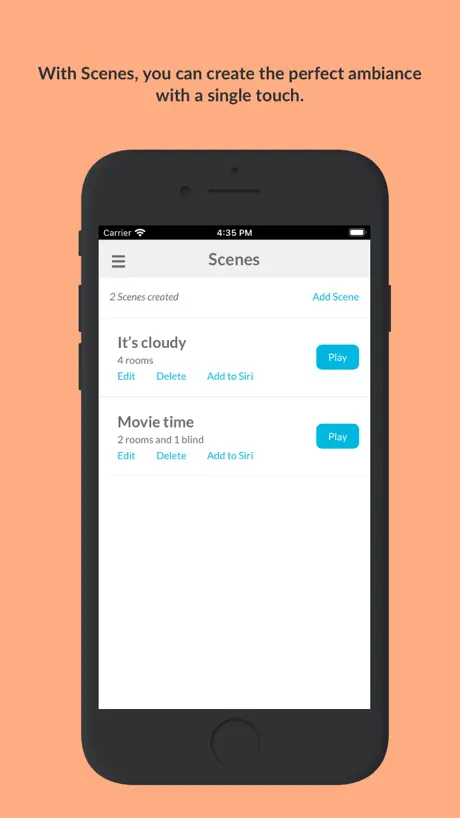
These no longer work, clicking add to Siri in scenes adds the shortcut in the shortcuts App but cannot be run returns an error.
Great support
I had an issue where my favorite setting wasn’t working so I reached out to tech support and they fixed it on the same day by pushing out an update to the Smart Controller. Amazing! Everything works well.
Not working anymore
Since few days some of my blind are not working anymore…. Works with the remote but not the wifi device very annoying when they are program to open and close with the sun
Works ok but could be improved
The rules you can program work fine but there could be some improvement. I suggested by email to Custom Brands Group to allow double condition rules such as open at sunrise but no earlier than 8am. This looks pretty simple to me to code but the person I reached by email told me to call them. When I called the person answered they would pass on the suggestion to the developers but couldn’t in any way give me feedback about my request to let me know if it’s doable and if so give me any idea of a time frame of development. Very poor customer service even though the lady was very nice to me and apologized for such poor service on their end. I hope this review finds the developers and they can code that or minimally provide some feedback on such a simple request.
Usability improvements
Got 6 blinds so far, but the app is lacking. Would be great to have the following: * Keep the schedules on the blinds or the controllers to execute even if the WiFi is not working. * Have schedules on Scenes as well as on individual blinds. * Several favourite positions (software defined). * Enable manual reordering of lists (hold-drag-drop) - rooms, blinds, scenes. * Have grids of rooms to serve as approximate floor plans. * Battery status. * Power switch on the controller.
Latest update has broken shortcuts integration
The app worked very well up until the latest update. This update looks to have broken the shortcuts integration. Please investigate & resolve this issue promptly.
My second review
Khalil is the best! He again fixed an issue caused by AWS outage! If Somfy motors could be compatible with percentage commands (10%-25% etc) it would be even better when using Alexa!🤞🏻👍🏻
Interface not straight forward
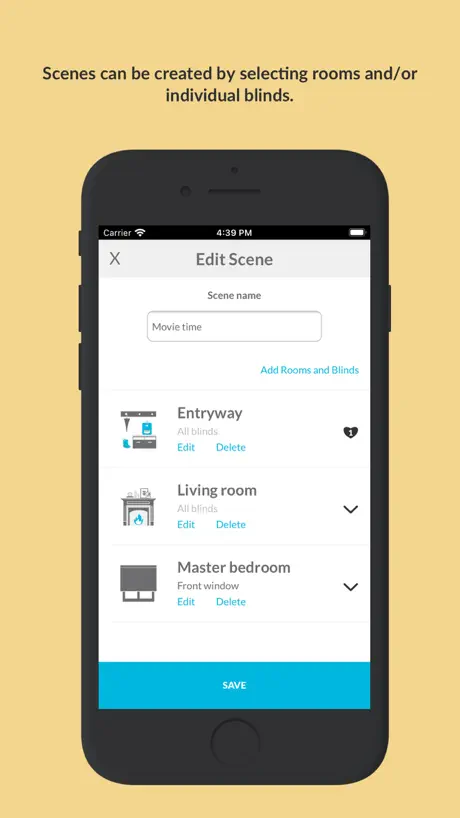
Very strange interface. You can’t create blinds and add them to a room. You have to create a room and then assign a name to a blind and add it to the room. You can only schedule rooms. So, if you want certain blinds to be scheduled (eg, south facing blinds), you have to create a new room and assign the blinds again. However, unless you give the exact same name to the blind the same blind can have multiple names. Also, if you want to remove a blind from a room, you have to delete the room and start all owner. You can create scenes but you can’t schedule the scene. Very confusing and not straight forward.
No bad - but could be a better
First of all it all works rather well. The Hub and app are backwards compatible with my powered blinds they are several years old. The app give you the ability for basic up / Down control but only allows you to control a full room with the basic commands. The secret for advanced control and the ability to voice control single blinds within a group is to use set up scenes in the Neo app. Search for the scene in Alexa app (best way is to disable the Neo app in Alexa and re-add) and then tie that scene into an Alexa routine. With a little patient you can get pretty much everything done via voice. Also my house is quite large and the Louvolite hub doesn’t have any issues communicating with any of the blinds.
Needs improvement
App works but needs the following: battery percentage for each blind, ability to set blind position instead of all open or all closed by percentage, status of blind position open or closed
Ok but slow to open app
App works ok for what is needed however even on the latest phones on a perfect network the app takes way too long to startup.
Great Tech Support!!
I purchased the neo smart blinds roman shades. I was not able to use the favourite option on the app nor with google assistant even though I could use the favourite option on the remote. Antonio tech support took the time investigate the problem and was able to find a problem with the app update which was fixed. It was also great that Antonio sent me updates throughout the process. Everything is working great and I’m enjoying the new features!! Excellent service and great results!
Not good.
Lucky if the app works 50% of the time. No way to tell if blinds are open or closed. Decided to lower my rating as the developers don’t seem interested in actually fixing the app or adding features that should be there. There should be the ability to tell if a blind is up or down. Scheduling may or may not work; and usually only on random blinds. Avoid using this app or their products until they put effort in an make a usable product.
Once it works, it works.
The app is ok, but could seriously use more documentation for actually setting up the blinds. The section “Advanced Settings” has 0 documentation and all of the magic for setting up your blinds, setting limits, adjusting default settings, etc is found there. The app works great with Alexa. Technical Support is excellent.
Poor Responsiveness
Whilst the set up was fairly straightforward the control pad once rooms have been set up is rather unresponsive would be great if it were a little more touch sensative than it is in coming updates
Great Tech Service!
Prompt and friendly service!
Zero documentation on advanced controls
Firstly, to call default limits for blinds “advanced controls” is just plain ridiculous. Then, to provide no documentation, and expect consumer to figure it out for them is just downright customer hostile. Finally, the ux on the advanced control is downright horrendous - “limit” and “Confirm(sync)” are not words that mean anything to people trying to use your product. I hope the developer has some pride in their work, and fixes their terrible app. Also, write some documentation To add some more feedback: 1/ use standard iOS controls. 2/ provide intuitive text in the ui 3/ let consumers set limits for open and closed - it’s not advanced but basic controls required to operate blinds 4/ the increments for “slow mode” is way too small to be useful. 5/ provide a way to skip forward by 5x or 10x
Works well, could have more customization
The app works seamlessly with my Google home. Not sure if this is an incompatibility on the Neo side or Google but you’re not able to ask the system to close blinds halfway via voice control. Only possible if you go into the app and pause where the blinds should stop. Sometimes rollers blinds don’t roll together simultaneously.
Very Basic
It’s an ok app but very basic and looks like an hobbyist developed it rather than an actual company. It seems break if you rename a blind or room, or if you add a blind to two or more rooms even though it is supported functionality. Would be good if it had rooms and zones. Would be good if you could reorder or sort the list of blinds. Would be good if the schedules were displayed in time order. All basic stuff that is missing and becomes problematic when you have multiple blinds.
Fantastic support team
I spent months trying to integrate my smart blinds with matter because for whatever reason, what would otherwise be a simple and easy method of integration was not working properly. After a while of using the Neo smart blinds not integrated with matter I decided to contact support who got my smart controller reset and working again. It’s now working fantastically and I would recommend Neo smart blinds to all who have had it with opening and closing blinds manually.
Broken
Having recently setup my house using version 4.1.4 the app controls have now stopped working and no rooms are displayed when attempting to setup the blinds again.
Pretty good, but needs the following improvements
Siri works well in scenes, but it needs to be part of Apples Home kit app to properly integrate it into an Apple users smart home. Some improved functionality would be helpful, indication that the blind is up, down or in between the upper and lower limits. Being able to reorder blinds in a room by dragging to a new position rather than relying on alpha numeric name order. Beings able to move or copy blinds from room to room without having to set up from scratch. Well done for the app so far, keep going to get that elusive last star!
Siri??
Needs Siri voice controls
Repair Issue
We have 4 zebra blinds on our bow window. One of them stopped working through the app while the other 3 are fine. Called Khalil about the issue. After trying a few things we’ve determined it’s probably a problem with the motor. Khalil sent us one the next day. He was very helpful without any run around. They really do stick to their word when it comes to any warranty issues. I would highly recommend this company.
Needs Apple HomeKit integration
They allow for Google and Amazon support but not Apple HomeKit. 60% of active smartphones in the UK are from Apple.
Scheduling not working
I’m amending my initial one star review as I’ve since received excellent support. The problem I had was that scheduled closure of the blinds via the app produced just a whir and judder but no movement. Scheduled opening and direct commands via the app worked normally. It turned out that my unit needed a firmware updated which was quickly provided and solved the problem. The problem that I mentioned about the app not giving any indication of the blinds status ie open/closed does not seem possible to fix even in future updates.
OK app for basic functionality
Does what it's supposed to do which is remotely open and shut my blinds, also has a scheduler and scene function BUT there is nothing in the app that tells me what the existing state is either open/closed/favourite. Not important if you are stood there watching the blinds but hugely important if you are on holiday for instance and want to know that your instructions have been executed. Can we please have a switch that changes colour for instance like the ewelink app off/black on/blue or closed/black open/green, just a suggestion which for me would deserve 5 ⭐️'
Thank you!
Thank you very much Khalil for your time and and expertise in troubleshooting my blind automation.
Yup so far 1
Will let you know if they fix the issue
Open or closed
Nice app works well only thing I will say is it should indicate if blind open or closed
Great idea could be better
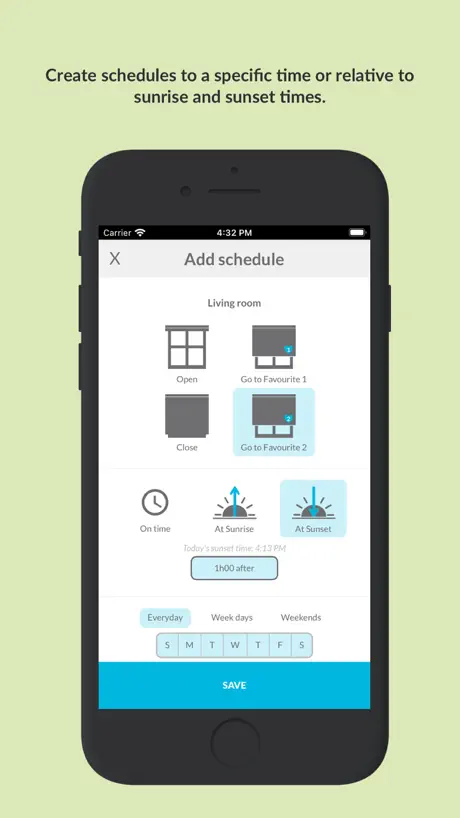
In general the idea of smart blinds is brilliant but if you want to schedule opening or closing it is very difficult to set the time I believe it could be set up easier. Trying to get the correct time is time consuming much easier is to use sunrise and sunset but if you want a different time it is challenging. Maybe the developers could check other Apps where time setting is better.
It’s Fixed!
Thank you Khalil for helping me resolve an issue related to setting the blinds. You were patient helpful and courteous. I wasn’t sure how to adjust the settings. The app works really well. Thank you.
Michael
Poor App even with two controllers our 3 blinds are so intermittent in closing. All are on three schedules open left 7:30am, open right 1pm & close sunset +15mins The open schedules work most of the time but the close schedules only work occasionally. When they fail to close a judder is heard on the blind concerned and it is random to which binds don’t close. Controllers show full Wi-Fi and are within 3 Mtrs of blinds. When close is operated on the app after the failure they close without a problem. Like others some indication of blind completing the operation is required. Very disappointed as although contacted Neo support they have failed to be able to find a solution. They think the blinds are receiving a start an immediate stop signal but haven’t discovered why. I’ll post again if a fix is eventually found.
Great start
A very clean clear responsive app but quite basic at the moment. Looking forward to seeing this app develop over time. Shame there isn’t watch support.
Neo Smart Blinds FAQ
- Is Neo Smart Blinds free?
- Yes. The app is free, in all 175 countries it sells in, and it sells nothing inside it.
- Does Neo Smart Blinds have a free trial?
- No. None of its offers (US) come with a free trial.
- What are the best alternatives to Neo Smart Blinds?
- TaHoma by Somfy (4.1 from 126,787 reviews), Somfy myLink (4.3 from 10,696 reviews) and Weiser (4.8 from 10,196 reviews).
Neo Smart Blinds download
Last updated 12 days ago.
Neo Smart Blinds sells in 175 countries. It was released 11 years ago, on 1 Nov 2015. It holds a 3.8 rating from 178 reviews.
Supports 1 language: English.
How much does Neo Smart Blinds make?
Third-party estimates for the last 30 days, worldwide — not the store's own figures, which Apple publishes for nobody.