
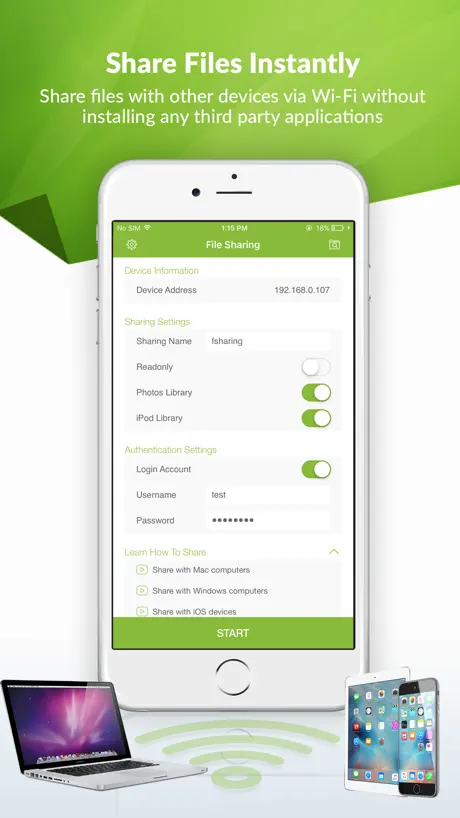
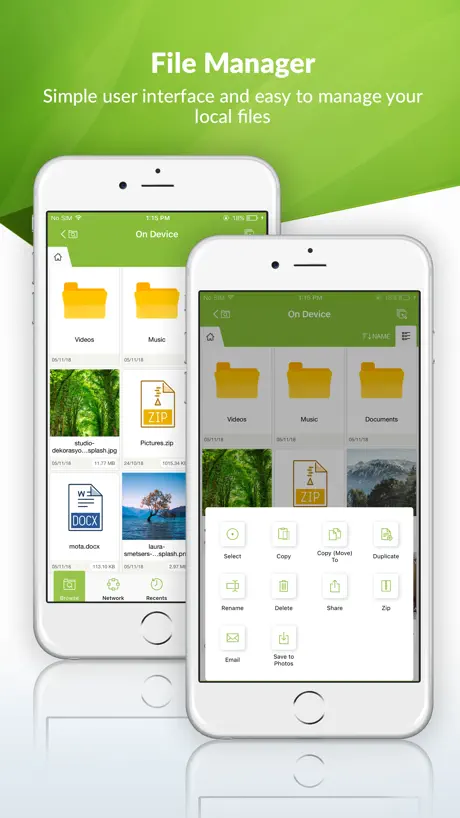
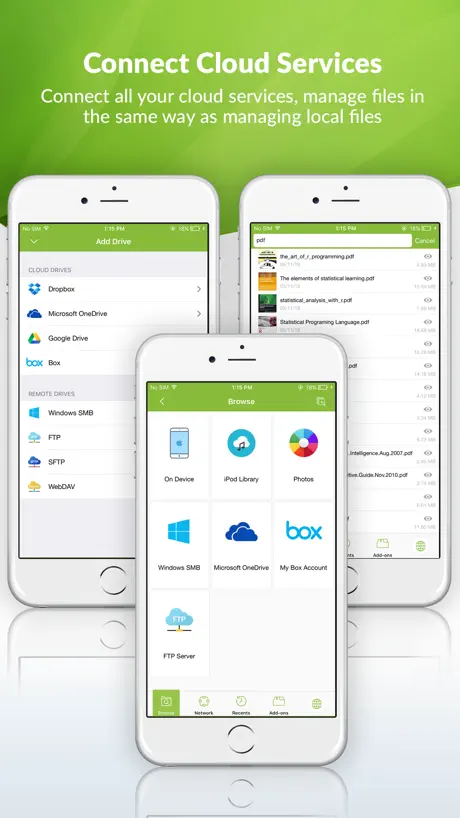
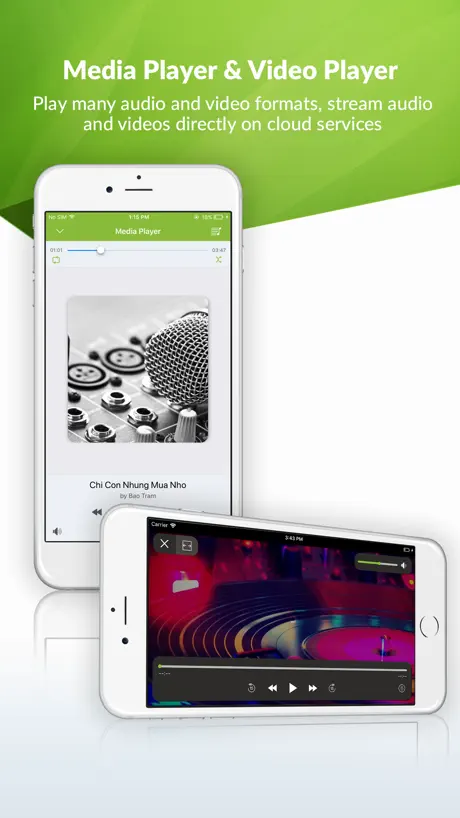
FSharing - Files, File Manager
File explorer, downloader, zip
How much does FSharing - Files, File Manager cost?
Prices are current as of 4 Oct 2026.
6 one-time purchases from $0.00
In the United States, FSharing - Files, File Manager has 6 one-time purchases priced $2.99 – 9.99.
| Product | Price |
|---|---|
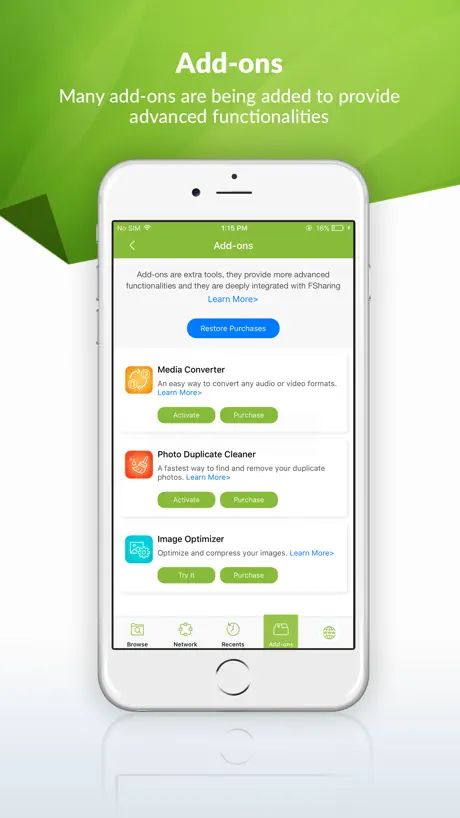
| Video Downloader | $0.00 |
| Image Converter | $2.99 |
| Image Optimizer | $2.99 |
| Photo Duplicate Cleaner | $2.99 |
| Media Converter | $4.99 |
| PRO Version | $9.99 |
See what FSharing - Files, File Manager costs in all 175 countries →
10+ alternatives to FSharing - Files, File Manager
| FSharing - Files, File Manager |   Owlfiles - File Manager Owlfiles - File Manager |   Files - File Manager & Browser Files - File Manager & Browser |   Documents Pro, Download & Edit Documents Pro, Download & Edit |   FileMate FileMate |   USB Disk SE, File Manager USB Disk SE, File Manager |   Phone Drive: File Storage Phone Drive: File Storage |   FileBrowserGO: File Manager FileBrowserGO: File Manager |   Documents : Media File Manager Documents : Media File Manager |   fGet - File Manager & Browser fGet - File Manager & Browser |   FileCentral for iPhone FileCentral for iPhone | |
|---|---|---|---|---|---|---|---|---|---|---|---|
| Rating / 5 | 4.4 | 4.6 | 4.6 | 4.5 | 4.7 | 4.5 | 4.6 | 4.5 | 4.4 | 4.6 | 4.7 |
| Reviews | 5K | 39K | 28K | 27K | 23K | 7.7K | 7.6K | 4.6K | 2.9K | 2.4K | 356 |
| Released | 2014 | 2012 | 2010 | 2009 | 2015 | 2010 | 2011 | 2009 | 2022 | 2021 | 2015 |
| Monthly price | — | $1.99 | $0.99 | $0.99 | $3.99 | $4.99 | $0.99 | $0.99 | — | — | — |
| Annual price | — | $9.99 | $5.99 | $2.99 | $34.99 | $39.99 | $6.99 | $5.99 | — | — | — |
| One-time price | $2.99 | $23.99 | $4.99 | — | $9.99 | — | $4.99 | — | $0.99 | $4.99 | — |
The going rate for each plan in United States, in its own currency, shaded from the cheapest price on the row to the dearest. Plans fewer than four in ten of the priced apps sell are left out.
FSharing - Files, File Manager reviews
4.4 out of 5, based on 4,971 reviews.
What people like
- Developer fixes bugs very quickly
- Easy to use and simple interface
- Great for transferring large files wirelessly
- Helpful support when you need it
What they complain about
- Full screen ads interrupt you constantly
- Cannot import songs from Apple Music
- Support never actually responds to emails
- App stops working after first connection
Excellent sharing app
Congratulations to the developer of FSharing app. Job well done. A very user friendly app with all the features you might possibly need. And very important is the friendly and professional service and support you get in case of need. This FSharing is highly recommended Oswin ( Curacao)
连不上
软件都没有申请本地网络权限,你们是怎么连上去的?
Great Idea!
Having an All in one tool is the best bet for production!
Stop working
Stop working after first connection. Now when I push Start button nothing happens.
Great job
Great job Can you add some features in the smb server ? Share contacts in .vcf or .contact format ? Share calendar in .ics format ? In fine, share maximum information by file :) And support VPN =) CAN You add compatibilité with « file iOS app » ?
Worth the purchase $
This app seems to do everything all by itself and does a impressive job of it. I read the description and a endless series of excellent reviews. I downloaded the free and bought the Pro version within 10 minutes. Highly recommend.
Reinvention
Why, why, why, why the f… why do developers feel the necessity to reinvent everything , to no great purpose. There’s been well established methods for copying files between environments for smeggin decades. Why is there some belief the way to do things you have start by creating yet another directory on the iPad. There’s already a file system on it, use the f…… thing. As an SMB client what’s wrong with being able to just navigate to the directory on the local machine and in pane next to it the host receiving.
Problème
Bonjour Bonne application. Mais j’ai acheté le converter mais je ne le vois pas apparaître même en suivant la notice en bas rien n’apparaît pour convertir.
Funktioniert Nicht
Downloads Funktioniert Nicht !!! 9,99€ für was Kauf wird Storniert fertig !!
How to have the music transferred read by Music?
I successfully transferred a music from one iPhone to the other. But it appears only at the app, and it is not seen by Apple's music app... how can I do that?
Help tool for Recording Artists
Atlas a way to listen to MP3's of my recordings on my iPad offline BEFORE they are released on iTunes.
Cannot transfer from NAS to iPad
App cannot transfer from NAS to iPad
Bonne application mais
Bonne application mais y a t’il des mises à jour de prévu? Fonction en arrière plan avec la musique allumée c’est pas top. Le dossier Fsharing serait mieux dans le meme dossier que les autres de l’iphone. En plus impossible de supprimer un document depuis l’application Fichiers de ios, obligé de passer par l’application Fsharing.
IPad nutzlos
Musik (genannt iPod) gefällt mir sehr gut, Browser ok, sonst findet er weder Dateien noch Netzwerk - schade. Sieht an und für sich gut aus. Pro-Version für 10€ ausprobieren zu riskant Revidiere 1 x gelang es auf Bilder zuzugreifen, aber nur auf angeklickte und das war’s weitere bislang keinen Weg gefunden, aber iCloud-Drive hat sich geöffnet, wusste gar nicht, was dort lagert
Love this App - Pro version worth it.
It has been difficult to figure out how it works. The help videos should be on YouTube. (I didn’t see them there if they are) It’s hard seeing the videos that are in the app because the words are so small on my phone. Need to be able to see them on my computer in YouTube. It took me a very looong time to get it to work EUREKA but after I did......., This is GREAT. I downloaded a very large file (GBs) and was able to transfer it to my laptop. Didn’t need to use up expensive HotSpot Thanks. A very useful app
A family member issue
I purchase this app so my brother can share his music, I was able to import from Music app and he wasn’t it ask him to go premium by paying $9.99. So what’s the use of six family member sharing option. I sent an email to support last week with no response till this moment.
Its good
When i first started using this app I wasn’t sure whether it can do multiple works fortunately it does thanks
Some bug
Maybe is not easy to use, design of app not smart
Good file downloader
I was looking for a good non-intrusive app that would download e-mail attachments to iPad. This one does the job! Downloaded 2 MP 3's and one Excel spreadsheet and able to open those files in their respective programs.
Disappointing
Can’t search or recognize FLAC files in folders. I was hoping for a explorer type of app. Wasted $10.00
Problème
Bonsoir J’ai suivi vos recommandations et j’ai retrouvé toutes les fonctionnalités de l’appli. Merci pour votre rapidité et votre efficacité 👍👍👍
Неадекватная цена
Совершенно неадекватная цена при большом количестве альтернатив. Отсутствует доступ по FTP, HTTP; через раз прорисовывается интерфейс - исчезают элементы управления; неудобная структура папок, затрудняющая систематизацию данных. Вообще за эти деньги можно купить локальную версию 1С или антивирус с годовой подпиской. Плюс, как я понял, постоянно усекается функционал. Так, например исчез video downloader. В общем полез удалять приложение, хотя задумка хорошая.
UPDATE: New version of app works flawlessly for me
So I had a problem where the list of files kept refreshing while trying to transfer a large number of files. Developer was fairly quick to look into and release a new version that fixed the problem and now I can not recommend this app enough. It works great and it is so easy to move my files off of my iPad now. THANK YOU for addressing my issues so quickly. Your app has really been a lifesaver for me.
Not a file “explorer” and too many ads
I am just looking for an app to explore and manage the files on my iPhone. If there is a way, it’s buried by the constant, and unrelenting barrage of ads! &@$?!$@ 🤬 Full screen ads take over the app every few file clicks, with no graceful way to terminate them. Needless to say, the ads are spawned by the Google cancer, so any hope of maintaining any personal privacy is history!
One of the best apps.
One star missing for one little bug and a couple of missing features.
Trash
Sees camera folder and, SURPRISE, WhatsApp and Instagram folders (but not other messengers or folder managers folders). That's what second star was for. But the first star was for TOTAL inability to transfer ANYTHING.
Very good
This app is very important to have on all apple devices... very good app!!!
Sorry app
Sorry app does not work
Upgrade the options
Its a nice app. But I must be able to share multiple musics simultaneously. I consider that like a bug. And you have to correct that as soon as possible! Thx
Sản phẩm
Mất tính năng tải video rồi
nice
very nice
Free to Try Only
Need to update the product description...free for 10 transfers
Super! Super!!
Nice app.. It very usefull.. Thanks the developers..
Import Music isn't working
I downloaded this app for only one main purpose. I wanted to import songs from the music app in my iPhone 5s 32 Gb, but this feature isn't working. It's displaying a message "import failed " when I am trying to import music. Other features I haven't tried but I address the developers to kindly fix this issue.
Great Great Job!
I like this app. It's easy to use. I actually searched for an app or program that can allow me transfer data from my from to another iOS. It took me so long. It's amazing that they come up with this idea. It is totally useful and handy in many ways. Thanks guys!
Only 10 shares for free. No disclosure of this before downloading.
Tired of apps claiming to be free when it’s only for a limited time or number of uses Disclose up front!
App cannot open plain text file
I do like this app, it is simple and pretty easy to use. An intro document is right at your fingertip. Its interface is fresh and simple. One request I have it for it to be able to open a simple text (ASCII) file. My first test was to drop a short text file fro my Mac to my iPhone , and I’m disappointed that FSharing can’t open it. I would love this capability.
To be fixed :(
Not able to import the songs downloaded from Apple Music.Please consider this issue and fix it.
Yes
Excellent app. Works with my windows pc. Creative design and helped me really good after my ipod cable broke.
No longer works.
App was great, now it's not working.
Хорошо!
Прога очень понравилась. То, что нужно!
FSharing - Files, File Manager price by country
A one-time purchase costs $2.74 in Qatar and $4.55 in Hungary — 1.7× more for the same thing. Below is the going rate for each plan in every country that sells it — the middle price of what the app charges there, in the country's own currency with the dollar equivalent beneath it.
| Country | One-time |
|---|---|
| Afghanistan | $2.99 |
| Albania | $3.99 |
| Algeria | $2.99 |
| Angola | $2.99 |
| Anguilla | $2.99 |
| Antigua And Barbuda | $2.99 |
| Argentina | $2.99 |
| Armenia | $3.99 |
| Australia | A$4.99$3.47 |
| Austria | €2.99$3.36 |
| Azerbaijan | $3.99 |
| Bahamas | $2.99 |
| Bahrain | $2.99 |
| Barbados | $3.99 |
| Belarus | $3.99 |
| Belgium | €2.99$3.36 |
| Belize | $2.99 |
| Benin | $3.99 |
| Bermuda | $2.99 |
| Bhutan | $2.99 |
| Bolivia | $2.99 |
| Bosnia & Herzegovina | €2.99$3.36 |
| Botswana | $2.99 |
| Brazil | R$19.90$3.81 |
| British Virgin Islands | $2.99 |
| Brunei Darussalam | $2.99 |
| Bulgaria | €2.99$3.36 |
| Burkina Faso | $2.99 |
| Cambodia | $2.99 |
| Cameroon | $3.99 |
| Canada | CA$3.99$2.81 |
| Cape Verde | $2.99 |
| Cayman Islands | $2.99 |
| Chad | $2.99 |
| Chile | CLP 2,990$3.04 |
| China | CN¥22.00$3.28 |
| Colombia | COP 14,900$4.50 |
| Congo | $3.99 |
| Congo, Democratic Republic | $2.99 |
| Costa Rica | $2.99 |
| Cote Divoire | $3.99 |
| Croatia | €2.99$3.36 |
| Cyprus | €2.99$3.36 |
| Czech Republic | CZK 79.00$3.64 |
| Denmark | DKK 29.00$4.36 |
| Dominica | $2.99 |
| Dominican Republic | $2.99 |
| Ecuador | $2.99 |
| Egypt | EGP 149.99$2.87 |
| El Salvador | $2.99 |
| Estonia | €2.99$3.36 |
| Fiji | $2.99 |
| Finland | €2.99$3.36 |
| France | €2.99$3.36 |
| Gabon | $2.99 |
| Gambia | $2.99 |
| Georgia | $3.99 |
| Germany | €2.99$3.36 |
| Ghana | $3.99 |
| Greece | €2.99$3.36 |
| Grenada | $2.99 |
| Guatemala | $2.99 |
| Guinea-bissau | $2.99 |
| Guyana | $2.99 |
| Honduras | $2.99 |
| Hong Kong | HK$22.00$2.80 |
| Hungary | HUF 1,490$4.55 |
| Iceland | $3.99 |
| India | ₹299.00$3.10 |
| Indonesia | IDR 59,000$3.30 |
| Iraq | $2.99 |
| Ireland | €2.99$3.36 |
| Israel | ₪9.90$3.25 |
| Italy | €2.99$3.36 |
| Jamaica | $2.99 |
| Japan | ¥500$3.17 |
| Jordan | $2.99 |
| Kazakhstan | KZT 1,790.00$4.03 |
| Kenya | $3.99 |
| Kosovo | €2.99$3.36 |
| Kuwait | $2.99 |
| Kyrgyzstan | $2.99 |
| Lao Peoples Democratic Republic | $2.99 |
| Latvia | €2.99$3.36 |
| Lebanon | $2.99 |
| Liberia | $2.99 |
| Libya | $2.99 |
| Lithuania | €2.99$3.36 |
| Luxembourg | €2.99$3.36 |
| Macao | $2.99 |
| Macedonia | $2.99 |
| Madagascar | $2.99 |
| Malawi | $2.99 |
| Malaysia | MYR 14.90$3.65 |
| Maldives | $2.99 |
| Mali | $2.99 |
| Malta | €2.99$3.36 |
| Mauritania | $2.99 |
| Mauritius | $3.99 |
| Mexico | MX$69.00$4.08 |
| Micronesia | $2.99 |
| Moldova | $3.99 |
| Mongolia | $2.99 |
| Montenegro | €2.99$3.36 |
| Montserrat | $2.99 |
| Morocco | $3.99 |
| Mozambique | $2.99 |
| Myanmar | $2.99 |
| Namibia | $2.99 |
| Nauru | $2.99 |
| Nepal | $3.99 |
| Netherlands | €2.99$3.36 |
| New Zealand | NZ$4.99$2.80 |
| Nicaragua | $2.99 |
| Niger | $2.99 |
| Nigeria | NGN 4,900.00$3.68 |
| Norway | NOK 39.00$4.05 |
| Oman | $2.99 |
| Pakistan | PKR 900$3.25 |
| Palau | $2.99 |
| Panama | $2.99 |
| Papua New Guinea | $2.99 |
| Paraguay | $2.99 |
| Peru | PEN 12.90$3.75 |
| Philippines | ₱199.00$3.18 |
| Poland | PLN 14.99$3.85 |
| Portugal | €2.99$3.36 |
| Qatar | QAR 9.99$2.74 |
| Romania | RON 14.99$3.16 |
| Russia | RUB 249.00$2.98 |
| Rwanda | $2.99 |
| Sao Tome & Principe | $2.99 |
| Saudi Arabia | SAR 12.99$3.46 |
| Senegal | $3.99 |
| Serbia | €2.99$3.36 |
| Seychelles | $2.99 |
| Sierra Leone | $2.99 |
| Singapore | SGD 3.98$3.11 |
| Slovakia | €2.99$3.36 |
| Slovenia | €2.99$3.36 |
| Solomon Islands | $2.99 |
| South Africa | ZAR 59.99$3.60 |
| South Korea | ₩4,400$3.27 |
| Spain | €2.99$3.36 |
| Sri Lanka | $2.99 |
| St. Kitts and Nevis | $2.99 |
| St. Lucia | $2.99 |
| St. Vincent & The Grenadines | $2.99 |
| Suriname | $2.99 |
| Swaziland | $2.99 |
| Sweden | SEK 39.00$3.88 |
| Switzerland | CHF 3.00$3.62 |
| Taiwan | NT$90.00$2.82 |
| Tajikistan | $2.99 |
| Tanzania | TZS 9,900.00$3.74 |
| Thailand | THB 99.00$2.95 |
| Tonga | $2.99 |
| Trinidad and Tobago | $2.99 |
| Tunisia | $2.99 |
| Turkey | TRY 149.99$3.05 |
| Turkmenistan | $2.99 |
| Turks and Caicos | $2.99 |
| Uganda | $3.99 |
| Ukraine | $3.99 |
| United Arab Emirates | AED 12.99$3.54 |
| United Kingdom | £2.99$3.96 |
| United States | $2.99 |
| Uruguay | $2.99 |
| Uzbekistan | $2.99 |
| Vanuatu | $2.99 |
| Venezuela | $2.99 |
| Vietnam | ₫99,000$3.81 |
| Yemen | $2.99 |
| Zambia | $3.99 |
| Zimbabwe | $3.99 |
FSharing - Files, File Manager FAQ
- Is FSharing - Files, File Manager free?
- Yes. The app and its basic features are free, in all 175 countries it sells in. Premium features are paid: they start from $2.99 (US), across 6 one-time purchases.
- Does FSharing - Files, File Manager have a free trial?
- No. None of its offers (US) come with a free trial.
- Where is FSharing - Files, File Manager cheapest?
- A one-time purchase costs QAR 9.99 (≈$2.74) in Qatar and HUF 1,490 (≈$4.55) in Hungary, its cheapest and dearest countries.
- What are the best alternatives to FSharing - Files, File Manager?
- Owlfiles - File Manager (4.6 from 39,398 reviews, premium from $1.99), Files - File Manager & Browser (4.6 from 27,746 reviews, premium from $0.99) and Documents Pro, Download & Edit (4.5 from 26,699 reviews, premium from $0.99).
FSharing - Files, File Manager download
Last updated 5 months ago.
FSharing - Files, File Manager sells in 175 countries. It was released 12 years and 6 months ago, on 24 Mar 2014. It holds a 4.4 rating from 4,971 reviews.
Supports 32 languages: English, Arabic, Armenian, Catalan, Czech, Danish, Dutch, Finnish, French, German, Greek, Hebrew, Hungarian, Indonesian, Italian, Japanese, Korean, Malay, Norwegian Bokmål, Persian, Polish, Portuguese, Romanian, Russian, Chinese, Slovak, Spanish, Swedish, Thai, Turkish, Ukrainian, Vietnamese.
How much does FSharing - Files, File Manager make?
Third-party estimates for the last 30 days, worldwide — not the store's own figures, which Apple publishes for nobody.
Revenue by plan
- One-time 100%
Revenue by country
- United States 34%
- Russia 14%
- France 6%
- United Kingdom 5%