
Mitsubishi Wi-Fi Control

How much does Mitsubishi Wi-Fi Control cost?
Prices are current as of 23 Nov 2026.
Mitsubishi Wi-Fi Control has no in-app products on record in Australia.
10+ alternatives to Mitsubishi Wi-Fi Control
| Mitsubishi Wi-Fi Control |   Trade Me Property |   Waitomo |   Wiser by SE |   Intesis AC Cloud |   EliteCloud |   DAIKIN Mobile Controller |   Honey Smart Home |   MITSUBISHI Remote Control |   BNELibraries |   Auckland Libraries | |
|---|---|---|---|---|---|---|---|---|---|---|---|
| Rating / 5 | 2.8 | 4.7 | 4.8 | 4.5 | 4.3 | 4.4 | 1.7 | 3.7 | 2.5 | 3.7 | 3.1 |
| Reviews | 179 | 34K | 24K | 13K | 12K | 3.2K | 750 | 156 | 114 | 62 | 37 |
| Released | 2014 | 2012 | 2020 | 2019 | 2012 | 2022 | 2014 | 2016 | 2019 | 2020 | 2015 |
Mitsubishi Wi-Fi Control reviews
2.8 out of 5, based on 179 reviews.
What people like
- Works perfectly after recent updates
- Easy to use remotely
- Better than competitor apps
What they complain about
- Setup process is confusing and fiddly
- Interface looks old and clunky
- Connectivity drops out frequently
Excellent app with one quibble
This app works very well. There is one improvement which I would like to see. It’s not hard. The app (and thermostat) allow you to set 1/2 degree set points. For some reason when programming rules one can only set whole numbers for temperature. Please update it to accomplish half degrees? Send the code to Claude and it will redo it quickly!
Doesn’t work
I spent about 1 hour trying to set it up and managed to use it maybe twice, not it doesn’t even log me on. I tried dozens of times at different locations and times of the day - can’t get into the app anymore. What an absolute joke.
HomeKit integration required
App seems to work well. However it would be great to be able to add it to the Home app so we can control our climate and lighting from one app. Hoping for this to be introduced with a future update.
Mr
The app error prone
Reviewing to share current issues
Very handy app and ability to control wherever I am. At the moment, I have to shut down the app for it to update the screen to show current temperature or if the unit is on/off. I would love timer options of 15mins and 45mins instead of just 30min increments
Easy, Reliable Remote Control for Both Ducted and Wall Units
I had this app connected to both my reverse cycle ducted system upstairs and a reverse cycle wall unit downstairs in my townhouse, and it worked flawlessly. The app let me: Set and adjust temperatures remotely Turn the units on and off with ease Schedule on/off times and temperature changes Use timers to automatically switch off Everything worked seamlessly, without any glitches. Compared to other systems I’ve used (including a Daikin unit in my new property), the Mitsubishi Wi-Fi Control is noticeably smoother, more reliable, and overall a better user experience. Highly recommended if you want simple, dependable remote control of your Mitsubishi air conditioning.
Too much waiting
whenever you send a signal to make a change you have to wait for ages till the progress bar thingy stops. You wait so long sometimes you accidentally click out and then the change hasn’t been made, so you have to go back in and start again. Other smart home stuff I have that goes via an offsite service you activate and it’s instant more or less every time. Why do you have to wait soo long ME???? Also more often than not you have to wait when you click into the app!! And constantly have to sign back into the app too They just did an upgrade with supposed “enhancements” and from what I can tell the only enhancement is the temperature is red if heating and blue if cooling. Woop dee doo. Fix the functionality please. And add some more features while you’re at it.
Difficult to set up
This app once set up works really well. Can stop start AC remotely, set timers and schedules. However setting up this app was a massive pain. The instructions in the app or the physical instruction manual are confusing and don’t reflect all the steps required for set up. I think it depends on your wifi set up, type of mobile device etc. I found I had to hit the pairing button on the modem then quickly run to the air con unit to enter it into net mode the. Manually type in the codes to hook it all up. Very fiddly process
Pretty disappointing
The app is good for turning system on /off, setting temp and basic schedules but that’s it. Considering close to $15000 was spent on the system I’m extremely disappointed with it’s functionality
Needs improvement
Needs toggle minus button left side and toggle button right side to adjust temp when doing small temp changes. The idea of pressing and trying to move the temperature increments up down currently is crude. Sometimes it works, other times it’s going just where you don’t want it to. Simple buttons either side is simple solution.
Works beautifully
Very simple interface and very easy to setup with the 3 split systems I have in my home. Having seen the convuluted way other brands connect to wifi controls, Mitsubishi has nailed it. Works well remotely as well to set/check unit operation when away from home. Other reviews that complain about connectivity in the app should ensure their Wifi network has good coverage throughout their homes before complaining!
Buggy as all hell
Added my lounge unit, then went to “add new unit” to add the bedroom… managed to get it connected to find the lounge had been deleted/overridden
Nice Refreshed Design – Support for Home Kit?
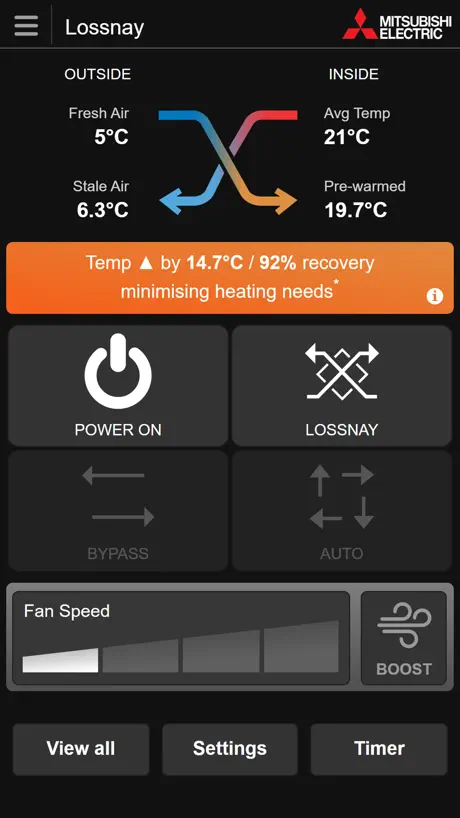
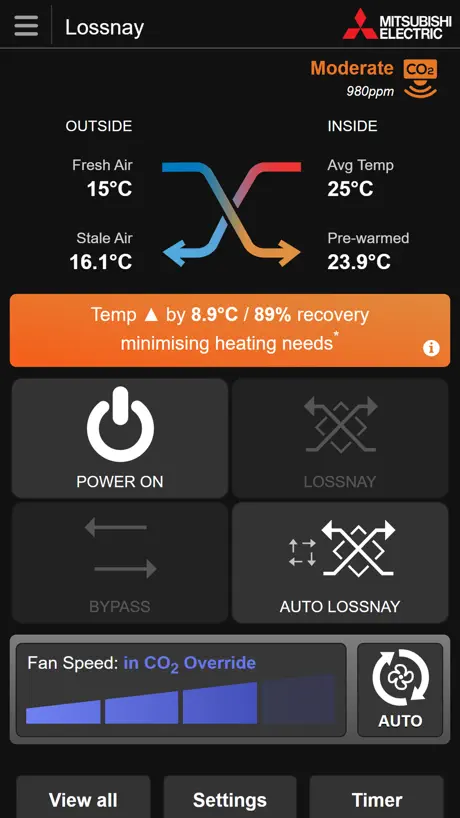
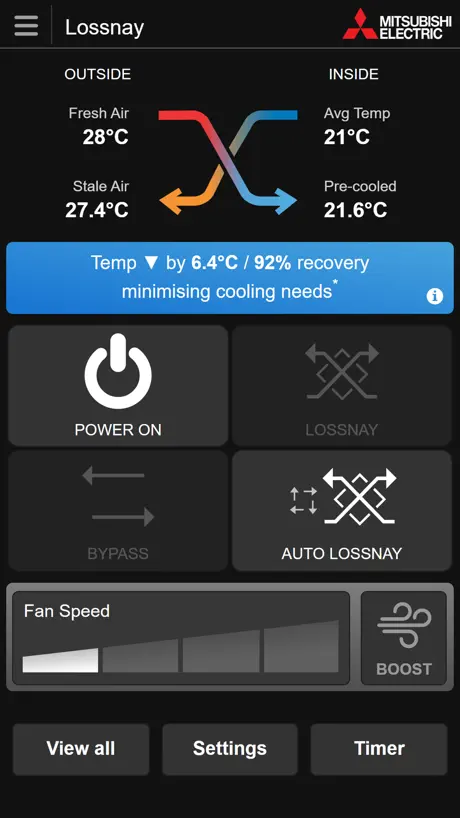
The refreshed design is a welcome improvement, along with support for Lossnay - which is fantastic! The app could be a game changer if it embraced more of the iOS ecosystem; - A widget that displayed settings at a glance. - Support for Apple Home Kit. Apple Home would provide additional ease of use for Mitsubishi customers, such as customisation like switching the unit off when you leave the house. And more brand awareness.
Very Basic Options
This app has potential to be an excellent app. Unfortunately, it seems that Mitsubishi haven’t invested the time and money in it. Considering you purchase a very expensive unit, you would think the app would have better features and options. You can’t even set a weekly schedule timer from the app. The interface looks very dated. Hopefully they invested some time and money into it in the future.
Matter / AppleHome support please!
Can you add Matter or AppleHome support please - supporting Google and not Apple tech should not be an issue in 2026. Can you add this key features please!
Fine to me
Works perfectly, not sure why folks would not like it.
Minimum Viable Product
Controls my AP and LN units over wifi and remotely. Reliable connectivity which is a plus. Gives access to only the minimum feature set - think temperature, fans, vanes and timers. None of the advanced settings are accessible so you cannot throw away the clunky remotes. The program looks dated despite the recent refresh. No HomeKit/voice connectivity unless using homebridge or equivalent software.
Very good.
The app is SO much better than the app I am forced to use for our (other) Daikin system. Only one problem I can't see what model to choose for our twin fan PUZ-ZM250YKA-A/ There doesn't appear to be a corresponding model number (under Ducted or anything else) and I can't choose 0.5 degrees when configuring rules
Horizontal control doesn’t work properly.
The horizontal fins won’t move when changed on the app.
Needs development
This app is easy to operate my 18kw ducted system however it needs some key features. The app doesn’t update status if someone turns the system off at the manual control interface - the app still shows the system is on. The app also doesn’t provide a way to remotely control zones. There needs to be more connectivity built in.
Mitsubishi Wi-Fi control
Much easier to use than the remote unit provided with the heat pumps. Can cotrol all heat pumps in the house with only one app.
Where did it go?
The latest update you added horizontal vane control, which was working on my units and app…. but now it has disappeared. Where did it go?
Great app refresh, needs slight adjustment.
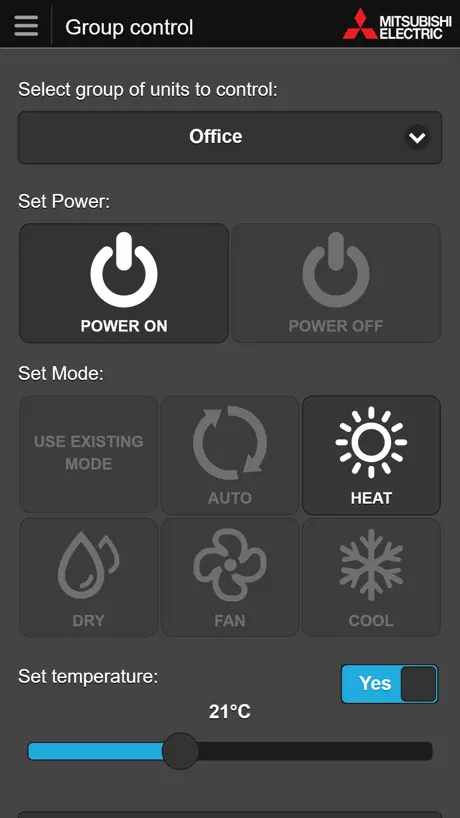
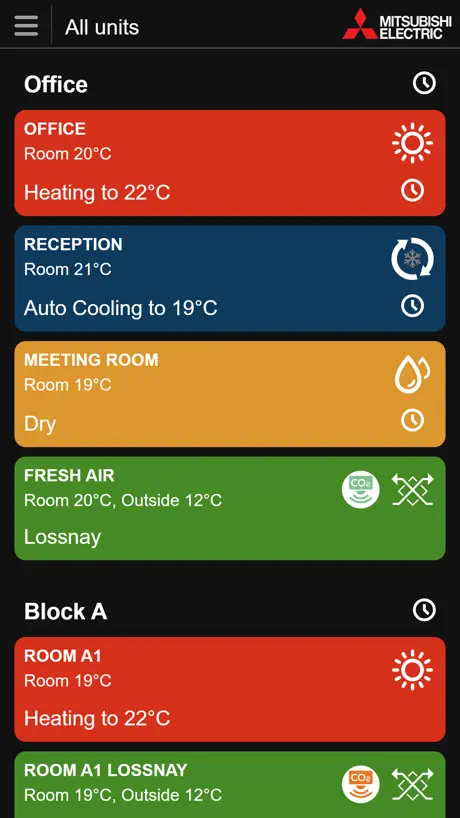
Well done team, new app refresh is lovely and far less iOS 5. Far easier to see now with the colour coding. Only feedback is the colour selections need slight adjustment as they don’t line up with the colours on the wall mounted controller. “Dry” in app is Yellow but light blue on the controller and “Fan” in app is is light blue but yellow on the controller. Swapping this would conform better with the hardware design principles for the visually impaired like myself.
Ok but
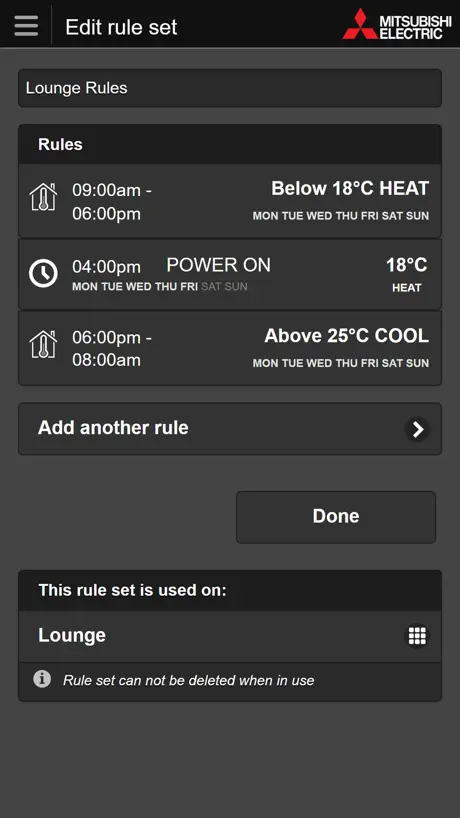
App is ok but not that easy to navigate and also you cant set multiple rules but then choose to use one and not the other, so i have a winter rule set and another rule set but cant stop one from being used but use the 2nd one you either have all the rules going or none. You have to enable all rules or disable all of them. I have a winter rule set to come one in the morning and go off a couple hrs later then come on in the evening and go off a couple hrs later. I now want to set an spring rule where it just comes on in the morning for a couple hrs but i cant run that rule on its own without the other rule running too. If i disable rules they both wont go
Could be sooooo much better…
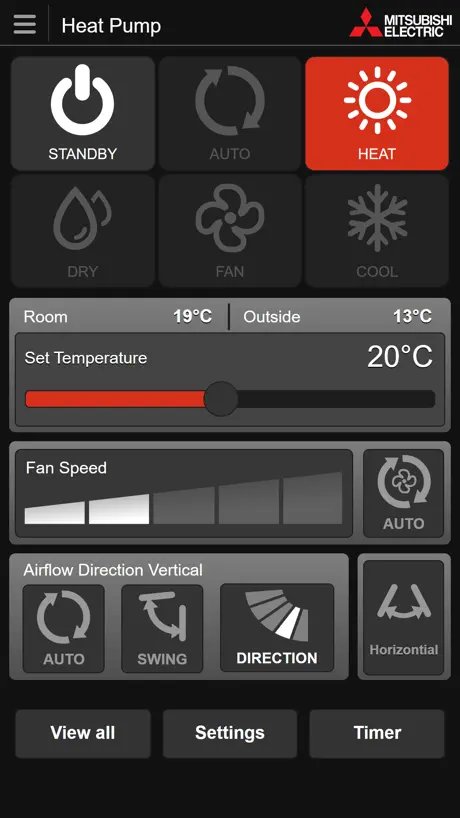
Works and does everything I need it do - power on / off, mode change, temperature set, fan speed etc But the interface is soooooo ugly, clunky and non-intuitive. Could be soooooooo much better.
Fantastic- But???
Fantastic feature although the only shortfall I’ve found is you can’t set economy mode which would be great if you could in todays climate of high power costs and energy conservation awareness. Surely the addition of an economy mode button wouldn’t be too hard???
Power button doesn't work
Power button doesn't work to turn the unit on. I have to switch to the iPhone version of the app to turn it on or off!
Great App but needs HomeKit
Please add Apple HomeKit functionality. That would take this app to 5/5
Why no update??
This app is good to turn the unit on or off or to change the temperature but when it comes to setting rules/timers for the unit, this app fails spectacularly. Is the rule set? Who knows. There’s nothing to indicate if the rule you made for the unit is actually on or off. You just have to wait for 4am to see if your heating rule actually worked. I don’t understand why this app hasn’t been updated, it could be so much better.
App ok but where’s the ‘on’ timer
App is basic but seems to work fine. I would love to see an addition to the timer function to set a time that turns the AC on.
New update is so good!
The app has recently had an update which has been a massive improvement! My heat pump turns on nearly instantly now with no issues, and now has a timer functionality built into the app. Perfect, thank you for updating!
WORST ESSENTIAL APP
Update 24 Sept 2022 So you spend thousands of dollars on an air conditioner and the Wi-Fi goes down on not one but two A/Cs. We can still stream movies with the same network. No problems. But A/C is a big no. The problem is clearly on Mitsubishi’s end. Come on Mitsubishi get your act together. Continuously logging into App. This is for an AC so is essential. Should be removed from App Store. Developer needs to come up to the plate. TERRIBLE. Don’t buy Mitsubishi AC!
The app works but has some UX issues
Generally the app works well but it will frequently fail to authenticate and show an “Error” page. The error is always fixed by just clicking the “Try again” button. Why make the user click try again if it fixes the issue? Why doesn’t the app simply try again and authenticate itself? Moreover, the “Logout” button is right next to the “Try again” button so my wife often clicks the logout button by mistake. Besides that issue it works well to control the heat pump.
Basic but Works
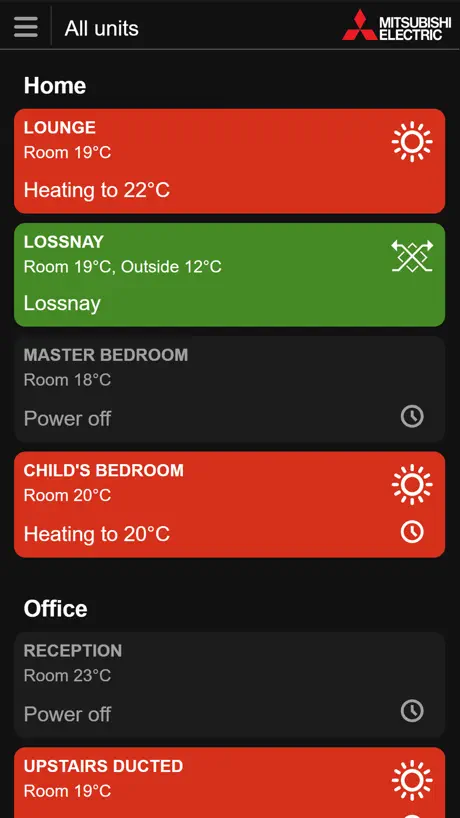
Would really love integration with Apple HomeKit and a more functional interface like KumoCloud or Other Mitsubishi apps used elsewhere around the world. Design of this one is very lacking. For iPad or larger phones should be able to see all units/zones.
Functional but tired
Although this app is functional and operates the unit okay. It just feels and looks like the app is 20 years old I have multiple unit so makes it difficult to operate all three at with just a touch of button
Great app
Very easy to use. We use it all the time.
Great product, terrible App
This App reminds me of 80s computing. It looks terrible, it’s clumsy, not at all user friendly, and in a desperate need of a style update. I can only presume this App was an in-house job that really needs outsourcing to a third party App developer.
Siri integration still missing
The app works well on my iPad and iPhone. Nevertheless, it would be great to have the option to use Siri or create shortcuts to e.g. switch heat pumps on or off, even in groups (I have 3 heat pumps)
Trev
It works controls the unit. But complex connection makes it crazy even the installers have trouble…. The MAIN problem is every 4 weeks or so your app connection drops out it doesn’t recognise your password and you have to go through the process again. Making you think. Is it worth it
Feature request
Can we get timer increments in less than 30 minute intervals?
Best Smart Aircon App
The is the best aircon App in the market. I would like to thank the App developers for the amazing app, Its simple yet it works with no issues. The temp sensor feature when the aircon is off measuring the room temperature is amazing. I don’t understand how other uses given this app three stars as they seem they don’t know how aircon works.
Password reset
Your password reset function isn’t working and I can’t log into my account
Good job but User interface need gets improve
Hi Team Overall is good. However the user interface looks old school, As well as add the quiet mode button on it. Thank you
No more, no less..
Gets the job done but the lack of HomeKit integration is a big downside. Complicated setup for scheduling and not a very intuitive user interface except for the basic home page. Could really use HomeKit integration to unlock its full potential and ease of use.
Very glitchy
The app is great when it is working properly. Once again I found out that the indoor unit model number had just disappeared from my settings on one unit, this has happened several times. I also now have 2 units that show the temperature in half degrees, first one then months later the second and the setting to turn this on/off will not stay on the off setting. The ability to setup unlimited routines is great but it would be great to be able to maybe skip them or unselect for example when it’s a warm day in winter and I don’t want the heat on. The countdown timer function is great but again you can only set it to turn off, would be nice to also set it to turn on
Fast and functional
Always connects instantly for me (fibre at home) and syncs with controller in under 10 seconds. Rules are useful. Only thing I would like is support for automation services like IFTTT.
Needs an update
This app really needs an update. In 2022, having WIFI control is somewhat the standard. Stating that consumers can have Wi-Fi control and asking them to pay a decent amount for it (via modules) then having them use an app like this is almost disrespectful. Simple things like not being able to adjust temp during dry mode and the app timing out each time you open it is shocking. You should be able to have 100% of the same control as the wall control unit but in a user friendly UX. COME ON MITSUBISHI ELECTRIC.
Very Handy App
A very handy tool, the rules make programming both of our heat pumps so easy, effective and efficient we are comfortable without wasting money. One issue I have is that the floor mount MSZ-FB50VA remote turns the unit down to 16 deg. The app has 17 deg as the lowest limit on this unit. This is a tad annoying, but overall the app is great.
Disappoint interface and functions
I am very disappointed in your Wi-Fi control application for iPhone. The interface on the control are very poor and I am unable to take full advantage of the functions of my unit. In addition it doesn’t update on the physical remote. I shouldn’t have to be locked into one remote to utilise my unit. Please update immediately.
Great app
It’s a great app when you can get it to work. It’s difficult to use when you get a new modem.
Mitsubishi Wi-Fi Control FAQ
- Is Mitsubishi Wi-Fi Control free?
- Yes. The app is free, in all 2 countries it sells in, and it sells nothing inside it.
- Does Mitsubishi Wi-Fi Control have a free trial?
- No. None of its offers (AU) come with a free trial.
- What are the best alternatives to Mitsubishi Wi-Fi Control?
- Trade Me Property (4.7 from 34,116 reviews), Waitomo (4.8 from 24,272 reviews) and Wiser by SE (4.5 from 12,734 reviews).
Mitsubishi Wi-Fi Control download
Last updated 5 months ago.
Mitsubishi Wi-Fi Control sells in 2 countries. It was released 12 years and 10 months ago, on 22 Jan 2014. It holds a 2.8 rating from 179 reviews.
Supports 1 language: English.
How much does Mitsubishi Wi-Fi Control make?
Third-party estimates for the last 30 days, worldwide — not the store's own figures, which Apple publishes for nobody.