
Text Message Export - MsgKeep
Print, Export & Backup SMS
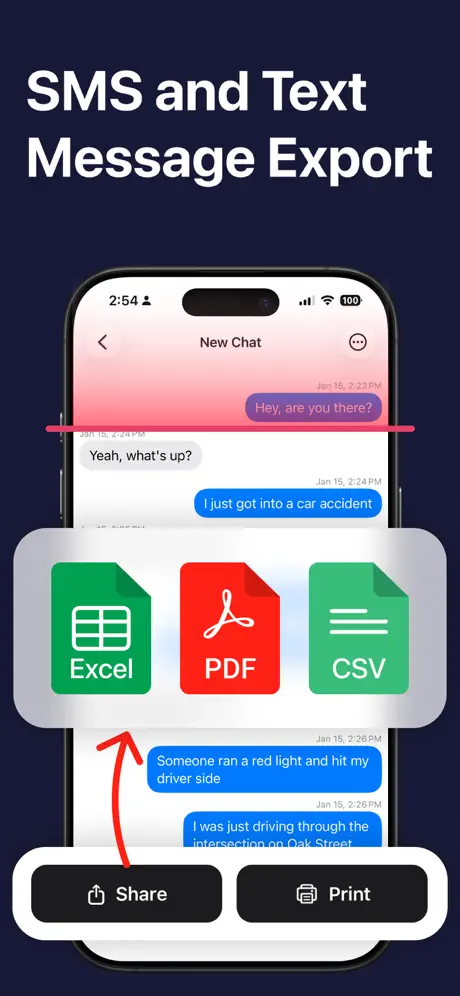
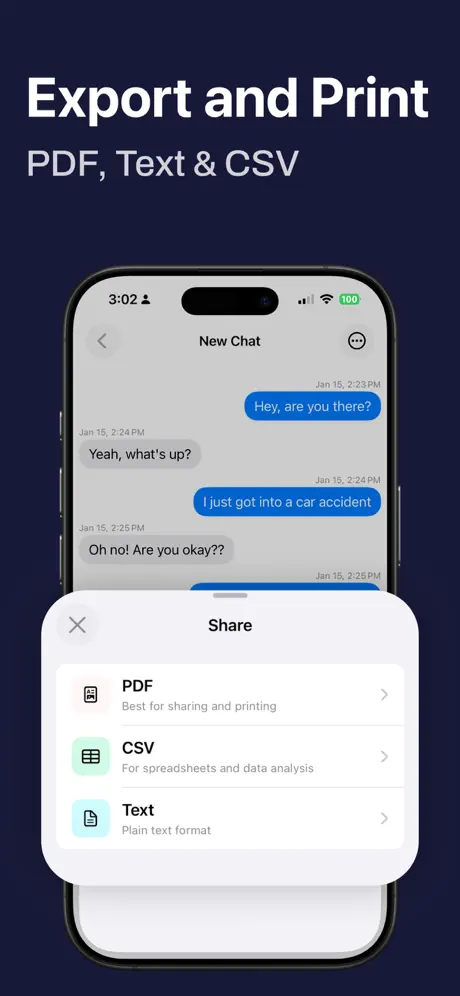

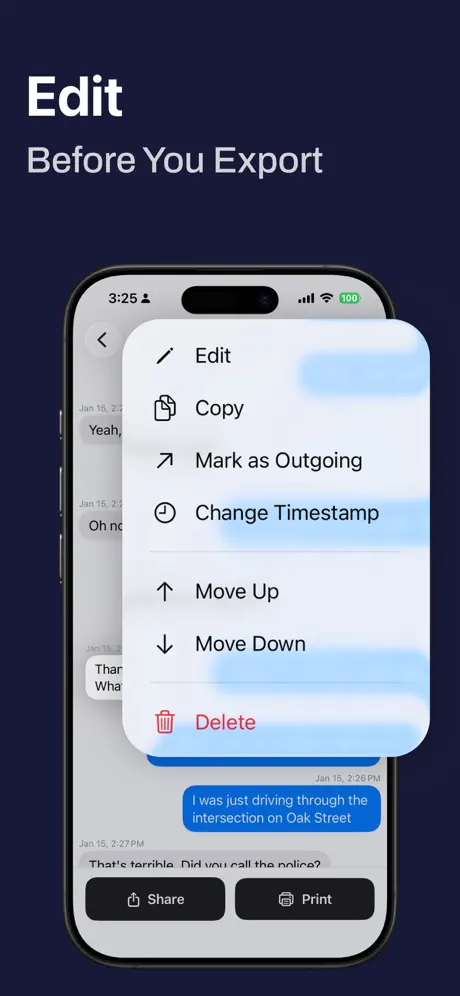
How much does Text Message Export - MsgKeep cost?
Prices are current as of 29 Sept 2026.
3 subscriptions from $4.99
In the United States, Text Message Export - MsgKeep has 3 subscriptions priced $4.99 – 59.99.
| Subscription | Period | Price |
|---|---|---|
| Premium Version | Weekly | $4.99 – 8.99 |
| Pro Version | Weekly | $14.99 |
| Pro Version | Annual | $39.99 – 59.99 |
See what Text Message Export - MsgKeep costs in all 173 countries →
10+ alternatives to Text Message Export - MsgKeep
| Text Message Export - MsgKeep |   OurFamilyWizard Co-Parent App OurFamilyWizard Co-Parent App |   Alimentor 2: Custody Tracker Alimentor 2: Custody Tracker |   E2PDF Pro - Easy Backup App E2PDF Pro - Easy Backup App |   Text to PDF Converter - TXT Text to PDF Converter - TXT |   Kidtime Coparenting Calendar Kidtime Coparenting Calendar |   ChatPDF chat to PDF converter ChatPDF chat to PDF converter |   BestInterest for Coparents BestInterest for Coparents |   Transcribe Video to Text: Vid2 Transcribe Video to Text: Vid2 |   Text to PDF Converter - Text2P Text to PDF Converter - Text2P |   ChatExport - AI to Docs ChatExport - AI to Docs | |
|---|---|---|---|---|---|---|---|---|---|---|---|
| Rating / 5 | 4.5 | 4.6 | 4.8 | 4.1 | 4.4 | 4.2 | 4.1 | 4.5 | 4.5 | 4.4 | 4.0 |
| Reviews | 158 | 61K | 1.4K | 524 | 444 | 424 | 264 | 262 | 261 | 129 | 25 |
| Released | 2026 | 2012 | 2018 | 2026 | 2025 | 2023 | 2020 | 2024 | 2025 | 2026 | 2025 |
| Weekly price | $8.99 | — | — | $1.99 | — | — | — | — | — | $4.99 | — |
| Monthly price | — | — | — | $4.99 | $9.99 | — | — | — | — | — | — |
| Annual price | $39.99 | $219.00 | — | $19.99 | $29.99 | — | — | — | — | $19.99 | — |
| One-time price | — | $9.99 | — | — | — | — | — | — | — | $29.99 | — |
The going rate for each plan in United States, in its own currency, shaded from the cheapest price on the row to the dearest.
Text Message Export - MsgKeep reviews
4.5 out of 5, based on 158 reviews.
Thanks
Finally archived chats into pdf. Exactly what I needed.
Hidden fee
Cant export without paying a lot
DO NOT PURCHASE SUBSCRIPTION
This app requires you either record your screen or upload screenshots of the messages- thus completely defeating the purpose of this app which is NOT to do either of those things. The app is misleading- the name is misleading, as if a single button is all it takes to export the msgs- but that’s not the case. Do not buy. I wish I’d read the reviews before purchasing.
Not free app
You can’t do or save anything without paying a crazy high price.
Trash
This app requires you to take screenshots or manually scroll through your message chats to save them. This defeats the entire purpose of purchasing an app. It is a scam for iMessages.
BS description
I was trying to figure out how to export a context conversation on iMessage and was told this would not need screenshots however, the only way to do so is with screenshots of each message. Feel like I was robbed and there’s no way to try to get a refund.
Waste
Paid for the app and does absalutly nothing like it claims. You have to take screen shots of your messages. The app does not extract your thread content automatically.
Waste of money
Absolute waste of money. Nothing in this app works.
Text Message Export - MsgKeep price by country
A weekly subscription costs $8.24 in Qatar and $12.79 in Hungary — 1.6× more for the same thing. Below is the going rate for each plan in every country that sells it — the middle price of what the app charges there, in the country's own currency with the dollar equivalent beneath it.
| Country | Weekly | Annual |
|---|---|---|
| Afghanistan | $8.99 | $39.99 |
| Albania | $9.99 | $49.99 |
| Algeria | $8.99 | $39.99 |
| Angola | $8.99 | $39.99 |
| Anguilla | $8.99 | $39.99 |
| Antigua And Barbuda | $8.99 | $39.99 |
| Argentina | $8.99 | $39.99 |
| Armenia | $9.99 | $49.99 |
| Australia | A$14.99$10.48 | A$59.99$41.95 |
| Austria | €9.99$11.60 | €44.99$52.25 |
| Azerbaijan | $9.99 | $49.99 |
| Bahamas | $9.99 | $39.99 |
| Bahrain | $9.99 | $39.99 |
| Barbados | $9.99 | $49.99 |
| Belarus | $9.99 | $49.99 |
| Belgium | €9.99$11.60 | €44.99$52.25 |
| Belize | $8.99 | $39.99 |
| Benin | $9.99 | $49.99 |
| Bermuda | $8.99 | $39.99 |
| Bhutan | $8.99 | $39.99 |
| Bolivia | $8.99 | $39.99 |
| Bosnia & Herzegovina | €9.99$11.60 | €44.99$52.25 |
| Botswana | $8.99 | $39.99 |
| Brazil | R$59.90$11.70 | R$249.90$48.81 |
| British Virgin Islands | $8.99 | $39.99 |
| Brunei Darussalam | $8.99 | $39.99 |
| Bulgaria | €9.99$11.60 | €44.99$52.25 |
| Burkina Faso | $8.99 | $39.99 |
| Cambodia | $9.99 | $39.99 |
| Cameroon | $9.99 | $49.99 |
| Canada | CA$11.99$8.50 | CA$49.99$35.45 |
| Cape Verde | $8.99 | $39.99 |
| Cayman Islands | $8.99 | $39.99 |
| Chad | $8.99 | $39.99 |
| Chile | CLP 9,990$10.71 | CLP 49,990$53.58 |
| China | CN¥58.00$8.63 | CN¥298.00$44.35 |
| Colombia | COP 39,900$12.70 | COP 199,900$63.65 |
| Congo | $8.99 | $39.99 |
| Congo, Democratic Republic | $8.99 | $39.99 |
| Costa Rica | $8.99 | $39.99 |
| Cote Divoire | $9.99 | $49.99 |
| Croatia | €9.99$11.60 | €44.99$52.25 |
| Cyprus | €9.99$11.60 | €44.99$52.25 |
| Czech Republic | CZK 249.00$11.95 | CZK 999.00$47.96 |
| Denmark | DKK 79.00$12.29 | DKK 349.00$54.28 |
| Dominica | $8.99 | $39.99 |
| Dominican Republic | $8.99 | $39.99 |
| Ecuador | $8.99 | $39.99 |
| Egypt | EGP 499.99$9.82 | EGP 1,999.99$39.30 |
| El Salvador | $8.99 | $39.99 |
| Estonia | €9.99$11.60 | €44.99$52.25 |
| Fiji | $8.99 | $39.99 |
| Finland | €9.99$11.60 | €44.99$52.25 |
| France | €9.99$11.60 | €44.99$52.25 |
| Gabon | $8.99 | $39.99 |
| Gambia | $8.99 | $39.99 |
| Georgia | $9.99 | $49.99 |
| Germany | €9.99$11.60 | €44.99$52.25 |
| Ghana | $9.99 | $49.99 |
| Greece | €9.99$11.60 | €44.99$52.25 |
| Grenada | $8.99 | $39.99 |
| Guatemala | $8.99 | $39.99 |
| Guinea-bissau | $8.99 | $39.99 |
| Guyana | $8.99 | $39.99 |
| Honduras | $8.99 | $39.99 |
| Hong Kong | HK$68.00$8.67 | HK$288.00$36.73 |
| Hungary | HUF 3,990$12.79 | HUF 17,990$57.66 |
| Iceland | $9.99 | $49.99 |
| Indonesia | IDR 149,000$8.44 | IDR 699,000$39.59 |
| Iraq | $8.99 | $39.99 |
| Ireland | €9.99$11.60 | €44.99$52.25 |
| Israel | ₪29.90$9.93 | ₪149.90$49.80 |
| Italy | €9.99$11.60 | €44.99$52.25 |
| Jamaica | $8.99 | $39.99 |
| Japan | ¥1,500$9.60 | ¥6,000$38.42 |
| Jordan | $8.99 | $39.99 |
| Kazakhstan | KZT 4,990.00$10.96 | KZT 22,990.00$50.49 |
| Kenya | $9.99 | $49.99 |
| Kosovo | €9.99$11.60 | €44.99$52.25 |
| Kuwait | $8.99 | $39.99 |
| Kyrgyzstan | $9.99 | $39.99 |
| Lao Peoples Democratic Republic | $9.99 | $39.99 |
| Latvia | €9.99$11.60 | €44.99$52.25 |
| Lebanon | $8.99 | $39.99 |
| Liberia | $8.99 | $39.99 |
| Libya | $8.99 | $39.99 |
| Lithuania | €9.99$11.60 | €44.99$52.25 |
| Luxembourg | €9.99$11.60 | €44.99$52.25 |
| Macao | $8.99 | $39.99 |
| Macedonia | $8.99 | $39.99 |
| Madagascar | $8.99 | $39.99 |
| Malawi | $8.99 | $39.99 |
| Malaysia | MYR 39.90$9.88 | MYR 199.90$49.48 |
| Maldives | $8.99 | $39.99 |
| Mali | $8.99 | $39.99 |
| Malta | €9.99$11.60 | €44.99$52.25 |
| Mauritania | $8.99 | $39.99 |
| Mauritius | $9.99 | $49.99 |
| Mexico | MX$199.00$11.78 | MX$899.00$53.23 |
| Micronesia | $8.99 | $39.99 |
| Moldova | $9.99 | $49.99 |
| Mongolia | $8.99 | $39.99 |
| Montenegro | €7.99$9.28 | €39.99$46.45 |
| Montserrat | $8.99 | $39.99 |
| Morocco | $8.99 | $39.99 |
| Mozambique | $8.99 | $39.99 |
| Myanmar | $8.99 | $39.99 |
| Namibia | $8.99 | $39.99 |
| Nauru | $8.99 | $39.99 |
| Nepal | $9.99 | $49.99 |
| Netherlands | €9.99$11.60 | €44.99$52.25 |
| New Zealand | NZ$14.99$8.47 | NZ$69.99$39.54 |
| Nicaragua | $8.99 | $39.99 |
| Niger | $8.99 | $39.99 |
| Nigeria | NGN 14,900.00$11.27 | NGN 69,900.00$52.88 |
| Norway | NOK 99.00$10.65 | NOK 499.00$53.66 |
| Oman | $8.99 | $39.99 |
| Palau | $8.99 | $39.99 |
| Panama | $8.99 | $39.99 |
| Papua New Guinea | $8.99 | $39.99 |
| Paraguay | $8.99 | $39.99 |
| Peru | PEN 39.90$11.77 | PEN 179.90$53.07 |
| Philippines | ₱599.00$9.59 | ₱2,490.00$39.87 |
| Poland | PLN 39.99$10.78 | PLN 199.99$53.91 |
| Portugal | €9.99$11.60 | €44.99$52.25 |
| Qatar | QAR 29.99$8.24 | QAR 149.99$41.21 |
| Romania | RON 49.99$11.06 | RON 199.99$44.25 |
| Russia | RUB 799.00$9.28 | RUB 3,490.00$40.54 |
| Rwanda | $8.99 | $39.99 |
| Sao Tome & Principe | $8.99 | $39.99 |
| Saudi Arabia | SAR 39.99$10.66 | SAR 179.99$48.00 |
| Senegal | $9.99 | $49.99 |
| Serbia | €9.99$11.60 | €44.99$52.25 |
| Seychelles | $8.99 | $39.99 |
| Sierra Leone | $8.99 | $39.99 |
| Singapore | SGD 12.98$10.22 | SGD 59.98$47.23 |
| Slovakia | €9.99$11.60 | €44.99$52.25 |
| Slovenia | €9.99$11.60 | €44.99$52.25 |
| Solomon Islands | $8.99 | $39.99 |
| South Africa | ZAR 199.99$12.53 | ZAR 799.99$50.12 |
| South Korea | ₩12,000$8.91 | ₩55,000$40.84 |
| Spain | €9.99$11.60 | €44.99$52.25 |
| Sri Lanka | $8.99 | $39.99 |
| St. Kitts and Nevis | $8.99 | $39.99 |
| St. Lucia | $8.99 | $39.99 |
| St. Vincent & The Grenadines | $8.99 | $39.99 |
| Suriname | $9.99 | $39.99 |
| Swaziland | $8.99 | $39.99 |
| Sweden | SEK 119.00$12.43 | SEK 499.00$52.14 |
| Switzerland | CHF 8.00$9.88 | CHF 35.00$43.21 |
| Taiwan | NT$290.00$9.17 | NT$1,290.00$40.78 |
| Tajikistan | $9.99 | $39.99 |
| Tanzania | TZS 24,900.00$9.42 | TZS 99,900.00$37.80 |
| Thailand | THB 299.00$9.08 | THB 1,490.00$45.26 |
| Tonga | $8.99 | $39.99 |
| Trinidad and Tobago | $8.99 | $39.99 |
| Tunisia | $8.99 | $39.99 |
| Turkey | TRY 499.99$10.32 | TRY 1,999.99$41.27 |
| Turkmenistan | $8.99 | $39.99 |
| Turks and Caicos | $8.99 | $39.99 |
| Uganda | $9.99 | $49.99 |
| Ukraine | $9.99 | $49.99 |
| United Arab Emirates | AED 34.99$9.53 | AED 149.99$40.87 |
| United Kingdom | £8.99$11.89 | £39.99$52.90 |
| United States | $8.99 | $39.99 |
| Uruguay | $8.99 | $39.99 |
| Uzbekistan | $9.99 | $39.99 |
| Vanuatu | $8.99 | $39.99 |
| Venezuela | $8.99 | $39.99 |
| Vietnam | ₫299,000$11.50 | ₫1,199,000$46.12 |
| Yemen | $8.99 | $39.99 |
| Zambia | $9.99 | $49.99 |
| Zimbabwe | $9.99 | $49.99 |
Text Message Export - MsgKeep FAQ
- Is Text Message Export - MsgKeep free?
- Yes. The app and its basic features are free, in all 173 countries it sells in. Premium features are paid: they start from $4.99 (US), across 3 subscriptions.
- Does Text Message Export - MsgKeep have a free trial?
- No. None of its offers (US) come with a free trial.
- Where is Text Message Export - MsgKeep cheapest?
- A weekly subscription costs QAR 29.99 (≈$8.24) in Qatar and HUF 3,990 (≈$12.79) in Hungary, its cheapest and dearest countries.
- What are the best alternatives to Text Message Export - MsgKeep?
- OurFamilyWizard Co-Parent App (4.6 from 60,714 reviews, premium from $9.99), Alimentor 2: Custody Tracker (4.8 from 1,443 reviews) and E2PDF Pro - Easy Backup App (4.1 from 524 reviews, premium from $1.99).
Text Message Export - MsgKeep download
Last updated 20 days ago.
Text Message Export - MsgKeep sells in 173 countries. It was released 7 months ago, on 24 Feb 2026. It holds a 4.5 rating from 158 reviews.
Supports 16 languages: English, Arabic, Danish, Dutch, French, German, Italian, Japanese, Korean, Norwegian Bokmål, Polish, Portuguese, Russian, Chinese, Spanish, Swedish.
How much does Text Message Export - MsgKeep make?
Third-party estimates for the last 30 days, worldwide — not the store's own figures, which Apple publishes for nobody.
Revenue by plan
- Weekly 85%
- Annual 15%
Revenue by country
- United States 71%
- Canada 11%
- Australia 7%
- United Kingdom 4%