
Aspector Squaready Multi
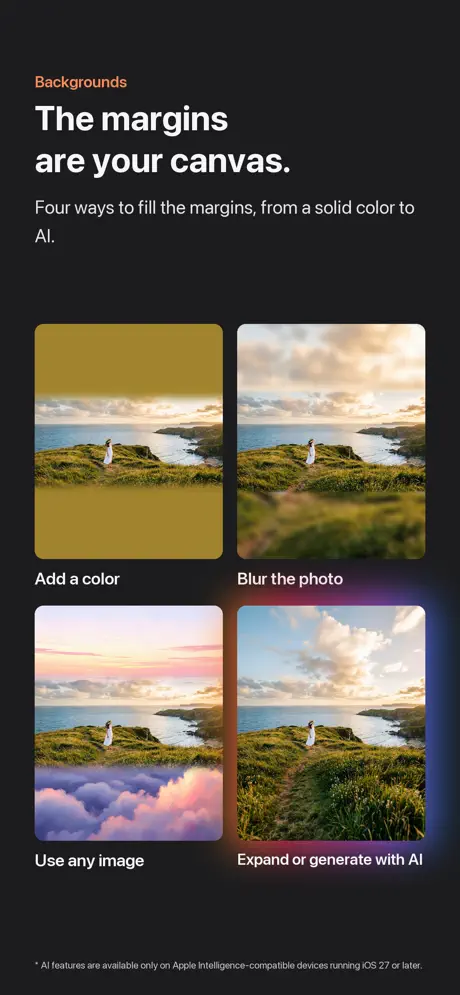
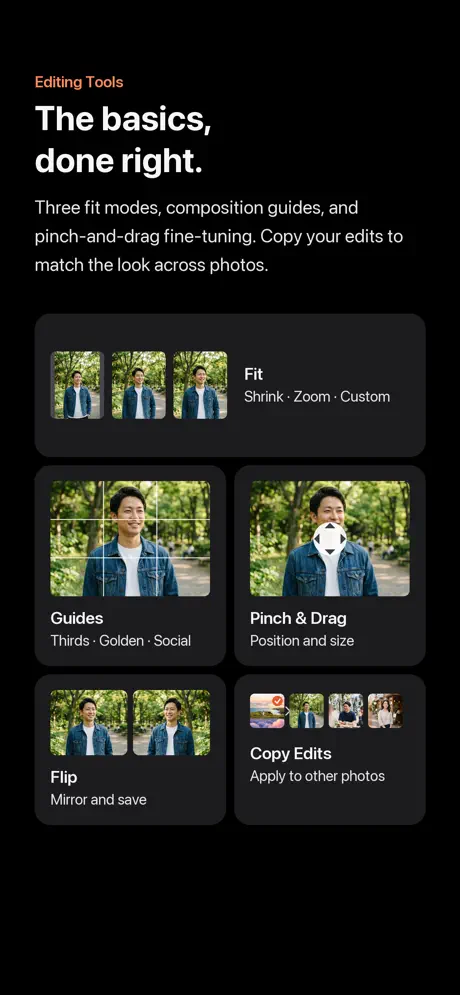
One tap. Any ratio. Any use.







How much does Aspector Squaready Multi cost?
Prices are current as of 8 Oct 2026.
2 subscriptions from $1.99
In the United States, Aspector Squaready Multi has 2 subscriptions priced $1.99 – 19.99.
| Subscription | Period | Price |
|---|---|---|
| Monthly Premium Membership | Monthly | $1.99 |
| Annual Premium Membership | Annual | $19.99 |
See what Aspector Squaready Multi costs in all 175 countries →
10+ alternatives to Aspector Squaready Multi
| Aspector Squaready Multi |   Best Nine Best Nine |   Square No Crop - Fit Full Size Square No Crop - Fit Full Size |   PhotoFrame Simple PhotoFrame Simple |   Square Fit Photo: PicFitter Square Fit Photo: PicFitter |   Top Nine 2025 for Instagram Top Nine 2025 for Instagram |   TinType by Hipstamatic TinType by Hipstamatic |   Best Nine 2025 Best Nine 2025 |   Tall Grid Maker: 9 Photo Split Tall Grid Maker: 9 Photo Split |   No Crop: Photo & Video Border No Crop: Photo & Video Border |   MargineMaker MargineMaker | |
|---|---|---|---|---|---|---|---|---|---|---|---|
| Rating / 5 | 4.2 | 4.5 | 4.5 | 4.6 | 4.7 | 4.6 | 4.8 | 4.7 | 4.7 | 4.7 | 4.6 |
| Reviews | 541 | 66K | 47K | 27K | 21K | 12K | 6.3K | 1.3K | 317 | 267 | 251 |
| Released | 2026 | 2017 | 2017 | 2014 | 2015 | 2020 | 2014 | 2022 | 2025 | 2021 | 2019 |
| Annual price | $19.99 | — | — | — | $19.99 | $1.99 | — | $1.49 | — | — | — |
| One-time price | — | $1.99 | $1.99 | $3.99 | $49.99 | $3.99 | — | $2.99 | $14.99 | — | — |
The going rate for each plan in United States, in its own currency, shaded from the cheapest price on the row to the dearest. Plans fewer than four in ten of the priced apps sell are left out.
Aspector Squaready Multi reviews
4.2 out of 5, based on 541 reviews.
What people like
- The interface is easy to use.
- You can process multiple photos at once.
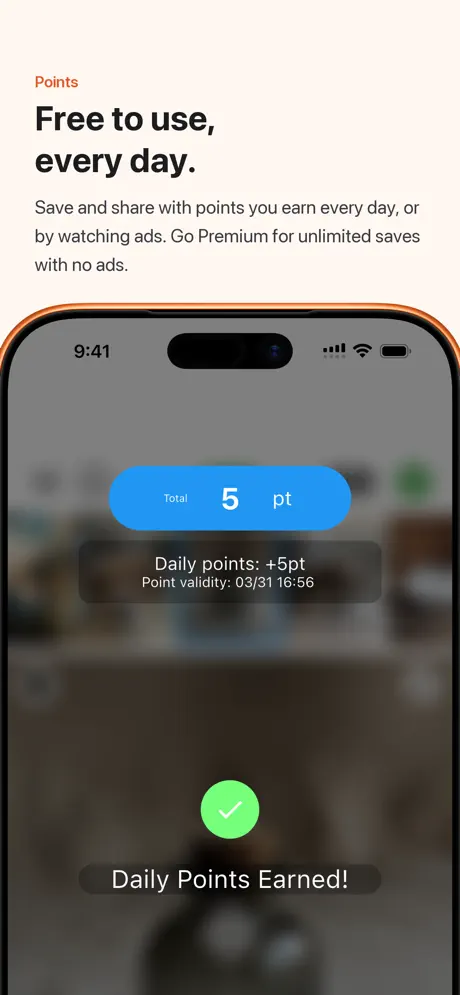
- Earning points feels quick and simple.
What they complain about
- App crashes when you try to save.
- You must pay a monthly subscription now.
- Points run out after just five photos.
正方形さん
物凄くいい!
What are the points for
I wish this didn’t have the points. Was a perfect app before. Now a pain to use
ตามมาจากแอปเดิม
ลองใช้แอปใหม่นี้แล้ว ภาพรวมการใช้งานสามารถใช้ได้ตามปกติ 1. UI ใช้ง่าย มีฟีเจอร์ให้ตกแต่งเยอะ แต่ฟีเจอร์คล้าย Squaready ตัวเดิม 2. มีระบบพอยต์และมีให้ดูโฆษณาสะสมหากต้องการใช้ฟรี ส่วนตัวมองว่า : ค่าสมัครบริการสูงเกินไป แต่ยังดีที่มีทางเลือกให้ดูโฆษณาแทน
Slow and very many ads
But I can't find another way to add square borders
A functional app that’s sadly all about subscriptions
I’ve used the predecessor to this app, Squareready, for years. In fact, I was very quick to unlock the ad free version for life as I use it so regularly. Once you get used to the quickness of the UI, it’s a great tool for placing your images in a square container. Aspector promises to do the same and, for the most part, it does. Alas we now have “tokens” for using the core functionality of the app and the only way to get around that is through a monthly or annual su scripting. I like the software and I believe in financially supporting developers, but not having a one-off purchase has turned me off.
disappointed
with the other square ready than I used to use for photos, it was fast and efficient. No ads did the job. I could change the color background but this one you can’t do any of that I wish I never updated it.
買い切りの正方形さまからのユーザーです
買い切りの正方形さまからのユーザーです こちらのアプリは新しい挑戦をしていると思いました 使い勝手は正方形さまよりはいいと思います 買い切りがなくなりましたが、ポイントはかなり簡単に溜まるので気に入っています あとは、投稿時再投稿ができない不具合があればそこを直してくれると助かります
Meh..
Squaready was a great app, but now you have to have points to save photos?? This is lame adding another monthly subscription!! The only good thing about this app is being able to save more than one photo at once.
Disappointing
Wow. I loved the original Squaready app and used it for YEARS. Now we’re forced to use this one and can’t even get to the photos saved. WHERE are they saving if not on my phone? Now I’m worried that they’re in a weird server somewhere I didn’t agree to. Super buggy and made my phone warm whilst using it. I watched like 3 ads for nothing. Please get your app developer on this. I would’ve gladly keep clicking on your ads in the original version.
完全無料とは
正方形さまを開いたら案内が出たので、ダウンロードしてみた。 まとめて処理できるのが魅力なのに、処理した写真を保存するのに、一枚1ポイント。 そのポイントは毎日アプリを起動して貯めるらしい。もしくはサブスク。 個人的は買い切りの方がラクなので、これまで通り正方形さまと正方形どんのお世話になります。
Doesn’t work
I like this in comparison to Squaready in terms of use but every time I try to save and download the photos the app crashes every time. It makes no sense plus I couldn’t find a support time of any sort
Disappointed
They closed their free version of app and created this one where you need points to save photos. Now, you could gain points by watching videos however, when it comes to saving it, it only saves two photos of mine. Pretty buggy app.
詐欺?
毎日ログインしてポイントを貯めたらやっと画像の保存ができると書いてあり、 無制限で画像を保存したければ有料プレミアムプランへとのことでした。 こつこつポイント貯めるのがわずらわしく課金をしましたが、 またポイントが足りないと延々出てきて画像を保存できません。 確実に課金したことは確認済みです。 お金だけ取られました。 こんなアプリ初めてです。
A pagamento!
In pratica solo il download dell’app è gratuito. Poi danno 5 punti bonus al primo utilizzo che servono a ben poco, già dopo 5 fotografie si esauriscono e bisogna prescrivere un abbonamento mensile o annuale! Neanche la possibilità di poter acquistare l’app una volta tantum! Pessima!
前ので良い
有料版がサブスクで使う気なくなった。
Aspector Squaready Multi price by country
A monthly subscription costs $1.62 in Indonesia and $3.19 in Colombia — 2× more for the same thing. Below is the going rate for each plan in every country that sells it — the middle price of what the app charges there, in the country's own currency with the dollar equivalent beneath it.
| Country | Monthly | Annual |
|---|---|---|
| Afghanistan | $1.99 | $19.99 |
| Albania | $1.99 | $22.99 |
| Algeria | $1.99 | $19.99 |
| Angola | $1.99 | $19.99 |
| Anguilla | $1.99 | $19.99 |
| Antigua And Barbuda | $1.99 | $19.99 |
| Argentina | $1.99 | $19.99 |
| Armenia | $1.99 | $22.99 |
| Australia | A$2.99$2.15 | A$29.99$21.58 |
| Austria | €1.99$2.31 | €22.99$26.70 |
| Azerbaijan | $1.99 | $22.99 |
| Bahamas | $1.99 | $19.99 |
| Bahrain | $1.99 | $19.99 |
| Barbados | $1.99 | $22.99 |
| Belarus | $1.99 | $22.99 |
| Belgium | €1.99$2.31 | €22.99$26.70 |
| Belize | $1.99 | $19.99 |
| Benin | $1.99 | $22.99 |
| Bermuda | $1.99 | $19.99 |
| Bhutan | $1.99 | $19.99 |
| Bolivia | $1.99 | $19.99 |
| Bosnia & Herzegovina | €1.99$2.31 | €22.99$26.70 |
| Botswana | $1.99 | $19.99 |
| Brazil | R$12.90$2.59 | R$129.90$26.08 |
| British Virgin Islands | $1.99 | $19.99 |
| Brunei Darussalam | $1.99 | $19.99 |
| Bulgaria | €1.99$2.31 | €19.99$23.22 |
| Burkina Faso | $1.99 | $19.99 |
| Cambodia | $1.99 | $19.99 |
| Cameroon | $1.99 | $22.99 |
| Canada | CA$2.99$2.11 | CA$24.99$17.60 |
| Cape Verde | $1.99 | $19.99 |
| Cayman Islands | $1.99 | $19.99 |
| Chad | $1.99 | $19.99 |
| Chile | CLP 1,990$2.15 | CLP 22,990$24.78 |
| China | CN¥15.00$2.23 | CN¥148.00$21.99 |
| Colombia | COP 9,900$3.19 | COP 99,900$32.15 |
| Congo | $1.99 | $19.99 |
| Congo, Democratic Republic | $1.99 | $19.99 |
| Costa Rica | $1.99 | $19.99 |
| Cote Divoire | $1.99 | $22.99 |
| Croatia | €1.99$2.31 | €22.99$26.70 |
| Cyprus | €1.99$2.31 | €22.99$26.70 |
| Czech Republic | CZK 49.00$2.35 | CZK 499.00$23.91 |
| Denmark | DKK 19.00$2.95 | DKK 179.00$27.84 |
| Dominica | $1.99 | $19.99 |
| Dominican Republic | $1.99 | $19.99 |
| Ecuador | $1.99 | $19.99 |
| Egypt | EGP 99.99$1.95 | EGP 999.99$19.48 |
| El Salvador | $1.99 | $19.99 |
| Estonia | €1.99$2.31 | €22.99$26.70 |
| Fiji | $1.99 | $19.99 |
| Finland | €1.99$2.31 | €22.99$26.70 |
| France | €1.99$2.31 | €22.99$26.70 |
| Gabon | $1.99 | $19.99 |
| Gambia | $1.99 | $19.99 |
| Georgia | $1.99 | $22.99 |
| Germany | €1.99$2.24 | €22.99$25.86 |
| Ghana | $1.99 | $22.99 |
| Greece | €1.99$2.31 | €22.99$26.70 |
| Grenada | $1.99 | $19.99 |
| Guatemala | $1.99 | $19.99 |
| Guinea-bissau | $1.99 | $19.99 |
| Guyana | $1.99 | $19.99 |
| Honduras | $1.99 | $19.99 |
| Hong Kong | HK$18.00$2.29 | HK$148.00$18.85 |
| Hungary | HUF 999$3.18 | HUF 8,990$28.63 |
| Iceland | $1.99 | $22.99 |
| India | ₹199.00$2.06 | ₹1,999.00$20.72 |
| Indonesia | IDR 29,000$1.62 | IDR 349,000$19.50 |
| Iraq | $1.99 | $19.99 |
| Ireland | €1.99$2.31 | €22.99$26.70 |
| Israel | ₪7.90$2.60 | ₪69.90$22.99 |
| Italy | €1.99$2.24 | €22.99$25.86 |
| Jamaica | $1.99 | $19.99 |
| Japan | ¥300$1.90 | ¥3,000$18.97 |
| Jordan | $1.99 | $19.99 |
| Kazakhstan | KZT 999.00$2.22 | KZT 11,990.00$26.66 |
| Kenya | $1.99 | $22.99 |
| Kosovo | €1.99$2.31 | €22.99$26.70 |
| Kuwait | $1.99 | $19.99 |
| Kyrgyzstan | $1.99 | $19.99 |
| Lao Peoples Democratic Republic | $1.99 | $19.99 |
| Latvia | €1.99$2.31 | €22.99$26.70 |
| Lebanon | $1.99 | $19.99 |
| Liberia | $1.99 | $19.99 |
| Libya | $1.99 | $19.99 |
| Lithuania | €1.99$2.31 | €22.99$26.70 |
| Luxembourg | €1.99$2.31 | €22.99$26.70 |
| Macao | $1.99 | $19.99 |
| Macedonia | $1.99 | $19.99 |
| Madagascar | $1.99 | $19.99 |
| Malawi | $1.99 | $19.99 |
| Malaysia | MYR 9.90$2.43 | MYR 99.90$24.55 |
| Maldives | $1.99 | $19.99 |
| Mali | $1.99 | $19.99 |
| Malta | €1.99$2.31 | €22.99$26.70 |
| Mauritania | $1.99 | $19.99 |
| Mauritius | $1.99 | $19.99 |
| Mexico | MX$39.00$2.17 | MX$399.00$22.19 |
| Micronesia | $1.99 | $19.99 |
| Moldova | $1.99 | $22.99 |
| Mongolia | $1.99 | $19.99 |
| Montenegro | €1.99$2.31 | €19.99$23.22 |
| Montserrat | $1.99 | $19.99 |
| Morocco | $1.99 | $19.99 |
| Mozambique | $1.99 | $19.99 |
| Myanmar | $1.99 | $19.99 |
| Namibia | $1.99 | $19.99 |
| Nauru | $1.99 | $19.99 |
| Nepal | $1.99 | $22.99 |
| Netherlands | €1.99$2.24 | €22.99$25.86 |
| New Zealand | NZ$3.99$2.32 | NZ$39.99$23.25 |
| Nicaragua | $1.99 | $19.99 |
| Niger | $1.99 | $19.99 |
| Nigeria | NGN 3,200.00$2.41 | NGN 29,900.00$22.55 |
| Norway | NOK 29.00$3.13 | NOK 249.00$26.86 |
| Oman | $1.99 | $19.99 |
| Pakistan | PKR 500$1.80 | PKR 4,900$17.65 |
| Palau | $1.99 | $19.99 |
| Panama | $1.99 | $19.99 |
| Papua New Guinea | $1.99 | $19.99 |
| Paraguay | $1.99 | $19.99 |
| Peru | PEN 9.90$2.95 | PEN 89.90$26.76 |
| Philippines | ₱129.00$2.06 | ₱1,290.00$20.59 |
| Poland | PLN 9.99$2.69 | PLN 99.99$26.88 |
| Portugal | €1.99$2.31 | €22.99$26.70 |
| Qatar | QAR 7.99$2.20 | QAR 69.99$19.23 |
| Romania | RON 9.99$2.21 | RON 99.99$22.12 |
| Russia | RUB 199.00$2.36 | RUB 1,790.00$21.22 |
| Rwanda | $1.99 | $19.99 |
| Sao Tome & Principe | $1.99 | $19.99 |
| Saudi Arabia | SAR 9.99$2.66 | SAR 89.99$24.00 |
| Senegal | $1.99 | $22.99 |
| Serbia | €1.99$2.31 | €22.99$26.70 |
| Seychelles | $1.99 | $19.99 |
| Sierra Leone | $1.99 | $19.99 |
| Singapore | SGD 2.98$2.35 | SGD 29.98$23.61 |
| Slovakia | €1.99$2.31 | €22.99$26.70 |
| Slovenia | €1.99$2.31 | €22.99$26.70 |
| Solomon Islands | $1.99 | $19.99 |
| South Africa | ZAR 39.99$2.47 | ZAR 399.99$24.71 |
| South Korea | ₩3,300$2.45 | ₩29,000$21.56 |
| Spain | €1.99$2.31 | €22.99$26.70 |
| Sri Lanka | $1.99 | $19.99 |
| St. Kitts and Nevis | $1.99 | $19.99 |
| St. Lucia | $1.99 | $19.99 |
| St. Vincent & The Grenadines | $1.99 | $19.99 |
| Suriname | $1.99 | $19.99 |
| Swaziland | $1.99 | $19.99 |
| Sweden | SEK 29.00$2.90 | SEK 249.00$24.92 |
| Switzerland | CHF 2.00$2.46 | CHF 18.00$22.17 |
| Taiwan | NT$60.00$1.89 | NT$690.00$21.70 |
| Tajikistan | $1.99 | $19.99 |
| Tanzania | TZS 5,900.00$2.23 | TZS 59,900.00$22.66 |
| Thailand | THB 79.00$2.35 | THB 699.00$20.80 |
| Tonga | $1.99 | $19.99 |
| Trinidad and Tobago | $1.99 | $19.99 |
| Tunisia | $1.99 | $19.99 |
| Turkey | TRY 99.99$2.03 | TRY 999.99$20.33 |
| Turkmenistan | $1.99 | $19.99 |
| Turks and Caicos | $1.99 | $19.99 |
| Uganda | $1.99 | $22.99 |
| Ukraine | $1.99 | $22.99 |
| United Arab Emirates | AED 7.99$2.18 | AED 79.99$21.80 |
| United Kingdom | £1.99$2.69 | £19.99$27.01 |
| United States | $1.99 | $19.99 |
| Uruguay | $1.99 | $19.99 |
| Uzbekistan | $1.99 | $19.99 |
| Vanuatu | $1.99 | $19.99 |
| Venezuela | $1.99 | $19.99 |
| Vietnam | ₫59,000$2.28 | ₫599,000$23.15 |
| Yemen | $1.99 | $19.99 |
| Zambia | $1.99 | $22.99 |
| Zimbabwe | $1.99 | $22.99 |
Aspector Squaready Multi FAQ
- Is Aspector Squaready Multi free?
- Yes. The app and its basic features are free, in all 175 countries it sells in. Premium features are paid: they start from $1.99 (US), across 2 subscriptions.
- How much does Aspector Squaready Multi cost per month?
- Monthly Premium Membership is $1.99 (US). The annual plan works out cheaper per month: $19.99 a year.
- Does Aspector Squaready Multi have a free trial?
- No. None of its offers (US) come with a free trial.
- Where is Aspector Squaready Multi cheapest?
- A monthly subscription costs IDR 29,000 (≈$1.62) in Indonesia and COP 9,900 (≈$3.19) in Colombia, its cheapest and dearest countries.
- What are the best alternatives to Aspector Squaready Multi?
- Best Nine (4.5 from 65,746 reviews, premium from $0.99), Square No Crop - Fit Full Size (4.5 from 46,605 reviews, premium from $1.99) and PhotoFrame Simple (4.6 from 26,546 reviews, premium from $3.99).
Aspector Squaready Multi download
Last updated 6 days ago.
Aspector Squaready Multi sells in 175 countries. It was released 5 months ago, on 24 Apr 2026. It holds a 4.2 rating from 541 reviews.
Supports 2 languages: English, Japanese.
How much does Aspector Squaready Multi make?
Third-party estimates for the last 30 days, worldwide — not the store's own figures, which Apple publishes for nobody.
Revenue by plan
- Monthly 84%
- Annual 16%
Revenue by country
- Japan 51%
- United States 29%
- United Kingdom 2%
- Thailand 2%