
BedrockConnect for Minecraft
Play on any server
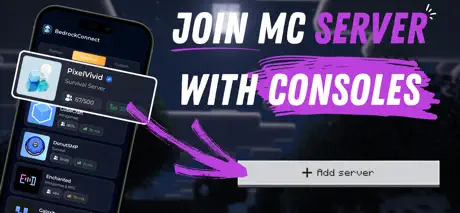
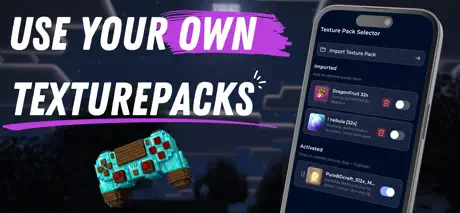
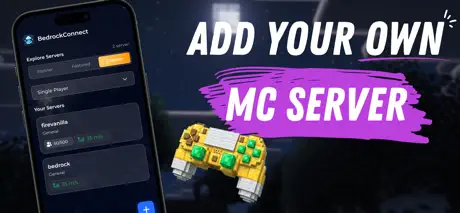
How much does BedrockConnect for Minecraft cost?
Prices are current as of 2 Oct 2026.
5 subscriptions from $1.99
In the United States, BedrockConnect for Minecraft has 5 subscriptions priced $1.99 – 22.99.
| Subscription | Period | Price |
|---|---|---|
| Premium | Monthly | $1.99 |
| BedrockConnect Premium | Monthly | $2.99 – 4.49 |
| BedrockConnect - Premium | Annual | $17.99 |
| Premium Yearly | Annual | $19.99 |
| BedrockConnect Premium | Annual | $22.99 |
See what BedrockConnect for Minecraft costs in all 175 countries →
10+ alternatives to BedrockConnect for Minecraft
| BedrockConnect for Minecraft |   Auto Paste Keyboard Auto Paste Keyboard |   BedrockTogether BedrockTogether |   Unlock-r Unlock-r |   Decks Royale for Clash Royale Decks Royale for Clash Royale |   MCPEDL for Minecraft MCPEDL for Minecraft |   BuildCores: 3D PC Builder BuildCores: 3D PC Builder |   Auto Clicker - AutoTap App Auto Clicker - AutoTap App |   Lunar Proxy for Minecraft: PE Lunar Proxy for Minecraft: PE |   Shop Of The Day Shop Of The Day |   YouFs-A YouFs-A | |
|---|---|---|---|---|---|---|---|---|---|---|---|
| Rating / 5 | 4.4 | 4.7 | 4.5 | 3.8 | 4.5 | 3.1 | 4.6 | 4.4 | 4.3 | 4.0 | 3.4 |
| Reviews | 11K | 146K | 131K | 8.2K | 5.7K | 4.9K | 4.2K | 2.9K | 1.5K | 1.2K | 628 |
| Released | 2022 | 2021 | 2020 | 2024 | 2019 | 2023 | 2019 | 2025 | 2025 | 2019 | 2022 |
| Weekly price | — | $14.99 | — | $6.99 | — | — | $5.99 | $3.99 | — | — | — |
| Monthly price | $2.99 | $14.99 | — | — | — | $3.99 | $9.99 | $9.99 | $8.99 | — | — |
| Annual price | $19.99 | $39.99 | — | — | — | $29.99 | $14.99 | $9.99 | $49.99 | — | — |
| One-time price | — | $4.99 | $7.99 | $3.99 | $4.99 | — | $2.99 | — | — | — | — |
The going rate for each plan in United States, in its own currency, shaded from the cheapest price on the row to the dearest. Plans fewer than four in ten of the priced apps sell are left out.
BedrockConnect for Minecraft reviews
4.4 out of 5, based on 11,328 reviews.
What people like
- Actually lets you play with Java friends.
- Works well for specific servers like Donut SMP.
- Better than other similar apps.
What they complain about
- Ads interrupt you constantly.
- Texture packs cost extra money.
- Connection fails or kicks you out.
- App stops working after updates.
Great
Really good let’s me join games unlike other apps
The thing will load but kick me instantly cus the ad or timer ran out
If u guys don’t fix that bs I’m just never using this app again would recommend it but if it’s like a YouTuber one it won’t work anything that they don’t offer has a 10% chance to actually work
Donutsmp
good but it always kick me out 4 stars bc I use it a lot anyway
DNS for switch
My parents have it so I can’t edit the settings of the internet so maybe if you could find a way to make it so it just connects without interfering with any parental controls?
more pvp servers needed
Everything else about it is just so good but I have a hard time connecting my texture packs to swimgg.club is there anyway you could make it a feature/partner server
Goated
It’s really good I love it i can play Donut SMP a lot now and my own custom servers
ABSOLUTELY LIES
THIS APP SUCKS IT MAKES ME WANNA KILL MYSELF IT GAVE ME A VIRUS AND NOW I CANT EVEN PLAY MINECRAFT BECAUSE I GOT HACKED THIS APP ALSO USES AI🤬🤬🤬🤬😡😡😡😤😤😤👿👿👿
Built in texture
You should put texture pack in the app so when we want to play servers we have the texture packs we want.
Doesn’t work anymore sadly 😔
About a month ago the app stopped working for my ps5 and I couldn’t load them or they just wouldn’t show up at least it was fun till it lasted ☹️
Need free texture pack option
Make the texture packs either free or need an ad
Good
Is goated
Can’t click past ad
After clicking start and the ad shows up, I watch it. I wait until the end. But the ad stays up permanently. I’m trying to use this solution and would pay you f it works, but I can’t get past proof of concept
Allowed me to continue my server journey
Thanks to this app, I was able to rejoin the Donut SMP after my old sever app crashed. It had more too it, less add time (if there was one) and allowed me to enjoy Minecraft with friends. Thank you to all creators of this app!❤️✌️
Needs more adds
I was just trying to donutsmp and then the same ad kept glitching over and over and I tried it on my phone too the same problem happened, so I figured they adds bc it only happened on that one ad
Gross
Continually forces me to watch adds, I hate it. Then the only way to stop ads is to pay a subscription. I’d do a one time purchase, but there’s no way I’m paying a subscription. Uninstalled
I can PvP on a server!!
I’ve always wanted to and now I can bc of u guys tysm!
Now my Minecraft isn’t working
So I use it and my Minecraft account is being so slow to get on and it wasn’t slow when u started
Super cool app
I like but it cost I don’t like that I have to pay
Go back to how it was before premium
You cant import texture packs for free anymore, now you have to pay a subscription
Meh
Si sirve la app pero que no podamos almenos ver un anuncio para usar texture packs es muy hambriento de su parte
Very nice connection and overall great
10/10
Worst decision of my life
It’s not letting me do anything when I load in. fix your game bud
Amazing
The app is really good and fast but I think you need to update it as it’s not working right now!
Nintendo problems
I tried many times to join various custom or partner servers and none showed up on my worlds like it said, both my phone and Nintendo were on the same internet like it instructed and still nothing worked. If this could be sorted then the app would be very good but this is a big problem.
Aeris
It doesn’t work with IcyNutella’s server Aeris
Amazing app
The only app that actually let me play donut smp thank you so much bedrock connect
Choose a different one to use
Does not work at all after some periods of time.
Good app
Nice slow and has not worked for me yet but has potential
.
Doesnt work half the time
Review
Very good but I have to watch two addd every time I want to play
ITS SO GOOD NEVER FAILS ME AND ITS A LOT BETTER ThEN BEDROCK TOGETHER THATS A VIRUS SO TRY THIS APP
5star
the ads
it’s just too much to much ads way too much
I don’t know if it’s Intentional
I looked about all the new versions and they all said the same thing as they usually do but there is no option to import a texture pack
Ruined it with premium
Why make everything premium add alot of adds but no premium and please remove the texture pack one from premium
Needs an update
I’m trying to join zeta but it’s said, “the hosted is using an older version of Minecraft” is just please update it
Thank you
It’s such a good app. I play on Xbox and I can’t play on donut smp. And my friends have pcs and I really wanted to play with them and this work so well. Don’t really like the ads but that how they make money. And if I buy the promo or the thing that cost money do I get X-rays???
Shi bunz
Shh
Issue
Sometimes when I go to join a server using my phone with this app it kicks me off the app not allowing me to join
Awful
Sure I can connect to servers okay but I spent 3 pounds monthly for the packs not to work at all please fix I want my moneys worth.
hi
it is good but suddenly stopped working
Good
Takes about a minute to load but lagy that’s all
Don’t download
I lost my Minecraft account
please please update the app 🙏
4 stars as there is the late updates
Help
When ever I try to join a server by using this app it all way say unable to connect to the world pls help
Disconnected from server
The other day the app was working fine and allowing me to join a server, now whenever I try and connect, it says it failed and kicks me out. This isn’t an MC server issues as my other friend on console is on.
I love it
It did help me with my thing... But now I can play with my friends that are on Java so thank you BedrockConnect
THIS
SUCKS
It’s good but
It doesn’t let me have download a pack more than 10 mb
Do the new update
Can u allow 1.20.1 version pls I wanna play donut
Good but needs to update more
Keep getting read timed out bc app didnt update
BedrockConnect for Minecraft price by country
A monthly subscription costs $1.79 in Egypt and $4.06 in Norway — 2× more for the same thing. Below is the going rate for each plan in every country that sells it — the middle price of what the app charges there, in the country's own currency with the dollar equivalent beneath it.
| Country | Monthly | Annual |
|---|---|---|
| Afghanistan | $2.99 | $9.99 |
| Albania | $2.99 | $9.99 |
| Algeria | $2.99 | $9.99 |
| Angola | $2.99 | $9.99 |
| Anguilla | $2.99 | $13.99 |
| Antigua And Barbuda | $2.99 | $12.99 |
| Argentina | $2.99 | $8.99 |
| Armenia | $2.99 | $9.99 |
| Australia | A$3.99$2.77 | A$19.99$13.88 |
| Austria | €2.99$3.39 | €19.99$22.66 |
| Azerbaijan | $2.99 | $9.99 |
| Bahamas | $2.99 | $14.99 |
| Bahrain | $2.99 | $12.99 |
| Barbados | $2.99 | $12.99 |
| Belarus | $2.99 | $9.99 |
| Belgium | €2.99$3.39 | €19.99$22.66 |
| Belize | $2.99 | $9.99 |
| Benin | $2.99 | $9.99 |
| Bermuda | $2.99 | $17.99 |
| Bhutan | $2.99 | $9.99 |
| Bolivia | $2.99 | $9.99 |
| Bosnia & Herzegovina | €2.99$3.39 | €9.99$11.33 |
| Botswana | $2.99 | $10.99 |
| Brazil | R$14.90$2.87 | R$49.90$9.60 |
| British Virgin Islands | $2.99 | $15.99 |
| Brunei Darussalam | $2.99 | $17.99 |
| Bulgaria | €2.99$3.39 | €9.99$11.33 |
| Burkina Faso | $2.99 | $9.99 |
| Cambodia | $2.99 | $9.99 |
| Cameroon | $2.99 | $9.99 |
| Canada | CA$3.99$2.81 | CA$19.99$14.08 |
| Cape Verde | $2.99 | $9.99 |
| Cayman Islands | $2.99 | $17.99 |
| Chad | $2.99 | $9.99 |
| Chile | CLP 2,800$3.00 | CLP 10,190$10.92 |
| China | CN¥20.80$3.10 | CN¥91.80$13.66 |
| Colombia | COP 12,000$3.60 | COP 40,000$12.00 |
| Congo | $2.99 | $9.99 |
| Congo, Democratic Republic | $2.99 | $9.99 |
| Costa Rica | $2.99 | $10.99 |
| Cote Divoire | $2.99 | $9.99 |
| Croatia | €2.99$3.39 | €11.99$13.59 |
| Cyprus | €2.99$3.39 | €16.99$19.26 |
| Czech Republic | CZK 60.00$2.78 | CZK 310.00$14.39 |
| Denmark | DKK 25.00$3.79 | DKK 129.00$19.58 |
| Dominica | $2.99 | $9.99 |
| Dominican Republic | $2.99 | $9.99 |
| Ecuador | $2.99 | $9.99 |
| Egypt | EGP 92.99$1.79 | EGP 199.99$3.85 |
| El Salvador | $2.99 | $9.99 |
| Estonia | €2.99$3.39 | €16.99$19.26 |
| Fiji | $2.99 | $9.99 |
| Finland | €2.99$3.39 | €19.99$22.66 |
| France | €2.99$3.39 | €14.99$17.00 |
| Gabon | $2.99 | $11.99 |
| Gambia | $2.99 | $9.99 |
| Georgia | $2.99 | $9.99 |
| Germany | €2.99$3.39 | €19.99$22.66 |
| Ghana | $2.99 | $9.99 |
| Greece | €2.99$3.39 | €14.99$17.00 |
| Grenada | $2.99 | $9.99 |
| Guatemala | $2.99 | $9.99 |
| Guinea-bissau | $2.99 | $9.99 |
| Guyana | $2.99 | $9.99 |
| Honduras | $2.99 | $9.99 |
| Hong Kong | HK$22.00$2.80 | HK$140.00$17.83 |
| Hungary | HUF 999$3.09 | HUF 3,950$12.23 |
| Iceland | $3.99 | $19.99 |
| India | ₹275.00$2.86 | ₹899.00$9.36 |
| Indonesia | IDR 49,000$2.74 | IDR 163,000$9.10 |
| Iraq | $2.99 | $9.99 |
| Ireland | €2.99$3.39 | €19.99$22.66 |
| Israel | ₪9.90$3.22 | ₪59.90$19.51 |
| Italy | €2.99$3.39 | €17.99$20.40 |
| Jamaica | $2.99 | $9.99 |
| Japan | ¥400$2.54 | ¥2,180$13.86 |
| Jordan | $2.99 | $9.99 |
| Kazakhstan | KZT 1,350.00$3.07 | KZT 3,900.00$8.87 |
| Kenya | $2.99 | $9.99 |
| Kosovo | €2.99$3.39 | €10.99$12.46 |
| Kuwait | $2.99 | $13.99 |
| Kyrgyzstan | $2.99 | $9.99 |
| Lao Peoples Democratic Republic | $2.99 | $9.99 |
| Latvia | €2.99$3.39 | €13.99$15.86 |
| Lebanon | $2.99 | $9.99 |
| Liberia | $2.99 | $9.99 |
| Libya | $2.99 | $9.99 |
| Lithuania | €2.99$3.39 | €13.99$15.86 |
| Luxembourg | €2.99$3.39 | €19.99$22.66 |
| Macao | $2.99 | $17.99 |
| Macedonia | $2.99 | $9.99 |
| Madagascar | $2.99 | $9.99 |
| Malawi | $2.99 | $9.99 |
| Malaysia | MYR 11.99$2.94 | MYR 40.50$9.93 |
| Maldives | $2.99 | $11.99 |
| Mali | $2.99 | $9.99 |
| Malta | €2.99$3.39 | €16.99$19.26 |
| Mauritania | $2.99 | $9.99 |
| Mauritius | $2.99 | $10.99 |
| Mexico | MX$52.00$2.88 | MX$199.00$11.01 |
| Micronesia | $2.99 | $9.99 |
| Moldova | $2.99 | $9.99 |
| Mongolia | $2.99 | $9.99 |
| Montenegro | €1.99$2.26 | €9.99$11.33 |
| Montserrat | $2.99 | $10.99 |
| Morocco | $2.99 | $9.99 |
| Mozambique | $2.99 | $9.99 |
| Myanmar | $2.99 | $9.99 |
| Namibia | $2.99 | $9.99 |
| Nauru | $2.99 | $10.99 |
| Nepal | $2.99 | $9.99 |
| Netherlands | €2.99$3.39 | €19.99$22.66 |
| New Zealand | NZ$3.99$2.25 | NZ$19.99$11.29 |
| Nicaragua | $2.99 | $9.99 |
| Niger | $2.99 | $9.99 |
| Nigeria | NGN 2,500.00$1.88 | NGN 10,400.00$7.83 |
| Norway | NOK 39.00$4.06 | NOK 199.00$20.71 |
| Oman | $2.99 | $11.99 |
| Pakistan | PKR 840$3.03 | PKR 2,149$7.76 |
| Palau | $2.99 | $11.99 |
| Panama | $2.99 | $12.99 |
| Papua New Guinea | $2.99 | $9.99 |
| Paraguay | $2.99 | $9.99 |
| Peru | PEN 11.00$3.20 | PEN 40.50$11.77 |
| Philippines | ₱179.00$2.85 | ₱590.00$9.40 |
| Poland | PLN 10.99$2.85 | PLN 46.99$12.21 |
| Portugal | €2.99$3.39 | €14.99$17.00 |
| Qatar | QAR 9.99$2.74 | QAR 63.00$17.31 |
| Romania | RON 12.99$2.79 | RON 43.49$9.35 |
| Russia | RUB 249.00$2.98 | RUB 679.00$8.11 |
| Rwanda | $2.99 | $9.99 |
| Sao Tome & Principe | $2.99 | $9.99 |
| Saudi Arabia | SAR 11.00$2.93 | SAR 48.49$12.93 |
| Senegal | $2.99 | $9.99 |
| Serbia | €2.99$3.39 | €9.99$11.33 |
| Seychelles | $2.99 | $12.99 |
| Sierra Leone | $2.99 | $9.99 |
| Singapore | SGD 2.99$2.34 | SGD 16.98$13.27 |
| Slovakia | €2.99$3.48 | €13.99$16.27 |
| Slovenia | €2.99$3.39 | €14.99$17.00 |
| Solomon Islands | $2.99 | $9.99 |
| South Africa | ZAR 48.99$2.98 | ZAR 179.00$10.90 |
| South Korea | ₩4,400$3.25 | ₩19,300$14.23 |
| Spain | €2.99$3.39 | €16.99$19.26 |
| Sri Lanka | $2.99 | $9.99 |
| St. Kitts and Nevis | $2.99 | $10.99 |
| St. Lucia | $2.99 | $10.99 |
| St. Vincent & The Grenadines | $2.99 | $9.99 |
| Suriname | $2.99 | $9.99 |
| Swaziland | $2.99 | $9.99 |
| Sweden | SEK 36.00$3.60 | SEK 180.00$18.00 |
| Switzerland | CHF 3.00$3.59 | CHF 20.00$23.95 |
| Taiwan | NT$90.00$2.82 | NT$320.00$10.03 |
| Tajikistan | $2.99 | $9.99 |
| Tanzania | TZS 7,500.00$2.83 | TZS 25,000.00$9.43 |
| Thailand | THB 95.00$2.83 | THB 310.00$9.23 |
| Tonga | $2.99 | $9.99 |
| Trinidad and Tobago | $2.99 | $10.99 |
| Tunisia | $2.99 | $9.99 |
| Turkey | TRY 99.99$2.06 | TRY 199.99$4.13 |
| Turkmenistan | $2.99 | $9.99 |
| Turks and Caicos | $2.99 | $15.99 |
| Uganda | $2.99 | $9.99 |
| Ukraine | $2.99 | $9.99 |
| United Arab Emirates | AED 10.99$2.99 | AED 62.00$16.89 |
| United Kingdom | £2.99$3.97 | £17.99$23.86 |
| United States | $2.99 | $19.99 |
| Uruguay | $2.99 | $12.99 |
| Uzbekistan | $2.99 | $9.99 |
| Vanuatu | $2.99 | $9.99 |
| Venezuela | $2.99 | $9.99 |
| Vietnam | ₫73,000$2.81 | ₫245,000$9.45 |
| Yemen | $2.99 | $9.99 |
| Zambia | $2.99 | $9.99 |
| Zimbabwe | $2.99 | $9.99 |
BedrockConnect for Minecraft FAQ
- Is BedrockConnect for Minecraft free?
- Yes. The app and its basic features are free, in all 175 countries it sells in. Premium features are paid: they start from $1.99 (US), across 5 subscriptions.
- How much does BedrockConnect for Minecraft cost per month?
- BedrockConnect Premium is $1.99 – 4.49 (US). The annual plan works out cheaper per month: $17.99 – 22.99 a year.
- Does BedrockConnect for Minecraft have a free trial?
- No. None of its offers (US) come with a free trial.
- Where is BedrockConnect for Minecraft cheapest?
- A monthly subscription costs EGP 92.99 (≈$1.79) in Egypt and NOK 39.00 (≈$4.06) in Norway, its cheapest and dearest countries.
- What are the best alternatives to BedrockConnect for Minecraft?
- Auto Paste Keyboard (4.7 from 145,814 reviews, premium from $4.99), BedrockTogether (4.5 from 131,178 reviews, premium from $7.99) and Unlock-r (3.8 from 8,227 reviews, premium from $0.99).
BedrockConnect for Minecraft download
Last updated 1 month ago.
BedrockConnect for Minecraft sells in 175 countries. It was released 3 years and 11 months ago, on 2 Nov 2022. It holds a 4.4 rating from 11,328 reviews.
Supports 9 languages: English, Arabic, French, German, Hindi, Italian, Portuguese, Russian, Spanish.
How much does BedrockConnect for Minecraft make?
Third-party estimates for the last 30 days, worldwide — not the store's own figures, which Apple publishes for nobody.
Revenue by plan
- Monthly 88%
- Annual 12%
Revenue by country
- United States 35%
- Germany 30%
- United Kingdom 8%
- Saudi Arabia 4%