
Planit2d
Floor plan blueprint creator
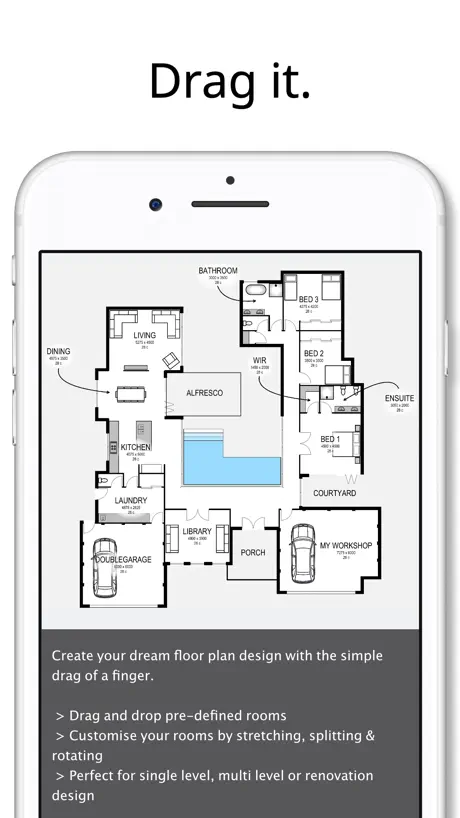
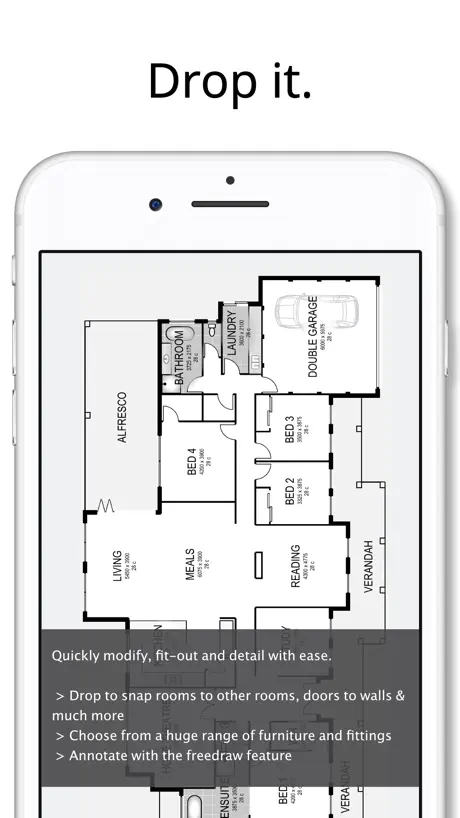
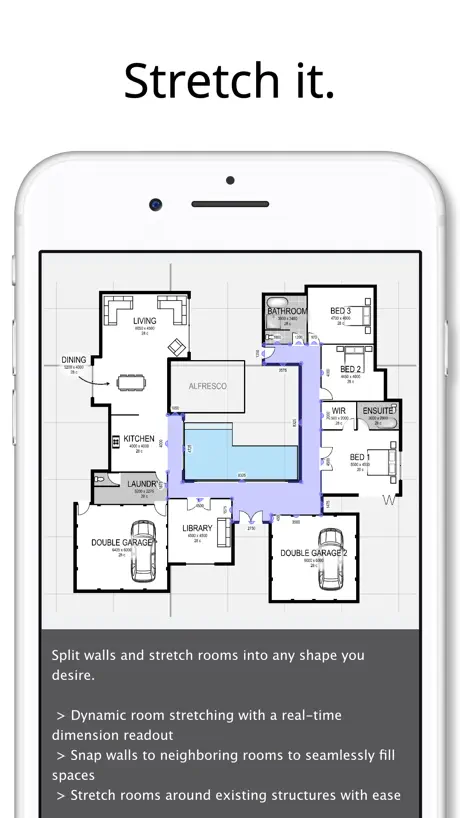
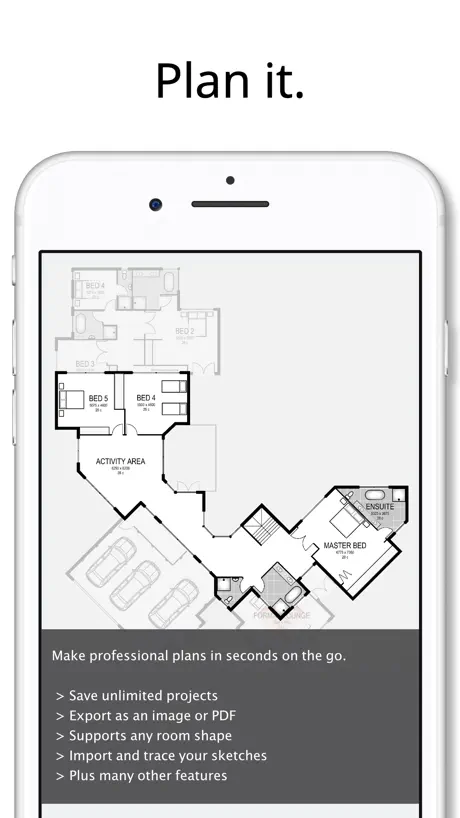
How much does Planit2d cost?
Prices are current as of 8 Sept 2026.
Planit2d has no in-app products on record in the United States.
Planit2d download price by country
| Country | Price |
|---|---|
| United States | $4.99 |
| Australia | A$7.99 |
| United Kingdom | £4.99 |
| Canada | CA$6.99 |
| New Zealand | NZ$9.99 |
| South Africa | ZAR 99.99 |
| India | ₹499.00 |
| United Arab Emirates | AED 19.99 |
| Germany | €5.99 |
| Malaysia | MYR 22.90 |
| Netherlands | €5.99 |
| Saudi Arabia | SAR 19.99 |
| Thailand | THB 199.00 |
| Spain | €5.99 |
| Mexico | MX$99.00 |
| Sweden | SEK 69.00 |
| France | €5.99 |
| Hungary | HUF 1,990 |
| Ireland | €5.99 |
| South Korea | ₩7,700 |
| Philippines | ₱299.00 |
| Belgium | €5.99 |
| Indonesia | IDR 89,000 |
| Romania | RON 29.99 |
| Russia | RUB 449.00 |
| Austria | €5.99 |
| Brunei Darussalam | $4.99 |
| Brazil | R$29.90 |
| Nigeria | NGN 7,900.00 |
| Norway | NOK 59.00 |
| Pakistan | PKR 1,300 |
| Singapore | SGD 6.98 |
| Trinidad and Tobago | $4.99 |
| Vietnam | ₫149,000 |
| Albania | $5.99 |
| Argentina | $4.99 |
| Bulgaria | €5.99 |
| Chile | CLP 5,990 |
| China | CN¥38.00 |
| Colombia | COP 24,900 |
| Denmark | DKK 39.00 |
| Finland | €5.99 |
| Hong Kong | HK$38.00 |
| Israel | ₪17.90 |
| Iraq | $4.99 |
| Jamaica | $4.99 |
| Japan | ¥800 |
| Kuwait | $4.99 |
| St. Lucia | $4.99 |
| Mauritius | $5.99 |
| Poland | PLN 24.99 |
| Slovakia | €5.99 |
| Turkey | TRY 249.99 |
| Tanzania | TZS 14,900.00 |
| Vanuatu | $4.99 |
| Afghanistan | $4.99 |
| Antigua And Barbuda | $4.99 |
| Anguilla | $4.99 |
| Armenia | $5.99 |
| Angola | $4.99 |
| Azerbaijan | $5.99 |
| Bosnia & Herzegovina | €5.99 |
| Barbados | $5.99 |
| Burkina Faso | $4.99 |
| Bahrain | $4.99 |
| Benin | $5.99 |
| Bermuda | $4.99 |
| Bolivia | $4.99 |
| Bahamas | $4.99 |
| Bhutan | $4.99 |
| Botswana | $4.99 |
| Belarus | $5.99 |
| Belize | $4.99 |
| Congo, Democratic Republic | $4.99 |
| Congo | $4.99 |
| Switzerland | CHF 4.00 |
| Cote Divoire | $5.99 |
| Cameroon | $5.99 |
| Costa Rica | $4.99 |
| Cape Verde | $4.99 |
| Cyprus | €5.99 |
| Czech Republic | CZK 129.00 |
| Dominica | $4.99 |
| Dominican Republic | $4.99 |
| Algeria | $4.99 |
| Ecuador | $4.99 |
| Estonia | €5.99 |
| Egypt | EGP 249.99 |
| Fiji | $4.99 |
| Micronesia | $4.99 |
| Gabon | $4.99 |
| Grenada | $4.99 |
| Georgia | $5.99 |
| Ghana | $5.99 |
| Gambia | $4.99 |
| Greece | €5.99 |
| Guatemala | $4.99 |
| Guinea-bissau | $4.99 |
| Guyana | $4.99 |
| Honduras | $4.99 |
| Croatia | €5.99 |
| Iceland | $5.99 |
| Italy | €5.99 |
| Jordan | $4.99 |
| Kenya | $5.99 |
| Kyrgyzstan | $4.99 |
| Cambodia | $4.99 |
| St. Kitts and Nevis | $4.99 |
| Cayman Islands | $4.99 |
| Kazakhstan | KZT 2,990.00 |
| Lao Peoples Democratic Republic | $4.99 |
| Lebanon | $4.99 |
| Sri Lanka | $4.99 |
| Liberia | $4.99 |
| Lithuania | €5.99 |
| Luxembourg | €5.99 |
| Latvia | €5.99 |
| Libya | $4.99 |
| Morocco | $4.99 |
| Moldova | $5.99 |
| Montenegro | €4.99 |
| Madagascar | $4.99 |
| Macedonia | $4.99 |
| Mali | $4.99 |
| Myanmar | $4.99 |
| Mongolia | $4.99 |
| Macao | $4.99 |
| Mauritania | $4.99 |
| Montserrat | $4.99 |
| Malta | €5.99 |
| Maldives | $4.99 |
| Malawi | $4.99 |
| Mozambique | $4.99 |
| Namibia | $4.99 |
| Niger | $4.99 |
| Nicaragua | $4.99 |
| Nepal | $5.99 |
| Nauru | $4.99 |
| Oman | $4.99 |
| Panama | $4.99 |
| Peru | PEN 22.90 |
| Papua New Guinea | $4.99 |
| Portugal | €5.99 |
| Palau | $4.99 |
| Paraguay | $4.99 |
| Qatar | QAR 19.99 |
| Serbia | €5.99 |
| Rwanda | $4.99 |
| Solomon Islands | $4.99 |
| Seychelles | $4.99 |
| Slovenia | €5.99 |
| Sierra Leone | $4.99 |
| Senegal | $5.99 |
| Suriname | $4.99 |
| Sao Tome & Principe | $4.99 |
| El Salvador | $4.99 |
| Swaziland | $4.99 |
| Turks and Caicos | $4.99 |
| Chad | $4.99 |
| Tajikistan | $4.99 |
| Turkmenistan | $4.99 |
| Tunisia | $4.99 |
| Tonga | $4.99 |
| Taiwan | NT$150.00 |
| Ukraine | $5.99 |
| Uganda | $5.99 |
| Uruguay | $4.99 |
| Uzbekistan | $4.99 |
| St. Vincent & The Grenadines | $4.99 |
| Venezuela | $4.99 |
| British Virgin Islands | $4.99 |
| Kosovo | €5.99 |
| Yemen | $4.99 |
| Zambia | $5.99 |
| Zimbabwe | $5.99 |
10+ alternatives to Planit2d
| Planit2d |   Keyplan 3D - Home design Keyplan 3D - Home design |   RenoPlan - Floor Plan Creator RenoPlan - Floor Plan Creator |  QuickPlan 3D - Floor plans QuickPlan 3D - Floor plans |   Blue Sketch - Handwritten note Blue Sketch - Handwritten note |   iPocket Draw Lite iPocket Draw Lite |   RENDR: Floor plans in seconds RENDR: Floor plans in seconds |  Arrette Sketch drafting tools Arrette Sketch drafting tools |   SecondFloor SecondFloor |   OpsPlan LCT50 Calculator OpsPlan LCT50 Calculator |   Floor Plan Magic Floor Plan Magic | |
|---|---|---|---|---|---|---|---|---|---|---|---|
| Rating / 5 | 4.2 | 4.6 | 4.5 | 4.3 | 4.6 | 3.2 | 4.5 | 3.7 | 3.7 | 5.0 | 2.6 |
| Reviews | 719 | 16K | 1.4K | 546 | 494 | 132 | 46 | 30 | 21 | 7 | 5 |
| Released | 2013 | 2014 | 2022 | 2015 | 2019 | 2009 | 2023 | 2014 | 2022 | 2023 | 2025 |
| One-time price | — | $1.99 | $9.99 | — | $0.99 | — | — | — | — | — | — |
The going rate for each plan in United States, in its own currency, shaded from the cheapest price on the row to the dearest. Plans fewer than four in ten of the priced apps sell are left out.
Planit2d reviews
4.2 out of 5, based on 719 reviews.
What people like
- Very fast for simple layout designs
- Easy to learn for beginners
- Affordable price point for basic needs
- Drag-and-drop rooms save a lot of time
What they complain about
- No undo button causes major frustration
- Syncing between devices is broken or missing
- App crashes and freezes frequently
- Touch control is inaccurate and picky
- Limited furniture and appliance options available
For Creator
I never give 5 stars, but I would give this a 4.5+ if there was such a thing. I have not mastered the use of the application by any means, but I would really like to see the “fitout” section have appliances, like refrigerator, range, water heater, furnace, etc. … a way to get better views of the sizing for spaces. Otherwise, for what it is, absolutely love this app. 👍🏼👍🏼
Waste of time and money
The 32nd tutorial races through in about eight seconds, no sound no volume just charges through. No ability to draw a block of land it’s only about drawing the house and that’s not what I asked for thanks for wasting my money
Floor Plan app made Simple, Well Done and almost perfect!
I had tried multiple Floor Plan apps and found many of them lacking either to simple so not useful, to difficult to navigate so hard to create a floor plan. After a few days of trying the Planit2D app I found it to be useful, simple, well done and almost perfect. Planit2d would be perfect for me, and perhaps most users interested in designing floor plans, with three (3) features added: 1) Ability to change the opacity / background opacity of the floor you’re working on so you can see and match up to the walls of the floor below; 2) Ability to add tiny labels and arrows to stairs to indicate direction while working on stairs on a specific floor; and 3) it needs a category for storage under Fitout menu. This category should contain storage pieces that are mounted to or attached to walls like kitchen cabinets, pantries, standard closets, under stair storage, and they have doors: single, double, folding, cavity, etc. So just create a sample of Storage units in Fitout menu.
Good app, but needs a lot of work, can't save to cloud
would be a really nice app, except there are a lot of issues: 1. cant save to cloud 2. cant sync to other ios devices and pickup where you left off 3. file is saved in some proprietary location that you can't access 4. full screen viewing on macos causing lockup 5. shrinking from full screen viewing on macos causes lockup 6. cant zoom in or out on Macos. This is a huge issues!!! 7. sometimes floor plan zooms in by itself and you cant zoom out using a Mac these are the bugs i found within 10 minutes of using this app. shame nothing is tested by developer
Easy to use but exports are all rasterized
The interface is fairly intuitive and surprisingly useable on a phone screen. Major limitation is that even the PDF exports are rasterised; there’s no way to get a vector of the floor plan out of the app.
Perfect
Exactly what I needed.
Don’t waste your time or money
This app only works on the iPad. They have a Mac version but it doesn’t work. Can’t sync to cloud. Asking for a refund. Emailed developer with issues. No reply.
SImple but effective
I needed to modify a floor plan but didn’t want to use a more featured architectural app. The simplicity of this app was perfect for my objective. The limitations are more apparent when editing once all the rooms are in place. 1 - The ability to select smaller objects and move them varies significantly with the Zoom level. Undo is VERY helpful because of this! 2 - Undo is also a great feature when zoomed in and there is limited unused screen area to touch. 3 - The snap-to feature should be capable of being disabled. Stretching can be effected by a point in another area making impossible to set the desired dimension. The room will not only need to be removed but moved diagonally from the primary structure thereby avoiding potential interference. 4 - The ability to share files between devices, including M based MacOS devices, is a major limitation. My 27” display would have been an improvement over working on a 11” iPad. I rated this app a 4 independent of the above because I was able to work with its limitation and achieve my goal. The layers are a nice feature. I used Layer 1 for the entire structure. Layer 2 was used to populate the rooms. This helped significantly with editing Layer 1 to support the necessary items. Layer 3 was used to remove the non-living areas and get the livable square footage.
It is a good phone App
Like I stated. It is a good phone app. I wish that it could improve the desktop version. On the desktop version you are not able to delete the designs, rename or delete previous files. Sometimes the page opens up and is uresponsive or opens partially and doesnt allow you to close the app unless you force quit it.
Great but need to be fixed
I would give 5 stars if it had a undo and redo function. Also a group link and separate; rooms tend to link causing you to make errors.
Just needs more outfits.
I am enjoying this app and putting my own touch on how I want my house to look. Its easy to use. Just needs outdoor options.
Maddening!
Literally maddening. It's nearly impossible to get the correct lengths by dragging your finger. No undo for all the constant errors. No manual input of exact measurements. I wasted $5 only because its the only thing I found to run on my ancient iPad. Time to upgrade gear
Great but lacks tiny details
Been using this app for years, and always really liked it. Even designed my mothers new house with this app. You have to get a little creative when it comes to “fill out” features like shelves, fridges, walk in showers, bar stools, water heaters and furnaces, things of that nature. But you can design pretty intricate designs once you get the hang of it. Great app, highly recommend.
SO horribly frustrating!
It seems like such a simple and easy program, but it is anything BUT! The touch is horribly inaccurate, and you constantly are grabbing the wrong room or feature. There is NO UNDO feature, and several times I have lost design elements because I have had to delete the completely malfunctioning “stretch” feature! It makes no sense why anyone would want the corners of a room to be so overly sensitive that they become irreversibly distorted. Again, no option to “undo”, so once the design becomes ridiculously distorted, there is no option but to delete and start over. There is no fine-tuning without major effort, and even at that point is often pointless and infuriating.
Need more support tools
The apps is good but need more support tools . First the thickness of the wall didn’t included in the actual area. When I design a plan , I found that wall area didn’t included from the cut area. Second, I need more tools to draw the stairs like spring shape stairs . Hope I see a new put soon . Then I will recommend this application to my friends. Thank you
Great app at great price.
Does exactly what I need without any hiccups.
Buggy, no undo
This app is relatively easy to use, but it’s also buggy. I’ve had two different projects where combining two rooms basically FREEZES the active room and the adjoining rooms. They can no longer be edited or moved. Just stuck on the layout where they are. Also, many users have requested some kind of UNDO button to allow you to undo a recent movement. Sometimes a wall gets ‘stretched’ on a corner and you have to fiddle around forever to get it fixed, where simply hitting a go back arrow or undo button solves it. Another thing is that I’d pay for the drawings to actually show up in a readable format with dimensions and lines, but nope, all you get in a room size. So much this could be for making things simple, but it’s like the 85% solution so far.
Glitches and limitations
Easier than other programs for the simple drawings I need. However, sizing a room is inconsistent. Sizing jumps above and below exact measurement I am trying to set. It would be nice to be able to also type the measurement vs only dragging. Makes angled room adjustments tough as well. Snap on/off option disappeared, but certain items are still snapping to grid. Very frustrating.
Helpful but not what I hoped for
The app will allow you to get an idea of what you would like but several deficiencies such as: Not enough options such as kitchen necessities ( appliances- cabinets), bedroom( closets ). Does not allow you to export to excel or a usable editing tool or to enlarge plan Difficult to edit room sizes and challenging to move items Does not allow you to insert a room or closet in a larger existing room so you have to freedraw which is difficult
Sizing needs work
I actually really enjoy using this app, however at times is very frustrating when you’re trying to stretch something and it goes from being small increments to all of a sudden a large skip to being too big. You cant always move benches to be against the wall, it often situates itself inside the wall. Being able to manually type in sizes /measurements would be great.
It’s Great But Needs Updating
Update (from me!) Thank you for the UNDO feature! I can't wait to play around with the new and improved version. This is so much fun! I can spend hours playing around with designing my future home. However, many reviewers have hit on the flaws that keep it from 5 stars. Can’t adjust the font size for rooms. Can’t label outside spaces such as “porch.” A slight adjustment makes walls go wonky, and it DESPERATELY NEEDS AN UNDO feature. Sometimes you have to literally move a room out of the house to fix the size. There should also be a way to set the size of a room or element by typing in the dimensions you want. It would be great to be able to add a houseplant, desk, or small table or bookshelf, as well. Developer, please update! :)
Not Worth Purchase
Online tutorials haven’t been updated in years. Missing or broken features (cannot import sketches). Developer does not respond to support requests.
👍🏼 Pretty Nice App
This app is functional for those who want to design a home or cottage on a concept level. You won’t be able to place details like electrical outlet, HVAC, or plumbing. However for the price point, I like this program and recommend it.👍🏼
Wow, so many helpful suggestions, yet no update in 3 years??
I think this could be a great app, but unfortunately, even the tutorial videos aren’t that detailed. You move too fast for the average person to see what you’re touching, what steps you’re taking, in the videos. Slow down. Listen to your consumers. Acknowledge that each of them paid $5 to take a look at your app and provide feedback, which you then ignored. Guess I will bumble around and be similarly frustrated until I discover another option.
REDO & UNDO
last comment is right. There is no REDO & UNDO. I’m surprised it’s an old suggestion & nobody still updating. UNLESS I did not see it.
4.25 Stars!! Built for speed
I really like this app for what I need. I need to create designs of homes within 5 minutes and I don’t want to pay for annual subscriptions and I want to be able to try the app first. This app just works for what I need and gives me abilities no other app gives. Very low learning curve, I can build a 2D layout fast, I don’t need measurement either, It just needs to look accurate. There is no other app, hand drawn or otherwise that I’ve seen that can make a 2D layout this fast and this professional. The app also features the ability to copy pre made layouts so you can make templates to get even faster. Maybe I’m missing something but there is no undo button if you delete something or move something by accident which happens all the time when your moving fast I would much rather multiple undos than a pop up to delete mid page. Could be a few more features but for what I do, it’s awesome.
Seriously don’t pay for it.
I bought looking to start making some blueprints/drawings for construction. I work in concrete so having something to show or even for permits, regard less ,this app is not of any help. It glitches, and you can’t free draw. You have to pick already made figures and it’s not any good. I’m mad that I paid for it and was unhappy of the amount of effort ,if any ,went it to this app.
Great but could be better
I love this app for designing my dream home. But I agree it definitely needs a redo/undo button. And I wish it was a little mote detailed
Frustrated
I’ve only just started using this app to help with designing a new home. I was liking but now bugs have been noticed. I’ve added a room, and I can not move it, delete it or stretch it. I’m going to have to start the plan from scratch again. Very frustrating and annoyed that I’ve wasted $7.99 on this app that doesn’t work as it should.
I use it a lot but is buggy
I actually really like this app, however it can be quite buggy which I find very frustrating. Often I will be designing and one of the rooms will remain on the screen and go clear and you can no longer move/resize or even delete the room however it’s sitting in the background somewhere. When this happens it usually means the plan has to be completely deleted and started under a new project which is quite frustrating! Also the walls don’t seem to be included in the measurement - it would be great to seperate the interior room measurement and the wall measurement into 2 seperate measurements - important for things like walls etc where there is a minimum space requirement.
Allow to share across devices
I have the app on my phone and iPad. However they do not sync. I also think an ‘undo’ button would be extremely helpful. When a line or item is accidentally moved, it is not easy to fix. Especially if your finger grabs a corner instead of the middle stretch. Overall, this is a fun app and has helped with design ideas.
Garbage
I couldn’t even name my project. No way to delete a project to start over. Don’t waste your money
Nice but need a little more
Needs Applances and to be able to sho measurements for tables and counter tops other than that it’s great! Just drew my floor plan for new house
Really basic
I love the drag-and-drop rooms. Missing some of the pieces I would expect of a blueprint system, and doesn’t seem to allow dimensions to be edited by typing or using menus, only by dragging, often with less satisfying results.
Needs work
App is fairly simple to use but would be much better with a simple undo button. Few bugs causing app to crash also
Great app
Honestly love this app so much.
Don’t spend your money just to save your work.
Honestly, trash... Wish I could get my $5.00 back.
Great basic floor plan app
This app is inexpensive and easy to use. It didn’t take more than a few minutes to get adept at using. I only really need it for one project but, I do plan on using it for others as well.
Buggy
Spent two hours drawing plans and then end up with a room that can't be selected, moved or deleted. Time to start drawing again. Also needs an undo button.
Good but...
Good cheap app. Full of bugs, but you can get through it by quitting and restarting. This can get annoying. Snaps are very restricting.
Great starter
I tried 2 other apps before finding this one. It is much easier to use than the others. It does need some tweaks - an undo and redo button would be nice. Also more options like a coffee table and kitchen appliance like a fright, range, dishwasher, sink. That aside, it’s a great app.
Not useful.
Too basic. Exterior walls only. Overpriced.
Still needs a bit of work
I like this App for creating plans but it has a few glitches and idiosyncrasies that frustrate me. Here they are: 1. It needs an undo button. Several times I have deleted or moved the wrong room and I couldn’t just hit “undo” in order to go back. It often takes 5-10 minutes to fix when a go back, or undo button would have fixed it. 2. There are only two save options, save and exit or export. I like to save periodically to make sure I don’t lose my work. When I save it closes, even though I want to continue working on my plans. Then I have to reopen the file again to continue. 3. Not enough kitchen choices. I would like to be able to add more options, like a pantry, a stove, a refrigerator, and a kitchen island or peninsula. 4 Occasional errors show up in my saved file. Right now I have a big black streak running through my home plans that I cannot delete. 5. Finally, I would like an eraser option. An eraser would allow me to shorten lines, smoothe or erase items I do not want. For the price, the app works moderately well, but there will be frustrations until some of these issues are fixed and needed options are added. I cannot give it 5 stars now, but hopefully I can change my rating in the future.
Ok but clunky and limited
Lacks the ability to share native file format with another user, even if the buy that app also. Great for a beta version, needs polishing and a full set of features.
Needs a little finessing
Easy to use, but need more flexibility to say add windows on a section where a wall was drawn freehand. Features can move around as others mention. Otherwise valuable app
Love this app!!
Works so well for me not knowing a thing about math or engineering! Easy easy to use!
Waste of money
Glitches! Freezes up, when you try to move something, it moves the wrong item. Limited furniture items, places walls where you don’t want them, no bay windows, no handicap features. Can’t get rooms to lock, so when you try to move anything, the room moves. Disappointed! Now you won’t post my review. RJ
Easy to use app but needs an undo button
Love this app for the most part! It definitely needs an undo button though. PLEASE ADD THAT FEATURE!! Sometimes with the stretch feature you can accidentally pull it into a weird shape and if you can’t get it to go back, you have to delete the whole room and start over. An “undo” button would solve that. But I LOVE that you can add rooms that are already labeled rather than having to draw a floor plan wall by wall. It’s super quick and easy to use! Makes designing a floor plan easy for beginners.
This app needs work!
We just got a new apartment & I thought it would be practical to sketch up where all furniture would go so our moving company knows and can set it up quickly. But this app does not catalogue a whole lot of furniture options.. No nursery furniture, no side tables, no shelves, no rugs, no lamps, no plants, no chairs/stools, no bar, no dressers, no tv units, no surround system, no speakers.. it’s a lot that’s just not there.. it barely covers the basics. You will end up designing your own furniture things, but even that is VERY limiting and VERY VERY time consuming & not user friendly.. You can’t fill the designs with dots/lines or something to differentiate them from each other.. Then there are no options for interior wardrobes (built in) so you actually have to make them as small rooms?? It’s impractical. Nothing for an open fireplace. Save your money and stick to a notepad. This app isn’t worth it & I don’t know why it got such a high rating.
Good but not great
Reasonably straight forward to use, however issues with some of the furnishing items not working. Doors just refused to be placed on a drawing. Also the lines tend to move by themselves whilst working on rest of plan, so always having to fix. Lastly, when using colour shading some thing became hidden. Really needs a “undo” arrow....not easy to delete some actions. Only saves as photo, not document. Expected more for my money. Would also be useful to see measurements of lines. Good for rough sketches but ultimately limiting and therefore slightly frustrating.
Planit2d FAQ
- Is Planit2d free?
- No. Planit2d costs $4.99 (US) to download.
- Does Planit2d have a free trial?
- No. None of its offers (US) come with a free trial.
- What are the best alternatives to Planit2d?
- Keyplan 3D - Home design (4.6 from 15,797 reviews, premium from $0.99), RenoPlan - Floor Plan Creator (4.5 from 1,386 reviews, premium from $9.99) and QuickPlan 3D - Floor plans (4.3 from 546 reviews).
Planit2d download
Last updated 8 months ago.
Planit2d sells in 175 countries. It was released 13 years and 6 months ago, on 28 Mar 2013. It holds a 4.2 rating from 719 reviews.
Supports 29 languages: English, Arabic, Catalan, Czech, Danish, Dutch, Finnish, French, German, Greek, Hebrew, Hungarian, Indonesian, Italian, Japanese, Korean, Malay, Norwegian Bokmål, Polish, Portuguese, Romanian, Russian, Chinese, Slovak, Spanish, Swedish, Thai, Turkish, Vietnamese.
How much does Planit2d make?
Third-party estimates for the last 30 days, worldwide — not the store's own figures, which Apple publishes for nobody.