
myWork - Time tracking
Overtimes, Salary, Automatic
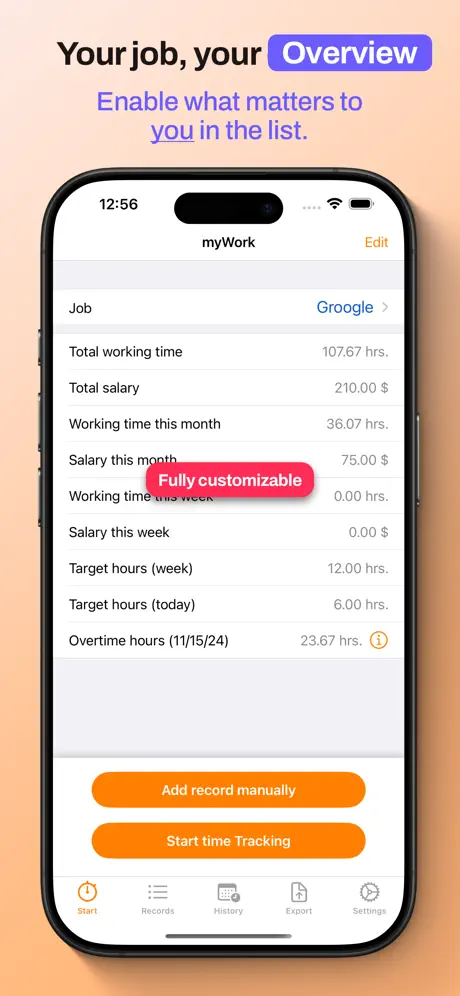
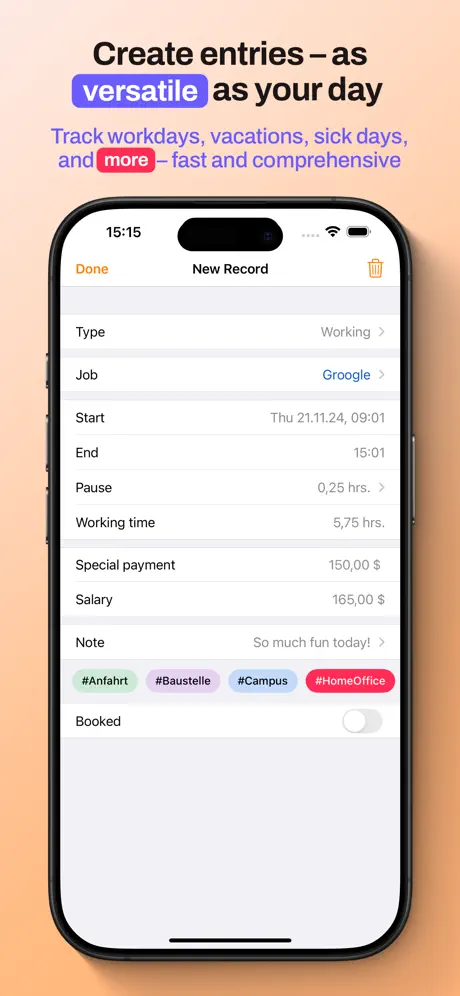
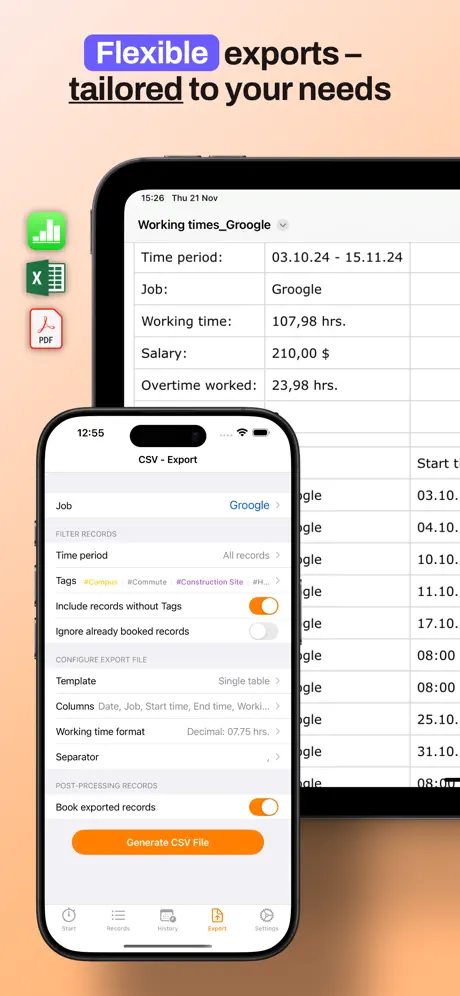
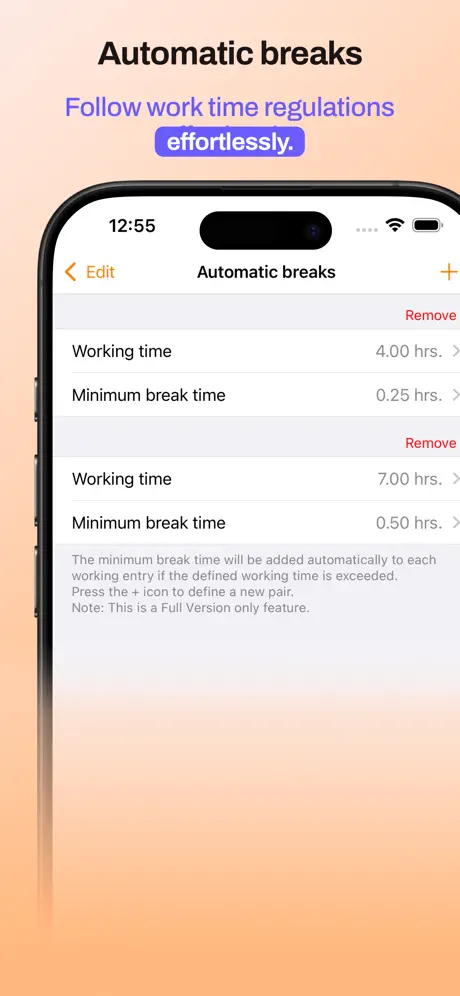
How much does myWork - Time tracking cost?
Prices are current as of 4 Oct 2026.
1 subscription from $1.49
In the United States, myWork - Time tracking has 1 subscription priced $1.49.
| Subscription | Period | Price |
|---|---|---|
| Full version (Subscription) | Monthly | $1.49 |
1 one-time purchase from $8.99
In the United States, myWork - Time tracking has 1 one-time purchase priced $8.99.
| Product | Price |
|---|---|
| Full version (Lifetime) | $8.99 |
See what myWork - Time tracking costs in all 175 countries →
10+ alternatives to myWork - Time tracking
| myWork - Time tracking |   Hours & Pay Tracker: atWork Hours & Pay Tracker: atWork |   Automatic Time Clock Automatic Time Clock |   Hours Tracker - myTime Hours Tracker - myTime |   WorkTimes - Work Hours Tracker WorkTimes - Work Hours Tracker |   TimeTrack for Freelancers TimeTrack for Freelancers |   TimeTac Classic TimeTac Classic |   iboChron - Work Time Tracker iboChron - Work Time Tracker |   WorkingHours • Time Tracker WorkingHours • Time Tracker |   TimeTrack - Time tracking TimeTrack - Time tracking |   Working Timer - Timesheet Working Timer - Timesheet | |
|---|---|---|---|---|---|---|---|---|---|---|---|
| Rating / 5 | 4.6 | 4.7 | 4.7 | 4.6 | 4.6 | 4.7 | 4.4 | 4.6 | 4.7 | 4.6 | 4.3 |
| Reviews | 5.8K | 72K | 36K | 14K | 7.7K | 5.9K | 4.8K | 2.3K | 2.2K | 1.6K | 1.1K |
| Released | 2011 | 2014 | 2016 | 2019 | 2009 | 2014 | 2013 | 2019 | 2018 | 2014 | 2020 |
| Monthly price | $1.49 | — | $1.99 | $1.99 | $2.99 | $4.99 | — | $2.99 | — | — | $2.99 |
| Annual price | — | — | $12.99 | $19.99 | $17.99 | $34.99 | — | $17.99 | — | — | — |
| One-time price | $8.99 | $3.99 | $29.99 | $6.99 | $2.99 | $3.99 | — | $3.99 | $9.99 | — | $49.99 |
The going rate for each plan in United States, in its own currency, shaded from the cheapest price on the row to the dearest. Plans fewer than four in ten of the priced apps sell are left out.
myWork - Time tracking reviews
4.6 out of 5, based on 5,814 reviews.
What people like
- Developer is super responsive and helpful.
- Simple, clean, and easy to use.
- Does exactly what it promises.
What they complain about
- Overtime calculations are often wrong.
- Missing basic features like breaks.
- Watch sync creates random errors.
- Does not support variable daily hours.
,
Eine super App
Automatische Zeiterfassung
Leider hab ich festgestellt das ich nach Kauf der Vollversion nur eine begrenzte Anzahl von automatisierten Einträgen habe. Das finde ich sehr schade da ich mehr als 18 Einträgen brauch.
Samstag, sonntag und Feiertag Zuschläge
Hab jetzt etwas gesucht, aber nichts gefunden. Ist es möglich Zuschläge zb Samstags, Sonntags, Feiertags und Nachtzuschläge mit Prozenten anzugeben für die richtige brutto Lohn Berechnung? Sonst eine top App
Ungenau
Habe die App erst ein paar Tage in der kostenlosen Version getestet, hat mich überzeugt und habe dann die Vollversion gekauft. Jetzt beim Monatswechsel viel mir allerdings auf, das die Arbeitsstunden falsch sind. Auf Arbeit habe ich eine einfache Exeltabelle und zwischen beiden liegt eine Differenz von 2,5h und ich finde den Fehler nicht. Kann leider den Kauf nicht rückgängig machen, bin sehr verärgert und enttäuscht.
Fehlende Tage
Es ist nicht möglich einen Sonderurlaub oder einen Brückentag einzutragen die vielen Vorgaben sind okay aber nicht Komplett Auch eine Info Arbeitszeit erreicht wäre nicht schlecht
Sehr nützlich
Ich finde die App bis auf zwei fehlenden Funktionen wirklich gut und hilft mir dabei, die Zeiten nicht mehr schriftlich festhalten zu müssen. Die zwei fehlenden Funktionen sind meines Erachtens zum einen die Pausenzeit. Die Pausenzeit sollte man tageweise einstellen können. In meinen Fall habe ich von Mo-Do die gleichen Pausenzeiten, am Freitag ist sie jedoch kürzer. Das zweite ist der Standort, den sollte man, wenn möglich selber eingrenzen können. Ich werde eigentlich aktuell zwei-drei Minuten zu früh eingestempelt (hier könnte man zwar aufrunden), aber ich werde auch zwei-drei Minuten zu spät ausgestempelt. Hochgerechnet im Jahr ca. 15 Stunden die also falsch berechnet wurden. Vielleicht gibt es ja eine Möglichkeit dort nachzubessern.
Update bitte
Bitte neues Update für das Jahr 2026 😅
Überstundenkonto
Mit der Kontoführung bei den Überstunden gibt es bei mir etwas Probleme da wäre editieren. gefragt
Unterschiedliche Wochenarbeitszeit
Hi Ich habe in einer Woche z.B. 25h und in der nächsten Woche dann 35h. Gibt es eine Möglichkeit einen 2WochenPlan in der APP zu erstellen? Mit wieviel Stunden wird der Urlaub oder krank in die sollStunden mit rein gezählt?
Export per E-Mail geht nur noch bis zum 15. des Monats
Wenn ich meine Zeit Erfassung wie immer erstelle, und sie per E-Mail weiterleite, geht sie nur noch bis zum 15. des Monats. Das ist exakt seit dem 31.12.2024 so. Woran kann das liegen?
Gute App
Vielen Dank für die tolle App 1a (Es wäre schön wenn die Kopierfunktion noch mal bestätigt werden müsste, dann würde man es nicht aus Versehen kopieren)
Top-App
Diese App funktioniert wunderbar und tut was sie soll. Es wäre schön, wenn man bei „Aktivität“ bzw. „Typ“ evtl. noch „Kindkrank“ auswählen könnte?! Ansonsten null Probleme. 👍
Fast perfekt
Die App macht alles, was sie soll. Der Support reagiert ziemlich schnell auf Anfragen, schon mal gut. Für mich ist nicht so richtig nachvollziehbar, wie die Überstunden berechnet werden., Außerdem hängt die Anzeige immer ein, zwei Tage hinterher. Aber Hauptsache es stimmt und das tut es.
App für Handy oder Watch
erst funktionierte die App gut, im Laufe des Testens stellte sich heraus da die Watch Funktion Fehler hat.Es ohne Handy in der Nähe nicht möglich, die Zeitfunktion zu aktivieren. Da ich die App Pro gerade wegen der Watch Funktion kaufte leider nutzlos geworden
Freie Tage
Weshalb kann man keine freien Tage auswählen. Wäre nicht schlecht, zwecks besserer Übersicht.
Super App
Gefällt mir sehr. Und wird immer besser. Sehr schneller Support vom Entwickler bei Fragen.
Kalender übertragen
Guten Tag Bis jetzt finde ich die App sehr übersichtlich. Ich kam schnell rein. Was ich noch toll finde wären das synchronisieren auf Kalender. Da ich mein Kalender mit meiner Frau teile und sie auch ein Überblick hat. Vilt geht das ja in der Pro Version die ich noch nicht geholt habe da ich die App noch testen
Finde den Fehler…
Habe ein Abo, um mich in meiner Apple Watch zeitgleich mit der Stempeluhr auf Arbeit ein und aus zu loggen. Pausen habe ich nach 6 und 9 Stunden automatisch eintragen lassen und die Wochenarbeitszeit. Soweit alles easy und verständlich. Das lief die ersten Monate auch super, und 1:1 mit der Stechuhr bis dann irgendwann ohne dass eine Veränderung herbei geführt wurde, jeden Tag minimale Abweichungen dazu kamen, die ich mir bis heute nicht erklären kann. Diese summieren sich mittlerweile laut myWork auf 40 Überstunden, auf meiner Stechuhr bin ich bei +/- 0. Um zu checken, wer da jetzt falsch rechnet, habe ich eine Excel Tabelle erstellt. Die aktuellen Überstunden meiner Stechuhr sind korrekt. Was ich nicht verstehe: die tagtäglich erfassten Stunden von myWork stimmen zu 100% mit meiner Stechuhr überein. Nur eben in der Überstunden Summe nicht. Habe schon x mal den Fehler in den Einstellungen gesucht und kann einfach nichts finden, da alle Grunddaten korrekt eingegeben sind.
ESSENZIALE MA EFFEICACE!
non vi do 4stelle solo perché andrebbero aggiunte funzioni basilari come poter mettere un valore e un tempo stimato ai vari progetti o di poter chiudere gli stessi lavori mese per mese,ma per il resto è ben fatta e pratica da aggiornare grazie alla funzione cloud con dropbox! Continuate così!
Top App
Sehr gute App. Aber habe ein kleines Problem. Kann ich Tage mit Krankmeldung auch mit 8 Stunden bewerten ?? Danke im Voraus Grüße Marco
So viel Zeit und Stress gespart durch diese App. Gold wert!
Ich mag diese App sehr. Sie erleichtert mir das dokumentieren meiner Stunden. Find auch gut das immer wieder Dinge dazukommen die es immer besser macht. Mächtige App. Einen Wunsch hätte ich aber noch. Ich würde gerne bei den Jobs die Anschrift hinzufügen um sie bei der Übersicht, wenn man draufklickt und das Fenster nach unten geht, untereinander sehen zu können. Im Moment ist es so dass wenn ich die Adresse mit im Job einfüge alles rechts verschwindet.
Fehler
Hallo,ich habe auch Fehler bei den Überstunden. Ich arbeite 7 Tage im Monat A 24std und die App macht einfach Arbeitstag die ich nicht gearbeitet habe hinzu. Und macht dadurch alles durcheinander. Mfg
Perfekt
Super APP zur Zeiterfassung 👍
Dienste
Guten Tag, an sich eine super App. Mir fehlt leider eine Funktion um Dienste hinzuzufügen weil ich immer andere Arbeitszeiten habe. Damit man z.b. nur „Dienst 1“ oder „dienst 2“ auswählen kann und dann sind Pausen etc. alles automatisch eingetragen. Wenn so eine Funktion kommen sollte, dann gerne 5 Sterne. Lg.
Naja
Auto Zeiterfassung geht die halbe Zeit nicht!!!!!
Updated review. Problem resolved in under 24 hours.
App developer was super responsive. Had to reset a setting, then quit and relaunch the app, and now it’s working again. 5-stars (up from one), and I hope this review replaces the previous one.
Unfreiwillige Kopie
Hallo , leider hat die App am Ende des Monats „ Schwierigkeiten ” und kopiert Arbeitszeit mehrfach. LG
:(
The app doesn't work properly!
Brilliant
I tested out a whole bunch of similar apps before selecting this one. And it’s a decision I’ve never regretted. This sophisticated but simple to use app is outstanding.
Überstunden
Seit dem letzten Update werden die Überstunden nicht mehr korrekt angezeigt. Es werden bei 8h Arbeit täglich weniger Überstunden angezeigt. Ansonsten finde ich die App super!
Great!!
I really like this app; it does everything I need it to do while staying simple and clean. The developer is also super helpful and responsive! No complaints.
Unterschiedliche Stunden an den Wochentagen
Hallo, ich finde die App grundsätzlich sehr gut, was mir fehlt ist: unterschiedliche Arbeitsstunden an unterschiedlichen Wochentagen! Ich arbeite an einem Tag 10 std und an einem anderen 6 std! Wenn ich Urlaub oder krank eintrage stimmt für mich dann die Stundentakt nicht mehr! Das ganze gilt auch für Feiertage! Lg
Useful App
This does app exactly what I need it to do. One thing that would make it better if I could pre-enter my paused time, because I don't use the pause feature on the app. I normally use the post pause feature. Great App
Zeiten lassen sich nicht exportieren
Leider kann ich mir alle Zeiten ob gebucht oder nicht auf diese Datei bringen, egal wie es eingestellt ist
myWork - Time tracking price by country
A monthly subscription costs $0.35 in Turkey and $1.96 in Colombia — 6× more for the same thing. Below is the going rate for each plan in every country that sells it — the middle price of what the app charges there, in the country's own currency with the dollar equivalent beneath it.
| Country | Monthly | One-time |
|---|---|---|
| Afghanistan | $1.49 | $8.99 |
| Albania | $1.79 | $9.99 |
| Algeria | $1.49 | $8.99 |
| Angola | $1.49 | $8.99 |
| Anguilla | $1.49 | $8.99 |
| Antigua And Barbuda | $1.49 | $8.99 |
| Argentina | $1.49 | $8.99 |
| Armenia | $1.49 | $9.99 |
| Australia | A$1.99$1.38 | A$14.99$10.41 |
| Austria | €1.49$1.68 | €9.99$11.24 |
| Azerbaijan | $1.49 | $9.99 |
| Bahamas | $1.49 | $9.99 |
| Bahrain | $1.49 | $9.99 |
| Barbados | $1.49 | $9.99 |
| Belarus | $1.49 | $9.99 |
| Belgium | €1.49$1.68 | €9.99$11.24 |
| Belize | $1.49 | $8.99 |
| Benin | $1.49 | $9.99 |
| Bermuda | $1.49 | $8.99 |
| Bhutan | $1.49 | $8.99 |
| Bolivia | $1.49 | $8.99 |
| Bosnia & Herzegovina | €1.49$1.68 | €9.99$11.24 |
| Botswana | $1.49 | $8.99 |
| Brazil | R$7.90$1.51 | R$59.90$11.48 |
| British Virgin Islands | $1.49 | $8.99 |
| Brunei Darussalam | $1.49 | $8.99 |
| Bulgaria | €1.49$1.68 | €9.99$11.24 |
| Burkina Faso | $1.49 | $8.99 |
| Cambodia | $1.49 | $9.99 |
| Cameroon | $1.49 | $9.99 |
| Canada | CA$1.99$1.40 | CA$11.99$8.44 |
| Cape Verde | $1.49 | $8.99 |
| Cayman Islands | $1.49 | $8.99 |
| Chad | $1.49 | $8.99 |
| Chile | CLP 1,400$1.43 | CLP 9,990$10.17 |
| China | CN¥9.00$1.34 | CN¥58.00$8.63 |
| Colombia | COP 6,500$1.96 | COP 39,900$12.05 |
| Congo | $1.49 | $9.99 |
| Congo, Democratic Republic | $1.49 | $8.99 |
| Costa Rica | $1.49 | $8.99 |
| Cote Divoire | $1.49 | $9.99 |
| Croatia | €1.59$1.79 | €9.99$11.24 |
| Cyprus | €1.49$1.68 | €9.99$11.24 |
| Czech Republic | CZK 39.00$1.79 | CZK 249.00$11.46 |
| Denmark | DKK 11.00$1.65 | DKK 79.00$11.88 |
| Dominica | $1.49 | $8.99 |
| Dominican Republic | $1.49 | $8.99 |
| Ecuador | $1.49 | $8.99 |
| Egypt | EGP 22.99$0.44 | EGP 499.99$9.57 |
| El Salvador | $1.49 | $8.99 |
| Estonia | €1.49$1.68 | €9.99$11.24 |
| Fiji | $1.49 | $8.99 |
| Finland | €1.49$1.68 | €9.99$11.24 |
| France | €1.49$1.68 | €9.99$11.24 |
| Gabon | $1.49 | $8.99 |
| Gambia | $1.49 | $8.99 |
| Georgia | $1.49 | $9.99 |
| Germany | €1.49$1.68 | €9.99$11.24 |
| Ghana | $1.49 | $9.99 |
| Greece | €1.49$1.68 | €9.99$11.24 |
| Grenada | $1.49 | $8.99 |
| Guatemala | $1.49 | $8.99 |
| Guinea-bissau | $1.49 | $8.99 |
| Guyana | $1.49 | $8.99 |
| Honduras | $1.49 | $8.99 |
| Hong Kong | HK$10.00$1.27 | HK$68.00$8.66 |
| Hungary | HUF 599$1.83 | HUF 3,990$12.18 |
| Iceland | $1.85 | $9.99 |
| India | ₹129.00$1.34 | ₹999.00$10.37 |
| Indonesia | IDR 25,000$1.40 | IDR 179,000$10.01 |
| Iraq | $1.49 | $8.99 |
| Ireland | €1.49$1.68 | €9.99$11.24 |
| Israel | ₪3.90$1.28 | ₪29.90$9.80 |
| Italy | €1.49$1.68 | €9.99$11.24 |
| Jamaica | $1.49 | $8.99 |
| Japan | ¥150$0.95 | ¥1,500$9.50 |
| Jordan | $1.49 | $8.99 |
| Kazakhstan | KZT 699.00$1.57 | KZT 4,990.00$11.23 |
| Kenya | $1.49 | $9.99 |
| Kosovo | €1.49$1.68 | €9.99$11.24 |
| Kuwait | $1.49 | $8.99 |
| Kyrgyzstan | $1.49 | $9.99 |
| Lao Peoples Democratic Republic | $1.49 | $9.99 |
| Latvia | €1.49$1.68 | €9.99$11.24 |
| Lebanon | $1.49 | $8.99 |
| Liberia | $1.49 | $8.99 |
| Libya | $1.49 | $8.99 |
| Lithuania | €1.49$1.68 | €9.99$11.24 |
| Luxembourg | €1.49$1.68 | €9.99$11.24 |
| Macao | $1.49 | $8.99 |
| Macedonia | $1.49 | $8.99 |
| Madagascar | $1.49 | $8.99 |
| Malawi | $1.49 | $8.99 |
| Malaysia | MYR 5.90$1.45 | MYR 39.90$9.78 |
| Maldives | $1.49 | $8.99 |
| Mali | $1.49 | $8.99 |
| Malta | €1.49$1.68 | €9.99$11.24 |
| Mauritania | $1.49 | $8.99 |
| Mauritius | $1.49 | $9.99 |
| Mexico | MX$35.00$1.92 | MX$199.00$10.93 |
| Micronesia | $1.49 | $8.99 |
| Moldova | $1.49 | $9.99 |
| Mongolia | $1.49 | $8.99 |
| Montenegro | €0.99$1.11 | €7.99$8.99 |
| Montserrat | $1.49 | $8.99 |
| Morocco | $1.49 | $9.99 |
| Mozambique | $1.49 | $8.99 |
| Myanmar | $1.49 | $8.99 |
| Namibia | $1.49 | $8.99 |
| Nauru | $1.49 | $8.99 |
| Nepal | $1.49 | $9.99 |
| Netherlands | €1.49$1.68 | €9.99$11.24 |
| New Zealand | NZ$2.49$1.40 | NZ$14.99$8.42 |
| Nicaragua | $1.49 | $8.99 |
| Niger | $1.49 | $8.99 |
| Nigeria | NGN 650.00$0.49 | NGN 14,900.00$11.20 |
| Norway | NOK 15.00$1.56 | NOK 99.00$10.29 |
| Oman | $1.49 | $8.99 |
| Pakistan | PKR 250$0.90 | PKR 2,500$9.03 |
| Palau | $1.49 | $8.99 |
| Panama | $1.49 | $8.99 |
| Papua New Guinea | $1.49 | $8.99 |
| Paraguay | $1.49 | $8.99 |
| Peru | PEN 5.90$1.72 | PEN 39.90$11.60 |
| Philippines | ₱75.00$1.20 | ₱599.00$9.57 |
| Poland | PLN 6.99$1.80 | PLN 39.99$10.28 |
| Portugal | €1.49$1.68 | €9.99$11.24 |
| Qatar | QAR 4.99$1.37 | QAR 29.99$8.24 |
| Romania | RON 6.99$1.47 | RON 49.99$10.55 |
| Russia | RUB 129.00$1.55 | RUB 799.00$9.57 |
| Rwanda | $1.49 | $8.99 |
| Sao Tome & Principe | $1.49 | $8.99 |
| Saudi Arabia | SAR 5.99$1.60 | SAR 39.99$10.66 |
| Senegal | $1.49 | $9.99 |
| Serbia | €1.49$1.68 | €9.99$11.24 |
| Seychelles | $1.49 | $8.99 |
| Sierra Leone | $1.49 | $8.99 |
| Singapore | SGD 1.98$1.55 | SGD 12.98$10.14 |
| Slovakia | €1.49$1.68 | €9.99$11.24 |
| Slovenia | €1.49$1.68 | €9.99$11.24 |
| Solomon Islands | $1.49 | $8.99 |
| South Africa | ZAR 24.99$1.50 | ZAR 199.99$12.00 |
| South Korea | ₩2,000$1.48 | ₩15,000$11.12 |
| Spain | €1.49$1.68 | €9.99$11.24 |
| Sri Lanka | $1.49 | $8.99 |
| St. Kitts and Nevis | $1.49 | $8.99 |
| St. Lucia | $1.49 | $8.99 |
| St. Vincent & The Grenadines | $1.49 | $8.99 |
| Suriname | $1.49 | $9.99 |
| Swaziland | $1.49 | $8.99 |
| Sweden | SEK 15.00$1.49 | SEK 119.00$11.85 |
| Switzerland | CHF 1.50$1.81 | CHF 8.00$9.65 |
| Taiwan | NT$40.00$1.26 | NT$290.00$9.11 |
| Tajikistan | $1.49 | $9.99 |
| Tanzania | TZS 3,200.00$1.21 | TZS 24,900.00$9.40 |
| Thailand | THB 49.00$1.46 | THB 299.00$8.91 |
| Tonga | $1.49 | $8.99 |
| Trinidad and Tobago | $1.49 | $8.99 |
| Tunisia | $1.49 | $8.99 |
| Turkey | TRY 16.99$0.35 | TRY 499.99$10.17 |
| Turkmenistan | $1.49 | $8.99 |
| Turks and Caicos | $1.49 | $8.99 |
| Uganda | $1.49 | $9.99 |
| Ukraine | $1.49 | $9.99 |
| United Arab Emirates | AED 5.99$1.63 | AED 34.99$9.53 |
| United Kingdom | £1.29$1.71 | £8.99$11.89 |
| United States | $1.49 | $8.99 |
| Uruguay | $1.49 | $8.99 |
| Uzbekistan | $1.49 | $9.99 |
| Vanuatu | $1.49 | $8.99 |
| Venezuela | $1.49 | $8.99 |
| Vietnam | ₫37,000$1.43 | ₫299,000$11.53 |
| Yemen | $1.49 | $8.99 |
| Zambia | $1.49 | $9.99 |
| Zimbabwe | $1.49 | $9.99 |
myWork - Time tracking FAQ
- Is myWork - Time tracking free?
- Yes. The app and its basic features are free, in all 175 countries it sells in. Premium features are paid: they start from $1.49 (US), across 1 subscription and 1 one-time purchase.
- How much does myWork - Time tracking cost per month?
- Full version (Subscription) is $1.49 (US).
- Does myWork - Time tracking have a free trial?
- No. None of its offers (US) come with a free trial.
- Where is myWork - Time tracking cheapest?
- A monthly subscription costs TRY 16.99 (≈$0.35) in Turkey and COP 6,500 (≈$1.96) in Colombia, its cheapest and dearest countries.
- What are the best alternatives to myWork - Time tracking?
- Hours & Pay Tracker: atWork (4.7 from 71,634 reviews, premium from $1.99), Automatic Time Clock (4.7 from 35,889 reviews, premium from $1.99) and Hours Tracker - myTime (4.6 from 13,521 reviews, premium from $1.99).
myWork - Time tracking download
Last updated 1 year ago.
myWork - Time tracking sells in 175 countries. It was released 14 years and 9 months ago, on 13 Dec 2011. It holds a 4.6 rating from 5,814 reviews.
Supports 3 languages: English, French, German.
How much does myWork - Time tracking make?
Third-party estimates for the last 30 days, worldwide — not the store's own figures, which Apple publishes for nobody.
Revenue by plan
- One-time 85%
- Monthly 15%
Revenue by country
- Germany 87%
- Switzerland 6%
- Austria 6%
- United States 0%