
Mackie Thump Connect 2
How much does Mackie Thump Connect 2 cost?
Prices are current as of 9 Sept 2026.
Mackie Thump Connect 2 has no in-app products on record in the United States.
10+ alternatives to Mackie Thump Connect 2
| Mackie Thump Connect 2 |   DJcity DJcity |   Smaart RTA Smaart RTA |   DriveRack PA2 Control DriveRack PA2 Control |   VirtualDJ Remote VirtualDJ Remote |   Electro-Voice QuickSmart Electro-Voice QuickSmart |   FLOW Mix FLOW Mix |   BPM Supreme by BPM Music BPM Supreme by BPM Music |   Alto Pro Alto Pro |   NoSongRequests.com NoSongRequests.com |   VARI Series VARI Series | |
|---|---|---|---|---|---|---|---|---|---|---|---|
| Rating / 5 | 2.0 | 4.8 | 4.8 | 3.1 | 2.5 | 3.3 | 3.7 | 3.8 | 2.5 | 4.2 | 4.7 |
| Reviews | 122 | 3K | 1.3K | 451 | 444 | 279 | 262 | 245 | 87 | 20 | 9 |
| Released | 2021 | 2012 | 2025 | 2014 | 2010 | 2017 | 2020 | 2019 | 2022 | 2024 | 2023 |
| Monthly price | — | — | $1.99 | — | — | — | — | — | — | — | — |
| Annual price | — | — | $19.99 | — | — | — | — | — | — | — | — |
| One-time price | — | — | $59.99 | — | — | — | — | — | — | — | — |
The going rate for each plan in United States, in its own currency, shaded from the cheapest price on the row to the dearest.
Mackie Thump Connect 2 reviews
2.0 out of 5, based on 122 reviews.
What people like
- Easy Bluetooth pairing process
- Works well for large spaces
- Convenient remote volume control
What they complain about
- EQ settings don't save after reboot
- App struggles to connect reliably
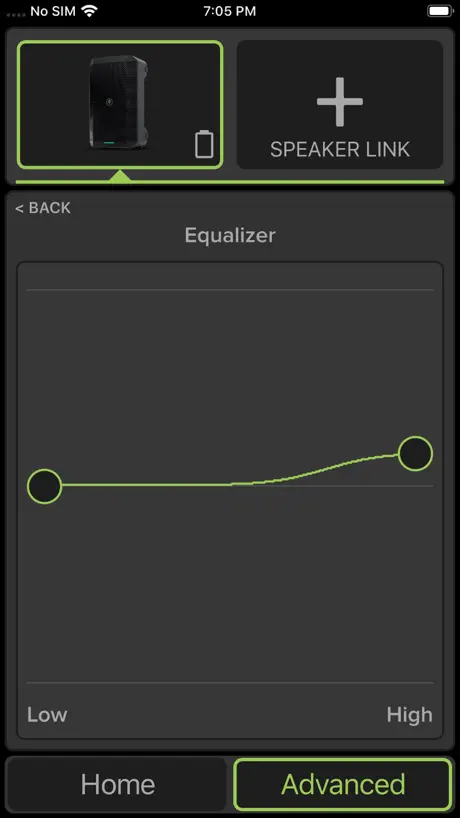
- Basic EQ lacks useful features
Super
Verbindung sofort gefunden, App läuft stabil, Features sind super, man brauchten Mischpult mehr und spart sich stundenlanges verkabeln… Hammer!
Doesn’t Connect
Just bought the Mackie Thump Go and SubGo. Can’t get either to connect to the app. Tried several times and made sure the app was able to use Bluetooth in settings.
Добавить функции
Не хватает эквалайзера на канал и ревера хотя бы на один канал
Conexión horrible
Cuesta la vida a veces conecte y cuando más falta hace
Nice app
Just got the Thump go. So downloaded the app. Nice to see features that can help with setting while not next to the speaker. In an update I would like to see a better eq , roll off some of the Mids (10 o’clock) and a reverb to channel 1. It can be a firmware update to the go as well.
App Won’t Connect. Works fine on Android.
Works as intended. Like mentioned before, make sure the app has Bluetooth enabled in your phone settings or the app won’t connect.
does not even connect
horrible app, i can connect to the speaker to play music, however it won’t connect to the app. even i who is a complete f up has created a app and a piece of wearable audio technology that connects with 100% success to any bluetooth device via NFC or MAC Address. Greg mackie should be ashamed to have his name associated with this worthless app.
Läuft
Mit iPhone 13 bei mir keinerlei Probleme. Box 1 im Vorfeld mit dem iPhone gepaired, App installiert, sofort sichtbar. Dann Box 2 per Taster an der Box mit Box 1 verlinkt. Taucht nun auch in der App auf. Kann die Probleme der anderen User nicht nachvollziehen.
CustomEQが使えない
アプリ内のCustomEQが表示はされますが機能せず、なんら音質の変化がありません。 アプリの強制終了とか工場出荷時にもどしたりとか再インストールとか、いろいろやってみましたがダメです。 アプリ内のその他の機能、音量操作とか各種切り替えとかはスムーズにできるのですが・・・ 英語でも構わないからアプリの取り扱いマニュアルがほしくて、ホームページから何度もダウンロードしようとしましたが、エラーになります。 対応お願いします。
Needs better documentation
Had the speaker for just over a year, had no luck with the app for a few. Decided to give it another shot. Speaker was connected via BT and working. Installed the app, app was not able to detect the speaker. Uninstalled the app, removed the spkr from BT. Added the speaker on BT, installed the software again, still no good. Decided to power off and on the phone. Now connected. I will test at home, still dont trust the functionality of the app on a paid gig.
Just tap the screen after connecting…
The app works fine. After you confirm your connected to Bluetooth in settings to your speaker, open this app, on startup, tap the screen and it’ll start up normally… that’s been my experience. It does still say searching, I just tap the screen and it’ll start moves on… great… it does what it’s supposed to do after that…
Horrible sound
it’s loud muffled and overbassed. Full eq might help
Pairing
If you set your phone to pair and press the button on the speaker that says pair, it works instantly I had music playing from my cell phone within 30 seconds. I’m not sure what the other reviewer was doing wrong. I have not use this for an event yet, so I can’t really speak to the sound quality with voice and music. I will come back and edit this.
Limited
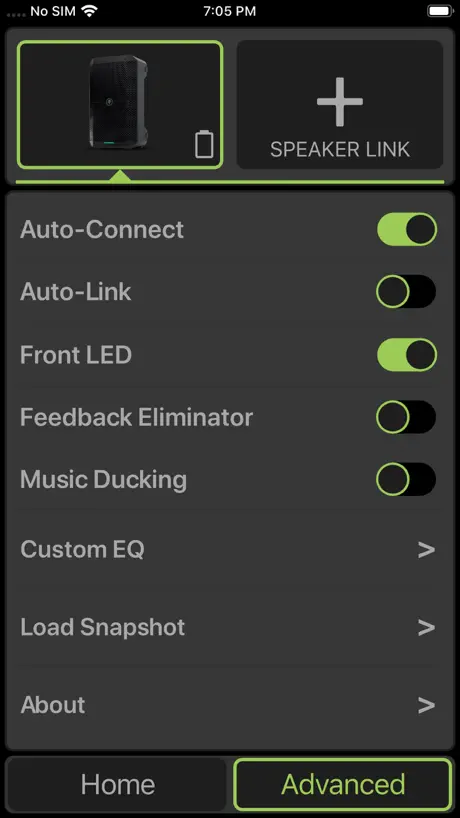
Basically you can boost or cut the lows or the highs. Nothing else is adjustable through the built in app custom EQ setting. So it’s not customizable. I think I like the app tho other than it’s many shortcomings, if that makes sense. If you’re gonna give an EQ option, let’s make it at least 3 band with adjustable frequency.
Incomplet
Détection excellente et facile, immédiate. Cependant, je trouve frustrant que l’equalizer ne fonctionne pas car il ne change rien au son malgré mes manipulations. Et puis, Il faudrait, si tant est qu’il puisse fonctionner, qu’il soit nettement moins succinct. Tant qu’à faire une appli, autant qu’elle serve vraiment à améliorer, optimiser les fonctions de l’appareil. En ce qui concerne l’equalizer sur iPhone dans cette app., l’énorme avantage serait de remplacer les effets d’une table de mixage non autonome électriquement. Merci par avance pour ce que vous pourrez changer à cela. Cédric
Works perfect
The app + speaker is great. I downloaded the app, allowed it to connect to Bluetooth and was instantly able to control the speaker. I use it in a basketball gym and the app works from anywhere inside the space.
Does not connect
The app just won’t connect to thump go 8. Brand new speaker that is connected to the Bluetooth fine and it won’t connect to the app
Actualización
Estaria genial que tuviera equalizacion de tres bandas por canal y algún tipo de efecto para un solista se ahorraría el gasto de una mixer
Reboot Doesn’t Recall Settings
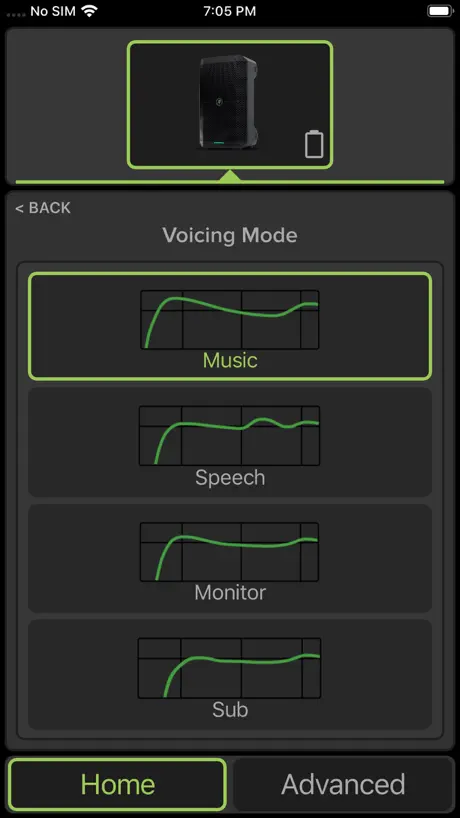
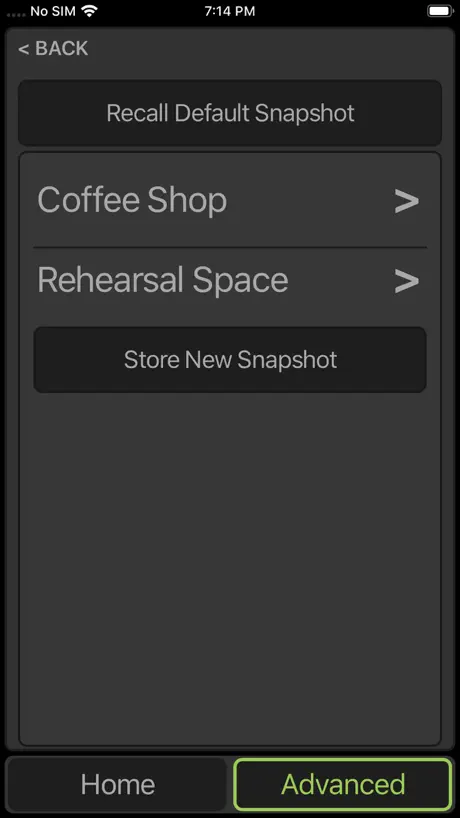
All settings, including level, voicing mode, EQ, and LED setting are forgotten upon speaker reboot. Using the app to recall a snapshot is not a good workaround.
Check settings
If you can’t get the app to work check that 1) in apple settings for the app, it is allowed to use bluetooth. You might have your phone itself connected to the speaker to play music, but that does not mean the app is allowed to use bluetooth. 2) Then pair the speaker with your phone by pressing and holding the “pair” button at the back of the speaker for 5+ seconds. Once the phone is connected to the speaker then 3) start the app. The app doesn’t do anything special but it’s useful for controlling the volume from your pocket.
No issues here
I didn't have any issues connecting or using the app. If you Google looking for the user manual for your speaks you will find it online. I have the 215xt. I Googled it and followed the directions in the manual and connected easily, the first time. You need to wait for the blue light on the pairing button to stop blinking fast. Once it does hold down the pairing button for a few seconds. It will start flasing blue but it will be much slower than when you turned it on. Open your bluetooth settings on the device and search. You should see the Thump Connect 2 app pretty much right away! I did it a few times with no problem. If you want to link the speakers, hold down the link button on one of the speakers till it slowly blinks blue. Then just press the link button normally on the other speaker and let go. They will find eachother and connect. It really was all very simple!
Pesima e inutil aplicacion
Poseo 4 thumpgo de los cuales son muy buenos para cubrir eventos pequenos al aire libre, sin embargo la app es una porqueria nunca conecto mis parlantes. Esta aplicacion no sirve.
Reverb
¿Se puede añadir a la app la opción poner reverb ? Tengo un Mackie thump go
Lack of controls
Needs more controls specially in equalization you need more than just lines.
Why sliders full volume on start up
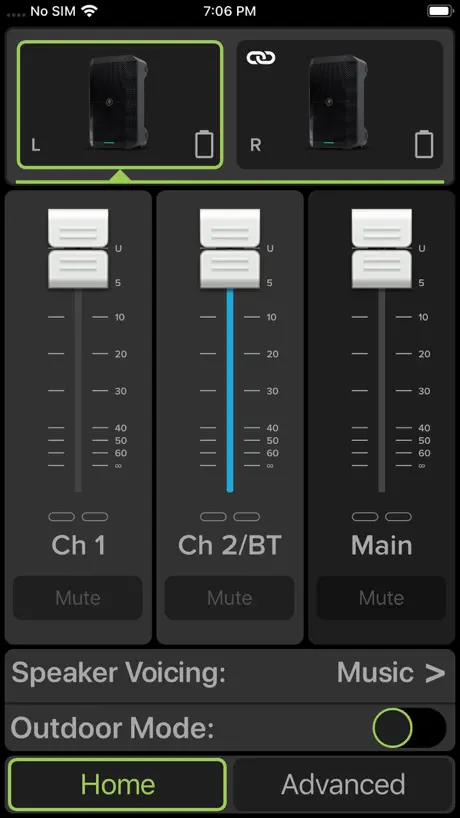
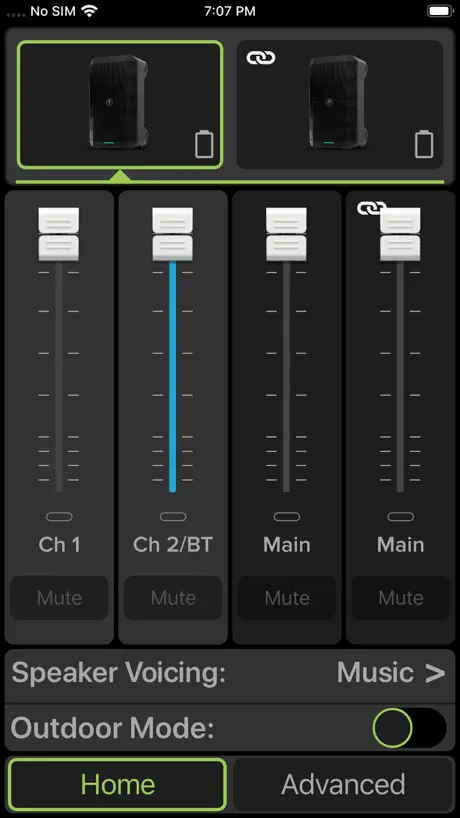
I let Mackie know about the obvious mess up by having the mixer sliders come up with max volume on all channels and the main slider. What nonsense is this. They told me they are not fixing and I should turn down the physical volume on the speaker first. Sounds mentally lacking to me. Who in their right mind who uses speakers and a mixer turns all the sliders up to full volume before turning on their system? Not one person would do that. Why have the app do it? Guessing this is an easy fix so why the push back? Admit you are wrong and fix it yo.
Works perfectly but no instructions at all
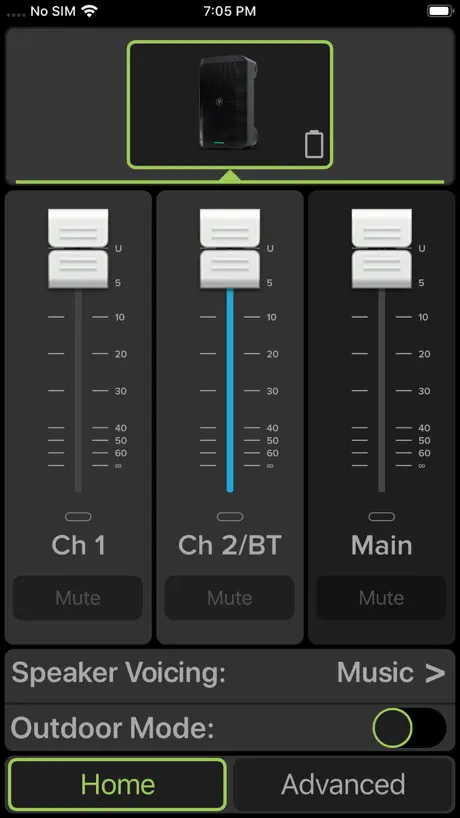
At first I agreed with other reviewers I thought this app didn’t work and I couldn’t even get the thump xt to show up in my Bluetooth devices. I figured out this is what u do: 1. Go to bluetooth devices in your phone settings and watch for devices that appear, for me it was called “thump xt”. 2. Press and hold the pair button on the back of the speaker until it starts blinking. I had to hold the button a good 5 seconds before it started blinking so if you push it briefly or don’t hold long you may not think it works. Don’t push the link button first or it won’t work, idk why. 3. Click thump xt and pair to it, then launch the app. The speaker eq and everything like outdoor mode can be viewed and turned on/off in app. You’re welcome :)
App Bug
Just Downloaded the app, connected with blue tooth but for whatever reason the app is not working on my phone, the Mackie thump Go is a great speaker, just wish they can fix whatever bug that’s causing this
Sans câble
Bonjour 2 mackie « linke « ensemble juste par l’appui d un bouton ça me va ! Le son est parfait pour du 8 pouces,et pour mon usage.tiens une journée sans charge ( a peu près 9 h )musique volume moitié . Mes premiers tests pour l’appli sont parfaits. Petit bug quand il s’agit de connecter l’appli plus un PC j’en suis au premier test.
Muy básica
La aplicación es muy básica. El ecualizador debe ser más completo. Así mismo, el altavoz debería guardar la configuración del ecualizador.
Compatibile con la vecchia generazione sbt?
Buongiorno, la nuova applicazione è compatibile con le vecchie casse? (Sbt)
App doesn’t connect
I was never able to connect it properly to my iPhone after several attempts.
perfect, but put the reverb in the app
the speaker is phenomenal, powerful and quality, but update the app by adding reverb, please
It works, just not well.
So, yes, it works. Order of operations for connecting to any Bluetooth speaker is practically identical. Slow down and try again… only 3 stars because it appears you can only link 2 speakers and the controls are modest, at best. Doesn’t save me any time or add any cool function, just an elementary volume control.
Connection
Will not connect to the mackie thump go. Stays on connecting to speaker.
It works but needs more features
A 3 band EQ would be a welcome addition
App won’t connect
As with legion of frustrated comments here I can pair my iPhone 14 Pro Max to speaker but the app won’t connect
App non funziona con IOS16
Tutto ok, ma dopo aggiornamento ad iOS16.0 l’applicazione non è più in grado di rilevare gli altoparanti anche se il telefono è connesso. App don’t work after iOS16 Upgrade. Impossible to connect to speakers! Can you solve it?!!!
Pains me to say
Initially, I was a huge advocate of Mackie products because they seem to work favorably well and we’re not bank busters, but when I got to the Mackey Gump, my opinion changed dramatically. First will address the defects in my Mackie Thump Go. Originally purchased in late December. It was only recently that I was able to set it up because Mackie does not provide you with any documentation instruction manuals or anything like that. They are online. If you’re online they can be downloaded if you’re able to download and of course you can print if you have a printer. I don’t have a printer. My Internet is spotty at best and I couldn’t download them because I’m operating on the Apple iOS. When I set it up today using My also recently purchased Mackie pro effects 10 and played the first chord of my guitar. It sounded as if the whole thing was going to come apart. There was obviously something wrong with the speaker it rattled, and was only producing maybe a quarter of the value that one would expect, fortunately the retailer I purchased it from was very kind and swapped it out. And I started searching for all the manuals that are referenced in the main manual, which I can only read online and lo and behold. There’s several of them. The one that I still haven’t found is the one for this ridiculous app in the main manual it makes reference to the fact that the, Thump Connect 2 is an intricate part of the thump go and is a necessity. If you want to use it, you need to use the Thump Connect 2 reference guide they say this is if you know it’s right there in front of you it’s not anywhere I looked on the webpage. I looked on this general Internet, nothing.Maybe I’m old maybe I’m crotchety, but this kind of customer service just pisses me off and I will not be doing business with Maggie again in the future so let mine pay your lesson. Don’t even bother with Mackie. It’s not worth the headache and a is going to treat you that way they’re not worth dealing with.
Mackie Thump Connect 2 FAQ
- Is Mackie Thump Connect 2 free?
- Yes. The app is free, in all 175 countries it sells in, and it sells nothing inside it.
- Does Mackie Thump Connect 2 have a free trial?
- No. None of its offers (US) come with a free trial.
- What are the best alternatives to Mackie Thump Connect 2?
- DJcity (4.8 from 2,961 reviews), Smaart RTA (4.8 from 1,298 reviews, premium from $1.99) and DriveRack PA2 Control (3.1 from 451 reviews).
Mackie Thump Connect 2 download
Last updated 5 months ago.
Mackie Thump Connect 2 sells in 175 countries. It was released 5 years ago, on 23 Sept 2021. It holds a 2.0 rating from 122 reviews.
How much does Mackie Thump Connect 2 make?
Third-party estimates for the last 30 days, worldwide — not the store's own figures, which Apple publishes for nobody.