
KedaReader
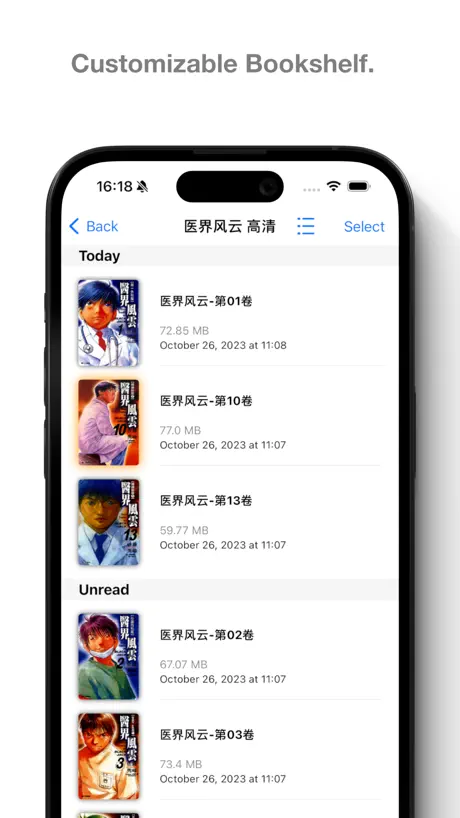
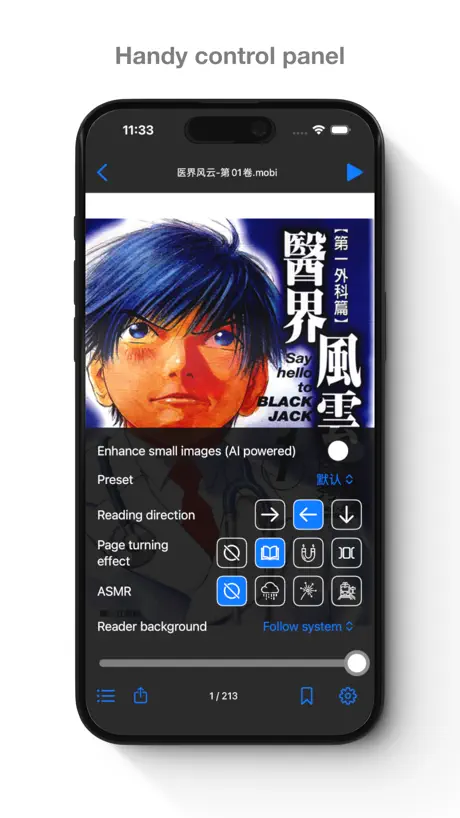
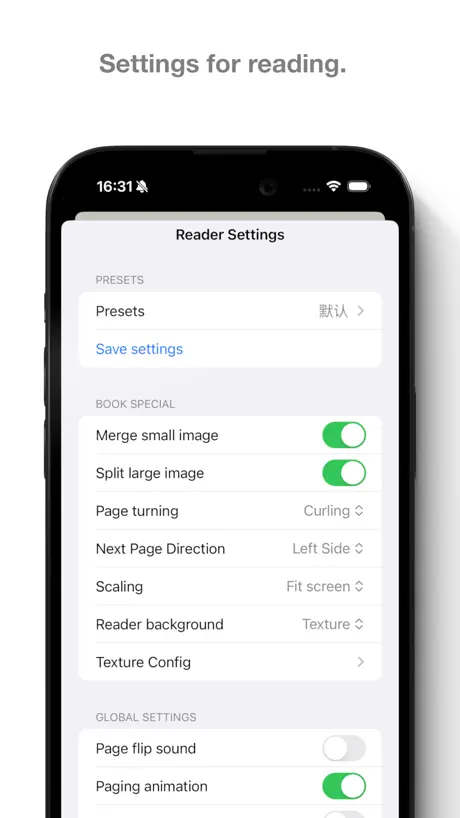
Image reader with NAS support
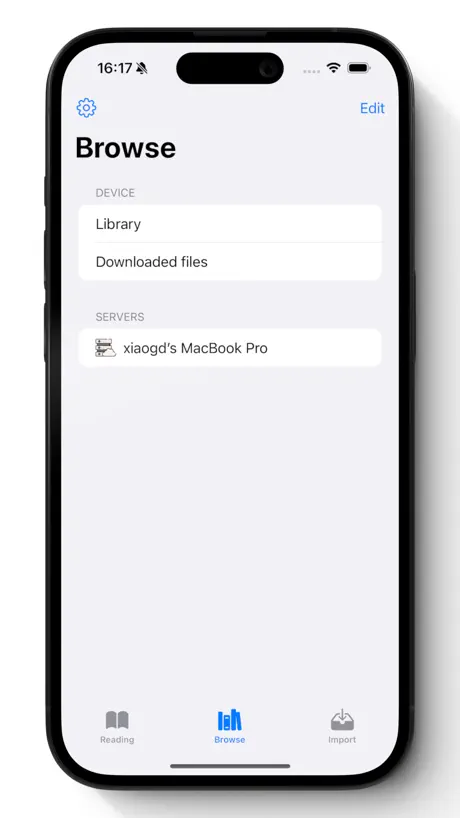
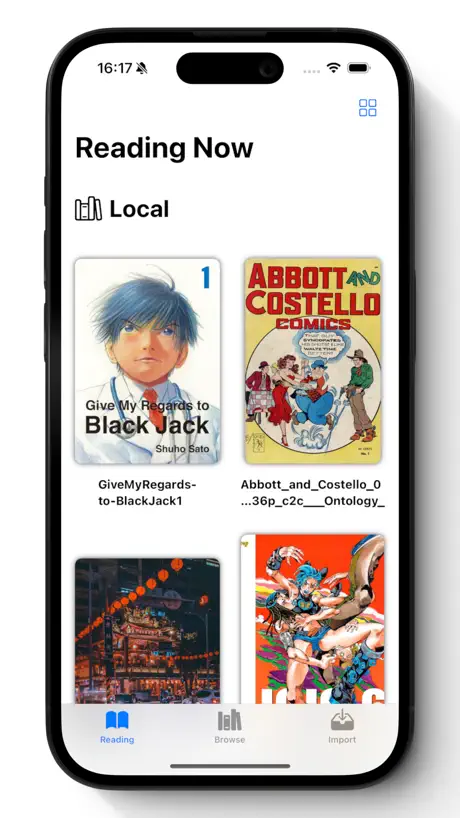
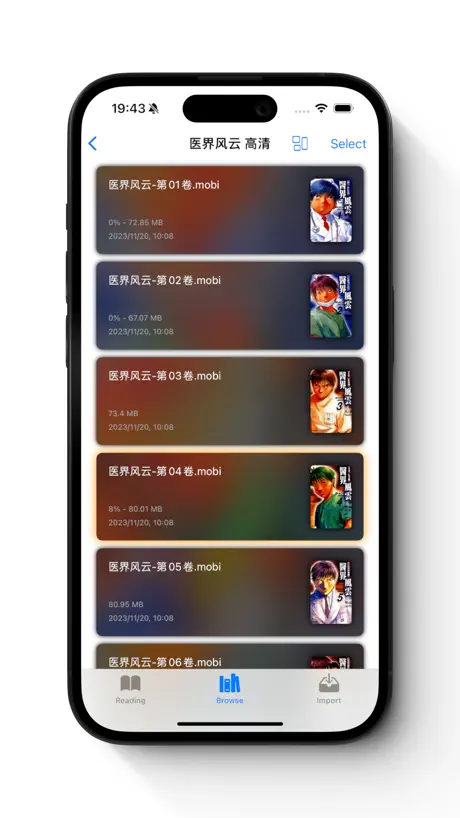
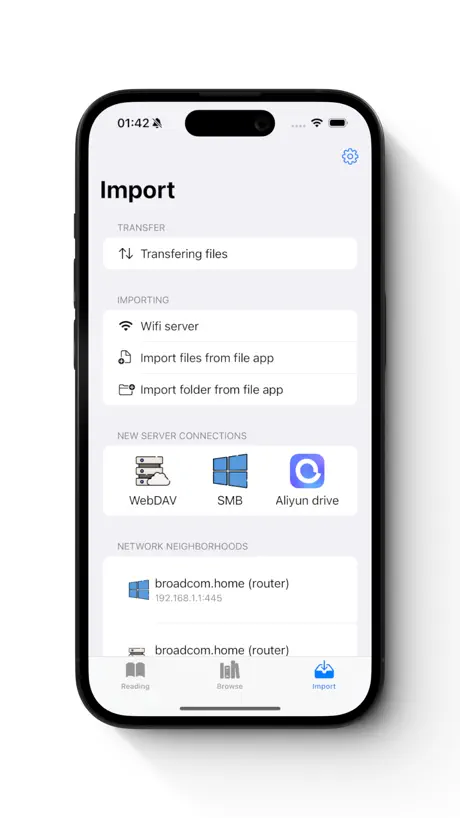

How much does KedaReader cost?
Prices are current as of 5 Oct 2026.
8 one-time purchases from $0.99
In the United States, KedaReader has 8 one-time purchases priced $0.99 – 14.99.
| Product | Price |
|---|---|
| Buy me an ice cream~ | $0.99 |
| Buy me a milk tea | $1.99 |
| Buy me a coffee | $2.99 |
| Buy me a happy day~ | $3.99 |
| Lifetime (Early supporter) | $3.99 |
| Lifetime(Festival Offer) | $6.99 |
| Buy me a happy week~ | $8.99 |
| Buy me a happy month~ | $14.99 |
10+ alternatives to KedaReader
| KedaReader |   Summit Reader Summit Reader |   PureLibro: eBook Reader PureLibro: eBook Reader |   Readingo Readingo |   iReadNote iReadNote |   SideBooks SideBooks |   Comic Book Viewer Comic Book Viewer |   Ice Comic - Local Image Reader Ice Comic - Local Image Reader |   MMReader Comic/Manga/Graphic MMReader Comic/Manga/Graphic |   Manga Capsule: AI Comic Reader Manga Capsule: AI Comic Reader |   WoWo Comics - Local Reader WoWo Comics - Local Reader | |
|---|---|---|---|---|---|---|---|---|---|---|---|
| Rating / 5 | 4.6 | 4.8 | 4.8 | 4.9 | 4.9 | 3.9 | 4.3 | 4.8 | 4.8 | 4.7 | 4.5 |
| Reviews | 3K | 38K | 19K | 7.2K | 2.6K | 1.8K | 896 | 764 | 446 | 346 | 279 |
| Released | 2021 | 2018 | 2021 | 2024 | 2023 | 2010 | 2015 | 2025 | 2025 | 2025 | 2023 |
| Monthly price | — | — | $0.99 | — | $0.99 | — | — | $0.99 | $3.99 | $0.99 | — |
| Annual price | — | — | $5.99 | — | $3.99 | — | — | — | $9.99 | $9.99 | — |
| One-time price | $3.99 | $4.99 | $12.99 | $9.99 | $0.99 | $0.99 | — | $5.99 | $1.99 | $6.99 | — |
The going rate for each plan in United States, in its own currency, shaded from the cheapest price on the row to the dearest. Plans fewer than four in ten of the priced apps sell are left out.
KedaReader reviews
4.6 out of 5, based on 2,978 reviews.
What people like
- Great value for one-time price
- Excellent NAS and cloud support
- Developer is active and helpful
What they complain about
- Crashes frequently on newer iPhones
- Hidden paywall locks basic features
- Updates ruin previous user experience
- Network access causes app freezing
Love it - One Tweak
Please make the default setting OFF for the gesture “Double fingers swipe to rotate page”. It gets accidentally triggered a lot when pinch-zooming during a read. I thought I was encountering a bug for months until I realized what was going on. Thanks for the great app!
闪退严重!
17Pro Max都频繁闪退,不知道什么设备才能带得起这个阅读器了~~~
Not support keyboard since ipad os 26
It’s all the best until ipad os 26 and suddenly you can’t use keyboard to turn pages, please fix!! Love the app
经常闪退
体验有点差,用OPDS协议,看十几篇漫画就会闪退
webg格式动图不动
刚下上试了一下,本来想买,结果动图不动还买个🥚
115网盘开发认证过期
大佬115用不了了,有空解决呀
你的7天免费好评已到期
你可以通过内购解锁更多好评!
equb
作者不看轻小说吗,equb希望能支持下
Too slow opening, unable to star fav page
Hope u update a new version.
请求恢复123云盘的挂载链接!!!
今天发现连接网盘功能中连接123云盘会直接显示404 无论如何都无法连接 其他网盘都可以 请求紧急修复!!
greatest reader of all time.
amazingly great dropbox support. worth it 100%.
之前一直挺好的,现在一直闪退
一分钟闪退一次,怎么看
建议压缩包内文件夹增加已读标记
如题,排序是按文件夹来的,但是不一定是想阅读的顺序. 有些一个压缩包上百话还有短篇特典之类的,没有已读标记不便于使用. 也不方便按自己希望的顺序来看漫画.
很不错的阅读器
支持的网盘太少了,希望后续更新能支持Google Drive,Onedrive,Dropbox。还有书本的封面个人感觉圆角不是很美观,希望可以增加多种样式。
Epub阅读
这个app只能阅读epub里的图片吗?不能阅读epub里的文字
Seamless Cloud and Local Folder Integration for Effortless Reading!
I love KedaReader’s Windows folder sharing and cloud storage linking features. It lets me easily load books and comics from local folders or NAS, without manually transferring files. It supports SMB for local sharing and integrates with Google Drive and OneDrive, giving me access anytime, anywhere. Perfect for users with large collections—highly recommended for seamless cross-device syncing!
升级后要钱了用不了了牛逼
第一次碰到,给个一星吧
Orientation bug
There’s a bug where if you rotate the device either horizontally then vertically the page you where on gets scrambled and it moves to a random place in the chapter you are reading
今回のアプデで改悪され劣化しました
・UIの改悪 ・ページめくり左側が機能しない ・背景白の削除 ・ページをめくる動きがカクつく ・重い 次回以降のアプデで有料化になるらしいので大人しく新しいの探します 凄く良いアプリだっただけに本当に残念
图片显示有bug
漫画有一页,图片被拉伸了怎么弄都弄不回来,删了重新再导入进去还是一样,什么时候能修复?
看漫画的首选
在所有iOS漫画Apps里最最最最最好用的,没有之一!!!
进去就是购买页面合理吗
好歹让我看看基础功能啊,一打开就是购买页面,还不能取消
可达鸭加油!
总体上很不错,细节上略有欠缺,我的建议是,如何能够实现漫画文字翻译,基本上就是神器
Opds 功能怪怪的
我是用 calibre web 架的 , 用瀏覽器看很順,可達也可以看,但是封面圖片很多跑不出來,而且像標籤分類只顯示一個字也怪怪的
豪用 力推
感謝盒友推薦 真的好用 爽看 !!!
Greedy
Advertised itself as the best free manga app, but turned greedy—now locking content behind a $9.99 paywall.
不支持15的系统
不支持15的系统,购买欲望不高
suddenly asking for money
app worked great for months but now its suddenly asking for $3.99 saying that a free trial i never agreed to has ended
Ideal reader for NAS collection
After trying a few other apps, I discovered KedaReader for streaming my cbr collection from a NAS home server. KedaReader offered the most features for a reasonable one-time price. I used the free trial version of the program for a few days, and then opted to buy the full version. The app is continually being improved and the author appears to be an active contributor in the GitHub community. I had a minor hiccup yesterday when I was reading a file and locked the orientation in my iPad control panel. One page got stuck with the wrong orientation and nothing I tried could get it to realign with the other pages. I looked for a manual control in the app to rotate the page to correct the orientation but couldn’t find anything. If it’s there I missed it. If not, it would be a useful feature to have. I deleted the file from the NAS, confirmed it no longer appeared in KedaReader and re uploaded the file back to the NAS. The error still appeared. I decided that either the app or the NAS was holding a copy of the bad file in a cache storage. I checked within KedaReader and it did not have anything saved in cache, so perhaps my SSD cache in the NAS was serving up the problem file. I renamed the file on my computer and re uploaded it into the NAS. This correctly presented all pages with correct orientation. The problem did not reoccur even after renaming back to original. All-in-all this program is a keeper. It is polished and even after I totally rearranged files and folders and sub folders on my NAS, it required no adjustments to reflect the changes I made. That’s good thoughtful programming.
Not worth it
Poor navigation and is only a 7 day trial
Suggestion: page match function
I like this app very much. One suggestion to make it even better is to add the function to adjust the page match. Some mangas have images across two pages, but the full display requires the page match (the correct even/odd number of pages) and not all the manga files fulfill it. Sometimes I have to delete a files to deliberately match the pages. If there is a built-in function to shift a page forward or backward it would be awesome!
Problem with importing ePub
I was going to purchase the app but the latest update has ruined my experience. All imported books in epub format now shows each page duplicated 5 times. Example, a 50 page book now has 100 pages. I checked the original format on other readers and on different platforms and they all show up fine there. I removed and reinstalled this app and problem still persist.
最好用的阅读器
大佬牛逼
Won’t open anymore now without a licence
I gave this app a try a year ago or so, it was freemium with optional paying features. Surprise today when re-opening it, access is denied until I pay a mandatory licence fee. Although I understand that the app can change its pricing model starting a given version, forcing all users to a new model is not fair, un-installing now.
试用到了不能继续免费用吗?
有广告也行啊
漫画、画像閲覧機能
小画像結合にしてしまうと処理が重いような…一瞬ではありますが 1ページだけ移動機能は現在の仕様だと絶対に要る 漫画閲覧機能であればMangaMeeyaそのままでいいんじゃないかなぁ 追記 現在のバージョンだと、ネットワーク越しに大量のZipファイルがあるフォルダにアクセスすると、激しく先読みしているのか?100パーセントフリーズする、何回か強制終了したら直るようだが これまでのバージョンだと問題なかったのになぜ無駄な挙動を追加するかな
真正懂用户的优秀应用An Outstanding App That Truly Understands Manga Reader
试用了一下午后我立刻入手。相比那些一年收 79.99 美元的阅读器,这款应用能以这样实惠的价格买断,真的物超所值。作者显然是资深漫画读者,各种细致贴心的功能都设计得非常用心。我最喜欢 NAS 支持、隐私模式、多种储存方式,以及实用的标签功能。感谢作者的努力,也期待未来持续使用并提供建议。After trying the app for an afternoon, I purchased it immediately. Compared to readers that charge $79.99 per year, the one-time purchase of this app is truly outstanding value. The developer is clearly a seasoned manga reader—many thoughtful features are crafted with great care. I especially enjoy the NAS support, privacy mode, flexible storage options, and the useful tagging feature. Thank you for the excellent work; I look forward to using the app long-term and offering feedback in the future.
收费的
用了才说要收费,开始说不会下载
Great For Manga!
Loved the reader enough to buy after accidentally updating, but was very disappointed that FTP is no longer a supported server option after having been supported in older versions. Would be great to have it back some day!
アップデートでUIが若干悪くなってしまった。
タイトル通りです。
翻页效果 bug
macOS 下安装 iOS 应用,使用书本翻页的动画有图形 bug,微信读书也有一样的问题,希望可以修复。
NOT FREE; trial and block
It should give a notice
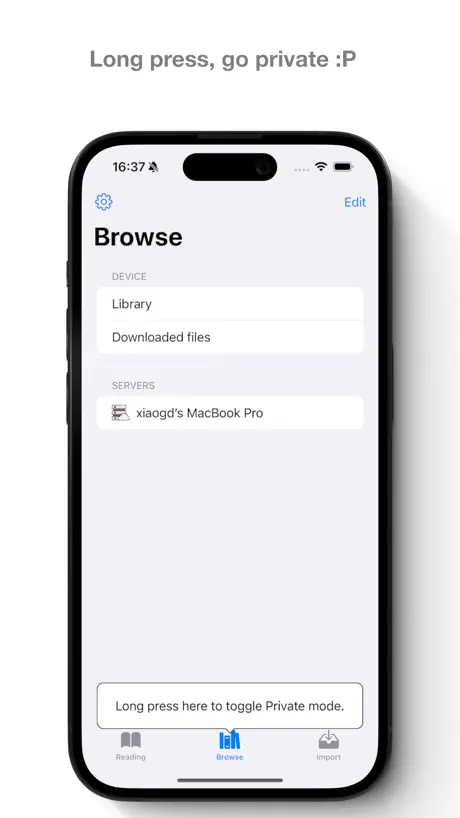
ipad mini 更新到2.0.1后隐私模式打不开
ipad版 隐私模式打不开了,长按底部无反应。请速修复。
ガラッと変わって使い勝手が悪くなった
できるなら前の操作感に戻せるようにしてほしい。 表紙が自分で設定できなくなったのが特に困った。 有料化してもこのままなら他のアプリを探すしかないけど他になさそう…我慢するしかないのか
KedaReader price by country
A one-time purchase costs $3.51 in Canada and $6.01 in Colombia — 1.7× more for the same thing. Below is the going rate for each plan in every country that sells it — the middle price of what the app charges there, in the country's own currency with the dollar equivalent beneath it.
| Country | One-time |
|---|---|
| Afghanistan | $3.99 |
| Albania | $4.99 |
| Algeria | $3.99 |
| Angola | $3.99 |
| Anguilla | $3.99 |
| Antigua And Barbuda | $3.99 |
| Argentina | $3.99 |
| Armenia | $4.99 |
| Australia | A$5.99$4.16 |
| Austria | €3.99$4.49 |
| Azerbaijan | $4.99 |
| Bahamas | $3.99 |
| Bahrain | $3.99 |
| Barbados | $4.99 |
| Belarus | $4.99 |
| Belgium | €3.99$4.49 |
| Belize | $3.99 |
| Benin | $4.99 |
| Bermuda | $3.99 |
| Bhutan | $3.99 |
| Bolivia | $3.99 |
| Bosnia & Herzegovina | €3.99$4.49 |
| Botswana | $3.99 |
| Brazil | R$24.90$4.77 |
| British Virgin Islands | $3.99 |
| Brunei Darussalam | $3.99 |
| Bulgaria | €3.99$4.49 |
| Burkina Faso | $3.99 |
| Cambodia | $3.99 |
| Cameroon | $4.99 |
| Canada | CA$4.99$3.51 |
| Cape Verde | $3.99 |
| Cayman Islands | $3.99 |
| Chad | $3.99 |
| Chile | CLP 4,990$5.05 |
| China | CN¥30.00$4.47 |
| Colombia | COP 19,900$6.01 |
| Congo | $4.99 |
| Congo, Democratic Republic | $3.99 |
| Costa Rica | $3.99 |
| Cote Divoire | $4.99 |
| Croatia | €3.99$4.49 |
| Cyprus | €3.99$4.49 |
| Czech Republic | CZK 99.00$4.56 |
| Denmark | DKK 39.00$5.86 |
| Dominica | $3.99 |
| Dominican Republic | $3.99 |
| Ecuador | $3.99 |
| Egypt | EGP 199.99$3.83 |
| El Salvador | $3.99 |
| Estonia | €3.99$4.49 |
| Fiji | $3.99 |
| Finland | €3.99$4.49 |
| France | €3.99$4.49 |
| Gabon | $3.99 |
| Gambia | $3.99 |
| Georgia | $4.99 |
| Germany | €3.99$4.49 |
| Ghana | $4.99 |
| Greece | €3.99$4.49 |
| Grenada | $3.99 |
| Guatemala | $3.99 |
| Guinea-bissau | $3.99 |
| Guyana | $3.99 |
| Honduras | $3.99 |
| Hong Kong | HK$32.00$4.08 |
| Hungary | HUF 1,790$5.46 |
| Iceland | $4.99 |
| India | ₹399.00$4.14 |
| Indonesia | IDR 79,000$4.41 |
| Iraq | $3.99 |
| Ireland | €3.99$4.49 |
| Israel | ₪12.90$4.24 |
| Italy | €3.99$4.49 |
| Jamaica | $3.99 |
| Japan | ¥600$3.80 |
| Jordan | $3.99 |
| Kazakhstan | KZT 2,490.00$5.55 |
| Kenya | $4.99 |
| Kosovo | €3.99$4.49 |
| Kuwait | $3.99 |
| Kyrgyzstan | $3.99 |
| Lao Peoples Democratic Republic | $3.99 |
| Latvia | €3.99$4.49 |
| Lebanon | $3.99 |
| Liberia | $3.99 |
| Libya | $3.99 |
| Lithuania | €3.99$4.49 |
| Luxembourg | €3.99$4.49 |
| Macao | $3.99 |
| Macedonia | $3.99 |
| Madagascar | $3.99 |
| Malawi | $3.99 |
| Malaysia | MYR 19.90$4.88 |
| Maldives | $3.99 |
| Mali | $3.99 |
| Malta | €3.99$4.49 |
| Mauritania | $3.99 |
| Mauritius | $4.99 |
| Mexico | MX$89.00$4.89 |
| Micronesia | $3.99 |
| Moldova | $4.99 |
| Mongolia | $3.99 |
| Montenegro | €3.99$4.49 |
| Montserrat | $3.99 |
| Morocco | $4.99 |
| Mozambique | $3.99 |
| Myanmar | $3.99 |
| Namibia | $3.99 |
| Nauru | $3.99 |
| Nepal | $4.99 |
| Netherlands | €3.99$4.49 |
| New Zealand | NZ$6.99$3.93 |
| Nicaragua | $3.99 |
| Niger | $3.99 |
| Nigeria | NGN 6,900.00$5.18 |
| Norway | NOK 49.00$5.09 |
| Oman | $3.99 |
| Pakistan | PKR 1,100$3.96 |
| Palau | $3.99 |
| Panama | $3.99 |
| Papua New Guinea | $3.99 |
| Paraguay | $3.99 |
| Peru | PEN 17.90$5.17 |
| Philippines | ₱249.00$3.98 |
| Poland | PLN 19.99$5.13 |
| Portugal | €3.99$4.49 |
| Qatar | QAR 14.99$4.12 |
| Romania | RON 19.99$4.21 |
| Russia | RUB 349.00$4.16 |
| Rwanda | $3.99 |
| Sao Tome & Principe | $3.99 |
| Saudi Arabia | SAR 17.99$4.80 |
| Senegal | $4.99 |
| Serbia | €3.99$4.49 |
| Seychelles | $3.99 |
| Sierra Leone | $3.99 |
| Singapore | SGD 5.98$4.67 |
| Slovakia | €3.99$4.49 |
| Slovenia | €3.99$4.49 |
| Solomon Islands | $3.99 |
| South Africa | ZAR 79.99$4.80 |
| South Korea | ₩6,600$4.91 |
| Spain | €3.99$4.49 |
| Sri Lanka | $3.99 |
| St. Kitts and Nevis | $3.99 |
| St. Lucia | $3.99 |
| St. Vincent & The Grenadines | $3.99 |
| Suriname | $3.99 |
| Swaziland | $3.99 |
| Sweden | SEK 49.00$4.88 |
| Switzerland | CHF 3.00$3.62 |
| Taiwan | NT$120.00$3.77 |
| Tajikistan | $3.99 |
| Tanzania | TZS 11,900.00$4.49 |
| Thailand | THB 149.00$4.44 |
| Tonga | $3.99 |
| Trinidad and Tobago | $3.99 |
| Tunisia | $3.99 |
| Turkey | TRY 199.99$4.07 |
| Turkmenistan | $3.99 |
| Turks and Caicos | $3.99 |
| Uganda | $4.99 |
| Ukraine | $4.99 |
| United Arab Emirates | AED 14.99$4.08 |
| United Kingdom | £3.99$5.28 |
| United States | $3.99 |
| Uruguay | $3.99 |
| Uzbekistan | $3.99 |
| Vanuatu | $3.99 |
| Venezuela | $3.99 |
| Vietnam | ₫119,000$4.59 |
| Yemen | $3.99 |
| Zambia | $4.99 |
| Zimbabwe | $4.99 |
KedaReader FAQ
- Is KedaReader free?
- Yes. The app and its basic features are free, in all 175 countries it sells in. Premium features are paid: they start from $0.99 (US), across 8 one-time purchases.
- Does KedaReader have a free trial?
- No. None of its offers (US) come with a free trial.
- Where is KedaReader cheapest?
- A one-time purchase costs CA$4.99 (≈$3.51) in Canada and COP 19,900 (≈$6.01) in Colombia, its cheapest and dearest countries.
- What are the best alternatives to KedaReader?
- Summit Reader (4.8 from 37,700 reviews, premium from $0.99), PureLibro: eBook Reader (4.8 from 18,651 reviews, premium from $0.99) and Readingo (4.9 from 7,225 reviews, premium from $9.99).
KedaReader download
Last updated 2 months ago.
KedaReader sells in 175 countries. It was released 5 years and 7 months ago, on 23 Feb 2021. It holds a 4.6 rating from 2,978 reviews.
Supports 3 languages: English, Japanese, Chinese.
How much does KedaReader make?
Third-party estimates for the last 30 days, worldwide — not the store's own figures, which Apple publishes for nobody.
Revenue by plan
- One-time 100%
Revenue by country
- China 67%
- United States 18%
- Japan 4%
- Hong Kong 3%