
WorkMax
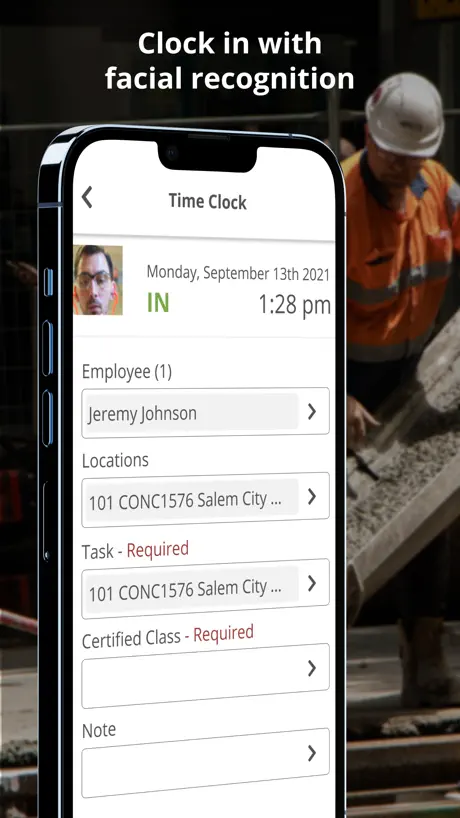
How much does WorkMax cost?
Prices are current as of 21 Nov 2026.
WorkMax has no in-app products on record in the United States.
10+ alternatives to WorkMax
| WorkMax |   Procore |   Raken Construction Management |   QuickBend: Conduit Bending |   Miter: Construction Time & Pay |   Tyfoom | Engagement Platform |   ExakTime Mobile–Time Clock App |   FOUNDATION Field Log |   ArcoroHR |   Kojo |   GotSafety2.0 | |
|---|---|---|---|---|---|---|---|---|---|---|---|
| Rating / 5 | 2.0 | 4.6 | 4.7 | 4.8 | 4.7 | 4.7 | 2.7 | 1.7 | 1.7 | 3.4 | 3.8 |
| Reviews | 122 | 54K | 24K | 4.2K | 2.8K | 2.4K | 340 | 280 | 40 | 39 | 20 |
| Released | 2021 | 2010 | 2013 | 2015 | 2021 | 2017 | 2010 | 2019 | 2017 | 2020 | 2019 |
| One-time price | — | — | $31.99 | — | — | — | — | — | — | — | — |
The going rate for each plan in United States, in its own currency, shaded from the cheapest price on the row to the dearest.
WorkMax reviews
2.0 out of 5, based on 122 reviews.
What people like
- Simple interface that is easy to use.
- Syncs data fast on your phone.
- Works perfectly if you save step by step.
What they complain about
- Crashes constantly when clocking in or out.
- Takes minutes to load or sync data.
- Forgets previous days logs and loses time.
- Hard to edit times without deleting them.
No me puedo conectar
Tengo problemas como los resuelvo
Terrible
Tracks time for one day and then it forgets every log from the previous days the following day. I’m having to keep a paper log of my hours. This is ridiculous. Having to screenshot every single record to show proof incase my employers requests it.
Decent improvements
Thanks for the following: 1. Removing that terrible splash screen 2. Not deleting the entire log in number when hitting the backspace key 3. THANK YOU FOR REMOVING THE SMALL AND TUCKED BUTTONS IN CORNERS Please put back the following items: 1. Either add back the month view for timesheet review or add an arrow to go back and forth days on the menu. No one likes to hit a drop down and then select a day if they don’t have to. (EDIT: I found that you can select multiple days on the time sheet and then just click once to expand the times!) Please add the following items: 1. Let me remain signed in to the app on my device, or add fingerprint or Face ID recognition for the default employee ID. What does Remember Selected Employee do in the setting menu? 2. Is there a way for the company to remove all our personal information from the entire company directory? I don’t need people showing up at my house that I don’t know. Especially when they know I’m at work and not at home. 3. Another feature that I’d love to see added is some kind of GPS recognition. If I leave a certain radius of a job site and I haven’t logged in or out it would be awesome to get a notification. Thanks for the vast improvements!
App crashes
The app crashes when I’m clocking my crew in or out Would like to leave a great review but this is very aggravating at the beginning and end of day. It usually takes 5-6 times before I can clock my guys in or out.
Great work management.
App works perfectly, sync forms and not stack if you have photos on the forms, it’ll make the app slower and sometimes kick you off the app losing everything, I’d recommend being patient and saving every form step by step so it can save even after it crashes, didn’t take me long to be able to manipulate it nicely.
Delete and reinstall every time I us it!
I have to delete and reinstall every time that I turn in time sheets because the app will not sync manually or automatically. Takes more time than if I just emailed my time into the office.
Lag
Although I love everything the app offers it lags bad. After the last update when clicking on names it takes 20 or more seconds to actually accept. If I had 2 or 3 guys it wouldn’t matter but I do time for over 10 guys and up to 30 and multiple task codes imagine how long that’s taking. If this gets fixed definitely 5 stars
Many benefits!
I use this everyday to clock in and out of work. Super helpful and love the mobility on my phone. Also the data syncs fast and the interface is simple and user friendly. I’d highly recommend!
Won’t load
Cost me money every week because it takes 10 minutes to clock in.
Crash
Crashes constantly. Like after every clock in or out. Has been happening for weeks.
glitchy
I seem to lose time in the beginning of the day because the app always fails first thing usually at least twice a week. the worst app our company has used so far
Terrible
I can’t believe a multi million dollar company chooses to use this app to track our time and jobs.
SLOW
What is the app even loading when clocking in and out? Takes 2-4 minutes to do anything. Really ends up screwing up my pay and my companies payroll.
Not Good
This app is terrible. The most boring and basic interface ever and yet somehow the app still manages to crash, not log time, not sync, etc. not sure why my company waste their money with this app.
No good
This app is driving crazy it doesn’t let me in sometimes, other times it doesn’t record my clock ins , other times it’s just buffers like today, luckily I was able to clock in with my buddy phone, this app crashes to much
Tracking
I don’t work 24 hours a day, why should I allow 24 hours tracking
Worst time keeping app
I have used several time keeping apps and this one is horrible and my company has only had it in place for a week. It’s not user friendly, there’s no overview of your time for the week so you can see your total hours- you have to look day by day, you can’t edit your time- you have to delete and do over… I could keep going but if you’re considering using this app for time keeping- DON’T, unless you enjoy frustrating your employees over their time keeping.
WorkMax FAQ
- Is WorkMax free?
- Yes. The app is free, in all 17 countries it sells in, and it sells nothing inside it.
- Does WorkMax have a free trial?
- No. None of its offers (US) come with a free trial.
- What are the best alternatives to WorkMax?
- Procore (4.6 from 54,148 reviews), Raken Construction Management (4.7 from 24,179 reviews, premium from $31.99) and QuickBend: Conduit Bending (4.8 from 4,234 reviews).
WorkMax download
Last updated 10 days ago.
WorkMax sells in 17 countries. It was released 5 years and 1 month ago, on 18 Oct 2021. It holds a 2.0 rating from 122 reviews.
Supports 1 language: English.
How much does WorkMax make?
Third-party estimates for the last 30 days, worldwide — not the store's own figures, which Apple publishes for nobody.