
Iriun Webcam for PC and Mac
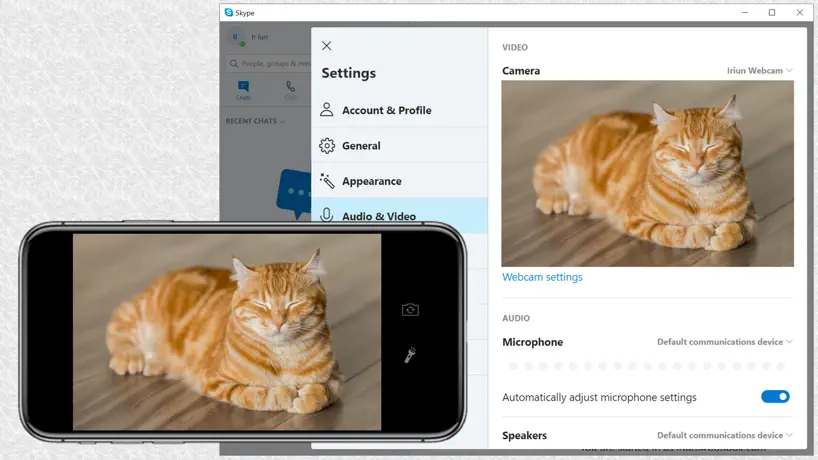
How much does Iriun Webcam for PC and Mac cost?
Prices are current as of 1 Oct 2026.
1 one-time purchase from $6.99
In the United States, Iriun Webcam for PC and Mac has 1 one-time purchase priced $6.99.
| Product | Price |
|---|---|
| Pro version | $6.99 |
See what Iriun Webcam for PC and Mac costs in all 173 countries →
10+ alternatives to Iriun Webcam for PC and Mac
| Iriun Webcam for PC and Mac |   Pro Camera-Omnipotent Camera Pro Camera-Omnipotent Camera |   Varlens - DSLR in Phone Varlens - DSLR in Phone |   Screen Mirroring MirrorMeister Screen Mirroring MirrorMeister |   Filmic Pro-Video Camera Filmic Pro-Video Camera |   Vozo AI Video Translator & Dub Vozo AI Video Translator & Dub |   Teleprompter: Floating Notes Teleprompter: Floating Notes |   Detail: AI Video Editor Detail: AI Video Editor |   Evoto: Photo Editor & Retouch Evoto: Photo Editor & Retouch |   Captions AI for Videos - Dubs Captions AI for Videos - Dubs |   Spring - Video Editor Spring - Video Editor | |
|---|---|---|---|---|---|---|---|---|---|---|---|
| Rating / 5 | 3.4 | 4.5 | 4.7 | 4.5 | 3.5 | 4.8 | 4.7 | 4.5 | 4.8 | 4.5 | 4.7 |
| Reviews | 2K | 83K | 62K | 38K | 38K | 27K | 27K | 10K | 7.7K | 7.3K | 6.1K |
| Released | 2018 | 2017 | 2021 | 2020 | 2011 | 2023 | 2021 | 2023 | 2024 | 2023 | 2024 |
| Weekly price | — | — | — | $5.99 | $2.99 | — | — | $4.99 | — | $6.99 | — |
| Monthly price | — | — | $5.99 | $9.99 | — | $9.99 | $3.99 | $9.99 | $11.99 | $8.99 | $5.99 |
| Annual price | — | — | $19.99 | $7.99 | $39.99 | $47.99 | $19.99 | $39.99 | $89.00 | $59.99 | $39.99 |
| One-time price | $6.99 | — | $99.99 | $23.99 | $13.99 | $24.99 | $39.99 | — | $6.69 | $14.99 | — |
The going rate for each plan in United States, in its own currency, shaded from the cheapest price on the row to the dearest.
Iriun Webcam for PC and Mac reviews
3.4 out of 5, based on 2,008 reviews.
What people like
- Setup is incredibly easy and fast
- Works great on a strong WiFi connection
- Free version has no watermark
- Looks seamless like Apple's Continuity Camera
What they complain about
- Connection often fails or lags
- USB support was removed from free version
- Updates sometimes break the app completely
- Video quality can be terrible and laggy
It just works
The best webcam app I’ve used. Free, simple, no watermark.
Screw this
Don’t download
Works again!
This app is great and works well even with the free tier. The pro has some pretty good features though.
Crashes with v2.9.0
Was working great until v2.9.0. Now the phone app crashes. I deleted and re-installed various times and also restarted the phone. But none of this resolved it. Unfortunately, there is no way to get support from the developer except for posting a review.
Great but could u add something to get my 5 stars
U should add an option to only use microphone because, sometimes im just using extra battery on the camera as i’m only using the microphone. Aswell as the app still connected when the phone is off.
Good app
I think develpers should add a function to lock the screen while keeping the app active.
Not well maintained
I used the app for work, streaming online selling pokemon cards. The app worked amazingly no issues super easy to use until my pc installed a new version automatically, and my phone never came out with the new version. If you don’t have the same version, you can’t use it.
I don’t think if you can download this if you are a YouTuber
1:i can’t download it and I’m trying to make a video on my phone 2:the webcam is not a webcam btw
Where is Iriun VR for ios?
Where is Iriun VR for ios?
Love hate
I’ve used this for about 2 years now and it has worked amazingly but tonight I ran across a problem to where I can’t flip my cam around to my face and I can’t find anyway to fix it. If anyone has tips please lmk. I’ve always been able to do it before.
This app is as good as it gets, low stars = bad wifi
This app does a phenomenal job and if you aren’t using Ethernet why do you have a pc
Didn’t work for me
Idk I tried all the fixes: Make sure its on the same wifi, make sure firewall allows it, use a USB, restart the devices and make sure they’re up to date. But nothing worked.. I’m using an iphone 13 with Windows computer. It seems like it works for everyone else so I’m sure its good but just… man I’m bummed
USB Connection Support
Thanks for this wonderful app! It’s nearly perfect, even on the free version (I hope this won’t get you to take away the free features and make them paid). The picture quality is superb and crisp. However, it’ll become totally perfect if full-blown support for USB connections is finally added and figured out.
Paid for pro now it’s missing.
I had pro on here before but now it’s asking me yo purchase it again.
New Update ruined
I can no longer use the app like I used to. I stream online and use my backup phones’s camera. But since the new update, I can’t use the app in vertical mode. It’s set to automatically be used in panoramic (horizontal) please! And I mean please bring back the vertical mode.
lifesaver
used this to take my dmv online test since ion got no webcam and this highkey worked
My camera broke
Every single time I try to open the app it will stop working, and it will freeze on the connecting screen
It does work with USB but….
Despite what the first review I read said, yes IT does work with USB and switches between them seamlessly. It doesn’t like the face side camera to be in held like a phone, it turns the image upside down but if phone is held sideways your image will be right side up even if flip the screen.
Front cam removal
Great app till the new update which says bug fixes? Wdym bug fixes man, You guys literally removed the front cam option. Please bring it back Also a friendly recommendation: there should be an option to use all 3 cameras on certain iPhones. Friendly recommendation 2: add iPhone “videocall reactions” as an option
Brightness suggestion
Can you make a brightness control button than to tap on the screen?I will give you a 5 star for it.
Retiring From Iriun :(
Well, this app was a GREAT app, such an easy set up, and such a easy way to use, it was like stacking pancakes! If you’re looking for an app. I advise you this is what you want. Anyways, I just moved on to a real webcam, so the use for Iriun became 0. But it was fun and useful, I’m sure you can ask anybody else still using this app. Thank you Iriun for being the one app that everybody was looking for and actually existed and wasn’t bad.
it dont work
the app doesn't work or connect
Great app but small issues
I had to reinstall it 2 times because on the computer it was a blank screen just black also there is no help on this app no forms or anything but overall decent app 7/10
Doesn’t work anymore
I don’t know what happened but this app and the download just stopped working with my phone and PC even after reinstalling ok both. For sure would wait until another update comes out if you’re trying to use this on your phone from a PC.
How can i use it with hotspot (mobile data)
Unfortunately this isn’t working if you are using your phone data hotspot instead of a wifi router…
Good app yeye boi
So freaking easy to use I love it so much. I got it up and working in 2 minutes.
16e
Doesn’t work
PLEASE please add support for the ultrawide lens and other things! \/
I really hope you read ratings, cause This app is sooo close to being perfect for my workflow. Please add support for the ultrawide and telephoto lenses on my 13 pro max, and also portrait video and center stage with the ultrawide cam (the things you can toggle from the control center). also make the app use the back microphone on the camera bump instead of the one next to the charging port, and add support for wide spectrum and voice isolation recording modes. (also from the control center) also, please have the app use hevc and opus (or something better!) to transmit video and audio respectively, and give us sliders to control the bitrates for maximum control. for me, 4k 60 is almost never 60 fps, and I feel like this will fix that. MOST IMPORTANTLY, PLEASEEEE don’t put all these behind a paywall! I’m begging you! Having features that other apps require a paywall for is exactly how you gain popularity and downloads! also make it so the phone screen dims or shuts off to prevent burn in. Droidcam has this feature. If you do all these things, your app will LITERALLY be perfect for me and probably many others. Oh, of course fix the fact that it’s not working for many people according to the other reviews also make it so the connection becomes dormant when the camera device isn’t used on the pc, I notices it transmits video all the time according to my network activity. I really hope you read this lol cause I spent a while on it
Was Great Until It Wasn’t
Used to use this app daily as a streamer but now the phone has to be sideways to get the full screen. Unfortunately until the bugs are worked out going to have to look for other programs
eh
why did you guys take away USB support? without it wifi is super unstable and lags a bunch. very dissapointing and frustrating
Criminally underrated
I almost never write reviews, but seeing the rating on this app makes me frustrated. This app is SEAMLESS and provides near flawless “continuity” cam functionality on other platforms. As is the case with ALL Wireless network solutions, if you have bad WiFi you will have a bad experience…. But on a good connection this thing is basically magic. Easy 5 star rating, and I can’t recommend it enough. I’ll be purchasing pro.
Weird glitch.
I can’t use the camera in landscape mode and point it straight down without a weird color corruption and misalignment. Maybe something to do with orientation, but the videos is fine until I point the camera down.
Please add colour correction settings
Hi I love the app, simple and efficient, with very little lag when wifi strength is strong. I am happy to support so I have paid for the full version. One thing that I would love to have is some kind of colour modulation ability. The footage colours seemed to be on the saturated side, which made my space looked like a disco floor! Thank you for considering!
Absolutely TANKS FPS in certain games.
While the webcam app itself works, any time I use it or give it access to my computer through camera settings, it makes certain games, like Roblox, freeze out of nowhere, for up to 10-20 seconds. I’m not sure if it’s a bug in the app for pc, but it needs to be fixed for me to continue using it.
To much lag
Need usb support ASAP I love they have a Linux distro but if it has lag don’t matter not useable
.5 Camera View?
anyway there is a .5 for back camera view or no i’m struggling but maybe there just isn’t one
Unusable
Surely it’s free and it’s very basic on the desktop, still it manages to lag like crazy even with low resolution streaming - tops 12fps. There are better options out there. I miss the times when Apple used to test the apps before approving them.
Decent
It’s decent and I like it. The only issue is that I never get it to connect first try always take a while even tho my phone and PC are both on the same WiFi.
Can’t auto focus with iphone
Just paid the 6.99 and cannot autofocus or use the usb which makes it worthless with Wi-Fi
any way to hide the interface???
i have the pro version but the interface gets in the way. in a call, or when i stream, it shows everything, is there a way to toggle in interface on and off, or have the interface not display to my viewers?
About the purchase
Can I use the camera's 0.5 focus after purchase? Or a smaller focus
It works great, BEFORE the last update.
Title. It won’t properly connect and the camera is now unresponsive and randomly zooms. Please fix because I have been using this for years with no issues until now.
Great!!
It worked just as intended. The only problem is sometimes when I change the ratio it sometimes stretches my camera. But everything else is great.
App version
Iriun app version on iPhone is 2.7 While the Irún web version is 2.8 Doesn’t make any sense since they different versions they can’t connect please update the Iriun app version
Latest server on pc 2.7.7
Version 2.7.7 on windows 11 when rerun and done what it says still errors Initialisation failed. Error code -1 2.6.10 runs fine. I am on windows 11 insider version 22H2 build 25290.1000
Very useful software
I just installed it and I love it already. I Dony wanna say anything more.
Nothing works
Nothing works, it’s so bad I’m wondering if it’s a virus
No settings option for Apple users?
On my Samsung device I’m able to access the settings menu to use portrait mode but on my iPhone I can’t access settings at all...
Lag
This app is great for actually connecting to the PC unlike other apps, but the quality is terrible, the contrast is insanely high, and it constantly lags and discounts to where it’s unreliable.
Dose the job.
Good app overall. Use it for obs stream labs
Iriun Webcam for PC and Mac price by country
A one-time purchase costs $6.48 in Israel and $9.91 in Sweden — 1.5× more for the same thing. Below is the going rate for each plan in every country that sells it — the middle price of what the app charges there, in the country's own currency with the dollar equivalent beneath it.
| Country | One-time |
|---|---|
| Afghanistan | $6.99 |
| Albania | $7.99 |
| Algeria | $6.99 |
| Angola | $6.99 |
| Anguilla | $6.99 |
| Antigua And Barbuda | $6.99 |
| Argentina | $6.99 |
| Armenia | $7.99 |
| Australia | A$9.99$7.19 |
| Austria | €7.99$9.06 |
| Azerbaijan | $7.99 |
| Bahamas | $7.99 |
| Bahrain | $7.99 |
| Barbados | $7.99 |
| Belgium | €7.99$9.06 |
| Belize | $6.99 |
| Benin | $7.99 |
| Bermuda | $6.99 |
| Bhutan | $6.99 |
| Bolivia | $6.99 |
| Bosnia & Herzegovina | €7.99$9.28 |
| Botswana | $6.99 |
| Brazil | R$49.90$9.56 |
| British Virgin Islands | $6.99 |
| Brunei Darussalam | $6.99 |
| Bulgaria | €7.99$9.06 |
| Burkina Faso | $6.99 |
| Cambodia | $7.99 |
| Cameroon | $7.99 |
| Canada | CA$9.99$7.04 |
| Cape Verde | $6.99 |
| Cayman Islands | $6.99 |
| Chad | $6.99 |
| Chile | CLP 7,990$8.26 |
| China | CN¥48.00$7.14 |
| Colombia | COP 29,900$8.88 |
| Congo | $7.99 |
| Congo, Democratic Republic | $6.99 |
| Costa Rica | $6.99 |
| Cote Divoire | $7.99 |
| Croatia | €7.99$9.06 |
| Cyprus | €7.99$9.06 |
| Czech Republic | CZK 199.00$9.24 |
| Denmark | DKK 59.00$8.95 |
| Dominica | $6.99 |
| Dominican Republic | $6.99 |
| Ecuador | $6.99 |
| Egypt | EGP 399.99$7.68 |
| El Salvador | $6.99 |
| Estonia | €7.99$9.06 |
| Fiji | $6.99 |
| Finland | €7.99$9.06 |
| France | €7.99$9.06 |
| Gabon | $6.99 |
| Gambia | $6.99 |
| Georgia | $7.99 |
| Germany | €7.99$9.06 |
| Ghana | $7.99 |
| Greece | €7.99$9.06 |
| Grenada | $6.99 |
| Guatemala | $6.99 |
| Guinea-bissau | $6.99 |
| Guyana | $6.99 |
| Honduras | $6.99 |
| Hong Kong | HK$58.00$7.39 |
| Hungary | HUF 2,990$9.24 |
| Iceland | $7.99 |
| India | ₹699.00$7.34 |
| Indonesia | IDR 119,000$6.74 |
| Iraq | $6.99 |
| Ireland | €7.99$9.06 |
| Israel | ₪19.90$6.48 |
| Italy | €7.99$9.06 |
| Jamaica | $6.99 |
| Japan | ¥1,100$6.99 |
| Jordan | $6.99 |
| Kazakhstan | KZT 3,990.00$9.08 |
| Kenya | $7.99 |
| Kosovo | €7.99$9.06 |
| Kuwait | $6.99 |
| Kyrgyzstan | $7.99 |
| Lao Peoples Democratic Republic | $7.99 |
| Latvia | €7.99$9.06 |
| Lebanon | $6.99 |
| Liberia | $6.99 |
| Libya | $6.99 |
| Lithuania | €7.99$9.28 |
| Luxembourg | €7.99$9.06 |
| Macao | $6.99 |
| Macedonia | $6.99 |
| Madagascar | $6.99 |
| Malawi | $6.99 |
| Malaysia | MYR 29.90$7.33 |
| Maldives | $6.99 |
| Mali | $6.99 |
| Malta | €7.99$9.06 |
| Mauritania | $6.99 |
| Mauritius | $7.99 |
| Mexico | MX$149.00$8.27 |
| Micronesia | $6.99 |
| Moldova | $7.99 |
| Mongolia | $6.99 |
| Montenegro | €6.99$7.93 |
| Montserrat | $6.99 |
| Morocco | $7.99 |
| Mozambique | $6.99 |
| Myanmar | $6.99 |
| Namibia | $6.99 |
| Nauru | $6.99 |
| Nepal | $7.99 |
| Netherlands | €7.99$9.06 |
| New Zealand | NZ$12.99$7.34 |
| Nicaragua | $6.99 |
| Niger | $6.99 |
| Nigeria | NGN 9,900.00$7.46 |
| Norway | NOK 89.00$9.27 |
| Oman | $6.99 |
| Pakistan | PKR 1,900$6.86 |
| Palau | $6.99 |
| Panama | $6.99 |
| Papua New Guinea | $6.99 |
| Paraguay | $6.99 |
| Peru | PEN 29.90$8.69 |
| Philippines | ₱449.00$7.17 |
| Poland | PLN 29.99$7.79 |
| Portugal | €7.99$9.06 |
| Qatar | QAR 24.99$6.87 |
| Romania | RON 39.99$8.60 |
| Rwanda | $6.99 |
| Sao Tome & Principe | $6.99 |
| Saudi Arabia | SAR 29.99$8.00 |
| Senegal | $7.99 |
| Serbia | €7.99$9.06 |
| Seychelles | $6.99 |
| Sierra Leone | $6.99 |
| Singapore | SGD 9.98$7.86 |
| Slovakia | €7.99$9.06 |
| Slovenia | €7.99$9.06 |
| Solomon Islands | $6.99 |
| South Africa | ZAR 149.99$9.14 |
| South Korea | ₩11,000$8.13 |
| Spain | €7.99$9.06 |
| Sri Lanka | $6.99 |
| St. Kitts and Nevis | $6.99 |
| St. Lucia | $6.99 |
| St. Vincent & The Grenadines | $6.99 |
| Suriname | $7.99 |
| Swaziland | $6.99 |
| Sweden | SEK 99.00$9.91 |
| Switzerland | CHF 6.00$7.19 |
| Taiwan | NT$220.00$6.91 |
| Tajikistan | $7.99 |
| Tanzania | TZS 19,900.00$7.61 |
| Thailand | THB 249.00$7.51 |
| Tonga | $6.99 |
| Trinidad and Tobago | $6.99 |
| Tunisia | $6.99 |
| Turkey | TRY 399.99$8.16 |
| Turkmenistan | $6.99 |
| Turks and Caicos | $6.99 |
| Uganda | $7.99 |
| Ukraine | $7.99 |
| United Arab Emirates | AED 24.99$6.81 |
| United Kingdom | £6.99$9.47 |
| United States | $6.99 |
| Uruguay | $6.99 |
| Uzbekistan | $7.99 |
| Vanuatu | $6.99 |
| Venezuela | $6.99 |
| Vietnam | ₫199,000$7.67 |
| Yemen | $6.99 |
| Zambia | $7.99 |
| Zimbabwe | $7.99 |
Iriun Webcam for PC and Mac FAQ
- Is Iriun Webcam for PC and Mac free?
- Yes. The app and its basic features are free, in all 173 countries it sells in. Premium features are paid: they start from $6.99 (US), across 1 one-time purchase.
- Does Iriun Webcam for PC and Mac have a free trial?
- No. None of its offers (US) come with a free trial.
- Where is Iriun Webcam for PC and Mac cheapest?
- A one-time purchase costs ₪19.90 (≈$6.48) in Israel and SEK 99.00 (≈$9.91) in Sweden, its cheapest and dearest countries.
- What are the best alternatives to Iriun Webcam for PC and Mac?
- Pro Camera-Omnipotent Camera (4.5 from 82,685 reviews), Varlens - DSLR in Phone (4.7 from 61,996 reviews, premium from $5.99) and Screen Mirroring MirrorMeister (4.5 from 38,391 reviews, premium from $5.99).
Iriun Webcam for PC and Mac download
Last updated 5 months ago.
Iriun Webcam for PC and Mac sells in 173 countries. It was released 7 years and 9 months ago, on 14 Dec 2018. It holds a 3.4 rating from 2,008 reviews.
Supports 1 language: English.
How much does Iriun Webcam for PC and Mac make?
Third-party estimates for the last 30 days, worldwide — not the store's own figures, which Apple publishes for nobody.
Revenue by plan
- One-time 100%
Revenue by country
- United States 32%
- Germany 6%
- Brazil 5%
- Canada 5%