
Live DV
How much does Live DV cost?
Prices are current as of 7 Sept 2026.
Live DV has no in-app products on record in the United States.
10+ alternatives to Live DV
| Live DV |   AKASO GO AKASO GO |   iSmart DV2 iSmart DV2 |   SJCAM Zone SJCAM Zone |   GoPlus Cam GoPlus Cam |   Victure Home Victure Home |   X-Sport Pro X-Sport Pro |   WiFi Look WiFi Look |   YUTUPRO YUTUPRO |   Fly Plus Fly Plus |   SportCams SportCams | |
|---|---|---|---|---|---|---|---|---|---|---|---|
| Rating / 5 | 1.9 | 4.5 | 4.4 | 4.7 | 2.2 | 2.0 | 1.7 | 2.5 | 1.9 | 3.1 | 2.7 |
| Reviews | 1.2K | 28K | 7.6K | 4.2K | 1.6K | 823 | 322 | 321 | 287 | 197 | 46 |
| Released | 2018 | 2019 | 2020 | 2015 | 2015 | 2020 | 2018 | 2017 | 2017 | 2020 | 2017 |
Live DV reviews
1.9 out of 5, based on 1,163 reviews.
What people like
- Downloads photos and videos quickly once connected
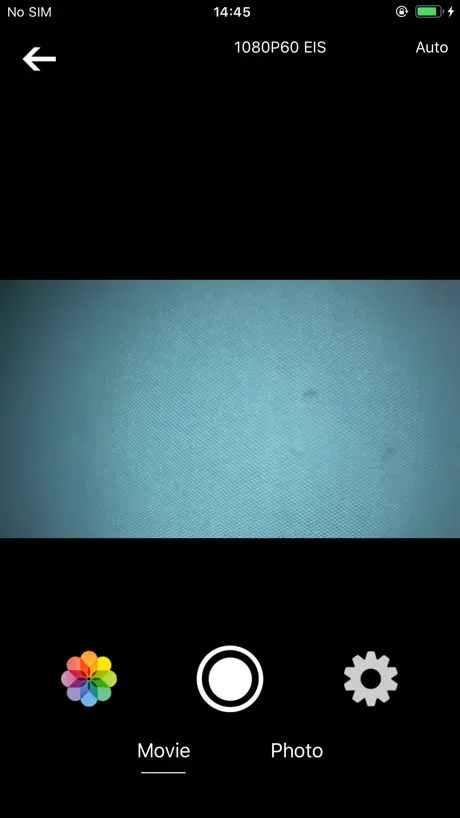
- Works well for viewing live camera feed
- Very cheap price makes it worth trying
What they complain about
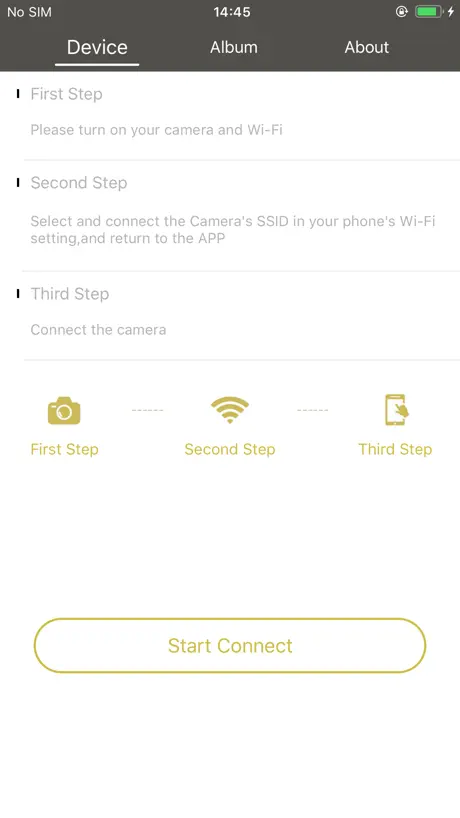
- You must turn off mobile data to connect
- App crashes or fails to connect reliably
- Photos look terrible when taken via the app
Works great!
I was able to download all of my photos and videos to my phone within minutes! This works great! I have an iPhone 15.
Bad software. Broken app
Keeps saying go to references. What references? Is that manspaining for we don’t know what we’re doing? Then it opens a window that says touch references and a keyboard which has nothing to do with the app.
you guys used wrong camera 💀
i think this app is only work for apexcam camera
Geht nicht
Sehr ärgerlich, nichts funktioniert.
Ok
It’s a little hard to get on but after it’s so simple and easy !
Everyone is weird
I have had the camera for this app, for a few years now, maybe like 4, and it’s never not worked. I have always been able to use my phone to download videos, through the camera, it works fine for the price of product and free app, stop complaining. Good stuff 👍 to me
Useless
Useless app doesn’t work for wifi don’t waste your time with it, claim they fixed it but they didn’t
Really Good
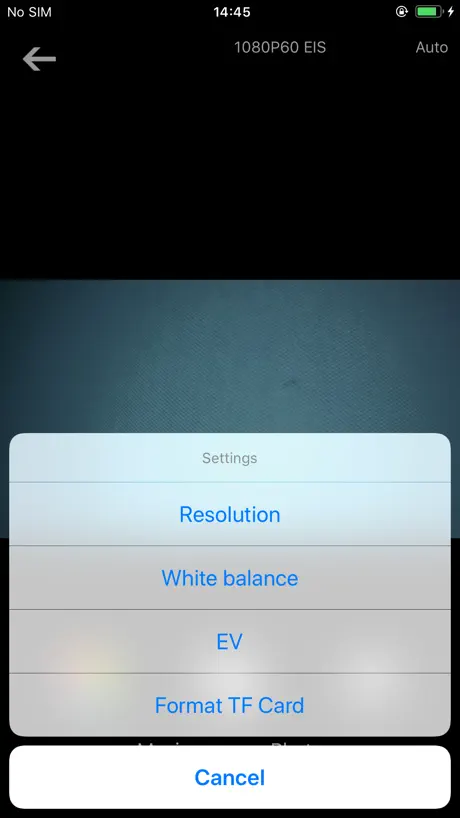
It’s pretty good you can change quality brightness but it updates every few seconds and is a bit laggy other then that it’s good btw to use it you have to type WiFi password and name
Nul
Je n’arrive pas à connecter ma camera
Can’t make it work on IPhone SE
Will not show the option to select the camera wifi.
good
don’t see what’s wrong with it
I used chat gpt for this
這個應用程式很糟糕,因為有連接問題,當你嘗試連接時,應用程式會將你踢出,所以請修復這個問題
Easy fix to get the app going
If the app isn’t working simply turn off your Telco data, and leave wifi on. After that it works exactly as expected.
Yep
30$ cam it works good enough
Turn off cell data to make it work
A bit of a piss off. But to get it to connect. Connect to the wifi like it says. But also turn off your cell data. Should connect after.
Amazing
I love this app such a good app for viewing sport cameras
1000% Useless
Either update it or stop saying it works for the camera
Turn off data
It took several messages back and forth, but eventually I was told the app won’t work if data is ok. Turned off data, and phone connected to camera no problem. Still doesn’t have some of the features I would expect, but for the price of the camera I really can’t complain. Hope this helps someone else connect!
Connecting to wifi is spotty as best
It seems if you turn off your data you might stand a chance in hell in connecting the camera to your iPhone - too bad, it’s otherwise a nice camera
Need to disable cellular data to get it to connect
Hi the app still has a major issue . I have iPhone X and need to disable my data to connect to app. Otherwise I get spinning wheel. This should have been fix in previous bug fix but looks like issue is back . Please can you fix
Live DV app
Been using for few months, connects in a blink, works every time
Issue was stated fixed yet it’s still having the same issue
“Connecting issues fixed” - 3 weeks ago, and I still can’t connect my camera
Works with DragonTouch Vision 4
Basic controls, camera view & media viewer, doesn’t always connect to camera on first go, but does eventually work. Would really like to be able to save multiple angles, and camera connections within the app. Been using app with iPhone 5s & iPhone X works for the very basics.
アップデートして
iPhone13に対応してください。 好きで使っているのですが、久しぶりに機種を変え使ったところ、写真・画像が保存されないです。 アップデートよろしくお願いします!
Correcte
La caméra fonctionne bien mais je suis incapable de lier mon iphone11 avec l’application et la caméra. Cela à fonctionné avec l’androïd de ma copine seulement. Les accessoires de montagne ne sont pas évident à utiliser.
Really
I can’t connect my Camera shows the app it’s almost impossible it’s really hard why can’t the guy who made this see the problems he/her made it it’s almost impossible it’s it’s really come on😡 he should be arrested right now 🤬
Review
It’s been many years with my camera and this app and the developer hasn’t seemed to fix the issue. My camera won’t connect with my phone because of the apps problems. Don’t bother purchasing unless they fix the app.
Only works in aeroplane mode
This app seems to only connects to the camera if my iPhone is in flight mode (thanks to a previous reviewer for the tip). Once it connects it’s ok. Album does not access the microSD card, use photo icon on the device page and then download videos or photos to create an album.
L'application ne se connecte pas à la cam
Il est regrettable que l'application ne se synchronise pas avec la caméra, ce qui gâche tout ! On demande une mise à jour mais apparemment l'éditeur n'est pas pressé
Works on Airplane Modea
This app is very faulty. After looking at a review, a helpful tip is to turn on airplane mode. It kept saying there was an error, but if I went to “About”, then tapped on “Test LiveView”, it was clearly connecting to the camera. After this I tried connecting and it worked... kind of. If you want to look at the albums on the SD card, you need to go to “photo” mode in the app, then tap the flower/ photo album ICON. It’s a very daft and poor app, but thanks to this review tip I found, it works just about okay at a 3mb/s transfer rate.
Love it
👋😻💄💋💋💋👄💋👄💋👄💋👄💋👄💋👄💋👄👄👄💋💋💋💋👄👄👄💋👄👄💋💋💋👄💋👄💋👄💄👄💄👄💄👄💋👄👄💋💋💋💋👄👄👄💋👄👄💋👄💋💋💋👄💋👄👄💋💋👄👄💋👄💋👄💋👄💋👄💋🦷💋👄💋💋👄💄💋👄💋💄💋💋💄💄💋👄💋 thanks for this app it’s golden if I cood I wood rate 100000 stars
App still doesn’t work with camera
App issues still haven’t been resolved and makes the camera useless. Don’t bother with the app and don’t buy the camera!
まぁ使え無くは無い。
A79で使ってますが、wi-fiを使って動画を撮ると音がほとんど聞こえないほどに小さく記録されます。本体の録画ボタンを押して録画した場合は普通に音が記録されます。此れでは自撮り棒を使って撮る時大変不便です。 記録する画素に寄ってはwi-fiだと情報量が多くスマホの映像がカクツキます。 アプリの設定したら 動画、写真共にスマホへ簡単にダウンロード出来ました。
Download nicht möglich
Leider ist es nicht möglich Fotos oder Videos herunterzuladen 🤷♂️😖
Ok 👌
The app is a little hard to use. I was able to connect to the wifi just fine but I would like it more if I was able to see my videos in the app, and not just on my camera . By that I mean actually watch my videos and see my pictures. Overall, I like it 🙌 Thanks 👍 Also the filters are really cool 😎
It works.
It’s not super pretty, but it gets the job done. I’m under the assumption that there are quite a few different branded cameras that work with this app. So if you have issues with it, update the firmware of your camera. iPhone 7 and it works fine. I’m able to watch the camera on my screen, and most importantly, backup footage to my phone on the fly.
Most bizarre app
Is there a rating less than 1? I could resonate with everyone on the review section expect for 1 person Curly fries or whatever. Am sure that person is part of the app development team! No joke, how can 1 enjoy this app unless you are not high on something? Grow up and bring out the truth. To the app development team : please take this app out of app store to stop getting humiliated anymore. Ironically, I see an update on this app that it has bug fixes 4 weeks ago. Royal scam!!!! My app crashes every-time I click the connect button. And what on earth is ‘Go to references’????? Seriously, why are you wasting our time by having this app’s presence here in app store?
So far so good!
“Error” message appears and will not connect over WiFi *Updated: Turn off Cellular Data, keep WiFi on and WIFI Will connect to device through APP.
Works in airplane mode only
Thanks to the other review for this. Only connects when in airplane mode with WiFi on. App works fine when finally connected. Would be 4/5 * if it worked without this workaround
It works...
Saw the negative reviews not connecting to wifi. Perhaps people just don’t know how to do it. 3 stars for now. I will update my rating after I test it outdoors. Peace out!
Really worked!
I had a boifun camera connected worked
Problems with app
Apex camera says it’s connected via wifi to app On iPhone XR the app says “cannot start preview screen” I bought another camera to see if it was camera. Same error HELP
Works fine with a trick
If using an iPhone put it in airplane mode and connect with WiFi and there is no problem with the app. If this could be done without airplane mode it would be a 5⭐️
Cannot save
Cannot save!!
Try turning off cell data for connecting problems
The app would crash trying to connect to the Apeman 4K camera. Tried looking for a solution and found one: try turning off cell data before connecting to the camera via WiFi. If the cell data is on, it'll "confuse" the connection. As for the app, it's basic and there could be more help documents so I wouldn't have to search the ends of the internet to try and find a solution to what I gather is a common problem
Been using
I’ve used this app for years I I have had no problems connecting it to my camera and recording and saving videos, the only problem I have is when I move the SD card and put it back in it deletes all my photos and videos
As they say, a complete waste of time and $
I’ve wasted way too much time trying out the simple act of connecting. It says it’s connected — but it’s not. A waste of money on the camera, a waste of time on the app, and it sucks as I won’t have a camera for my trip. Very unhappy.
Turn off mobile data if using phone
For the app to work turn off mobile data! Thank you for to the other person who left this review! Now works perfectly
静止画の解像度が悪い
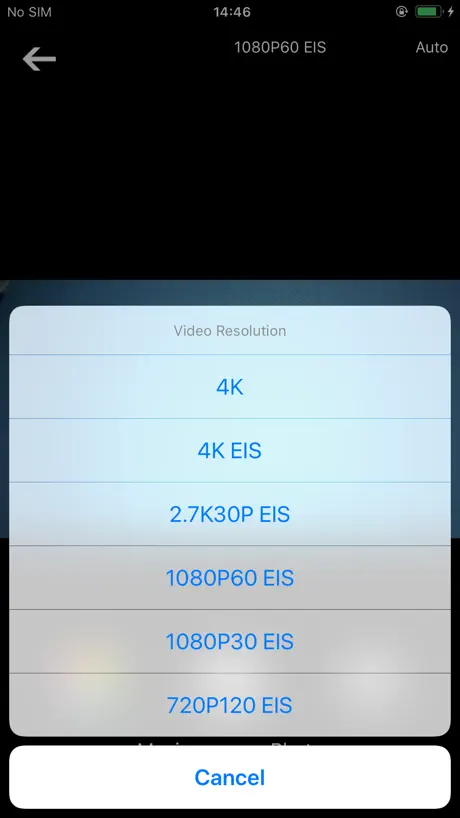
アプリの起動も動作も問題なく、アクションカムともスムーズに接続できました。 ただ、スマホ側から画面を見ながら静止画を撮影すると画質が著しく悪化します。 解像度が明らかに低く実用に耐えません。 どうやら動画側で設定した解像度のままのようで、写真モードに切り替えても画素数の設定が切り替わりません。 そのため1080に動画解像度を設定していると200万画素相当で撮影されます。 カメラ側で静止画解像度を2000万画素と設定してあっても意味がないです。 静止画側のモードでも解像度の設定ができるような修正を望みます
Android connection problem
I had similar problem with wifi connection. I could connect on my ipad, but not on my android phone. The trick is with how your device reacts to the wifi, android does not want to stay connected to the wifi without internet - you need to tell it to stay connected. Now it works on both of my devices.
Live DV FAQ
- Is Live DV free?
- Yes. The app is free, in all 175 countries it sells in, and it sells nothing inside it.
- Does Live DV have a free trial?
- No. None of its offers (US) come with a free trial.
- What are the best alternatives to Live DV?
- AKASO GO (4.5 from 28,051 reviews), iSmart DV2 (4.4 from 7,648 reviews) and SJCAM Zone (4.7 from 4,206 reviews).
Live DV download
Last updated 1 year ago.
Live DV sells in 175 countries. It was released 8 years and 7 months ago, on 2 Mar 2018. It holds a 1.9 rating from 1,163 reviews.
Supports 13 languages: English, French, German, Greek, Italian, Japanese, Korean, Polish, Portuguese, Russian, Chinese, Spanish, Thai.
How much does Live DV make?
Third-party estimates for the last 30 days, worldwide — not the store's own figures, which Apple publishes for nobody.