THINKWARE CLOUD
How much does THINKWARE CLOUD cost?
Prices are current as of 14 Nov 2026.
THINKWARE CLOUD has no in-app products on record in the United States.
10+ alternatives to THINKWARE CLOUD
| THINKWARE CLOUD |   MyNextbase Connect |   Dash Cam: Dashcam Recorder |   HydroHome - by BC Hydro |   Danby |   KENWOOD DASH CAM MANAGER |   AirIQ |   WeblinkMaestro |   Metra Heise Connect |   DirectLoader |   PowerProbe Link | |
|---|---|---|---|---|---|---|---|---|---|---|---|
| Rating / 5 | 1.9 | 4.0 | 4.4 | 4.1 | 2.1 | 1.6 | 3.2 | 2.0 | 2.4 | 4.0 | 3.2 |
| Reviews | 990 | 6K | 2.5K | 1.9K | 220 | 182 | 26 | 24 | 18 | 8 | 5 |
| Released | 2017 | 2019 | 2026 | 2024 | 2020 | 2019 | 2022 | 2021 | 2023 | 2024 | 2024 |
| Monthly price | — | — | $5.99 | — | — | — | — | — | — | — | — |
| Annual price | — | — | $24.99 | — | — | — | — | — | — | — | — |
| One-time price | — | — | $49.99 | — | — | — | — | — | — | — | — |
The going rate for each plan in United States, in its own currency, shaded from the cheapest price on the row to the dearest.
THINKWARE CLOUD reviews
1.9 out of 5, based on 990 reviews.
What people like
- Video recording quality is really great
- Downloading videos to your phone is fast
- Works well if you use a hotspot
What they complain about
- Support never actually helps with issues
- App crashes constantly when you open it
- WiFi connection drops off frequently and randomly
Use hotspot instead of direct WiFi connection
The app works fine with my U1000. I find that it’s a more seamless and reliable experience to connect to the camera using my phone’s hotspot instead of connecting directly to the camera via WiFi. Since the camera doesn’t provide an internet connection, the iPhone often complains then disconnects from the camera but this isn’t an issue over a hotspot connection. I suspect many people have issues with this app because they connect to the camera’s WiFi directly and the iPhone likes to disconnect automatically because it has no active internet connection.
Never connects
App has so many issues connecting to phone. I never really connects
Now connects 1.2.48
I just upgraded and it now connects. I’m updating my rating because now it works as it should. I’ll give it five stars if it stays working for six months or more.
Ehh
Ehh. Its ok. Camera itself works well but connectivity and user interface are severely lacking. Buy a dashcam with a viewing screen on it so you dont have to deal with connectivity issues.
Great dash cam. App not so much.
I’ve owned two units of the U1000 dash cam, and overall the camera hardware itself has performed well — it reliably records video to the SD card without issue. However, after performing a firmware update, I ran into a significant problem: while the camera continues to record properly, the footage is no longer accessible through the mobile app. The only way I can review recordings now is by physically removing the SD card, which defeats a major convenience feature of a screenless dash cam. This is especially frustrating considering the price point (close to $500). For comparison, I previously used a less expensive competitor model with a built-in screen that never had these kinds of usability issues. At this stage, I would rate the camera itself 5 stars for recording quality and reliability, but the app experience after the firmware update at 1 star due to the loss of functionality. Overall experience: heavily dependent on whether the app/firmware combination is stable at the time of use. My advice to potential buyers: if your unit is working well out of the box, think carefully before applying firmware updates unless the improvements are clearly necessary.
What is the password for wifi
What is the password for wifi
Terrible app/customer support
The dash cam itself works great, but the Thinkware Cloud app and customer support have been extremely frustrating. The app randomly logged me out one day, and I haven’t been able to access my account since. I can’t reset my password, and I can’t create a new account because my camera is already tied to the existing account that I’m locked out of. I contacted customer service and provided all of the camera information they requested so they could reset my account. That was two months ago, and I’m still waiting for them to fix it. I’ve followed the process they asked me to follow, but there has been no resolution. It’s disappointing because I’m very happy with the dash cam itself, but the app and lack of effective customer support seriously hurt the overall experience. A premium dash cam shouldn’t become partially unusable because of an account problem that takes months to resolve.
Better than it was
Thinkware cloud being available. I can now monitor my car anywhere as long as it’s connected to hotspot. My personal cellphone stays in the car while im at work so I see everything. What I wish it would do tho is that I wanna be able to access that footage that triggered a light impact or motion sensor. Hope in the future they make it available
Difficult to use and connect
I purchased the Thinkware Dash Cam DC-U1-FG through my GM dealer for my Silverado Truck. Instructions indicated I needed the Thinkware Cloud App. The WiFi connection to my iPhone is very temperamental. Drops off frequently and you have to re-connect. Never have been able to login to the iCloud it will not recognize passwords. This is a real shame since the app is such an integral part of camera system.
App will not connect to camera
Even after connecting to the camera via WiFi, the app does not connect. Tried restarting the app and turning the WiFi on the camera on and off. Yes, I have a Q800Pro, which is meant for this app. Yes, I have the latest iOS update. Just get a Garmin instead.
Great camera
Please update software to support iPad fully.
Thinkware Support: Copy-Paste Excuses, No Results
Dealing with Thinkware customer support has been an absolute nightmare. Since January 8, 2026, I’ve been trying to fix a simple issue: my dash cam is locked to an account that was deleted and needs to be deregistered. For WEEKS, the first customer support agent did nothing but send generic “we’re working on it” emails. They never told me they needed any additional information. They just let the ticket sit while pretending it was being handled. Only after I kept reaching out multiple times did they finally admit — on January 27, 2026 — that they actually needed my device UUID or serial number to proceed. I provided it immediately the same day. And then? Nothing. No response. No reset. No resolution. So to summarize: • First support agent wasted weeks of my time with fake progress emails • They didn’t request the required info until I kept pushing • I provided it immediately • They still did absolutely nothing This is not customer support — it’s incompetence and stalling. I will be taking this issue everywhere I can and making it public until it is fixed. I will not stop bringing attention to this problem until my device is properly deregistered and usable again. If you enjoy being trapped in an endless loop of copy-paste replies while your expensive hardware becomes unusable, then Thinkware is the brand for you. Otherwise, save yourself the frustration and buy literally anything else. I will never purchase another Thinkware product again.
Suggestion for app
Everything works as it’s supposed. I wish there was a way to zoom in when reviewing video from the app. Currently, I have to download, then transfer to my phone, then use the phone video app to play and zoom in. Thanks,
Barely a 2
App appears to connect and allows some setting and some viewing …….. most of the time. Hotspot is major failure. It’s too bad that Thinkware is so out of touch with their apps. I’ve had a couple of Thinkwares but I’m moving on now. Too frustrating to pay a ton for product and be ignored
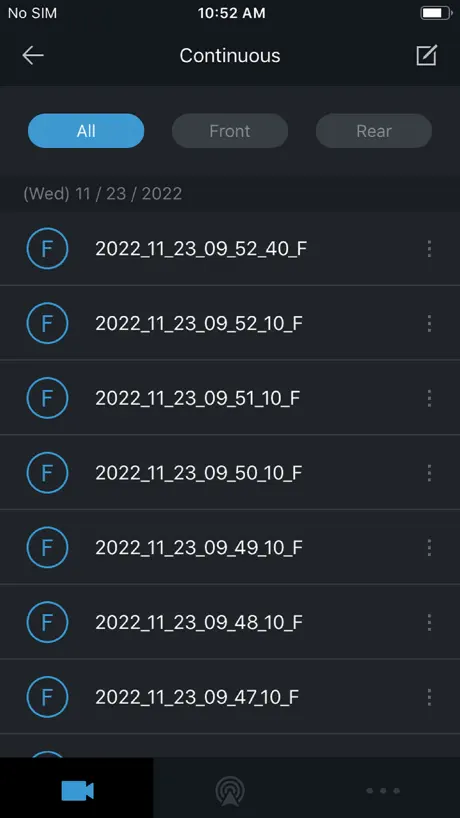
Cannot view continuous recordings
F800 PRO Every time I go to open up the file list, the app crashes. I have reinstalled the app. Updated phone iOS and the firmware in the camera in updated. I can open up all the other file lists, just not the continuous recording. Also. The cloud has never worked since getting the dash cam 5 years ago.
Si
Great app and worksSeamlessly with q800pro
WiFi connections are aggravating
The camera itself is ok. I have problems with the app. It’s possible it’s because I’m using an IPhone. I will get it connected to my phone and for a while everything is good. I can check footage and download things. However if I don’t do it frequently (I don’t drive the car enough to check it all the time) then I have issues trying to get the camera to connect to my phone. I especially have problems when the phone gets an update. My husband got a different camera and he can open the app and see things without having all the issues I have with Thinkware. As of right now I wouldn’t buy another camera with the Thinkware app.
Great Dashcam
I’ve been using this dashcam for 2 years, the quality is great, downloading to smart phone is relatively fast, Highly recommend the Thinkware Cloud dash cam•
App has a programming flaw
If your phone goes to sleep or you swipe out of the app, it disconnects from your phone. That will happen repeatedly if you go in and out of it or if you lock and unlock your phone. This app would probably get 4-5 stars if that was addressed.
How many times do I need to be told …
… to use my smartphone to find a WiFi connection that starts with Thinkware? Has no one stopped to think that the owner of the car is bombarded with this irritating and utterly pointless message EVERY TIME HE STARTS THE ENGINE? In the name of God, write a line of code to stop issuing the message after the first couple of times.
Works fine.
Other review helped. You need to ‘forget network’ when you’re finished / before you re-connect, every time. Not really a problem it’s not like you connect to it that frequently takes an extra 10 seconds. Not one issue all features works fine. F200
Same issues
There is nothing I can say that has not been shared in other low reviews. It is very disappointing the issues with the app have not addressed. I wish I had checked the reviews on the app prior to buying. As expensive as this camera is I will be removing for one with a much better app.
Update
After my first review and an update on my U1000. App has been connecting much faster via mobile hotspot and auto connects to my home network. Only issues is if the app could be more user friendly, and connecting via live view does lag and occasionally loose connection.
Thinkware Cloud for U1000
Will not recommend, there have only been problems and more problems since I bought the camera in March 2023, and nothing else with this app and the dash cam. You never know when the app is going to work. Keep freezing and freezing constantly regardless the numbers of times I rebooted my phone (and the camera). The idea of the dash cam sounds wonderful, but dash cam and software setup/ development / installation are terrible.
Safety camera download
Please fix the safety camera download issue. Everytime I try update via the app it just crashes. Also the camera data you use is very old, could you please update
Fantastic
Love this app. Not sure why everyone has connection issues, I don’t have any myself. Remember the ignition must be in the on position in order to be able to connect to the cam’s WiFi
Won’t connect to any thinkware app
I bought the F200 version and it is not worth it, I downloaded 3 different versions of the app for this camera and none work. Save your money and time.
App feels okay?
Previous reviews talking about drop link or something like that, never happened on me. The app feels okay compared with my old dash cam app, which is laggy.
Hard to connect to iPhone
It’s dealt hard to connect to the phone in order to adjust or review clips I moved the camera into my new truck and wanted a live view to adjust camera position , I was trying for a hour and finely gave up
Seems ok
The dash cam is great to have I recvomend everyone gets one but the app is glitchy keeps disconnecting from the Wi-Fi. The connection isn’t secure at all on that sense
影片無法匯出
已修正完成 謝謝
Horrible
I would have bought a different camera had I known the app and complexity of saving videos was going to be this bad. I would think a $400 camera system would have an app that reflected that price point. Bad first experience!
U1000
Strange, can’t alter any of the cam settings with latest iPad on latest iOS, and yet it says it’s compatible with this iPad. I can see file lists and watch videos, click on settings then nothing?. Everything else works....fine.
Hotspot not working
I tried to connect hotspot to register my product(Q800 pro), but never works. I did almost 100times. Watched lots of videos and read lots of articles, but nothing helps. Already cannot connect and announce “cannot find hotspot”. So tried of it.
Works well with Q800 Pro, with a few issues
I’ve had the Q800 pro for 2 weeks now and the app has worked perfectly for configuring my camera, viewing the live feed, and downloading videos. The one function that didn’t work initially was changing the camera’s wifi password from the default. I followed the instructions and the app said the password was successfully changed, but I was unable to connect using the new password. The camera was still set to the default password. After several tries I figured out that you have to set the password, then restart the camera and reconnect for it to take effect. The restart wasn’t mentioned in the instructions. I’ve found that the instructions are unclear in two other places. After installing the app, it asks for location permissions, stating that the “service” cannot work without it. However, it doesn’t say what the service it’s referring to is. Initially I believed I had to give my location to use the app. This worried me since I don’t want to give it out unless necessary and I couldn’t tell why Thinkware needed it. I found out that it’s referring to the Thinkware Cloud service, which I don’t intend to use. If you don’t want to use this service, deny the request and check the box to stop showing the prompt. The rest of the app will work fine. It doesn’t prevent you from changing settings, viewing videos, or installing firmware updates. When connecting to the dash cam over wifi, the app says to connect after pressing the wifi button on the camera and hearing the voice prompt it responds with. However, the wifi network doesn’t appear right away in the network list, you’ll need to scan a few times by tapping back then wifi again before it appears. These details should be mentioned in the instructions to give the user a better understanding of the app.
Cannot connect.
iPhone 7 Plus with iOS 11.1.1 cannot connect at all now. Just bought & installed the F800 Pro dash cam. Please help to fix the bug thank you in advance.
Garbage app
For the price of these devices there is no reason that they don’t come with a screen and you have to relay on an app which either can’t or won’t connect or stays connected. Better to go with cheaper more reliable brand.
App is good could be better
F800 pro Runs smoothly with my iPhone SE iOS 14.2.1 Could you consider add “flip left and right live recording” feature in the rear camera setting, please? That will be handy! Thx
Great Camera. Crappy App
The Q800 Pro and the rear cam are excellent if you want to pull the microSD card and upload the video to a computer. Connecting to the app via WiFi I snt bad… but the HotSpot connection doesn’t EVER work… and I need my Wi-Fi connection because I have wireless Apple CarPlay. The app looks like it was tossed together by some first year programmers in high school. For a company that makes such excellent cameras, the App software is truly terrible.
Horrible software / Impressive hardware (U1000)
Setting up and connecting an account isn’t as straight forward as it should be. Took me several attempts over a few hours to work out the exact sequence the app wanted to connect to a WiFi hot spot. If you power down the unit or simply want to switch connections from WiFi to your phone / Hotspot you need to setup a new connection every time, which is annoying. UI/UX needs a complete overhaul, and the cloud features are minimal. If you persist you can get it to work and it’s quite stable. Bit of a shame the software is lacking since the hardware is excellent.
Stopped working
I’ve had this app for 2 years, and while never great it at least functioned. A few months ago it no longer would connect to my dash cam, I’ve been trying for 1.5 hours today to fix the issue and absolutely nothing has worked. I’ve updated the camera firmware, reset it, deleted and redownloaded the app, and nothing. My phone says it’s connected to the wifi, but the app and camera say otherwise. Out of desperation I tried connecting on someone else’s Android phone and it immediately worked. Don’t know what happened with this iOS app, but if I were to buy another dash cam (I’m likely going to do so after this experience) I would absolutely not get a Thinkware. Too bad, I do like the camera quality.
Not bad
After reading reviews already here, I was a bit worried as this is my first Dashcam. But I found it easy to use once I watch the tutorial videos from YouTube. It has got lot of functions. Live remote option put me down as you have to have it connected with a device or phone hotspot. You can’t connect to your home wifi connection. They should have add the option. I will keep updating.
Customer support non existent
Dashcam is really good. That’s where the pros end. Can NEVER sign into the app or website. Always get an error message saying that the username/password do not match, even after resetting the password. On hold for over 30min. Waiting to get help before I finally gave up. For a dashcam that is this expensive I think it’s fair to expect even the slightest effort for them to support the customer base. Probably going to take it out of my car and get a Garmin.
Ap won’t open since the 13 October 2020 update
Touch ap to open and it flashes up then closes again.
Do NOT buy this crap
Firs of all, this dashcam - or whatever can be called, it’s JUNK. If you can get it for 99¢, buy it. That what is worth! The app developers are just a bunch kf janitors - no functionality at all, crashes… maybe will work on iPhone 3S or 4. Anything beyond… no use!
😒
This app makes the cam look like a cheap end cam but it’s not com on think wear sort it out no good having a fantastic cam and a rubbish app come sort it or you may end up loosing a lot of customers to other manufacturers think about it
barely even connects
i have the u1000 and the app is helpful when it works, but getting the app to open is a struggle on its own. it crashes every time i open it, the only way to get it to open is to turn off my wifi and cellular data, open the app, then turn wifi and data back on. and even after that connecting to my phone takes several tries. and once i leave the app, it crashes again until i turn off wifi and data all over again. please fix this.
Need to improve
Can’t even preview a recording before downloading it. Too tedious especially when you are trying to trace a recording
THINKWARE CLOUD FAQ
- Is THINKWARE CLOUD free?
- Yes. The app is free, in all 175 countries it sells in, and it sells nothing inside it.
- Does THINKWARE CLOUD have a free trial?
- No. None of its offers (US) come with a free trial.
- What are the best alternatives to THINKWARE CLOUD?
- MyNextbase Connect (4.0 from 6,047 reviews), Dash Cam: Dashcam Recorder (4.4 from 2,501 reviews, premium from $1.99) and HydroHome - by BC Hydro (4.1 from 1,912 reviews).
THINKWARE CLOUD download
Last updated 1 year ago.
THINKWARE CLOUD sells in 175 countries. It was released 9 years and 5 months ago, on 16 Jun 2017. It holds a 1.9 rating from 990 reviews.
Supports 14 languages: English, Arabic, Czech, French, German, Hebrew, Italian, Japanese, Korean, Portuguese, Russian, Chinese, Spanish, Thai.
How much does THINKWARE CLOUD make?
Third-party estimates for the last 30 days, worldwide — not the store's own figures, which Apple publishes for nobody.