
BatchResizer2
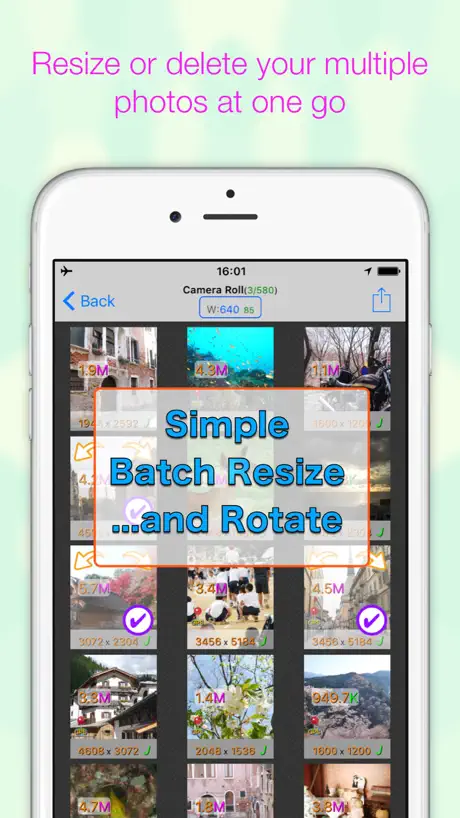
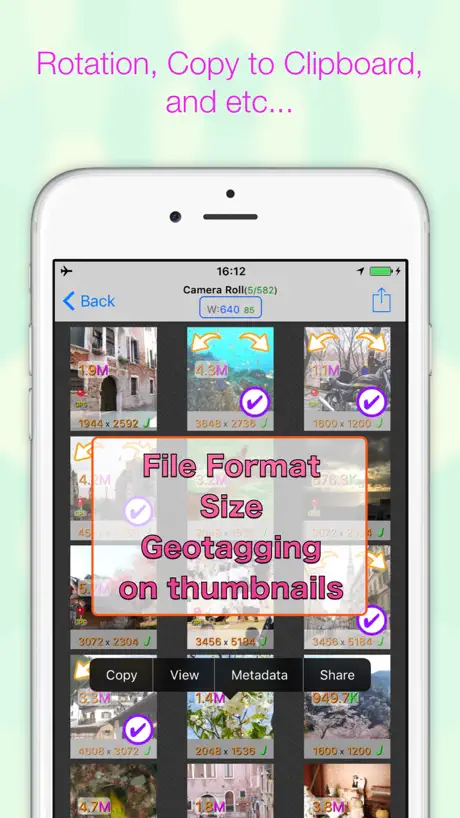
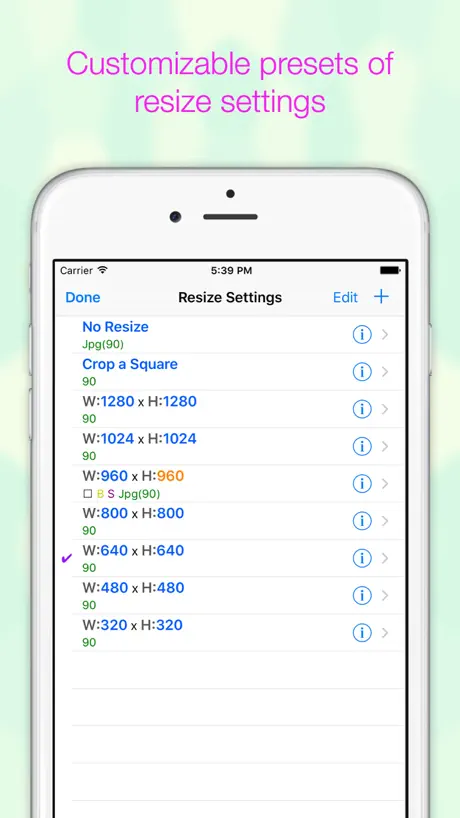
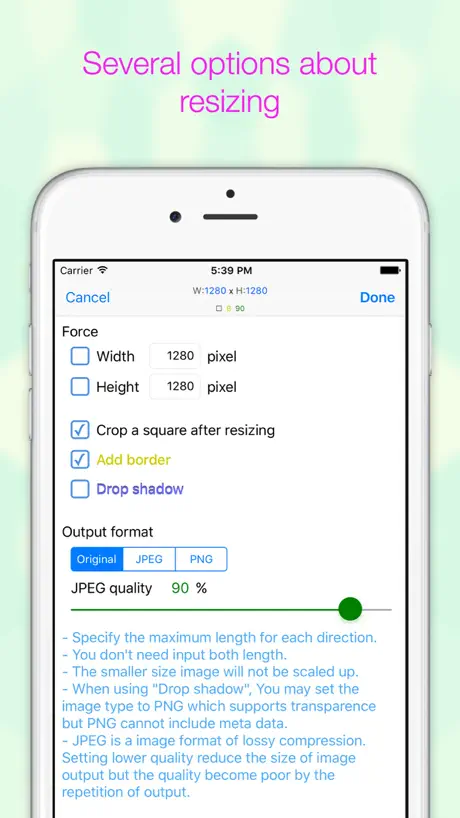
Resize Multiple Photos At Once
How much does BatchResizer2 cost?
Prices are current as of 3 Oct 2026.
1 one-time purchase from $1.99
In the United States, BatchResizer2 has 1 one-time purchase priced $1.99.
| Product | Price |
|---|---|
| No Ads | $1.99 |
10+ alternatives to BatchResizer2
| BatchResizer2 |   Square Fit Photo: PicFitter Square Fit Photo: PicFitter |   Photo Resizer: resize image Photo Resizer: resize image |   MoviPic - Movie to Photo MoviPic - Movie to Photo |   ImageResize ImageResize |   Easy Photo Compressor: Resize Easy Photo Compressor: Resize |   Image Size - Photo Compress Image Size - Photo Compress |   ResizeMail: Batch Photo Resize ResizeMail: Batch Photo Resize |   Desqueeze - Batch Resizer Desqueeze - Batch Resizer | 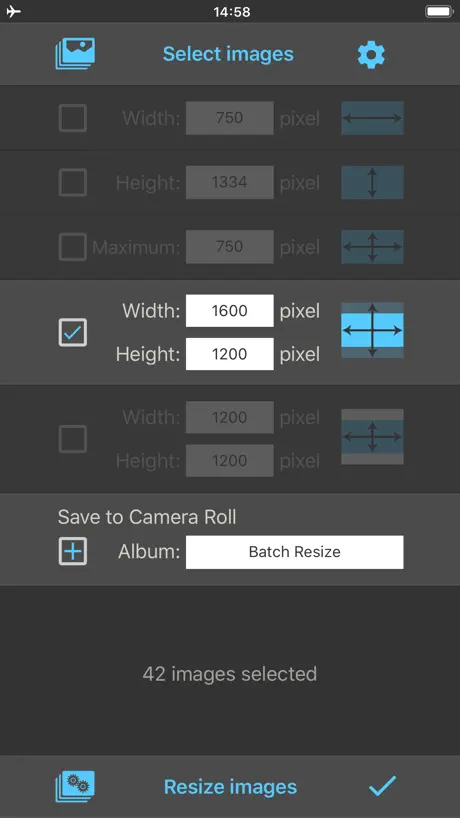  Batch Resize Batch Resize | 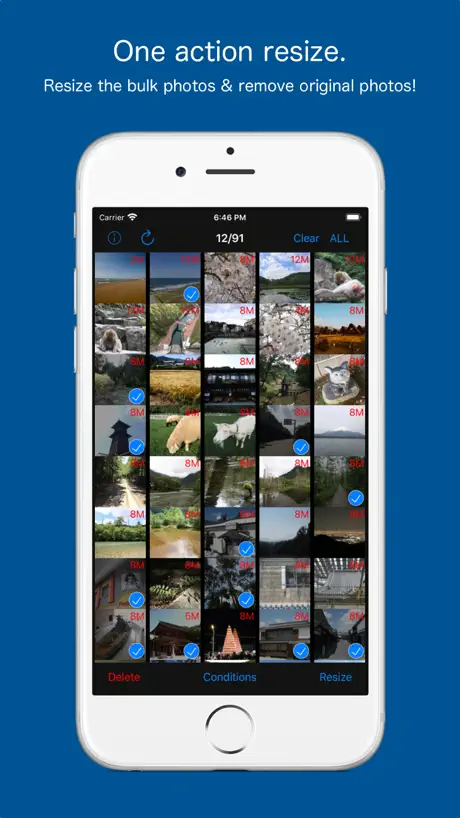  MagicResize MagicResize | |
|---|---|---|---|---|---|---|---|---|---|---|---|
| Rating / 5 | 4.4 | 4.7 | 4.6 | 4.6 | 4.3 | 4.6 | 4.6 | 4.5 | 4.7 | 4.6 | 4.3 |
| Reviews | 1.2K | 21K | 9.8K | 9K | 8.1K | 6.9K | 5K | 2.6K | 2.2K | 2.2K | 1.4K |
| Released | 2016 | 2015 | 2021 | 2013 | 2013 | 2020 | 2018 | 2015 | 2015 | 2017 | 2015 |
| One-time price | $1.99 | $49.99 | $0.99 | — | $2.99 | $2.99 | $2.99 | $3.99 | $59.99 | $34.99 | $2.99 |
The going rate for each plan in United States, in its own currency, shaded from the cheapest price on the row to the dearest. Plans fewer than four in ten of the priced apps sell are left out.
BatchResizer2 reviews
4.4 out of 5, based on 1,170 reviews.
What people like
- Resizes photos incredibly fast
- Very easy to use interface
- Handles large batches well
- Lets you pick exact size
What they complain about
- App crashes or freezes often
- Image quality drops noticeably
- Photo dates change randomly
- Ads appear even in paid version
Best in It’s Class 😍
The app does exactly what it is supposed to do, and it does it exceedingly well! It is the fastest and easiest photo resizer I have found. BatchResizer2 is an indispensable app. The default photo size with iPhone and iPad is too big for many purposes. This app will reduce photos to a reasonable size almost instantly. You select the size you want and select the photos. Whether you are doing one or hundreds, it is lightning fast.
⚠️ Koichi! Please fix for iOS 17 ! ⚠️
17.6.1, iPhone 12 mini. 2022 review: Good app--bAD Privacy Policy Koichi--please fix that policy. It's anti-end user, and invasive. Same for BatchCropper. Really. Thank you.
iOS15.2の仕様に向けてさらに便利に更新を希望します
PNGで容量を取るスクショをJPEGに変換して容量を削減して保存をするのにとても役立っています。 iOS14.8では、変換したスクショはiPhone写真のスクリーンショットアルバムには含まれないようになっていましたが、先日、iOS15.2にアップデートをした際に、変換したスクショもスクリーンショットアルバムに分類されるようになっていました。 既に変換済みのスクショもバッチリサイズのスクリーンショットアルバムに表示されるようになり、その中のスクショを変換すると、同じスクリーンショットアルバムに入り画面が再ソートされてしまいます。 未変換のスクショだけ別アルバムに入れれば良いのですが、バッチリサイズのアルバム形式がiPhone写真で見るのとは違う順番になっており、さらにアルバムをスクロールするとフリーズしてしまい動作しなくなります。 アルバム形式をiPhone写真と同じように表示するか、アルバムのスクロールでフリーズしないように更新していただきたいと思います。 よろしくお願いします。
長辺側を自動にできないのが残念すぎる
リサイズサイズの長辺側を指定したら、短辺側は比率を守って自動でサイズを決めて欲しい。てっきりそれができるのかと思って1800×1800にしてリサイズしたら全部正方形になっていた。あとは作業フォルダじゃなくて最初から指定フォルダに出力して欲しい。
拡大&縮小用のアプリ
勝手に1px単位でトリミングできるアプリかと思い込んでインストールしましたが、拡大縮小するためのアプリだった。とはいえ目的が合う人には便利そうです。 写真の上に重なっている文字が無駄にカラフル&影付きなのが見づらいと感じた。
GR8 app & good 4 pic info, too
Use this app every week. Half time for cutting my image sizes by 1/2 = saves 4X memory and still can print a 4x6 if I want. PLUS! I can check image dimensions and memory used if I need too. Esp. good to be sure I have good size for downloaded logos, memes, etc. No bugs in 18 mos. use. #RECOMMENDED iPhone 8 & iPad mini, iOS 14.6
After iOS 16, IT doesn't work anymore
Please fix it. Thanks!
メール送信の機能がしていません
共有からEvernoteへで賄えますがEvernoteが重いのでメール送信を使いたいです。しかしメールをしますとアプリがダウンしてメール送信されません。改善をお願いします。
Changes file name
It changes the name of the file which makes it hard to keep organized
日付けが…
便利なアプリでありがたかったです。 一気にたくさんの写真をリサイズできたのですが、一部の写真の日付けが今日撮影したことになってしまいました。元写真は削除したので、いつの写真かわからないものができてしまいました。
Best
This is best app of its kind available for iOS.
Inoperable
Waiting up to 45 seconds for the app to launch on an iPhone 11 Pro Max is just unacceptable. Broken app. Doesn’t work.
全て選択機能を追加して欲しい
便利に利用させて頂いています。 複数枚、一度にリサイズするという特性上 全て指定する、という機能を追加して 頂きたいです。 30枚全てタップするのが面倒くさいので よろしくお願いします。
勉強代とします
・五分操作して5,6回落ちる ・有料なのに広告がある ・プレビューできない ・直感的に操作が難しい
😢
iOS14にアップデートしてから透過画像がリサイズ後に透過でなくなってしまいます。 修正お願いします🙏
Love it.
First app I reloaded when my phone was wiped. Essential for iPhone photos to social media.
Albums not showing since last 2 updates – please fix
Albums still not showing, so the app is unusable right now. I miss using this great app to reduce size of pics to put into Word docs. Please fix, thank you!
スピーディーな画像変換にうってつけ
スピーディーな変換にうってつけ 変換後の縦横ピクセル数値のみを指定しておくことで、縦画像、横画像とも長辺に適用され、そのまま使えるのは助かります。 希望としては以下のものがあると嬉しいです。 ・pingyuの減色 (PNG減色 8bitsよりも少ない減色) ・パーセント縮小
インストール直後
立ち上げるとフリーズ、そのまま数秒後にアプリ落ちます。なんでかな〜?
便利に使っていたが(直った)
現在は一切加工対象画像が表示されず加工する画像の選択ができなくなっている。 …その後、iOSの「設定」からバッチリサイズ2を選んで「写真」の設定を「すべての写真」にすれば機能すると作者のTwitterで応答があり、確かに直った。 が、これはかなりわかり難く、iOSのアップデートが原因とはいえ、突然こうなると相当途方に暮れるのでアプリ内でも誘導があった方が良いと思う。
BatchResizer2
It’s amazing app. Using all the time. Thank you.
Not working on iPhone
Unable to open app on iPhone. On iPad it works fine.
無料ですが
とっても便利でずっと使っています。ありがとうございます。 ただ、今回のアップデートで、写真一覧が前よりも見辛くなってしまいました。 それは置いておいて、前々からお願いしたかった事があります。H1000とか、W1000とかでリサイズの指定をすると、横向きの写真と縦向きの写真を、別々にリサイズする事になります。その場合、リサイズされた写真は、時系列のままの並びになりません。縦向きが時系列がだーっと並んでから、次に横向きが時系列に並ぶ事になります。縦A 縦B 横C 縦D 横E という写真がある場合、リサイズすると、ABDCEか、CEABDの順になってしまい、リサイズ後の写真だけ残したい場合、順番が非常に残念です。5枚ぐらいなら良いのですが、旅の後に数十枚となると、かなり悲惨な順番になります。縦か横を指定するのではなく、長い方の辺を1000などと指定出来れば、縦向き横向きで分けてリサイズする必要がなくなるので、リサイズ後の時系列順もそのままで、とても助かります。 今のままでも有り難く使わせて頂いているのですが、ご一考頂けますと、幸いです。よろしくお願いいたします。
アルバムの並び順をなんとかして
リサイズしたい写真をアルバムに整理しても、そのアルバムが不規則な並びになっていて何処にあるか探さなきゃいけないので意味がないのには閉口します。最上位なる様にしてとはいいません。せめて如何なる名称にしたら「すべての写真」のとなりにくるのか教えて下さい。もしくはタイル画像から一枚一枚タップする方式からスライドしながら選択できるようはならないもんでしょうか? それが可能になるのなら最新200枚とか500枚しか表示されないとかの制限も容認します。しかし・・ それはiOSの基本写真Appに直接リサイズ出来る機能が備わる事を願った方が早く実現するし、それしか道はないと思った方がいいのでしょうか。
設定を変更したい
カメラロールの読み込みが初期設定から外れたようで、以前の写真のリサイズができなくなってしまいました。 最新の写真も読み込めたりできなかったりで、安定して使えません。 リサイズしないまでもカメラロールの写真容量を確認するのに重宝していたので、この設定を再変更できるようにしていただきたいです。
Outstanding Product!
I use it all the time. Tell all my friends about this app. 👍🏼
Rotation does not work
Photo just goes back to normal after trying to save rotation
Needs percentage-based
This is a great tool for batch resizing photos. My only complaint is the square thumbnails don’t show me if I’m clicking on a vertical or horizontal image and so it doesn’t work well with mixed orientations. This could be solved by offering a PERCENTAGE resize, which would make the images the same size, even when in different layouts. Please consider that. When I run actions in photoshop for photo editing, I choose to resize based on percentage and then can run all my edited images at once and not have to organize by vertical vs. horizontal.
I used love LOVE this app
Now the send button isn't available for me to resize and email my photos. Great app and will continue to use if they fix the bug
Update changed its usefulness
The most recent update seemed to have changed the ability to choose photos that are not in an album. I have an 'all' button to choose but it just shows albums. Am i missing the way to get to all photos?
Easy to learn and use. Well designed.
I have to insert a lot of photos into Microsoft Work for work. This app helps reduce the documents overall size so it doesn’t exceed the email limits.
I still have Ads
I paid for the full version but I still see Ads 😖
Will Be Great When Bugs Are Fixed!
I was a fan of the original Batch Resizer, which despite its complexities was/is perhaps the must full featured batch resizer app available on ios. The biggest problem for me was that it was confusing, and there weren't great instructions. This version fixes those problems. The instructions are pretty good...they could be better but I think language barriers intervene. But the redesign makes the app much easier to use too. If you look at the App Store version of this app, you can find more detailed instructions using the 'App Support' link. Look for the small 'English' link to change the language...or translate it using Google Translate. There is some great information here! I think this app will be amazing once the glitches are addressed. For me, those include the app freezing up or taking a really long time ''to start up initially. This may have something to do with the huge photo library I have! What appears to be a very simple need on the surface of it is apparently a really hard one for app developers to address...which is why I believe this developer has an advantage in capturing the market if the minor problems were fixed.
撮影日時が変更されました
撮影日時が変更されるなら一言注意が欲しかった いつのかわからなくなった
Easy to use but loses quality
I tried many batch resizing apps, and this one has the best designed interactions. (They could still be improved, however.) My biggest problem with the app is that even with the highest quality setting, the images lose a ton of quality when compared with other batch resizing apps. I hope the developer can fix this.
Great App
Love it,it does a great job I use it all the time.
A disappointing sequel.
A disappointing sequel. I've gone back to version 1. Slow to open, clumsy interface, buggy, shuts down repeatedly. Thumbs down!
best in its class, but needs a bit more
this is almost perfect, would be too long to let all good feedback here. FOUR missing important features: 1) preserve HEIC format (now converts to JPG) 2) resize animate GIF (now takes one frame) 3) user defined sorting, most importantly be size or original (image taken) date (sorting is unclear now) 4) preserve original file date. (now uses resized date, but i personally would want not to generate new date stamp) ———— I realize that this is a lot to ask and would, probably, lead to the next version, but I would gladly purchase these additional features.
Unreliable
Every time I try to upload the pictures to Dropbox it skips a few. It converts them great but lousy Dropbox integration.
Justo lo que buscaba
estuve buscando en muchas aplicaciones un comprimidor de fotos ya que una foto con mi iPhone es de aproximadamente 3024x 4023 Y yo necesitaba algo para comprimir a 1200 x720 Y esta aplicación es excelente ya que me deja elegir A cuánta resolución la quiero Sin estar adivinando Los resultados como en las otras aplicaciones.
Does not work
I am a fanatic for the original app. I got this newer version. Paid the $.99 to remove ads and it has not worked once for me. I am still using the trusty old version of this app. No English support links. Entire website is in a different language.
Batch down AND upsize.
I love this app. It does a great job downsizing and upsizing photos. I use this for photos I'm going to post on my blog. I want all the photos to have their biggest side be 640px. This app handles that no problem! I had a batch of 30 photos of different sizes. With the appropriate settings, one tap and everything was brought to the correct size, small photos were up sized, large photos were downsized. The only things keeping me from giving this app five stars are: - it loads photo stream albums with no option to skip those albums. - when I run a large batch and try to save directly to camera roll, some of the photos end up with an error "Failed to add image to Camera Roll: The operation couldn't be completed. (Cocoa error -1)." If I save to the "Working Directory" first, then save to Camera Roll from the settings menu, it works fine. - Camera Roll is the only local location you can save to. I'd like to save the photos back to the photos album (local, not photo stream) that I'm working from.
Batch rotate?
Does not appear to Batch rotate...
Perfect for my needs
Does a great job in regards to batch resizing photos on my iPhone. Already upgraded to the version without ads because the developer has done such a nice job.
Just Crashes
Sorry - Can't do anything at all. Open it - tap and .... Crash.... Fix it so I can change this review.
Works fine downsize but needs upsizing capability
The app works fine when downsizing a mixed bag of image sizes, but sometimes you have images in the batch that need to be up sized to the new dimension. This app does not appear to upsize images.
BatchResizer2 price by country
A one-time purchase costs $1.59 in Israel and $2.99 in Colombia — 1.9× more for the same thing. Below is the going rate for each plan in every country that sells it — the middle price of what the app charges there, in the country's own currency with the dollar equivalent beneath it.
| Country | One-time |
|---|---|
| Afghanistan | $1.99 |
| Algeria | $1.99 |
| Angola | $1.99 |
| Anguilla | $1.99 |
| Antigua And Barbuda | $1.99 |
| Argentina | $1.99 |
| Armenia | $1.99 |
| Australia | A$2.99$2.08 |
| Azerbaijan | $1.99 |
| Bahamas | $1.99 |
| Bahrain | $1.99 |
| Barbados | $1.99 |
| Belize | $1.99 |
| Benin | $1.99 |
| Bermuda | $1.99 |
| Bhutan | $1.99 |
| Bolivia | $1.99 |
| Botswana | $1.99 |
| Brazil | R$12.90$2.49 |
| British Virgin Islands | $1.99 |
| Brunei Darussalam | $1.99 |
| Burkina Faso | $1.99 |
| Cambodia | $1.99 |
| Cameroon | $1.99 |
| Canada | CA$2.99$2.11 |
| Cape Verde | $1.99 |
| Cayman Islands | $1.99 |
| Chad | $1.99 |
| Chile | CLP 1,990$2.04 |
| China | CN¥15.00$2.24 |
| Colombia | COP 9,900$2.99 |
| Congo | $1.99 |
| Congo, Democratic Republic | $1.99 |
| Costa Rica | $1.99 |
| Cote Divoire | $1.99 |
| Dominica | $1.99 |
| Dominican Republic | $1.99 |
| Ecuador | $1.99 |
| Egypt | EGP 99.99$1.91 |
| El Salvador | $1.99 |
| Fiji | $1.99 |
| Gabon | $1.99 |
| Gambia | $1.99 |
| Georgia | $1.99 |
| Ghana | $1.99 |
| Grenada | $1.99 |
| Guatemala | $1.99 |
| Guinea-bissau | $1.99 |
| Guyana | $1.99 |
| Honduras | $1.99 |
| Hong Kong | HK$18.00$2.29 |
| India | ₹199.00$2.06 |
| Indonesia | IDR 39,000$2.17 |
| Iraq | $1.99 |
| Israel | ₪4.90$1.59 |
| Jamaica | $1.99 |
| Japan | ¥300$1.90 |
| Jordan | $1.99 |
| Kazakhstan | KZT 999.00$2.26 |
| Kenya | $1.99 |
| Kuwait | $1.99 |
| Kyrgyzstan | $1.99 |
| Lao Peoples Democratic Republic | $1.99 |
| Lebanon | $1.99 |
| Liberia | $1.99 |
| Libya | $1.99 |
| Macao | $1.99 |
| Madagascar | $1.99 |
| Malawi | $1.99 |
| Malaysia | MYR 9.90$2.42 |
| Maldives | $1.99 |
| Mali | $1.99 |
| Mauritania | $1.99 |
| Mauritius | $1.99 |
| Mexico | MX$39.00$2.13 |
| Micronesia | $1.99 |
| Mongolia | $1.99 |
| Montserrat | $1.99 |
| Morocco | $1.99 |
| Mozambique | $1.99 |
| Myanmar | $1.99 |
| Namibia | $1.99 |
| Nauru | $1.99 |
| Nepal | $1.99 |
| New Zealand | NZ$3.99$2.24 |
| Nicaragua | $1.99 |
| Niger | $1.99 |
| Nigeria | NGN 3,200.00$2.41 |
| Oman | $1.99 |
| Pakistan | PKR 500$1.80 |
| Palau | $1.99 |
| Panama | $1.99 |
| Papua New Guinea | $1.99 |
| Paraguay | $1.99 |
| Peru | PEN 9.90$2.87 |
| Philippines | ₱129.00$2.05 |
| Qatar | QAR 7.99$2.20 |
| Rwanda | $1.99 |
| Sao Tome & Principe | $1.99 |
| Saudi Arabia | SAR 9.99$2.66 |
| Senegal | $1.99 |
| Seychelles | $1.99 |
| Sierra Leone | $1.99 |
| Singapore | SGD 2.98$2.33 |
| Solomon Islands | $1.99 |
| South Africa | ZAR 39.99$2.40 |
| South Korea | ₩3,300$2.43 |
| Sri Lanka | $1.99 |
| St. Kitts and Nevis | $1.99 |
| St. Lucia | $1.99 |
| St. Vincent & The Grenadines | $1.99 |
| Suriname | $1.99 |
| Swaziland | $1.99 |
| Taiwan | NT$60.00$1.88 |
| Tajikistan | $1.99 |
| Tanzania | TZS 5,900.00$2.23 |
| Thailand | THB 79.00$2.35 |
| Tonga | $1.99 |
| Trinidad and Tobago | $1.99 |
| Tunisia | $1.99 |
| Turkmenistan | $1.99 |
| Turks and Caicos | $1.99 |
| Uganda | $1.99 |
| United Arab Emirates | AED 7.99$2.18 |
| United States | $1.99 |
| Uruguay | $1.99 |
| Uzbekistan | $1.99 |
| Vanuatu | $1.99 |
| Venezuela | $1.99 |
| Vietnam | ₫59,000$2.27 |
| Yemen | $1.99 |
| Zambia | $1.99 |
| Zimbabwe | $1.99 |
BatchResizer2 FAQ
- Is BatchResizer2 free?
- Yes. The app and its basic features are free, in all 133 countries it sells in. Premium features are paid: they start from $1.99 (US), across 1 one-time purchase.
- Does BatchResizer2 have a free trial?
- No. None of its offers (US) come with a free trial.
- Where is BatchResizer2 cheapest?
- A one-time purchase costs ₪4.90 (≈$1.59) in Israel and COP 9,900 (≈$2.99) in Colombia, its cheapest and dearest countries.
- What are the best alternatives to BatchResizer2?
- Square Fit Photo: PicFitter (4.7 from 20,542 reviews, premium from $3.99), Photo Resizer: resize image (4.6 from 9,772 reviews, premium from $0.99) and MoviPic - Movie to Photo (4.6 from 9,007 reviews).
BatchResizer2 download
Last updated 2 years ago.
BatchResizer2 sells in 133 countries. It was released 10 years and 8 months ago, on 14 Jan 2016. It holds a 4.4 rating from 1,170 reviews.
Supports 2 languages: English, Japanese.
How much does BatchResizer2 make?
Third-party estimates for the last 30 days, worldwide — not the store's own figures, which Apple publishes for nobody.
Revenue by plan
- One-time 100%
Revenue by country
- Japan 81%
- United States 13%
- Canada 2%
- Australia 1%