
Grid # - Add grid on image
Grid Method Drawing
How much does Grid # - Add grid on image cost?
Prices are current as of 28 Sept 2026.
1 one-time purchase from $3.99
In the United States, Grid # - Add grid on image has 1 one-time purchase priced $3.99.
| Product | Price |
|---|---|
| [More features & Remove Ads] | $3.99 |
See what Grid # - Add grid on image costs in all 175 countries →
10+ alternatives to Grid # - Add grid on image
| Grid # - Add grid on image |   GRIDS Post maker for Instagram GRIDS Post maker for Instagram |   PhotoSplit for Instagram PhotoSplit for Instagram |   Grid Post - Grids Photo Crop Grid Post - Grids Photo Crop |   Smartist: Art Preview on Wall Smartist: Art Preview on Wall |   Grid: Photo Split & Post Maker Grid: Photo Split & Post Maker | 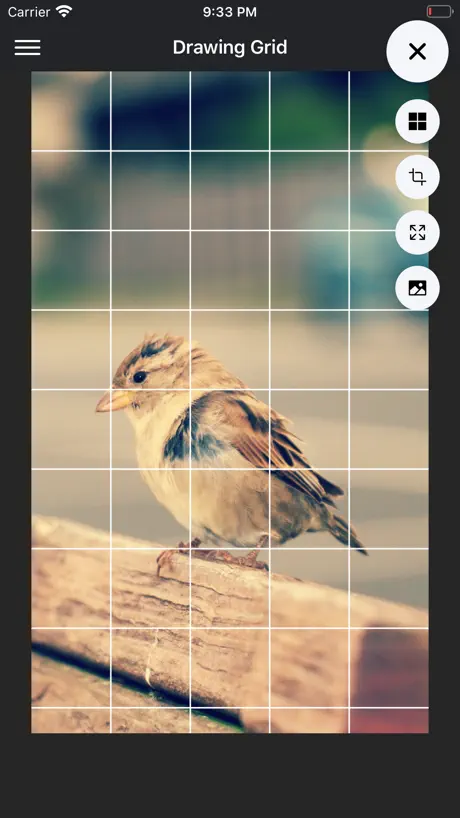  DrawinGrid DrawinGrid |   Grid post & Photo layout maker Grid post & Photo layout maker |   Pencil Photo Sketch Editor Pencil Photo Sketch Editor |   Grid・Photo Split for Instagram Grid・Photo Split for Instagram |   Frameit:Framed Art &Video edit Frameit:Framed Art &Video edit | |
|---|---|---|---|---|---|---|---|---|---|---|---|
| Rating / 5 | 4.6 | 4.6 | 4.8 | 4.8 | 4.7 | 4.7 | 4.7 | 4.4 | 4.7 | 4.9 | 4.7 |
| Reviews | 28K | 210K | 114K | 81K | 30K | 25K | 18K | 15K | 10K | 9.3K | 3.3K |
| Released | 2015 | 2013 | 2017 | 2017 | 2021 | 2019 | 2020 | 2020 | 2019 | 2020 | 2022 |
| Weekly price | — | $5.99 | — | — | $8.99 | — | — | $9.99 | — | — | $7.99 |
| Monthly price | — | $5.99 | — | $3.99 | $12.99 | — | $8.00 | $19.99 | $4.99 | — | $7.99 |
| Annual price | — | $40.99 | — | $12.99 | $89.99 | $19.99 | $86.00 | $49.99 | $25.49 | — | $42.90 |
| One-time price | $3.99 | $1.99 | $19.99 | $0.99 | — | — | $10.00 | — | $4.99 | — | — |
The going rate for each plan in United States, in its own currency, shaded from the cheapest price on the row to the dearest. Plans fewer than four in ten of the priced apps sell are left out.
Grid # - Add grid on image reviews
4.6 out of 5, based on 27,985 reviews.
What people like
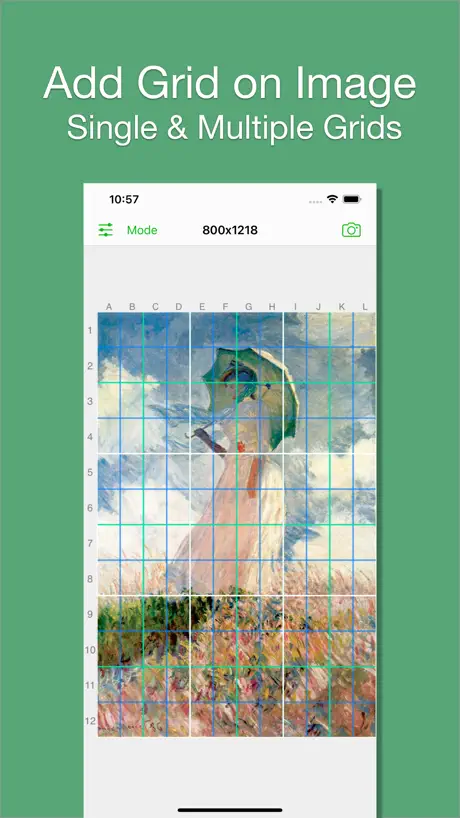
- Great for transferring photos to canvas
- Simple and easy to use
- Works with existing photos in gallery
What they complain about
- Hard to make square grids
- Ads look like viruses
- No clear instructions for beginners
- Upsells you constantly to Pro
Love it
It is rly easy to use and pretty simple but rly helpful
Why can’t I make a square grid?
I used to love this app but now I can’t get out of rectangular mode and I want matching squares.
Artist’s friend
I love this app because I’m bad at free hand drawing. I’ll use this grid to get the general shapes down and then shade it in with charcoal. The app works great but I do not like the threatening pop-up virus-looking advertisements. Almost every single one of them look like a virus. Please don’t allow disturbing advertisements like that.
Was great
I used to love this app, helped a lot with painting. Just opened it today, the grid lines are now thick, blurry, and blurry. It's a shame, this was until recently a very good app.
Instructions
I just wish there was clear access to simple explanations and instructions about different aspects and general usage of the program
Exactly as marketed
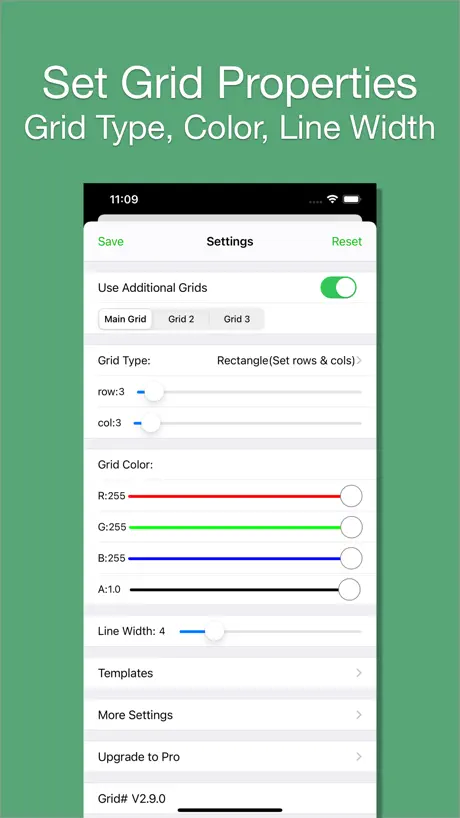
This app immediately allowed me to put a grid over a preexisting image I had in my camera roll (there are some apps that promise grids but only work if it’s a photo you took in the app), it allowed me to adjust the number of columns and rows, the color of the grid lines, the thickness of the grid lines, it even has options for making a square grid. But the best part? It didn’t try to upsell me or trick me into their pro service. This is a simple app with a simple purpose, but it absolutely honors the promises it makes for its functionality, and it was extremely easy to use.
Confusing
Unable to manage the grid document and not able to print the Grid photo
Comment
Sizing and reversing would be helpful, as would locking the image. Otherwise, very useful.
No good anymore
It’s a basic grid app why do i need to pay premium for square grids 💀
Confusing
I don’t really see how to export the now gritted picture. I find the upsell to pro annoying because everything you go to try to do you get encouraged to buy the pro version.
Elias
Absolutely great for overlaying grids onto a reference it even lets you edit the amount of columns and row
Confusing
Great concept, but no instructions that I can find. Not user friendly.
Nearly perfect
Great tool for drawing, I just wish there was an option for squares AND columns.
Hard to use
I can’t figure out how to make a square grid. I admit I’m not tech savvy, but I can’t even find directions to help.
Helpful, but “tap to pick colour” function not working
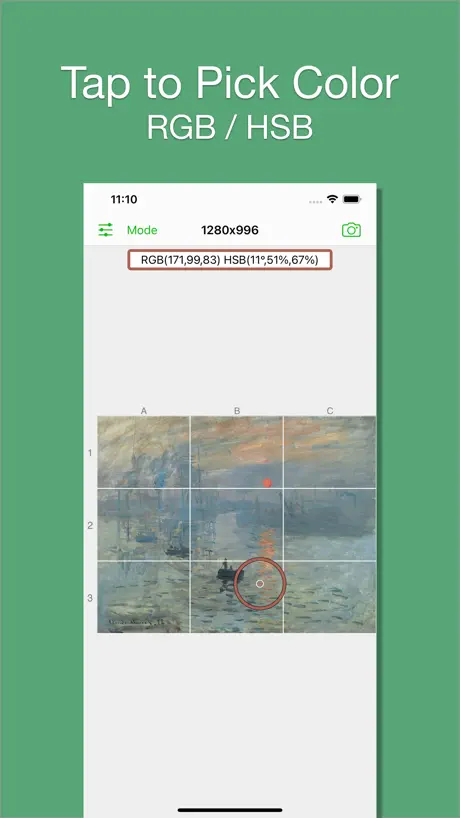
Useful app. Not intuitive, so a tutorial video would be welcome. I did pay for the pro version, but this gave me access to no additional features, or if there are any, I don’t know how to use them. Also, the “tap to pick colour” only works for the first tap/colour. Is this a glitch or is there a trick to it that I haven’t figured out?
Tried a bunch of these...
And this is the best for me of the entry level offerings. It's easy to upload your photo, adjust the grid to your liking and save it. Simple, flexible, works great.
Does Nothing
You can't import an image. And you can't make a grid. This app is just a white screen with a menu. None of the menu buttons do anything. I don't know what this is for.
Useful add this
Using the app to map to canvass, it would be useful to be able to add canvass size and be given square/rectangle dimensions for transfer.
Difficult
Not enough options to help you work out how to make changes to the grid. How can you print this?
Not working anymore
Used to work perfectly,. Don't know what happened.
LOVE HER
does what it says it’s going to do! 10/10
Not user friendly
This grid is only in 3rds which may be good for finding the golden rule spots but if you are drawing you need a ruler to find thirds.
Great app for grid over photos.
Can be used to put a grid over phone/tablet photos and then used to transfer to a painting,etc. 5 stars if it could do a center point with vertical,horizontal and a 45 line from each corner. i.e. a compass rose with single width lines.
Stopped working
Once you select an image nothing happens and you still see a blank white screen
Difficult
It’s hard to erase and make changes
Art teacher
The grid making tool AND the breakdown in grey scale helps my students draw and paint their pets. Great resource.
No longer works
The app used to work. The grid is only white, so it’s invisible, and only rectangles, no squares, and you can no longer set any amount of rows or columns. Completely worthless. Don’t bother
Overall works well.
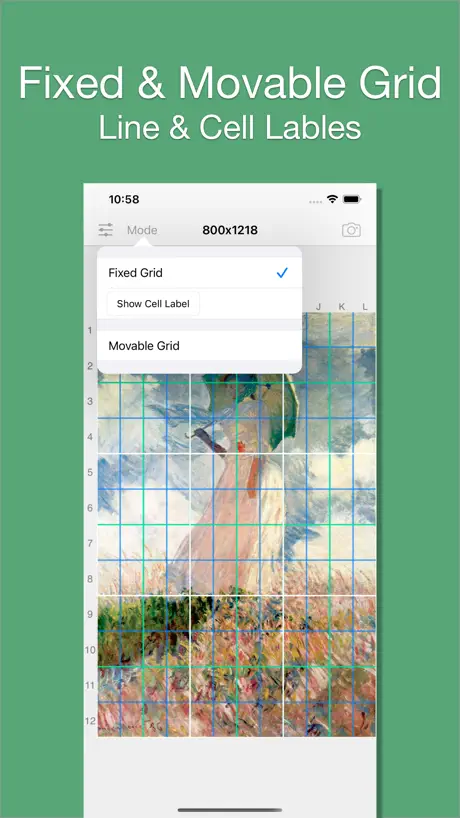
This app does a decent job and has helped me transfer my work quite easily with the help of the grid system. The only caveat is that if you accidentally touch the gridded image somewhere, you get the “Tap to pick color” option and, so far I can’t find a way to deselect it, as there are no instructions. So I usually have to go back to the grid menu, hit save and go back to the image to make the selection disappear. I t would seem easier if a double- tap would deselect it. It’s a minor issue but annoying nonetheless.
squares
can't set rows and columns as squares only as rectangles
Only rectangle rows and columns
I think this app is great. I would appreciate having a SQUARE rows AND columns
Extremely useful and free
I use this all the time for my drawings and paintings.
Grid App
I don’t know what I’m doing wrong and there are know instructions for beginners. I can got the photo but no grid lines no matter what I do. I can only get 2 circles to show. This need app needs instructions!
Grid
Have found it useful, but I require more patience ..
It was going good until it just stopped
I was trying to grid up another picture when it wasn’t even loading
Decent app
Downloaded and use this on my iPad mini and it’s fine but can’t get square grid on my iPad Pro it only does rectangles which is difficult to replicate on paper.
Love the app for sketching before I make portraits
This app is perfect for checking my sketches before I create a pet or human portrait.
Stuck
The app was ok until it became stuck on “movable grid”. Now I can deselect this option and I can’t insert the line numbers. This is a problem and makes me not want to use this app.
A humble request
Great app! Could you please add scale in cm and inches for the grid so we know how far apart to space them when relaying them on paper. Also, please add the option to put diagonal(crisscross) lines inside the boxed grids to further improve accuracy. Currently there are options to overlay additional grids but they are limited to a rectangular or square shape pattern. While these are not bad themselves, but having the option for an extra grid pattern wouldn’t be bad either. In fact it would only make the app more user friendly for everyone. I am using the free version so I cannot demand anything, therefore I can only request humbly. Thank you for listening to my suggestions.
Changes dimensions
It should have the option to change dimensions using cm etc. I’d used the grid with one image which worked really well, but with the next photo I used, the dimensions for my grid changed, so the grid was no longer one that worked wit the sizes of my paper. Quite frustrating
Grid #
Excellent app. It is very useful. Is it available for laptop? Can’t find it in the App Store.
Good for drawing
I have just started drawing with graphite pencils, and this app is a great tool to add gridlines to my photo resources. It allows me to select the size of the grid, and then I can move the grids up down left right. It would be great if I could rotate the grid, but that’s a feature that would be nice to have. Love the app.
Does not put grids on pictures
I am sad to say when I went to use this app it did not put any grids on my pictures. I went through all of the settings multiple times and tried to pull pictures from my gallery and files to have nothing appear on the pictures. I eventually bought the Pro version thinking maybe I needed more settings but it was the same result. If anyone has any help or ideas feel free to let me know.
Feature request
Please add an option to include the line labels when using the “print grid only” option. This would be helpful when using a copy of the printed grid to copy an image. Thank you.
Can’t change grid
I have tried to increase the amount of columns and rows but it won’t let me
Grid Review
Great app ... Simple to use ... One wish - I would like to be able to SAVE the grid patterned picture.
Nice App for Beginners’ Art
Could have a toll free number aside from an email address for technical support. Other than that it’s a good app for beginning art students.
Grid
I think you should be able to choose a square grid that allows you to put how many rows and columns you need. Not just the rectangle. I also think you should be able to put the dimensions of the paper you are working on so that the grid is just right. This is an ok app. Not all cracked up as I’ve been told. Wasted my money thinking it would be better than what I was previously working with before I paid. Oh well you win some and you lose some!
Does what it says!
My art teacher recommended this app for a topic we were working on - it made the lesson so much easier. My finished artwork didn’t look like a child had done it because I could work from the grids!
Grid # - Add grid on image price by country
A one-time purchase costs $3.54 in Canada and $6.34 in Colombia — 1.8× more for the same thing. Below is the going rate for each plan in every country that sells it — the middle price of what the app charges there, in the country's own currency with the dollar equivalent beneath it.
| Country | One-time |
|---|---|
| Afghanistan | $3.99 |
| Albania | $4.99 |
| Algeria | $3.99 |
| Angola | $3.99 |
| Anguilla | $3.99 |
| Antigua And Barbuda | $3.99 |
| Argentina | $3.99 |
| Armenia | $4.99 |
| Australia | A$5.99$4.19 |
| Austria | €3.99$4.54 |
| Azerbaijan | $4.99 |
| Bahamas | $3.99 |
| Bahrain | $3.99 |
| Barbados | $4.99 |
| Belarus | $4.99 |
| Belgium | €3.99$4.54 |
| Belize | $3.99 |
| Benin | $4.99 |
| Bermuda | $3.99 |
| Bhutan | $3.99 |
| Bolivia | $3.99 |
| Bosnia & Herzegovina | €3.99$4.54 |
| Botswana | $3.99 |
| Brazil | R$24.90$4.81 |
| British Virgin Islands | $3.99 |
| Brunei Darussalam | $3.99 |
| Bulgaria | €3.99$4.54 |
| Burkina Faso | $3.99 |
| Cambodia | $3.99 |
| Cameroon | $4.99 |
| Canada | CA$4.99$3.54 |
| Cape Verde | $3.99 |
| Cayman Islands | $3.99 |
| Chad | $3.99 |
| Chile | CLP 4,990$5.19 |
| China | CN¥28.00$4.17 |
| Colombia | COP 19,900$6.34 |
| Congo | $4.99 |
| Congo, Democratic Republic | $3.99 |
| Costa Rica | $3.99 |
| Cote Divoire | $4.99 |
| Croatia | €3.99$4.54 |
| Cyprus | €3.99$4.54 |
| Czech Republic | CZK 99.00$4.63 |
| Denmark | DKK 39.00$5.95 |
| Dominica | $3.99 |
| Dominican Republic | $3.99 |
| Ecuador | $3.99 |
| Egypt | EGP 199.99$3.87 |
| El Salvador | $3.99 |
| Estonia | €3.99$4.54 |
| Fiji | $3.99 |
| Finland | €3.99$4.54 |
| France | €3.99$4.54 |
| Gabon | $3.99 |
| Gambia | $3.99 |
| Georgia | $4.99 |
| Germany | €3.99$4.54 |
| Ghana | $4.99 |
| Greece | €3.99$4.54 |
| Grenada | $3.99 |
| Guatemala | $3.99 |
| Guinea-bissau | $3.99 |
| Guyana | $3.99 |
| Honduras | $3.99 |
| Hong Kong | HK$32.00$4.08 |
| Hungary | HUF 1,790$5.58 |
| Iceland | $4.99 |
| India | ₹399.00$4.16 |
| Indonesia | IDR 79,000$4.41 |
| Iraq | $3.99 |
| Ireland | €3.99$4.54 |
| Israel | ₪12.90$4.23 |
| Italy | €3.99$4.54 |
| Jamaica | $3.99 |
| Japan | ¥600$3.81 |
| Jordan | $3.99 |
| Kazakhstan | KZT 2,490.00$5.63 |
| Kenya | $4.99 |
| Kosovo | €3.99$4.54 |
| Kuwait | $3.99 |
| Kyrgyzstan | $3.99 |
| Lao Peoples Democratic Republic | $3.99 |
| Latvia | €3.99$4.54 |
| Lebanon | $3.99 |
| Liberia | $3.99 |
| Libya | $3.99 |
| Lithuania | €3.99$4.54 |
| Luxembourg | €3.99$4.54 |
| Macao | $3.99 |
| Macedonia | $3.99 |
| Madagascar | $3.99 |
| Malawi | $3.99 |
| Malaysia | MYR 19.90$4.89 |
| Maldives | $3.99 |
| Mali | $3.99 |
| Malta | €3.99$4.54 |
| Mauritania | $3.99 |
| Mauritius | $4.99 |
| Mexico | MX$89.00$5.02 |
| Micronesia | $3.99 |
| Moldova | $4.99 |
| Mongolia | $3.99 |
| Montenegro | €3.99$4.54 |
| Montserrat | $3.99 |
| Morocco | $4.99 |
| Mozambique | $3.99 |
| Myanmar | $3.99 |
| Namibia | $3.99 |
| Nauru | $3.99 |
| Nepal | $4.99 |
| Netherlands | €3.99$4.54 |
| New Zealand | NZ$6.99$3.95 |
| Nicaragua | $3.99 |
| Niger | $3.99 |
| Nigeria | NGN 6,900.00$5.20 |
| Norway | NOK 49.00$5.15 |
| Oman | $3.99 |
| Pakistan | PKR 1,100$3.97 |
| Palau | $3.99 |
| Panama | $3.99 |
| Papua New Guinea | $3.99 |
| Paraguay | $3.99 |
| Peru | PEN 17.90$5.28 |
| Philippines | ₱249.00$3.97 |
| Poland | PLN 19.99$5.21 |
| Portugal | €3.99$4.54 |
| Qatar | QAR 14.99$4.12 |
| Romania | RON 19.99$4.32 |
| Russia | RUB 349.00$4.15 |
| Rwanda | $3.99 |
| Sao Tome & Principe | $3.99 |
| Saudi Arabia | SAR 17.99$4.80 |
| Senegal | $4.99 |
| Serbia | €3.99$4.54 |
| Seychelles | $3.99 |
| Sierra Leone | $3.99 |
| Singapore | SGD 5.98$4.67 |
| Slovakia | €3.99$4.54 |
| Slovenia | €3.99$4.54 |
| Solomon Islands | $3.99 |
| South Africa | ZAR 79.99$4.90 |
| South Korea | ₩6,600$4.87 |
| Spain | €3.99$4.54 |
| Sri Lanka | $3.99 |
| St. Kitts and Nevis | $3.99 |
| St. Lucia | $3.99 |
| St. Vincent & The Grenadines | $3.99 |
| Suriname | $3.99 |
| Swaziland | $3.99 |
| Sweden | SEK 49.00$4.94 |
| Switzerland | CHF 3.00$3.62 |
| Taiwan | NT$120.00$3.78 |
| Tajikistan | $3.99 |
| Tanzania | TZS 11,900.00$4.48 |
| Thailand | THB 149.00$4.46 |
| Tonga | $3.99 |
| Trinidad and Tobago | $3.99 |
| Tunisia | $3.99 |
| Turkey | TRY 199.99$4.09 |
| Turkmenistan | $3.99 |
| Turks and Caicos | $3.99 |
| Uganda | $4.99 |
| Ukraine | $4.99 |
| United Arab Emirates | AED 14.99$4.08 |
| United Kingdom | £3.99$5.28 |
| United States | $3.99 |
| Uruguay | $3.99 |
| Uzbekistan | $3.99 |
| Vanuatu | $3.99 |
| Venezuela | $3.99 |
| Vietnam | ₫119,000$4.59 |
| Yemen | $3.99 |
| Zambia | $4.99 |
| Zimbabwe | $4.99 |
Grid # - Add grid on image FAQ
- Is Grid # - Add grid on image free?
- Yes. The app and its basic features are free, in all 175 countries it sells in. Premium features are paid: they start from $3.99 (US), across 1 one-time purchase.
- Does Grid # - Add grid on image have a free trial?
- No. None of its offers (US) come with a free trial.
- Where is Grid # - Add grid on image cheapest?
- A one-time purchase costs CA$4.99 (≈$3.54) in Canada and COP 19,900 (≈$6.34) in Colombia, its cheapest and dearest countries.
- What are the best alternatives to Grid # - Add grid on image?
- GRIDS Post maker for Instagram (4.6 from 210,215 reviews, premium from $1.99), PhotoSplit for Instagram (4.8 from 113,815 reviews, premium from $19.99) and Grid Post - Grids Photo Crop (4.8 from 81,113 reviews, premium from $0.99).
Grid # - Add grid on image download
Last updated 2 years ago.
Grid # - Add grid on image sells in 175 countries. It was released 11 years ago, on 11 Sept 2015. It holds a 4.6 rating from 27,985 reviews.
Supports 4 languages: English, German, Japanese, Chinese.
How much does Grid # - Add grid on image make?
Third-party estimates for the last 30 days, worldwide — not the store's own figures, which Apple publishes for nobody.
Revenue by plan
- One-time 100%
Revenue by country
- United States 49%
- United Kingdom 9%
- Saudi Arabia 6%
- Canada 5%