Paywall A/B Testing: A Revenue-First Playbook for App Teams

Paywall A/B testing is the controlled experiment that isolates which price, offer, or layout gets more users to convert and stay paying. The metric that actually matters is retained ARPU, not raw conversion rate, because a paywall that converts more people at a lower price can still lose money over 90 days. Start with pricing and offer-matrix tests before touching visuals or country pricing. That single sequencing decision, backed by Adapty’s testing playbook, determines whether your first few experiments produce real revenue lift or just noise.
TL;DR:
- Testing top-priority is on pricing and offer-matrix changes, with a recommended minimum of 200 conversions per variant over three weeks to detect meaningful revenue lifts.
- Visual and user experience experiments come third in importance and typically require less traffic, usually around 1 to 3 weeks, to assess adjustments like button copy and layout.
- Accurate setup includes pre-registering hypotheses and stop rules, using persistent user IDs for cohort tracking, and ensuring SDK caching and asset loading are consistent across devices.
- Market benchmarking tools help determine realistic test points by comparing your pricing to category medians across countries, avoiding small or risky price changes.
- Monitoring refund rates, verifying traffic allocation, and documenting every result are critical to prevent biases, false positives, and to inform continuous testing strategies.
Table of Contents
- What to Test First on Your Paywall
- How Do You Set Up a Paywall A/B Test?
- How Long Should a Paywall Test Run?
- Which Paywall Hypotheses Actually Move Revenue?
- Implementation Details That Can Quietly Wreck a Test
- Using Market Pricing Data to Pick Test Points
- Your Pre-Flight Checklist Before Launching
- What I’ve Learned Watching Teams Run These Tests
- Get Faster, Data-Backed Price Tests With Apppricer
- Sources
What to Test First on Your Paywall
Pricing moves the needle harder than anything else on a subscription paywall. Adapty’s playbook on what to test first, second, and third reports pricing experiments can produce significant uplift, while visual changes typically deliver moderate uplift, and country pricing adjustments provide more modest improvement. That’s not a small gap. It’s the difference between a quarter that changes your growth trajectory and one that shuffles pixels.
Here’s a rough priority order that holds up across most subscription apps:
- Pricing and offer-matrix tests first. New price points, bundle structures, or discount depth carry the highest ceiling and should get tested before anything else.
- Trial length and intro pricing second. A 7-day trial versus a 3-day trial, or a $0.99 intro week versus none, often shifts trial-to-paid conversion meaningfully.
- Visual and UX tests third. Button copy, layout order, and feature-list framing matter, but they rarely rival a well-chosen price change.
- Country pricing last. Wait until you have a stable baseline and enough volume per market. Testing 40 countries at once with thin traffic just produces underpowered noise.
Apps that run this kind of testing cadence regularly tend to show stronger MRR trends over time, according to Adapty’s data, mostly because pricing decisions compound every renewal cycle rather than only affecting the initial conversion.
How Do You Set Up a Paywall A/B Test?
A paywall test only earns trust if you build it the same way every time. Skipping steps here is how teams end up debating a result for three weeks instead of shipping the next one.
- Write the hypothesis in If → Then → Because form. Example: “If we raise the annual price by 25%, then ARPU will increase without a proportional drop in trial-to-paid, because our current price sits below the category median.” This format forces you to state the mechanism, not just the guess.
- Pick one placement and isolate one variable. Don’t change price and copy and layout in the same variant. If the paywall shows after onboarding and again after a feature gate, decide upfront which surface you’re testing, or run them as separate experiments.
- Split traffic and randomize consistently. Assign users to a variant once, at first exposure, and keep them there for the life of the test. Switching users between variants midstream corrupts cohort data.
- Pre-register your metrics and stop rules before launch. Decide your primary metric, your minimum sample size, and your maximum run length in writing, before you see a single result. Superwall’s guide to paywall testing treats this as the difference between a real signal and three months chasing a false positive.
- Preload the paywall and check SDK caching behavior. A paywall that loads inconsistently across devices, or shows a stale cached version to some users, will quietly bias your results before you even collect data.
Pro Tip: Write your stop rule as a sentence you’d be comfortable reading back to your CFO: “We commit to running this for 21 days or until each variant hits 200 conversions, whichever comes later.” Vague rules get bent the moment a result looks promising early.
How Long Should a Paywall Test Run?
The primary metric question comes first: don’t optimize for whichever variant converts more people at the paywall. Optimize for ARPU and retained revenue, because a cheaper offer regularly wins on conversion and loses on total revenue once refunds and churn show up. Adapty and Superwall both recommend using fast trial-start signals for quick iteration, but holding off on a full rollout decision until you’ve verified the winner on D30 or D90 cohort data.
Sample size and duration follow directly from that. Adapty’s guide to getting started with paywall testing puts a practical floor at around 200 conversions per variant for most pricing tests, with smaller expected effect sizes needing more traffic to detect reliably.
| Test type | Minimum sample guidance | Typical run length |
|---|---|---|
| Pricing / offer change | ~200+ conversions per variant | 3 weeks or more (through at least one renewal cycle) |
| Trial length change | ~200+ trial starts per variant | 2 to 4 weeks |
| Visual / copy change | Higher traffic volume, smaller expected lift | 1 to 3 weeks |
| Country pricing | Sufficient per-country volume before splitting further | 4+ weeks |
Peeking at results daily and calling a winner the moment a p-value crosses a threshold is how false positives sneak into a roadmap. Superwall’s guidance is blunt about this: either commit to your pre-registered stop rule and don’t look again until then, or use a sequential testing method like mSPRT or a Bayesian framework that’s built to handle repeated looks without inflating your false-positive rate.
Which Paywall Hypotheses Actually Move Revenue?
Every good paywall test starts from a specific belief about why users hesitate to pay, not a vague “let’s see what happens.” Here are the categories that consistently produce usable results.
- Offer-matrix changes. Test a straight price lift, a new subscription duration (monthly versus annual weighting), or free trial versus a low-cost intro period. These tend to have the widest range of outcomes, which is exactly why they belong first in your sequence.
- Copy and value-prop tests. Headline framing, feature-list order, and social proof (ratings, download counts, testimonial snippets) shift how a price feels even when the price itself doesn’t change. A tool like MimicTyper’s pricing copy notes is a useful reference when you’re iterating on how a price point reads, not just what it is.
- Gating and flow experiments. Hard paywalls (no free path forward) versus soft paywalls (dismissible, with a delayed second ask) behave very differently by category. A multi-step flow that shows value before asking for payment often outperforms a single upfront screen, but only in apps where the value is genuinely visible in the first session.
- Safety checks running underneath every test. Monitor refund rates by variant, not just conversion. A price increase that also spikes refunds within the first week isn’t a win, it’s a mispriced offer that hasn’t shown up in your primary metric yet. Verify cohort composition too. If one variant happens to catch a different acquisition channel mix, your “winner” might just be a traffic artifact.
The Washington Post’s Tiny Tiles paywall redesign is a useful reference case here, not because a news paywall maps directly onto a mobile subscription app, but because of the discipline behind it. The test tied a UX change to long-term revenue impact instead of stopping at click-through, and results differed enough between the paywall and a related registration wall that the team rolled back the part that didn’t hold up. That’s the standard to hold your own tests to.
Implementation Details That Can Quietly Wreck a Test
Most invalid paywall tests aren’t caused by bad hypotheses. They’re caused by engineering details nobody checked before launch.
- Use remote configuration instead of app-store-gated paywalls. If changing a price or layout requires a new app store submission and review cycle, your iteration speed drops from days to weeks, and you’ll be tempted to test fewer, bigger changes instead of more, smaller ones.
- Preload and cache paywall assets correctly per device. RevenueCat’s documentation on testing paywalls covers preview modes and offering overrides for internal builds, which catch rendering issues before they reach live traffic. A paywall that fails to load for a subset of users on older devices will bias your sample without triggering any obvious error.
- Tie every paywall view to a persistent user identifier. Anonymous or session-based tracking makes cohort analysis at D30 and D90 nearly impossible, since you lose the thread on which users saw which variant.
- Use weighted allocation for low-volume placements. A 50/50 split works fine when you have volume. On a placement that gets a few hundred views a week, consider a 70/30 or 80/20 split toward the control so you’re not stalling the whole roadmap waiting for a low-traffic surface to reach significance.
Pro Tip: Before launching, load your paywall variant on a low-end Android device and a two-year-old iPhone with a throttled connection. Caching bugs and slow asset loads show up there first, and they’ll skew your results toward whichever variant happens to load faster, not whichever one converts better.
Using Market Pricing Data to Pick Test Points
The hardest part of designing a pricing test usually isn’t the mechanics. It’s picking the number. Testing a 10% price increase when the market would support 40% wastes a testing cycle on a result too small to matter, and testing 50% when your category sits at the ceiling risks tanking conversion for no learning.
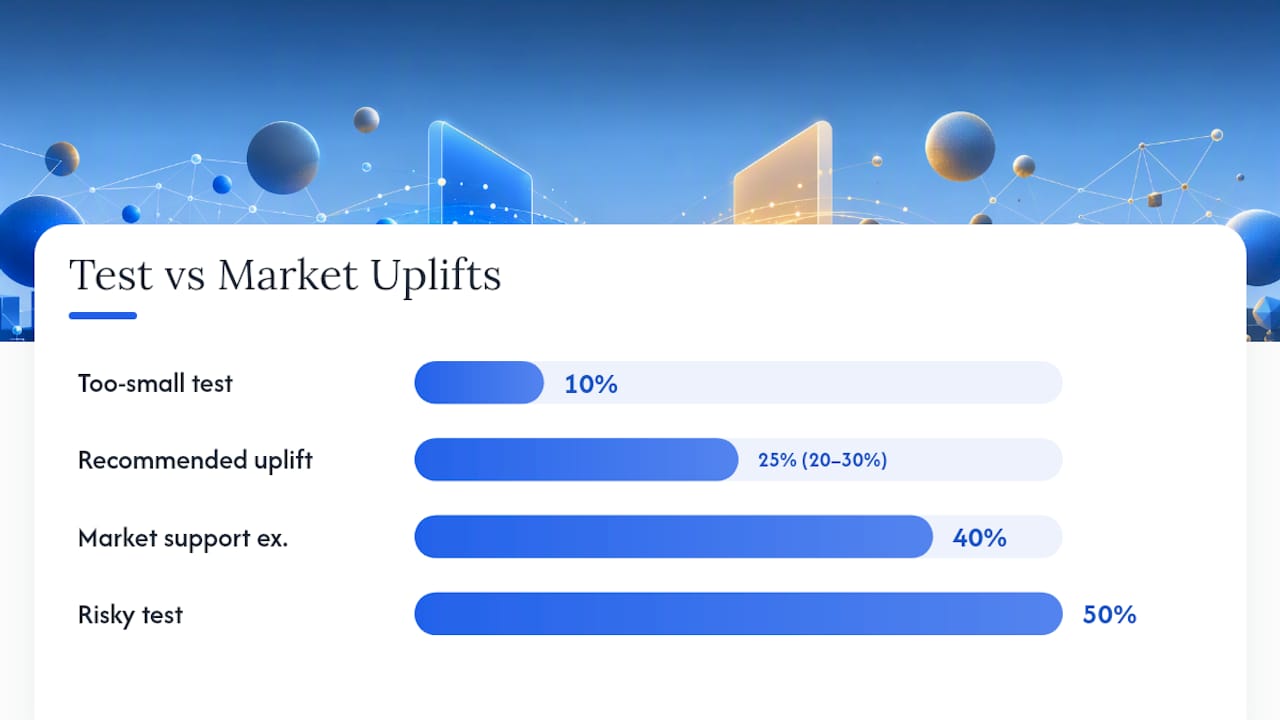
This is where price benchmarking earns its place in the process. Looking at what comparable apps in your category actually charge, across specific countries, tells you whether there’s real room to move before you commit engineering time to a test. Apppricer’s app pricing and subscription data across 175 countries gives product teams a reference point for where a category’s pricing actually sits, rather than guessing from a handful of competitor screenshots.
A few practical rules follow from that:
- If benchmark data shows your price sitting meaningfully below the category median, a 20% to 30% uplift is a reasonable starting test, in line with the pragmatic range Adapty’s playbook recommends when there’s clear room to move.
- If your price already sits near or above the category ceiling, skip straight to layout or value-prop tests instead of forcing another price experiment that’s unlikely to hold.
- Use revenue and download trend data by country to decide which markets deserve a country-pricing test first, rather than testing all 175 markets with thin traffic in most of them.
Your Pre-Flight Checklist Before Launching
Run through this before you flip on any traffic split.
- Record your baseline. Paywall views, trial starts, trial-to-paid rate, and current ARPU, all measured over a comparable prior period.
- Pre-register the hypothesis, primary metric, sample target, and stop rule. Write it down somewhere the whole team can see it before launch, not after.
- Allocate traffic and confirm cohort tracking works. Verify that persistent user IDs are attached to variant assignment before you go live, not discovered missing at analysis time.
- Set up monitoring for refunds and crashes. A spike in either should pause the test regardless of what the primary metric shows.
- Document the result and the next hypothesis. Every test, win or lose, should produce a specific idea for what to try next.
What I’ve Learned Watching Teams Run These Tests
Start with pricing. Every team that jumps to visual polish before touching price leaves the biggest lever untouched, and most regret it once they finally test a price change six months later and see the gap.

Be patient with the data. Cohort behavior at D30 and D90 tells a different story than day-one conversion almost every time, and the teams that roll out based on week-one numbers alone are the ones rerunning the same test in Q3.
Document everything, including the tests that fail. A rejected hypothesis with a clear reason attached is worth more to the next quarter’s roadmap than a win nobody can explain.
— Sergey
Get Faster, Data-Backed Price Tests With Apppricer
Picking the right price to test shouldn’t take a week of screenshotting competitor apps across app stores. Apppricer gives you direct access to pricing, revenue, and subscription structures for iOS apps across 175 countries, so you can see where your category’s pricing actually sits before you commit a testing cycle to a guess.
If your benchmark shows meaningful headroom, a 20% to 30% price uplift test is a reasonable place to start, following the pattern that tends to hold up across subscription categories. If your pricing already sits near the top of the market, that same data tells you to redirect your next test toward layout or value-prop instead of forcing another price experiment that likely won’t move. Browse current app pricing and subscription data for your category, or start with the full apppricer platform to pull revenue and download trends for the countries you’re weighing for your next test.
Sources
For deeper detail beyond this playbook: Superwall’s guide to A/B testing a paywall covers sample-size math and stop rules. Adapty’s testing playbook breaks down test sequencing. RevenueCat’s paywall testing docs cover SDK-level preview tools.
- Washington Post’s Tiny Tiles paywall test offers blueprint for scaling subscriber revenue — INMA
- Paywall experiments playbook: What to test first, second, third — Adapty
- How to A/B Test a Paywall (Without Wasting Three Months on a False Positive) — Superwall blog