Stop Quota Surprises: Offer Codes iOS Checklist for Developers & PMs
Offer codes give App Store users free or discounted access to your app’s subscriptions and in-app purchases, redeemable through a link, an email, or right inside your app. The single decision that determines whether your campaign feels seamless or clunky: set up the offer in App Store Connect, then implement Apple’s system redemption sheet with StoreKit instead of building a custom flow. Everything else, from eligibility rules to quotas, builds on that choice.
TL;DR:
- One-time-use codes are best for tracking individual redemptions and should be used for targeted campaigns like influencer outreach, with expiration limits up to six months.
- Custom codes are suitable for large-scale acquisitions when volume matters more than individual tracking, with limits of up to 25,000 codes per batch and six-month expiration options.
- Sandbox codes are solely for testing redemption flows and should be used extensively during QA before launching any offer campaign.
- Generate and test initial offer code batches at small sizes to identify and fix issues before deploying full campaigns, avoiding costly errors.
- Apple restricts offer code volume to one million redemptions per app per quarter, requiring careful planning to avoid hitting limits unexpectedly.
Table of Contents
- What Are iOS Offer Codes and Which Type Should You Use?
- How Do You Create Offer Codes in App Store Connect?
- Which StoreKit APIs Handle In-App Redemption?
- How Should You Test Offer Codes Before Launch?
- What Are the Quotas and Limits on Offer Code Campaigns?
- What Mistakes Should You Avoid With Offer Code Campaigns?
- Where Do Offer Codes Fit in a Subscription Growth Stack?
- Where Can You Find Apple’s Official Offer Code Documentation?
- Sources
What Are iOS Offer Codes and Which Type Should You Use?
Apple gives you three offer code types, and picking the wrong one is the most common early mistake teams make.
One-time-use codes are unique, single-redemption strings generated in batches. Each code works exactly once, then it’s dead. Use these for influencer partnerships, press outreach, or any campaign where you need to track individual redemptions and prevent a code from circulating past its intended recipient. You can set them to expire or let them run indefinitely, but Apple caps expiration windows at six months.
Custom codes are named, shareable strings you create once and distribute widely (think “LAUNCH2026” printed on packaging or blasted through an email list). Multiple customers can redeem the same custom code up to a redemption limit you define, which makes it the right tool for large-scale acquisition campaigns rather than one-off outreach.
Sandbox codes exist purely for testing. They pull from a separate quota, work only with sandbox test accounts, and let you validate redemption flows without touching your production numbers or your real quarterly allowance.
Here’s the quick way to decide:
- Need to track exactly who redeemed what? Use one-time-use codes.
- Running a broad campaign where volume matters more than individual tracking? Use custom codes.
- Building or QA-testing the redemption flow itself? Use sandbox codes, every time, before anything goes live.
Note that these subscription offer codes are entirely separate from app promo codes, which grant free copies of a paid app rather than discounted in-app purchases. Promo codes are limited in quantity per version per platform and have a limited validity period after generation. Confusing the two systems is a fast way to burn through a limited allocation meant for something else entirely.
How Do You Create Offer Codes in App Store Connect?
Building an offer code campaign in App Store Connect follows a predictable sequence, and skipping a step here is what causes redemption failures later.
- Create the offer. Navigate to your subscription’s offer codes section, give it a clear reference name (this is what you’ll search for later in Sales and Trends reports, so make it specific, not “Promo1”).
- Set eligibility. Choose whether the offer targets customers who have never purchased, purchased within the last 30 days, or purchased more than 30 days ago. This single setting determines whether you’re running acquisition, a save campaign, or a win-back push.
- Pick your price model and duration. Options include free, pay-up-front, or pay-as-you-go, each with configurable duration. If the subscriber already has an active introductory offer, understand how your new offer code interacts with it. Apple won’t let a customer stack a code on top of an unused intro price without the eligibility settings accounting for that.
- Generate the codes. For one-time-use codes, you’ll select a batch size between 500 and 25,000 codes per creation request. Sandbox codes have minimum and maximum batch sizes per creation request. Download the resulting file (usually a CSV) for distribution.
- Set expiration, if needed. Custom and one-time codes can carry an expiration date up to six months out, or you can leave them open-ended.
- Deactivate when the campaign ends. Deactivating an offer stops future redemptions immediately, but codes already redeemed keep their entitlements. Unredeemed codes simply stop working. Reference names stay searchable in your reporting even after deactivation, so don’t skip naming them well in step one.
Which StoreKit APIs Handle In-App Redemption?
The system redemption sheet is not optional if you want a supported, frictionless experience. Apple explicitly discourages custom UIs for this flow, and building your own risks both a worse conversion rate and App Review friction.
Three APIs cover the implementation, depending on your framework and target OS:
- SwiftUI: use
offerCodeRedemption(isPresented:onCompletion:)as a view modifier. Bind it to a boolean state variable, and Apple presents the native sheet when that value flips to true. - UIKit: call
presentOfferCodeRedeemSheet(in:)on your active scene to trigger the same native experience outside SwiftUI. - Pre-iOS 16 fallback: for apps still supporting older OS versions,
presentCodeRedemptionSheet()covers the legacy path, though it lacks some of the refinements added in newer StoreKit releases.
In-app redemption requires a minimum OS version, so apps supporting older devices need a fallback, typically a redemption URL sent by email, that still works without requiring the sheet.
Once the user submits a code, your onCompletion handler receives a VerificationResult wrapping a Transaction object on success. Don’t just update your UI and move on. The recommended pattern is to present the sheet, receive that result, immediately validate the receipt against your server, update entitlements and analytics, and only then unlock the new content for the user. This ordering matters because it closes a race condition where a client-side UI update happens before your backend has confirmed the purchase, which causes support tickets when Store Server Notifications and your local state disagree about what a user actually owns.
Pair your transaction observer with Apple’s Store Server Notifications so that redemptions happening outside a live app session (someone redeeming a code from an email link when the app is closed) still reach your backend and update entitlements correctly.
How Should You Test Offer Codes Before Launch?
Sandbox testing catches the failures that only show up after real users start redeeming codes, so treat it as mandatory, not optional QA.
- Generate sandbox codes separately from production codes. Their quota and six-month expiration ceiling are independent of your live allocation.
- Use StoreKit Testing in Xcode to simulate different eligibility states, including win-back scenarios, without needing dozens of real sandbox accounts.
- Confirm your app correctly clears purchase history on a sandbox account when testing gets blocked by a prior “purchase.”
- Verify receipt parsing end to end, not just that the sheet dismisses successfully.
- Test that Store Server Notifications actually arrive and update entitlements when redemption happens outside the app.
- Remember the one hour propagation window: codes may take up to sixty minutes to become redeemable after creation, so don’t panic if a freshly generated code fails immediately.
Pro Tip: Run your first batch of any new campaign type at the smallest viable size, even 500 one-time codes, and confirm the entire distribution and redemption pipeline works before generating the full 25,000-code batch. Fixing a broken CSV export or a mistyped eligibility rule is far cheaper before you’ve mailed 10,000 codes.
What Are the Quotas and Limits on Offer Code Campaigns?
Apple sets hard ceilings on offer code volume, and hitting them mid-quarter with no warning is a planning failure, not a platform surprise.
- Each app can generate offer codes for up to 1,000,000 redemptions per quarter, a pool shared across every subscription and every active offer.
- App Store Connect also limits how many offers can be active simultaneously, so consolidate similar campaigns rather than spinning up a new offer for every micro-segment.
- Eligibility settings (never purchased, within 30 days, beyond 30 days) directly determine who can redeem, and they interact with any existing introductory offer a customer may already hold.
- One-time and custom codes can carry expiration windows up to six months, or none at all if you want the offer to stay live indefinitely.
- Distribution happens through a redemption URL, in-app entry via the redemption sheet, email, or offline channels like printed cards. Users without the app installed who tap a redemption link get routed to the App Store listing first.
- Deactivating an offer halts new redemptions instantly but leaves prior redemptions and their entitlements untouched. Keep reference names specific from the start, since Sales and Trends reporting depends on them to separate one campaign’s performance from another’s.
What Mistakes Should You Avoid With Offer Code Campaigns?
Most offer code failures trace back to a handful of repeatable mistakes.
- Default to the system redemption sheet. A custom UI adds review risk and typically converts worse than Apple’s native flow.
- Don’t use promo codes to solve a subscription discount problem. Promo codes exist for free app distribution and cap out at 100 per version, an allocation you’ll exhaust fast if you misuse it for subscription offers.
- Plan batch sizes against your quarterly quota before you commit to a campaign, and stagger large custom code distributions rather than pushing all 25,000 at once.
- Keep your backend ready to process redemptions that happen outside the app session, since email and URL-based redemptions won’t always pass through your active app instance.
- Watch for two silent killers: forgetting the minimum OS requirement for in-app redemption (leaving older-OS users stuck), and shipping without testing how a new offer interacts with an existing introductory offer.
Pro Tip: Before any campaign larger than a few thousand codes, pull competitor subscription pricing data to confirm your discount depth actually beats what users can already find. A tool like Apppricer can show what similar apps charge across markets, which keeps you from discounting deeper than necessary just to win a redemption.
Where Do Offer Codes Fit in a Subscription Growth Stack?
Offer codes work best as a targeted lever, not a blanket discount strategy. Introductory pricing suits broad, always-on acquisition; offer codes suit specific moments, an influencer partnership, a win-back push to lapsed subscribers, a beta tester thank-you, where you need control over who redeems and how many.
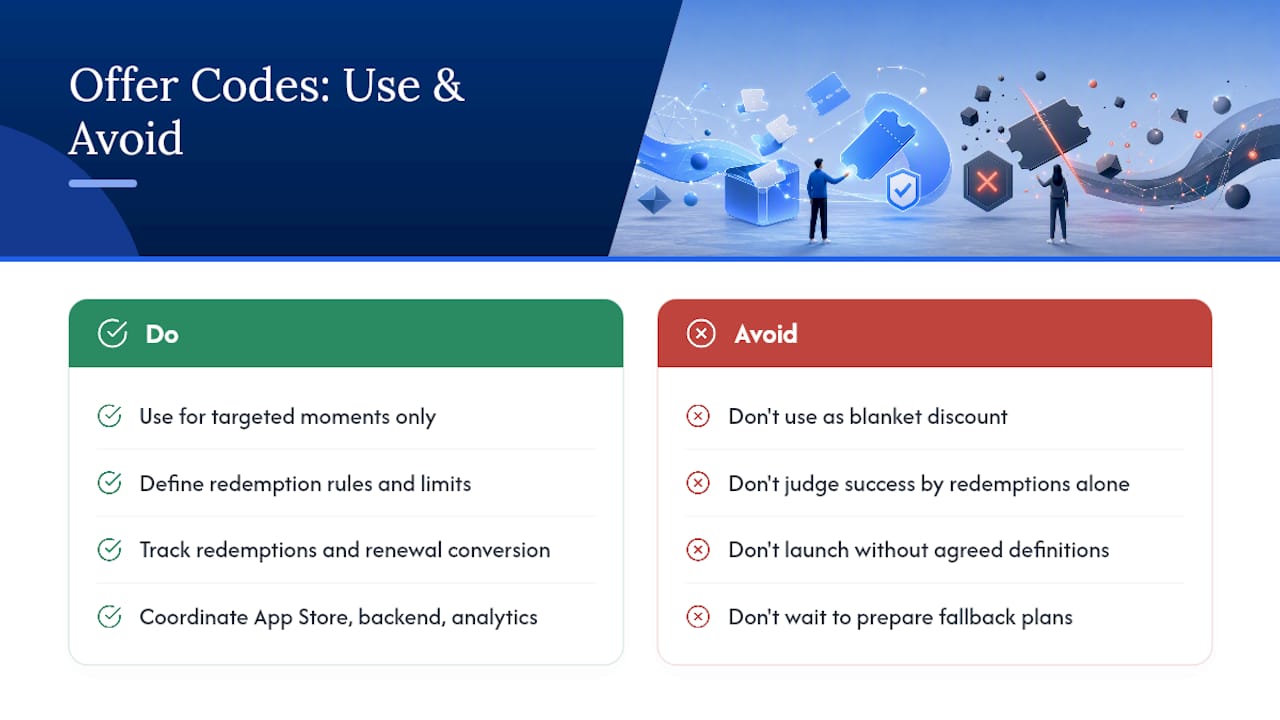
The KPIs that matter aren’t redemption count alone. Track redemption rate against distribution volume, conversion after the discounted period ends, retention lift versus a non-offer cohort, and churn delta over the following two billing cycles. A campaign that redeems well but converts poorly at renewal isn’t a growth win, it’s a deferred cancellation.
Coordination matters more than most teams expect: App Store Connect settings, backend entitlement logic, analytics event tagging, and support scripts all need to agree on what an “offer redemption” means before launch. If you exhaust your quarterly quota mid-campaign, have a fallback, typically a promotional pricing push or a targeted introductory offer, ready before you need it, not after.
— Sergey
Where Can You Find Apple’s Official Offer Code Documentation?
For setup, consult App Store Connect’s guide on creating offer codes. For integration, reference the offerCodeRedemption API documentation. For testing and recent platform changes including win-back offers, watch the WWDC 2024 StoreKit session, and check general Apple developer resources for broader platform context.