12 Data Backed Niche App Opportunities for Builders

Yes, targeted niche apps still generate real, monetizable demand in 2026. The clearest openings sit in categories with few competing apps but a steady stream of one-star reviews: hyperlocal weather, offline hiking navigation, room and furniture planning, and patient scheduling tools all show this pattern. Start by pulling app counts and review data on a handful of these categories, or run a quick pricing scan through a tool like Apppricer before you write a line of code.
TL;DR:
- Niche app opportunities are strongest in categories with 30 to 80 competitors and 11 to 15 critical reviews per app, indicating real demand with manageable competition.
- Validating a niche involves counting apps, analyzing repeated user complaints, checking keyword interest, and testing demand with a short landing-page campaign.
- Building the most promising niches requires focusing on clear pain points, ensuring high willingness to pay, frequent use, and strong retention, while avoiding feature overbuilding.
- Successful monetization strategies include subscriptions for daily use, one-time payments for safety tools, and lower-priced freemium models for utility apps, with price research from similar categories.
- Growth depends on distribution through community engagement, content marketing, and validated minimal versions, as well as analyzing real pricing data to avoid underpricing or overpricing.
Table of Contents
- Where the Data Says the Niche App Opportunities Are
- How to Validate a Niche Before You Build Anything
- Which Niche Should You Build First? A Simple Scoring Framework
- The Data Behind This List
- What Actually Makes a Niche Profitable
- How Niche Apps Actually Make Money
- Where Niche Apps Are Headed Next
- Marketing a Niche App Without a Big Budget
- What I’ve Seen Kill Good Niche App Ideas
- Turn Your Shortlist Into a Pricing Decision With Apppricer
- Sources
- FAQ
Where the Data Says the Niche App Opportunities Are
The best signal for an underserved app category isn’t buzz. It’s math: few apps, lots of angry reviews. A review analysis covering 136,000-plus App Store and Play Store reviews across 7,758 apps found that the strongest gaps show up in categories where users keep filing the same complaints against a small pool of mediocre incumbents. That combination proves people want the thing badly enough to write a review about it, but nobody has built it well yet.
Here are twelve categories worth checking first, each with the job it solves, who wants it, what to scrape for proof, and a rough monetization shape.
1. Hyperlocal weather. Generic weather apps average city-level forecasts; people who fish, farm, or coach youth sports want block-by-block precipitation timing. Target user: outdoor hobbyists and small-scale agriculture. Evidence to check: reviews mentioning “inaccurate for my area” or “doesn’t account for elevation.” MVP features: radar overlay, push alerts for rain windows, historical accuracy score, offline caching, widget support. Pricing: $2.99 to $4.99 monthly, since accuracy-obsessed users tolerate premium pricing better than casual ones.
2. Offline trail navigation. Hikers lose signal exactly where they need maps most. Target user: backcountry hikers and trail runners. Evidence to check: complaints about apps that “stop working without service.” MVP features: downloadable topographic maps, GPS breadcrumb trail, offline elevation profile, battery-saving mode, SOS location sharing. Pricing: one-time purchase around $9.99 to $14.99, because hikers distrust subscriptions for safety tools.

3. Room and furniture planning. Furniture retailers offer clunky, brand-locked planners. Target user: renters and first-time homeowners furnishing on a budget. Evidence to check: reviews about apps that only support one retailer’s catalog. MVP features: AR room scan, drag-and-drop layout, dimension checker, shareable mood boards, save multiple room versions. Pricing: freemium with a $4.99 one-time unlock for unlimited rooms.
4. Meal planning with family sync. Most meal planners assume one user; households need shared grocery lists and dietary overlaps. Target user: parents managing mixed dietary needs. Evidence to check: complaints about apps lacking multi-user sync. MVP features: shared shopping list, per-person dietary tags, recipe scaling, pantry inventory, weekly auto-plan. Pricing: $3.99 monthly household plan.
5. Local civic and recycling reference. Recycling rules change by municipality and nobody remembers them. Target user: environmentally conscious residents in mid-size cities. Evidence to check: low app counts paired with reviews asking “why doesn’t this cover my city.” MVP features: address-based sorting rules, pickup schedule reminders, barcode scanner for item lookup, municipal update alerts. Pricing: free with municipal sponsorship or a $1.99 ad-free tier.
6. Patient portal and appointment scheduling for small practices. Big hospital systems have bloated portals; small clinics and specialists often have none. Target user: independent dental, chiropractic, and therapy practices. Evidence to check: patient reviews complaining about phone-only booking. MVP features: appointment booking, reminder texts, intake form upload, secure messaging, insurance card scan. Pricing: B2B SaaS licensing to the practice, roughly $50 to $150 monthly per location.
7. Reading trackers with real social sync. Existing trackers feel like spreadsheets, not communities. Target user: book club members and serious readers. Evidence to check: complaints about clunky logging or dead social features. MVP features: barcode scanning for adds, reading pace stats, shared book club shelves, annotation sharing, goal streaks. Pricing: freemium, $2.99 monthly for stats and unlimited shelves.
8. Travel fare transparency. Flight and rail apps hide fees until checkout. Target user: budget travelers and remote workers booking frequently. Evidence to check: reviews calling out “hidden fees” or “price changed at checkout.” MVP features: fee breakdown before booking, price history graph, fare alert triggers, multi-carrier comparison. Pricing: affiliate booking commission plus a $3.99 monthly alert tier.
9. Accessibility-first utilities. Mainstream utility apps treat accessibility as an afterthought. Target user: users with visual or motor impairments needing calculators, timers, or converters. Evidence to check: one-star reviews mentioning screen reader failures. MVP features: full VoiceOver and TalkBack support, high-contrast modes, large-touch targets, voice input. Pricing: one-time purchase, $4.99, since this audience prefers ownership over subscriptions.
10. Plant and instrument identification with high accuracy. General ID apps misidentify constantly, frustrating serious hobbyists. Target user: home gardeners and amateur musicians buying used instruments. Evidence to check: reviews citing wrong species or model identification. MVP features: photo-based ID, confidence score, care or maintenance guide, community correction voting. Pricing: $3.99 monthly for unlimited scans.
11. Graphics and design micro-tools. Full design suites overwhelm users who need one specific task done well, like removing a background or resizing for a single platform. Target user: small business owners and social media managers. Evidence to check: category-wide complaints about bloated, slow apps for single tasks. MVP features: single-task focus, batch processing, export presets per platform, no watermark tier. Pricing: $2.99 monthly or $19.99 lifetime.
12. Medical reference and symptom logging for chronic conditions. General health apps don’t track condition-specific patterns well. Target user: people managing chronic illness who need to log symptoms for specialist visits. Evidence to check: reviews asking for more granular tracking fields. MVP features: custom symptom fields, medication timing log, exportable PDF for doctor visits, trend charts. Pricing: $4.99 monthly, often justified as a healthcare expense.
Across categories like these, incumbents in Graphics & Design, Weather, Navigation, Books, Reference, and Medical average between 11 and 15 critical reviews per app, while the total app count in each category stays under 80. That range, roughly 30 to 80 apps with 11 to 15 critical reviews per app, is the sweet spot: enough demand signal to matter, not so much competition that a small team gets buried.
How to Validate a Niche Before You Build Anything
Don’t trust a gut feeling about demand. Pull the numbers first, then run a two-week test before committing engineering time.
- Count the apps and pull the reviews. Search the target category in the App Store and Google Play, log the total app count, then sort each competitor’s reviews by “most critical” or lowest star rating. You’re looking for the 30 to 80 app range with 11 to 15 critical reviews per app.
- Extract repeated complaints. Read through the one and two-star reviews and note anything that shows up across three or more different apps. Repeated complaints across incumbents are often predictive enough to become your entire initial feature list, since the market is telling you exactly what’s missing.
- Check keyword demand and pricing context. Run the core search terms through Google Trends to confirm the interest isn’t fading, then check a tool like Apppricer to see what similar apps charge and how their revenue trends look across regions.
- Estimate a rough total addressable market. Multiply the category’s monthly download estimate by a realistic conversion rate for your pricing tier. You don’t need precision here, just a sanity check that the math can support a business.
- Run a two-week landing-page test. Build a single page describing the app’s core promise, drive a small paid traffic budget to it, and measure click-through rate, sign-up conversion, and cost per install against a target you set beforehand. If you’re testing UA at this stage, remember that iOS UA spend has been climbing, so budget accordingly rather than assuming yesterday’s CPI numbers still hold.
- Set clear success criteria before you launch the test. A reasonable bar: 3% or higher click-through rate on ad creative, 25% or higher landing-page conversion to email or waitlist sign-up, and a cost per install that leaves room for profit at your planned price point.
Pro Tip: Watch day 1 and day 7 retention closely once you have even a rough prototype in testers’ hands. A day 1 retention above 25% with day 7 holding above 10% suggests the core loop works. If the numbers are mixed, don’t scrap the idea outright. Isolate whether the drop-off is onboarding friction or a genuinely weak hook, and fix the cheaper problem first.
If the signals disagree, lean on qualitative digging before you kill an idea. A short round of structured interviews, the kind Raw specializes in, can tell you whether a soft launch number reflects the wrong audience or the wrong feature set.
Which Niche Should You Build First? A Simple Scoring Framework
Score every candidate niche on five axes, one to five each, and add them up. This keeps you from chasing the idea that feels most exciting instead of the one that pays back fastest.
- Reachability: how easily you can find and message the target user (forums, subreddits, existing communities)
- Frequency: how often the user needs the app, daily use scores higher than seasonal use
- Monetizability: evidence users already pay for adjacent tools or services
- Incumbent weakness: how bad the reviews are for existing apps in that space
- Build effort: inverse score, five means low effort, one means high effort
Add the five scores for a total out of 25. Anything above 18 deserves a landing-page test within two weeks. A score between 13 and 17 needs more digging, usually a round of user interviews. Below 13, move on.
Take three quick examples. Offline trail navigation might score high on frequency (hikers use it every trip) and incumbent weakness (offline mode complaints are everywhere), but moderate on build effort since offline maps require real engineering. Hyperlocal weather scores well across the board except monetizability, since free weather apps set a low anchor price. Patient scheduling for small practices scores lower on reachability, since you’re selling to businesses, not consumers, but high on monetizability because practices already pay for scheduling software.
Your next action depends on where you land: an 18-plus score means build a clickable prototype and start a landing page. A middling score means talk to twenty potential users before writing code. A low score means shelve it and move to the next candidate on your list.
The Data Behind This List
This list didn’t come from guessing which app categories sound underserved. It came from cross-referencing review volume, app counts, and complaint patterns across thousands of listings, the same category-level signals that separate a real gap from a crowded market that just looks quiet.
- App counts and critical review density per category, the core filter for every niche listed above
- UA spend trends, since generative AI tools are lowering the barrier to entry for new apps, which makes distribution efficiency the harder problem for 2026 builders
- Repeated complaint extraction across competing apps in the same category, used to build MVP feature lists directly from user frustration
Categories like Weather (35 apps, roughly 15 critical reviews per app) and Navigation (39 apps, roughly 14 critical reviews per app) sit right in the range this analysis flags as promising. Apppricer’s own pricing and revenue data across 175 countries lets builders cross-check what similar niche apps already charge before locking in a pricing model, which shortens the guesswork phase considerably. None of this replaces direct user conversations. Treat the numbers as a filter that narrows a hundred possible ideas down to five worth talking to real users about.
What Actually Makes a Niche Profitable
Four things separate a niche that pays rent from one that just gets downloads. Willingness to pay comes first: users who already spend money on adjacent tools (fitness gear, professional software, specialty hobbies) convert far better than users hunting for a free fix to an annoying problem. Frequency of use matters almost as much. A daily-use app builds habit and justifies a subscription; a seasonal or one-time-use app usually only supports a one-time purchase price.
Retention is the quiet killer of otherwise promising niches. An idea can score well on paper and still fail if the core loop isn’t sticky enough to bring users back past week one. That’s why day 1 and day 7 retention numbers matter more early on than download counts. Finally, low competition isn’t about zero competitors. It’s about competitors who are actively failing their users, visible in critical review density and repeated one-star complaints. A niche with three mediocre apps and a wall of angry reviews beats a niche with zero apps and zero search volume, because the second scenario often means there’s no real demand at all.
How Niche Apps Actually Make Money
Subscription pricing dominates the niches with daily or weekly use cases: weather, meal planning, reading trackers, and health logging all fit natural recurring billing, typically in the $2.99 to $4.99 monthly range for consumer apps. One-time purchases work better for safety-critical or infrequently-used tools, offline hiking navigation being the clearest example, since users distrust a subscription model for something they might open five times a year.
B2B niches, like patient scheduling for small practices, follow a different logic entirely. Pricing runs per-location or per-provider, often $50 to $150 monthly, and the sales cycle is longer but churn is lower once a practice depends on the tool for daily operations. Freemium works best for utility-style apps like recycling reference or plant identification, where a free tier proves value and a modest paid unlock, usually under $5, removes a specific limitation rather than gating the entire product.
Whatever the model, check what comparable apps in the category actually charge before setting your own price. Looking at real subscription pricing and revenue data across app categories shows how incumbents structure their tiers, which saves you from either underpricing a genuinely differentiated tool or overpricing a commodity utility.
Where Niche Apps Are Headed Next
Distribution is changing faster than the app ideas themselves. App clips, instant experiences, and social-platform-native distribution now let users try a niche app’s core function without a full install, which matters enormously for validation. A hiking navigation app that lets someone preview a trail map through an app clip before committing to a download removes the single biggest friction point in early user acquisition.
Offline-first and privacy-focused tools are also a durable trend rather than a passing preference. Roughly 7% of a large sample of user-requested app ideas specifically asked for offline-first or privacy-first solutions, a meaningful chunk given how broad that request category is. Expect this to keep growing as users grow wary of constant cloud sync and data collection, especially in categories like navigation, health logging, and financial tracking.
Generative AI is reshaping the supply side more than the demand side. AI tools make it faster to build a niche app’s MVP, but they also flood categories with low-effort clones, which pushes the real advantage toward distribution and genuine user research, rather than raw feature count. The niches that will still be worth building in late 2026 are those where a human actually understood a specific frustration, not those an AI model could generate a plausible-sounding app for in an afternoon.
Marketing a Niche App Without a Big Budget
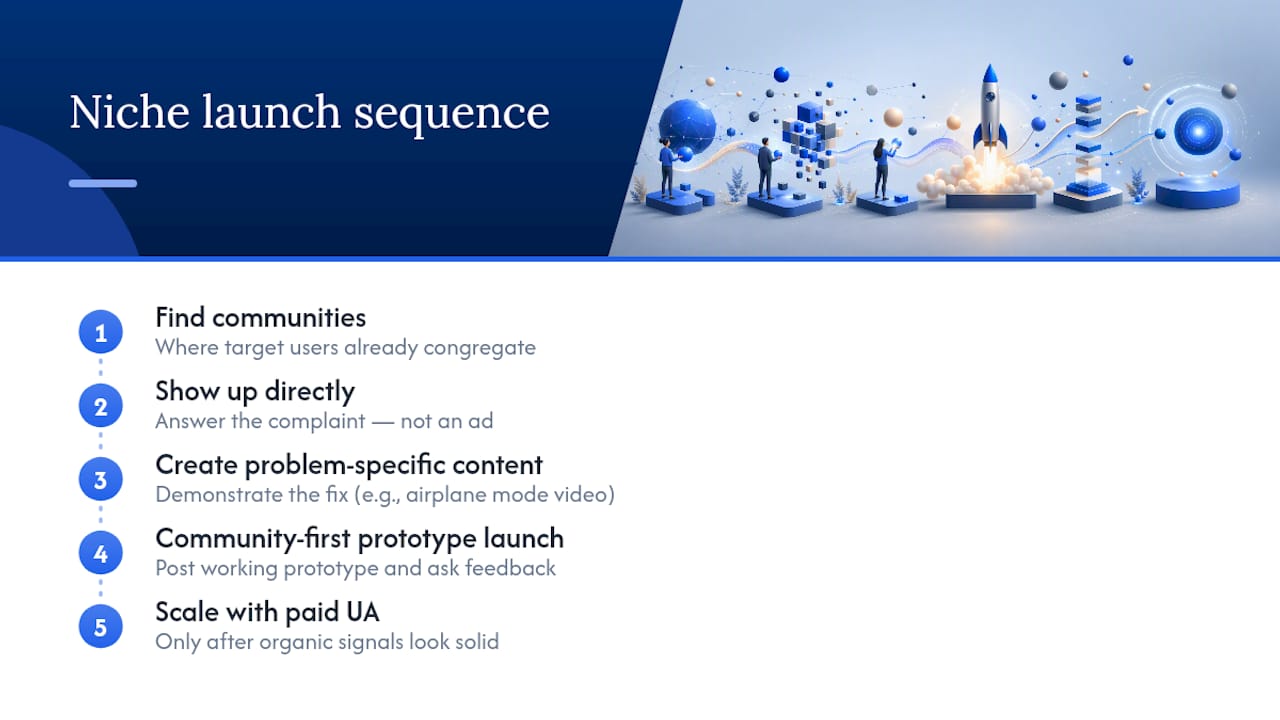
Forget broad-audience ad campaigns for a niche app. The entire advantage of a tightly scoped app is that its audience already congregates somewhere specific, and that’s where the first hundred users come from. Trail runners live in specific subreddits and Strava clubs. Chronic illness patients follow specific Instagram accounts and Facebook groups. Find where your target user already complains about the problem you’re solving, and show up there with a direct answer, not an ad.
Content that solves the exact complaint you found during validation converts better than generic app-store optimization. If your review research turned up “this app doesn’t work offline” as the top complaint, a short video showing your app working with airplane mode on is worth more than a dozen keyword-stuffed App Store screenshots. Community-first launches, posting a working prototype in the relevant forum and asking for feedback, also double as a second validation round before you spend anything on paid acquisition.
Paid UA still has a place once organic signals look solid, but budget it knowing iOS UA costs have been rising and short-form video creative now outperforms static ads across most categories. If early prototyping needs a boost, tools built specifically for rapid idea testing, like AmmarAI’s entrepreneur-focused AI tools, can help you get a testable version in front of your target community faster than building everything from scratch.
What I’ve Seen Kill Good Niche App Ideas
The most common failure isn’t a bad idea, it’s overbuilding before anyone’s asked for the thing. Founders add five features when one repeated complaint would have been enough to launch on. Ignoring distribution until after launch is the second killer, and a vague sense of “who this is for” is the third.
Three rules hold up: ship the smallest version fast, measure retention before download counts, and fix the one complaint that shows up most often across incumbent reviews. Test your assumptions before you’re emotionally invested in the answer.
— Sergey
Turn Your Shortlist Into a Pricing Decision With Apppricer
Once you’ve scored a niche and picked a front-runner, the next question is what to charge, and guessing wrong on price kills more first launches than a weak feature set does. This tool pulls actual pricing, subscription structures, and revenue trends from comparable apps across many countries, so you can see what similar apps charge before you set your own tier.
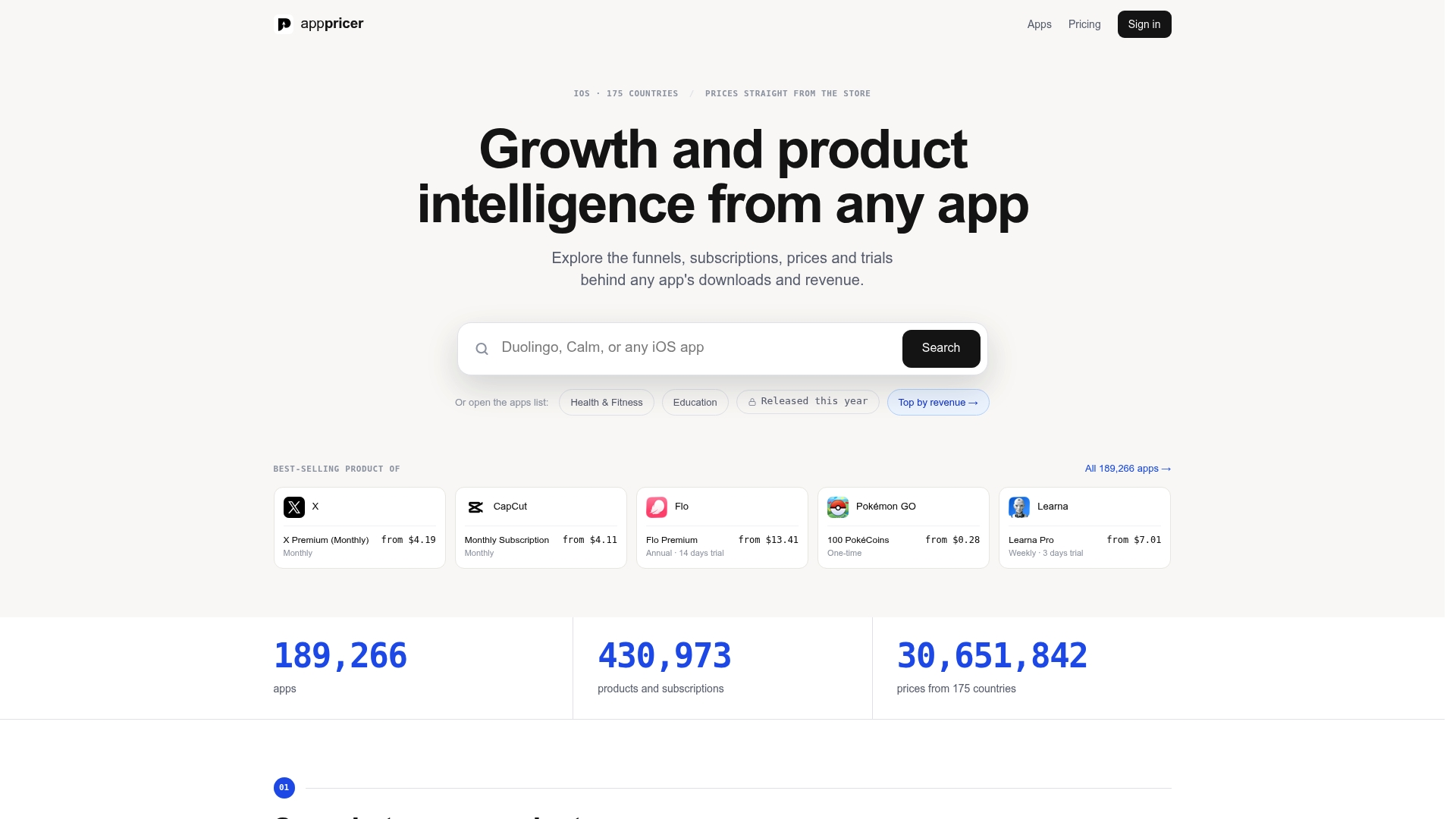
Start by running a category scan on the niche you scored highest in the prioritization framework above. Pull up the apps pricing and subscription listing to see how competitors structure free tiers, monthly pricing, and one-time unlocks within that category. From there, check revenue projections by country if you’re planning international launch, since pricing that works in one market often needs adjusting elsewhere. Head to the Apppricer homepage to see the full range of tracking and comparison features, and start a scan on your shortlisted niche today.
Sources
- Low Competition Mobile App Ideas for 2026 (Real Data) — BigIdeasDB
- Top data trends of 2025 shaping 2026 strategy — AppsFlyer
- State of Mobile Apps 2026: Key Trends & Statistics — Appalize
FAQ
What are niche apps?
Niche apps are mobile applications built for a specific, narrow audience or use case rather than a broad general market, such as offline trail navigation for hikers instead of a general maps app.
How do I find good niche app ideas?
Look for App Store or Google Play categories with 30 to 80 competing apps and 11 to 15 critical reviews per app, then read the negative reviews to find repeated complaints you can fix. Tools like Apppricer can then show you what comparable apps in that category actually charge.
What makes a niche app idea profitable?
A profitable niche combines four traits: users already willing to pay for adjacent tools, frequent use that supports a subscription, retention past the first week, and visibly weak incumbents based on review data.
What are some good niche job posting sites for developers?
Specialized job boards for developers and app builders typically outperform general job sites because they concentrate the exact audience employers want, similar to how a niche app concentrates a specific user need instead of chasing a broad market.
How much competition is too much for a niche app idea?
Categories with more than 80 competing apps usually signal the market is already served, while categories under 30 apps with few critical reviews often mean the demand isn’t there either. The sweet spot sits in between, with a healthy volume of critical reviews per app.