What Should Your iOS App Actually Cost?

Default to freemium with an auto-renewable subscription if your app delivers ongoing value, and reserve a straight paid or paymium model for apps that solve a problem once and well. Before you touch a number, accept that Apple controls the playing field: your Apple Developer account, the App Store Connect pricing tools, and the App Store Small Business Program all shape what you can charge and what you keep.
A few numbers to hold onto before you pick a price:
- Apple supports 175 App Store storefronts, each with its own converted pricing.
- The current system offers roughly 900 price points, from a floor near $0.29 up to $10,000 for approved values.
- The App Store Small Business Program cuts the standard commission for developers earning under its annual threshold.
Pick your model, choose a base region and starting price point, then schedule it in App Store Connect.
Pro Tip: Don’t pick a price point in isolation. Check what comparable apps in your category actually charge across a few key storefronts before you commit to a base price.
Key Takeaways
Choosing a defensible iOS app price requires matching your monetization model to how your app delivers value, then implementing it correctly across Apple’s price-point system and storefronts.
| Point | Details |
|---|---|
| Default to freemium plus subscription | Continuous-value apps convert best with a free tier and auto-renewing subscription. |
| Anchor annual pricing to monthly | Discount annual plans 20 to 40 percent against twelve months of monthly billing. |
| Respect subscription scheduling limits | You can only schedule one price change per storefront at a time in App Store Connect. |
| Localize beyond raw FX conversion | Adjust high-priority markets for purchasing power, not just currency rates. |
| Check Small Business Program eligibility | Qualifying developers keep a larger share of proceeds under the reduced commission rate. |
Table of Contents
- How Does iOS App Pricing Actually Work?
- Which Pricing Model Fits Your App?
- How Do You Set and Change Prices in App Store Connect?
- How Much Revenue Will You Actually Keep?
- What Do Real iOS App Prices Look Like?
- What Legal and Tax Rules Apply to Your App’s Price?
- What’s the Smartest Way to Approach iOS Pricing?
- Where Can You Verify Pricing Details Before You Publish?
- Frequently Asked Questions
- Sources
How Does iOS App Pricing Actually Work?
Every price you set starts with a base country or region. Apple uses that anchor to auto-generate comparable prices across the other 174 storefronts, adjusting for currency and local tax so you don’t have to price 175 markets by hand. You can still override individual storefronts when you want tighter control, and Apple won’t touch your base-country price when it does this.
The price-point system itself changed substantially in 2023. Apple moved from a legacy 87-tier structure to an expanded set of roughly 900 price points, with a floor around $0.29 and a ceiling near $10,000 for approved high-end values. Legacy tier IDs still show up in some tooling for backward compatibility, which can confuse anyone cross-referencing older documentation.
- Setting any paid price requires accepting the Paid Apps Agreement in App Store Connect.
- Standard commission applies unless you qualify for the Small Business Program, which reduces the rate for smaller developers.
- Subscription price changes follow separate rules: you can schedule one change at a time per storefront, and large increases can trigger a subscriber consent prompt.
That last point trips up a lot of teams. Auto-renewable subscriptions don’t get Apple’s automatic tax and FX adjustments the way one-time purchases do. You own those updates.
Which Pricing Model Fits Your App?
Apple’s own framework breaks monetization into a handful of core business models, and matching the right one to your app matters more than nailing the exact price point.
| Model | How it works | Best fit |
|---|---|---|
| Free | No direct monetization | Lead-gen, ad-supported, or portfolio apps |
| Freemium | Free download plus in-app purchases or subscription | Apps with ongoing, recurring value |
| Paid | One-time upfront charge | Apps that deliver full value in a single use |
| Paymium | Paid download plus in-app purchases | Premium tools with optional add-ons |
| Subscription | Auto-renewing recurring charge | Apps with continuous or evolving value |
If your app delivers value once, front-load the charge; if it delivers value repeatedly, subscriptions win because they capture that ongoing relationship. For billing cadence, monthly and annual is the standard pair, with annual typically discounted 20 to 40 percent against twelve months of monthly billing to reward commitment. Weekly plans work for high-intent, short-lifecycle apps like fitness challenges. Lifetime pricing suits utilities where subscription fatigue kills conversion.
Pro Tip: Watch your refund rate closely after any price increase. A spike usually signals the new price broke a psychological anchor, not that the product got worse.
How Do You Set and Change Prices in App Store Connect?
Getting a price live is mechanical once you know the sequence. Skip a step and you’ll either block publishing or scramble price data across storefronts you didn’t mean to touch.
- Accept the Paid Apps Agreement and confirm your tax and banking details are complete.
- Choose your base country or region in App Store Connect; this becomes the anchor for every other storefront.
- Select a base price point from the current pricing matrix, keeping the $0.29 floor and $10,000 ceiling in mind.
- Review the auto-generated storefront prices before publishing. Adjust any market where the converted price feels off.
- Publish immediately or schedule the change for a future date.
For subscriptions, the process branches slightly. You can schedule one future price change per storefront, and you have the option to preserve current pricing for existing subscribers while charging new subscribers the updated rate. Larger increases require Apple to notify affected subscribers and, past certain thresholds, get their explicit consent.
Two gotchas catch developers repeatedly: changing your base country deletes any scheduled price change still pending, and once you manually override a storefront’s price, that storefront stops receiving Apple’s automatic tax and FX updates. You’ve opted into manual maintenance for that market.
Pro Tip: Export your live pricing matrix to CSV before making bulk changes. Community tools built around the App Store’s pricing matrix make it easier to audit every storefront at once instead of clicking through each one.
How Much Revenue Will You Actually Keep?
The proceeds math is simple, but the inputs are easy to underestimate. Start with your customer-facing price, subtract applicable local tax, then subtract Apple’s commission. What’s left is your gross proceeds, before you’ve covered a single operating cost.
Before you lock in a number, account for the buckets that eat into that remainder:
- Development and ongoing maintenance
- Backend hosting and infrastructure
- Payment processing outside the App Store cut (for anything not routed through IAP)
- Customer support
- Marketing and user acquisition
- Analytics and third-party tooling
- Local tax compliance and reporting
Commission rate is the biggest lever you control directly. Standard commission applies by default, but developers who qualify for the Small Business Program keep a meaningfully larger share of every sale. If you’re near the program’s revenue threshold, it’s worth checking whether staying under it for a year changes your unit economics.
Pro Tip: Model your proceeds under both a high customer-acquisition-cost scenario and a low one. A subscription price that looks profitable at $2 CAC can lose money fast at $15 CAC, especially in competitive categories.
What Do Real iOS App Prices Look Like?
Benchmarks vary enormously by category, but a few anchors give you a starting point instead of a blind guess.
Say you set a base price of $9.99/month in the US. After Apple’s commission and estimated local tax in a given storefront, your actual proceeds might land closer to $7 to $8.50 depending on your commission tier and market. Run that same math against your expected conversion rate from install to paid subscriber, and you’ll see fast whether your acquisition spend has room to work.
Localization matters more than raw currency conversion. A price that converts cleanly from USD to a lower-income market’s currency can still be unaffordable relative to local purchasing power, which tanks conversion even when the “converted” number looks reasonable on paper. Cross-referencing live prices and subscription structures across 175 storefronts gives you a faster read on what competitors are actually charging in each market, rather than guessing from a spreadsheet of FX rates.
What Legal and Tax Rules Apply to Your App’s Price?
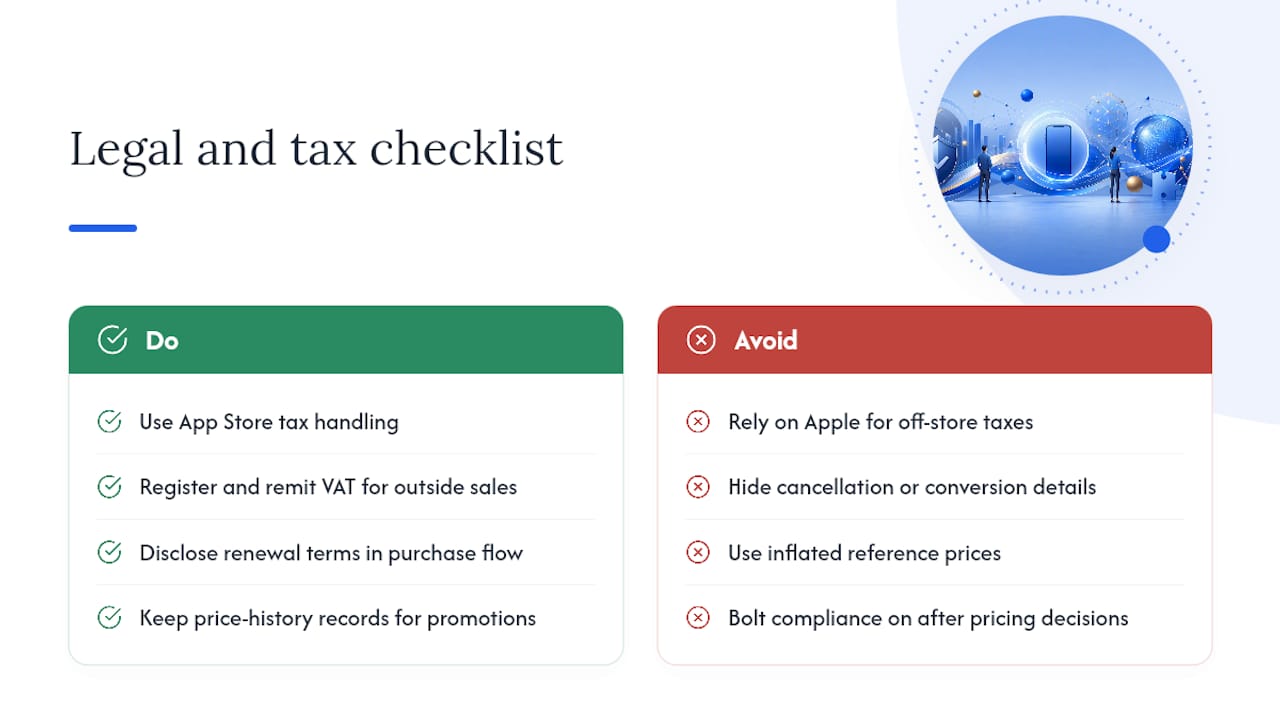
VAT and sales tax obligations vary by storefront, and Apple generally handles the calculation and remittance for purchases made through the App Store in most markets, folding tax into the price the customer sees or into Apple’s commission calculation depending on jurisdiction. That doesn’t remove your compliance burden entirely. If you sell anything outside Apple’s payment system, such as a companion web subscription, you’re responsible for your own VAT registration and remittance in the countries where you have customers or a tax nexus.
Consumer protection rules add another layer, particularly around auto-renewing subscriptions. Several jurisdictions, including the EU and various US states, require clear disclosure of renewal terms, cancellation methods, and free-trial-to-paid conversion timing before a customer completes a purchase. Apple’s own subscription guidelines require this disclosure inside your app’s purchase flow, not just in your terms of service.
Price transparency matters too. Some regions restrict how you frame discounts or “limited time” pricing, requiring that a reference price reflect a real prior price rather than an inflated anchor invented for the promotion. If you run frequent promotional pricing, keep records showing the price history behind any “was/now” framing, since regulators in markets like the EU have pursued companies over misleading discount claims in digital products.
None of this should scare you away from subscriptions or promotions. It just means your pricing decisions and your compliance decisions need to be made together, not bolted on after the fact.
What’s the Smartest Way to Approach iOS Pricing?
Pricing isn’t a single decision. It’s a starting hypothesis you test and adjust as real usage data comes in. I’d rather see a developer ship a defensible price this week and revise it in 90 days than spend a month debating $4.99 versus $5.99.
Product-market fit and lifetime value matter far more than which adjacent price point you picked. Instrument your funnel, watch churn and conversion, and let the data tell you where to move.
Where Can You Verify Pricing Details Before You Publish?
Cross-check these before you finalize a price:
- Apple’s pricing and availability guide for base-country rules and price points.
- Subscription pricing management for scheduling and consent thresholds.
- Live pricing and subscription data across storefronts on Apppricer for real competitor benchmarks.
- ASO-focused pricing tools if you need broader visibility alignment alongside your price strategy.
Frequently Asked Questions
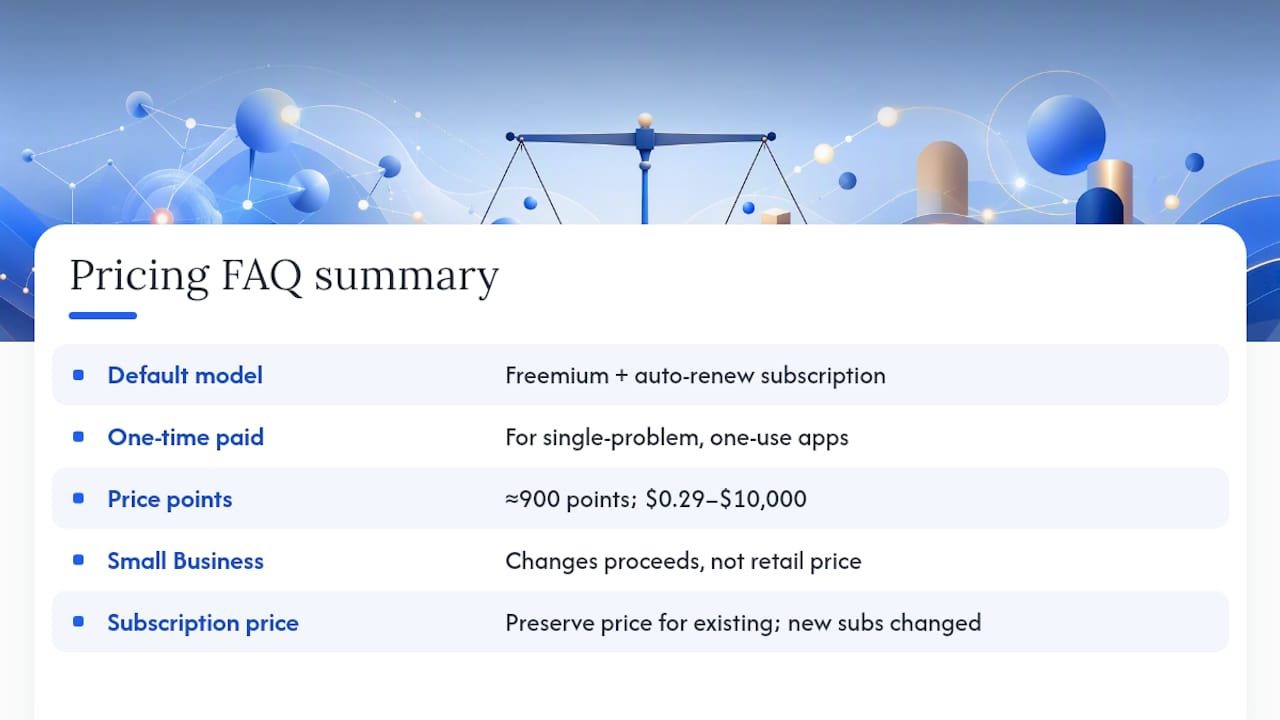
What’s the best default pricing model for a new iOS app? Freemium with an auto-renewable subscription works for most apps that deliver ongoing value. Reserve a one-time paid model for apps that solve a single problem completely in one use.
How many price points does Apple currently support? Roughly 900 price points, ranging from a floor near $0.29 to a ceiling of $10,000 for approved high-end values.
Does the App Store Small Business Program change how I should price? It changes your proceeds, not necessarily your customer-facing price. Qualifying developers keep a larger share of revenue at the same retail price, which can justify a slightly lower price than a standard-commission competitor.
Can I change a subscription price without upsetting current subscribers? Yes. App Store Connect lets you preserve pricing for existing subscribers while applying a new price only to new subscribers, though large increases may still require subscriber consent.
Should I price the same in every country? No. Apple auto-converts your base price across storefronts, but purchasing power varies enough that manually adjusting key markets usually improves conversion over relying on raw currency conversion alone.
Sources
- Set a price - Manage app pricing - App Store Connect - Help - Apple Developer
- Manage pricing for auto-renewable subscriptions - Manage subscriptions - App Store Connect - Help - Apple Developer
- In-App Purchase - Apple Developer
- Apple App Store pricing tiers · 2026 · Galva
- App Store business models - Apple Developer