App Subscription Models: Which One Fits Your App

If your app delivers repeat value, whether that’s a content library, a fitness routine, or a tool people open daily, a subscription is usually the highest-LTV path to revenue. The harder question is which model. Freemium, hard paywall, tiered, usage-based, and hybrid each fit different usage patterns and different costs to serve.
Before picking one, do three things:
- Pull category pricing benchmarks so you know what users already expect to pay.
- Choose a paywall style based on how fast your app proves its value.
- Plan an A/B test on pricing or paywall placement instead of guessing once and hoping.
The rest of this guide breaks down each model family, the billing math behind them, and the store mechanics that quietly shape your margins.
Key Takeaways
Subscription success depends on matching the model, billing cadence, and paywall placement to how quickly your app proves value, then testing every assumption against real cohort data.
| Point | Details |
|---|---|
| Match model to value speed | Use hard paywalls when value is obvious fast; freemium when users need time to experience it. |
| Annual plans multiply LTV | Annual subscribers can produce roughly 3x the lifetime value of monthly subscribers in many categories. |
| Store proceeds reward loyalty | App Store proceeds rise from 70% to 85% once a subscriber hits one year of paid service. |
| Track CPS against LTV by channel | Blended averages hide channel-level differences that determine whether ad spend is sustainable. |
| Benchmark before you price | Apppricer’s cross-country pricing and subscription data helps you set and test prices against real category medians. |
Table of Contents
- Types of App Subscription Models and When to Use Each
- Setting Prices: Flat, Tiered, Per-User, and Annual Discounts
- Building the Paywall and Onboarding Funnel
- Trials, Promotional Offers, and App Store Mechanics
- Metrics That Actually Tell You If Pricing Is Working
- Running Pricing Experiments Without Guessing
- Pricing Templates by App Category
- Validating Pricing Decisions With Real Market Data
- Pricing Is a Test, Not a Decision You Get to Make Once
- Benchmark and Monitor Your Pricing With Apppricer
- Sources
Types of App Subscription Models and When to Use Each
Every subscription model solves a different trust problem: how much value does a user need to see before they’ll pay? Match the model to that answer, not to what a competitor happens to be running.
1. Freemium
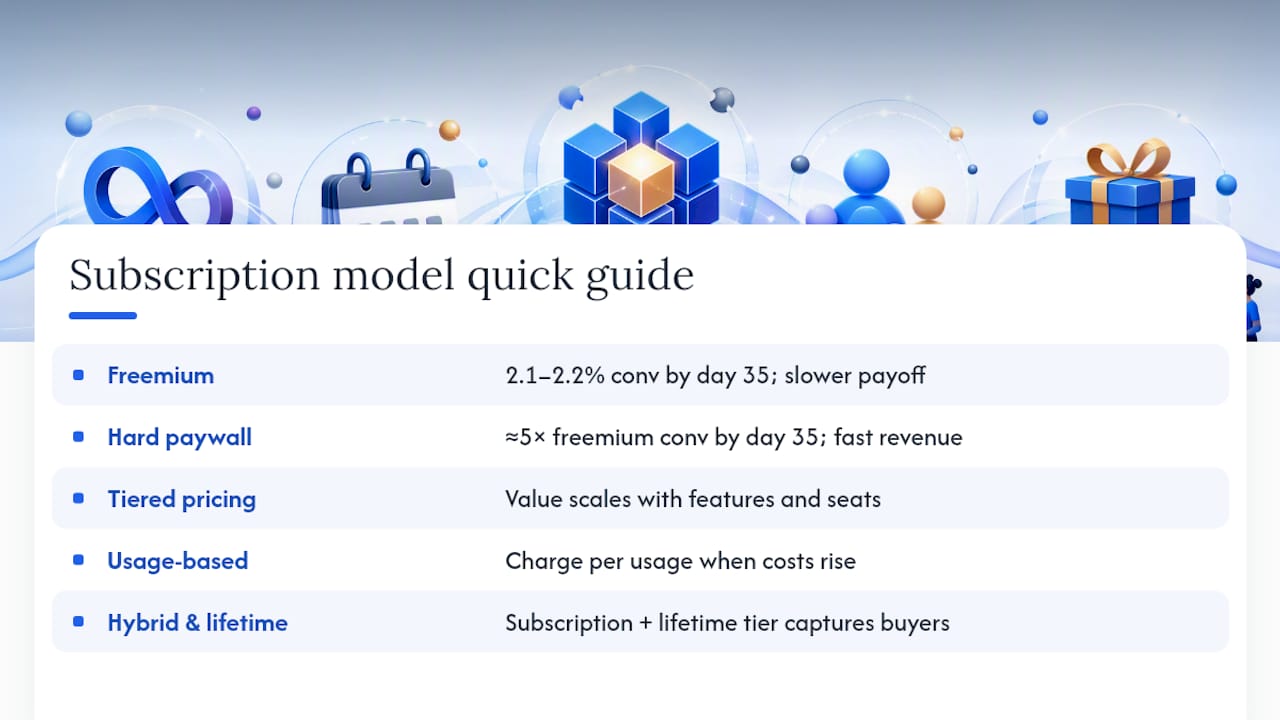
Freemium works when users need hands-on time with the product before they believe it’s worth paying for. Think habit trackers, note apps, or games with deep mechanics that only reveal themselves after a few sessions. The tradeoff is speed: freemium funnels convert around 2.1 to 2.2% of downloads to paid by day 35, according to RevenueCat’s subscription benchmarks. You’re trading a slower payoff for a wider top of funnel.
2. Hard paywall
A hard paywall makes sense when the value is obvious in the first screen. Premium content libraries, professional tools, and apps solving an urgent problem (password managers, VPNs) all convert fast this way. The same RevenueCat data shows hard paywalls convert a notably higher share of downloads by day 35, around five times the freemium rate. Retention tends to even out over the long run, so the real advantage is front-loaded revenue and faster signal on whether your pricing works at all.
3. Tiered and per-user pricing
Tiered pricing fits products where value scales with features, storage, or seats. This is standard for productivity and B2B tools where a solo user and a 10-person team get genuinely different value.
4. Usage-based pricing
Usage-based pricing works when your cost to serve rises with consumption, API calls, storage, AI inference, transcription minutes. Charging flat regardless of usage either underprices heavy users or overprices light ones.
5. Hybrid and lifetime options
Hybrid models combine a subscription with one-time purchases or consumables, and they’re often the right call when a portion of your audience refuses recurring billing on principle. A comparison of subscription, one-time, and hybrid pricing notes that offering a lifetime tier alongside a subscription can capture that segment without cannibalizing your core recurring revenue, as long as the lifetime price is set high enough to protect long-term LTV.
Pro Tip: If you’re unsure which model fits, launch with a soft paywall (browsable but gated at the point of action) for the first four weeks. It gives you real conversion data before you commit to a harder or softer stance.
Setting Prices: Flat, Tiered, Per-User, and Annual Discounts
The pricing lever you pull changes both conversion and lifetime value, and the two don’t always move together. Flat pricing is the simplest to communicate but leaves money on the table with your highest-value users. Tiered pricing captures more of that value but adds decision friction. Per-user pricing scales cleanly for team products but can suppress adoption among smaller buyers who bristle at seat-based math. Usage-based pricing aligns cost with value most precisely, but it makes revenue harder to forecast month to month.
Billing period is the lever most teams underuse. Category-level data shows annual subscribers can produce significantly higher lifetime value than monthly subscribers, depending on category and retention curves, according to Airbridge’s 2026 subscription benchmarks. That gap comes from two things: annual buyers self-select as higher-intent, and they don’t get a monthly cancellation reminder every 30 days.
By the numbers: Airbridge’s benchmark data gives indicative median prices for weekly, monthly, and annual plans, with annual discounts commonly ranging widely off the monthly equivalent.
That’s a wide discount range, and where you land in it depends on your goal:
- A 40% discount nudges price-sensitive monthly users toward annual without giving away much margin.
- A 60%+ discount is an aggressive LTV play, useful if churn is your biggest problem and locking in a year of revenue matters more than per-unit price.
- Showing all three billing periods side by side, with monthly priced high enough to make annual look obviously smarter, is basic price anchoring. It works because most users don’t compare against a spreadsheet, they compare against the option next to it.
Whatever you choose, keep it consistent with the trial length and onboarding sequence you’re testing. Pricing and paywall design aren’t separate decisions, they’re one funnel.
Building the Paywall and Onboarding Funnel
Where you place the paywall determines what kind of decision you’re asking users to make. Gate too early, before anyone understands what they’re buying, and you convert only the already-convinced. Gate too late, after they’ve built a habit around the free tier, and you’ve trained them to expect free.
The middle ground that works for most categories: let users complete one full “aha” action (the first workout logged, the first document created, the first match found) before showing the paywall. That single action is usually what separates a curious download from an intent signal.
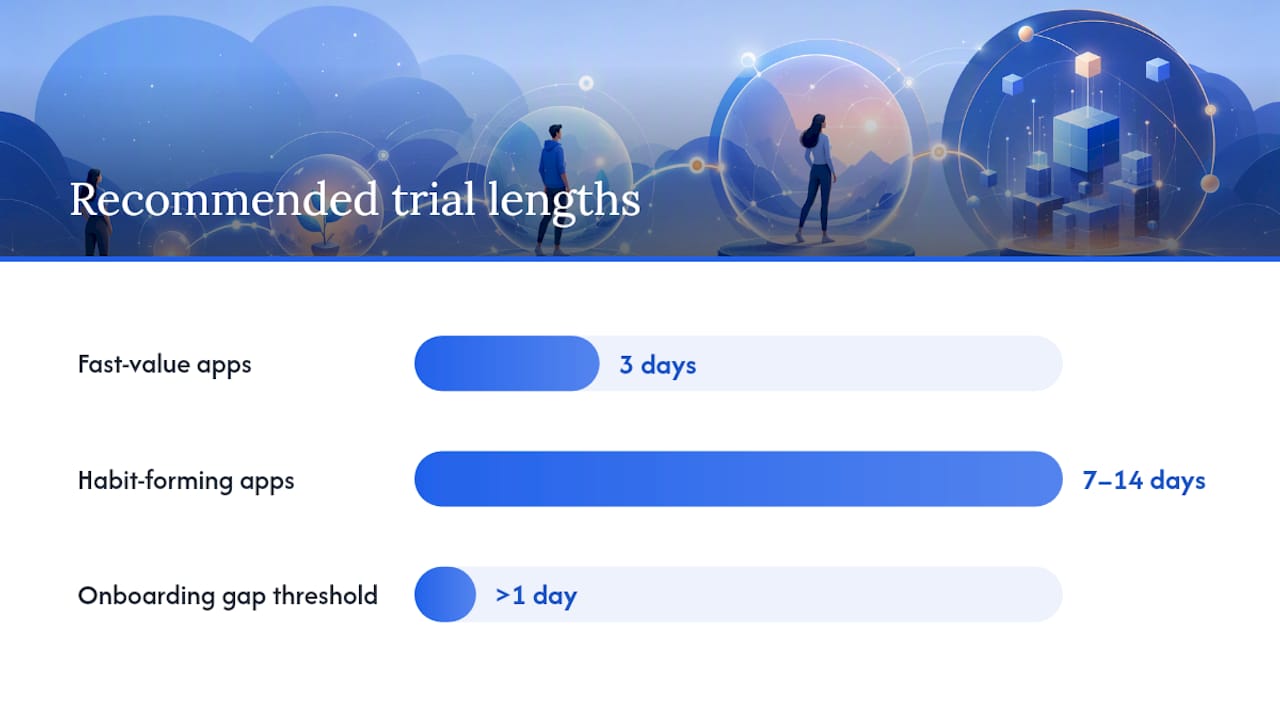
Trial length should map to how long it takes a user to form a habit with your specific product, not to a generic 7-day default:
- Fast-value apps (utilities, simple tools) can use 3-day trials since the value is obvious almost immediately.
- Habit-forming apps (fitness, learning, meditation) generally need 7 to 14 days, long enough to hit a second or third session.
- Very short trials paired with immediate charge dates are the single biggest driver of refund requests and one-star reviews. If someone forgets they started a trial, they’ll blame the app, not their memory.
Instrument these onboarding events from day one: paywall view, trial start, first core action completed, and day-1 return. Without that data you’re optimizing pricing blind.
Pro Tip: Track the gap between “trial start” and “first core action.” If that gap is longer than a day, your onboarding, not your price, is probably your real conversion problem.
Trials, Promotional Offers, and App Store Mechanics
Stores give you more offer types than most teams use. Free trials are the default, but introductory pricing (a reduced price for a fixed number of billing cycles), pay-up-front offers, pay-as-you-go structures, one-time offer codes for influencer campaigns, and win-back offers for lapsed subscribers all serve different jobs. A win-back offer targeted at someone who canceled three months ago converts differently than a cold trial offer ever will.
Apple’s subscription system requires every auto-renewable subscription to sit inside a subscription group, with levels inside that group controlling how upgrades and downgrades are handled. Proceeds start at 70% of the subscription price and rise to 85% once a subscriber has accumulated one year of paid service, per Apple’s official subscription documentation. That 15-point jump is a strong argument for annual plans on its own: a subscriber who commits to a year hits the higher proceeds tier in one transaction instead of twelve.
A few operational details trip up teams that haven’t run store subscriptions before:
- Price changes across territories can hit API rate limits and advance-notice requirements, so schedule updates well ahead of a planned launch date.
- Existing subscribers can be preserved at a legacy price if you don’t explicitly migrate them, which is sometimes intentional and sometimes an expensive mistake.
- Offer codes and introductory offers have visibility rules tied to whether a user has ever subscribed before, so test redemption paths in sandbox before a live campaign.
Manage this across many countries and it gets complicated fast, which is exactly why automated tracking tools matter once you’re pricing beyond a handful of territories.
Metrics That Actually Tell You If Pricing Is Working
Five numbers matter more than the rest, and most teams only track two of them.
Lifetime value (LTV) is the total revenue you expect from a subscriber over their full relationship with the app, calculated per cohort and billing period, never as a single blended number.
Churn is the percentage of subscribers who cancel or lapse in a given period. Voluntary churn (a user cancels) and involuntary churn (a card fails) behave differently and need different fixes.
Download-to-paid conversion measures the share of installs that become paying subscribers by a fixed day, usually D35, which is the window RevenueCat uses in its category benchmarks.
RPI (revenue per install) blends conversion rate and price into one number you can compare across campaigns.
CPS (cost per subscriber) is what you paid, in ad spend, to acquire one paying subscriber. Compare CPS against LTV by channel and billing period, not against a single company-wide average, since RevenueCat’s data shows channel mix is a major driver of performance variance.
| Metric | What it tells you |
|---|---|
| LTV | Total expected revenue per subscriber, by cohort and billing period |
| Churn rate | Percentage canceling or lapsing per period, split by voluntary vs. involuntary |
| Download-to-paid conversion | Share of installs converting to paid by a fixed day (commonly D35) |
| CPS vs. LTV | Whether acquisition spend on a given channel is sustainable |
Report every one of these split by channel and billing period. A blended average hides the fact that your paid social users might be mostly weekly subscribers with weak LTV, while organic search brings in annual buyers who are quietly propping up your whole model.
Running Pricing Experiments Without Guessing
Treat pricing as a testing program, not a launch decision you make once and revisit in a panic a year later.
- Write a specific hypothesis. “Moving the paywall after onboarding step 3 increases trial starts by improving perceived value” beats “let’s try a different paywall.”
- Define cohorts before you launch, not after. Split by acquisition channel at minimum, since channel mix changes billing-period distribution and skews results if you don’t control for it.
- Pick metrics in advance. CPS, trial-to-paid conversion, and D30 or D60 revenue per cohort are the standard set. Watching only day-1 conversion will mislead you if your trial is longer than a few days.
- Run until you have a real sample. Low-traffic apps testing price should expect experiments to take weeks, not days, before results settle.
- Read results by segment, not just in aggregate. A price increase that raises average revenue can still be hurting your best channel while helping a weak one.
The highest-leverage tests worth running first: paywall timing (before vs.)
Pro Tip: If you only have budget for one test this quarter, test annual discount depth. It’s the fastest lever to move blended LTV, and the RevenueCat data on channel-level LTV variance makes it clear this is where most of the money actually sits.
Pricing Templates by App Category
Packaging patterns repeat within categories because user expectations already exist there. Copy the structure, then adjust the number to your own value.
- Health & Fitness: weekly trial into a monthly plan around $6 to $10, with an annual plan discounted 50 to 60% off the monthly equivalent. Most apps in this category run three tiers: free with basic tracking, a core paid tier, and a premium tier with coaching or personalized plans.
- Productivity: freemium with a generous free tier, paid individual plan, and a separate team or per-user tier for organizations. Annual discounts run similar to Health & Fitness.
- Gaming: hybrid is common, subscription for ad removal and perks, plus consumable in-app purchases for currency or boosts sold alongside it.
- Education: tiered by content depth, often with a family or multi-seat plan as a fourth tier, since a single household subscription frequently covers multiple learners.
Add a lifetime tier as a complement, not a replacement, when your data shows a persistent segment refusing recurring billing.
Validating Pricing Decisions With Real Market Data
Guessing at competitor pricing wastes cycles you don’t have. Apppricer tracks actual prices, subscription structures, and revenue signals for iOS apps across 175 countries, which turns “what should we charge” into a question you can answer with data instead of instinct.
Three ways teams use it in practice:
- Pull category medians before setting a starting price, rather than anchoring to whatever number felt reasonable in a meeting.
- Model revenue impact of a price change before shipping it, using comparable apps’ pricing history as a reference point.
- Monitor competitor price moves over time so an experiment you’re running isn’t accidentally competing against a rival’s own price test.
Pro Tip: Check territory-level pricing before assuming your home-market price translates. Purchasing power and local competitor pricing vary enough that flat currency conversion often leaves money on the table or prices you out entirely.
Pricing Is a Test, Not a Decision You Get to Make Once
The teams that win at subscriptions treat every price point as a working hypothesis, not a settled fact. Set a number, watch the cohort, and expect to revisit it within a quarter. The apps that struggle usually froze their pricing the day they launched and never touched it again, even as their user base, costs, and competitors all shifted underneath them.
The bigger risk isn’t pricing too high or too low. It’s failing to keep delivering fresh value after the first billing cycle. Subscription fatigue is real among users juggling a dozen recurring charges, and the apps that survive it are the ones that keep earning the renewal, not just the initial sign-up.
— Sergey
Benchmark and Monitor Your Pricing With Apppricer
Setting a subscription price without seeing what comparable apps actually charge is a guess dressed up as a strategy. Apppricer gives you the alternative: real price and subscription data across 175 countries, so you can see category medians, tier structures, and billing-period splits before you commit to a number.
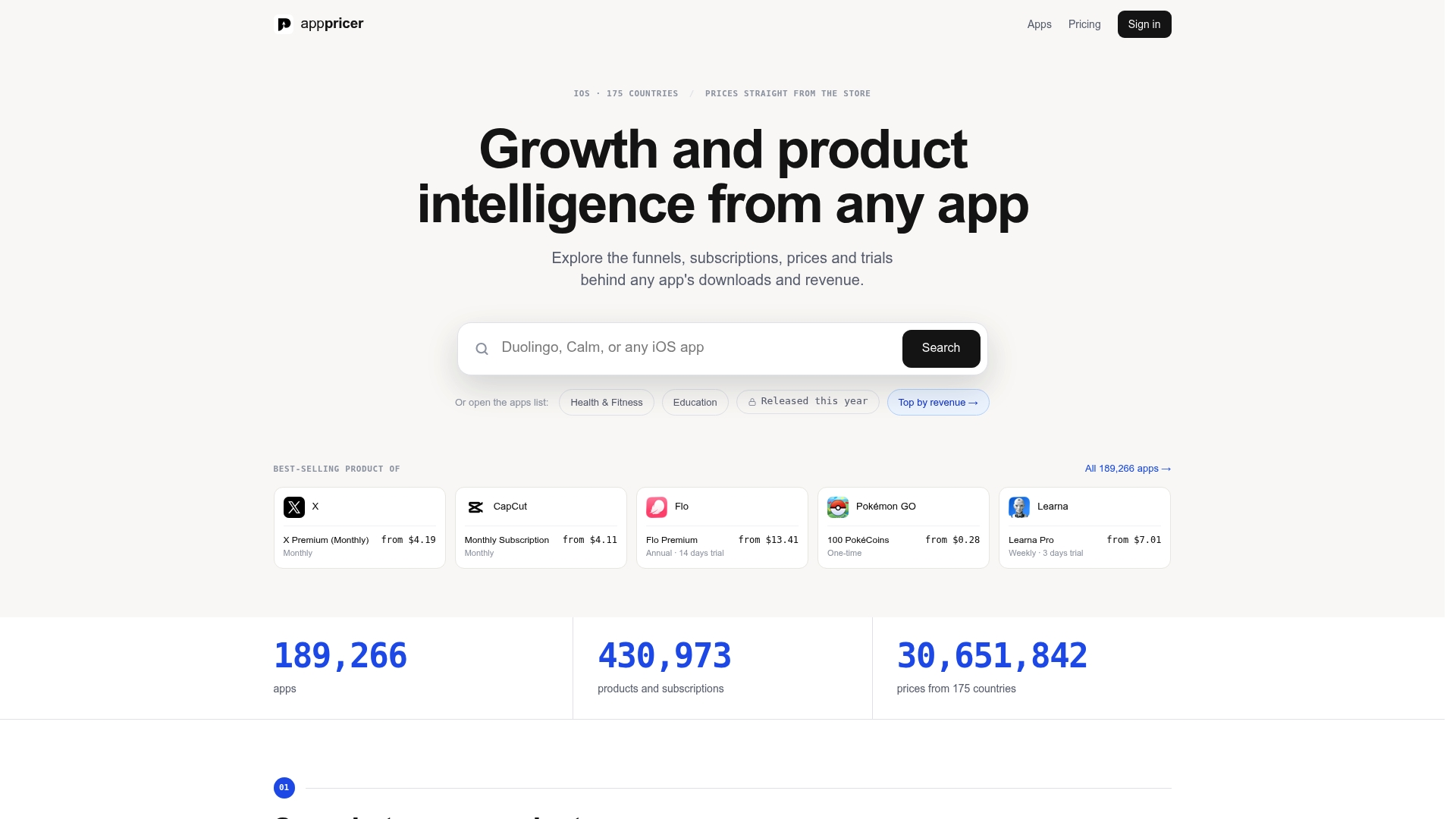
Use it to find where your planned price sits against category medians, simulate how a CPS-to-LTV ratio might shift if you move users toward annual plans, and track competitor price changes so you’re never the last to know a rival cut their monthly rate. The full catalog of iOS app prices and subscriptions is the fastest starting point if you want a direct look at what your category charges right now. For a broader view of what the platform covers, including revenue projection modeling and country-by-country breakdowns, start with the Apppricer product page and see what a data-backed price point looks like for your app.
Sources
- Subscription App Pricing by Category: 2026 Benchmarks — Airbridge
- App Store subscriptions — Apple Developer
- State of Subscription Apps 2026 – RevenueCat