900 App Price Points: Ship Safe Pricing for Developers

Apple runs 900 price points anchored to a $0.29 floor, with a standard ceiling of $999.99 and approved options up to $10,000. Auto-renewable subscriptions moved onto this same system in May 2023, so the rules below apply whether you’re pricing a one-time unlock or a monthly plan. Before you lock in a number, open App Store Connect → Pricing and Availability and confirm the exact customerPrice for each storefront, then run a category-benchmarked test rather than guessing at a round number.
TL;DR:
- Developers should verify regional prices regularly using the App Store Connect matrix and API, as Apple’s automatic updates can shift prices without notice.
- Pricing increments vary depending on the price range, with smaller steps below $10 and broader jumps above, affecting precise price setting.
- The median subscription price varies by category, often around $6.68, not the overall modal of $9.99, which can lead to mispricing if not adjusted accordingly.
- For higher-tier pricing above $999.99 or specific regions, a formal request and approval process is necessary before implementing changes.
- Pricing experiments should be ongoing, with measurements of lifetime value and retention, rather than one-time fixes, to optimize long-term revenue.
Table of Contents
- How Many App Price Points Exist and How the System Is Built
- How Apple Maps Your Price to 175 Storefronts
- How to Set and Manage Prices in App Store Connect and via the API
- What Changed in 2022 to 2023 and the Rules You Must Follow Now
- Category Benchmarks and Practical Pricing Tactics
- How to Design Price Experiments and Measure Unit Economics
- Where to Verify Your Exact Regional Price
- What I’ve Learned Watching Pricing Experiments Play Out
- How Apppricer Turns Price Points Into a Testable Strategy
- Sources
- FAQ
How Many App Price Points Exist and How the System Is Built
Apple scrapped its old 87-tier structure and replaced it with 900 price points, most of them anchored to round USD values, with a smaller set of special tiers built for high-inflation currencies where a straight conversion would look absurd to local buyers. That’s the number every pricing decision in App Store Connect now runs through.
The floor sits at $0.29. The standard ceiling is $999.99, but you can request access to points as high as $10,000 for enterprise or B2B apps that need it. Granularity changes as you move up the scale, which catches a lot of developers off guard the first time they try to set a price:
- Below roughly $10, price points step in $0.10 increments.
- Above that, steps widen to $0.50 increments.
- Endings expand beyond the old psychological “.99” habit to include “.00,” “.50,” “.90,” and “.95,” giving you more realistic anchor points for annual plans.
- Legacy tier IDs still show up in older API responses, so if your billing tooling was built against the 87-tier system, audit it before you assume a price change will sync cleanly.
That legacy-ID quirk is the kind of thing that only surfaces when a finance team reconciles proceeds and finds a mismatch. Check your integration now, not after a launch.
How Apple Maps Your Price to 175 Storefronts
You pick one anchor price, and App Store Connect auto-generates the equivalent price across all 175 storefronts, adjusting for currency conversion, local taxes, and pricing conventions specific to each market. A $9.99 anchor in the United States doesn’t just get converted at the daily exchange rate. It gets rounded to whatever price point looks natural in that region.
Apple also refreshes these regional prices periodically as tax rules and exchange rates shift, pulling from financial data providers rather than leaving stale conversions in place. A few things matter here for anyone modeling revenue:
- The anchor price is a starting point, not the final word on what a French, Japanese, or Brazilian buyer actually pays.
- You can override individual storefronts manually when you need a bespoke regional price, say, a lower point in a price-sensitive market.
- Automated updates can shift your displayed price without any action on your part, which means a screenshot from six months ago may already be wrong.
- Marketing copy that quotes a specific price should always get double-checked against the live
customerPrice, not the anchor you originally chose.
If your growth team is building paid acquisition creative around a specific number, that number needs a source. Pull it from the storefront, not from memory.
How to Set and Manage Prices in App Store Connect and via the API
Setting a price point isn’t complicated once you know where to look, but the workflow has a few steps most guides skip past.
- Go to My Apps → [App Name] → Pricing and Availability in App Store Connect and select a base price point from the list.
- Click See Additional Prices to preview how that anchor translates across every storefront before you save anything.
- If you need a price above the standard $999.99 ceiling, submit a request for access to the higher tier. Approval isn’t automatic, and it takes time, so file it well before a launch date.
- For programmatic access, query the App Store Connect API’s price point endpoints, which return current price data for apps and in-app purchases. Watch for legacy tier IDs mixed into older response fields if you’re maintaining an integration built before 2023.
- Schedule changes in advance rather than pushing them live same-day, and test the sequence on a staging app entry first if your team has one available.
- On the day a change goes live, pull the actual
customerPricefor your top five storefronts by revenue and confirm it matches what you intended.
That last step catches more pricing errors than any other single habit. Automated regional updates plus manual overrides plus scheduled changes create enough moving parts that verification isn’t optional.
What Changed in 2022 to 2023 and the Rules You Must Follow Now
Apple announced the pricing overhaul in December 2022, rolled out the full 900-point system in March 2023, and extended it to auto-renewable subscriptions that May. Before that, subscription pricing was boxed into the old 87-tier grid, which meant a lot of awkward jumps between what a plan should cost and what Apple would let you charge.
The subscription rollout matters more than it sounds. Once subscriptions joined the 900-point system, developers got real flexibility at the low end for win-back offers and promotional pricing, and real flexibility at the high end for premium tiers that previously had no clean price point to land on.
Price increases on subscriptions come with consent rules that trip up teams constantly:
- Apple requires explicit subscriber consent for increases above certain thresholds, generally around 50% relative to the current price, or an absolute jump near $5 for non-annual plans and roughly $50 for annual plans, depending on the specifics of the subscription.
- Smaller increases can go through with a standard notification instead of requiring the subscriber to actively agree.
- If you don’t secure consent where it’s required, affected subscribers keep their old price instead of moving to the new one, which quietly erodes your average revenue per user without triggering an obvious alert.
Scheduling has its own trap: if you queue up two price changes with overlapping windows, the earlier scheduled change can get silently overwritten by the later one. Always reopen the Pricing and Availability screen after scheduling anything to confirm what’s actually queued, not just what you think you set.
Category Benchmarks and Practical Pricing Tactics
Most developers price off the wrong number. The overall market’s modal monthly subscription price is $9.99, but the actual median across the market sits closer to $6.68, and the variation in pricing becomes more pronounced when data is segmented by app category.
That’s nearly a 2x spread, and it means pricing your fitness app against the overall market median will likely leave money on the table, while pricing a casual game against that same number will tank your conversion rate.
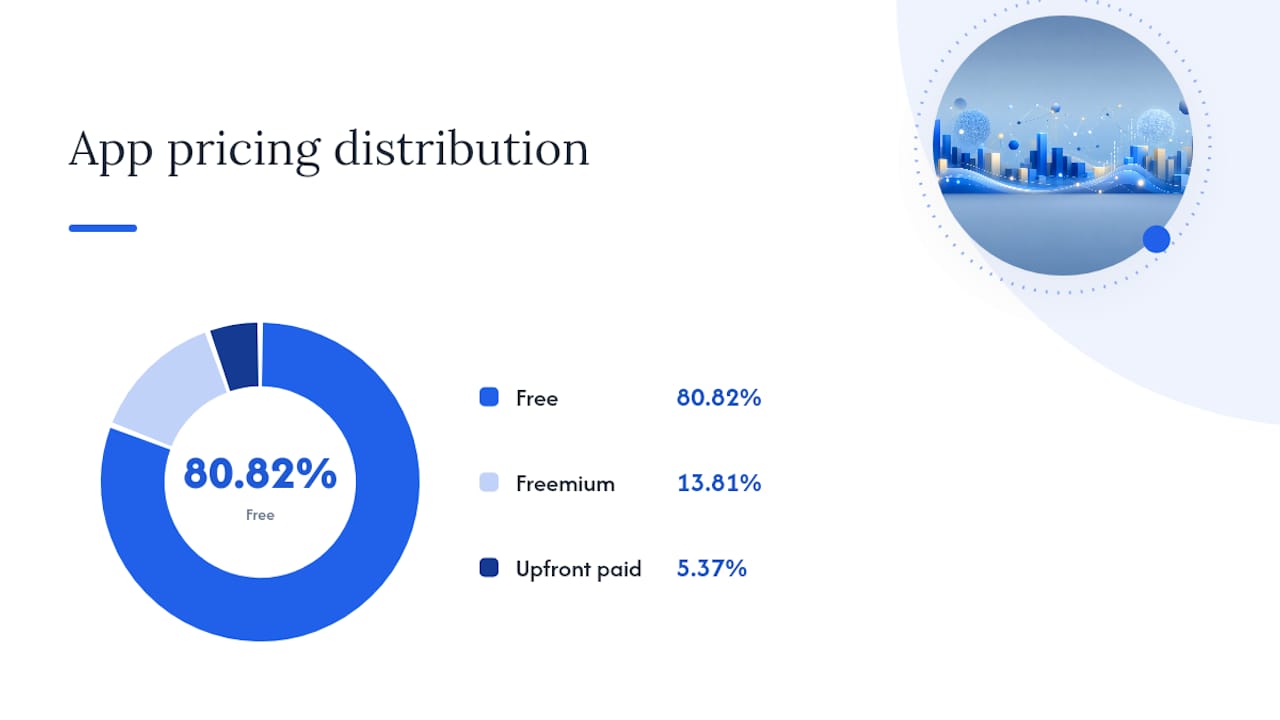
A separate large-sample study of over a million iOS apps found that 80.82% are free, 13.81% run freemium, and only 5.37% charge upfront, with a median upfront price of just $2.99. Upfront pricing is a shrinking minority strategy, which tells you most of the real pricing decisions happen inside subscription and freemium structures, not sticker prices.
Practical rules worth following:
- Start at your category’s median, not the market-wide modal price.
- Offer both monthly and annual billing, with the annual price commonly anchored in the mid to high double-digit dollar range.
- Discount the annual plan by a substantial percentage off the monthly equivalent to incentivize the annual option.
- Match your free trial length to how long it takes someone to form a habit with your app. Seven days works for simple utilities; 14 days suits anything requiring more onboarding.
Pro Tip: Run your annual discount as a percentage off the monthly rate, not a flat dollar amount. A 45% discount reads as more generous than “$30 off” even when the math comes out the same, and it’s easier to keep consistent across storefronts with different currencies.
How to Design Price Experiments and Measure Unit Economics
A price change without a measurement plan is just a guess with extra steps. Structure it properly and you’ll know within weeks whether it worked.
- Run a randomized A/B test on your paywall or offer screen, splitting traffic evenly and controlling for acquisition channel so a spike in one paid campaign doesn’t skew your read on the price itself.
- Track cost per subscriber (CPS) against day 30 and day 60 revenue per install, not just raw conversion rate. A price that converts fewer users but each at higher value can still win.
- Build out retention curves by cohort and compare year-one lifetime value (LTV) against your category’s benchmark rather than an industry-wide average.
- Let the test run long enough to capture at least one full billing cycle of renewals before drawing conclusions, since first-month conversion tells you little about churn.
Higher price points tend to filter for buyer intent before the purchase even happens. One benchmark found apps at higher price tiers hit roughly 2.7% day-35 conversion versus 1.5% for lower-priced apps, largely because casual browsers self-select out before paying. The trade-off is volume: you’ll generally see fewer total subscribers at the higher price, so the decision to scale should hinge on whether LTV growth outpaces the CPS you’re paying to acquire each one. Pairing pricing tests with a solid retention strategy matters just as much as the number itself, since a great price with weak retention still loses long term.
Pro Tip: Don’t scale a price increase off week-one data alone. Wait for the first renewal cycle to complete so you’re measuring actual retained revenue, not just initial willingness to pay.
Where to Verify Your Exact Regional Price
Two places give you the real number, and neither is your USD anchor. The App Store Connect pricing matrix shows the live customerPrice per storefront, and the App Store Connect API’s appPricePoints endpoint returns the same data programmatically for anyone building automated monitoring.
A short verification routine keeps you from getting surprised:
- Schedule a recurring API pull, weekly is usually enough, to catch any Apple-driven regional price update before a customer or reporter finds it first.
- Capture storefront screenshots after any price change ships, so you have a record of what buyers actually saw on a given date.
- Reconcile list price against realized proceeds. Apple’s standard commission leaves developers roughly 70% of the list price, though the Small Business Program and long-tenured subscriptions can raise that to 85%, so model net revenue, not sticker price.
- If you need a price point above the standard ceiling, request it through App Store Connect well ahead of any launch deadline, since approval isn’t instant.
Run this checklist the day any pricing change goes live, and again a week later once regional auto-updates have had time to settle.
What I’ve Learned Watching Pricing Experiments Play Out
The biggest mistake I see is treating a price point like a fixed decision instead of a lever you keep pulling. Teams launch at $9.99 because it’s the market’s modal price, then wonder why conversion lags a category where $4.99 is the real benchmark.
I’ve also watched win-back pricing get overused. A steep discount recovers a churned subscriber for a month or two, but if the underlying LTV doesn’t clear the acquisition cost, you’ve just delayed the loss. The teams that get this right treat every price change as a live experiment, and having a tool to pull actual competitor price matrices and subscription structures across storefronts makes those experiments faster to design and easier to defend.
— Sergey
How Apppricer Turns Price Points Into a Testable Strategy
Every tactic above depends on knowing what your category actually charges, not what you assume it charges. Apppricer pulls live per-storefront price matrices, aggregates competitor subscription models, and tracks historical price changes across 175 countries, so you’re benchmarking against real numbers instead of guessing at a category median.
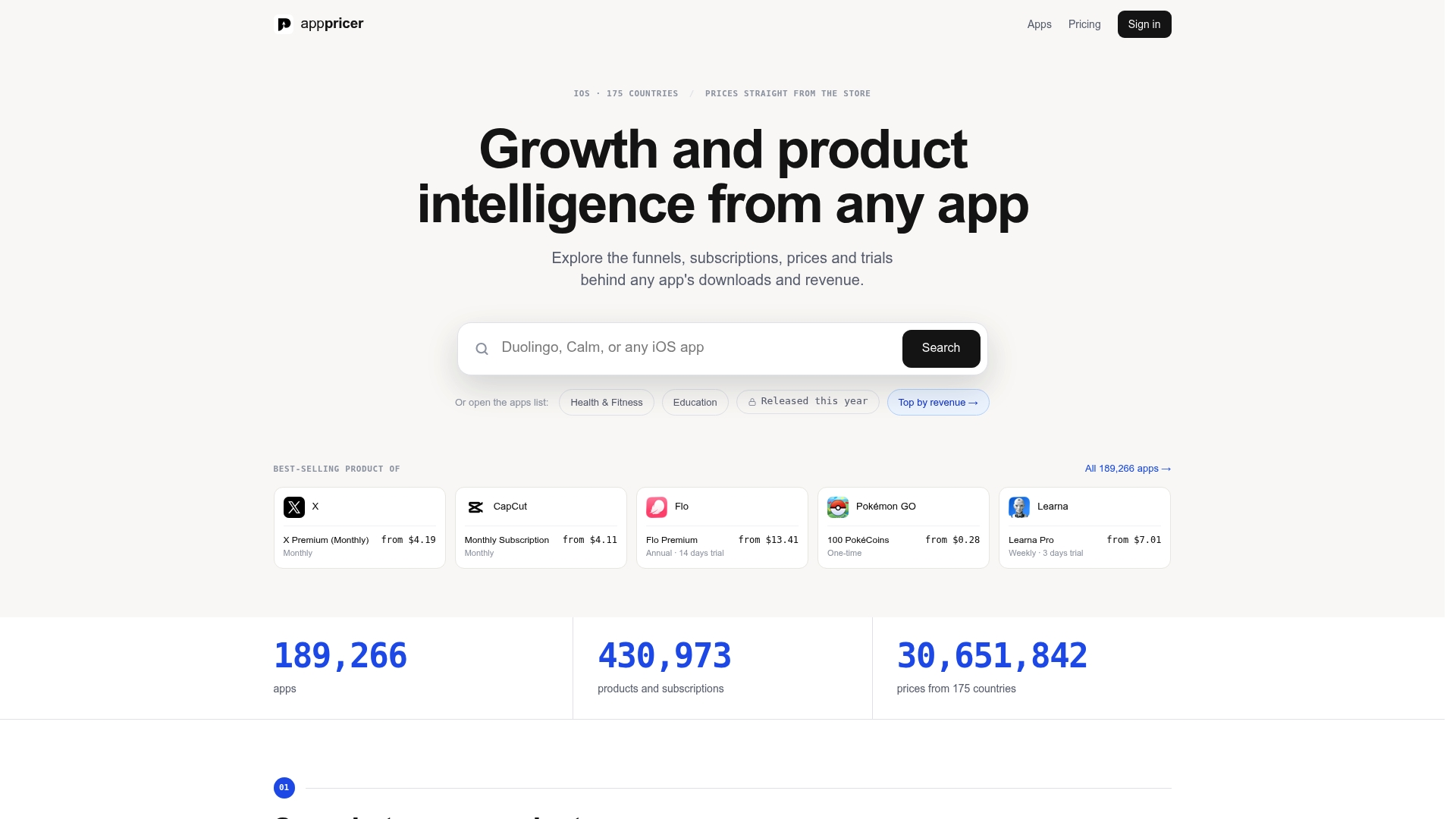
Manually checking App Store Connect across dozens of storefronts to see what rivals charge, and how their prices moved over time, eats hours you don’t have. Such platforms aggregate that data continuously, including revenue projections and download trends, so you can spot a profitable price point before you commit to a full experiment cycle. You can also browse live app pricing examples to see how competitors structure trials and annual discounts in your exact category.
If you’re planning a price test this quarter, start by pulling your category’s real benchmark data rather than relying on the market-wide modal price. Visit the Apppricer Pro plan to see what access to full price matrices and API integration looks like for your team.
Sources
- Apple App Store pricing tiers · 2026 · Galva
- Set a price - Manage app pricing - App Store Connect - Help
- Subscription app pricing by category: 2026 benchmark — Airbridge
- iOS App Pricing Study 2026: how 1,037,841 apps charge | GetAppNiche
- Apple support: price increase and consent rules
FAQ
Is there an app that shows what other apps charge?
Yes. Apppricer aggregates live pricing, subscription structures, and download trends for apps across 175 countries, so you can see exactly what competitors charge in your category rather than estimating from a handful of screenshots.
What’s the best app or tool for tracking price changes over time?
Any tool you use should pull directly from live storefront data rather than relying on manual checks, since Apple updates regional prices on its own schedule. Apppricer tracks historical price-point changes and subscription model shifts, which is useful when you’re deciding whether a competitor’s move is a permanent reposition or a short-term promotion.
How do you find the exact price of an app in a specific country?
Check the App Store Connect pricing matrix if it’s your own app, or the App Store Connect API’s price point endpoint for programmatic access. For competitor apps, a pricing intelligence tool that pulls storefront-level customerPrice data is the fastest route since manually checking 175 storefronts isn’t realistic.
What’s the best approach for pricing a new app or subscription?
Start at your category’s median price rather than the market-wide modal price of $9.99, since categories like Gaming and Health & Fitness sit far apart on the benchmark data. Offer both monthly and annual options, discount the annual plan 40% to 50%, and validate the choice with an A/B test before scaling it broadly.