5 App Paywall Examples That Can Double Year 1 LTV for Mobile App Teams

Five paywall archetypes cover almost every mobile app on the market: hard paywall, freemium/soft, trial-first, metered/usage-based, and credit packs. The right one comes down to three factors: how fast your app proves its value, what it costs you to serve a free trial user, and how many pricing experiments you need to run per quarter. RevenueCat-tracked benchmarks, Headspace’s own trial-length testing, and pricing data from apppricer all point to the same rule: pick the archetype that matches your value-delivery speed, not the one your competitor happens to use.
TL;DR:
- Matching your paywall archetype to your app’s value-delivery speed reduces the need for multiple pricing experiments and improves long-term revenue.
- Hard paywalls typically double lifetime value compared to freemium models but see higher initial refund requests and quick uninstalls.
- Fourteen-day trials are generally most effective for conversion, especially when the product takes more than a few taps to demonstrate value.
- Usage-based paywalls require clear credit remaining indicators and should account for platform fees when setting prices to maintain margins.
- Localizing prices with purchasing power parity and framing annual plans effectively increases conversion rates and reduces churn in global markets.
Table of Contents
- App Paywall Examples: The Hard Paywall Model
- Freemium and Soft Paywall Strategies for Mobile Apps
- Trial-First Paywalls: What Length Actually Converts
- Metered and Usage-Based Paywalls: When Flat Pricing Fails
- Localizing Paywall Pricing: PPP Rules and Annual Framing
- Complementary In-App Purchases That Boost Subscription Revenue
- How to Use Apppricer Data to Choose Your Paywall Anchors
- Legal and Compliance Rules Every App Paywall Has to Follow
- A 90-Day Paywall Experiment Playbook
- See Your Category’s Real Pricing With Apppricer
- Sources
App Paywall Examples: The Hard Paywall Model
A hard paywall blocks every feature until payment, no free tier, no preview. Meditation apps, premium journaling tools, and niche productivity apps with a proven “aha” moment in under a minute tend to run this model, because the product doesn’t need much convincing time.
The trade-off is stark but predictable. Hard paywall apps post a median Year 1 LTV around $49.30 versus roughly $24.24 for freemium equivalents, close to double. That gain comes with higher refund requests and uninstall rates in the first 48 hours, since users who never touched the product before paying are quicker to bail.
Pro Tip: If you’re testing a hard paywall for the first time, cap your ad spend for two weeks and watch Day 1 refund rate before scaling budget. A spike there means your paywall copy is overselling the product.
Implementation basics that matter more than people expect:
- One primary call-to-action button, annual plan shown first
- Effective monthly price displayed under the annual price, not hidden in fine print
- Entitlement checks wired before the paywall ships, not after
Freemium and Soft Paywall Strategies for Mobile Apps
Freemium works when your app has a genuinely useful free tier that still leaves an obvious reason to upgrade. Photo editors, note apps, and fitness trackers use this model constantly because the core action, editing a photo or logging a workout, has real value even without premium filters or advanced analytics.
Gating decisions come down to usage frequency, not feature complexity. Gate the feature a power user hits daily, not the one a casual user might try once. Three-tier structures (Free, Plus, Pro) also lean on a pricing psychology trick worth knowing:
- Set the middle tier close in price to the top tier, within 20 to 30%
- Watch most users gravitate to the middle option because it looks like the “smart” choice
- Price the top tier to make Plus look like the obvious deal, not to sell many units of Pro itself
Freemium tends to beat a hard paywall when cost-per-install is high and the app category has strong organic word-of-mouth, since free users become your marketing channel. Track activation-to-paid conversion by cohort week, not just blended conversion, because early cohorts often convert at half the rate of cohorts that arrive after a referral.
Trial-First Paywalls: What Length Actually Converts
Trial length is the single most tested variable in mobile subscription apps, and the data is unusually consistent. Trials of four days or fewer convert to paid at about 25.5%. Trials stretching 17 to 32 days land at 42.5%, the highest band measured.
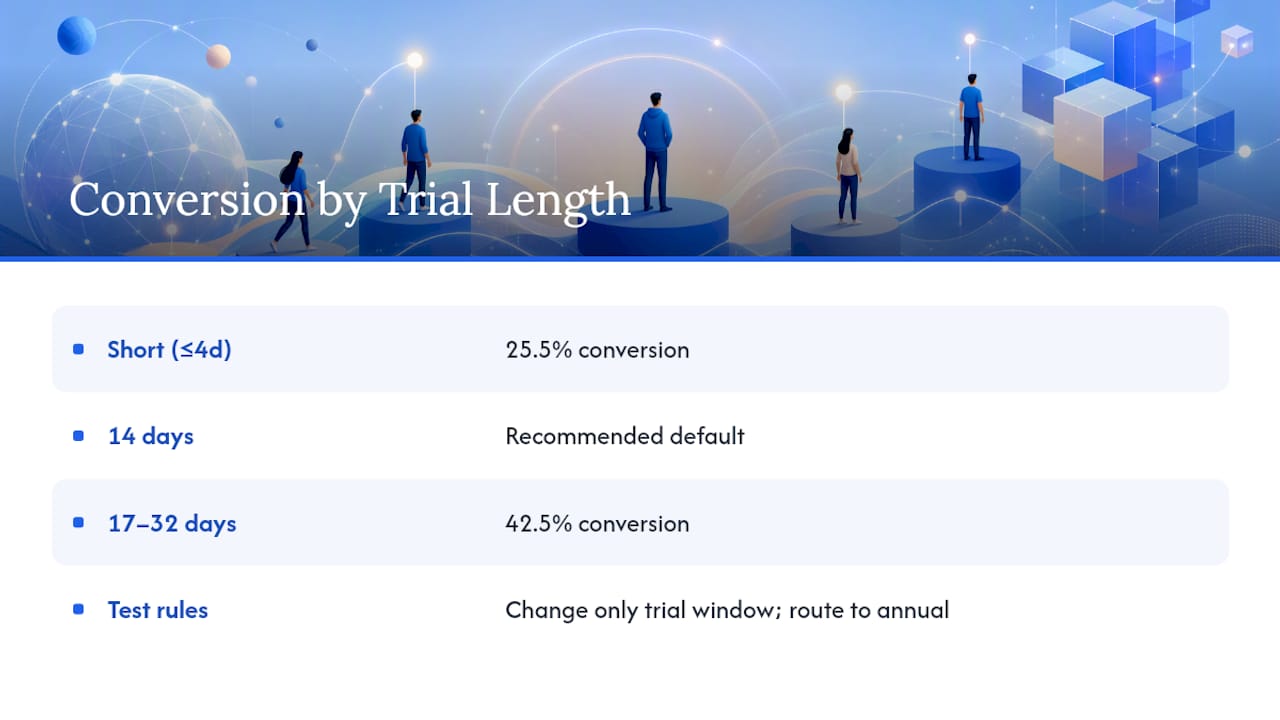
That pattern is why 14 days on an annual plan has become the default recommendation for apps with a value proposition that takes more than a few taps to prove. Headspace’s own trial testing favored the 14-day window over shorter alternatives, and it’s a sensible starting point if you’re building your first trial-first paywall.
Shorten to seven days when you need experiment velocity more than peak conversion, or when per-trial serving cost is high (compute-heavy AI features, for example). Duolingo cut its trial from two weeks to one week specifically to double how fast it could run pricing tests.
Two rules for a clean trial-length test: change only the trial window, never redesign the paywall in the same test, and always route the trial toward an annual plan rather than monthly, since annual trials convert to longer-term customers at a materially better rate.
Metered and Usage-Based Paywalls: When Flat Pricing Fails
Flat subscriptions break down fast for apps where cost-to-serve scales with usage, AI image generation, voice transcription, or any feature running on a per-call API cost. Metered and credit-based paywalls solve this by tying price to consumption instead of time.

Credit packs typically follow a simple shape: a small starter pack priced to feel like an easy yes, a mid-size pack priced per-unit cheaper to nudge bulk buying, and a “power user” pack that makes the mid-tier look efficient by comparison. This mirrors the three-tier anchoring trick from freemium, just applied to consumables instead of subscription tiers.
UX details that separate good metered paywalls from confusing ones:
- Show remaining credits somewhere visible at all times, not buried in settings
- Trigger the refill prompt at the moment of use, not as a separate notification
- Never let a user hit zero credits mid-task without warning
Run your unit economics before setting credit prices. Platform store fees take roughly 30% of consumable in-app purchases, which means your credit price needs real margin above raw compute cost, not just a markup that looks good on a slide.
Localizing Paywall Pricing: PPP Rules and Annual Framing
Purchasing power parity pricing isn’t a nice-to-have for apps chasing global downloads, it’s often the difference between a market converting or not. Localized pricing in India, for instance, priced around ₹79 to ₹149 per month rather than a flat dollar conversion, has pushed conversion from under 1% to the 3 to 5% range in observed case studies, with multi-market localization lifting global subscription revenue by an average of roughly 22%.
Pair localization with annual-first framing. Pricing the annual plan at roughly twice the monthly price, then displaying the effective monthly cost underneath it, consistently drives higher annual selection and lower churn.
- Round localized prices to store-supported price points, never raw currency conversions
- Re-check PPP tiers annually as currencies shift
- Track blended ARPU and refund rate by country for 60 days post-launch, not just conversion rate
Complementary In-App Purchases That Boost Subscription Revenue
Consumable purchases work alongside a subscription when they add something genuinely new, not when they patch a subscription that’s underdelivering. A meal-planning app selling one-time recipe packs on top of its subscription is additive. An app that walls off a core feature and sells it back as a “boost” tends to frustrate the exact users it should be retaining.
Common complementary IAP types include consumable boosts, one-time content packs, and cosmetic customization. Price these as a small multiplier over your monthly subscription cost, not as a fraction of it, so they read as premium extras rather than a cheaper way around paying full price.
Model your margin carefully: platform fees run about 30% on consumables regardless of subscription lifecycle discounts.
How to Use Apppricer Data to Choose Your Paywall Anchors
Guessing at competitor pricing wastes weeks. Apppricer aggregates actual prices, subscription structures, and revenue trends across 175 countries, so you can see what comparable apps actually charge instead of estimating from App Store screenshots.
A practical workflow looks like this:
- Pull three to five comparable apps in your category from apppricer’s app listings
- Extract their price anchors: monthly price, annual price, and trial length
- Model trial-to-paid scenarios against the conversion bands above to project your own Year 1 revenue
- Check country-level pricing to plan your PPP localization tiers before launch
Pro Tip: *Before you set a single price, check what the three closest competitors in your exact category charge in your top five markets.
This is also where you set realistic experiment targets.
Legal and Compliance Rules Every App Paywall Has to Follow
Both major app stores enforce strict rules on how paywalls present subscriptions, and violating them risks app rejection or removal. Apple’s App Store Review Guidelines require clear disclosure of subscription price, billing period, and auto-renewal terms before a user commits to a purchase. Google Play enforces comparable transparency requirements under its subscriptions policy.
A few compliance points trip up developers repeatedly:
Auto-renewal disclosure has to appear before the transaction, not after. If your trial converts to a paid annual plan automatically, that fact needs to be visible on the paywall screen itself, not buried in a terms-of-service link. Cancellation instructions also need to be reachable within the app, not just through a support email.
Regional consumer protection law adds another layer. The European Union’s Digital Markets Act and various national consumer protection statutes require clear pricing disclosure and, in some jurisdictions, a right to cancel within a set window after purchase. Requirements vary by country, so a paywall compliant in the United States isn’t automatically compliant in Germany or Brazil.
Dark patterns, the industry term for deliberately confusing cancellation flows or hidden pricing, draw increasing regulatory scrutiny and app store enforcement action. A paywall that makes the free trial button visually dominant while shrinking the “no thanks” option is the kind of design that gets flagged in store review.
Run your paywall copy past your legal counsel before shipping to markets with strict consumer protection regimes, and don’t treat this as a one-time check. Store policies get revised often enough that a compliant paywall from last year can fall out of compliance without any change on your end.
A 90-Day Paywall Experiment Playbook
Running a paywall experiment without a checklist is how teams end up with contaminated data and no clear read three months later.
During the test, monitor daily: conversion by cohort, refund rate, and uninstall rate within the first 48 hours. A refund spike early usually means the paywall oversold the product relative to what it delivers.
At evaluation, three checks matter most: confirm the result reaches statistical significance before you act on it, look at cohort LTV at 30 and 90 days rather than day-one conversion alone, and calculate CAC payback period against your actual ad spend. A paywall that converts well but pushes payback past six months isn’t a win, it’s a slower problem.
— Sergey
See Your Category’s Real Pricing With Apppricer
Every benchmark in this article gets more useful once you can see it against your own category. Apppricer pulls actual subscription prices, trial lengths, and revenue trends from apps competing in your exact niche across 175 countries, so instead of guessing whether $9.99 or $14.99 monthly is right, you can check what’s already working for comparable apps at that price point.
That means you can skip the multi-week competitor research cycle most teams run before setting a price. Browse comparable apps and their current pricing to build your first set of price anchors, or start from the apppricer platform overview to see the full range of revenue and download data available for your category. If you’re refining your offer structure alongside pricing, SaaS offer optimization resources can help you tighten packaging once your price anchors are set.