App Competitor Analysis for Product Teams: A Practical Playbook

A useful app competitor analysis combines four things: app-store signals, historical pricing and revenue data, review sentiment, and a market-size check, run against 3-5 real competitors until you have enough evidence to build, pivot, or kill an idea. Skip any one of those four and you’re guessing with better spreadsheets.
For most teams, the fastest path runs through three tool categories. Focused ASO tools like AppFollow and AppTweak handle keyword tracking and metadata monitoring. Full-market intelligence platforms like Sensor Tower (data.ai), Similarweb, and Crayon give you download and revenue estimates plus broader market context. Pricing-specific platforms like Apppricer solve a narrower but often more decisive problem: what competitors actually charge, how their subscription tiers are structured, and how that pricing performs across 175 countries.
Whichever combination you pick, collect the same five data points before you form an opinion: downloads, revenue estimates, store rankings, keyword ownership, and review sentiment. The App Store functions as a free market-research panel once you know how to read its charts, keyword popularity scores, and review threads, so a lot of this data costs nothing but time.
- TAM/SAM/SOM sizing tells you whether the opportunity is big enough to chase.
- Historical depth matters more than most teams expect. Serious benchmarking against seasonality and multi-year trends generally requires 3+ years of historical data, and plenty of tools quietly cap you at 12 months.
- Google Play and the App Store often tell different stories for the same app category, so pull both before you draw conclusions.
Key Takeaways
Effective app competitor analysis combines store signals, pricing data, and review sentiment across 3-5 competitors, validated against a pre-committed kill criterion.
| Point | Details |
|---|---|
| Combine tool categories | Pair an ASO tool for keywords with a pricing tracker for monetization data rather than relying on one platform. |
| Demand 3+ years of history | Multi-year data is necessary to separate seasonal blips from real trend shifts. |
| Cross-check every estimate | Compare download and revenue figures against review counts and store rankings before trusting them. |
| Mine one-star and three-star reviews | Cancellation stories and near-miss feature complaints reveal roadmap opportunities competitors already validated. |
| Use Apppricer for pricing intelligence | Apppricer aggregates real subscription pricing and revenue by country across 175 countries, exportable via CSV or API. |
Curated resources to consult next
- App market research guide for a full framework on reading store signals.
- Mobile app market research overview for guidance on export and integration needs.
- Step-by-step competitor framework for sequencing metadata, downloads, and reviews.
- Competitor analysis tool roundup for cross-checking vendor claims before you buy.
- Apppricer pricing data by app for a live example of pricing and subscription exports.
Table of Contents
- What Is App Competitor Analysis and Why Does It Matter?
- Which Competitor-Analysis Tool Approach Fits Your Team?
- How Do You Choose the Right Competitor-Analysis Tool?
- How Do You Run a Lean App Competitor Analysis Step by Step?
- How Do You Validate the Data Behind an App Competitor Analysis?
- Which Competitor-Analysis Tools Should Be on Your Shortlist?
- Is App Competitor Analysis Legal and Ethical?
- Get Faster Pricing Answers With Apppricer
- Frequently Asked Questions
- Sources
What Is App Competitor Analysis and Why Does It Matter?
App competitor analysis is the process of systematically tracking rival apps’ pricing, downloads, revenue, keyword rankings, and review sentiment to inform product and go-to-market decisions. It’s the mobile-specific cousin of traditional competitive intelligence, adapted for the fact that app stores publish an unusual amount of usable data in public view: rankings, review counts, screenshot history, and update cadence, all visible without a subscription.
The discipline matters because app store economics punish guesswork. A pricing tier set $2 too high can suppress conversion for years before anyone notices, and a keyword strategy built on assumption instead of data leaves ranking opportunity on the table indefinitely. Teams that treat competitor analysis as a one-time research sprint before launch, rather than an ongoing practice, tend to miss the metadata changes, price tests, and feature rollouts that competitors run continuously.
Which Competitor-Analysis Tool Approach Fits Your Team?
No single tool covers pricing, keywords, downloads, and reviews with equal depth, which is why most serious app competitor analysis workflows combine two or three tool categories rather than relying on one platform for everything.
Enterprise market-intelligence platforms (Crayon, Klue, Sensor Tower/data.ai, Similarweb) sit at the top of the price range and cover the broadest set of metrics: download estimates, revenue modeling, web and app traffic overlap, and category-level trend data. They’re built for teams that need cross-functional intelligence, not just app store specifics, and they typically integrate with a broader competitive-intelligence stack.
ASO-first tools (AppTweak, AppFollow) specialize in keyword tracking, metadata optimization, and rank monitoring across the App Store and Google Play. They’re narrower in scope but far more precise on the questions that matter for organic visibility: which keywords a competitor ranks for, how their title and subtitle changed last quarter, and how review response time correlates with rating trends.
Pricing and revenue trackers like Apppricer occupy a category the broader platforms tend to underserved. Instead of a general download estimate, you get actual pricing structures, subscription tiers, and revenue breakdowns by country for iOS apps across 175 countries. If your core question is “what should we charge,” a general market-intelligence tool gives you a download curve; a pricing tracker gives you the number on the paywall.
Metadata-change trackers and review-analysis tools round out the stack, often as add-on modules inside the platforms above rather than standalone purchases. They matter most for teams running continuous monitoring rather than periodic snapshots.
Search authority tools (Ahrefs, Semrush) round out the picture for a specific but frequently overlooked use case: understanding how competitors drive web traffic to their app landing pages and which search terms feed app store conversion outside the store’s own search bar. Neither is an app-store tool natively, but both help when your competitor’s growth strategy leans on content or SEO rather than paid acquisition.
Here’s how the categories stack up across the dimensions that actually drive a purchase decision:
| Dimension | Enterprise market-intel | ASO-first tools | Pricing & revenue trackers | Metadata/review trackers |
|---|---|---|---|---|
| Best for | Cross-functional competitive intelligence | Keyword and rank optimization | Pricing strategy and revenue benchmarking | Continuous monitoring of listing changes |
| Stores covered | App Store, Google Play, web | App Store, Google Play | App Store (typically), multi-country | App Store, Google Play |
| Metrics provided | Downloads, revenue, traffic, market share | Keywords, rankings, metadata, reviews | Prices, subscription tiers, revenue by country | Metadata diffs, screenshot history, ratings |
| Historical depth | Often 2-3+ years on paid tiers | Varies, usually 12 months | Varies by vendor and country coverage | Typically 12 months or less |
| Pricing/free tier | High cost, limited or no free tier | Mid-range, some free tiers | Mid-range, often has a trial or sample export | Often bundled into ASO suites |
| API & integrations | Usually available on enterprise plans | Common on mid/high tiers | Available on select platforms including Apppricer | Varies, often limited |
| Ease of use | Steep learning curve, built for analysts | Moderate, built for marketers | Straightforward, built for quick benchmarking | Moderate |
| Monitoring & alerts | Yes, often real-time | Yes, rank and keyword alerts | Price-change tracking on some platforms | Core feature (daily snapshot alerts) |
A few things to keep in mind before you pick a lane:
- Indie developers and solo founders rarely need enterprise market-intelligence pricing. A focused ASO tool plus a pricing tracker covers 80% of what you need to validate an idea.
- Growth-stage teams benefit most from combining an ASO tool with a pricing tracker, since keyword visibility and monetization strategy tend to move together as you scale.
- Enterprise teams juggling multiple product lines or markets are the ones who actually justify the cost of a full market-intelligence platform, particularly when competitive intelligence feeds into board reporting.
Pro Tip: Never take a vendor’s download estimate at face value. Cross-check it against the app’s review count and its position on category charts. If a tool claims 500,000 monthly downloads for an app sitting at rank #180 in its category with 3,000 total reviews, the estimate is probably inflated. Independent validation of vendor claims should be a standing habit, not a one-time audit.
How Do You Choose the Right Competitor-Analysis Tool?
Run through this checklist before you sign a contract, not after:
- Data depth. Ask for exactly how many years of historical data the platform retains, not just what the dashboard displays by default.
- Store and market coverage. Confirm App Store and Google Play coverage, plus whether country-level breakdowns go beyond your top five markets.
- Exact metrics, not categories. “Revenue insights” could mean modeled estimates or a single ballpark figure updated quarterly. Ask which.
- API access and integrations. If you plan to feed data into a BI tool or product dashboard, confirm export and API support before you commit budget.
- Data freshness SLA. Daily, weekly, or monthly refresh cycles change what kinds of decisions the tool can actually support.
Before trusting any vendor’s numbers, spend 15 to 30 minutes running a quick validation pass: pick three competitors you already know well, pull the tool’s estimates for downloads and revenue, and compare them against what you can observe directly from store rankings and review velocity. If the tool’s numbers are wildly off for apps you understand, they’re probably off for the ones you don’t.
Watch for these red flags:
- Data sources that aren’t disclosed anywhere in the product documentation.
- No historical data beyond the current month or quarter.
- Store coverage limited to a single platform when your competitors operate on both.
- No monitoring or alerting, forcing you to manually re-check the dashboard on a schedule.
On budget: free tiers work fine for a single competitive snapshot or an early-stage feasibility check. Paid plans earn their cost once you need ongoing monitoring, multi-country breakdowns, or API access for a recurring reporting workflow.
How Do You Run a Lean App Competitor Analysis Step by Step?
- Define the competitive arena. List both direct competitors (same feature set) and job-to-be-done competitors (different app, same user problem solved).
- Pick 3-5 competitors. More than five and the analysis stalls; fewer than three and you risk drawing conclusions from an outlier.
- Gather signals. Pull store charts, keyword popularity scores, download and revenue estimates, and a sample of reviews across star ratings.
- Size the market. Layer search volume, competitor download estimates, and review velocity together. When all three converge, you’re looking at a real, sizable market rather than a niche mirage.
- Validate demand directly. A landing page test or a small keyword-ads campaign will tell you more in a week than another round of desk research.
- Pre-commit a kill criterion. Write down, before you start, what result would make you walk away. Do this before you fall in love with the idea.
At each step, collect concrete numbers: download counts, review velocity (reviews per week), keyword popularity score, star-rating distribution, and update frequency. A competitor updating weekly with a growing review count is actively investing; one that hasn’t updated in eight months is coasting or dying.
Review mining deserves its own pass. Sample one-star and three-star reviews specifically. One-star reviews reveal cancellation stories for subscription apps, which is some of the most direct churn-cause data you’ll ever get for free. Three-star reviews tend to surface “almost great” feature gaps: the app works, but a specific missing capability keeps users from loving it.

Here’s a keyword-opportunity example: a competitor ranks #4 for a keyword with strong estimated search volume, but their app has stalled on updates for four months and their rating has drifted down over that period. That’s a realistic gap. A keyword dominated by an app updating weekly with a 4.8 rating and rising downloads is not a realistic near-term target, no matter how attractive the volume looks.
How Do You Validate the Data Behind an App Competitor Analysis?
Before trusting any number, check five things: whether the data source is disclosed, how many years of history are available, what cross-checks the vendor ran, whether you can export it, and whether an API exists for programmatic pulls.
- Data source disclosure. Store API data, statistical estimates, and panel data carry very different confidence levels. A vendor that won’t say which one you’re getting is a vendor to question.
- Historical coverage. Teams evaluating seasonality and long-term trend lines generally want 3+ years of history; shorter windows work for a quick snapshot but not for trend analysis.
- Cross-checks performed. Does the vendor validate download estimates against review counts, or just publish a raw model output?
- Exportability and API access. A platform like Apppricer that lets you pull pricing and subscription data by app removes the manual-entry step entirely.
A minimal usable export should include, at minimum: date, country, downloads estimate, revenue estimate, category ranking, and keyword data. Anything less and you’re back to manual cross-referencing.
| Column | Why it matters |
|---|---|
| Date | Lets you track change over time, not just a single snapshot |
| Country | Pricing and demand vary sharply by market |
| Downloads estimate | Core demand signal, best read alongside review velocity |
| Revenue estimate | Ties monetization to actual pricing structure |
| Category ranking | Context for whether downloads reflect algorithmic momentum |
| Keyword data | Shows organic visibility separate from paid acquisition |
Which Competitor-Analysis Tools Should Be on Your Shortlist?
For pure ASO work, AppFollow and AppTweak cover keyword tracking, metadata history, and rank alerts well, and both are built specifically around app store mechanics rather than general market intelligence. For broad market sizing and cross-platform intelligence, Sensor Tower (data.ai) and Similarweb give the deepest download and revenue estimate coverage, useful when you need to justify a market-entry decision to stakeholders outside the product team.
Crayon and Klue serve a different job: they aggregate competitive intelligence across many sources, not just app stores, and fit teams that need a single feed for sales enablement and executive reporting. Productboard isn’t a competitor-analysis tool by design, but it’s worth including because product teams often route the review-mining and feature-gap findings from a competitor analysis directly into a Productboard backlog for prioritization.
For pricing specifically, Apppricer fills a gap the broader platforms leave open. If your team’s decision hinges on subscription tier structure, country-by-country pricing, or which monetization model a competitor just switched to, that’s a narrower question than “how many downloads did they get,” and it needs a tool built around that exact question.
Ahrefs and Semrush round out the list for teams whose competitors invest heavily in app store optimization through owned content or backlink-driven traffic to their landing pages, a factor that’s easy to miss if your analysis stays entirely inside the app store.
Is App Competitor Analysis Legal and Ethical?
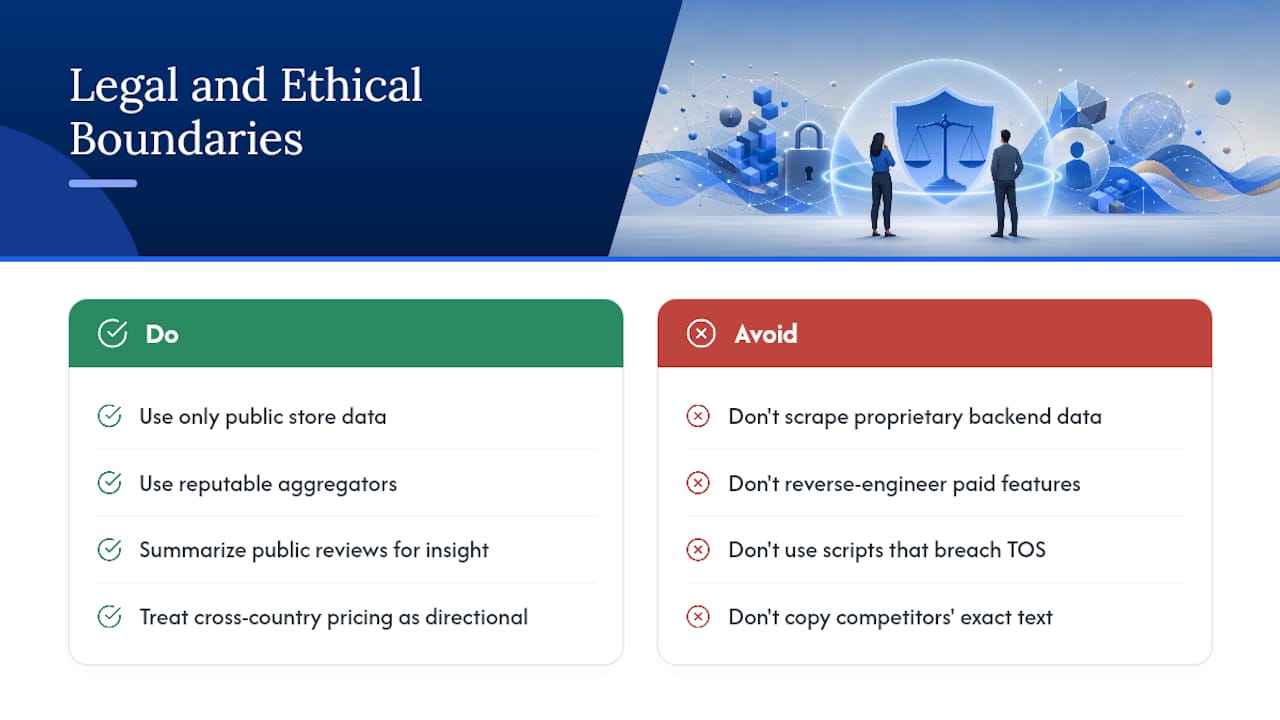
Yes, within clear boundaries. Everything covered so far — store rankings, public reviews, published pricing, keyword rankings, and metadata — is public information that any user of the App Store or Google Play can see. Collecting and analyzing it doesn’t violate any platform’s terms of service, and it’s standard practice across the app industry.
The line moves when you go beyond public data. Scraping a competitor’s app to extract proprietary backend logic, reverse-engineering paid features to replicate them exactly, or using automated scripts that violate a platform’s terms of service to pull data at scale all cross from research into risk. Most reputable data platforms, Apppricer included, aggregate what’s already publicly disclosed, pricing shown to any shopper, download estimates modeled from public signals, rather than extracting anything proprietary.
Review mining deserves a specific ethical note. Reading and summarizing public reviews for product insight is fine. Copying a competitor’s exact feature descriptions or marketing language into your own listing isn’t just an ethics problem, it’s a trademark and copyright risk. Use reviews to understand what users want, not to template what a competitor already shipped.
One more practical point: when you’re benchmarking pricing across countries, remember that currency, tax treatment, and consumer protection rules vary by jurisdiction. A pricing strategy that’s standard in one market can run into local regulatory requirements elsewhere, so treat cross-country pricing comparisons as directional intelligence, not a legal green light to copy a specific number.
Author perspective: common approaches product teams actually use
Most teams run a fast ASO check and skip the deeper review mining, because it’s tedious and doesn’t show up in a dashboard. That’s backwards. The keyword data tells you where competitors rank; the reviews tell you why users are leaving them. One team I’ve seen this play out for shifted an entire roadmap after finding the same cancellation complaint buried in a competitor’s three-star reviews for months. Nobody had looked until the pivot was already overdue.
Get Faster Pricing Answers With Apppricer
Everything in this guide gets faster once pricing data stops being a manual research task. Apppricer is built specifically for the question most competitor-analysis tools treat as an afterthought: what are competitors actually charging, in which countries, and how is that translating into revenue?
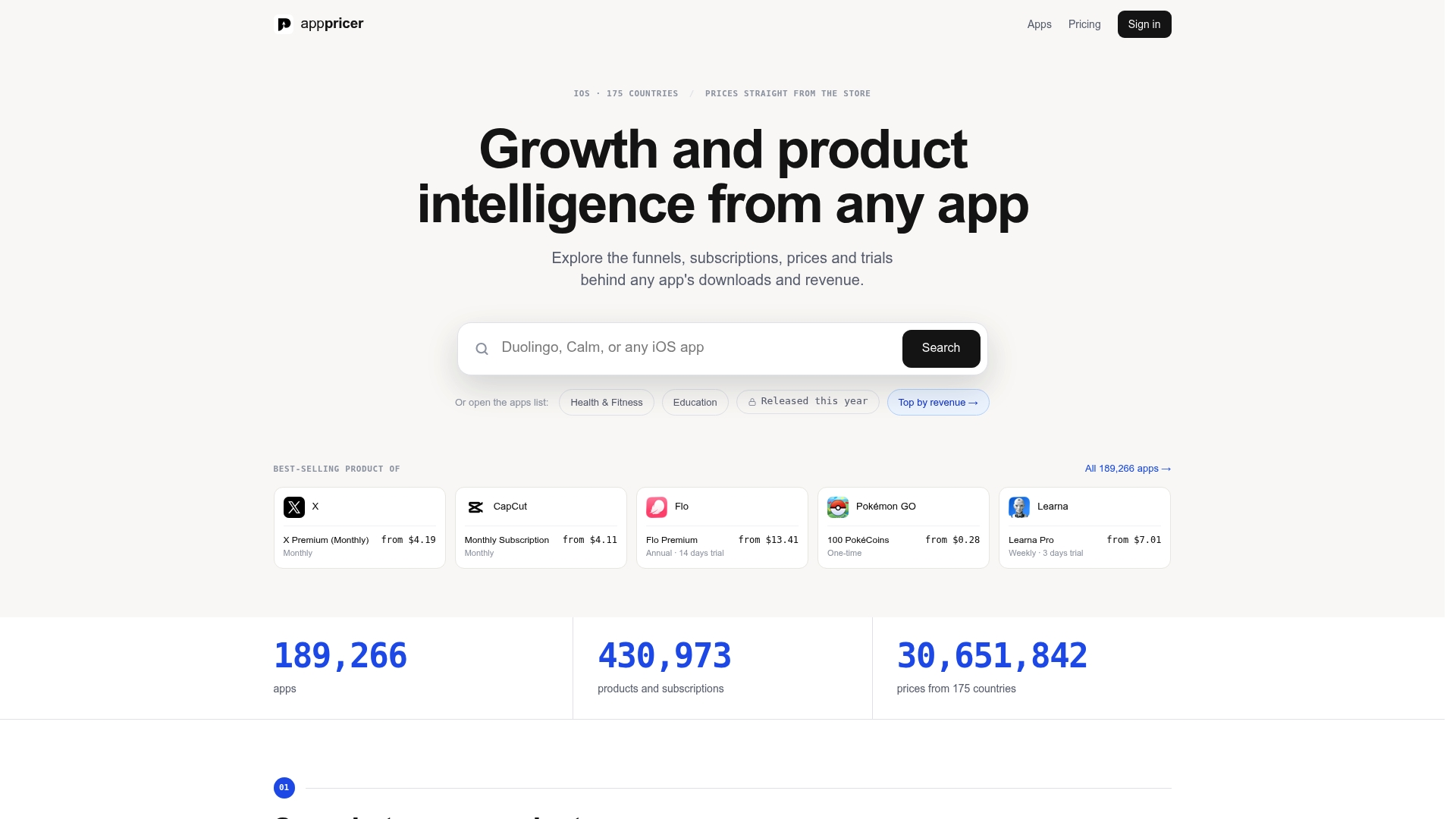
The platform aggregates real subscription models and pricing structures for iOS apps across 175 countries, paired with revenue estimates and country-level breakdowns you can export as CSVs or pull through the API. Instead of guessing at a competitor’s pricing tiers from a screenshot, you get the actual structure, which niches are underpriced relative to demand, and where a competitor just changed their model. Browse the current iOS pricing and subscription data by app to see a sample export, or start with the Apppricer platform overview to check what a trial covers for your team.
Frequently Asked Questions
What is the difference between app competitor analysis and general market research? App competitor analysis focuses specifically on rival apps’ store metrics, pricing, and reviews. Broader market research includes that data plus demand validation, TAM/SAM/SOM sizing, and customer interviews outside the app stores themselves.
How often should product teams repeat a competitor analysis? Monitor pricing, rankings, and keyword shifts continuously if possible, and run a full deep-dive analysis quarterly or ahead of any major roadmap decision. Competitors change pricing and metadata more often than most teams check for it.
Do I need a paid tool to do app competitor analysis, or can I start free? You can start with free store data, category charts, keyword popularity, and reviews, all visible without a subscription. Paid tools save time and add historical depth, revenue modeling, and monitoring alerts once your analysis needs to scale.
What’s the biggest mistake teams make in app competitor analysis? Skipping the kill criterion. Teams gather data, get excited about a gap they’ve found, and never define upfront what evidence would make them walk away, which leads to confirmation bias creeping into the final decision.
How many competitors should I include in an analysis? Three to five works best. Fewer than three risks drawing conclusions from an outlier; more than five slows the process down without adding proportional insight.
Sources
- How to Do App Market Research: The 2026 Guide | ASO Agency
- Mobile app market research | BuildFire
- How to Analyze App Competitors (Step-by-Step Framework)
- The 10 best competitor analysis tools | Zapier