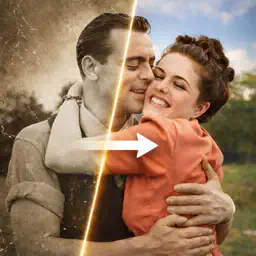
RePhoto: Restore Old Photos AI
Animate, Colorize & Repair
| Revenue % | |||||
|---|---|---|---|---|---|
| One-time purchase | 175 | $23.37 – $35.84 | 24.8% | +18.0% | |
| One-time purchase | 175 | $9.06 – $14.92 | 24.8% | +18.0% | |
| One-time purchase | 175 | $39.36 – $61.56 | 24.8% | +18.0% | |
| Annual | 175 | $43.75 – $68.72 | 24.8% | +18.0% | |
| 6 months | 175 | $27.32 – $41.01 | 24.8% | +18.0% | |
| Weekly | 175 | $9.08 – $14.92 | 24.8% | +18.0% | |
| One-time purchase | 175 | $1.48 – $2.98 | 24.8% | +18.0% | |
| Monthly | 44 | $17.48 – $26.59 | 24.8% | +18.0% |
Description
RePhoto turns faded, torn, and black-and-white photos into vivid, lifelike memories — powered by AI, right on your iPhone.
Whether it's a century-old portrait of your grandparents, a scratched childhood Polaroid, or a dusty wedding photo, RePhoto restores every detail in seconds. No expertise needed — just pick a photo and tap once.
KEY FEATURES
Restore — one-tap restoration with automatic colorization. Ideal for black-and-white photos and heavily damaged images.
Upscale — boost any photo to high resolution while preserving natural detail. Perfect for printing, framing, or enlarging small, low-quality scans.
Face Detail Boost — an extra boost for blurry faces, especially in group photos.
Animate — bring still photos to life. Turn any portrait into a short video or GIF ready to share.
Eye Color — change eye color directly on-device, instantly, with natural-looking results.
Before / After Slider — compare the original and restored versions with a single swipe.
Save & Share — export in full resolution to Photos, Messages, WhatsApp, Instagram, and more.
PERFECT FOR
Reviving old family albums
Restoring childhood photos
Printing and framing restored photos
Gifts for parents and grandparents
Genealogy and family history projects
Social media throwbacks
PRIVACY FIRST
Your photos are yours. We never sell your data, and images are processed securely.
ABOUT REPHOTO PRO
RePhoto Pro includes a generous token allowance that renews with your subscription — use it for restorations, upscales, and animations, with priority processing.
Terms of Use: https://rephoto.studio/terms
Privacy Policy: https://rephoto.studio/privacy
Last collected from the App Store on