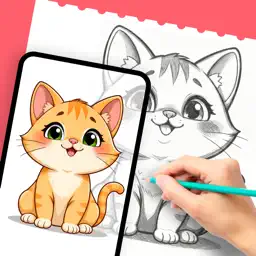
AR Sketch Art: Camera Drawing
Trace & Draw by WhatSticker
| Revenue % | |||||
|---|---|---|---|---|---|
| One-time purchase | 175 | $4.46 – $7.57 | 24.8% | +18.0% | |
| One-time purchase | 175 | $8.92 – $15.17 | 24.8% | +18.0% | |
| One-time purchase | 175 | $1.54 – $3.10 | 24.8% | +18.0% | |
| Weekly | 175 | $3.96 – $7.57 | 24.8% | +18.0% | |
| Annual · 3 days trial | 175 | $15.97 – $42.72 | 24.8% | +18.0% | |
| Weekly | 175 | $5.35 – $9.09 | 24.8% | +18.0% | |
| Annual · 3 days trial | 175 | $23.20 – $36.46 | 24.8% | +18.0% | |
| Weekly · 7 days trial | 44 | $2.79 – $4.53 | 24.8% | +18.0% | |
| Annual · 7 days trial | 44 | $27.97 – $39.99 | 24.8% | +18.0% |
Description
AR Sketch Art turns your iPhone or iPad into a tracing tool. Pick any image, look through the camera and trace it line by line onto real paper. Inside the app you'll also find a collection of WhatSticker stickers, ready to draw. When you want to learn instead of copy, step-by-step lessons guide you from the first line to the finished drawing.
Made for anyone who wants to draw
New to drawing? Tracing helps you get the shapes and proportions right from the start, so you finish drawings you are proud of. Hobby artists can copy references, make drawings for friends and try new styles. Experienced artists can use it as a quick warm-up or to transfer a sketch onto a new sheet.
Key Features:
Choose how you draw: Camera to Draw, Canvas to Draw or Advance AR
Resize, move and rotate the image, then lock it so it stays in place while you draw
Adjust opacity, zoom from 0.5x to 3x, turn on the flash or switch to the outline-only Edge view
Turn your photos into Sketch, Deep Sketch, Anime or Comics styles before you trace them
Learn with step-by-step lessons that build each drawing a few lines at a time
Explore ready-to-trace drawings in themed categories, from cute animals to love and holidays
Draw with a friend: create a room, share the code and each draw half of the same picture
Record a photo, video or time-lapse of your drawing and save it to your Photos
How to Get Started:
1. Choose a drawing from the library, or pick a photo from your gallery, Files or camera.
2. Adjust the image: change its opacity, switch to the outline-only Edge view or apply a sketch style.
3. Place your phone on a stable support, about 1 foot (30 cm) above the paper.
4. Look at the screen: the image appears semi-transparent over the camera view of your paper.
5. Follow the lines on the screen with your pencil on the paper.
Subscription Details:
AR Sketch Art Premium gives you unlimited drawing modes, all drawings and lessons, Photo to Sketch styles and drawing with friends.
Plans: Weekly Premium (1 week) and Yearly Premium (1 year), both with a 7-day free trial
Payment is charged to your Apple ID account at confirmation of purchase
The subscription renews automatically unless auto-renew is turned off at least 24 hours before the end of the current period
Your account is charged for renewal within 24 hours before the end of the current period
You can manage or cancel your subscription in your Apple ID Account Settings after purchase
Any unused portion of a free trial is forfeited when you purchase a subscription
Terms of Use: https://www.apple.com/legal/internet-services/itunes/dev/stdeula/
Last collected from the App Store on