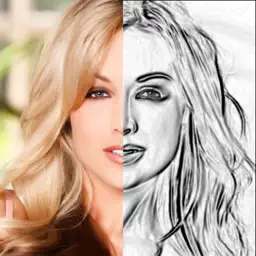
Sketch my photo drawing booth
Turn your picture into artwork
| Revenue % | |||||
|---|---|---|---|---|---|
| Monthly | 175 | $0.73 – $6.83 | 24.8% | +18.0% | |
| Annual · 3 days trial | 175 | $3.36 – $30.58 | 24.8% | +18.0% | |
| 3 months | 175 | $1.49 – $13.41 | 24.8% | +18.0% | |
| One-time purchase | 175 | $3.51 – $5.97 | 24.8% | +18.0% |
| Downloads | Revenue | Top product | |||
|---|---|---|---|---|---|
| United States | 1,201 | 24.8% | 24.8% | 1stAnnual · 7 days trialPremium Yearly$59.99 | |
| United Kingdom | 229 | 24.8% | 24.8% | 1stMonthlyPro Monthly$9.99 | |
| Canada | 106 | 24.8% | 24.8% | 3rdWeekly · 3 days trialUnlimited Weekly$4.99 | |
| Australia | 96 | 24.8% | 24.8% | 1stOne-time purchaseLifetime Unlock$29.99 | |
| India | 46 | 24.8% | 24.8% | 2nd6 monthsPlus 6 Months$34.99 | |
| South Africa | 30 | 24.8% | 24.8% | 4thOne-time purchaseStarter Pack$2.99 | |
| Pakistan | 18 | 24.8% | 24.8% | 1stAnnual · 14 days trialFamily Annual$119.99 | |
| Netherlands | 15 | 24.8% | 24.8% | 2nd3 monthsPro Quarterly$24.99 | |
| Philippines | 14 | 24.8% | 24.8% | 1stOne-time purchaseRemove Ads$6.99 | |
| United Arab Emirates | 12 | 24.8% | 24.8% | 1stMonthly · 7 days trialPremium Monthly$12.99 |
Description
Sketch Booth - Core Features that make us unique
===========================
● Live video filters to help make the perfect sketch
● 1-of-a-kind custom designed sketch filters
● Adjust any filter settings to get the perfect photo
● Advanced colouring tools to touch up the photo
Sketch Booth is an advanced photo editing tool that allows you to turn any photo into a work of art. There are heaps of filters to choose from as well as tools to make adjustments to the filters to get the perfect photo. Once you have created a sketch from your photo or camera, you can then add a touch of color to make the photo truly amazing. You can also save your photo and come back and edit it at a later stage and share it with all of your friends & family.
-------------------------------
All Sketch Booth Features:
● Live video filters
● Loads of custom designed filters
● Tools to adjust each filter
● Advanced coloring tools
● Multiple color pallets to choose from
● Save your edits and come back later
● Share & save your photo with friends & family
● Undo & redo features in case you make a mistake
-------------------------------
Premium Upgrade Features
-----------------------
Unlock all colors
Unlock all filters
Add unlimited texture brushes
Remove ads
Remove watermarks
Save hi-resolution photos
Choose the length of subscription: 1 Month / 3 Months / 1 Year.
Choose from different subscription options.
Subscription with a free trial period will automatically renew to a paid subscription. You can cancel your subscription in the iTunes settings at least 24-hours before the end of the free trial period. Subscription payments will be charged to your iTunes account at confirmation of your purchase and upon commencement of each renewal term.
Please note: any unused portion of a free trial period (if offered) will be forfeited when you purchase a premium subscription during the free trial period.
You can cancel a free trial or subscription anytime by cancelling your subscription through your iTunes account settings. This must be done 24 hours before the end of a free trial or subscription period to avoid being charged. The cancellation will take effect the day after the last day of the current subscription period, and you will be downgraded to the free service.
Please read our Privacy Policy here
http://www.revosoft.com.au/uploads/8/2/0/2/82026220/2015.10_revosoft_privacy_policy.pdf
Please read Terms of Use here
http://www.revosoft.com.au/uploads/8/2/0/2/82026220/terms_of_use.pdf
Last collected from the App Store on