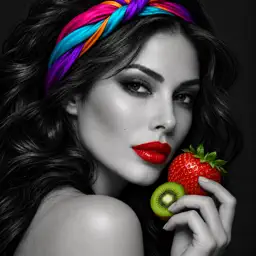
color pop photo
No in-app products collected for this app.
| Rating | |||
|---|---|---|---|
| United Kingdom | 35%341 | 4.37 | |
| United States | 27%264 | 4.35 | |
| Australia | 4%42 | 4.43 | |
| Canada | 4%40 | 4.22 | |
| India | 3%31 | 3.87 | |
| Ireland | 3%28 | 4.57 | |
| New Zealand | 2%23 | 4.09 | |
| Philippines | 2%21 | 3.71 | |
| France | 1%11 | 4.73 | |
| Sweden | 1%10 | 4.00 |
Description
Turn ordinary photos into dramatic selective-color artwork.
Color Pop Photo converts your image to black and white, then lets you restore vivid original color exactly where you want it. Paint with precision, blur selected areas, apply beautiful filters, and create striking photos directly on your iPhone or iPad.
MAKE COLOR STAND OUT
Create the classic color splash effect by keeping selected details in full color while the rest of your picture remains black and white. Highlight a person, flower, outfit, car, sky, or any detail you want viewers to notice.
PRECISION COLOR BRUSH
Restore original color with your finger
Erase areas back to black and white
Adjust brush size and opacity
See the exact brush size before painting
Use the magnified preview for detailed edges
Undo, redo, or reset your brush strokes
SELECTIVE BLUR
Apply blur only where you paint instead of blurring the entire picture.
Soften distracting backgrounds
Keep your subject sharp
Adjust blur strength
Control the blur-brush size
Create portrait-style focus effects
MOVE AND ZOOM
Select Move when you need to reposition or inspect your image.
Drag to move the canvas
Pinch to zoom up to 7×
Double-tap for quick zoom
Reset position and zoom instantly
Paint without accidentally moving the image
BLACK, WHITE AND SEPIA STYLES
Choose the monochrome appearance that works best with your photo:
Classic
Noir
Tonal
Sepia
PHOTO FILTERS
Complete your image with a finishing filter:
Original
Vivid
Warm
Cool
Noir
Fade
Chrome
SAVE AND SHARE
Take a new picture or choose one from your photo library
Export your finished edit at full photo resolution
Save directly to your photo library
Share through your favorite installed apps
PRIVATE PHOTO EDITING
Your photos are processed on your device. Color Pop Photo uses the camera only when you choose Take a Photo and saves an image only when you tap Save Photo.
Create eye-catching portraits, artistic black-and-white pictures, selective-color effects, softened backgrounds, and memorable social posts with simple touch controls.
Last collected from the App Store on