
VIA App
How much does VIA App cost?
Prices are current as of 9 Nov 2026.
VIA App has no in-app products on record in the United States.
10+ alternatives to VIA App
| VIA App |   Pharos Print |   Q-SYS UCI Viewer |   Crestron AirMedia |   OvrC |   Swivl Capture |   Ditto Connect |   Extron Control |   MP Manage |   Meeting Owl |   ShareLink Pro | |
|---|---|---|---|---|---|---|---|---|---|---|---|
| Rating / 5 | 2.1 | 1.3 | 3.1 | 2.3 | 2.6 | 3.8 | 3.3 | 4.0 | 2.8 | 2.8 | 3.1 |
| Reviews | 146 | 256 | 151 | 123 | 61 | 61 | 43 | 42 | 38 | 32 | 25 |
| Released | 2014 | 2015 | 2011 | 2013 | 2020 | 2014 | 2019 | 2012 | 2019 | 2017 | 2019 |
VIA App reviews
2.1 out of 5, based on 146 reviews.
What people like
- Some users give it high marks.
- Supports Google Drive file display.
What they complain about
- App crashes immediately after updating.
- Connection drops when switching apps.
- File picker integration is broken.
Trash
Haven’t used it yet but I heard is trash here’s 5 stars tho
App?
“App” is a misnomer for this, since it is unable to be applied. It simply doesn’t work. Don’t waste your time downloading and troubleshooting it, unless you are into masochism.
Actual Garbage
This app is terrible. Just thought you would value a higher review. Would give -4 stars
Как оно вообще работает ?
Помогите
Google Team Drive?
You can display files in your Google Drive, but there doesn’t seem to be a way to access Team Drives.
Proyección
No me sale la presentación completa, los slay salen con la mitad de las letras.
Doesn’t work
This is the only screen-mirroring presenting app my college uses and it rarely works. If you try it from the app on your phone, it will mirror the app, but as soon as you try to switch to what you want to present, it stops mirroring. For laptops, it says it’s connected but doesn’t mirror anything.
cool?
4yt
Works okay
Would like more support for other O365 applications built into the app.
Would give 0 if possible
App seems like it was made by a 12 year old. it’s absolutely atrocious and the airplay feature literally never work
Not taking code
The app was working fine with 1.8. Just updated to 1.9 - connects to VIA, put in code, login - just clears the code field and sits there. Keep entering code from display- nothing. Don't update until they fix this, broken app-tried on several VIAs
I just don't understand...
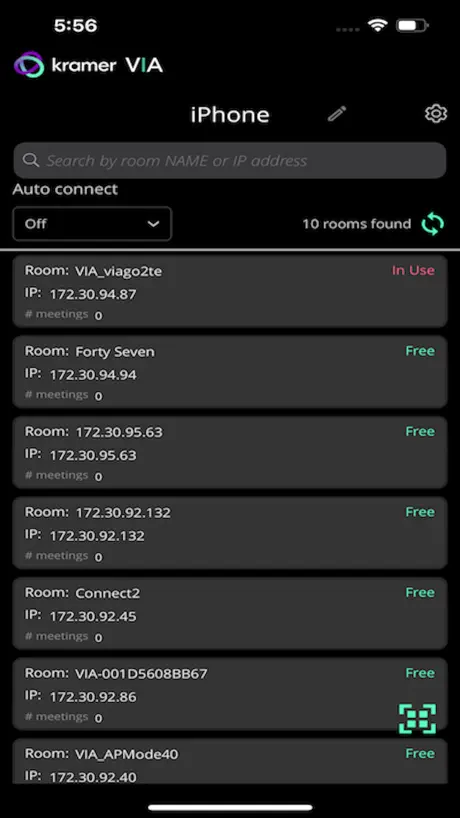
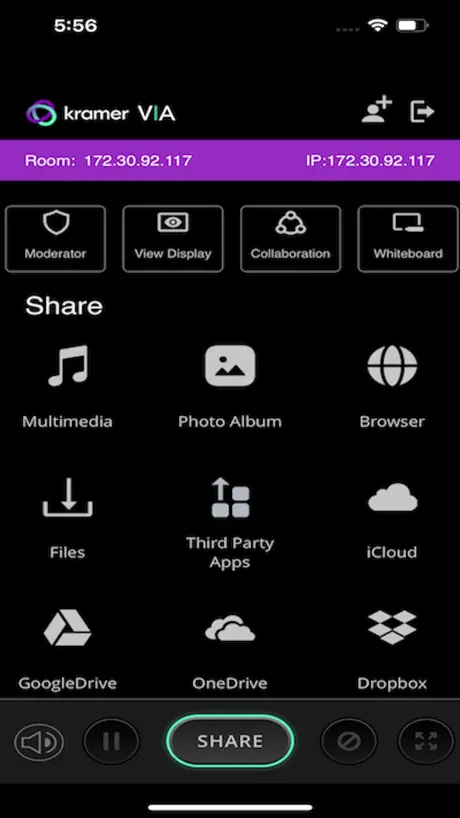
The app has ONE thing to do, present stuff. And it can't seem to do that. With something like opening a document from OneDrive, Google Drive, etc, it seems like it would be a central hub for things to project. It presents multiple service icons to tap after you connect... Except that it doesn't really do anything. Tapping OneDrive doesn't open the file picker API or my OneDrive app, it tries to load a web interface to log into a service to grab something directly from OneDrive (which your company may not allow). Also, why should I expect users to re-log into every service inside of this app (and ONLY this app)? iOS has a native file manager. Use it. Switching to any other app IMMEDIATELY kills the VIA connection, so you cannot first connect and then share from another app. What you can try to do is use your device's built-in AirPlay to connect to the VIA device. That allows you to actually share your screen or open a document from OneDrive or Dropbox or something. Basically, the app itself is beyond useless. The VIA device itself is also pretty terrible, as the AirPlay functionality keeps crashing and freezing the device, preventing all incoming connection attempts. Does this company not test their own products? The hardware is crappy and the app is useless. The terrible grammar and engrish inside of the app also makes it clear they don't care about any professional appearance.
Complete Garbage
Recommended to our customer because Kramer typically has good AV products…this was a bust. Garbage.
Keep crashing
Useless.
don’t like
for such a simple idea this thing is so frustrating to use. like geez…
Absolutely Terrible
Broken interface and outdated method for accessing files. When I could pull a document up it constantly switched between size formats with no way to stop it.
Literal trash
Doesn’t work. Trash. Don’t even bother
Terrible
App is terrible Does NOT work
VIA App FAQ
- Is VIA App free?
- Yes. The app is free, in all 175 countries it sells in, and it sells nothing inside it.
- Does VIA App have a free trial?
- No. None of its offers (US) come with a free trial.
- What are the best alternatives to VIA App?
- Pharos Print (1.3 from 256 reviews), Q-SYS UCI Viewer (3.1 from 151 reviews) and Crestron AirMedia (2.3 from 123 reviews).
VIA App download
Last updated 1 year ago.
VIA App sells in 175 countries. It was released 12 years and 5 months ago, on 19 Jun 2014. It holds a 2.1 rating from 146 reviews.
Supports 9 languages: English, French, German, Japanese, Polish, Portuguese, Russian, Chinese, Spanish.