
DocuNet Viewer
How much does DocuNet Viewer cost?
Prices are current as of 8 Oct 2026.
DocuNet Viewer has no in-app products on record in the United States.
10+ alternatives to DocuNet Viewer
| DocuNet Viewer |   RosterBuster Crew App RosterBuster Crew App |   Crewline Crewline |   Crew Access Mobile Crew Access Mobile |   Airbus WIN Airbus WIN |  Flysmart+ Ops Lib Flysmart+ Ops Lib |  Flysmart+ InFlight Flysmart+ InFlight |  Flysmart+ TakeOff Flysmart+ TakeOff |  Flysmart+ Manager Flysmart+ Manager |  Flysmart+ Landing Flysmart+ Landing |  Flysmart+ Loadsheet Flysmart+ Loadsheet | |
|---|---|---|---|---|---|---|---|---|---|---|---|
| Rating / 5 | 1.9 | 4.4 | 4.8 | 1.4 | 3.7 | 1.9 | 2.2 | 2.7 | 2.1 | 3.6 | 5.0 |
| Reviews | 136 | 11K | 1.5K | 791 | 91 | 56 | 42 | 34 | 33 | 12 | 3 |
| Released | 2014 | 2015 | 2020 | 2019 | 2018 | 2012 | 2019 | 2013 | 2013 | 2013 | 2013 |
| Monthly price | — | $1.99 | $1.99 | — | — | — | — | — | — | — | — |
| 3-month price | — | $5.49 | — | — | — | — | — | — | — | — | — |
| 6-month price | — | $7.49 | — | — | — | — | — | — | — | — | — |
| Annual price | — | $29.99 | $21.99 | — | — | — | — | — | — | — | — |
The going rate for each plan in United States, in its own currency, shaded from the cheapest price on the row to the dearest.
DocuNet Viewer reviews
1.9 out of 5, based on 136 reviews.
What people like
- Really helpful for reading company work manuals.
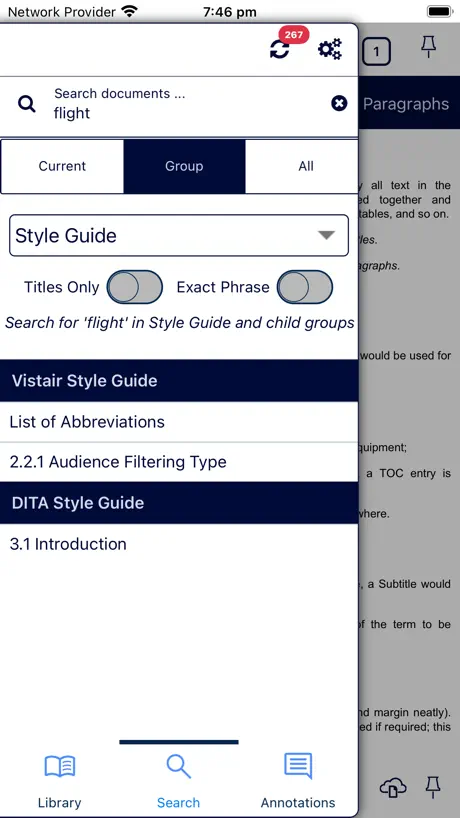
- Finally added a decent word search feature.
- New read aloud option is very nice.
What they complain about
- App freezes and takes forever to load.
- Crashes constantly on newer iPads and Macs.
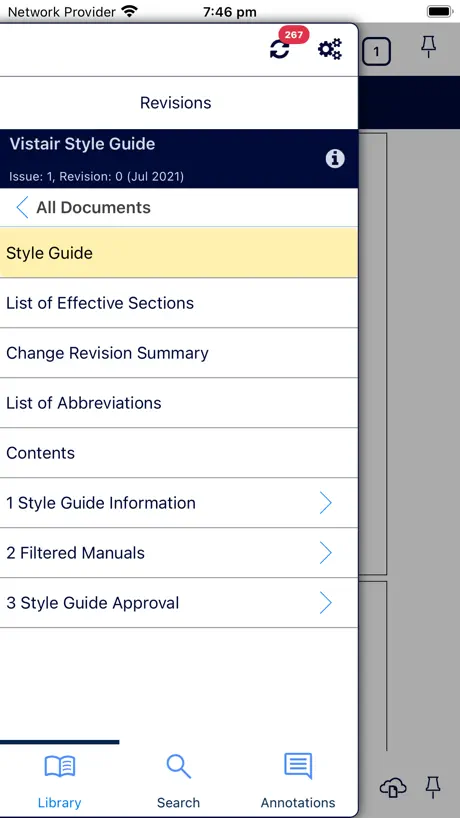
- Sidebar menu disappears when you click something.
- Search results often show the wrong pages.
I have a problem.
The app is great. But I have a bug that makes me unable to go back in pages. Please fix it ASAP. KEEP UP THE GOOD WORK.
Very poor
There’s been a bug in this app for months where it freezes and locks up for 5 seconds or more after making a selection in the sidebar or completing an action. There’s also a bug whereby selecting a search result will result in a completely different page loading and the link has to be reselected. Much improvement needed!
Keeps crashing
App is used for work manuals and used to work. Now it keeps crashing whenever I try to open it. Tried deleting and reinstalling it but still crashing.
Great before the update.
The app was very useful for certain tasks but not having the ability to collapse the side library is really inconvenient. It means that the text for any document is Quite small, Not centralised and Not the main focus. The is really distracting and I wish there was an easy implementation for improvement on this aspect.
option to choose
i do not need to view all the file offline, just some file; theres no options
Audio
"Hello, and thank you for the recent update. I'm excited about the possibility of having an option to listen to content rather than solely reading it." As an option “Read Aloud”
Crashes on M1 Mac
With the update to Ventura, now crashes on the M1 Mac
Multiscreen support
This app helps a lot with company manuals. However would been better if it supports multiscreen (half screen) view on ipad.
Freezes
Freezes annoyingly for 5+ seconds every second you open the app, even if it’s already open and you just momentarily switch to another app and back. ⏳
Problemas con iOS18
Desde la última actualización de iOS18 cada vez que entro en la aplicación me hace volver a bajar toda la documentación cuando quiero actualizar. No solo baja la actualización sino todo. Por favor actualicen la app para que esto no ocurra. Pasa en iPADOS como en iOS
Password reset
Greetings, How can I reset my password plz?
Crashes on M2 chip
This app just crashes, trying to access important work files. Unable. Please fix
Needs updating to support iPad Pro screen
No real problems with this app, it just needs updating to make use of the screen size of the iPad Pro. Please look into this VISTAIR! :)
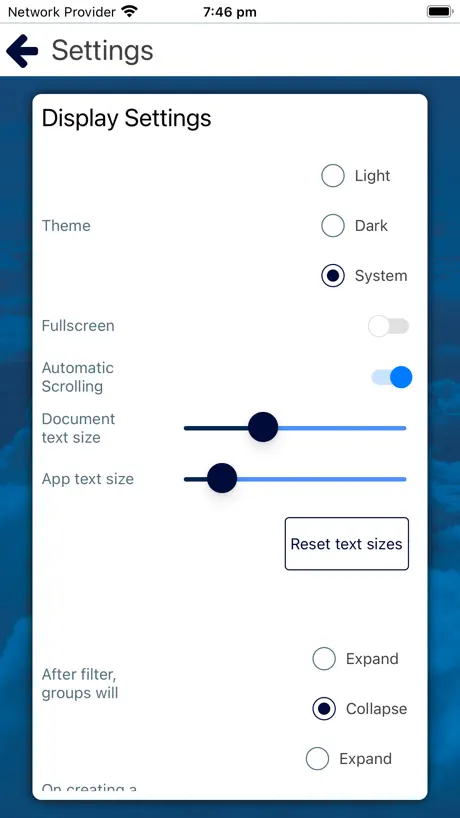
Dark mode please.
How about a dark mode for those of us that work in a flight deck?
Its ok
Dark mode needs a overhaul. It makes pictures all weird. And it should make a widget for like favorites or bookmarks to find and use easily.
Issue
The new update is giving a bit trouble as everytime i open it to read something, it automatically opens some different page! Using docunet in my iPad. We need an update!
Crashes on Apple mac
This version sadly does not work on an Apple Mac M2 desktop. It immediatly crashes when opened.
Full Screen Issues
App needs updated to fit the new IPad screen sizes. 11inch and 12.5.
Cannot search anything after update
The search function is still there but when you try to search any keywords, the documents you need wont come out. The older version is better.
App hangs for 4 seconds every time before any actions work
tasks hindered by time delay. Every time open the app or switch to it, a 4 second or more delay is experienced before anything can be done. Didn’t used to do this.
Full screen
Please optimize for ipad pro 11 inch full screen.
If it ‘ain’t broke....?
Why the update? Is it for money? Because it certainly isn’t to improve the product. It worked well before, it’s now very user unfriendly.
Contextual menu disappearing
I use the Vistair extensively to view our company's documentation on an iPad. I would however like to request a feature for the next update. I feel forced to use the app in landscape mode as it is the only way to keep the contextual menu from remaining visible. When the iPad is turned into its natural portrait position, one has to keep clicking on the contextual menu icon to keep it visible. Each time a selection is made in a sub-menu, it causes the menu to disappear.
Still not full screen on latest iPad Pro 11 inch
Please can you update this app to run in full screen on the latest models of iPad Pro.
Problem opening in Ventura
None of the versions of Docunet currently open in Ventura.
Search Filter for the aircraft
Need seach filter by typing the aircraft regis or that be able to mark the aircraft as flavour
Unresponsive and clunky
The latest version of this app is slow to the point of being unusable. Selections made on tabs take so long you think your iPad has frozen. Scrolling between pages takes four or five seconds so you keep trying and end up in a totally different place. Needs some attention to put it politely.
Sort the menus please
Selecting anything through the menu system loads the new page...but makes the menu browser disappear, meaning if you are trying to find something obscured deep in a manual it takes a completely unnecessary 4 million clicks to get there because you have to keep pressing the menu button on the bottom left to reopen it as you go through every submenu/subsection. A very annoying bug/design oversight.
Update for Ipad Pro please
As per the title.
Très satisfaite de la dernière actualisation
Merci pour la mise a jour. ENFIN la recherche par mot ou phrase est possible et précise. Toujours aussi pratique et simple d'utilisation. Je recommande!
Very slow
This app needs an immediate update. Systems is incredibly slow and a pain in the backside to navigate. Nothing wrong with the old layout, this new layout and navigation is shocking.
Average App and Falling behind iOS
Whilst finding an item in your company manuals is straightforward, the updated annotation feature is irratating, why it changed is baffling. AirPrint doesn’t really work properly and compresses text. Why cant the App update the manuals when the iPad is asleep? You cannot use the split screen function for iOS which is crazy given most people use this on an iPad. The developers are not willing to change with the times which is a great shame. Surely Apple would help? It’s a great shame as this was a good app, unfortunately the developers seem to refuse to take onboard what these reviews say and are unwilling to change the app or want to improve it.
Compatible devices (full screen)
Please update for the latest devices iphone 11 pro max, ipad pro and ect. Does not cover the whole device screen and very low res.
Backward Upgrade
Just two points of many: the title pages keep disappearing from the top line making it difficult to switch frequently between different documents; you have to tap the screen and then wait for the titles to reappear. Secondly, the automatic scrolling feature in settings does not appear to work: I keep having to tap to continue reading after very short sections
Cannot add bookmarks
Since the last update, I am unable to add any new bookmarks. I can delete and rearrange them, but there is no option to add. Please fix as this is was a really useful feature.
v3.1
Latest update is very temperamental. Pressing the button to go back to the library list only seems to work erratically.
Can we have the old app back?
Tried the “updated” version today, still the same hot mess. Just one example: some of the touch targets are so small and next to other stuff that does different things, that using it in turbulence becomes almost impossible. Are the authors aware that a fair amount people have to use this app in the air? Soon to be the subject of an ASR/MOR as it is starting to impact safety.
Annotations has ruined it
New annotation ability is not as good. Yes you can have different colours but it will no longer save the order you rearrange them. Very annoying for the bookmarks you use more often!
Highlight
Unable to highlight. I am using this apps to read a note from my company. It will be very helpful if i can highlight the important point from the note. Thanks.
A step backwards
This is a fine example of how to take a perfectly good piece of software and make it a bad one
DocuNet Viewer FAQ
- Is DocuNet Viewer free?
- Yes. The app is free, in all 175 countries it sells in, and it sells nothing inside it.
- Does DocuNet Viewer have a free trial?
- No. None of its offers (US) come with a free trial.
- What are the best alternatives to DocuNet Viewer?
- RosterBuster Crew App (4.4 from 11,065 reviews, premium from $1.99), Crewline (4.8 from 1,460 reviews, premium from $0.99) and Crew Access Mobile (1.4 from 791 reviews).
DocuNet Viewer download
Last updated 2 months ago.
DocuNet Viewer sells in 175 countries. It was released 12 years and 3 months ago, on 6 Jul 2014. It holds a 1.9 rating from 136 reviews.
Supports 1 language: English.