
MocaDeco - Be Creative
Photo Editor & Visual Creator
How much does MocaDeco - Be Creative cost?
Prices are current as of 29 Sept 2026.
10 one-time purchases from $0.99
In the United States, MocaDeco - Be Creative has 10 one-time purchases priced $0.99 – 9.99.
| Product | Price |
|---|---|
| Botanic Garden Deco Pack | $0.99 |
| Coffee & Tea Decorations | $0.99 |
| Halloween Party Deco Pack | $0.99 |
| Love Letters Deco Pack | $0.99 |
| Sacred Geometry Deco Pack | $0.99 |
| Season's Greetings Deco Pack | $0.99 |
| Type Talk Deco Pack | $0.99 |
| Vintage Label Deco Pack | $0.99 |
| Welcome Summer Deco Pack | $0.99 |
| MocaDeco Pro | $9.99 |
See what MocaDeco - Be Creative costs in all 175 countries →
10+ alternatives to MocaDeco - Be Creative
| MocaDeco - Be Creative |   Fade It - Insta-Size & No-Crop Fade It - Insta-Size & No-Crop |   Trigraphy: Photo to Art Trigraphy: Photo to Art |   Color Splash and Photo Editor Color Splash and Photo Editor |   RNI Aero RNI Aero |   Red – Dark Filters Red – Dark Filters |   iColorama S iColorama S |   Tinge - Glow Cam Tinge - Glow Cam |   Image Filters Photo Editor + Image Filters Photo Editor + |   Duotone - Photo Color Effects Duotone - Photo Color Effects |   Photo Color Effects Editor Photo Color Effects Editor | |
|---|---|---|---|---|---|---|---|---|---|---|---|
| Rating / 5 | 4.5 | 4.3 | 4.6 | 4.3 | 4.6 | 4.7 | 4.2 | 4.3 | 3.6 | 4.5 | 4.1 |
| Reviews | 3.3K | 6.1K | 6K | 4.3K | 1.6K | 610 | 501 | 254 | 61 | 34 | 27 |
| Released | 2014 | 2015 | 2014 | 2017 | 2020 | 2019 | 2012 | 2012 | 2013 | 2023 | 2018 |
| Monthly price | — | — | $7.49 | $4.99 | $0.99 | — | — | — | — | — | — |
| Annual price | — | — | $44.99 | $23.99 | $9.99 | — | — | — | — | — | — |
| One-time price | $0.99 | $0.99 | $2.99 | $1.99 | $17.99 | — | — | — | — | — | — |
The going rate for each plan in United States, in its own currency, shaded from the cheapest price on the row to the dearest. Plans fewer than four in ten of the priced apps sell are left out.
MocaDeco - Be Creative reviews
4.5 out of 5, based on 3,316 reviews.
What people like
- Totally free basic functionality works well
- Great filters and nice fonts
- Simple and easy to use
What they complain about
- Ads interrupt you constantly
- Forces you to write a review
- Most features cost extra money
- Cannot rotate objects precisely without snapping
Great Effects!
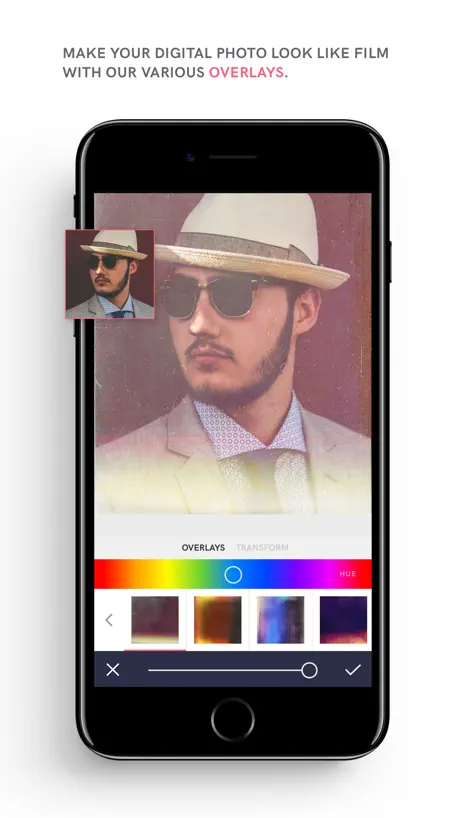
I just love going to this app for adjusting my photos quality and especially the overlays, I really wish they would make updates and make new gradient overlays for colorful sunsets and backgrounds. Love it! 👏🏻❤️
Unstoppable Video adverts
There’s a button that says “skip video” but it’s part of the video and does nothing. After the 30 sec ad, the “X” appears, once pressed, this rating/review window appeared for an app I have yet to even use.
Eraser??
Would make this beyond stellar !
Landscape orientation needed
It’s a great app, but I wish it could work in landscape orientation on my iPad. My personal preference is NOT portrait. If there were an option for landscape, I’d give the app 10 stars.
Good foundation, needs more content
Needs to implement upgrade option so there is path from part to full without double paying. Would be awesome with more pack updates small content amount but whats there is good.
;)
It’s skip
Poor response to user
I deleted this App almost as soon as I downloaded as it was showing me ad after ad and I was not even able to explore the features of the app itself. Sooo sadly , I have no idea to what this app has to offer.
再加一句
字体很美,
Paquete muy básico
Te permite algunas cosas, pero la mayoría de las herramientas están condicionadas a su compra.
3 estrellas
Tiene buenos Graficos y facilidades , amo sus tipografías , pero le resta puntos que ponen muchos comerciales
Awesome app for editing photos — one suggestion
This app works really well when it comes to editing photos. One suggestion I wanted to say is that the masking/erase feature should be added. That way, photos will look more better and unique!
Grifter app
Hadn’t even finished with initial set up and had already been blasted with 3 intrusive ads. I’m out.
👌🏻
So far so good! Love the typos!
かわいい!
つかいやすいー!
Da ist aber vieles verschwunden
Fand die App mal richtig klasse.
Excellent
I appreciate the basic functionality of the app as much as all the various options available. My major iPad design app!
So many ads
I used the app for less than a minute and had to wait through 5 ads, don't download.
Love it
My go to app for filters and text
Super app
Die App ist klasse nur schade dass man für alles Einzelnd zahlen muss..
No Filter Edits On Photos???
Come on now... I bought the $10 assuming ALL was unlocked....you can’t edit your own photos with the filters? What crazy nonsense is that? Not everyone takes the photos right then with live filters. They’re FILTERS which means they can be applied later too. I wish I was on this beta test team. I’m an artist who also beta tests art and music apps. This is a huge failure imo. I have loads of other ideas but since I’m not on the beta team, start with fixing the app so we can use filters on our camera roll. Yesterday. Thanks Brice
BEST APP EVER
I’ve been using this app for months now and I love it so much. The best part? TOTALLY FREE!!
Too many ads!
Before I get to do anything, it asks for a review!
Great tool for marketing materials
I love using this app to make signs for my hair salon
いい
いいと思う
Great tool!
Simple and easy to use.
Ok
Ok
Boring
Stop asking every second if I’m enjoying the app! I can’t even tell because that keeps popping up!
评论解锁
🔒
Text einfügen nervt
Ansonsten sehr Easy aber enthält weniger Inhalte als gedacht
MadForMoca
I use moca all the time. My main app for creating memes!
Way too diffficult to navigate
Waste of time
Review
Pros: Get free filters when you write a review. Cons: Have to write a review.
Lässt sich nicht mehr öffnen
Sehr schöne App, lässt sich allerdings nach dem letzten Update leider nicht mehr öffnen.... Bitte Fehler beheben
Super useful app!
I’ve been using this app for a few months now, and it is just great! Two enthusiastic thumbs up! 👍🏻👍🏻🎉
ADs Everywhere
An Ad will appear every time you want to do something and you HAVE to watch 1 if you want to use filters or anything with a lock symbol. If you want this because it’s *Free it’s not worth it.
还在摸索中
收费的应该会有过人之处吧 摸索中
Ganz ok
Einfach anzuwenden.
Rate review
I can tell you more after I try it...
Full of Pop-Up Spam
Difficult to use because of non-stop ads. I’m deleting it.
Nice
So far so good
Vou experimentar.
Parece bom.
Awesome app
Awesome app!
Infrared
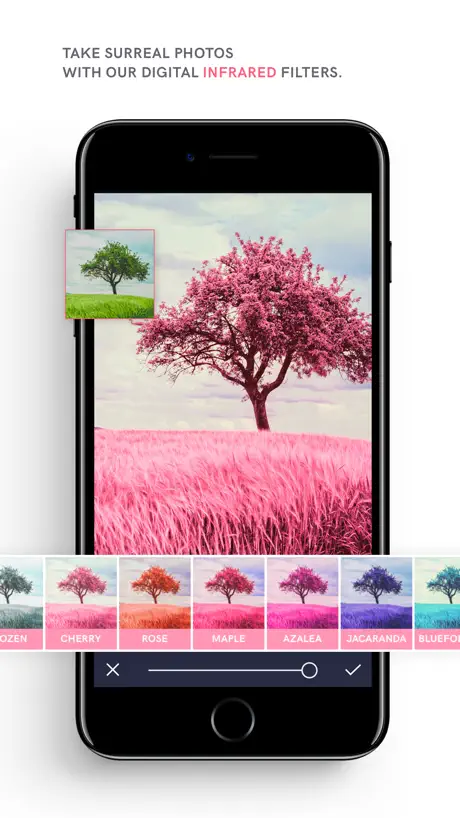
I specifically purased infrared filter series and can’t find it in app. I’ve tried looking for it in overlays, nope not there. If I paid for them and don’t get them. I’ll ask for a refund.
Love it!
Great app
Einrastfunktion
Sehr schöne App, aber wenn man diese Formen hinzufügen will sieht man als erstes die die man kaufen muss...das ist aber nur halbe so schlimm. Viel schlimmer ist das es keine Einrastfunktion gibt, wie soll man Sachen so drehen können das sie nicht schief sind? Ja mit viel Geduld aber das ist auf Dauer nervig. Bitte Eintastfunktion dann 4 oder 5 Sterne.
MocaDeco - Be Creative price by country
A one-time purchase costs $0.70 in Canada and $1.55 in Hungary — 2× more for the same thing. Below is the going rate for each plan in every country that sells it — the middle price of what the app charges there, in the country's own currency with the dollar equivalent beneath it.
| Country | One-time |
|---|---|
| Afghanistan | $0.99 |
| Albania | $0.99 |
| Algeria | $0.99 |
| Angola | $0.99 |
| Anguilla | $0.99 |
| Antigua And Barbuda | $0.99 |
| Argentina | $0.99 |
| Armenia | $0.99 |
| Australia | A$1.99$1.39 |
| Austria | €0.99$1.13 |
| Azerbaijan | $0.99 |
| Bahamas | $0.99 |
| Bahrain | $0.99 |
| Barbados | $0.99 |
| Belarus | $0.99 |
| Belgium | €0.99$1.13 |
| Belize | $0.99 |
| Benin | $0.99 |
| Bermuda | $0.99 |
| Bhutan | $0.99 |
| Bolivia | $0.99 |
| Bosnia & Herzegovina | €0.99$1.13 |
| Botswana | $0.99 |
| Brazil | R$6.90$1.33 |
| British Virgin Islands | $0.99 |
| Brunei Darussalam | $0.99 |
| Bulgaria | €0.99$1.13 |
| Burkina Faso | $0.99 |
| Cambodia | $0.99 |
| Cameroon | $0.99 |
| Canada | CA$0.99$0.70 |
| Cape Verde | $0.99 |
| Cayman Islands | $0.99 |
| Chad | $0.99 |
| Chile | CLP 990$1.03 |
| China | CN¥8.00$1.19 |
| Colombia | COP 4,900$1.47 |
| Congo | $0.99 |
| Congo, Democratic Republic | $0.99 |
| Costa Rica | $0.99 |
| Cote Divoire | $0.99 |
| Croatia | €0.99$1.13 |
| Cyprus | €0.99$1.13 |
| Czech Republic | CZK 29.00$1.36 |
| Denmark | DKK 9.00$1.37 |
| Dominica | $0.99 |
| Dominican Republic | $0.99 |
| Ecuador | $0.99 |
| Egypt | EGP 49.99$0.97 |
| El Salvador | $0.99 |
| Estonia | €0.99$1.13 |
| Fiji | $0.99 |
| Finland | €0.99$1.13 |
| France | €0.99$1.13 |
| Gabon | $0.99 |
| Gambia | $0.99 |
| Georgia | $0.99 |
| Germany | €0.99$1.13 |
| Ghana | $0.99 |
| Greece | €0.99$1.13 |
| Grenada | $0.99 |
| Guatemala | $0.99 |
| Guinea-bissau | $0.99 |
| Guyana | $0.99 |
| Honduras | $0.99 |
| Hong Kong | HK$8.00$1.02 |
| Hungary | HUF 499$1.55 |
| Iceland | $0.99 |
| India | ₹99.00$1.03 |
| Indonesia | IDR 19,000$1.06 |
| Iraq | $0.99 |
| Ireland | €0.99$1.13 |
| Israel | ₪2.90$0.95 |
| Italy | €0.99$1.13 |
| Jamaica | $0.99 |
| Japan | ¥150$0.95 |
| Jordan | $0.99 |
| Kazakhstan | KZT 499.00$1.13 |
| Kenya | $0.99 |
| Kosovo | €0.99$1.13 |
| Kuwait | $0.99 |
| Kyrgyzstan | $0.99 |
| Lao Peoples Democratic Republic | $0.99 |
| Latvia | €0.99$1.13 |
| Lebanon | $0.99 |
| Liberia | $0.99 |
| Libya | $0.99 |
| Lithuania | €0.99$1.13 |
| Luxembourg | €0.99$1.13 |
| Macao | $0.99 |
| Macedonia | $0.99 |
| Madagascar | $0.99 |
| Malawi | $0.99 |
| Malaysia | MYR 4.90$1.20 |
| Maldives | $0.99 |
| Mali | $0.99 |
| Malta | €0.99$1.13 |
| Mauritania | $0.99 |
| Mauritius | $0.99 |
| Mexico | MX$19.00$1.07 |
| Micronesia | $0.99 |
| Moldova | $0.99 |
| Mongolia | $0.99 |
| Montenegro | €0.99$1.13 |
| Montserrat | $0.99 |
| Morocco | $0.99 |
| Mozambique | $0.99 |
| Myanmar | $0.99 |
| Namibia | $0.99 |
| Nauru | $0.99 |
| Nepal | $0.99 |
| Netherlands | €0.99$1.13 |
| New Zealand | NZ$1.99$1.12 |
| Nicaragua | $0.99 |
| Niger | $0.99 |
| Nigeria | NGN 1,500.00$1.13 |
| Norway | NOK 9.00$0.95 |
| Oman | $0.99 |
| Pakistan | PKR 300$1.08 |
| Palau | $0.99 |
| Panama | $0.99 |
| Papua New Guinea | $0.99 |
| Paraguay | $0.99 |
| Peru | PEN 4.90$1.45 |
| Philippines | ₱49.00$0.78 |
| Poland | PLN 4.99$1.30 |
| Portugal | €0.99$1.13 |
| Qatar | QAR 2.99$0.82 |
| Romania | RON 4.99$1.08 |
| Russia | RUB 99.00$1.18 |
| Rwanda | $0.99 |
| Sao Tome & Principe | $0.99 |
| Saudi Arabia | SAR 4.99$1.33 |
| Senegal | $0.99 |
| Serbia | €0.99$1.13 |
| Seychelles | $0.99 |
| Sierra Leone | $0.99 |
| Singapore | SGD 0.98$0.77 |
| Slovakia | €0.99$1.13 |
| Slovenia | €0.99$1.13 |
| Solomon Islands | $0.99 |
| South Africa | ZAR 19.99$1.22 |
| South Korea | ₩1,100$0.81 |
| Spain | €0.99$1.13 |
| Sri Lanka | $0.99 |
| St. Kitts and Nevis | $0.99 |
| St. Lucia | $0.99 |
| St. Vincent & The Grenadines | $0.99 |
| Suriname | $0.99 |
| Swaziland | $0.99 |
| Sweden | SEK 9.00$0.91 |
| Switzerland | CHF 1.00$1.21 |
| Taiwan | NT$30.00$0.94 |
| Tajikistan | $0.99 |
| Tanzania | TZS 2,900.00$1.09 |
| Thailand | THB 29.00$0.87 |
| Tonga | $0.99 |
| Trinidad and Tobago | $0.99 |
| Tunisia | $0.99 |
| Turkey | TRY 49.99$1.02 |
| Turkmenistan | $0.99 |
| Turks and Caicos | $0.99 |
| Uganda | $0.99 |
| Ukraine | $0.99 |
| United Arab Emirates | AED 2.99$0.81 |
| United Kingdom | £0.99$1.31 |
| United States | $0.99 |
| Uruguay | $0.99 |
| Uzbekistan | $0.99 |
| Vanuatu | $0.99 |
| Venezuela | $0.99 |
| Vietnam | ₫29,000$1.12 |
| Yemen | $0.99 |
| Zambia | $0.99 |
| Zimbabwe | $0.99 |
MocaDeco - Be Creative FAQ
- Is MocaDeco - Be Creative free?
- Yes. The app and its basic features are free, in all 175 countries it sells in. Premium features are paid: they start from $0.99 (US), across 10 one-time purchases.
- Does MocaDeco - Be Creative have a free trial?
- No. None of its offers (US) come with a free trial.
- Where is MocaDeco - Be Creative cheapest?
- A one-time purchase costs CA$0.99 (≈$0.70) in Canada and HUF 499 (≈$1.55) in Hungary, its cheapest and dearest countries.
- What are the best alternatives to MocaDeco - Be Creative?
- Fade It - Insta-Size & No-Crop (4.3 from 6,111 reviews, premium from $0.99), Trigraphy: Photo to Art (4.6 from 6,023 reviews, premium from $2.99) and Color Splash and Photo Editor (4.3 from 4,306 reviews, premium from $1.99).
MocaDeco - Be Creative download
Last updated 11 months ago.
MocaDeco - Be Creative sells in 175 countries. It was released 12 years and 6 months ago, on 13 Mar 2014. It holds a 4.5 rating from 3,316 reviews.
Supports 1 language: English.
How much does MocaDeco - Be Creative make?
Third-party estimates for the last 30 days, worldwide — not the store's own figures, which Apple publishes for nobody.
Revenue by plan
- One-time 100%
Revenue by country
- United States 24%
- Germany 9%
- China 4%
- Japan 4%