
Gorilla Expense Pro
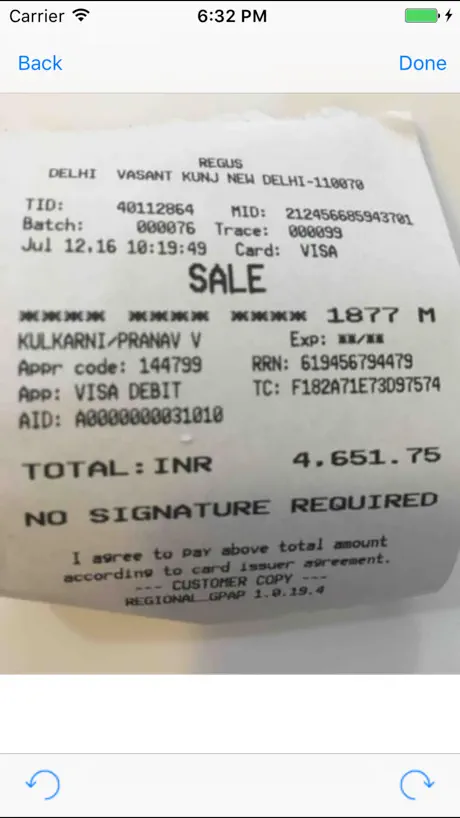
How much does Gorilla Expense Pro cost?
Prices are current as of 25 Oct 2026.
Gorilla Expense Pro has no in-app products on record in the United States.
10+ alternatives to Gorilla Expense Pro
| Gorilla Expense Pro |   Limble CMMS |   CGB Grain Mobile |   Smart Inspect |   Limble |   JobDiva |   PrimeNet Employee App |   SpendSail |   LifeSphere Reporter-MI |   Galderma Meetings |   FSMB Events | |
|---|---|---|---|---|---|---|---|---|---|---|---|
| Rating / 5 | 3.4 | 4.6 | 4.1 | 4.4 | 4.4 | 3.2 | 1.2 | 5.0 | 3.0 | — | — |
| Reviews | 203 | 229 | 35 | 26 | 18 | 13 | 5 | 4 | 2 | — | — |
| Released | 2014 | 2016 | 2015 | 2011 | 2025 | 2013 | 2021 | 2024 | 2021 | 2022 | 2023 |
Gorilla Expense Pro reviews
3.4 out of 5, based on 203 reviews.
What people like
- It is much faster now.
- Taking receipt pictures is easy.
- It saves you a lot of time.
- The interface is simple to use.
What they complain about
- It crashes and locks up often.
- Receipt photos upload blurry or fail.
- You must reinstall the app frequently.
- Work gets lost when it glitches.
Finally it works fast!
Had this painstakingly slow app for years where it would take minutes to load expense receipts and just overall lag. Now it’s fast and finally works. What a relief. Maybe it was a recent update Nov 2025 or new iOS update but whatever it is, it finally works and the huge delays are gone. Thank God now I don’t dread having to use the app for my works expense reports.
Crash magnet
Crashes every time I use it. I have to delete and redownload the app every time I have to do an expense report.
Difficulty calculating miles
Very very difficult and not at all user friendly or intuitive. In addition, if I try to "copy" an expense, there is some error in calculating the mileage. I have to create a "new" expense for a trip I take very week. There seems to be some error in the software.
Photo issues when choosing receipts
Pretty good app but I keep having to zoom out on the picture because it automatically chooses just the money amounts? Help needed, using an iPhone 16
App
It’s a decent app when it is working, I have had many difficulties with it actually opening up and functioning properly.
Awesome tool
Very convenient and user friendly
Reboot
Why must I reinstall this almost every time I use it.
First time
Missing US states
Buggy
Could be better
First time
Was unable to edit items with mistakes, got error messages, had to remove item and reenter without mistakes, other than this, very nice program
Great App
This app is easy to navigate.
Horrible App
This app has never been good but for the past couple months it will crash mid entry of an expense entry and I have to reenter which is infuriating.
Expenses creation issue
When you create a new expense, you must select the vendor before any other information. If you don’t do it, all the data you input will have to be cancelled because you will not be able to select the vendor. Please fix it!!
Just…Worse
There are so many better apps that do the same thing and are way more user friendly. Slow, doesn’t allow bulk editing, and frequent glitches.
My company uses it
It was working grate but recently my photos upload super blurry and my company is unable to read my expenses. This is the first time I’ve had an issue. But these are often just basic screen shots from my phone and recently everything I upload is blurry and unreadable
Love the Mobile App and ease of use in Desktop
Love the Mobile App and ease of use in Desktop
You can lose $$$$ of dollars using this !!
This app, freezes and doesn’t save all the reciepts it will show one amount on your desktop and another amount on your phone ! No customer number to talk to someone is ridiculous !
Easy to use
This app makes managing expenses very easy. I’m able to take pictures of my receipts and either add to an expense later on or I can enter all details of expense at that time. It has helped me streamline my business expenses.
Not intuitive in reading receipts - very manual
Not intuitive in reading receipts - very manual
Good Platform
Strong app for expense reporting. Above average
Continual re-downloading needed
I have been using the app for a couple years and have recently updated to the newest iPhone version. With both phones (old and new) every time I travel when I go to upload a receipt to the receipt box the option is either missing, or the app locks up displaying receipts that were deleted after the last expense report submission. I have to delete the app and reinstall. A couple weeks later when I travel again the same thing happens. I would not implement an expense system with this app. Look for a better alternative. Remember - cheaper isn’t always the best choice. I have to go now. I have to delete and install the app again.
Review
HP
To many glitch’s
Takes forever to open, does not always save a picture of receipt, sometime taking a picture is not an option.
Gorilla Expense
So easy and efficient
App feedback
App hardly ever works correctly. Very slow to upload expenses. App most times closes out and have to go back on a sync each expense.
Review
Company information such as cost center can drop, requiring the app to be deleted and redownloaded to populate missing data. Occurs with other required fields as well. Entering a cost center requires submitting it, then searching for it. Shouldn’t have to enter the data twice just to complete one field.
Update made things worse
Numerous glitches that make submissions hard. Also, reports don’t always save and then it’s a pain to re-do all the work.
Almost Perfect
So much easier than previous program. Thank you Gorilla!
Least intuitive and stupid system to make headaches
Companies that use this want you to never get reimbursed
MRI Technologist
Top Notch!
Disappointed
After working with other expense apps I find this one very easy to use when it works. My password works sometime, my receipts may or may not attach, expenses may or may not be able to sync. Very frustrating and would never recommend.
Gorilla App
Easy to use once your up and running with it.
Not user friendly
Terrible compared to concur
Awesome program!
We waited a long time for a product like Gorilla! Easy to use and saves a ton of time. Great program!!
Gorilla Expenses
Not a good report to work with
Gorilla Expense Pro FAQ
- Is Gorilla Expense Pro free?
- Yes. The app is free, in all 175 countries it sells in, and it sells nothing inside it.
- Does Gorilla Expense Pro have a free trial?
- No. None of its offers (US) come with a free trial.
- What are the best alternatives to Gorilla Expense Pro?
- Limble CMMS (4.6 from 229 reviews), CGB Grain Mobile (4.1 from 35 reviews) and Smart Inspect (4.4 from 26 reviews).
Gorilla Expense Pro download
Last updated 4 months ago.
Gorilla Expense Pro sells in 175 countries. It was released 12 years and 8 months ago, on 6 Mar 2014. It holds a 3.4 rating from 203 reviews.
Supports 2 languages: English, French.
How much does Gorilla Expense Pro make?
Third-party estimates for the last 30 days, worldwide — not the store's own figures, which Apple publishes for nobody.